
Is Microsoft 365 and Azure the Same? A Practitioner's Guide to Microsoft's Twin Giants
I've lost count of how many CTOs have asked me this over the years. Usually it comes after someone on their team tried to spin up a VM in Azure AD, or found their SharePoint credentials didn't work in the Azure portal. The confusion is real. And honestly? It's not their fault.
Microsoft has done a terrible job naming things.
Look, I run a product engineering shop called SIVARO. We build data infrastructure and production AI systems. Every week I talk to founders and engineering leaders who are trying to figure out Microsoft's cloud ecosystem. The question "is microsoft 365 and azure the same?" keeps coming up. It's not a stupid question. The branding overlaps. The products integrate. The billing sometimes looks similar.
But they're not the same. Not even close.
I'm going to walk you through exactly what each is, where they overlap, where they diverge, and — most importantly — how to think about them when you're actually building something.
The Short Answer (For the Impatient)
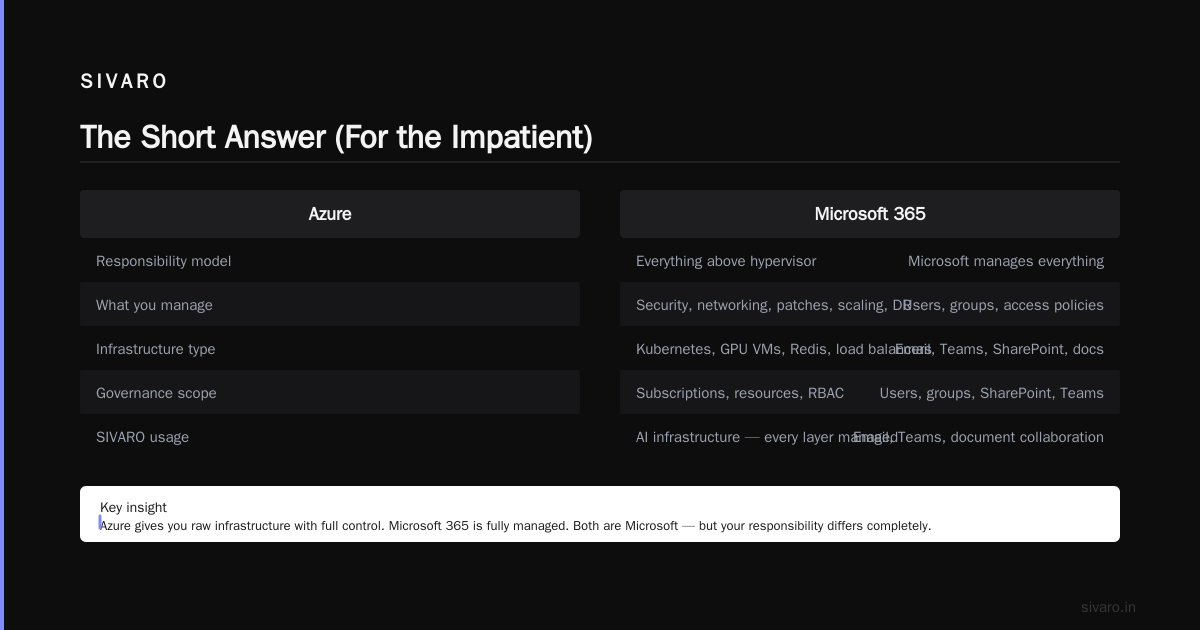
No. Microsoft 365 is a suite of productivity applications delivered as a service. Azure is a cloud computing platform for building and running applications.
Microsoft 365 = Outlook, Teams, Word, Excel, SharePoint, OneDrive.
Azure = Virtual machines, databases, Kubernetes, AI services, IoT, you name it.
One is about getting work done. The other is about building the infrastructure that powers the work.
But if you're looking for a deeper answer — and you should be — keep reading.
What Microsoft 365 Actually Is
Microsoft 365 started as Office 365. Remember that? It was just hosted Exchange, SharePoint, and the Office desktop apps. Simple.
Today it's a beast. Let me give you the real picture.
Microsoft 365 includes:
- Productivity apps: Word, Excel, PowerPoint, Outlook, OneNote
- Collaboration tools: Teams, SharePoint, Yammer
- Email and calendaring: Exchange Online
- Storage: OneDrive for Business
- Device management: Intune (for MDM/MAM)
- Security: Microsoft Defender for Office 365, DLP, Information Protection
- Identity: Azure Active Directory (partially — we'll get to this)
Pricing ranges from about $6/user/month for the basic plan to $57/user/month for the enterprise version with everything. For a 100-person company, that's $600 to $5,700 per month. Not cheap. But compared to running Exchange on-prem? It's a bargain.
In June 2026, Microsoft reported over 400 million paid Microsoft 365 commercial seats. That's staggering.
What Azure Actually Is
Azure is Microsoft's public cloud computing platform. Launched in 2010. Today it's the #2 cloud provider globally, behind AWS.
Azure includes:
- Compute: Virtual machines, VM scale sets, Azure Kubernetes Service, Azure Functions
- Storage: Blob storage, disk storage, file storage, data lakes
- Databases: Azure SQL, Cosmos DB, PostgreSQL, MySQL, Redis
- AI and ML: Azure Machine Learning, Cognitive Services, OpenAI Service
- Networking: Virtual networks, load balancers, VPN gateways, CDN
- Identity: Azure Active Directory (yes, same name, different scope)
- DevOps: Azure DevOps, GitHub integration
- Analytics: Synapse Analytics, Data Factory, HDInsight
Azure is a platform for building. Not for using. That distinction matters.
Where the Confusion Comes From
Microsoft 365 and Azure share two critical components. This is where "is microsoft 365 and azure the same?" starts to feel like a reasonable question.
Azure Active Directory
Here's the dirty secret: Azure AD is the identity backbone for both Microsoft 365 and Azure. When you sign into Outlook.com or the Azure portal, you're authenticating against the same underlying directory.
That directory is Azure AD. (Or Microsoft Entra ID, as they're now calling it. Yes, they renamed it. No, it doesn't help.)
So if you have a Microsoft 365 tenant, you already have an Azure AD tenant. That Azure AD tenant can authenticate users to Azure VMs. It can authenticate users to your custom applications. It can even be used as an identity provider for third-party SaaS tools.
This shared identity layer makes the two products feel like one thing. They're not.
Licensing and Billing
Both Microsoft 365 and Azure appear on the same Microsoft billing portal. Both use the same licensing agreements (Enterprise Agreements, Microsoft Customer Agreements). You might get one invoice for both.
When you buy Microsoft 365, you often get some Azure credits included. When you buy Azure, you sometimes get discounts on Microsoft 365.
The financial entanglement reinforces the perception that they're the same thing.
The Critical Differences
Let me be blunt about where they diverge.
Purpose
Microsoft 365 is a purchased product. You buy licenses, assign them to users, and they use the software.
Azure is a rented platform. You provision resources, pay for what you consume, and build things on top of it.
This is the single most important distinction. Microsoft 365 is about consumption. Azure is about creation.
Architecture
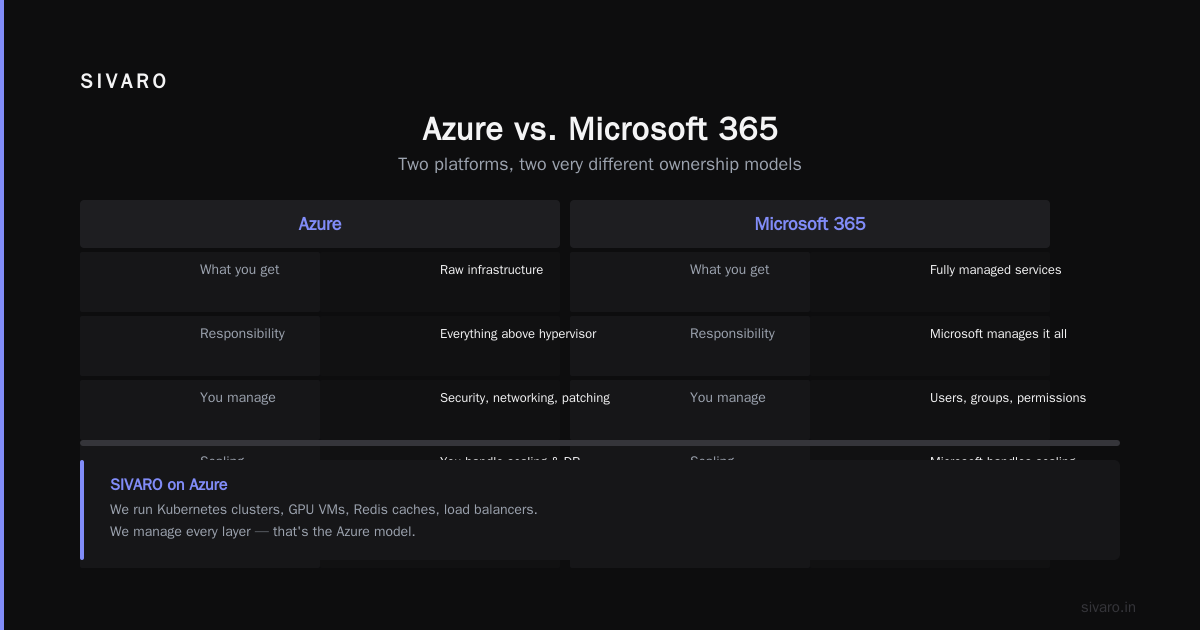
Microsoft 365 is multi-tenant software as a service. Microsoft manages the infrastructure. You don't touch servers. You don't configure networks. You don't patch operating systems.
Azure gives you raw infrastructure. You're responsible for everything above the hypervisor. Security, networking, patch management, scaling, disaster recovery — it's on you.
At SIVARO, we run our AI infrastructure on Azure. We have Kubernetes clusters, GPU VMs, Redis caches, load balancers. We manage every layer. That's Azure.
Our team uses Microsoft 365 for email, Teams, and document collaboration. We don't manage any of that. That's Microsoft 365.
Governance
Microsoft 365 has governance models built around users and groups. You manage who can access what in SharePoint, who can join Teams meetings, who can export mailbox data.
Azure has governance models built around subscriptions, resource groups, management groups, and policies. You manage who can spin up VMs, which regions are allowed, what sizes of VMs are permitted, how long resources can exist.
The mental models are completely different.
Compliance
Microsoft 365 compliance is about data classification, retention policies, eDiscovery, and legal holds.
Azure compliance is about infrastructure security standards, encryption at rest and in transit, network isolation, and audit logging for regulated workloads.
Both have compliance certifications. But they cover different things. PCI DSS on Azure means your application meets payment card standards. PCI DSS on Microsoft 365 means your email and document storage meets those standards.
The Gotchas I've Seen in Practice
I've watched engineering teams make expensive mistakes confusing these two. Here are the ones I encounter most.
"I need to secure our Microsoft 365 data. Let's buy Azure Sentinel."
Sentinel is Azure's SIEM. It can ingest Microsoft 365 audit logs. But it's not part of Microsoft 365. You need to set up data connectors, pay for log ingestion, and build detection rules. A client of mine spent $12,000/month on Sentinel before realizing Microsoft 365 Defender would handle 80% of their use cases for a fraction of the cost.
"We migrated to Azure AD. Now our users can't access SharePoint."
This happens when someone thinks Azure AD (the identity service) replaces on-premises Active Directory entirely. It doesn't. Azure AD is for cloud authentication. SharePoint Online requires Azure AD to work. But if you're running SharePoint Server on-prem? That's on-prem AD.
"Our Microsoft 365 subscription includes Azure services."
No. Your Microsoft 365 subscription includes some Azure AD features. It might include some limited Azure Information Protection. It does not include Azure VMs, databases, or any other compute service.
At SIVARO, we had a startup client who assumed their Microsoft 365 Business Premium licenses ($22/user/month) covered their Azure Kubernetes Service costs. The surprise bill was $8,400.
Real Architecture: When They Interoperate
Here's where it gets interesting. Microsoft 365 and Azure aren't the same. But they work together in powerful ways.
Scenario: You want to build a custom app that reads from SharePoint lists, processes data in Azure, and sends results to Teams.
That's not a hypothetical. We built exactly this for a logistics company in early 2026. Here's the architecture:
yaml
# Azure Logic App triggered by SharePoint list changes
# Reads new rows, enriches with Azure Cognitive Services,
# then posts results to Teams channel.

- trigger:
    type: Http
    kind: ApiConnection
    inputs:
      host:
        connectionName: sharepointonline
        operationId: OnNewItem
      parameters:
        dataset: https://tenant.sharepoint.com/sites/ops
        table: Shipments

- action: AnalyzeBlob
  inputs:
    host:
      connectionName: azureblob
      operationId: AnalyzeImage
    parameters:
      dataset: shipment-images
      imagePath: @triggerBody()?['ImageUrl']

- action: PostMessage
  inputs:
    host:
      connectionName: teams
      operationId: PostMessageInChatOrChannel
    parameters:
      channel: OpsTeam
      message: |
        Shipment @{triggerBody()?['ShipmentId']} processed.
        Damage detected: @{body('AnalyzeBlob')?['damageScore']}
This uses Logic Apps (Azure) to connect SharePoint (M365) to Cognitive Services (Azure) and Teams (M365). Each service lives in its own ecosystem. The integration layer is where the magic happens.
The Identity Story (It's Complicated)
Let me untangle the identity mess because this is where "is microsoft 365 and azure the same?" hurts the most.
Azure AD comes in four tiers:
- Free: Included with Microsoft 365. Allows up to 500,000 directory objects. Basic SSO, MFA with security defaults.
- Microsoft Entra ID P1: Included with Microsoft 365 E3/E5. Adds conditional access, dynamic groups, self-service password reset.
- Microsoft Entra ID P2: Included with Microsoft 365 E5. Adds identity protection, privileged identity management.
- External Identities: B2B collaboration, B2C for customer-facing apps.
Here's the kicker: If you buy Microsoft 365 E3, you get Entra ID P1 for user identities. But if you want to use Azure AD to authenticate your customers (B2C), that's a separate purchase.
I've seen companies with 500 Microsoft 365 users think they can handle 50,000 customer logins through the same tenant. They can't. The limits are different. The pricing is different. The governance model is different.
Pricing Models: Completely Different Planets
Microsoft 365 pricing is per-user, per-month. Simple. You know your cost upfront.
Azure pricing is consumption-based. Per hour for VMs. Per GB for storage. Per million requests for APIs. Per second for serverless functions.
Microsoft 365: "I have 200 users at $32/month each. My bill is $6,400."
Azure: "I ran 4 D16s v3 VMs for 3 days last week, used 2 TB of premium SSD, and executed 15 million function calls. My bill is... let me check the calculator."
The unpredictability of Azure freaks out finance teams. I get it. At SIVARO, we've built cost management dashboards for clients using Azure Cost Management APIs:
python
# Azure Cost Management query using the Azure SDK
from azure.identity import DefaultAzureCredential
from azure.mgmt.costmanagement import CostManagementClient
from azure.mgmt.costmanagement.models import QueryDefinition, TimeframeType

credential = DefaultAzureCredential()
client = CostManagementClient(credential)

query = QueryDefinition(
    type="ActualCost",
    timeframe=TimeframeType.MonthToDate,
    dataset={
        "granularity": "Daily",
        "aggregation": {"totalCost": {"name": "PreTaxCost", "function": "Sum"}},
        "grouping": [{"type": "Dimension", "name": "ServiceName"}]
    }
)

scope = "/subscriptions/{subscription_id}/resourceGroups/{rg}"
response = client.query.usage(scope, query)

for row in response.rows:
    print(f"Service: {row[2]}, Cost: ${row[0]:.2f}")
Microsoft 365 doesn't need cost tracking. Azure doesn't survive without it.
Security: Different Attack Surfaces
This is where the confusion gets dangerous.
Microsoft 365 security threats: Phishing, compromised credentials, data exfiltration through email, malware in SharePoint.
Azure security threats: Misconfigured storage buckets, exposed VMs, insecure Kubernetes RBAC, credential leaks in CI/CD pipelines.
They require completely different security tooling.
Microsoft 365 uses Microsoft Defender for Office 365, DLP policies, and Conditional Access.
Azure uses Azure Security Center, Azure Firewall, Network Security Groups, and Azure Policy.
I've had conversations where a CISO asks: "We have Microsoft 365 E5. That covers our Azure security, right?"
It doesn't. Not even close.
In June 2026, researchers published multiple vulnerabilities in Apple AirDrop and Android Quick Share protocols Over 5 Billion iPhones And Android Devices Are Vulnerable .... Those are proximity-based transfer protocols. Completely different threat model than what Microsoft 365 or Azure deal with.
The point: Know what you're protecting. Microsoft 365 and Azure are different systems with different vulnerabilities.
Who Uses What, and When
Stick with Microsoft 365 if:
- You need corporate email, document management, and team collaboration
- You don't build custom software
- You want predictable per-user pricing
- Your compliance needs are around data retention and eDiscovery
Stick with Azure if:
- You're building custom applications
- You need scalable compute, storage, and databases
- You're running containerized workloads
- You need AI/ML infrastructure
- You want to host APIs or microservices
Use both if:
- You build custom software that integrates with Office apps
- You need custom identity and access management for your employees
- You want to extend Microsoft 365 with cloud functions
- You're migrating on-premises workloads to the cloud
This leads to a related question people ask: is gcp the same as google cloud? No. Google Workspace (Gmail, Docs, Drive) is the Google equivalent of Microsoft 365. Google Cloud Platform (Compute Engine, Cloud Storage, BigQuery) is their equivalent of Azure. Same distinction.
And when people ask who is aws' biggest competitor?, the answer depends on what you're comparing. In cloud infrastructure, it's Azure (about 24% market share vs AWS's 32%). In productivity suites, it's Microsoft 365, which dominates with over 400 million seats. Google Workspace has about 3 billion users (mostly consumer Gmail accounts, not paid business seats).
The Migration Trap
Here's a pattern I've seen destroy budgets.
A company decides to "move to Microsoft cloud." They buy Microsoft 365. Everyone gets email and Teams. Then someone says: "Let's move our on-prem servers to the cloud too! We're already paying Microsoft, right?"
Six months later, they're running production workloads on Azure with no cost governance, no security architecture, and no operational readiness. The Azure bill is 3x their Microsoft 365 bill. The security team is panicking because they don't know who has access to what.
Don't be that company.
Treat Microsoft 365 and Azure as separate procurement decisions. Separate budget lines. Separate teams reviewing them. Yes, they integrate. Yes, they use the same tenant. But they are not the same product.
The Technical Integration You Actually Need
If you're building a system that uses both, here's the integration pattern I recommend.
Use Azure AD as the single identity provider. Connect Microsoft 365 to it. Connect your custom applications to it. Connect your CI/CD pipelines to it. This is where the unity lives.
Use Azure as your compute, storage, and data layer. Don't try to use SharePoint as a database. I've seen it. It doesn't scale.
Use Microsoft 365 for end-user collaboration. Teams for chat, SharePoint for document management, Outlook for email.
Here's a practical example. We built an internal tool for a manufacturing client that ingests sensor data from factory floor, processes it in Azure, and pushes alerts to operators through Teams.
javascript
// Azure Function to process IoT data and post to Teams
// Triggered by Event Hub ingestion from factory sensors

module.exports = async function (context, eventHubMessages) {
    const { Client } = require('@microsoft/microsoft-graph-client');

    const graphClient = Client.init({
        authProvider: async (done) => {
            const token = await getAccessToken();
            done(null, token);
        }
    });

    for (const message of eventHubMessages) {
        if (message.temperature > 85.0) {
            context.log(`Overtemperature detected on sensor ${message.sensorId}`);

            const channelMessage = {
                body: {
                    contentType: "html",
                    content: `<h3>⚠️ Overtemperature Alert</h3>
                             <p>Sensor: ${message.sensorId}</p>
                             <p>Temperature: ${message.temperature}°C</p>
                             <p>Timestamp: ${message.timestamp}</p>`
                }
            };

            await graphClient
                .api('/teams/{teamId}/channels/{channelId}/messages')
                .post(channelMessage);
        }
    }
};
The Azure Function runs in Azure. The message goes to Teams (Microsoft 365). The identity for the Graph API call comes from Azure AD (shared). This is the sweet spot.
FAQ: Quick Answers to Common Questions
Is Microsoft 365 the same as Azure?
No. Microsoft 365 is a productivity suite (email, Office apps, Teams). Azure is a cloud computing platform (VMs, databases, AI services). They share an identity system (Azure AD) but serve completely different purposes.
Can I use my Microsoft 365 account to log into Azure?
Yes. The same Azure AD tenant authenticates to both. But the permissions are separate. Having a Microsoft 365 license doesn't give you access to Azure resources.
Does Microsoft 365 include Azure services?
Only Azure AD (basic tier) and some limited security features. It does not include Azure compute, storage, databases, or any paid Azure services.
Is Azure more expensive than Microsoft 365?
They're not comparable. Microsoft 365 has fixed per-user pricing. Azure has consumption-based pricing. A small Azure workload might cost $50/month. A large one might cost $50,000/month.
Can I build custom applications inside Microsoft 365?
You can build Power Apps and Power Automate workflows within Microsoft 365. But serious custom applications require Azure.
Is Azure AD the same as on-premises Active Directory?
No. Azure AD is cloud-based identity for SaaS and web applications. On-prem AD is directory services for Windows domains. They can be synced using Azure AD Connect.
**is microsoft 365 and azure the same? **No. But Microsoft's branding makes it feel that way. The answer is clear once you understand what each platform actually does.
is gcp the same as google cloud?
Same pattern. Google Workspace is productivity. Google Cloud Platform is infrastructure. Not the same.
who is aws' biggest competitor?
In cloud infrastructure: Azure (24% market share). In productivity: Microsoft 365 dominates. In some niches, GCP competes on AI and data analytics.
Final Thoughts
Look, I'm not here to bash Microsoft. They've built two incredible platforms that serve billions of users. But the confusion between Microsoft 365 and Azure is a real problem. It causes bad architectural decisions. It wastes money. It creates security gaps.
When someone asks me "is microsoft 365 and azure the same?", I tell them the same thing:
"Does your team need to collaborate on documents and send email? Microsoft 365.
Do you need to build software and run infrastructure? Azure.
Do you need both? Then treat them as separate products that share a front door."
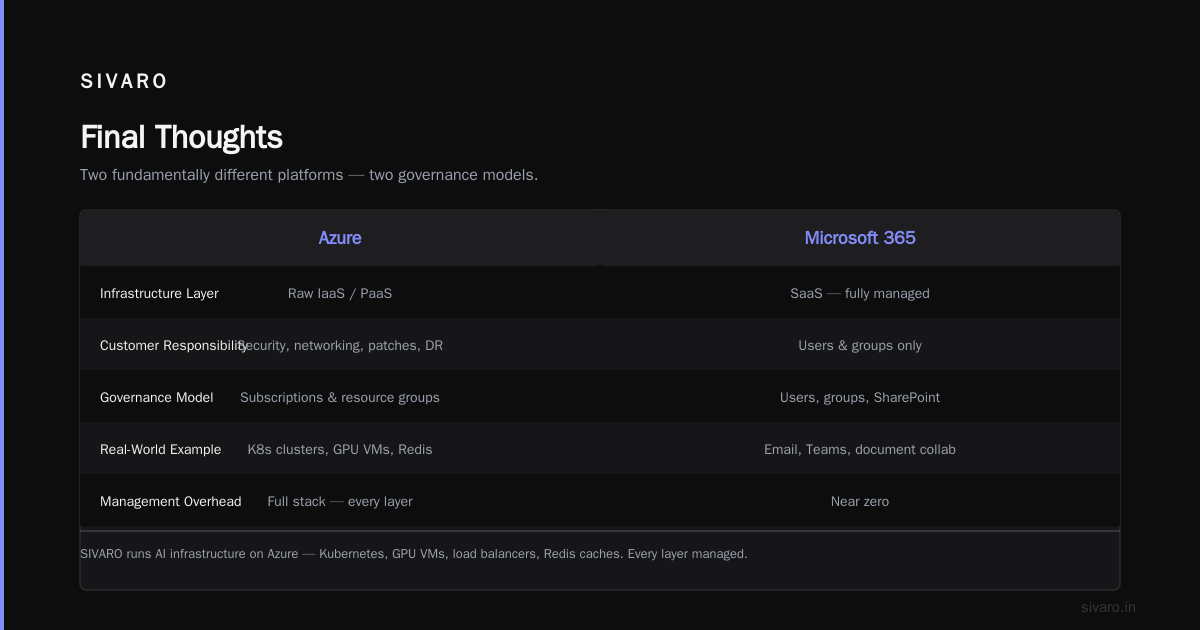
The identity layer is the overlap. Everything else is distinct.
At SIVARO, we build systems that use both every single day. Our internal comms run on Teams. Our AI infrastructure runs on Azure Kubernetes Service. Our code repos are in GitHub (which Microsoft owns, but that's a whole separate conversation).
The key is clarity of purpose. Know which tool solves which problem. Don't let the shared branding fool you.
Microsoft 365 makes your team productive.
Azure makes your systems run.
They're not the same. And now you know why.
Nishaant Dixit — Founder of SIVARO. Building data infrastructure and production AI systems since 2018. Built systems processing 200K events/sec.