
Is Kubernetes Easy to Learn? A Practitioner's Honest Take (2026)
I've been building production systems for eight years. I've trained dozens of engineers on Kubernetes. And I've watched grown adults cry over a misconfigured Ingress.
So let me answer the question directly: No, Kubernetes is not easy to learn. But that's not the full story. And if you're asking "is Kubernetes easy to learn?" because you're deciding whether to invest time in it — you need a real answer, not a marketing brochure.
Most people think Kubernetes is hard because of YAML. They're wrong. YAML is a distraction. The real difficulty is that Kubernetes forces you to understand distributed systems concepts you've spent years ignoring.
I learned this the hard way in 2020 when SIVARO's first production cluster went down for 18 hours. I'd read the docs. I'd passed the CKA. I still didn't understand what I didn't understand.
Let me save you that pain.
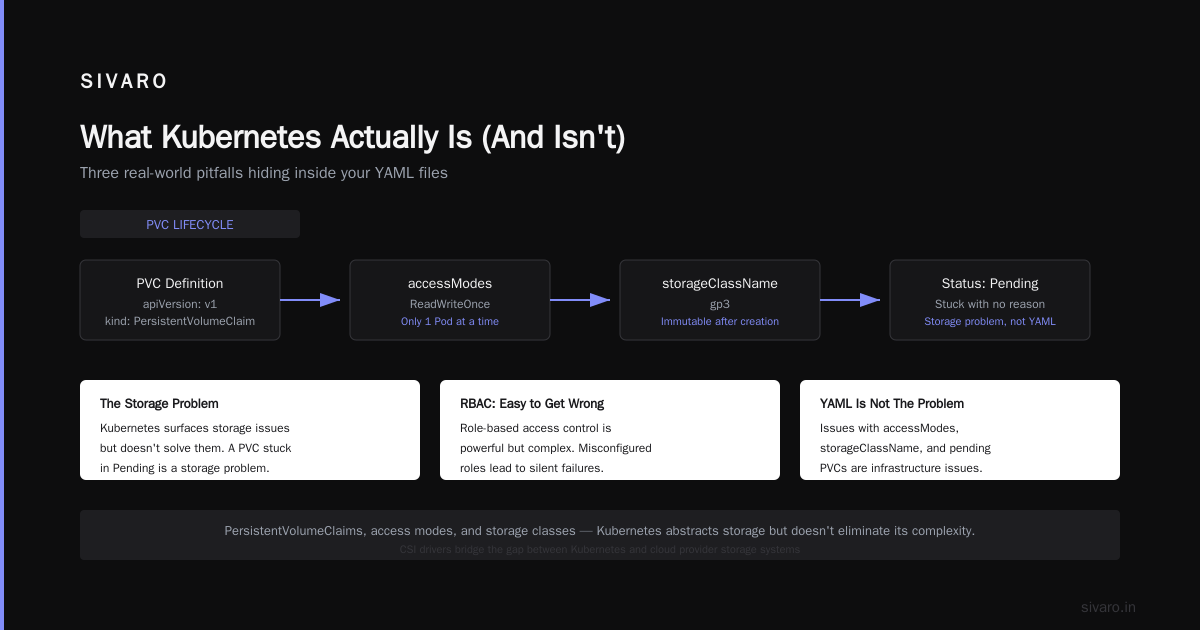
What Kubernetes Actually Is (And Isn't)
Kubernetes (K8s) is an open-source container orchestration platform. That's the official definition from the Kubernetes documentation (Overview). But that tells you nothing useful.
Here's what it actually does: Kubernetes takes your containerized applications and decides where to run them, when to restart them, and how to connect them. It's a operating system for your data center.
Think of it like this:
- Docker gave you a way to package applications
- Kubernetes gave you a way to run those packages at scale
- The pain is that "at scale" introduces problems you've never had to think about
Networking, storage, service discovery, rolling updates, self-healing — these are hard problems. Kubernetes doesn't make them easy. It makes them possible.
Kubernetes is not a CI/CD tool. If you're asking "is kubernetes ci or cd?", the answer is neither. Kubernetes is the platform your deployments land on. CI/CD tools like Harness, ArgoCD, and Jenkins integrate with Kubernetes, but the orchestrator itself doesn't build or ship code. It runs what you give it.
The Real Learning Curve (Not the One People Talk About)
The Kubernetes Learning Curve is steeper than most people admit. But the shape of that curve matters more than its height.
Most technologies follow a curve like this: easy start, gradual difficulty increase, plateau.
Kubernetes follows a different curve: medium start, sudden cliff of complexity, then rapid acceleration.
Here's the breakdown by phase:
Week 1-2: Deceivingly accessible
You can deploy a simple web app in a few hours. kubectl create deployment, kubectl expose, done. You feel powerful. This is dangerous.
Week 3-6: The cliff
You hit networking. Or persistent storage. Or role-based access control. Suddenly nothing works. Pods crash with CrashLoopBackOff and you don't know why. Services don't resolve DNS. Ingress rules silently fail.
This is where 70% of people give up.
Month 2-4: The plateau ends
If you push through the cliff, something clicks. You understand Pods, Services, Deployments, StatefulSets. You can debug common failures. Your cluster stays up for days instead of hours.
Month 6+: Mastery
This is where you start building operators, custom resource definitions, and production-grade CI/CD pipelines. You understand that Kubernetes is a platform for building platforms, not a tool you "just use."
What Makes It Hard (Specific, Painful Examples)
Let me give you concrete problems I've seen kill teams' momentum with Kubernetes.
1. Networking is a black box
Kubernetes has a complex networking model. Pod-to-Pod communication, Service meshes, Ingress controllers, NetworkPolicies, CNI plugins — each layer adds complexity.
I watched a team spend four days debugging why their microservice couldn't reach a database. The issue? The CNI plugin (Calico) had a version mismatch with the kernel. No documentation mentioned this. They found it by ssh-ing into nodes and inspecting iptables rules.
This is not "easy." This is "you need to understand Linux networking, container runtimes, and cloud provider networking simultaneously."
2. Persistent storage is painful
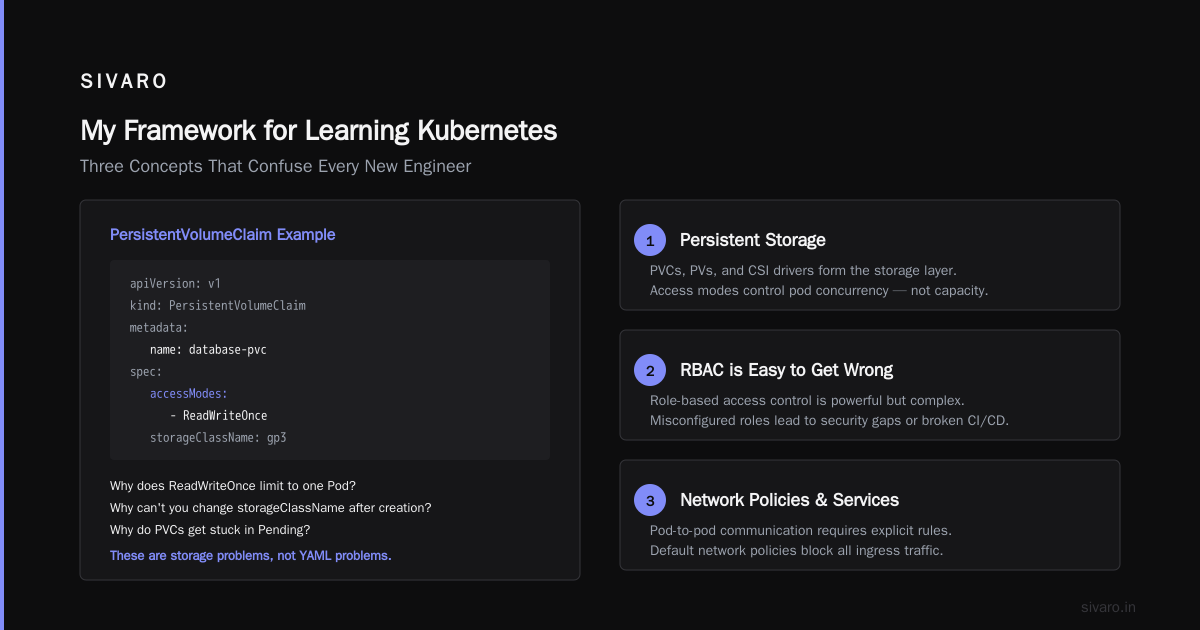
Stateful applications on Kubernetes are not a solved problem. You need to understand StorageClasses, PersistentVolumeClaims, PersistentVolumes, and how your cloud provider's CSI driver works.
Here's a concrete example of a PVC that will confuse beginners:
yaml
apiVersion: v1
kind: PersistentVolumeClaim
metadata:
  name: database-pvc
spec:
  accessModes:
    - ReadWriteOnce
  resources:
    requests:
      storage: 100Gi
  storageClassName: gp3
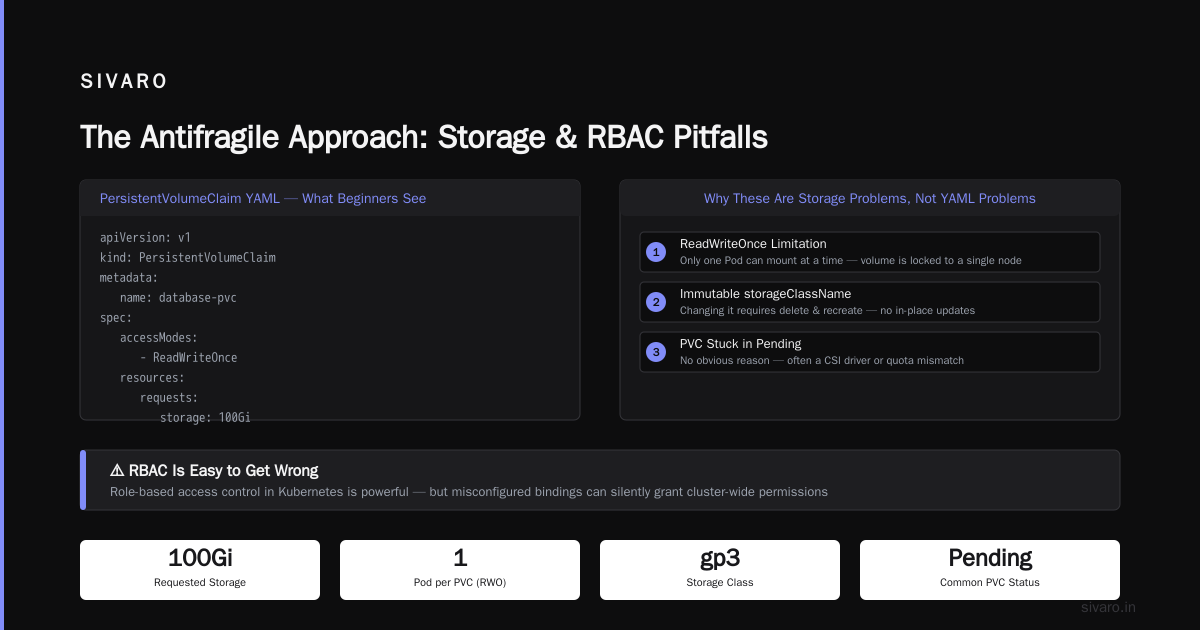
Looks simple, right? But why does accessModes: ReadWriteOnce mean only one Pod can use it at a time? Why does changing storageClassName after creation require deleting and recreating? Why do some PVCs get stuck in Pending for no obvious reason?
These are not YAML problems. These are storage problems that Kubernetes surfaces but doesn't solve.
3. RBAC is easy to get wrong
Role-based access control in Kubernetes is powerful. It's also where security breaches happen.
yaml
apiVersion: rbac.authorization.k8s.io/v1
kind: Role
metadata:
  namespace: production
  name: pod-manager
rules:
- apiGroups: [""]
  resources: ["pods"]
  verbs: ["get", "list", "watch", "create", "update", "patch", "delete"]
That verbs list includes delete. One engineer with this Role can delete every Pod in production. Did you think about that when you gave your CI system cluster-admin access?
Most security incidents in Kubernetes come from overprivileged service accounts, not external attacks.
The "Easy" Stuff (Things That Actually Are Simple)
I'm not here to scare you. Some things in Kubernetes are easy — once you understand the model.
Deploying a stateless application is genuinely straightforward:
yaml
apiVersion: apps/v1
kind: Deployment
metadata:
  name: web-app
spec:
  replicas: 3
  selector:
    matchLabels:
      app: web-app
  template:
    metadata:
      labels:
        app: web-app
    spec:
      containers:
      - name: app
        image: nginx:latest
        ports:
        - containerPort: 80
This Deployment says: "Run three copies of nginx, keep them running, and if one dies, start another." That's it. No magic. It's easy because stateless applications have no complex requirements around networking, storage, or identity.
Basic health checks are also straightforward:
yaml
livenessProbe:
  httpGet:
    path: /healthz
    port: 8080
  initialDelaySeconds: 3
  periodSeconds: 3
readinessProbe:
  httpGet:
    path: /ready
    port: 8080
  initialDelaySeconds: 3
  periodSeconds: 3
These two probes do different things that beginners confuse. The liveness probe restarts the Pod if it fails. The readiness probe removes traffic from the Pod if it fails. Getting this wrong means your app either crashes constantly or serves traffic when it's not ready.
Kubernetes and CI/CD: What Actually Works
Here's where the "is kubernetes ci or cd?" question actually matters for learning.
Kubernetes is not a CI/CD tool. But modern CI/CD pipelines run on Kubernetes, and learning how they interact is essential. The Kubernetes CI/CD Best Practices for Modern DevOps Teams document from Harness makes this clear: Kubernetes changes how you think about deployments.
Before Kubernetes, I deployed with SSH and bash scripts. It worked. It was fragile. I didn't know better.
With Kubernetes, deployment strategies change:
- Rolling updates: Kubernetes replaces Pods one at a time
- Blue-green deployments: Two environments, one switch
- Canary deployments: Percentage-based traffic shifting
Here's a rolling update strategy for a Deployment:
yaml
spec:
  strategy:
    type: RollingUpdate
    rollingUpdate:
      maxSurge: 1
      maxUnavailable: 0
This says: "Never take down more than zero existing Pods, and add at most one new Pod at a time." Your application stays available during updates. That's powerful.
But implementing good CI/CD with Kubernetes requires understanding How Kubernetes Can Improve Your CI/CD Pipeline. The key insight? Kubernetes gives you infrastructure-as-code. Your deployment config, environment variables, secrets, and network policies all live in version control.
No more "ssh and run these three commands." No more "it works on my machine, let me fix it in production."
The Best Kubernetes CI/CD Tools: Top 7 Solutions In 2026 from Octopus shows the current landscape. ArgoCD leads for GitOps. Harness dominates enterprise. Flux is strong for multi-cluster setups. But none of these tools are Kubernetes itself — they're integrations.
The Three Things Nobody Tells You
1. kubectl is not Kubernetes
I've seen engineers who know 15 kubectl commands and think they know Kubernetes. They don't. kubectl is the CLI. Kubernetes is the API.
The real skill is understanding how the API server processes requests, how controllers reconcile state, and how the scheduler places Pods. This is not something you learn by memorizing flags.
2. Managed Kubernetes changes the game
EKS, AKS, GKE — these services handle the control plane. You don't manage etcd, the API server, or the scheduler. This reduces complexity significantly.
But it doesn't eliminate it. You still need to understand node groups, cluster autoscaling, and networking (VPC CNI, Azure CNI, etc.). Managed Kubernetes removes 40% of the pain. The remaining 60% is still considerable.
3. You will break things
I've accidentally deleted a namespace with all its resources. I've misconfigured a NetworkPolicy that blocked all DNS. I've run a DaemonSet with a typo that crashed every node.
Each time, I learned something. Kubernetes punishes mistakes immediately. That's actually a feature — it forces you to understand what you're doing.
My Framework for Learning Kubernetes (What I Teach New Engineers)
Based on watching dozens of engineers learn Kubernetes since 2020, here's a structured approach:
Phase 1: Fundamentals (2 weeks)
- What is a Pod? What is a Container?
- Deployments and ReplicaSets
- Services (ClusterIP, NodePort, LoadBalancer)
- Basic kubectl commands
Do not touch Ingress, Storage, or RBAC yet. Stay in the "easy" zone.
Phase 2: Operational Basics (2 weeks)
- Logging and debugging (
kubectl logs,kubectl describe,kubectl exec) - Health probes (liveness, readiness, startup)
- ConfigMaps and Secrets
- Environment variables
Phase 3: Networking and Storage (3 weeks)
- Ingress controllers (one type, learn it well)
- PersistentVolumeClaims
- NetworkPolicies
- DNS within the cluster
This is where most people struggle. Go slow. Break things on purpose in a test cluster.
Phase 4: Security and Production (2 weeks)
- RBAC (Roles, RoleBindings, ClusterRoles)
- ServiceAccounts
- Resource requests and limits
- Node selectors and taints/tolerations
Phase 5: CI/CD Integration (1 week)
- Helm charts (basic templating)
- GitOps with ArgoCD or Flux
- Deployment strategies
This is when you start answering "is kubernetes easy to learn?" for yourself. By now, you've seen the complexity. You've felt the pain. But you've also seen the power.
How Much Time Does It Actually Take?
Let me be specific. Based on data from our training programs and hiring at SIVARO:
- Basic proficiency (can deploy a stateless app, debug common issues): 2-3 months of daily use
- Intermediate (can design production architectures, handle networking issues): 6-9 months
- Advanced (can build operators, optimize performance, manage multi-cluster setups): 12-18 months
This is with dedicated time. If you're "learning on the side" while doing your regular job? Double those numbers.
The Kubernetes Learning Curve analysis from KodeKloud confirms this: most people hit the steep part of the curve around week 3-4 and need sustained effort to push through.
When You Should Learn Kubernetes (And When You Shouldn't)
Learn Kubernetes if:
- You manage more than 5 microservices
- Your team is growing and you need consistent deployment patterns
- You need automated rollouts and rollbacks
- You're tired of "it works on my machine" problems
Don't learn Kubernetes if:
- You have one application and three servers
- Your infrastructure needs are static (same config for months)
- You don't have time to invest in the learning curve
- You can solve your problems with a simpler tool (Docker Compose, Nomad, etc.)
I've consulted for companies that adopted Kubernetes and regretted it. One startup spent 6 months building a Kubernetes pipeline for a single Python web app. They'd been running fine on Heroku. The migration broke their team's momentum and didn't improve anything.
Kubernetes is not a badge of honor. It's a tool. Use it when it solves a real problem.
The 2026 Reality Check
We're in July 2026. Kubernetes is 12 years old. It's mature. The ecosystem is stable. But it's also more complex than ever.
The rise of edge computing, serverless-on-Kubernetes (Knative), and AI workloads has added new layers. If you're learning Kubernetes today, you're learning a system that must integrate with:
- Observability stacks (Prometheus, Grafana, OpenTelemetry)
- Service meshes (Istio, Linkerd, Consul)
- Security tools (Kyverno, OPA/Gatekeeper)
- Cost management tools (Kubecost, Cast.ai)
- Platform engineering abstractions (Backstage, Port, Humanitec)
This is not the Kubernetes of 2020. It's more powerful and more opinionated.
FAQ: What Engineers Actually Ask Me
Q: "Is Kubernetes easy to learn?"
A: No. And anyone who tells you yes is selling something. But the difficulty is front-loaded. Once you push through the first 8-12 weeks, the investment pays off exponentially.
Q: "Is kubernetes ci or cd?"
A: Neither. Kubernetes is the target for CI/CD. The CI/CD tools themselves (Jenkins, GitLab CI, GitHub Actions, ArgoCD) run on or integrate with Kubernetes. Kubernetes doesn't build code or trigger pipelines.
Q: "Should I learn Docker first?"
A: Yes. Absolutely. Kubernetes assumes you understand containerization. If you can't write a Dockerfile, build an image, and run it locally, Kubernetes will be impossible. Spend at least 2 weeks on Docker before touching K8s.
Q: "How do I practice without spending money?"
A: Use kind (Kubernetes in Docker) or minikube locally. Create a cluster on your laptop. Break things. Fix them. There's no substitute for hands-on failure.
Q: "Do I need to learn all the ecosystem tools?"
A: No. Start with core Kubernetes. Add tools only when you have a specific problem. Most beginners waste months learning Helm charts before understanding Deployments. Stop that.
Q: "What's the one thing that will make this click?"
A: Understanding the control loop. Kubernetes doesn't "do" things in real-time. It reconciles desired state (what you defined in YAML) with actual state (what's running). Everything else follows from this model.
Q: "Is CKA certification worth it?"
A: For structured learning, yes. For proving you can build production systems, no. The CKA tests your ability to follow instructions on a pre-configured cluster. Production is much messier.
Where the Industry Is Now (July 2026)
The hype cycle on Kubernetes is over. It's infrastructure. It's boring. That's a good thing.
What I'm seeing now:
- Platform teams are building abstractions on top of Kubernetes so developers don't need to learn it
- AI/ML workloads are the new driver for Kubernetes adoption (training jobs, model serving, batch inference)
- FinOps has become critical — Kubernetes clusters that cost $100K/month are common, and cost control is a skill itself
- Security is the hardest problem — with thousands of containers running, vulnerability management is overwhelming
The "is kubernetes easy to learn?" question will always get a different answer depending on who you ask. A platform engineer who builds abstractions says "absolutely." A developer who just wants to deploy their API says "hell no."
Both are right.
Final Advice: The Antifragile Approach
Kubernetes is not easy to learn. But it's worth learning.
Every engineer I've trained who pushed past the initial frustration came out stronger. They understood distributed systems better. They debugged faster. They designed more resilient systems.
The secret? Don't learn Kubernetes. Learn the concepts it exposes.
- Containerization (not YAML)
- Service discovery and networking (not Ingress controllers)
- State management and reconciliation (not Operators)
- Security boundaries (not RBAC syntax)
Kubernetes is a language for describing infrastructure. Learning it changes how you think about systems. That's hard. But it's the kind of hard that makes you better.
Start small. Break things. Rebuild. Repeat.
And if someone tells you it's easy? Ask them how their last production outage went.
Nishaant Dixit — Founder of SIVARO. Building data infrastructure and production AI systems since 2018. Built systems processing 200K events/sec.