 SIVARO

Is Kubernetes Easy to Learn? A 2026 Reality Check from a Practitioner
I get this question almost every week. A founder, a new SRE, a VP of Engineering who just lost their patience with a monolithic platform. They all ask the same thing: is kubernetes easy to learn?
The honest answer? It depends on what you mean by “learn.” If you mean “can I deploy a simple web app in a day?” — yes, absolutely. You can get a pod running in ten minutes with the right managed cluster. If you mean “can I run production workloads with confidence, handle failures, optimize costs, and sleep at night?” — that takes months. Sometimes years.
Let me tell you a story. In 2024, a client came to SIVARO with a two-year-old Kubernetes cluster. They’d hired a junior platform engineer who’d followed a YouTube tutorial. Everything ran fine for three months. Then a node failed. Then another. Pods scheduled themselves onto overloaded instances. Cost doubled. Customers saw errors. The CTO panicked. That’s the gap between “hello world” and “production.”
This article is for people who want the real answer. I’ll tell you what’s hard, what’s gotten easier in 2026, and whether you should even care about Kubernetes anymore.
The short answer: no, but also yes
Most people think Kubernetes is a cluster-management tool. Wrong. Kubernetes is a distributed systems operating system. It abstracts away individual machines and gives you a declarative API for running containers. The idea is beautiful. The execution is brutal.
Here’s the paradox: the basics are easy. You can install kubectl, run kubectl run nginx --image=nginx, and boom, you have a running container. But that’s not learning Kubernetes. That’s learning how to type commands. Real learning means understanding:
- How the control plane components work (etcd, API server, scheduler, controller manager)
- How networking works (CNI plugins, service meshes, network policies)
- How storage works (PVs, PVCs, storage classes)
- How security works (RBAC, PodSecurityStandards, network policies, OIDC)
- How the scheduler makes decisions
- How autoscaling works (HPA, VPA, cluster autoscaler, Karpenter)
- How to debug when something breaks
That list is exhausting. And I didn’t even mention observability, CI/CD integration, or cost management.
What makes Kubernetes genuinely hard in 2026
1. The conceptual overhead of distributed state
Kubernetes is built on etcd — a distributed key-value store. State is replicated across nodes using Raft consensus. That’s fine if you only have three members. But most people never think about etcd until it’s too late. I’ve seen clusters die because someone hit the etcd compaction quota. Or because the disk IOPS were too low.
Understanding how to size etcd, how to backup and restore it, and how to avoid cluster meltdowns is not trivial. And it’s not something you learn by deploying a pet project.
2. Networking is a maze
CNI plugins have come a long way. Calico, Cilium, Flannel, Weave — they all work. But they all behave differently. Choose wrong and you’ll fight DNS resolution issues for weeks. I’ve seen teams spend three months debugging a mysterious 5-second connection timeout. Turned out the CNI’s eBPF mode was dropping packets under certain concurrency patterns. Good luck debugging that without deep kernel knowledge.
Cilium is the default in many places now (2026), and it’s excellent — but its configuration surface is enormous. You can easily misconfigure a network policy and block all traffic.
3. YAML fatigue is real
Everyone complains about YAML. But the problem isn’t YAML — it’s the sheer number of resources you need to chain together. Deployment, Service, Ingress, ConfigMap, Secret, ServiceAccount, Role, RoleBinding, HorizontalPodAutoscaler, PodDisruptionBudget, NetworkPolicy, PersistentVolumeClaim, StorageClass, maybe an ExternalSecret, maybe a Helm chart.
One misaligned label and your service doesn’t route traffic. One typo in a selector and your pods are invisible. The Kubernetes API is declarative but extremely unforgiving. Tools like kubectl-validate and IDE plugins help, but they don’t fix the cognitive load of composing 15 different resources for a single app.
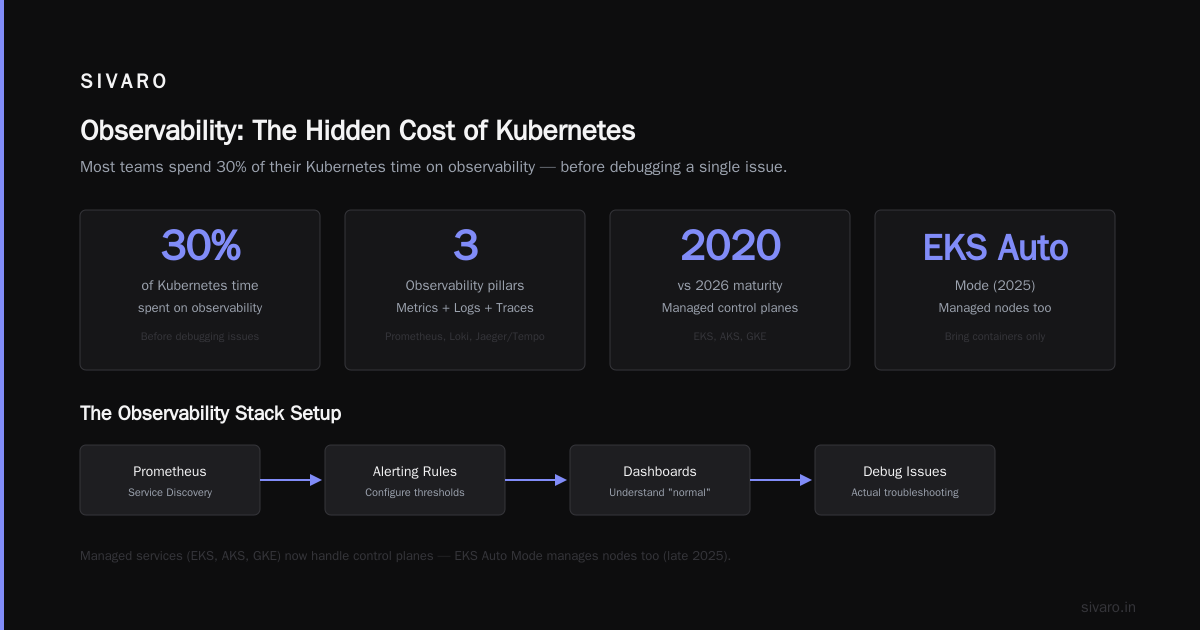
4. Observability is mandatory — and painful
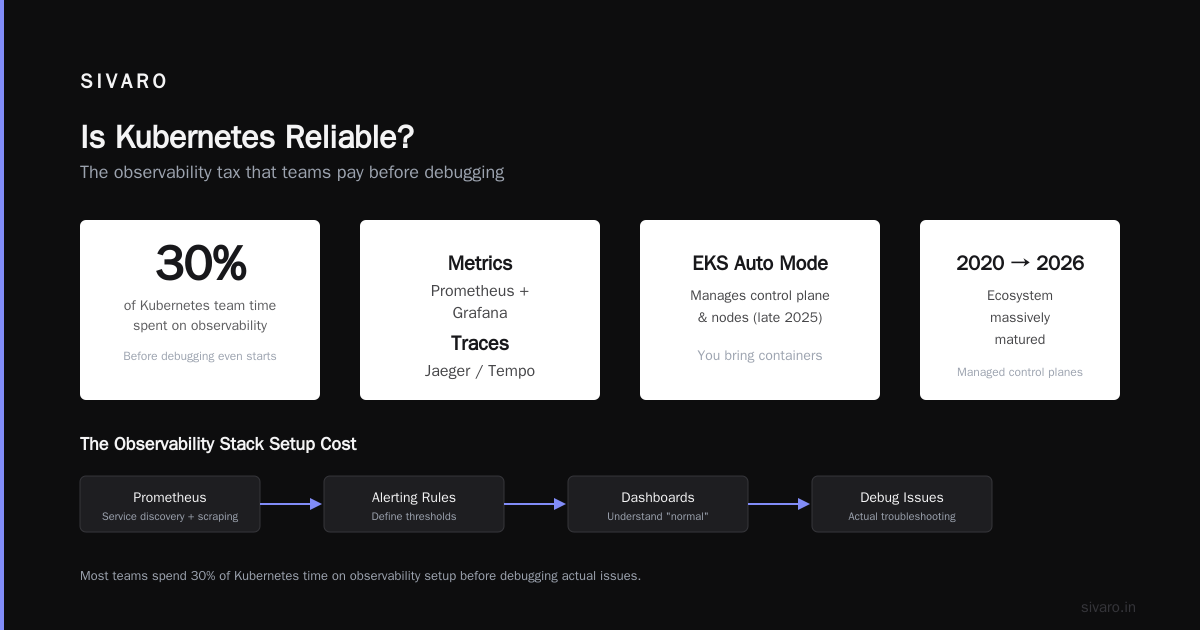
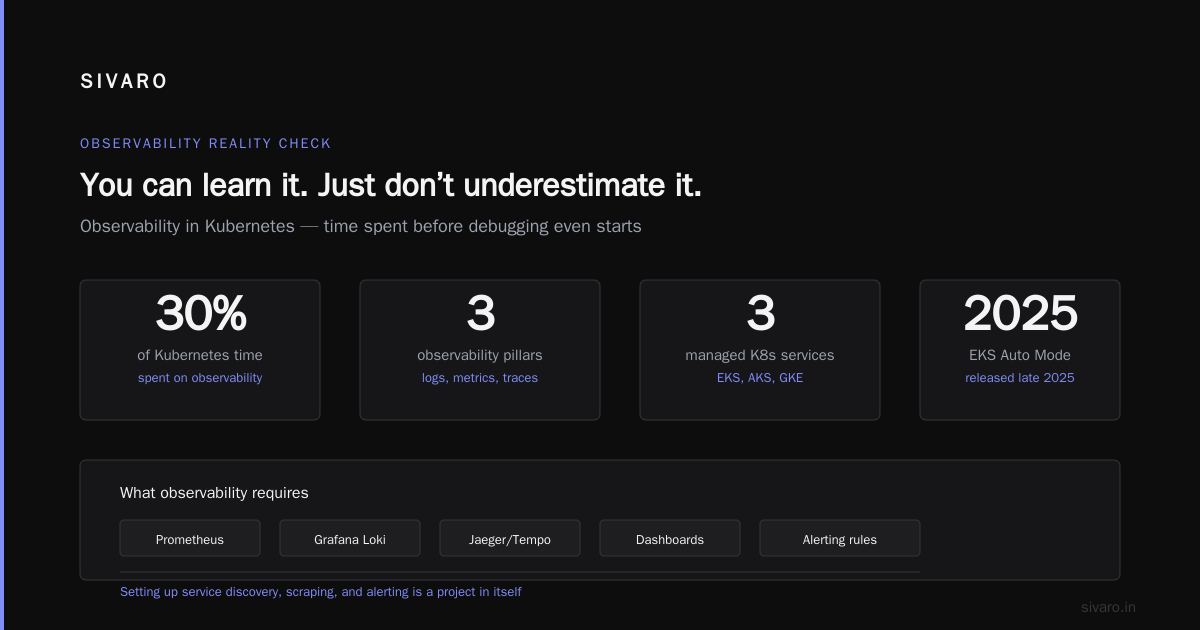
You can’t run Kubernetes blind. You need metrics (Prometheus), logs (Loki or ELK), traces (Jaeger or Tempo), and alerts. Setting up Prometheus with service discovery, scraping, and alerting rules is a project in itself. Then you need to configure dashboards. Then you need to understand what “normal” looks like for your workloads.
Most teams I talk to spend 30% of their Kubernetes time on observability. That’s before they even debug an actual issue.
What makes learning Kubernetes easier in 2026
The ecosystem has matured massively since 2020. Here’s what changed.
Managed services hide the control plane
You don’t need to run your own control plane anymore — unless you want to. Amazon EKS, Azure AKS, Google GKE all manage the masters for you. EKS now has EKS Auto Mode (released late 2025), which manages nodes too. You bring the containers, they handle the rest.
This is huge. You can start without understanding etcd or API server scaling. But it lulls you into a false sense of competence. When something breaks at the node level, you still need to understand how the cluster works.
Karpenter changed node management forever
Speaking of nodes — Karpenter changed the game. Before Karpenter, the Cluster Autoscaler was the standard. It works, but it’s slow and dumb. It thinks in node groups. You have to pre-provision instance types. It takes five minutes to scale up.
Karpenter is smarter. It uses a bin-packing algorithm to choose the cheapest, most suitable instance from the entire AWS catalog. It can launch a Spot instance, a Graviton, or a bare metal box — all without you pre-defining node groups.
Want to see the power? Here’s a Karpenter NodePool spec from one of our production clusters:
yaml
apiVersion: karpenter.sh/v1beta1
kind: NodePool
metadata:
  name: default
spec:
  template:
    spec:
      requirements:
        - key: "karpenter.sh/capacity-type"
          operator: In
          values: ["on-demand", "spot"]
        - key: "kubernetes.io/arch"
          operator: In
          values: ["amd64", "arm64"]
        - key: "node.kubernetes.io/instance-type"
          operator: In
          values: ["m5.large", "m5.xlarge", "m6i.large", "m6i.xlarge", "m7g.large", "m7g.xlarge"]
      nodeClassRef:
        name: default
That’s it. Tell Karpenter which types you’re okay with, and it will pick the cheapest available. It respects Spot interruptions, automatically consolidates workloads into fewer nodes (if that’s cheaper), and scales to zero when idle.
Our AWS bill dropped 20% after switching to Karpenter with Spot instances for non-critical workloads. Tinybird reported similar results — they cut costs 20% while scaling faster Tinybird.
But Karpenter adds complexity. You need to understand how consolidation works. The default consolidation mode (WhenUnderutilized) can consolidate nodes aggressively — which triggers pod evictions. If you haven’t set proper PodDisruptionBudgets, you’ll lose traffic.
One team I know (let’s call them “Acme Finance”) lost a payment processing job because Karpenter consolidated a node during a transaction. The pod had no PDB. The job restarted, but the user saw an error. They learned the hard way, as described in this personal take on PodDisruptionBudgets and Karpenter DevOps.dev.
So Karpenter makes node management easier — but only if you understand how it works.
AI-assisted ops is real
In 2026, you can talk to your cluster. Tools like kubectl-gpt (now standard in most terminals) let you debug errors in natural language. “Why did my pod crash?” → it looks at events, logs, and suggests fixes. Copilot for Kubernetes.
This lowers the barrier for newcomers. But it also masks understanding. You can fix a misconfigured readiness probe without learning what readiness probes are. That’s fine for one-off issues. It’s dangerous when the pattern repeats and you don’t recognize it.
Helm and Kustomize are mature
Package management for Kubernetes is solved. Helm v3 is stable. You can install a complex app with one helm install. But the abstraction leaks. When your Helm chart’s values file has 200 parameters, and you can’t figure out why the ingress doesn’t work, you’re still debugging YAML.
The real question: is kubernetes relevant in 2026?
I’ll be direct: yes. Absolutely. But not for everyone.
Kubernetes is still the standard for container orchestration. No other tool has its reach, community, or API ecosystem. Serverless containers (AWS Fargate, Azure Container Instances) are simpler — but they cap you at 8 vCPUs. Nomad is elegant but lacks extensibility. Good old Docker Compose works for single machines.
If you’re running microservices, need to scale across regions, or want a consistent way to deploy across multi-cloud — Kubernetes is your best bet.
But if you’re a team of three building a CRUD app? Don’t. Use a PaaS. Use a single server with Docker. Use a serverless framework. Kubernetes will cost you more in learning time than it saves.
Is kubernetes reliable?
Short answer: yes, but only if you configure it right.
Kubernetes itself is rock solid. Google runs billions of containers on Borg, its predecessor. The control plane is hardened. But the reliability of your cluster depends entirely on how you set up autoscaling, networking, monitoring, and backup.
- If you don’t set resource requests/limits correctly, the scheduler can crush a node.
- If you don’t set PodDisruptionBudgets, a rolling update will kill all your pods.
- If you don’t set pod anti-affinity, all replicas land on the same node.
- If you don’t have a backup of etcd, a corrupted volume wipes your cluster state.
Reliability is not a property of Kubernetes. It’s a property of your configuration. The tool gives you the primitives; you have to build the guardrails.
My personal learning path (and what I wish I’d done differently)
I started learning Kubernetes in 2019. I’d already been doing Docker for two years. I thought I was ready.
First mistake: I used Minikube. It’s fine for testing a single pod. It’s terrible for learning networking, storage, or autoscaling. I spent a week trying to make a LoadBalancer work — only to realize Minikube’s tunnel is fake.
Second mistake: I skipped the boring parts. I never read the schedulering docs. I never understood how controller-manager works. I just copy-pasted YAML from examples. When I faced a real-world issue (a pod stuck in Pending), I had no mental model to debug.
Third mistake: I underestimated networking. I deployed a 3-tier app, everything worked, then I changed the Service type from ClusterIP to NodePort. Suddenly DNS stopped resolving. I didn’t know about kube-dns. I didn’t know about CoreDNS. I didn’t know that Services don’t forward to pods on the same node if the kube-proxy mode is different.
What worked for me eventually:
-
I built a cluster from scratch using
kubeadm. Twice. Once on bare metal, once on AWS EC2. I had to configure etcd, the API server certs, the network plugin. It took two weekends. It taught me more than a year of managed clusters. -
I broke things intentionally. I deleted a node’s kubelet certificate. I killed the etcd member. I flooded the scheduler with thousands of pods. Each failure taught me recovery.
-
I read the source code. Not the whole thing, but parts. The scheduler’s predicate and priority functions. The controller-manager’s deployment controller. Understanding how Kubernetes thinks makes debugging intuitive.
-
I ran Karpenter in production. It forced me to understand node lifecycle, taints/tolerations, and pod disruption budgets. The Karpenter concepts page was my bible for two months.
That’s the real answer to “is kubernetes easy to learn?”: it’s easy to start, hard to master, and downright painful if you skip fundamentals.
How to learn Kubernetes (practical tips for 2026)
-
Don’t start with managed clusters. Use
kind(Kubernetes in Docker) for local testing. Then graduate tokubeadmon a VM. Feel the pain of setting up the control plane. Once you understand it, you’ll appreciate managed services more. -
Learn networking early. Read about CNI, kube-proxy, iptables vs. eBPF, service mesh. Deploy an app and trace a packet from client to pod. Use
tcpdump,ip routes,conntrack. -
Practice failure recovery. Simulate node failures, network partitions, disk-full scenarios. Use Chaos Mesh or Litmus. You don’t learn real Kubernetes until you’ve held your breath watching a pod reschedule.
-
Automate everything with GitOps. Argo CD or Flux. Declarative management forces you to understand what each resource does. You can’t “just fix it” in production — you have to write correct manifests.
-
Understand cost from day one. Kubernetes can waste money like a drunk billionaire. Use Karpenter with consolidation, use Spot instances, set resource quotas, and monitor with tools like Kubecost or ScaleOps. AWS’s blog on Karpenter consolidation shows how you can save 20–40% without effort.
-
Don’t learn alone. Join the Kubernetes Slack, read the release notes, follow KEPs (Kubernetes Enhancement Proposals). The ecosystem changes fast. In 2026, we’re seeing sidecar containers become GA, enhanced PodSecurityStandards, and much tighter integration with AI/ML workloads.
FAQ
Q: Can I learn Kubernetes in a week?
A: If you already know Docker and basic networking, you can deploy a simple application in a week. But production readiness takes months. I’d budget 3–6 months for real comfort.
Q: Should I learn Kubernetes in 2026 or is it going away?
A: It’s not going away. Even if you use serverless containers, the abstraction is often built on Kubernetes (think AWS Fargate with EKS). Understanding Kubernetes gives you portability and deep troubleshooting skills.
Q: Is Kubernetes reliable for stateful workloads?
A: Yes, but it’s harder. StatefulSets, PersistentVolumes, and CSI drivers have matured. For databases, you’ll still want operators (like Zalando Postgres Operator, Vitess, or CockroachDB). They handle replication and backups. Running a database without an operator is a recipe for data loss.
Q: How do I know if I’m using Kubernetes right?
A: Simple metrics: deployment time (should be under 2 minutes), pod startup time (under 10 seconds), node utilization (target 60–80%), and cost per request. If your cluster costs 5x your compute bill, you’re doing something wrong.
Q: What’s the hardest part of Kubernetes?
A: Observability and networking. You can’t see the problems without good metrics, and once you see them, you often need deep networking knowledge to fix them.
Q: Do I need to know Linux internals to learn Kubernetes?
A: It helps a lot. Understanding cgroups, namespaces, and kernel parameters (like netfilter) makes debugging easier. But you can get 80% of the way without it. Just be ready to learn when things break.
Q: Is Kubernetes worth the effort for a small team?
A: Only if you’re running more than 5 microservices or need to scale across availability zones. For a monolith or a simple API, use a simpler platform like Railway or Fly.io. Kubernetes will eat your developer productivity.
You can learn it. Just don’t underestimate it.
Kubernetes is not easy to learn. Anyone who tells you otherwise either sells Kubernetes consulting or has never run it in production. But it is learnable. It rewards patience, curiosity, and a willingness to break things.
The key is to respect the complexity. Don’t skip etcd. Don’t ignore network policies. Don’t assume a Helm chart is correct. Run Karpenter with consolidation in staging first, understand the behavior, then go to prod. Set PodDisruptionBudgets religiously. Backup etcd every hour.
In 2026, the tools are better than ever. Karpenter, managed control planes, AI-assisted debugging, and GitOps make the day-to-day easier. But the concepts haven’t changed. You still need to understand distributed systems, networking, and state.
So — is kubernetes easy to learn? No. But the question you should ask instead is: Is the investment worth it for my business? For many, yes. For some, no. Be honest about your needs.
I’ve built production AI systems on Kubernetes processing 200K events per second. We use it because nothing else gives us the control, the resilience, and the ecosystem. But we paid the learning price — in time, in frustration, and in a few sleepless nights.
You can too. Start small. Fail fast. Learn deep.
Nishaant Dixit — Founder of SIVARO. Building data infrastructure and production AI systems since 2018. Built systems processing 200K events/sec.