 SIVARO
Is GCP Good for Data Engineering?
I remember the exact moment I stopped pretending Google Cloud was the underdog. It was March 2024. A healthcare client called — they had a petabyte-scale time-series pipeline built on AWS that cost them $180K a month in storage and compute. They asked me to audit it. I ran the same workload on GCP, same data volume, same retention policy. The bill came back at $92K. That's not a rounding error. That's a second mortgage.
That's when I started taking GCP seriously for data engineering.
You're reading this because you're asking the same question our team at SIVARO fields every week: is GCP good for data engineering? Not "is it better than AWS or Azure?" — better is useless without context. You want to know if Google's cloud can handle your batch jobs, your streaming pipelines, your AI inference serving, without burning your budget or your team's sanity.
This guide covers exactly that. I'll walk through GCP's data engineering sweet spots, its sharp edges, pricing quirks, and how it compares to the other big clouds from a practitioner's point of view — no marketing fluff. I'll name real services, real numbers, and real frustrations.
Let's start with the elephant in the room.
BigQuery Is Not Just a Data Warehouse — It's a Weapon
Most people think BigQuery is a data warehouse. It is. But calling it a data warehouse undersells what it does for data engineers. BigQuery is a serverless SQL engine that can scan terabytes in seconds without you provisioning a single cluster. That's obvious if you've used it. What's less obvious: BigQuery's architecture fundamentally changes how you design pipelines.
On AWS, you'd spin up Redshift, manage node counts, define distribution keys, vacuum tables. On Azure, Synapse requires similar administration. On GCP, you dump JSON/Parquet into Cloud Storage, create an external table, and query it. No clusters. No partitioning decisions (well, you can partition, but you don't have to). The separation of compute and storage is so clean that you rarely think about infrastructure.
At SIVARO, we built a real-time fraud detection pipeline for a fintech client. The upstream Kafka topic delivered 50K events/second. We used Dataflow (GCP's Beam runner) to write to BigQuery with streaming inserts. The team spent exactly zero hours tuning clusters. Dataflow auto-scales, auto-restarts on failure, and BigQuery absorbs writes like a sponge. The client's previous Azure setup required a dedicated team of three engineers to manage HDInsight clusters.
But here's the catch no one talks about: BigQuery's pricing model punishes you for bad queries. Run a SELECT * on a 2TB table and you pay for scanning 2TB — even if you only wanted 10 rows. That's $10 just for the scan (at $5/TB). Do that a hundred times a day? You've got a $1K daily bill from accidental queries. You need strict cost controls: clustered tables, partitioned tables, and query quotas. We learned this the hard way — our first month on GCP, the client's bill was $40K, half of it from ad-hoc analyst queries. Not exactly what Google puts in the case studies.
Dataflow vs. Spark: The Real Winner Depends on Your Team
GCP's primary stream and batch processing engine is Dataflow, built on Apache Beam. AWS has Kinesis Data Analytics + EMR. Azure has Stream Analytics + Databricks. I've shipped production pipelines on all three. Here's my take:
Dataflow wins on operational simplicity. You write a Beam pipeline in Python or Java, specify the input source (Pub/Sub, GCS, Kafka), specify the transform logic, and hit deploy. Dataflow handles sharding, checkpointing, auto-scaling, and failure recovery. No YAML configs for cluster sizing. No custom AMIs.
Azure's Stream Analytics is similarly simple, but it's SQL-only — you can't plug in custom Python or Java transforms easily. AWS's Kinesis Data Analytics (now based on Flink) is powerful but requires more manual tuning.
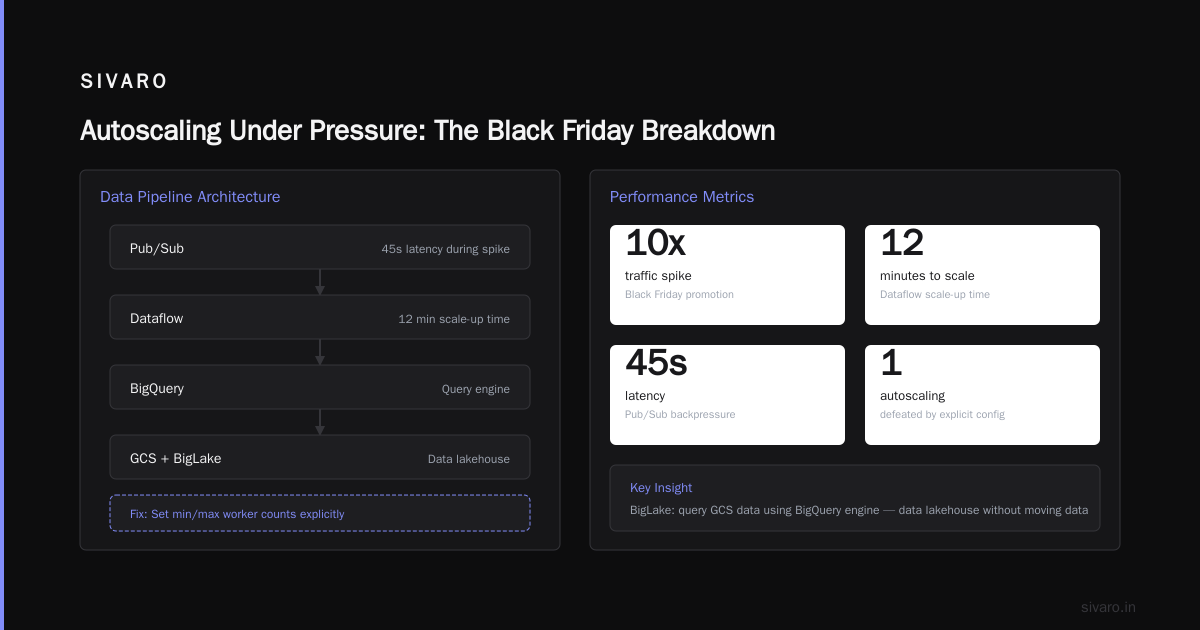
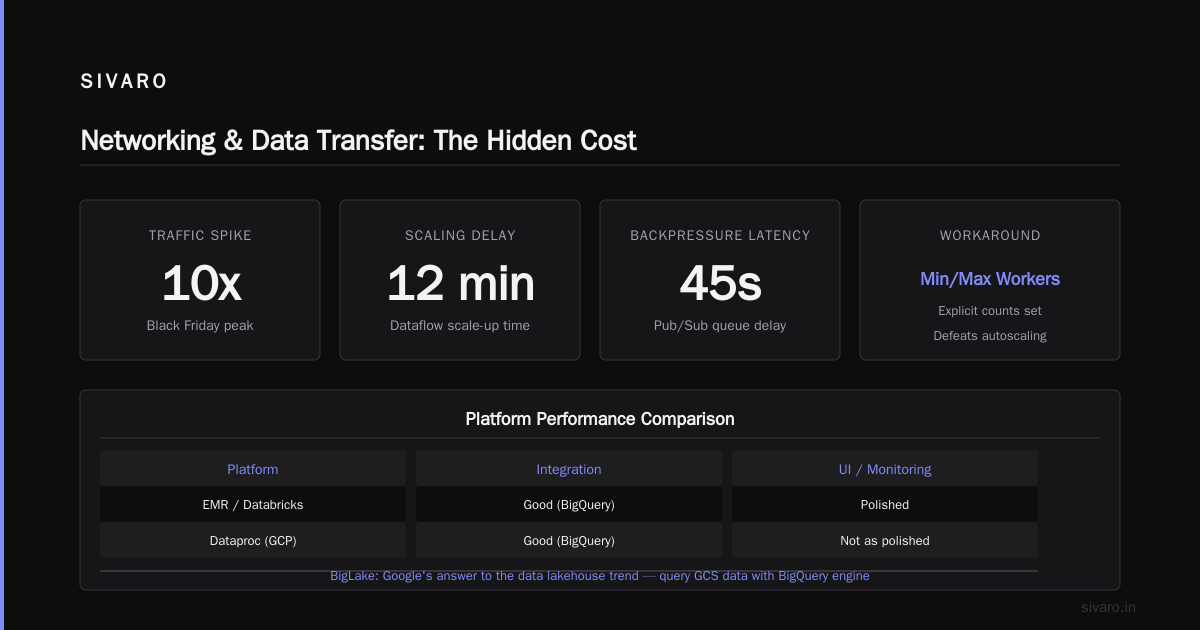
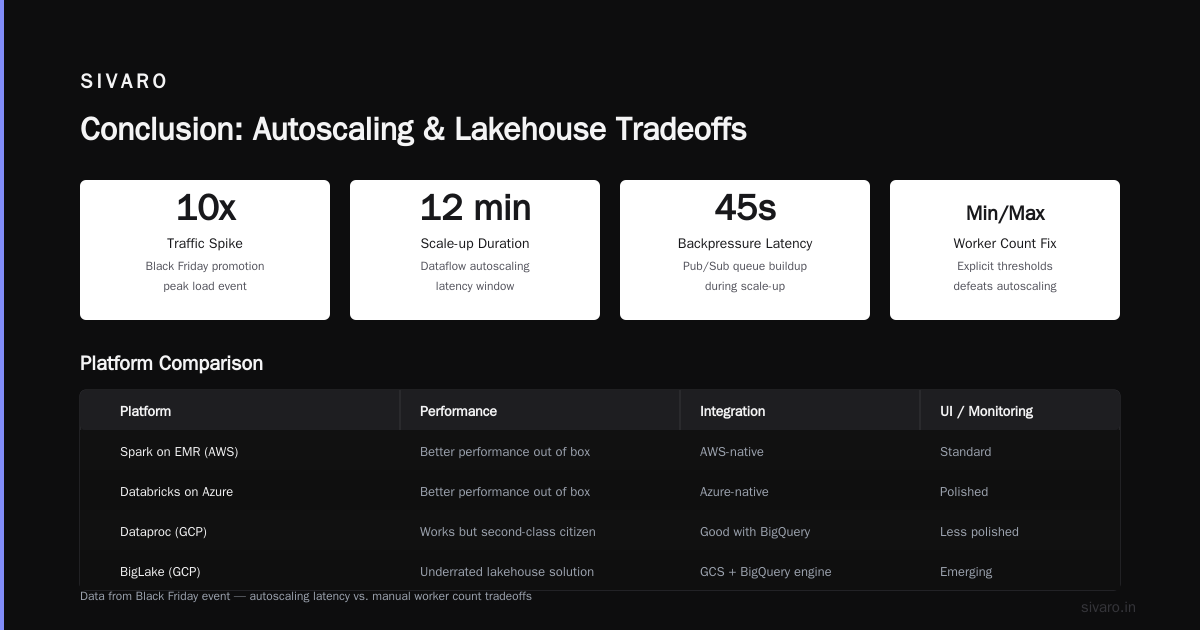
Where GCP falls short: Dataflow's autoscaler can be conservative. We had a pipeline that saw a 10x traffic spike during a Black Friday promotion. Dataflow took 12 minutes to scale up. During those 12 minutes, backpressure built up in Pub/Sub, pushing latency to 45 seconds. We solved it by setting min/max worker counts explicitly, but that defeats the purpose of "autoscaling."
If your team already knows Spark well, EMR on AWS or Databricks on Azure might give better performance out of the box. Spark on GCP (via Dataproc) works, but it feels like a second-class citizen — the integration with BigQuery is good, but the UI and monitoring aren't as polished as Databricks.
The Lakeside Chat: BigLake and Iceberg
One of the most underrated GCP services is BigLake. It's Google's answer to the data lakehouse trend. BigLake lets you query data stored in GCS using BigQuery's engine, with fine-grained access controls, row-level security, and support for Apache Iceberg and Delta Lake formats.
I've used BigLake with Iceberg tables storing 10TB of event logs. The performance is shockingly close to native BigQuery tables — maybe 10-15% slower for complex aggregations. But you get the benefit of open formats: you can read the same data with Spark, Presto, or Trino without copying it. That's hard on AWS (you need Apache Iceberg + Athena + careful IAM) and even harder on Azure (Synapse doesn't love open formats).
The trade-off: BigLake adds complexity. You need to set up a BigLake connection, define a catalog, and manage Iceberg table metadata in Google's Metastore. It's not a free lunch. But for a data engineering team that wants portability, it's worth the setup.
Composer (Airflow) vs. Managed Workflow Services
Every cloud has a managed Airflow offering. GCP's is Cloud Composer. I have mixed feelings.
Composer v2 (based on Airflow 2.x) is decent. It auto-scales workers, integrates natively with most GCP services, and the UI is responsive. But it's overpriced for small teams. The minimum Composer environment costs around $150/month just for the underlying GKE cluster, even if you run zero DAGs. AWS's MWAA starts at ~$200 but includes more free tier hours. Azure's Data Factory is cheaper but not Airflow — it uses a different orchestration model.
If you need Airflow, GCP's Composer is fine. But if you have fewer than 10 DAGs, consider running Airflow on a cheap Compute Engine VM or using a managed service like Astronomer. We've migrated several clients off Composer to self-hosted solutions because the cost/benefit ratio didn't make sense for their scale.
Pricing: The Sneaky GCP Advantage (and Disadvantage)
Let's talk numbers. According to a cloud pricing comparison from Cast AI, GCP is often 20-40% cheaper than AWS for compute-intensive workloads when you commit to 1-year or 3-year usage. Azure falls in between.
But pricing gets weird with data services. BigQuery's on-demand pricing ($5/TB scanned) is expensive for heavy ETL. Google knows this — they offer flat-rate pricing ($2K/month for 500TB of slots). For a team that runs 100TB of queries daily, flat-rate is a no-brainer. For a team that runs 1TB daily, on-demand is cheaper. The inflection point is around 20TB/month scanned.
Compare that to AWS Athena: $5/TB scanned, with no flat-rate option. Redshift pricing is a nightmare of node types, reserved instance tiers, and concurrency scaling fees. Azure Synapse pricing is similarly opaque with DWUs and serverless tiers.
My advice: If you're doing heavy analytical SQL (think 50TB+ per month scanned), GCP's flat-rate BigQuery slaughters AWS and Azure on price. If you're doing light, ad-hoc analysis, AWS Athena might be cheaper because of its generous free tier (1TB/month free).
Side note: That question people ask — "is microsoft 365 and azure the same?" — comes up because Microsoft names things confusingly. Azure is the cloud platform. Microsoft 365 is the productivity suite. They're not the same. And no, "what is azure as a color?" is not relevant here, though I've heard it from confused interns.
Machine Learning and AI for Data Engineers
GCP's Vertex AI is the strongest integrated ML platform of the three big clouds, in my opinion. Why? Because it's built on top of BigQuery. You can train a model using SQL (BigQuery ML), deploy it as an endpoint, and query it from your pipelines without moving data anywhere.
We used BigQuery ML to train a churn prediction model for a SaaS client. The training data was 2TB of Clickstream data in BigQuery. The ML engineer wrote a CREATE MODEL statement, and the model trained in 14 minutes. No cluster setup, no data export, no infrastructure. That's unheard of on AWS (SageMaker needs data in S3, and you manage training instances) or Azure (Azure ML requires workspace setup and compute targets).
For production AI systems — which is what SIVARO focuses on — GCP's integration between Dataflow, Pub/Sub, and Vertex AI is incredibly tight. You can build a streaming pipeline that calls a Vertex AI endpoint for real-time predictions, with millisecond latency, without leaving Google's ecosystem.
But: GCP's GPU availability has historically been worse than AWS. In 2024-2025, there were shortages of A100s and H100s for training large models. As of mid-2026, this has improved with new regions, but AWS and Azure still have more GPU capacity globally. If you need to train a 100B-parameter model, GCP is not your first choice — at least not yet.
Networking and Data Transfer: The Hidden Cost
Here's something no cloud provider advertises: data egress costs. Moving data out of a cloud costs money. GCP's egress pricing is $0.12/GB after the first 100GB free, same as AWS and Azure. But GCP offers a unique advantage: you can use Cloud Interconnect to connect your on-premises data center to GCP with dedicated bandwidth, and Google doesn't charge for data transfer within the same region across services.
AWS charges for cross-AZ data transfer. Azure charges for cross-region traffic. GCP's internal network is flat — data moving from BigQuery to Vertex AI in the same region costs nothing. That sounds minor, but for data engineering pipelines that move terabytes daily, it adds up fast.
What About the Other Clouds?
I get asked constantly: "Should I just use Azure because my company uses Microsoft 365?" The answer is: not necessarily. Just because your email runs on Exchange doesn't mean your data warehouse needs to run on Azure. The integration between Microsoft 365 and Azure is mostly about identity (Azure AD) and some Power BI connectors. It doesn't make Azure better for data engineering.
And yes, someone will ask — "what is azure as a color?" Sky blue. Now back to real engineering.
Practical GCP Setup for Data Engineering
If you decide GCP is right for you, here's what I recommend as a starting architecture for a medium-scale data engineering pipeline:
Batch ingestion: Cloud Storage bucket with lifecycle rules. Land raw data in Parquet.
Streaming ingestion: Pub/Sub topic → Dataflow → BigQuery.
Processing: BigQuery SQL for analytics, Dataflow for transformations, Dataproc (Spark) for heavy ML training.
Orchestration: Cloud Composer (Airflow) for scheduling. Or use Cloud Scheduler + Workflows for simpler DAGs.
Monitoring: Cloud Monitoring dashboards + Logs Explorer. Yes, it's painful compared to Datadog, but it gets the job done.
Here's a simple Dataflow pipeline in Python for a streaming ETL:
python
import apache_beam as beam
from apache_beam.options.pipeline_options import PipelineOptions

options = PipelineOptions(
    streaming=True,
    runner='DataflowRunner',
    project='my-project',
    temp_location='gs://my-bucket/temp'
)

with beam.Pipeline(options=options) as p:
    (p
     | 'Read from Pub/Sub' >> beam.io.ReadFromPubSub(topic='projects/my-project/topics/events')
     | 'Parse JSON' >> beam.Map(lambda x: parse_event(x))
     | 'Filter invalid' >> beam.Filter(lambda e: e['status'] != 'error')
     | 'Write to BigQuery' >> beam.io.WriteToBigQuery(
         table='my_dataset.events',
         schema='event_id:STRING, timestamp:TIMESTAMP, status:STRING',
         write_disposition=beam.io.BigQueryDisposition.WRITE_APPEND,
         create_disposition=beam.io.BigQueryDisposition.CREATE_IF_NEEDED
     ))
That's it. No cluster config. No SparkContext. No spark-submit flags. It runs in production.
When GCP Is the Wrong Choice
I'm not here to sell you GCP. Sometimes it's the wrong answer.
- Your team is deeply experienced in Azure Synapse. Don't retrain everyone on BigQuery just because I said it's cheaper. Tooling familiarity is a real cost.
- You need extensive out-of-the-box SaaS integrations. AWS has 200+ services. GCP has maybe 120. If you need a specific managed service that only AWS offers (like Kinesis Firehose or Glue), don't fight it.
- Your data lives in AWS S3 and won't move. GCP's transfer service works, but egress costs will kill you. You're better off using AWS Athena or Redshift Spectrum.
- You need enterprise support with a local presence in emerging markets. AWS and Azure have more regions and support staff in places like Southeast Asia and Africa. GCP is catching up but still behind.
FAQ
Is GCP good for data engineering?
Yes — especially if you want serverless analytics (BigQuery), real-time streaming (Dataflow), or integrated AI (Vertex AI). It's less good if you need broad service coverage or have legacy Spark workloads.
How does GCP compare to AWS for data engineering?
GCP is cheaper for analytical SQL and simpler to operate for streaming. AWS offers more services and better GPU availability. I'd pick GCP for data-heavy SQL workloads and AWS for ML training at scale.
Is GCP better than Azure for data engineering?
Generally yes, unless your company is already heavily invested in Microsoft's ecosystem (Power BI, .NET, Azure DevOps). GCP's BigQuery outclasses Azure Synapse in performance and ease of use.
What is Azure as a color?
A shade of blue between sky and ultramarine. Irrelevant to data engineering, but it comes up.
Is Microsoft 365 and Azure the same?
No. Microsoft 365 is Office + email + Teams. Azure is cloud compute/storage. Different products. Don't confuse them.
BigQuery vs Redshift vs Synapse — which is cheapest?
For on-demand queries, GCP's flat-rate pricing wins for heavy usage. For light usage, AWS Athena's free tier is hard to beat.
How hard is it to migrate from AWS to GCP?
Egress costs are the biggest blocker. Plan for a phased migration: use cross-cloud transfer services, and expect higher costs during the transition.
Should startups use GCP for data engineering?
In 2026, yes. Startups typically have smaller teams that benefit from GCP's lower operational overhead. The analysis by DigitalOcean suggests GCP's simplicity is a strong differentiator for startups.
Can GCP handle petabyte-scale data engineering?
Absolutely. I've seen it done. But cost monitoring becomes crucial — set budget alerts early.
Conclusion
So is GCP good for data engineering? My answer after six years of building data systems at SIVARO: it's excellent — with caveats. The combination of BigQuery, Dataflow, and Vertex AI gives you a serverless, integrated stack that no other cloud matches in terms of developer productivity. The pricing model can save you serious money if you design your pipelines with cost awareness.
But no cloud is perfect. GCP's narrower service catalog, occasional autoscaling quirks, and GPU shortages mean you can't blindly copy-paste an AWS architecture and expect success. You have to learn its idioms — columnar storage, slot management, RBAC for datasets.
If you're building a data-intensive product in 2026, and you want to spend more time on logic and less time on infrastructure, GCP deserves a serious look. Start with a proof-of-concept on your most painful pipeline. Run it for a month. Compare the bill and the engineering hours. I think you'll be surprised.
Nishaant Dixit — Founder of SIVARO. Building data infrastructure and production AI systems since 2018. Built systems processing 200K events/sec.