 SIVARO
How We Deploy AI Agents in Production: A Field Guide from 2026
You deploy your first AI agent. It works in staging. You push to production. Three hours later, your Slack blows up. The agent is hallucinating API calls, burning through your OpenAI budget, and your customers are seeing "I'll get back to you on that" — forever.
I've been there. We've all been there. SIVARO has been shipping production AI systems since 2018, and the last two years have been a crash course in what actually works when you let autonomous agents touch real systems.
This isn't theory. This is what we've learned from deploying agentic systems at scale, processing 200K events per second, and watching things fail in ways we never imagined.
What You're Actually Deploying
Before we talk about deployment, let's be honest about what an AI agent is. It's not magic. It's a loop — observe, decide, act — wrapped in an LLM call with tools attached. The LLM decides what to do, calls functions, gets results, and decides again.
The hard part isn't the loop. It's everything around it.
Your agent system includes:
- The orchestration layer (how agents plan and execute)
- Tool definitions and access controls
- Memory systems (short-term, long-term, episodic)
- Observability pipeline
- Safety and guardrail infrastructure
- Cost management
Each of these can fail independently. And they will.
The Framework Trap
Everyone asks me: "What framework should I use?"
My answer: The one you understand well enough to debug at 2 AM.
We've tested most major frameworks. LangChain's agent paradigm works well for simple chains. CrewAI handles multi-agent conversations decently. AutoGen from Microsoft gives you fine-grained control over agent interactions. But here's the thing — every framework abstracts complexity, and that abstraction leaks.
I spent three days debugging a production issue where our agent kept calling the same tool twice. Turned out the framework was retrying failed tool calls silently. The framework thought it was helping. It was eating our budget.
The LangChain team themselves wrote a piece about thinking through agent frameworks that I wish I'd read six months ago. Their core argument: frameworks should be evaluated on how they handle state management, not on features.
Here's my rule: If your agent framework has more than 50 lines of configuration, you're fighting the framework, not the problem.
The Four Deployment Patterns That Actually Work
We've settled on four patterns for deploying agents in production. You'll use different ones for different use cases.
Pattern 1: The Locked Loop
Your agent runs a predefined sequence of tools. It can choose which to call and in what order, but the set of available tools is fixed per agent type.
This is what most people should start with. We use it for customer support triage at SIVARO. The agent can call our ticket system, knowledge base, and escalation API — nothing else.
Why this works: You control the blast radius. An agent can't decide to call your payment API because it misunderstood a customer request.
Pattern 2: The Managed Handoff
Your primary agent delegates to specialized sub-agents. Each sub-agent has its own locked toolset.
We built this for our data pipeline monitoring system. The main agent detects anomalies, then hands off to specialized agents that can query specific data stores or trigger remediation workflows.
The critical insight documented in the AI Agent Protocols survey: handoff protocols need explicit retry logic and timeout specifications. Without them, agents wait forever for sub-agents that crashed.
Pattern 3: The Parallel Swarm
Multiple agents work independently on the same problem, voting on outcomes.
This is expensive. We only use it for high-stakes decisions like config changes or financial transactions. Three agents with different system prompts solve the same problem. Two must agree before execution happens.
Is it overkill? For many cases, yes. But when an agent tried to delete a production database (it had the wrong tool definition), I was glad we had this pattern available.
Pattern 4: The Human-in-the-Loop Pipeline
Agent proposes, human approves, agent executes. Or: agent executes, humans review results asynchronously.
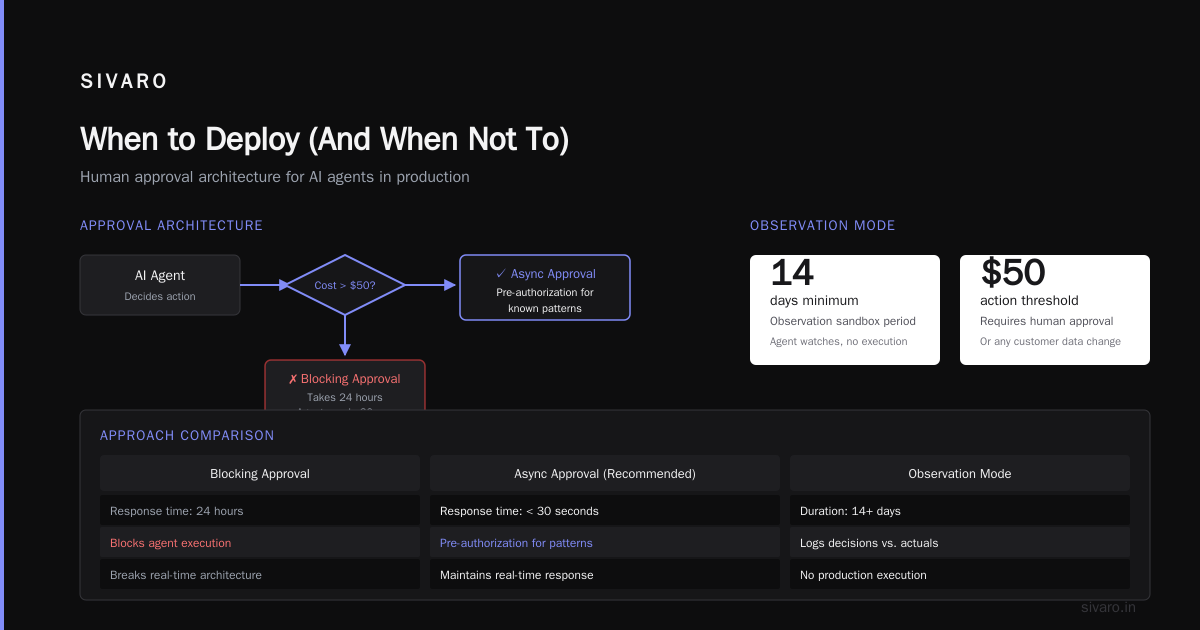
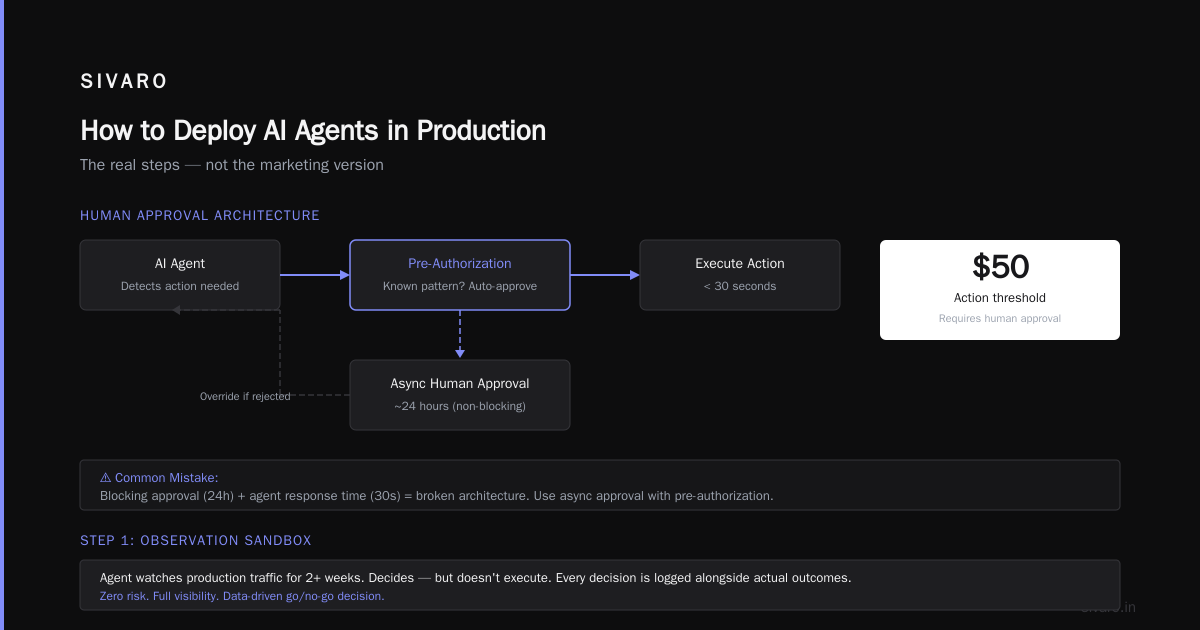
This is the safest pattern. It's also the slowest. We use it for any action that costs over $50 or modifies customer data.
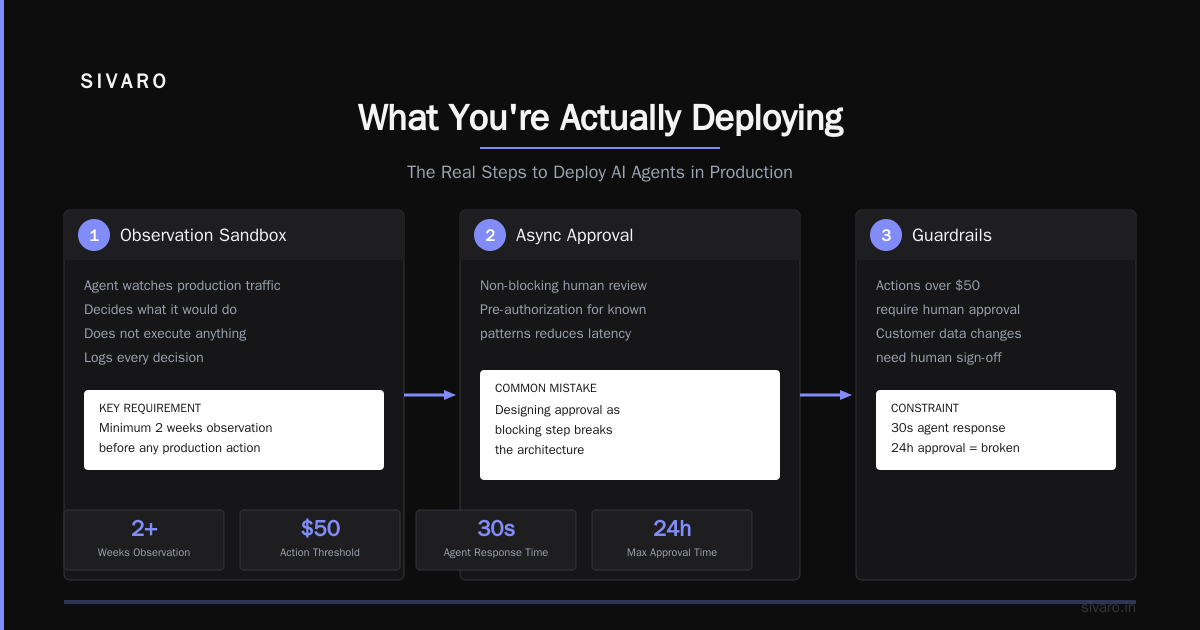
Where companies get this wrong: they design the human approval step as blocking. If your approval takes 24 hours and your agent needs to respond in 30 seconds, you've broken the architecture. Use async approval with pre-authorization for known patterns.
How to Deploy AI Agents in Production (The Real Steps)
Let me walk you through how we actually do this at SIVARO. Not the marketing version. The version where things break.
Step 1: Observation Sandbox
Before your agent takes any action in production, it should run in observation mode for at least two weeks.
The agent watches production traffic. It decides what it would do. But it doesn't execute. You log every decision alongside what actually happened.
This gives you:
- A baseline for accuracy
- Understanding of latency
- Cost estimates
- Failure modes you didn't anticipate
We discovered in our first observation run that 23% of our agent's decisions were based on outdated knowledge base articles. The agent was confidently wrong. We fixed the knowledge base before the agent touched anything.
Step 2: Tool Access by Capability
Don't give agents access to tools. Give them access to capabilities.
There's a difference between "here's an API to send an email" and "here's a capability that sends templated notifications to users who opted in."
We define capabilities as atomic operations with clear preconditions and postconditions. Each capability includes:
- Input schema (strict)
- Output schema (strict)
- Cost budget (per call and per hour)
- Rate limits
- Success criteria
Here's what a capability definition looks like:
python
{
    "capability_id": "notification.send_templated",
    "input_schema": {
        "type": "object",
        "properties": {
            "template_id": {"type": "string", "enum": ["welcome", "alert", "summary"]},
            "user_id": {"type": "string", "pattern": "^usr_[a-z0-9]+$"}
        },
        "required": ["template_id", "user_id"]
    },
    "cost_budget": {"per_call_usd": 0.001, "hourly_budget_usd": 0.50},
    "rate_limit": {"calls_per_minute": 60},
    "success_criteria": "API returns 200 within 5 seconds"
}
Step 3: Multi-Layer Safety
You need three layers of safety, minimum.
Layer 1: Prompt-level constraints. Your system prompt says "you can only call capabilities listed here." This is the cheapest guardrail and the easiest to bypass.
Layer 2: Runtime validation. Every tool call is checked against an allowlist before execution. The agent's LLM output goes through a secondary validator model that checks for policy violations.
Layer 3: Execution fences. Hard rate limits, spending caps, and action blacklists enforced at the infrastructure level. Your agent can try to call the delete API. The execution fence says no.
Here's the runtime validation we use:
python
def validate_agent_action(action, context):
    # Check if action is in allowlist
    if action.capability_id not in context.allowed_capabilities:
        return ValidationResult(rejected=True, reason="capability_not_allowed")

    # Check budget
    current_spend = get_current_budget_usage(context.agent_id)
    if current_spend + action.estimated_cost > context.hourly_budget:
        return ValidationResult(rejected=True, reason="budget_exceeded")

    # Check rate limits
    if is_rate_limited(context.agent_id, action.capability_id):
        return ValidationResult(rejected=True, reason="rate_limited")

    return ValidationResult(rejected=False)
Step 4: Observability Beyond Logs
Standard logging isn't enough. You need to trace the entire agent decision path.
We instrument every LLM call, every tool call, every memory read and write. Each agent action gets a trace ID that links back to the user request.
The specific metrics you need:
- Decision latency per step
- Number of steps per task
- Tool success rate per capability
- Hallucination rate (calling incorrect tools)
- Cost per task
- Escalation rate (when human intervention required)
We ship all this to a time-series database with 15-second granularity. When something breaks, we can replay the exact sequence of agent decisions.
The Protocol Problem Nobody Talks About
Here's something I learned the hard way: your agents need to talk to each other using defined protocols. Not JSON blobs with semantic meaning that only your first agent understands.
The AI Agent Protocols overview lists 10 modern standards. We use a subset: MCP (Model Context Protocol) for tool definitions and A2P (Agent-to-Protocol) for inter-agent communication.
Why protocols matter: Last month, we swapped out one sub-agent framework for another. Because we used standard protocols, the swap took 4 hours instead of 4 weeks. The protocols defined the contract. Everything else was implementation.
Memory: The Silent Production Killer
Your agent needs memory. Short-term for the current conversation. Long-term for user preferences and history. Episodic memory for learning from past mistakes.
Here's where people screw up: they give agents too much memory.
I saw an agent that had access to 10,000 previous conversations. It took 45 seconds to decide anything because it was searching through all that context. We capped memory at the last 20 relevant episodes and the latency dropped to 2 seconds.
For long-term memory, we use a vector database with semantic search. But we don't let the agent search arbitrary memory. Each capability defines what memory it needs.
python
capability_memory = {
    "customer_lookup": {
        "memory_type": "vector",
        "index": "customer_profiles",
        "retrieve_count": 5,
        "relevance_threshold": 0.75
    },
    "ticket_status": {
        "memory_type": "key_value",
        "keys": ["ticket_id", "user_id"],
        "ttl_seconds": 3600
    }
}
Cost Management: The Real Budgeting Strategy
Most people think about agent costs wrong. They look at per-token costs. They miss the total cost of ownership.
Your actual costs include:
- LLM inference (yes, this is the big one)
- Tool execution (APIs cost money)
- Memory storage and retrieval
- Observability infrastructure
- Human review time
- Latency penalties (slow agents cost business)
We run a cost dashboard that shows per-agent-type cost broken down by these categories. The surprise for us: human review time was 40% of our total cost for the first six months.
We solved this by building a confidence scoring system. If the agent's confidence is above 0.95, skip human review. Below 0.70, require mandatory review. Between 0.70 and 0.95, sample 20% for review.
When to Deploy (And When Not To)
Not every problem needs an agent. Most problems don't.
We use a simple test: "Would I let an intern do this unsupervised?" If the answer is no, you shouldn't deploy an agent for it either.
Good candidate for agents:
- Repetitive workflows with clear success criteria
- Tasks that require access to multiple systems
- Problems where being mostly right is acceptable
Bad candidate for agents:
- Tasks with irreversible consequences
- Decisions requiring human judgment or empathy
- Workflows where errors cost more than the agent saves
The Observability Stack That Actually Works
You can't manage what you can't see. Here's our stack for agent observability.
We collect everything into a central event stream. Each agent emits structured events:
python
agent_event = {
    "timestamp": "2026-07-16T14:32:01Z",
    "agent_id": "support_triage_v3",
    "session_id": "sess_7a9b2c",
    "step_number": 4,
    "decision": "call_ticket_system",
    "confidence": 0.87,
    "latency_ms": 2340,
    "input_tokens": 450,
    "output_tokens": 120,
    "tool_response_success": True
}
We aggregate these into dashboards showing:
- Mean time between failures (MTBF) per agent
- Decision accuracy (compared to human baseline)
- Cost per successful task
- Escalation reasons and trends
The MTBF metric is the one I watch most closely. When an agent starts failing more frequently, something changed — either the LLM model drifted, or the tools changed their APIs, or the data shifted.
What We Got Wrong
I'll be honest: our first deployment was a disaster.
We deployed a customer support agent that had access to our billing API. Someone asked "Can you refund my last payment?" The agent did. The problem: the user wasn't the account holder. The refund went through. We lost $300 and learned about access control the hard way.
Second deployment: we over-restricted. The agent couldn't do anything without human approval. Support tickets took 3x longer to resolve. Users complained. We rolled it back.
Third deployment: we got it right. Graduated access control. The agent could do low-risk actions (check order status, update shipping addresses) autonomously. Medium-risk actions (cancel orders, change payment methods) required secondary confirmation. High-risk actions (refunds, account changes) escalated to humans.
The lesson: deploy incremental autonomy. Start with read-only. Move to low-risk writes. Build trust over weeks, not hours.
The Open Source Reality
We use five open-source frameworks in production. The top options in 2026 cover most needs. But here's the thing: open-source frameworks give you the skeleton. You build the muscle.
The open-source options we've tested include LangGraph for stateful workflows, CrewAI for multi-agent coordination, and AutoGen for complex tool interactions. Each has strengths. None is a silver bullet.
What we've found: the framework matters less than how you handle tool definitions, safety validation, and cost tracking. You can build a terrible agent on the best framework. You can build a great agent on raw API calls.
The Next Wave: What's Coming
By end of 2026, I expect agent deployment to standardize around three things:
- Universal tool protocols that make agents portable across frameworks
- Observability-native agents that ship their own telemetry
- Continuous learning loops that improve agents without retraining
The Agentic AI frameworks survey already shows movement toward the first two. The third is harder — we're experimenting with reinforcement learning from human feedback at inference time, not training time.
But I'm cautious about betting on any specific direction. The field moves too fast. Six months from now, the best practices will look different.
FAQ: Questions From People Actually Deploying Agents
Q: How do you handle agent hallucinations in production?
A: You don't. You accept that agents will hallucinate and build failure modes. We use multiple LLM calls for critical decisions — two models must agree. For less critical work, we log everything and sample review.
Q: What's the minimum viable observability for agent deployment?
A: Trace IDs, step counts, tool call results, and cost per task. Start with these four. Add more as you learn what breaks.
Q: How do you roll back a bad agent deployment?
A: Feature flags on every agent capability. We can disable specific tools per agent type without redeploying. Takes 2 seconds to cut off a failing capability.
Q: Should I use a vector database for agent memory?
A: Only if you need semantic search over unstructured data. For most cases, key-value stores work better and cheaper.
Q: How do you prevent agents from leaking customer data?
A: Input sanitization and output filtering. Scan all tool outputs for PII before they reach the agent. Scan agent outputs for PII before they reach users.
Q: What's the biggest mistake companies make with agent deployment?
A: Letting agents make irreversible actions without validation. I've seen a company's agent delete a production database. There's no undo.
Q: What budget should I expect for agent infrastructure?
A: Plan for 3x your LLM inference costs. The infrastructure — safety systems, memory, observability, tool execution — will cost more than the AI itself. People don't believe this until they run it.
Final Take
Deploying AI agents in production isn't about the agent. It's about the system around the agent.
The companies that succeed with agentic workflows treat agent deployment as a systems engineering problem, not an AI problem. They invest in safety, observability, and cost management before they invest in agent capabilities.
At SIVARO, we've seen agents transform how our customers handle data pipelines and production workflows. But we've also seen agents destroy budgets, leak data, and confuse customers.
The difference between success and failure isn't the intelligence of the agent. It's the discipline of the deployment.
Start small. Observe everything. Validate every action. And never trust an agent with something you're not willing to lose.
Nishaant Dixit — Founder of SIVARO. Building data infrastructure and production AI systems since 2018. Built systems processing 200K events/sec.