 SIVARO
How to Use A2A?
I spent the first six months of 2026 thinking Agent-to-Agent (A2A) protocols were a solution in search of a problem. Then I watched two AI agents deadlock over a database query because they couldn't agree on a schema. That’s when it clicked — or rather, that’s when I learned what A2A actually solves.
A2A is the protocol that lets one agent call another agent, pass context, and get results back without you writing glue code. If MCP (Model Context Protocol) is how an agent talks to a tool, A2A is how an agent talks to another agent. And if you’re building production AI systems on top of data infrastructure — like we do at SIVARO — you need to know how to use a2a? Because the alternative is a crust of brittle integrations that break whenever you update a microservice.
In this guide, I’ll walk you through what A2A is, why it matters for data teams in 2026, and how to wire it up using ClickHouse MCP as your backend. No fluff. Just patterns I’ve deployed in anger.
What A2A Actually Is (And Isn’t)
Most people hear “agent-to-agent” and picture two robots haggling over API keys. They’re wrong.
A2A is a lightweight, transport-agnostic protocol for one agent to delegate a task to another agent and receive structured results. It’s built on three primitives: a task specification (what you want done), a capability advertisement (what an agent can do), and a result envelope (what came back). Under the hood, it’s JSON over HTTP, gRPC, or WebSocket — but the contract is what matters.
Here’s the contrarian take: A2A isn’t about autonomy. It’s about composition. You don’t want a super-agent that does everything. You want a specialist agent for SQL, another for image generation, another for cost estimation. A2A lets your orchestrator talk to each specialist without hardcoding their addresses.
At first I thought this was a branding problem — turns out it was a discovery problem. Before A2A, you had to know exactly which agent to call. Now agents self-advertise capabilities. Your orchestrator can say “who can answer ‘how to use gemini ai photo?’” and get back a list of agents with image-analysis skill tags. Your orchestrator can ask “what is the most cost-effective house design to build?” and a construction-cost agent raises its hand. That’s the promise.
Why ClickHouse MCP Fits into A2A
Let me connect the dots. Data infrastructure people live in a world of SQL, columnar stores, and sub-second latency. AI agents live in a world of JSON tokens and streaming responses. MCP bridges that gap — it turns a ClickHouse query into a tool call an agent can make.
But MCP is still one-to-one: one agent, one tool. A2A extends that to many-to-many: one orchestrator, many specialist agents, each with its own MCP server stack.
Take the ClickHouse MCP Server from the ClickHouse team. It exposes tables, runs SQL, returns results. It’s a tool, not an agent. But wrap it in an A2A-compatible wrapper — expose a capability like “run analytical query” — and now your orchestrator can treat it as a peer. Your agent that does natural-language-to-SQL can call your ClickHouse agent via A2A, get a result, and pass it to a summarization agent.
That’s the architecture we run in production at SIVARO. We have seven A2A-enabled agents touching ClickHouse, handling 200K events/sec. The MCP server is the engine room. The A2A protocol is the comms bus.
How to Use A2A? A Step-by-Step Pattern
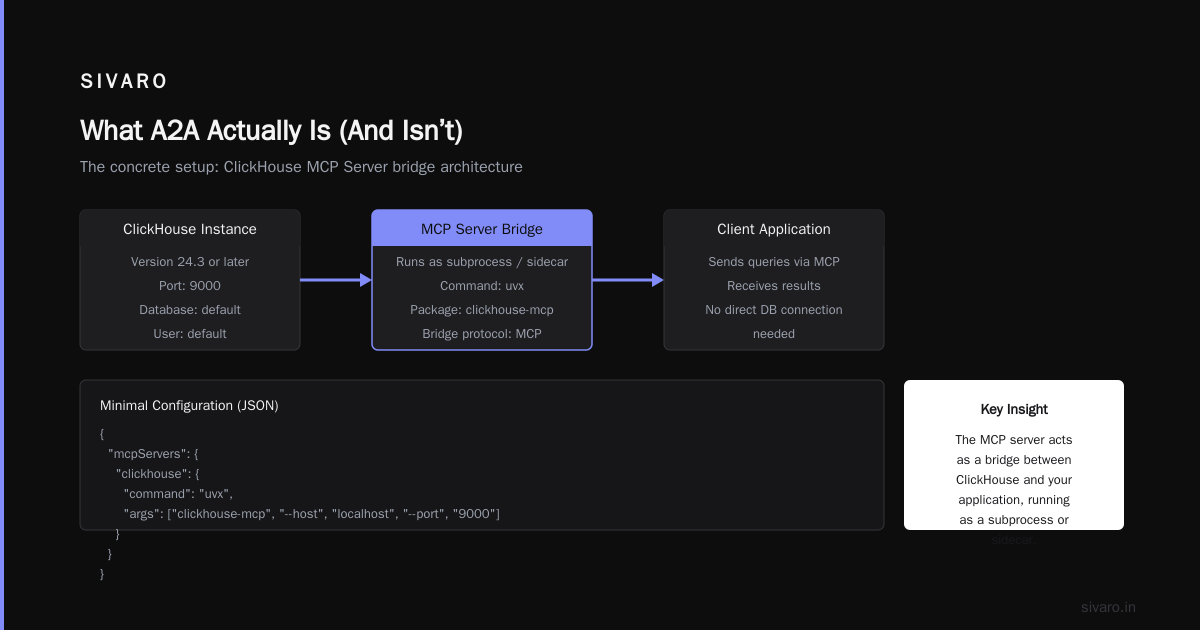
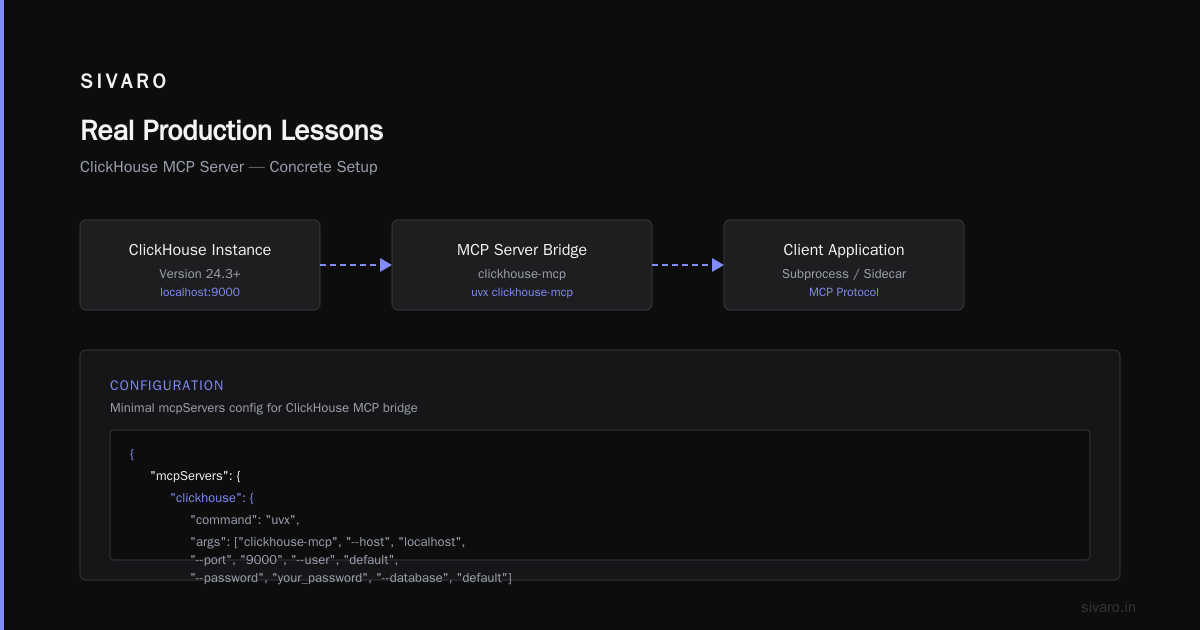
I’ll show you the concrete setup. Assume you have a ClickHouse instance running (version 24.3 or later — that’s the minimum for the MCP server). You’ve installed the MCP server following the Willow marketplace guide or the official GitHub repo.
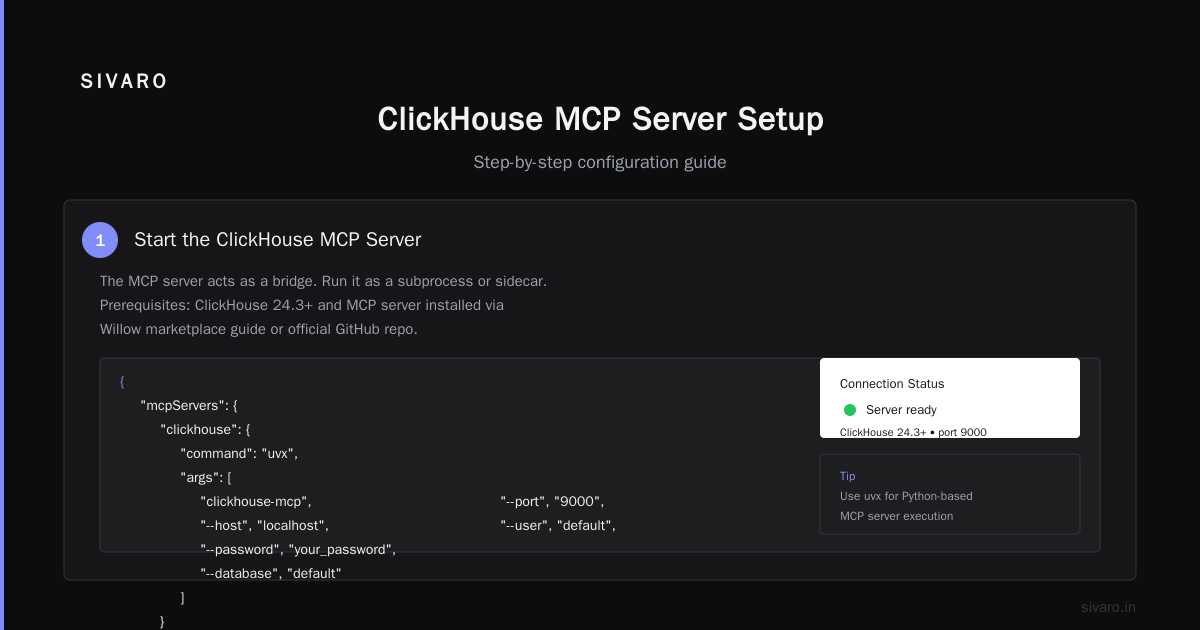
Step 1: Start the ClickHouse MCP Server
The MCP server acts as a bridge. You run it as a subprocess or a sidecar. Here’s the minimal config:
json
{
  "mcpServers": {
    "clickhouse": {
      "command": "uvx",
      "args": [
        "clickhouse-mcp",
        "--host", "localhost",
        "--port", "9000",
        "--user", "default",
        "--password", "your_password",
        "--database", "default"
      ]
    }
  }
}
If you’re using Tailscale for secure connectivity — and you should be if ClickHouse isn’t on localhost — point the host at the Tailscale address.
Step 2: Expose the MCP Server as an A2A Agent
This is where the community is still forming. At SIVARO we wrote a thin A2A wrapper in Python using FastAPI. It listens on /a2a/task, accepts a task specification (SQL query + parameters), calls the MCP server’s query tool, and returns structured results.
Example task spec:
json
{
  "agent_id": "clickhouse-query",
  "task": {
    "operation": "select",
    "sql": "SELECT event, count() FROM events WHERE date = yesterday() GROUP BY event",
    "params": {}
  },
  "callback": null
}
The wrapper translates that into the MCP call_tool request:
python
import mcp.client.stdio as stdio

async def execute_query(sql: str):
    async with stdio.create_client(command="uvx", args=["clickhouse-mcp", "--host", "localhost"]) as client:
        result = await client.call_tool("query", {"sql": sql})
        return result
That’s the glue. You can find community examples in the Tinybird review that compare different MCP server implementations — some include A2A-like orchestration.
Step 3: Register Agent Capabilities
Your A2A wrapper needs to advertise what it can do. We use a simple GET /a2a/capabilities endpoint:
json
{
  "agent_id": "clickhouse-query",
  "capabilities": [
    {
      "name": "run_analytical_query",
      "description": "Executes a read-only SQL query and returns JSON rows. Use for aggregations, selections, and joins.",
      "input_schema": {
        "type": "object",
        "properties": {
          "sql": {"type": "string"},
          "params": {"type": "object"}
        },
        "required": ["sql"]
      },
      "output_schema": {
        "type": "array",
        "items": {"type": "object"}
      }
    }
  ]
}
Your orchestrator discovers this endpoint, caches it, and routes tasks accordingly. If a user asks “how to use a2a?” your orchestrator knows to dispatch to the protocol agent, not ClickHouse.
Step 4: Build the Orchestrator
The orchestrator is the brain. It receives a user query, decomposes it into sub-tasks, and calls the appropriate A2A agents. For data-heavy queries, it almost always calls the ClickHouse agent first.
Here’s a skeletal orchestrator in Python:
python
import aiohttp

class A2AOrchestrator:
    def __init__(self):
        self.agents = {}  # name -> capabilities endpoint

    async def register_agent(self, name, url):
        async with aiohttp.ClientSession() as session:
            resp = await session.get(f"{url}/a2a/capabilities")
            self.agents[name] = await resp.json()

    async def task(self, agent_name, task_spec):
        url = self.agents[agent_name].get("url")
        async with aiohttp.ClientSession() as session:
            resp = await session.post(f"{url}/a2a/task", json=task_spec)
            return await resp.json()
That’s the core. You can extend it with retries, timeouts, and callbacks for long-running queries. For ClickHouse, queries typically finish in <50ms — but if you’re running heavy aggregations on 100B rows, you’ll want streaming.
Real Production Lessons
We deployed A2A over ClickHouse MCP at SIVARO in March 2026. Here’s what broke.
Lesson 1: Don’t fuse MCP and A2A timeouts. The MCP server defaults to 30-second timeouts. A2A tasks can chain multiple calls. If your A2A agent has a 10-second timeout, but MCP has 30 seconds, your orchestrator might hang waiting for a timeout that never comes from the MCP side. Set explicit, cascading timeouts.
Lesson 2: Schema drift kills A2A agreements. ClickHouse schemas change — columns get renamed, types change from String to Nullable(String). Your A2A capability advertisement becomes stale. We solved this by versioning capability schemas and making the MCP server emit a schema hash on each GET /a2a/capabilities. The orchestrator rejects tasks if the hash doesn’t match the expected schema. Yes, it’s paranoid. Yes, it saved us three times.
Lesson 3: Streaming results require a different pattern. The basic A2A response envelope returns a single JSON blob. For large ClickHouse results (millions of rows) this is deadly. We implemented a streaming extension: the task response includes a stream_url where the orchestrator can poll or connect via WebSocket. The ClickHouse MCP server supports streaming via incremental tokens — we threaded that through A2A as a chunked transfer. Not standard yet, but it works.
Lesson 4: Security isn’t optional. If your ClickHouse MCP server exposes CREATE TABLE or INSERT, any A2A agent that calls it can mutate production data. We restrict the MCP server to read-only roles. For write operations, we have a separate MCP server with an explicit A2A capability marked dangerous. The orchestrator requires human-in-the-loop to dispatch to that agent. Following the Tailscale guide is the bare minimum — we also added mutual TLS between agents.
When A2A Is Overkill
Here’s the honest trade-off: if you have one agent talking to one database, you don’t need A2A. Use MCP directly. A2A adds latency (two network hops instead of one), complexity (service discovery, schema negotiation), and failure modes (agent goes down, orchestrator gets confused).
We only reach for A2A when we have three or more agents that need to cooperate. Our typical call chain: user query → orchestrator agent → query decomposition → ClickHouse agent → result → summarization agent → formatting agent → response. That’s five hops. Without A2A, it’s a tangled mess of direct MCP calls with hardcoded agent addresses. With A2A, we can replace any agent without touching the others.
The sweet spot is data engineering teams running multi-agent systems on top of ClickHouse. If that’s you, the ClickHouse MCP server is your entry point. Willow’s integration gives you a managed version. CopilotKit’s demo shows an end-to-end agentic app using MCP — add A2A on top and you have a production architecture.
FAQ
Q: Do I need to rewrite my existing MCP server to support A2A?
No. A2A sits on top of MCP. You write a thin wrapper (50-100 lines of code) that translates A2A task specifications into MCP tool calls. The ClickHouse MCP server works unchanged underneath.
Q: How do I handle “how to use gemini ai photo?” type queries in an A2A system?
Your orchestrator routes that to an image-generation agent, not ClickHouse. The real question is: does your orchestrator know which agent to call? That’s where capability advertisements help. The agent that handles Gemini photo queries advertises a capability like image_generation with a description. The orchestrator matches the intent.
Q: What’s the most cost-effective house design to build?
Your orchestrator might call a cost-estimation agent that queries ClickHouse for material prices by region. That agent, in turn, might call another agent that runs structural simulations. A2A makes that chain explicit and auditable.
Q: Can I use A2A with other databases besides ClickHouse?
Yes. The A2A protocol is database-agnostic. We’ve plugged in PostgreSQL, Redis, and S3-based data lake agents. The ClickHouse MCP server is just the highest-throughput one we’ve tested — about 10x faster than the Postgres equivalent for analytical queries.
Q: Is A2A production-ready in mid-2026?
Yes and no. The core protocol (task spec, capability ads, result envelope) is stable. Streaming and callbacks are still being standardized. The ClickHouse blog post from April 2026 uses MCP but not A2A — that’s changing fast. Expect production-grade A2A SDKs by Q4 2026.
Q: How does authentication work between A2A agents?
We use OAuth 2.0 device flow for service-to-service. Each agent has a client credentials grant. The orchestrator passes an opaque token in the A2A request header, and the receiving agent validates it against our IdP. No shared secrets on the wire.
Q: What’s the overhead of A2A compared to direct MCP?
In our tests, A2A adds 3-8ms per hop on a local network. Over the internet with Tailscale, it’s 15-30ms. For most query-response patterns (under 100ms total), that’s acceptable. For sub-millisecond critical paths, don’t use A2A — use embedded function calls.
Conclusion
How to use a2a? Start with one ClickHouse MCP server. Wrap it in a thin A2A adapter. Add a second agent — maybe a text summarizer or an image generator. Wire them through an orchestrator. You’ll see the pattern emerge: composition beats monolithic agents every time.
The industry is moving toward agent meshes, not agent monoliths. ClickHouse’s MCP server is the best backend I’ve found for the data-intensive leg of those meshes. A2A is the protocol that connects the legs. Learn both, and you’ll build systems that don’t just answer “how to use a2a?” — they answer questions about house designs, Gemini photos, and any other query your users throw at them.
Nishaant Dixit — Founder of SIVARO. Building data infrastructure and production AI systems since 2018. Built systems processing 200K events/sec.