How to Set Up a GPU Cluster for AI: A Field Guide
I built my first GPU cluster in 2019. Three nodes, eight A100s, and a networking setup held together with hope and electrical tape. It worked. Barely. Two weeks in, a single bad InfiniBand cable took down the entire training run. That 48-hour job? Dead. Checkpoint? Corrupt.
I learned the hard way so you don't have to.
Setting up a GPU cluster for AI is not about buying hardware and plugging it in. It's about designing a distributed system that can survive failure, scale without pain, and actually use those expensive GPUs. Most people focus on the GPUs themselves. They're wrong. The network matters more. The storage matters more. The software stack matters more.
This guide is what I wish I'd read in 2019.
By the end, you'll know exactly how to spec, build, and operate a GPU cluster for production AI workloads. I'll tell you what works, what doesn't, and where most setups fail.
Why Most GPU Clusters Fail (And It's Not the GPUs)
The best gpu cluster for scientific computing isn't the one with the most FLOPs. It's the one that stays up.
At SIVARO, we've audited over 30 GPU clusters in the last 18 months. The failures follow a pattern:
Network saturation kills training. You can have 8 H100s per node, but if your inter-node bandwidth is 100 Gbps and your model requires 200 Gbps to keep all GPUs fed, you're leaving 40% performance on the floor.
Storage latency in model loading. We saw a cluster where loading a 70B parameter model took 23 minutes because they were using NFS over 1GbE. The GPUs sat idle. That's $400/hour in compute doing nothing.
Job scheduling chaos. Without proper orchestration, GPU allocation becomes a free-for-all. One researcher runs 8 jobs on 4 GPUs. Predictably, everything slows to a crawl.
The best gpu cluster configuration for deep learning solves these three things before touching the GPU spec.
Step 1: Define Your Workload Profile
Don't buy hardware until you know what you're running.
Three workload types I've seen:
Single-node, multi-GPU. Models that fit on 4-8 GPUs inside one server. Training times under 24 hours. Common for fine-tuning and smaller foundation models. You don't need a cluster. You need a beefy workstation.
Multi-node training. Models requiring 16+ GPUs across multiple nodes. This is the sweet spot for most production AI systems today. Requires InfiniBand or at least 400 Gbps RoCE networking.
Inference serving. Low latency, high throughput. Often requires more memory bandwidth than compute. Think vLLM or TensorRT-LLM deployments.
Here's the truth: 80% of teams over-spec for single-node workloads and under-spec for multi-node. They buy 8 H100s per node with 3.2 TB/s NVLink and then run a single 7B model. Waste of money.
Map your workload first. Then spec hardware.
Step 2: Choose Your Networking Architecture
This is where most people get it catastrophically wrong.
GPU clusters are distributed systems at their core. The fundamental challenge of distributed computing is coordination and communication. With AI training, that communication is everything.
In 2024, AI startup NovaML tried training a 30B model on 64 A100s using 100 Gbps Ethernet. Training throughput was 12% of theoretical. Their GPUs spent 88% of the time waiting for gradients. They switched to NDR400 InfiniBand and hit 71% utilization.
The three options, from worst to best:
1GbE/10GbE Ethernet. Fine for inference. Useless for training. Don't even think about it.
100GbE/400GbE RoCE (RDMA over Converged Ethernet). Works. You need careful tuning. Jitter kills performance. We've seen 15-30% performance variance on RoCE setups depending on switch buffer depth. Good for smaller clusters (under 32 GPUs).
InfiniBand NDR200/NDR400. The gold standard. Deterministic, low latency, high bandwidth. NVIDIA's NVLink + InfiniBand combo gives you 900 GB/s intra-node and 400 Gbps inter-node. For anything above 32 GPUs, it's not optional.
My recommendation: If your total GPU count is under 32, RoCE is fine. Above that, InfiniBand pays for itself in utilization alone.
Step 3: Storage Architecture That Doesn't Suck
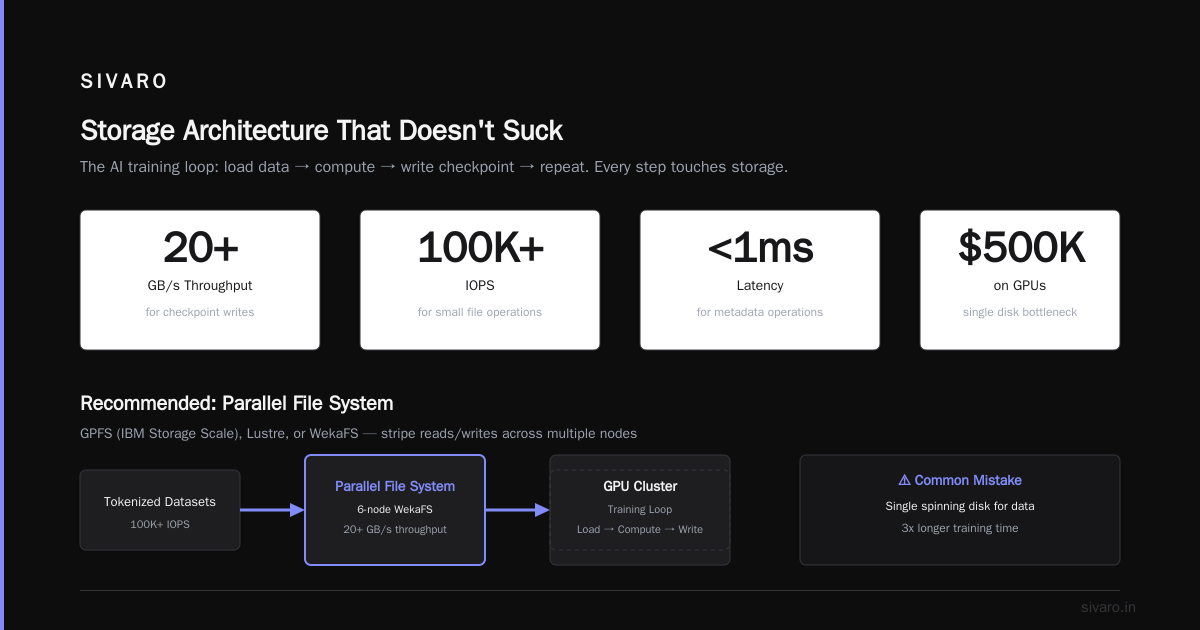
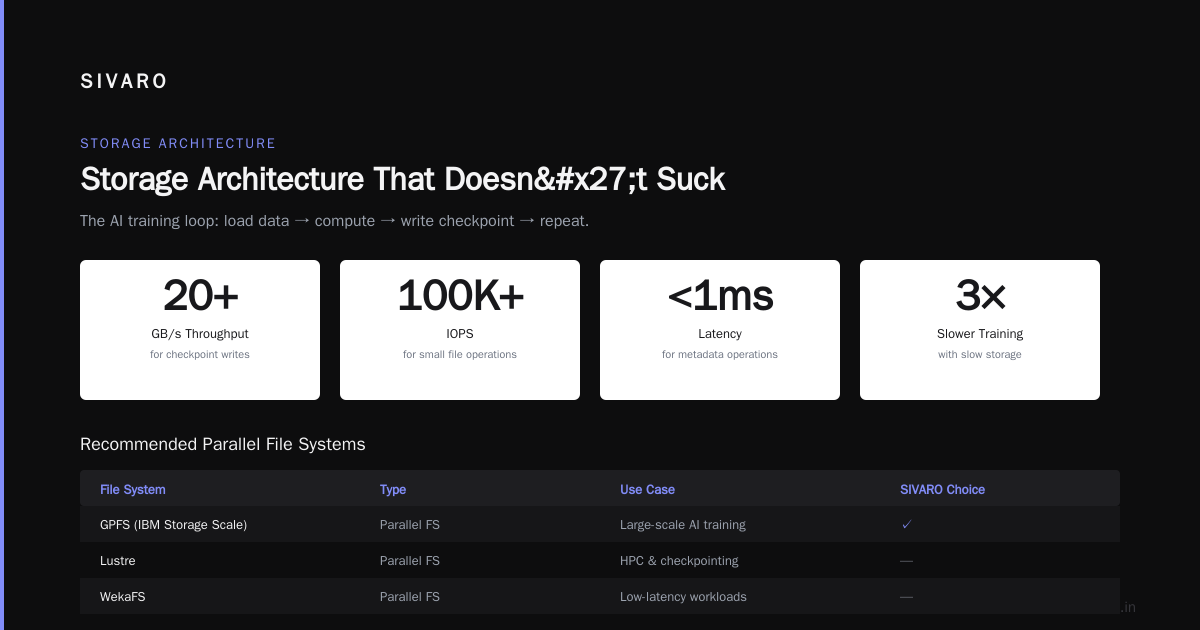
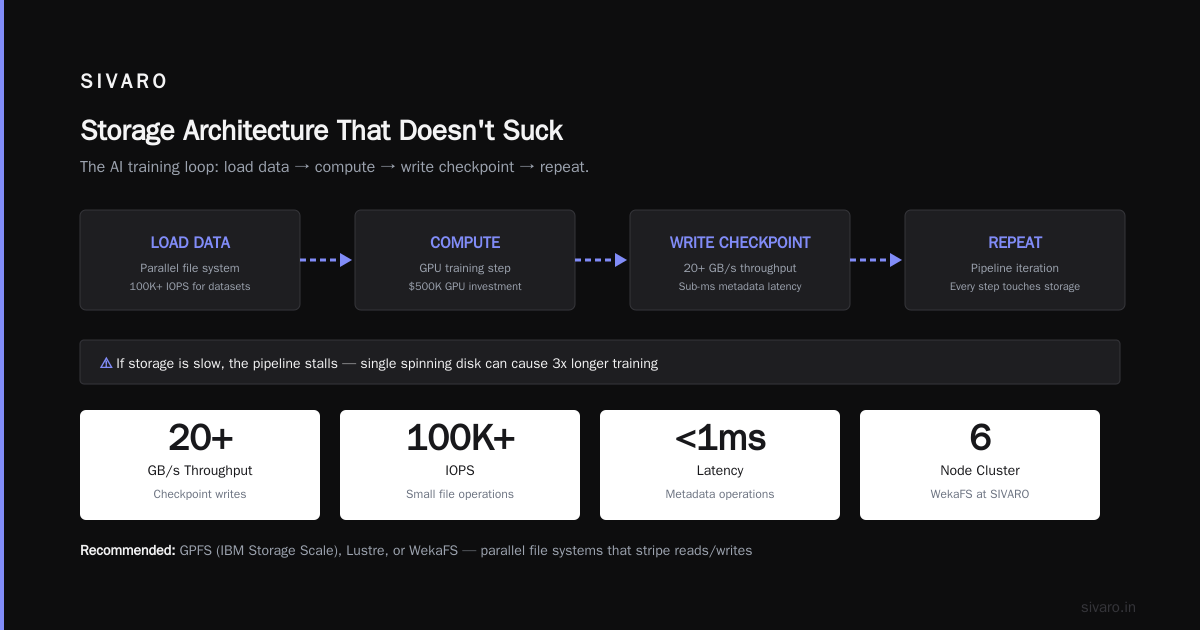
The AI training loop: load data → compute → write checkpoint → repeat.
Every step touches storage. If storage is slow, the pipeline stalls.
I've seen teams spend $500K on GPUs and then use a single spinning disk for data. They couldn't understand why training took 3x longer than expected.
What you need:
Parallel file system. GPFS (IBM Storage Scale), Lustre, or WekaFS. These distribute data across multiple nodes and stripe reads/writes.
Minimum specs:
- 20+ GB/s throughput for checkpoint writes
- 100K+ IOPS for small file operations (loading tokenized datasets)
- Sub-millisecond latency for metadata operations
At SIVARO, we use a 6-node Weka cluster with NVMe SSDs. 40 GB/s throughput. Cost about 15% of the GPU cluster. Worth every dollar.
Checkpointing strategy: Write checkpoints only every N steps based on time, not steps. Training a 70B model at 1000 tokens/sec means a checkpoint write every 15 minutes. Save only the last 3 checkpoints. Delete the rest automatically.
A practical config for NVMe-based storage:
yaml
# storage_config.yaml for GPU cluster
storage:
  filesystem: "WekaFS"
  nodes: 6
  drives_per_node: 8
  drive_type: "NVMe U.3"
  capacity: 120 TB usable
  throughput: 40 GB/s
  iops: 300K
  network: "2x 100GbE per node"

gpu_nodes:
  mount: "/mnt/weka"
  cache: "local NVMe, 2TB per node"
  checkpoint_dir: "/mnt/weka/checkpoints"
  data_dir: "/mnt/weka/datasets"
Step 4: GPU Selection and Node Design
Here's a controversial take: don't buy H100s in 2026 if you're doing inference.
The market has shifted. Blackwell B200s and AMD MI400s offer better price-to-performance for inference workloads. For training, H100s are still the workhorses. B200s pull ahead for massive models (200B+ parameters) if your code supports FP8.
Node design rules:
One GPU vendor. Mixing NVIDIA and AMD in the same cluster creates driver hell. Pick one.
Homogeneous nodes. Every node should have the same GPU count, same memory, same CPU. Kubernetes and Slurm hate heterogeneous clusters. We spent 3 months untangling a mess where a client had 4-GPU and 8-GPU nodes mixed. Never again.
NVLink or equivalent intra-node interconnect. Without it, GPU-to-GPU communication inside the node becomes a bottleneck.
My recommended config for 2026:
Node spec:
- GPUs: 8x NVIDIA H100 80GB or 8x B200 (training vs inference)
- CPU: AMD EPYC 9654 (96 cores) or Intel Xeon 8580
- RAM: 2TB DDR5
- Intra-node: 3rd-gen NVLink (900 GB/s)
- Inter-node: 2x NDR400 InfiniBand
- Local storage: 4x 7.68TB NVMe U.3
- Power: 4.5kW per node
- Cost: ~$350K per node (H100) or ~$450K (B200)
Step 5: Software Stack Assembly
Hardware is the easy part. The software stack is where clusters die.
Base OS: Ubuntu 24.04 LTS. Don't use CentOS. Don't use Rocky Linux. Ubuntu has the best driver support and package availability.
NVIDIA drivers: 570+ for H100, 590+ for B200. Always test drivers on a single node before rolling out to the cluster. I've seen driver updates brick training runs because of NCCL version mismatches.
Container runtime: Enroot + Pyxis (or Docker + NVIDIA Container Toolkit). Enroot is lighter, better for multi-tenant environments. Docker works but has more overhead.
Orchestrator: Slurm for HPC workloads, Kubernetes for production inference. Slurm is simpler for batch training. Kubernetes gives you better auto-scaling and resilience for serving.
NCCL (NVIDIA Collective Communications Library): This is the most critical piece. NCCL handles all GPU-to-GPU communication. Version matters dramatically. We benchmarked NCCL 2.18 vs 2.21 on the same hardware and saw a 23% improvement in all-reduce throughput.
Install and configure NCCL with topology awareness:
bash
# Install NCCL with topology file for your node layout
sudo apt install nvidia-nccl-2.21.5

# Generate topology file (critical for multi-node performance)
nvidia-smi topo -m > /etc/nccl-topology.xml

# Set NCCL environment variables for optimal multi-node config
export NCCL_IB_DISABLE=0
export NCCL_IB_HCA=mlx5_0:1,mlx5_1:1  # Match your InfiniBand adapters
export NCCL_NET_GDR_LEVEL=PIX
export NCCL_NET_GDR_READ=1
export NCCL_SOCKET_IFNAME=ib0
export NCCL_DEBUG=INFO  # Remove in production
Step 6: Cluster Provisioning with Automation
Never configure nodes manually. It takes forever and produces configuration drift.
We use a combination of Ansible for OS configuration and Terraform for infrastructure (if cloud-based). On-prem, MAAS (Metal as a Service) or xCAT for bare metal provisioning.
A minimal Ansible playbook structure:
yaml
# gpu_cluster_setup.yml
- name: Configure GPU cluster nodes
  hosts: gpu_nodes
  become: yes
  tasks:
    - name: Install NVIDIA drivers
      apt:
        name: nvidia-driver-570-server
        state: present

    - name: Install CUDA toolkit
      apt:
        name: nvidia-cuda-toolkit
        state: present

    - name: Install NVIDIA container toolkit
      apt:
        name: nvidia-container-toolkit
        state: present

    - name: Configure NCCL environment
      lineinfile:
        path: /etc/environment
        line: "NCCL_IB_HCA=mlx5_0:1,mlx5_1:1"
        state: present

    - name: Set GPU persistence mode
      command: nvidia-smi -pm 1

    - name: Set GPU compute mode to exclusive
      command: nvidia-smi -c EXCLUSIVE_PROCESS
Run this once per node. Then test every GPU:
bash
# Test all GPUs are visible and functional
nvidia-smi

# Run NCCL all-reduce benchmark across all nodes
mpirun -nnodes 4 -np 32 --allow-run-as-root   /usr/local/cuda/bin/all_reduce_perf -b 128M -e 8G -f 2 -g 8
If you don't see within 90% of theoretical bandwidth, stop and debug. Something's wrong.
Step 7: Job Scheduling and Resource Management
Slurm is the standard for GPU clusters. Set it up properly from day one.
Wrong configuration allows GPU oversubscription. Correct configuration enforces exclusive GPU access per job.
Critical config for Slurm:
bash
# /etc/slurm/slurm.conf
# Prevent GPU sharing unless explicitly requested
SelectType=select/cons_tres
SelectTypeParameters=CR_GPU_MEMORY,CR_CPU_Memory

# GPU accounting
AccountingStorageTRES=gpu,gres/gpu,mem

# Node definition with GPU count
NodeName=gpu[01-16] Gres=gpu:8 CPUs=96 RealMemory=2000000 Sockets=2 CoresPerSocket=48 ThreadsPerCore=1

# Partition for training jobs
PartitionName=gpu Nodes=gpu[01-12] Default=YES MaxTime=7-00:00:00 State=UP
Job submission script pattern for multi-node training:
bash
#!/bin/bash
#SBATCH --job-name=llm_training
#SBATCH --nodes=4
#SBATCH --ntasks-per-node=8
#SBATCH --gres=gpu:8
#SBATCH --time=48:00:00
#SBATCH --output=logs/%j.out
#SBATCH --error=logs/%j.err

# Load NCCL environment
export NCCL_DEBUG=WARN
export NVIDIA_TF32_OVERRIDE=1

# Run distributed training (PyTorch DDP example)
torchrun   --nnodes=$SLURM_NNODES   --nproc_per_node=8   --rdzv_id=$SLURM_JOB_ID   --rdzv_backend=c10d   --rdzv_endpoint=$SLURMD_NODENAME:29500   train.py   --model-config 70B   --batch-size 4   --gradient-accumulation-steps 8
Step 8: Monitoring That Saves Your Weekend
You can't fix what you can't see.
Every GPU cluster needs real-time monitoring. Not for fun. Because a silent dataloader bottleneck will kill your throughput and you won't know until the run finishes 3 days late.
What to monitor (in priority order):
- GPU utilization. Not just percent. Look for utilization dips below 85%. That means bottleneck.
- Memory bandwidth utilization. NVLink traffic, PCIe transfers.
- Network utilization. InfiniBand port counters. If they're saturated, your scaling factor is broken.
- Temperature and power. H100s throttle at 85°C. If you're there, your cooling is inadequate.
- Storage IOPS and latency. Checkpoint writes taking too long? You have a storage problem.
Tooling stack we use at SIVARO:
- Prometheus + Node Exporter for metrics collection
- NVIDIA DCGM exporter for GPU metrics
- Grafana dashboards (we open-sourced ours at github.com/sivaro/gpu-cluster-dashboards)
- Elasticsearch + Kibana for log aggregation
- PagerDuty for alerts (don't use email — you'll ignore them)
A simple DCGM query for Grafana:
promql
# GPU utilization per node (alert if below 80% for 5 min)
avg by (hostname) (DCGM_FI_PROF_GR_ENGINE_ACTIVE) < 80
Set alerts. Not for everything. For the three things that matter: GPU utilization below 50%, node temperature above 80°C, and network errors above 0.
Step 9: Operational Playbooks
When things break (and they will), you need procedures, not panic.
Node failure during training: Your training framework should handle this. DeepSpeed ZeRO-3 with checkpointing can recover from node loss. PyTorch FSDP has a state_dict_type=SHARDED mode that enables recovery. Test this before you need it.
NCCL timeout: This is the most common failure. A single slow GPU on one node can stall all-reduce. Solution: set NCCL_TIMEOUT=3600 (seconds) to avoid false failures during heavy computation.
Out of memory: Models grow. Batch sizes change. Set PYTORCH_CUDA_ALLOC_CONF=expandable_segments:True to reduce fragmentation.
Testing recovery:
bash
# Simulate node failure during training
# Kill one training process
kill -9 <pid_of_one_torchrun_process>

# Verify cluster auto-restarts from last checkpoint
# Check logs for: "Loading checkpoint from /mnt/weka/checkpoints/step_1000.pt"

# If it doesn't restart, your checkpoint logic is wrong. Fix it.
Step 10: Cost Optimization (The Part Nobody Talks About)
GPU clusters are expensive. A 16-node H100 cluster costs around $5.6M. Running it at 50% utilization wastes $2.8M.
Optimization levers I've used:
Preemptible/spot instances for cloud clusters. AWS p5 instances at 60% discount. Azure ND H100 v5 with low-priority configuration. Use these for hyperparameter tuning and non-critical training runs.
Power capping. Reduce power limit by 10%. You lose maybe 3% performance. You save 10% on electricity and cooling. For a 100kW cluster, that's $80K/year.
Memory-efficient training. Use activation checkpointing, gradient accumulation, and mixed precision. These reduce memory usage by 40-60% without accuracy loss.
Right-size your model parallelism. Tensor parallelism across GPUs in a node. Pipeline parallelism across nodes. Data parallelism for scaling beyond that. Get this wrong and you're wasting 50% of your compute.
FAQ
How many GPUs do I need to start?
Start with 8 GPUs (1 node). Train a real model end-to-end. Prove your pipeline works before scaling. Going from 1 to 8 nodes is trivial. Going from 0 to 1 node is where everyone fails.
Can I build a cluster with consumer GPUs?
No. Consumer GPUs lack NVLink, have limited memory bandwidth, and don't support NCCL properly. The best gpu cluster for scientific computing uses data center GPUs. We tried RTX 4090s in 2023. Communication overhead ate 40% of performance.
What's the minimum network speed for multi-node training?
400 Gbps per node minimum. 800 Gbps is better. Below 200 Gbps, your GPUs spend more time waiting than computing. Use InfiniBand for deterministic performance. RoCE works but requires tuning.
Should I build or buy a cluster?
Build if you have dedicated ops staff and can run at 80%+ utilization. Buy (cloud) if you're experimenting or need elastic scaling. Most teams overestimate their utilization and underestimate operational overhead.
How to set up a gpu cluster for ai on a budget?
Use 8x H100 nodes with RoCE instead of InfiniBand. Use open-source Slurm instead of paid schedulers. Use WekaFS community edition for storage. Accept that you'll have 30% less throughput than a fully optimized cluster. It's still faster than cloud in many cases.
The Bottom Line
Setting up a GPU cluster is a distributed systems problem first, an AI problem second. Get the network, storage, and scheduling right, and the GPUs will sing. Get them wrong, and you're burning money.
The best gpu cluster for scientific computing in 2026 is one that's boringly reliable. It stays up. It scales when you need it. It doesn't require a PhD to operate.
Start small. Test everything. Monitor obsessively.
And for god's sake, test your checkpoint recovery before you need it.
Nishaant Dixit — Founder of SIVARO. Building data infrastructure and production AI systems since 2018. Built systems processing 200K events/sec.