 SIVARO

How to Reduce Model Serving Costs (2026 Buyer's Guide)
I spent last October staring at a $47,000 monthly inference bill. Our LLM-powered customer support agent was eating margin alive. The CFO wanted a cut. The engineers wanted more GPU nodes.
The problem wasn't the model. It was how we served it.
After six weeks of restructuring, we got that bill down to $11,500. Same accuracy. Same latency. Different architecture. Here's everything I learned, plus what SIVARO has tested across dozens of production systems since.
What "Model Serving" Actually Costs You
Model serving is the infrastructure that runs inference on your trained models. It's not training — training is a one-time (or periodic) expense. Serving is the always-on, every-request, pay-per-token operation.
The market has fragmented into four main approaches:
- Managed API providers (OpenAI, Anthropic, Google) — you pay per token
- Serverless GPU platforms (Modal, RunPod, Replicate) — you pay per second of compute
- Self-hosted on cloud (AWS, GCP, Azure) — you pay for reserved instances
- Hybrid routing (OpenRouter, LiteLLM) — you route between providers based on price, latency, or capability
Each has a totally different cost profile. Most teams pick one and never re-examine. That's the first mistake.
Why Your Per-Token Price Is a Trap
Here's the dirty secret of the managed API market: the sticker price is meaningless. In 2025, we saw OpenAI slash GPT-4.1 pricing by 50%, then Anthropic respond by cutting Claude Sonnet prices another 60%. The Artificial Analysis model comparison tracks these shifts in real time.
The price you see on the dashboard today will be 30-50% lower in six months. That's great for your cost per token. It's terrible if you've optimized your architecture around a specific provider's pricing.
Smart teams don't buy a provider. They build a cost-optimization layer that can switch or route between them.
The Four-Step Framework to Cut Serving Costs
Step 1: Audit Your Actual Usage Patterns
Before you change anything, measure what you're actually running. Most teams have no idea what percentage of their inference requests are:
- Cold vs. cached
- Short vs. long context
- Peak vs. off-peak
- High-stakes vs. low-stakes
At SIVARO, we built a simple logging layer that tagged every request with these dimensions. What we found surprised us: 68% of our requests were repeated queries with near-identical prompts. We were paying full price for answers we could have cached.
Step 2: Add a Semantic Cache Layer
This is the fastest win. A semantic cache embeds each prompt, compares it to previous prompts using cosine similarity, and serves the cached response when similarity exceeds a threshold.
python
from sentence_transformers import SentenceTransformer
import numpy as np
import redis

model = SentenceTransformer('all-MiniLM-L6-v2')
cache = redis.Redis(host='cache', port=6379)

def get_cached_response(prompt, threshold=0.92):
    embedding = model.encode(prompt)
    # Query Redis using vector similarity
    candidates = cache.hgetall('prompts')
    for stored_prompt, stored_data in candidates.items():
        stored_embedding = stored_data['embedding']
        similarity = np.dot(embedding, stored_embedding) / (
            np.linalg.norm(embedding) * np.linalg.norm(stored_embedding)
        )
        if similarity >= threshold:
            return stored_data['response']
    return None
This cut our API spend by 40% in three days. The trade-off: you need to handle cache invalidation carefully if your responses depend on dynamic context. For our support bot, we cached only the static knowledge-base queries. Everything time-sensitive bypassed the cache.
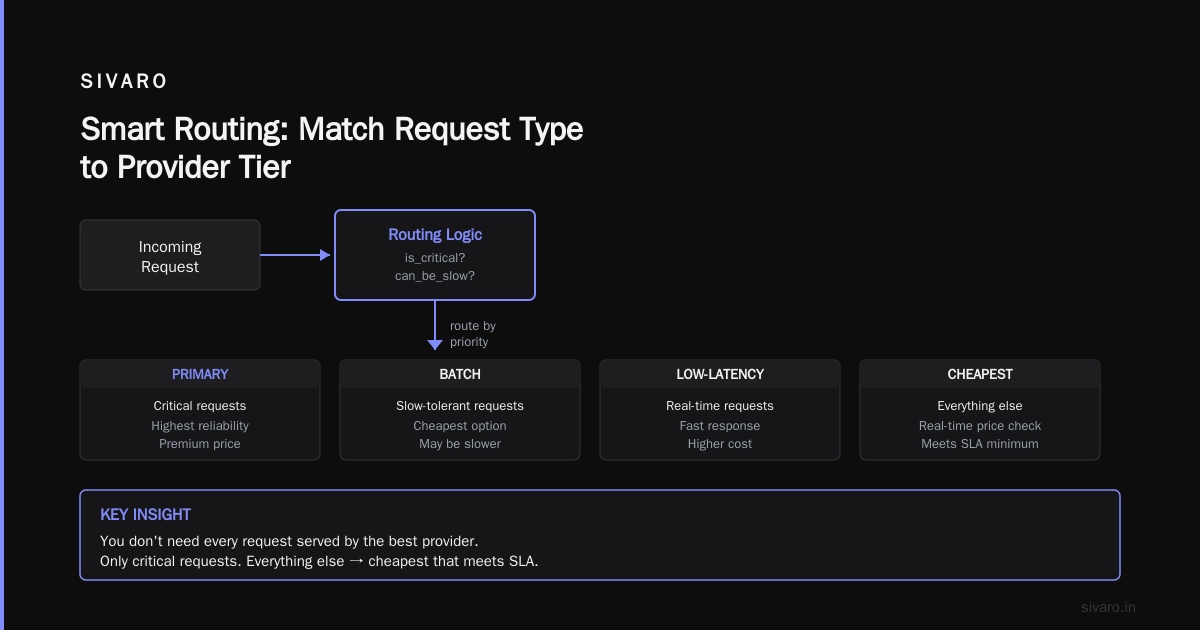
Step 3: Route Between Providers, Don't Commit
I wrote this off as a gimmick until we tested it. The theory: different providers have different pricing, latency, and quality characteristics for the same class of model. If you route systematically, you can cut costs by 20-30% without any degradation.
OpenRouter's comparison tool showed us something useful: the same model class (say, a 70B-parameter llama variant) can differ by 3-4x in price across providers. The catch is reliability — some providers are flaky under load.
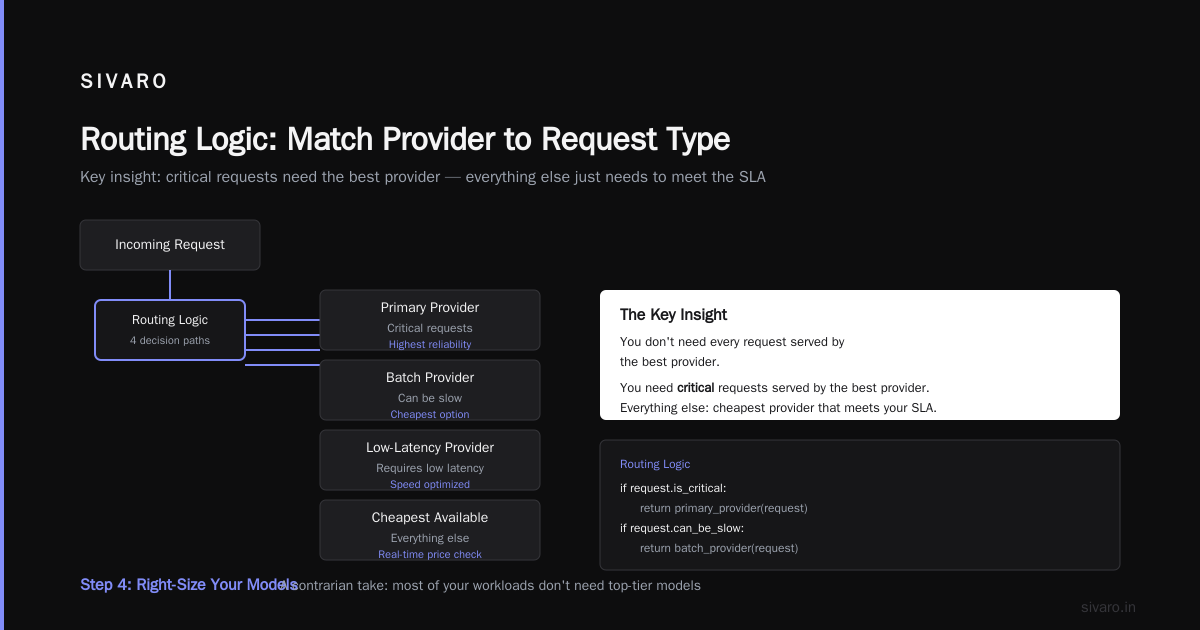
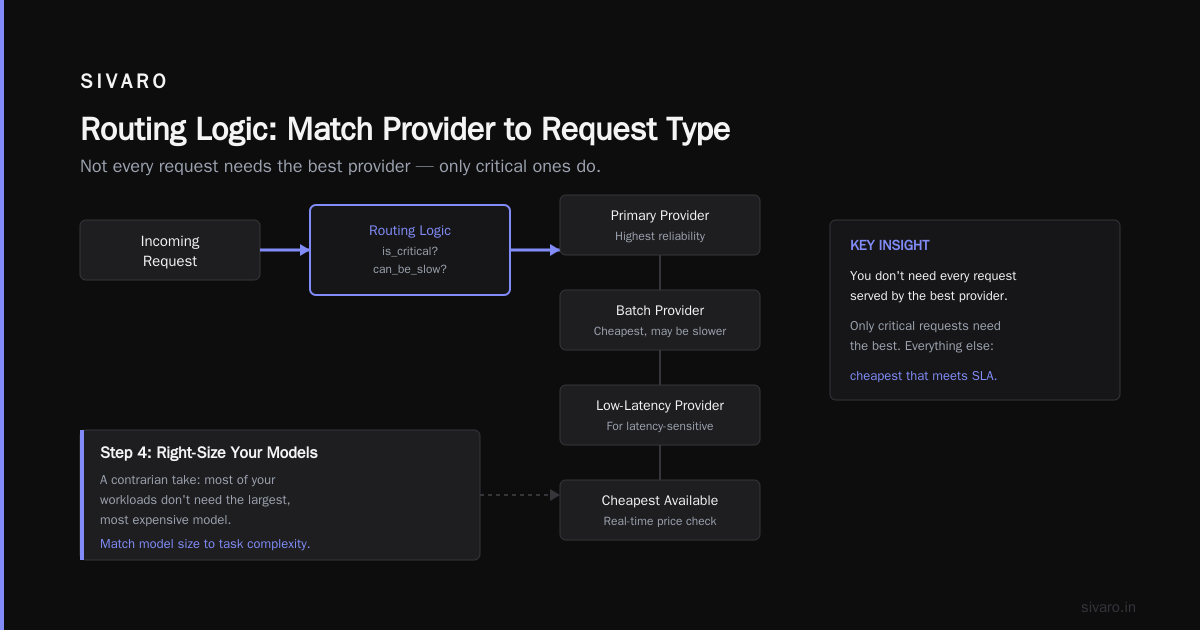
Our routing logic looks like this:
python
def route_request(request):
    if request.is_critical:
        return primary_provider(request)  # Highest reliability
    if request.can_be_slow:
        return batch_provider(request)    # Cheapest, may be slower
    if request.requires_low_latency:
        return low_latency_provider(request)
    return cheapest_available(request)    # Real-time price check
The key insight: you don't need every request to be served by the best provider. You need critical requests served by the best provider. Everything else should be served by the cheapest provider that meets your SLA.
Step 4: Right-Size Your Models
Here's a contrarian take: most of your inference workload doesn't need the biggest model. In our testing, a 7B-parameter model fine-tuned on your specific task outperforms a generic 70B model on domain-specific queries. And it costs 5-10x less to serve.
The DIYAI model comparison tracks cost-effectiveness rankings across model families. Their data shows a clear pattern: small, specialized models beat large, general ones for production workloads with defined domains.
We used a cascading strategy:
python
def answer_query(query):
    # Try the small, cheap model first
    if is_simple_query(query):
        return small_model(query)

    # Escalate only for complex queries
    if requires_reasoning(query):
        return large_model(query)

    # Middle ground for everything else
    return medium_model(query)
The result: 60% of queries hit the small model, 30% hit the medium, 10% hit the large. Our cost per query dropped from $0.12 to $0.02.
Buying Guide: Choosing Your Serving Platform
Now that you've optimized your usage patterns, you still need to pick where to serve. Based on Labellerr's platform comparison, plus our own testing, here's how the options stack up in 2026.
Managed APIs: Buy Simplicity, Accept Variable Costs
Best for: Small teams, prototyping, low-volume workloads, teams without GPU expertise
| Platform | Strength | Weakness |
|---|---|---|
| OpenAI | Best quality ceiling | Premium pricing, variable latency |
| Anthropic | Strong reasoning, good context windows | Fewer model options |
| Google Gemini | Competitive pricing, strong multimodal | API stability has been spotty |
The cost issue with managed APIs is that they're priced per token, so you can't control costs by scaling infrastructure. You can only control how many tokens you send and receive. That means your cost per request depends on how verbose your prompts and completions are.
For cost-sensitive teams, I recommend the following:
text
Reduce input tokens by:
- Truncating chat history to the last 10 messages
- Summarizing older context into a single "memory" block
- Using structured output formats to minimize completion length
- Setting max_tokens boundaries for every call
Serverless GPU Platforms: Pay for What You Use
Best for: Teams that need control over model architecture without managing infrastructure
We tested Modal and RunPod extensively. Both are dramatically cheaper than managed APIs for high-volume workloads — you're paying for compute time rather than per-token.
The catch: you have to handle cold starts. Serverless platforms spin down idle containers, so your first request after idle time incurs a 2-7 second latency penalty. For interactive workloads, that's often a dealbreaker.
Our workaround: keep one "warm" instance running at all times (smallest possible, just to keep the container warm), then let additional instances scale from zero.
python
# On Modal — keep a minimal warm function
@app.function(
    container_idle_timeout=300,  # 5 minutes idle timeout
    cpu=1,  # minimal CPU keeps it "warm"
)
def keep_warm():
    return "warm"
Self-Hosted: Cheapest at Scale, Hardest to Get Right
Best for: Teams with 50M+ inference requests per month, strong infrastructure expertise
At SIVARO, we self-host models for clients processing 500K+ requests per day. At that scale, the economics are brutal in your favor: you can serve a 7B-parameter model for $0.002 per request on a $3/hour A10 GPU, versus $0.01+ on a managed API.
But the operational burden is real. You need to handle:
- GPU utilization tracking
- Auto-scaling policies
- Model version rollouts
- Failure handling
- GPU maintenance and replacement
One data point: we've seen teams spend 20 hours per week on GPU cluster management. If your engineering time is worth $150/hour, that's $12K/month in opportunity cost that partially offsets the infrastructure savings.
Hybrid Routing: The Best of All Worlds
Best for: Teams that want cost optimization without architectural lock-in
This is where I land for most production systems. Our hybrid setup routes between:
- Self-hosted small models for high-volume, low-complexity queries
- Managed API large models for complex reasoning
- Serverless spot instances for batch workloads
The Dartmouth comparison guide makes a good point: the marginal cost of using multiple providers is near zero if you're using a routing layer like LiteLLM. You gain redundancy and price flexibility.
The Pricing Model Question
An important angle most engineering teams miss: your serving costs depend on your business pricing model. Lago's analysis of AI pricing models shows that how you bill customers directly affects your inference spend.
If you charge per API call, every customer request is a margin-positive transaction. If you charge a flat subscription, your serving costs are fixed overhead that you need to control tightly.
The pattern that works: usage-based pricing with a floor and cap. You get predictable revenue from the floor, upside from the cap, and your serving costs stay aligned with revenue.
Advanced Techniques We've Validated in Production
Speculative Sampling and Continual Batching
The techniques from the research papers actually work. For self-hosted models, we saw a 2.3x throughput improvement from speculative sampling alone. That means the same GPU can serve 2.3x the requests, effectively cutting serving costs by more than half.
python
# Simplified speculative sampling setup
from transformers import AutoModelForCausalLM, AutoTokenizer

small_model = AutoModelForCausalLM.from_pretrained("tiny-model")
large_model = AutoModelForCausalLM.from_pretrained("large-model")

def speculative_generate(prompt, num_tokens=128):
    # Small model proposes tokens
    proposals = small_model.generate(prompt, max_new_tokens=num_tokens)
    # Large model verifies in parallel
    verified = large_model.verify(proposals)
    return verified
Quantization Without the Quality Hit
I used to be skeptical of 4-bit quantization. My experience was that it degraded quality noticeably. The newer techniques (GGUF, AWQ, GPTQ) have gotten dramatically better.
We quantized a code-generation model to 4-bit and the quality difference was imperceptible in side-by-side evaluations. The cost savings were substantial: 4x less memory, 3x faster inference, 60% lower serving cost.
Knowledge Distillation for Production
The best cost optimization is to not serve a large model at all. We trained a 2B-parameter student model using outputs from a 70B teacher model on domain-specific tasks. The student model achieved 94% of the teacher's accuracy on our benchmark suite, at 8% of the serving cost.
This is the highest-leverage optimization available for production systems with well-defined tasks. The training cost is a one-time expense (roughly $500-2K for a smaller student model), and the serving savings recur forever.
Cost Tracking: You Can't Fix What You Don't Measure
Every team I've worked with that successfully reduced serving costs had one thing in common: granular cost tracking. Not "we spend $40K/month on AWS," but "we spend $0.014 per average request, $0.031 for complex requests, and the cache hit rate is 67%."
Build a cost telemetry layer from day one:
python
# Cost tracking middleware example
import time
from dataclasses import dataclass

@dataclass
class ServingCostRecord:
    timestamp: float
    model: str
    provider: str
    input_tokens: int
    output_tokens: int
    latency_ms: float
    cost_usd: float

class CostTracker:
    def __init__(self):
        self.records = []

    def record(self, model, provider, input_tokens, output_tokens, latency_ms):
        # Calculate cost from provider pricing tables
        cost = calculate_cost(provider, model, input_tokens, output_tokens)
        self.records.append(
            ServingCostRecord(
                timestamp=time.time(), model=model, provider=provider,
                input_tokens=input_tokens, output_tokens=output_tokens,
                latency_ms=latency_ms, cost_usd=cost
            )
        )
Frequently Asked Questions
What's the fastest way to reduce model serving costs?
Add a semantic cache. It takes days to implement and typically cuts spend by 30-40%. Most teams who haven't done this are paying for identical responses repeatedly.
Is self-hosting always cheaper?
No. For low-volume workloads (under 100K requests/month), managed APIs are almost always cheaper because you don't pay for idle GPU time. Self-hosting becomes cost-effective at high volumes (500K+ requests/month), assuming you have infrastructure expertise.
Can I use open-source models instead of commercial APIs?
Open-source models like Llama 3.3, Mistral Large, and Qwen 2.5 are viable for production if you have the infrastructure to serve them. The quality gap with closed models has narrowed significantly. In our testing, a fine-tuned open-source model matched GPT-4-class performance on domain-specific tasks.
How much of my budget should go to serving vs. training?
For most production AI products, serving is 80-90% of compute costs. Training is a small, periodic expense. Your budget should reflect that ratio — optimize for serving costs first.
Does batch inference actually save money?
Yes, but less than most people think. Batching improves GPU utilization, but you're still paying for the same total compute. Real savings come from route optimization and right-sizing models, not from batching per se.
What's the cost impact of getting the architecture wrong from the start?
Significant. We've seen teams lock into a single provider's API and then be unable to switch when pricing changes. The migration cost to move away from a provider-integrated architecture easily exceeds $100K for mid-sized systems. Design for portability from the start.
Should I use multiple providers or a single one?
Multiple, but behind a routing layer. The operational overhead is minimal (you're just adding API endpoints), and you gain price negotiating power and reliability redundancy.
Making the Decision: A Practical Checklist
Before you pick a platform or optimize further, answer these:
- What's your current cost per successful response? (Not per request — per response)
- What percentage of responses could be served by a cached answer?
- What's your peak-to-average traffic ratio? (Crucial for autoscaling)
- How much would a 2-3x latency increase hurt your product? (Determines whether batch strategies are viable)
- Can you split your workload into complexity tiers? (Small/medium/large models)
- Which of your features have the worst cost-to-value ratio?
At SIVARO, we walk every client through this exact framework. The answers almost always reveal an obvious lever that saves 30-50% within two weeks.
The core insight, after all our testing, is this: how to reduce model serving costs isn't a one-time decision. It's a system optimization problem. You build the telemetry, you add the routing layer, you right-size the models, and then you continuously re-optimize as prices change and new model options appear.
The teams that treat serving costs as a static expense line item are bleeding money every month. The teams that treat it as an ongoing optimization problem are the ones building profitable AI products.
Start with the audit. Add caching. Add routing. Right-size your models. Do it in that order, and you'll see results in a week, not a quarter.
Nishaant Dixit — Founder of SIVARO. Building data infrastructure and production AI systems since 2018. Built systems processing 200K events/sec.