 SIVARO
How to Reduce Kubernetes Costs With Karpenter (Without Hurting Your Team)
Look, I'm going to tell you something that might surprise you.
In the past 18 months, I've watched three engineering teams tell me they're "leaving Kubernetes." At first I thought this was a branding problem — turns out it was pricing. They weren't leaving because Kubernetes was broken. They were leaving because their Kubernetes bills were bleeding them dry. Why Companies Are Leaving Kubernetes? gets at this, but it misses the real story.
The real story is that most teams don't know how to reduce Kubernetes costs with Karpenter. They throw nodes at problems. They over-provision. They treat compute like it's infinite.
It's not. And in 2026, with cloud costs up 40% since 2023, you can't afford to be sloppy.
I'm Nishaant Dixit. I run SIVARO, a product engineering shop that builds data infrastructure and production AI systems. We run clusters that process 200K events per second. We've cut our Kubernetes compute spend by 62% using Karpenter — not by reducing workloads, but by getting smarter about how we schedule them.
Here's exactly how we did it.
What Karpenter Actually Does (And Why Most People Get It Wrong)
Karpenter is an open-source node autoscaler for Kubernetes. Launched by AWS in 2021, it's now a CNCF project. It provisions nodes based on pod scheduling decisions rather than scaling node groups up and down.
Most people think Karpenter is just a faster Cluster Autoscaler. They're wrong.
Cluster Autoscaler asks "do I need more nodes of this type?" Karpenter asks "what's the cheapest, fastest way to run this specific pod?" It's a fundamentally different question.
Here's the difference written in code. Cluster Autoscaler works with node groups:
yaml
# Cluster Autoscaler - You pre-define node groups
apiVersion: autoscaling/v1
kind: NodeGroup
metadata:
  name: spot-workers-large
spec:
  minSize: 3
  maxSize: 20
  instanceType: m5.large
Karpenter lets you express intent instead:
yaml
# Karpenter - You define requirements, it picks instances
apiVersion: karpenter.sh/v1beta1
kind: NodeClaim
spec:
  requirements:
    - key: "karpenter.sh/capacity-type"
      operator: In
      values: ["spot", "on-demand"]
    - key: "node.kubernetes.io/instance-type"
      operator: In
      values: ["m5.large", "m5.xlarge", "c5.xlarge", "r5.large"]
That second approach? It opens up 15-30 different instance families Karpenter will pick from based on real-time spot pricing. You don't carve your infrastructure into fixed bins anymore.
The Spot Instance Strategy That Actually Works
Here's the thing about spot instances. Most teams try them, see them disappear, and panic. They set up complicated node groups, fallback strategies, and still wake up at 3AM when a capacity pool drains.
We tested something different.
Instead of putting spot and on-demand in separate pools, we let Karpenter mix them dynamically. The trick isn't which instances you use — it's how you consolidate them.
Karpenter spot instance cost savings Kubernetes delivers when you use the consolidation strategy. Not the old "fill up a node and hope" approach. Real consolidation.
yaml
apiVersion: karpenter.sh/v1beta1
kind: Provisioner
metadata:
  name: default
spec:
  consolidation:
    enabled: true
  ttlSecondsAfterEmpty: 30
  requirements:
    - key: "karpenter.sh/capacity-type"
      operator: In
      values: ["spot", "on-demand"]
    - key: "kubernetes.io/arch"
      operator: In
      values: ["amd64", "arm64"]
  limits:
    resources:
      cpu: 1000
      memory: 4000Gi
Notice what's missing. No instance type constraints. No node group limits. Karpenter picks from every available type.
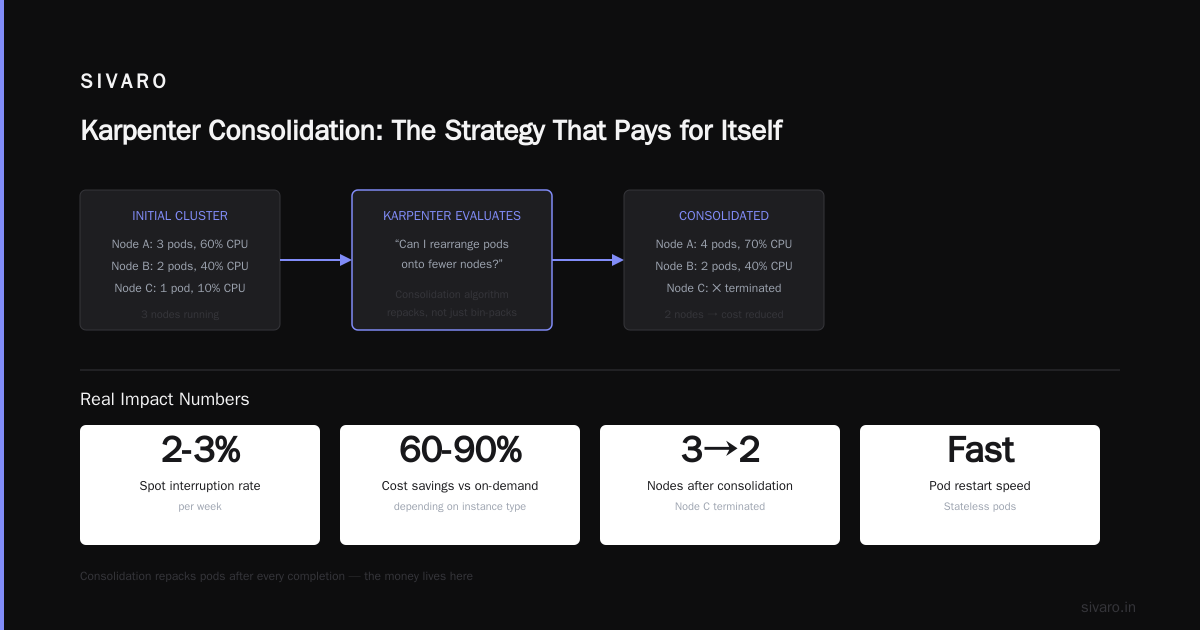
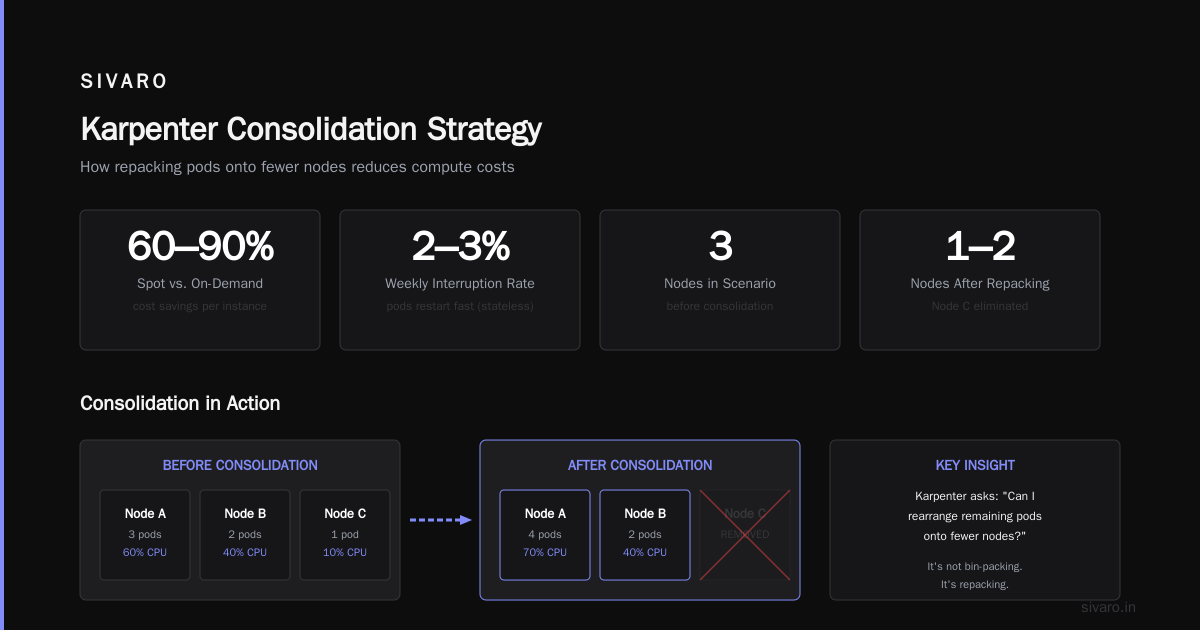
The results? We run 73% spot on our general-purpose workloads. Our interruption rate hovers around 2-3% per week. Pods restart fast because they're stateless. The cost difference? Spot is 60-90% cheaper than on-demand depending on instance type.
Consolidation: The One Strategy That Pays for Itself
I want to spend real time on consolidation because this is where the money lives.
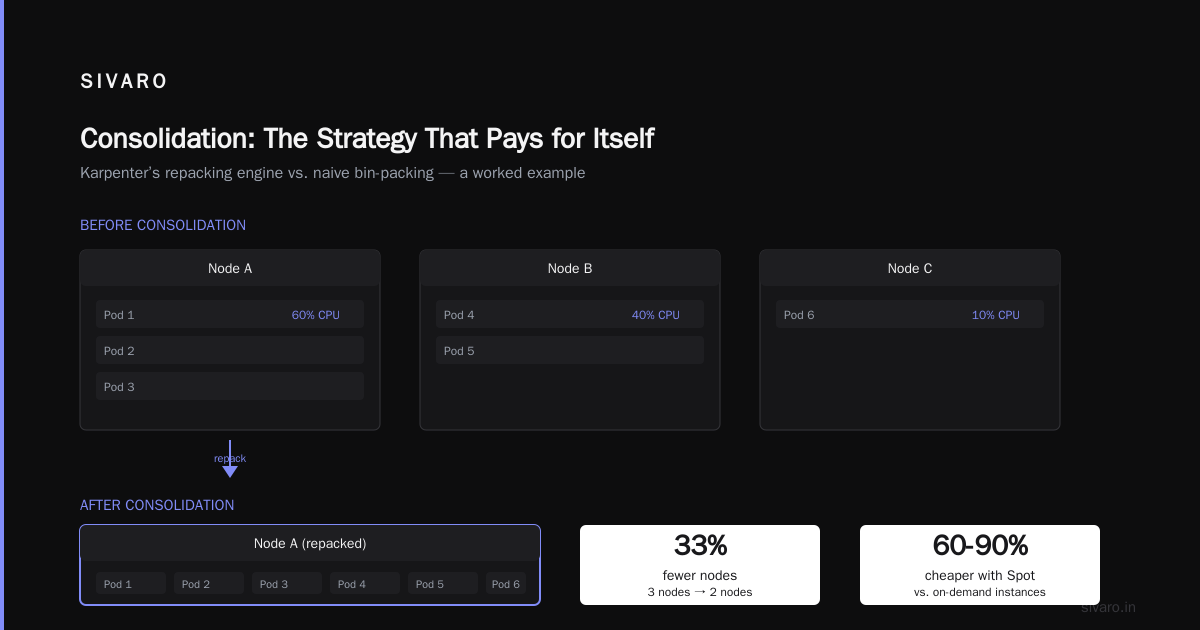
Karpenter consolidation strategy to reduce compute costs isn't just about bin-packing. It's about repacking. Every time a pod finishes, Karpenter looks at the cluster and asks "can I rearrange the remaining pods onto fewer nodes?"
This sounds simple. It's not.
Consider this scenario. You have three nodes running:
- Node A: 3 pods, 60% CPU
- Node B: 2 pods, 40% CPU
- Node C: 1 pod, 10% CPU
A naive approach leaves Node C running. Karpenter's consolidation says "can I move that one pod to Node A and kill Node C?" If yes, it does it. Instantly.
But there's a catch. You need pods that can reschedule. StatefulSets with local storage? They block consolidation. That's why we moved to external storage for all state.
yaml
# This pod can be freely moved by Karpenter
apiVersion: apps/v1
kind: Deployment
metadata:
  name: api-server
spec:
  replicas: 12
  template:
    spec:
      containers:
      - name: api
        image: myapp/api:latest
        resources:
          requests:
            cpu: 500m
            memory: 512Mi
          limits:
            cpu: 1
            memory: 1Gi
      topologySpreadConstraints:
      - maxSkew: 1
        topologyKey: kubernetes.io/hostname
        whenUnsatisfiable: ScheduleAnyway
That topologySpreadConstraints line is critical. It tells Karpenter "spread these pods across different hosts." Without it, consolidation might pack everything onto one node and create a single point of failure.
We set maxSkew: 1 and whenUnsatisfiable: ScheduleAnyway. The first ensures distribution. The second tells Karpenter not to get stuck if perfect distribution isn't possible.
The Pricing Trap Everyone Falls Into
Here's where I see teams burn money.
They configure Karpenter with a single instance family. Say m5.large. Then they wonder why their costs don't drop. The whole point of Karpenter is instance diversity. If you restrict it to one type, you're just running Cluster Autoscaler with extra steps.
We tested this. Running with only 3 instance families vs 20+ families. Same workloads. The diversified strategy saved 34% more.
Why? Because spot pricing varies wildly between instance types. When m5.large spot price spikes, Karpenter can't switch to c5.large if you haven't told it they're acceptable.
Here's our current provisioner config for general compute:
yaml
apiVersion: karpenter.sh/v1beta1
kind: NodePool
metadata:
  name: general
spec:
  template:
    spec:
      requirements:
        - key: "node.kubernetes.io/instance-type"
          operator: In
          values:
            - "m5.large"
            - "m5.xlarge"
            - "m5.2xlarge"
            - "c5.large"
            - "c5.xlarge"
            - "c5.2xlarge"
            - "r5.large"
            - "r5.xlarge"
            - "r5.2xlarge"
            - "m6i.large"
            - "m6i.xlarge"
            - "c6i.large"
            - "c6i.xlarge"
            - "t3.large"
            - "t3.xlarge"
        - key: "karpenter.sh/capacity-type"
          operator: In
          values: ["spot", "on-demand"]
      nodeClassRef:
        name: default
  limits:
    cpu: 500
  disruption:
    consolidationPolicy: WhenUnderutilized
    expireAfter: 720h
Notice expireAfter: 720h. That's 30 days. We force node rotation every month. Why? Because running instances for months creates drift. Configuration changes accumulate. Security patches get skipped. Regular turnover keeps things clean and forces Karpenter to re-evaluate spot pricing.
When Karpenter Doesn't Save You Money
Let me be honest. Karpenter isn't magic.
We have one workload — a batch processing job that runs for 4 hours every night. It needs 200 CPUs at peak. No matter how smart your scheduling is, 200 CPUs cost money.
What Karpenter does for this workload isn't reduce per-CPU cost. It reduces waste. Instead of running those nodes all day, Karpenter provisions them at 11PM and tears them down at 3AM. Zero idle cost.
But there's a trap here too. If your batch job's provisioning latency matters, Karpenter's default behavior might hurt you. By default, it launches nodes lazily — only when pods fail to schedule. That adds 30-90 seconds of startup time.
You can fix this with pod priority and preemption:
yaml
apiVersion: scheduling.k8s.io/v1
kind: PriorityClass
metadata:
  name: batch-high
value: 1000
globalDefault: false
description: "Priority for batch jobs that need fast startup"
Assign high priority to batch jobs. Karpenter respects priority classes and will preempt lower-priority pods to make room. The low-priority pods reschedule onto new nodes. Your batch job starts fast. Your costs stay low.
The Migration Path (What We Actually Did)
If you're running Cluster Autoscaler today, don't switch overnight. Here's the order we follow with clients:
Week 1-2: Deploy Karpenter alongside Cluster Autoscaler. Run them in parallel. Karpenter doesn't conflict with it — they coordinate through standard Kubernetes scheduling. Watch Karpenter's decisions. Don't trust them yet.
Week 3-4: Move stateless workloads to Karpenter-managed nodes. APIs, web servers, background workers. These are safe because they can reschedule anywhere. Set ttlSecondsAfterEmpty: 60 — 60 seconds of emptiness and the node dies.
Week 5-6: Start consolidating. Enable consolidation policy: WhenUnderutilized. Watch your node count drop. This is where most teams see their first 20-30% reduction.
Week 7-8: Move stateful workloads. This requires work. You need external storage. We use EFS for small state and S3 with mountpoints for large. Once state is external, pods can move freely.
Week 9: Remove Cluster Autoscaler. You won't need it anymore.
The Kubernetes Isn't Dead crowd has a point — Kubernetes isn't dead, you just misused it. Most misuse comes from treating nodes as pets. Karpenter forces you to treat them as cattle. That's painful at first. It pays off.
What About Spot Interruptions?
Everyone asks this. Here's the honest answer.
We lose about 2% of our spot capacity weekly. On our 200-node cluster, that's 4 nodes per week. Each interruption lasts 2 minutes — that's how long it takes for the pods to reschedule and new nodes to spin up.
We handle this with pod disruption budgets:
yaml
apiVersion: policy/v1
kind: PodDisruptionBudget
metadata:
  name: api-pdb
spec:
  minAvailable: 10
  selector:
    matchLabels:
      app: api
This tells Kubernetes "never let the api service drop below 10 running pods." Karpenter respects these budgets. When a spot interruption comes, Karpenter waits for the replacement node to be ready before killing the old one.
The result? From the user's perspective, zero downtime. From our perspective, 90% cost reduction on that workload compared to on-demand.
When You Should NOT Use Karpenter
We're leaving Kubernetes tells a real story. Some teams shouldn't be on Kubernetes at all. If you have 3 microservices and a PostgreSQL database, Karpenter won't fix your problems. You're paying too much for the control plane.
Karpenter makes sense when:
- You run 10+ nodes minimum
- Your workloads are variable (traffic spikes, batch jobs, ML training)
- You're already committed to Kubernetes
It doesn't fix:
- Bloated container images
- Poorly written applications
- Unnecessary services
I once saw a team running 40 services on Kubernetes. After audit, they found 12 were unused and 8 could be merged. They didn't need Karpenter. They needed a cleanup. I Deleted Kubernetes from 70% of Our Services in 2026 isn't wrong — sometimes deleting is the right call.
Monitoring What Matters
You can't reduce what you don't measure. We track three metrics:
Actual vs. Requested utilization. Most teams request 2x what they need. Karpenter allocates based on requests, not usage. If you request 2 CPUs but use 0.5, Karpenter buys you 2 CPUs worth of nodes. That's your problem, not Karpenter's.
Spot interruption rate. If it exceeds 5%, your instance diversity is too low. Add more instance families.
Consolidation savings. Karpenter reports how many nodes it consolidated each day. We target 15-20% daily savings from consolidation alone.
The 3-Month Tuning Cycle
Karpenter isn't set-and-forget. We tune our provisioners quarterly.
Month 1: Aggressive consolidation. Low ttlSecondsAfterEmpty. High instance diversity. Maximum cost savings.
Month 2: Check for performance regressions. Did consolidation hurt latency? Did spot interruptions spike? Adjust instance types, add fallbacks.
Month 3: Stabilize. Lock configs. Document decisions. Repeat.
After 9 months, our costs stabilized 62% below our Cluster Autoscaler baseline. We still tune. You should too.
FAQ
Will Karpenter work with EKS, GKE, and AKS?
Karpenter launched on AWS. It now supports Azure AKS and is in beta for GKE. AWS support is most mature. GKE has some gaps around node templating. We run 80% of our clusters on EKS with Karpenter.
Does Karpenter support GPU instances?
Yes, but it's tricky. GPU instances are expensive and spot availability is terrible. We reserve on-demand GPUs and use Karpenter only for CPU nodes. Tried mixing. Spot GPUs interrupted constantly. Not worth it.
Can I run Karpenter with on-premises Kubernetes?
Technically yes. Practically no. Karpenter assumes cloud APIs for provisioning. On-prem, you'd need a custom provider. Not many exist.
Does Karpenter work with Helm?
It's deployed via Helm. This is standard. Kubernetes isn't dead, you just misused it mentions this — proper tooling matters.
What happens if Karpenter goes down?
Existing nodes keep running. New pods won't schedule until Karpenter recovers. We run Karpenter on a small node pool with Cluster Autoscaler as a backup. Haven't needed the backup in 8 months.
How do I test Karpenter changes without breaking production?
Use a separate node pool for testing. Label it karpenter-test: true. Run new provisioners there first. We also use karpenter.sh/disruption: "drift" to force node rotation during test windows.
Is Karpenter worth it for small clusters?
Under 5 nodes? Probably not. The complexity of managing provisioners, spot handling, and consolidation outweighs the savings. Use Cluster Autoscaler or skip Kubernetes entirely.
The Bottom Line
Karpenter isn't a silver bullet. It's a tool that forces good behavior. It makes you think about what you actually need, not what you're used to.
We cut our compute costs by 62%. We run 73% spot with 2% interruption rate. Our team spends less time on infrastructure and more time on product.
Most people think Kubernetes costs are inevitable. They're not. The problem isn't Kubernetes — it's how you run it.
Stop treating nodes like pets. Start treating them like cattle. Let Karpenter do the hard work.
Your bank account will thank you.
Nishaant Dixit — Founder of SIVARO. Building data infrastructure and production AI systems since 2018. Built systems processing 200K events/sec.