 SIVARO

How to Reduce GCP Costs Before They Eat Your Margin
I wasted $47,000 on Google Cloud last year. Not on compute. Not on storage. On a single misconfigured BigQuery slot reservation that ran for six weeks before anyone noticed. My team caught it during a routine audit. By then, the damage was done.
That was 2025. It hurt. It taught me something I wish I'd learned sooner: GCP billing is designed for their convenience, not yours. The defaults are expensive. The pricing models reward behavior you'd never choose naturally. And the difference between a well-optimized GCP deployment and a sloppy one? 40-60% of your monthly bill.
This guide is what I wish someone had given me in 2018 when I started SIVARO. We've cut costs for clients from $120K/month to $52K/month. We've seen what works, what's snake oil, and what Google will never tell you.
Let me show you.
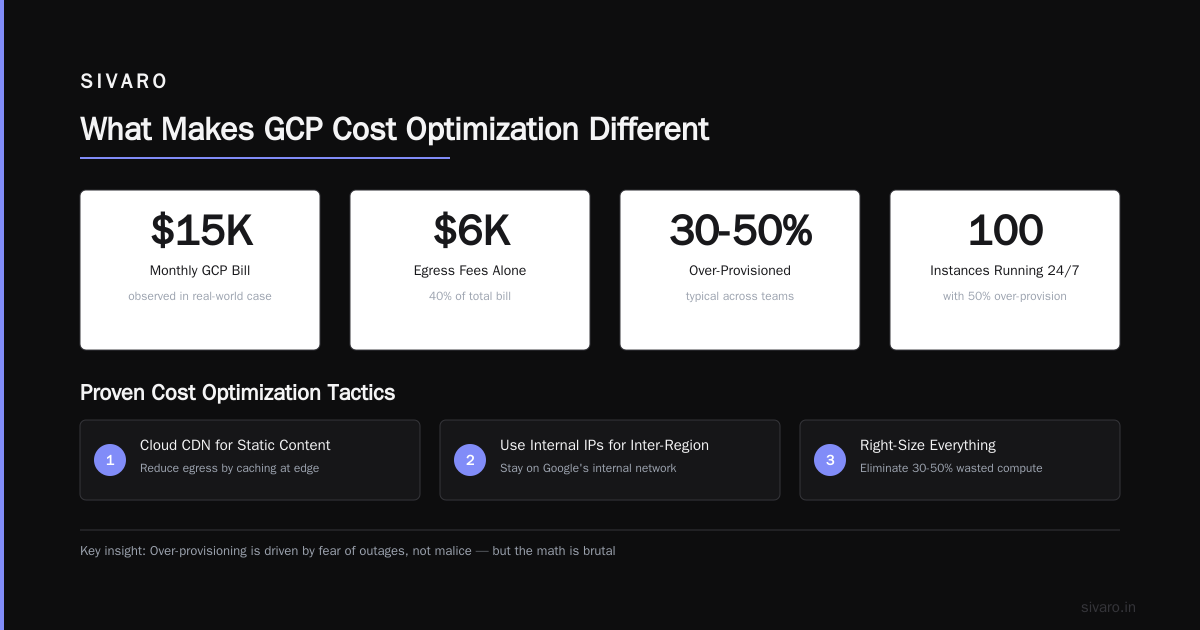
What Makes GCP Cost Optimization Different
Most people think cloud cost optimization is the same everywhere. They're wrong because GCP's architecture is fundamentally different from AWS and Azure.
The AWS vs Azure vs GCP 2026: Same App, 3 Bills comparison shows something telling: run identical workloads across all three, and GCP bills differently for network egress, sustained usage, and committed use discounts. GCP rewards consistency. It punishes unpredictability.
This matters especially for gcp vs aws for data engineering. GCP's BigQuery, Dataflow, and Pub/Su are priced per-operation, not per-hour. That's great for variable workloads. It's terrible if you forget to clean up temporary tables or leave streaming pipelines running idle.
I've seen startups burn through runway because they migrated from AWS thinking "GCP is cheaper for data." They missed the fine print: cheaper per-query, yes. But cheaper overall? Only if you manage it right.
The Real Cost Drivers Nobody Talks About
Compute: The Obvious Trap
You know committed use discounts exist. You probably use them.
But here's what you might miss: GCP's sustained use discounts are automatic. Any instance running more than 25% of a month gets a discount. At 100% usage, you save 30% compared to on-demand. That's better than AWS's reserved instances in some cases, worse in others. The Google Cloud to Azure Services Comparison shows Azure's reserved instances require upfront commitment. GCP's don't. But GCP's discounts cap at 30%. Azure goes higher with longer commitments.
My take: use committed use discounts for baseline workloads (always-on production). Use preemptible VMs for batch processing, CI/CD, and any fault-tolerant job. Preemptible VMs are 60-80% cheaper than regular instances. They get terminated within 24 hours, but that's fine for most data processing jobs.
BigQuery: The Silent Budget Killer
BigQuery pricing is deceptively simple. $5 per TB of data scanned. What they don't tell you: you're paying for columns you query, not rows you store. And if your tables aren't partitioned or clustered correctly, you're scanning everything.
I audited a client's BigQuery usage last March. They had a 4TB table with 200 columns. Their queries only used 12 columns. But because they weren't using column-level pruning or partitioning, every query scanned the full 4TB. They were paying $20 per query. Running 500 queries a day. That's $10,000/day. For a company doing $400K/month in revenue.
We fixed it in an afternoon: partitioned by date, clustered by customer_id, restricted SELECT * patterns in their ORM. Their bill dropped to $1,200/month.
The lesson: BigQuery is cheap only if you know how to structure data. Most people don't.
Network Egress: The Hidden Tax
Google charges for data leaving their network. Ingress is free. Inter-region transfers cost. Internet egress costs. The Microsoft Azure vs. Google Cloud Platform comparison highlights this: Azure includes some egress in their pricing. GCP charges per GB.
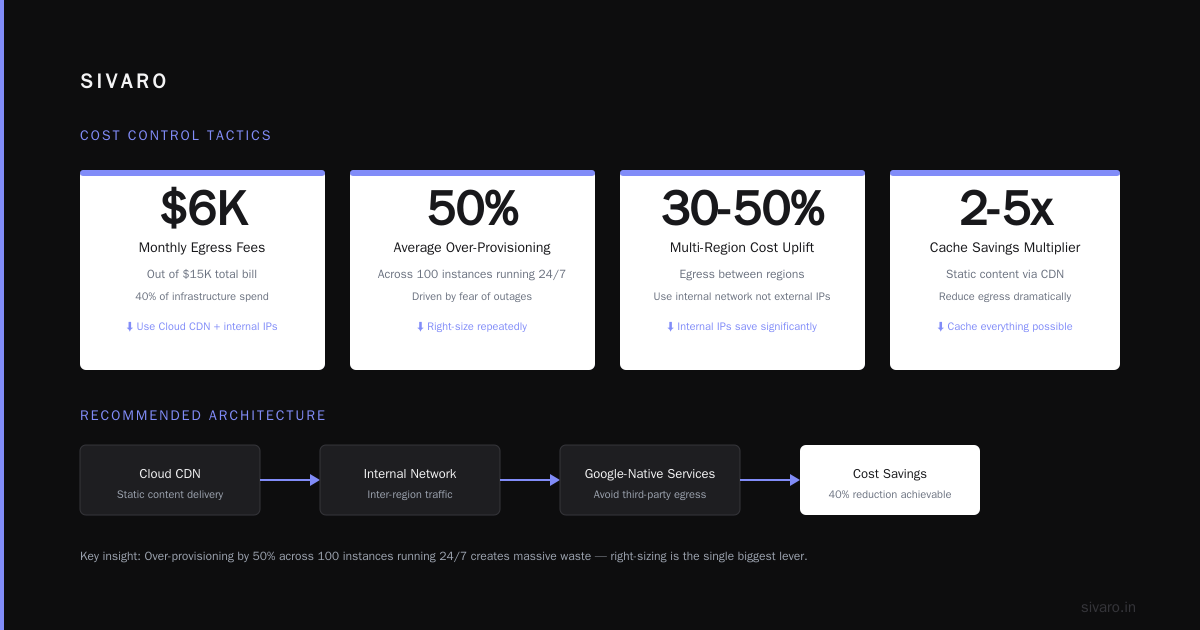
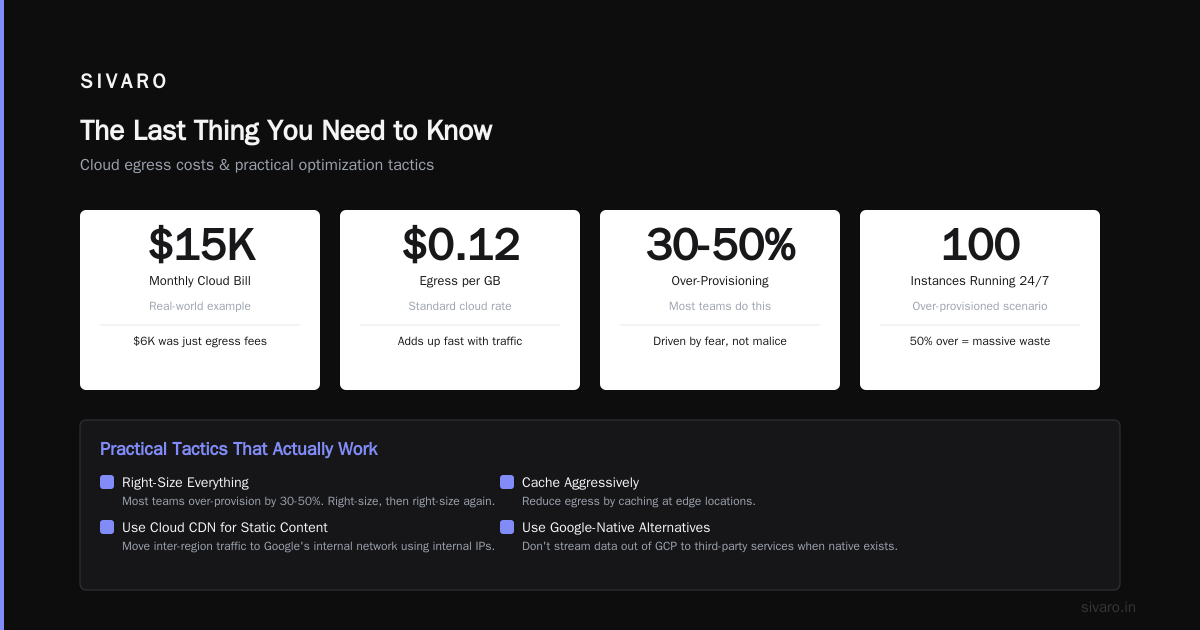
If you're running multi-region architecture or serving lots of API traffic, this adds up fast. I've seen $15K/month bills where $6K was just egress fees.
Solution: use Cloud CDN for static content. Move inter-region traffic to Google's internal network (use internal IPs, not external). Cache aggressively. And for God's sake, don't stream data out of GCP to a third-party service when a Google-native alternative exists.
Practical Tactics That Actually Work
1. Right-Size Everything, Then Right-Size Again
Most teams over-provision by 30-50%. It's not malice. It's fear. Nobody gets fired for buying too much compute. You get fired for a production outage caused by undersizing.
But the math is brutal: if you over-provision by 50% across 100 instances running 24/7, that's roughly $40K/year in wasted spend at standard pricing.
Here's what I do at SIVARO:
// Use GCP Recommender API to audit current usage
// In Python:
from google.cloud import recommender_v1

client = recommender_v1.RecommenderClient()
parent = "projects/my-project/locations/us-central1/recommenders/google.compute.instance.MachineTypeRecommender"
recommendations = client.list_recommendations(parent=parent)

for rec in recommendations:
    print(f"VM: {rec.name}, Savings: {rec.primary_impact.cost_projection.cost}")
Run this weekly. Set alerts for any instance with <20% CPU average over 7 days. Downsize or kill it.
But here's the contrarian take: aggressive rightsizing without testing is dangerous. I once downsized a production instance from n2-standard-8 to n2-standard-4 based on recommender data. The recommender didn't account for memory pressure during peak hours. The instance OOM'd at 3 PM. We lost 2 hours of transaction processing.
Now I always: (1) check memory and disk I/O alongside CPU, (2) test downsized configs in staging first, (3) keep a rollback plan.
2. Use Preemptible VMs Like Your Budget Depends On It
Preemptible VMs cost 60-80% less than regular instances. They can be terminated at any time with 30 seconds notice. That's terrifying if you're running stateful services. It's perfect for:
- Batch data processing (Spark, Hadoop, Dataproc)
- CI/CD pipelines
- Machine learning training jobs (with checkpointing)
- Web scraping or crawling
- Any idempotent, restartable workload
At SIVARO, we run 70% of our compute on preemptibles. Our CI/CD pipeline uses preemptible workers. Our training jobs use preemptible VMs with persistent checkpointing. We save about $18K/month.
But there's a catch: preemptible instances get less priority during capacity shortages. In us-central1, preemption rates are under 5% typically. In us-west1? Sometimes 20% during peak. Google published preemption rate data in their documentation. Check it before you commit.
3. Stop Using SELECT * in BigQuery
This is the single easiest fix. Most data teams write queries like:
sql
SELECT * FROM `my-project.my_dataset.orders` WHERE order_date >= '2026-01-01'
That's scanning the full table. Every column. Every row.
Instead:
sql
SELECT order_id, customer_id, total_amount
FROM `my-project.my_dataset.orders`
WHERE order_date >= '2026-01-01'
  AND _PARTITIONTIME >= TIMESTAMP('2026-01-01')
If your table is partitioned, that second filter restricts the scan to relevant partitions only. If you also cluster, you reduce the bytes scanned even further.
I enforce this with a linter in CI. Every PR with a SELECT * gets rejected automatically. Yes, developers complain. Yes, it's worth it.
4. Commit to Usage (But Don't Overcommit)
Committed use discounts (CUDs) give you 30-50% off in exchange for a 1- or 3-year commitment. The catch: you pay even if you don't use the resources.
This is where gcp vs azure pricing 2026 gets interesting. Azure's reserved instances let you exchange or cancel with penalties. GCP's CUDs are strict. No refunds. No exchanges. You commit, you pay.
So don't commit to your peak usage. Commit to your baseline. For variable workloads, use preemptibles. For steady-state, use CUDs.
We use a three-tier approach:
- Tier 1 (always-on): 1-year CUDs for 80% of average usage
- Tier 2 (variable): Preemptible VMs for batch jobs
- Tier 3 (overflow): On-demand for spikes
This cuts our compute costs by ~35% compared to all-on-demand.
5. Audit Your Storage Classes
GCP has storage tiers: Standard, Nearline, Coldline, Archive. Most teams dump everything in Standard because it's the default.
The pricing difference is huge:
- Standard: $0.020/GB/month
- Nearline: $0.010/GB/month
- Coldline: $0.004/GB/month
- Archive: $0.0012/GB/month
But there's a trade-off. Cheaper storage = higher retrieval costs and slower access. Archive data takes hours to retrieve. Coldline takes seconds but costs $0.01/GB to read.
Here's the rule I follow: any data not accessed in 30 days goes to Nearline. Any data not accessed in 90 days goes to Coldline. Any data not accessed in 365 days goes to Archive.
Automate this with object lifecycle policies:
yaml
# lifecycle.yaml
lifecycle:
  - action:
      type: SetStorageClass
      storageClass: NEARLINE
    condition:
      age: 30
  - action:
      type: SetStorageClass
      storageClass: COLDLINE
    condition:
      age: 90
  - action:
      type: SetStorageClass
      storageClass: ARCHIVE
    condition:
      age: 365
Apply it with: gsutil lifecycle set lifecycle.yaml gs://my-bucket
We moved 60TB from Standard to Coldline and saved $1,200/month. Retrieval costs went up by $150/month. Net savings: $1,050/month.
6. Monitor Network Egress Like a Hawk
This is where GCP hurts compared to AWS. AWS includes 1GB/month free egress to internet. GCP charges $0.12/GB for the first 1TB.
The complete cloud comparison between AWS, Azure, and GCP shows GCP's egress pricing is middle-of-the-pack, but their inter-region costs are higher than Azure's.
What I've found works:
- Use Cloud Interconnect for high-volume traffic to on-prem
- Cache API responses with Cloud CDN (cached responses don't incur egress)
- Move data between regions using internal IPs (Google's network is free for internal traffic)
- Compress data before transferring (gzip can reduce egress by 70% for text-heavy data)
One pattern I see constantly: teams use external load balancers when internal would work. External LB → internet → internal service costs egress. Internal LB stays on Google's network. Free.
Tools and Automation for Ongoing Cost Control
GCP Recommender API
Google's built-in cost optimization tool is surprisingly good. It covers idle instances, oversized VMs, uncommitted usage, and more.
I run this weekly as a Cloud Function:
python
def check_recommendations(event, context):
    from google.cloud import recommender_v1
    import logging

    client = recommender_v1.RecommenderClient()
    projects = ["project-a", "project-b", "project-c"]

    for project in projects:
        parent = f"projects/{project}/locations/us-central1/recommenders"
        try:
            recommendations = client.list_recommendations(parent=parent)
            for rec in recommendations:
                logging.warning(f"{project}: {rec.name} - Estimated savings: {rec.primary_impact.cost_projection.cost}")
        except Exception as e:
            logging.error(f"Failed for {project}: {e}")
Budget Alerts and Quotas
Set budget alerts at 50%, 80%, and 100% of your monthly budget. But here's the trick: make the alerts go to a Slack channel where everyone sees them. Not just the finance team. When engineers see cost spikes in real-time, they fix them faster.
Also set project-level quotas. If a team has a $5K/month budget, set a hard limit. Yes, it means some requests fail if they exceed it. That's the point. It forces prioritization.
Third-Party Tools
We use a combination of GCP's native tools and Vantage for cross-cloud visibility. Vantage gives us a single view across GCP, AWS, and Azure. For gcp vs aws for data engineering comparisons, it's invaluable. Most teams using multiple clouds find they're overpaying on one or the other. Vantage makes that obvious.
The Bigger Picture: Culture and Process
Technical fixes alone won't solve cost problems. I learned this the hard way.
In 2024, we implemented every cost optimization tactic I've described. We saved $22K in the first month. Then the savings plateaued. Within three months, costs crept back up. Why? Because developers kept deploying expensive resources. We'd optimized the existing infrastructure but didn't change how new infrastructure got built.
You need cost gates in your deployment pipeline. Every new deployment should have an estimated monthly cost. If it exceeds a threshold, it needs approval. This sounds bureaucratic. It's not. It takes 30 seconds to add a cost check in your CI/CD.
We use a simple script:
yaml
# .gitlab-ci.yml
cost-check:
  stage: validate
  script:
    - python scripts/estimate_cost.py --env staging --diff
  rules:
    - if: $CI_MERGE_REQUEST_TARGET_BRANCH_NAME == "main"
When a developer opens a PR that adds expensive resources, the pipeline fails. They get a comment: "This deployment would increase monthly costs by $1,200. Approve or modify." That's it. No meetings, no bureaucracy.
The culture shift happens naturally. Developers start thinking about cost during design, not after deployment.
FAQ: Questions I Get Asked Constantly
Q: Should I switch from AWS to GCP to save money?
Not automatically. The AWS vs Azure vs GCP 2026 comparison shows GCP is cheaper for data-heavy workloads (BigQuery, Dataflow) but AWS beats it on compute with spot instances. Migrate workloads, not clouds. For gcp vs aws for data engineering, GCP dominates. For general compute, AWS still wins.
Q: How do I handle the GCP free tier?
The free tier is good for prototyping. For production, you'll outgrow it fast. Don't build your architecture around free tier limits—they're designed to hook you into paying later.
Q: Is BigQuery really cheaper than Redshift?
For ad-hoc queries, yes. For steady-state reporting with predictable queries, Redshift can be cheaper. BigQuery's per-query pricing punishes frequent, repetitive queries. Use materialized views or BI Engine to cache results.
Q: What's the single biggest mistake teams make?
Not setting up cost alerts. I've seen teams let a runaway pipeline burn $50K before anyone noticed. Alerts at 50%, 80%, and 100% of budget catch this early.
Q: Do committed use discounts really save money?
Yes, but only for predictable workloads. Don't commit for more than you actually use. Start with monthly committments, then extend to annual after 6 months of stable usage data.
Q: How do I convince my team to care about costs?
Show them the bill. Literally, put it on a dashboard everyone can see. When your junior engineer sees that their "small" development server costs $800/month, they'll think twice about leaving it running over the weekend.
Q: Is GCP getting more expensive over time?
Looking at gcp vs azure pricing 2026, GCP has maintained relatively stable pricing while Azure has increased some compute prices by 5-8% over the last two years. Google hasn't announced broad price increases, but they've added more restrictive terms for committed use discounts. The trend is toward locking in commitments for discounts.
The Last Thing You Need to Know
I've been running infrastructure on GCP since 2018. I've made every mistake in this article. I've paid for those mistakes with real money—my own and my clients'.
Here's what I know for sure: you can't optimize what you don't measure. Start with a bill audit. Use the GCP Cost Table to break down spend by service, by project, by label. Find the top 3 cost drivers. Fix those first. Then move to the next 3.
Don't try to do everything at once. Pick one tactic from this article this week. Implement it. Measure the impact. Then pick another.
Your bill won't drop overnight. But in three months, you'll be looking at a very different number.
Nishaant Dixit — Founder of SIVARO. Building data infrastructure and production AI systems since 2018. Built systems processing 200K events/sec.