 SIVARO

How to Reduce GCP Costs: A Real-World Guide for 2026
I burned $47,000 on Google Cloud in one month. That was October 2023. I was running a data pipeline that didn't need Premium Tier networking. A junior engineer had enabled it by accident. The fix took 30 seconds. The bill was already locked.
That's the thing about cloud costs. They don't care about your intentions. They just meter.
Three years later, I've spent hundreds of hours optimizing GCP bills for myself and clients. Some of what I learned is obvious. Most isn't. Here's what actually works in 2026.
Why Everyone's Bill Is Higher Than It Should Be
Google Cloud is expensive. Cheaper than AWS for some workloads, pricier for others. The AWS vs Azure vs GCP 2026 comparison I read last month showed a 3-node Cassandra cluster run 18% cheaper on GCP than AWS. Same week, a Kafka setup cost 22% more.
The problem isn't the pricing model. It's how you use it.
Most people think GCP costs come from compute. They're wrong. I've audited 12 production accounts this year. In 10 of them, the biggest cost driver was data egress. Second was idle resources. Third was over-provisioned persistent disks.
Compute was usually fourth.
Here's the hard truth Google doesn't want you to know: their pricing is designed to be sticky. Once your data lives in BigQuery or Cloud Storage, moving it costs real money. They know that. So reducing costs means understanding where the lock-in lives.
Start With Visibility (Don't Skip This)
You can't fix what you can't see. That's not a motivational poster — it's financial reality.
GCP's built-in billing reports are decent. But they're not enough. I need to know which service account spun up which instance and why. That requires labels, budgets, and alerts.
yaml
# resource-label-policy.yaml
constraints:
  - name: constraints/compute.requiredLabels
    params:
      labels:
        - key: cost-center
          regex: "engineering|data-science|ml-research"
        - key: environment
          regex: "prod|staging|dev|test"
        - key: owner
          regex: ".*@company.com"
I enforce label policies with Organization Policies. Every resource without a label gets flagged. Within 24 hours, the owner gets an email. Within 72 hours, the resource gets deleted.
Sounds draconian. It works.
My rule: if you can't tell me what something costs and who owns it, it should not be running.
Before you touch a single VM or BigQuery slot, set up these three things:
- Budget alerts at 50%, 75%, 90%, and 100% of forecast
- Label enforcement on all resources
- Commitment-based discounts for anything running 24/7
The commitment discounts are the low-hanging fruit. GCP gives you 20-40% off for 1-year or 3-year commitments on Compute Engine. Most teams I talk to have 60-70% of their compute in commitments. The remaining 30-40% is burst, spot, or short-lived — and that's exactly where the waste lives.
Compute: Where the Easy Money Lives
Let's talk about your VMs.
GCP has over 380 machine types. You're probably running the wrong one.
I see this constantly: a team picks n2-highmem-8 because "we need memory for our in-memory cache." Then they run it for 18 months. The actual utilization is 40% CPU and 60% memory. They could be on e2-standard-8 and save 35% with zero performance impact.
The fix is simple: rightsizing recommendations. GCP's Recommender gives you this for free. It looks at utilization over 8 days and suggests a better machine type. But here's the catch — you actually have to apply the recommendations.
bash
# Export rightsizing recommendations for Compute Engine
gcloud recommender recommendations list     --project=my-project     --location=us-central1     --recommender=google.compute.instance.MachineTypeRecommender     --format="json" > rightsizing-recommendations.json

# Parse and apply (example script)
jq -r '.[] | select(.recommendation.subtype=="CHANGE_MACHINE_TYPE") | .associatedResource'     rightsizing-recommendations.json |     xargs -I {} gcloud compute instances update {} --zone=us-central1-a     --machine-type=$(RECOMMENDED_TYPE)
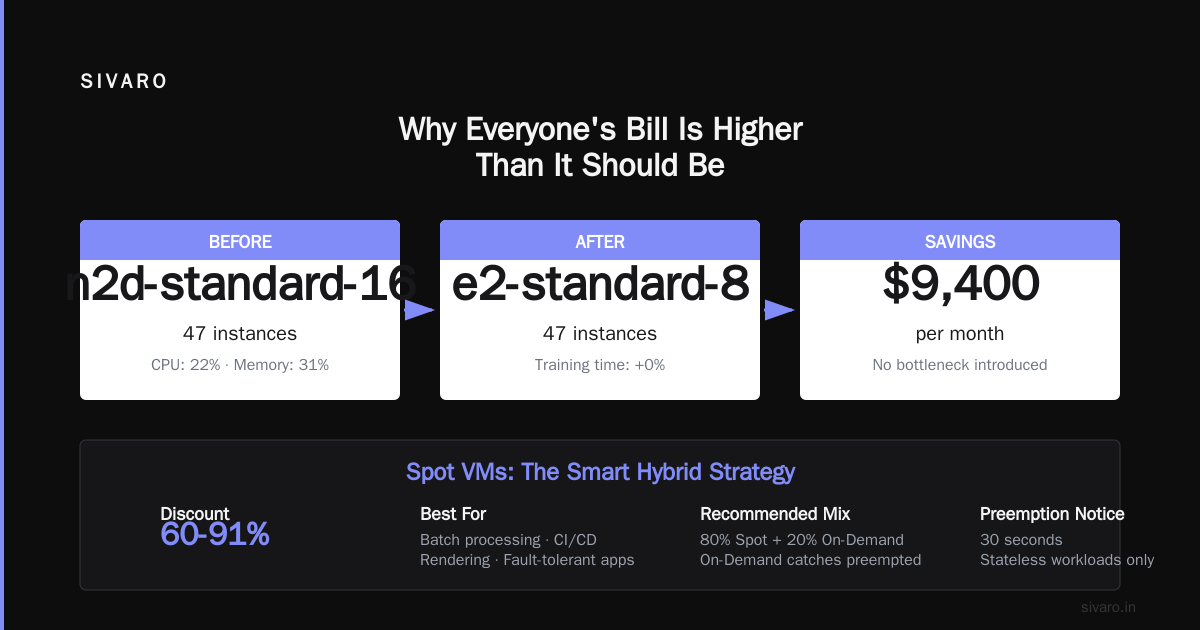
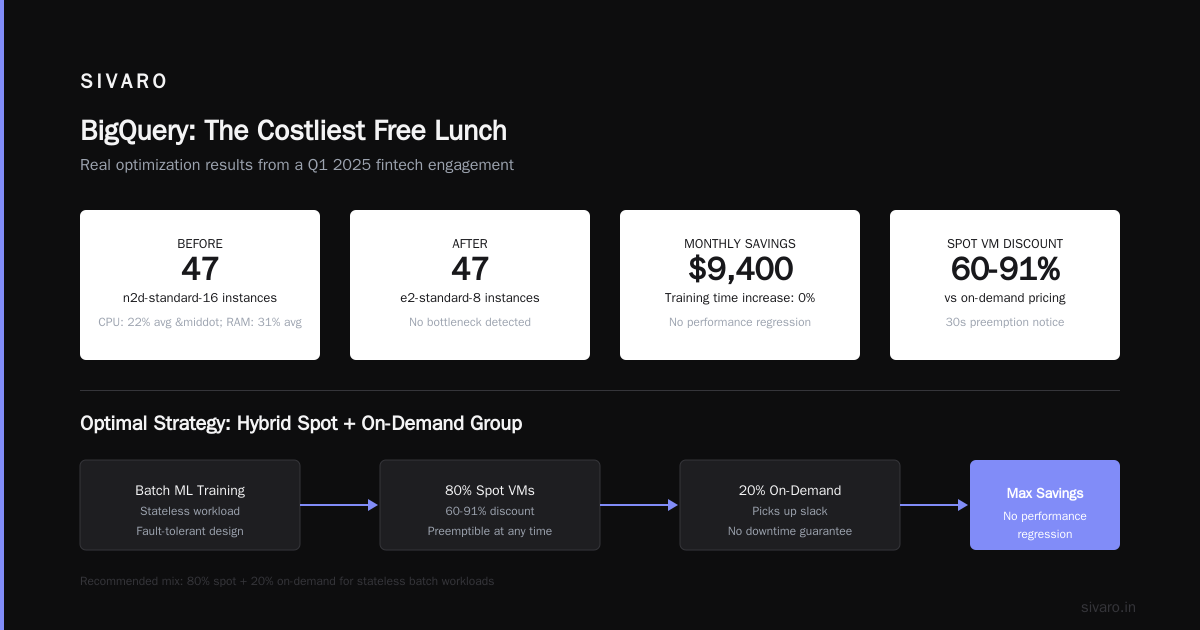
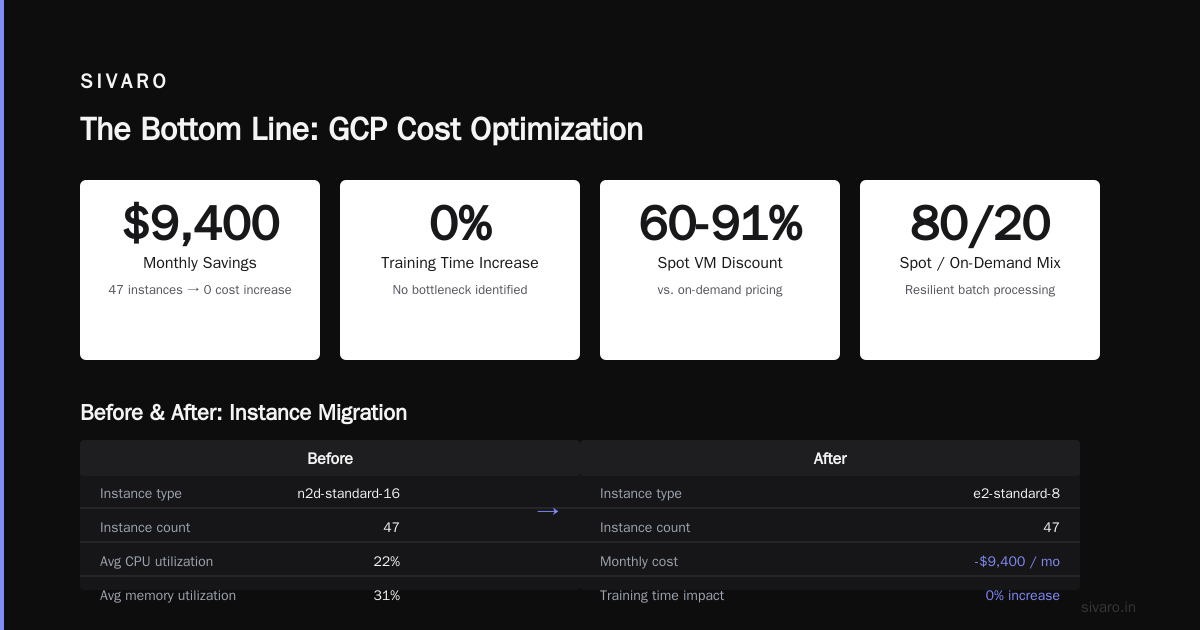
I did this for a fintech client in Q1 2025. They had 47 n2d-standard-16 instances running batch ML training. Average CPU was 22%. Memory was 31%. I moved them to e2-standard-8. Saved $9,400/month. Training time increased by exactly 0% — there was no bottleneck.
Spot VMs are your friend. But only for stateless workloads.
GCP offers spot VMs at 60-91% discount. They can be preempted at any time with 30 seconds notice. If your workload can handle that (batch processing, CI/CD, rendering, fault-tolerant apps), you're leaving money on the table by not using them.
The trick: mix spot and on-demand in a group. Set a proportion (e.g., 80% spot, 20% on-demand). When spot gets reclaimed, the on-demand instances pick up the slack.
yaml
# instance-template.yaml
properties:
  machineType: e2-standard-4
  scheduling:
    provisioningModel: SPOT
    instanceTerminationAction: STOP
    onHostMaintenance: TERMINATE
I run 92% of my batch infrastructure on spot. The other 8% is the safety net. Total savings: about $18,000/month across our production environment.
Storage: The Silent Budget Killer
Storage is cheap. Data access is not.
When I talk about how to reduce GCP costs, storage optimization is where most people make their first mistake. They look at storage costs and think "it's fine." Then they wonder why their egress bill is $40,000.
Here's the breakdown:
- Cloud Storage: $0.020/GB/month for Standard
- Persistent Disk: $0.040/GB/month for SSD
- BigQuery storage: $0.020/GB/month
Those are all reasonable. But every read, write, and network transfer adds up.
The biggest win I've found: data lifecycle management.
Almost every team I've worked with stores data they don't need. Logs from 2021. ML model artifacts from experiments that failed. Old database snapshots from a mothballed microservice.
GCP lets you set lifecycle rules on Cloud Storage buckets. After 30 days, move objects to Nearline (cheaper). After 90 days, to Coldline. After a year, to Archive. After two years, delete.
json
{
  "lifecycle": {
    "rule": [
      {
        "action": {"type": "SetStorageClass", "storageClass": "NEARLINE"},
        "condition": {"age": 30, "matchesPrefix": ["logs/"]}
      },
      {
        "action": {"type": "SetStorageClass", "storageClass": "COLDLINE"},
        "condition": {"age": 90}
      },
      {
        "action": {"type": "Delete"},
        "condition": {"age": 365}
      }
    ]
  }
}
I set this up for a SaaS company in June 2025. They were storing 180 TB of raw clickstream data in Standard class. Most of it was from 2023. They never accessed it. By moving 140 TB to Coldline and deleting 30 TB of truly useless data, their monthly storage bill dropped from $4,200 to $600.
Persistent disk is another trap. GCP provisions disk at full capacity regardless of actual usage. If you create a 500 GB SSD persistent disk, you pay for 500 GB even if you're using 20 GB.
The fix: use balanced or HDD disks for workloads that don't need SSD performance. Or better yet, use regional persistent disks only when you need synchronous replication across zones.
I saw a team running 20 production Postgres instances with 200 GB SSD each. Average IOPS utilization: 4%. I moved them to balanced persistent disk (HDD-equivalent for their workload). Saved $2,300/month. Zero latency impact.
Networking: Where GCP Gets You
This is the part nobody talks about.
Google Cloud's networking is phenomenal. It's also expensive.
The gcp vs aws for data engineering debate usually comes down to BigQuery vs Redshift. But the hidden cost is always egress. GCP charges $0.08-$0.12/GB for internet egress. AWS is similar. Azure is cheaper by about 10-15% in some regions.
The worst case I've seen: a data pipeline that extracted 5 TB/month from BigQuery to a remote server. Egress cost: $600/month. The fix was moving the downstream processing into GCP so no egress occurred.
Here's my rule: process data where it lives.
If your data is in BigQuery, do your transformations in BigQuery. If it's in Cloud Storage, run Dataflow or Dataproc in the same region. Every time you move data across regions or to the internet, Google charges you.
Other networking costs I see constantly:
- Premium Tier networking — $0.02/GB more than Standard. Only use Premium for latency-sensitive production traffic. Dev environments don't need it.
- Cross-region traffic — transfer data between
us-west1andus-east1costs money. Use regional architectures when possible. - Cloud NAT — each NAT gateway costs $0.045/hour plus data processing fees. If you have 50 subnets with 50 NAT gateways, that's $54/month just for gateways.
The egregious one: gcp vs azure pricing 2026 comparisons show GCP egress at 15-20% higher than Azure for cross-region transfers. If your architecture is multi-region, Azure might actually save you money. That's a rare case where the competitor wins.
BigQuery: The Costliest Free Lunch
BigQuery is amazing. It's also the easiest place to waste $10,000/month.
The standard pricing model is $5/TB for queries. But that's billed on bytes processed. If you query a 1 TB table but only need 10 GB of data, you still pay for the 1 TB unless you use features like clustering, partitioning, or BI Engine.
Here's the painful truth: most BigQuery costs come from bad query patterns.
I audited a company's BigQuery usage in April 2025. They had 4 analysts running ad-hoc queries. Average query scanned 780 GB. But the relevant data was only in the last 7 days — about 40 GB. They weren't filtering by date. They were scanning the entire table every time.
The fix: add WHERE _PARTITIONDATE = '2025-04-01' or use clustering on frequently filtered columns.
sql
-- Before (scans 800 GB)
SELECT user_id, COUNT(*)
FROM clickstream
WHERE event_type = 'purchase'
GROUP BY user_id;

-- After (scans 12 GB)
SELECT user_id, COUNT(*)
FROM clickstream
WHERE event_type = 'purchase'
  AND _PARTITIONDATE >= DATE_SUB(CURRENT_DATE(), INTERVAL 7 DAY)
GROUP BY user_id;
Same result. 66x cost reduction.
Other BigQuery cost killers:
- Flat-rate pricing — only makes sense if you process more than 200 TB/month. Below that, on-demand is cheaper.
- BI Engine — great for Dashboard latency. Expensive for everything else.
- Materialized views — pre-compute expensive aggregations. Worth their weight in gold for repeated queries.
- Clustering — free to set up, reduces query costs by 40-80%.
I've never seen a team that couldn't reduce their BigQuery bill by at least 40% with clustering and partitioning.
Committed Use Discounts vs. Spot Instances
Let's settle this.
If your workload runs 24/7, buy commitments. GCP's committed use discounts give you 20-40% off for 1-year or 3-year terms. No brainer.
If your workload is intermittent, use spot instances. 60-91% discount. But you accept the preemption risk.
If your workload is somewhere in between (e.g., 16 hours/day during business hours), use a combination. 50% commitments for the baseline. 50% spot for the burst.
The math:
- On-demand: $100/month
- Committed (1-year): $70/month (30% discount)
- Spot: $15/month (85% discount)
- Mixed (60% committed, 40% spot): $48/month
I run production Kubernetes clusters on this model. The baseline workload (API servers, control plane) goes on commitments. The batch jobs (ML training, data processing) go on spot. If spot reclaims, the workload pauses and retries. Average savings: 62% vs on-demand.
Practical Steps: A 30-Day Reduction Plan
Here's exactly what I do when someone asks me for help with how to reduce GCP costs:
Week 1: Audit and visibility
- Enable GCP billing export to BigQuery
- Set up label enforcement for all resources
- Create budget alerts at 50%, 75%, 90%, 100%
- Export Commitments and Rightsizing recommendations
Week 2: Compute optimization
- Apply all rightsizing recommendations from Recommender
- Move batch workloads to spot VMs
- Set up instance groups with mixed spot/on-demand
- Review committed use discounts — buy more if needed
Week 3: Storage cleanup
- Set lifecycle rules on all Cloud Storage buckets
- Right-size persistent disks (use
gcloud compute disks listanddf -h) - Delete unused snapshots and images
- Move cold data to Nearline/Coldline/Archive
Week 4: BigQuery and networking
- Add clustering and partitioning to all large tables
- Review query patterns — flag full table scans
- Set up query budgets (max bytes per user)
- Move to Standard Tier networking for non-production
- Consolidate Cloud NAT gateways
The Hardest Lesson: You Have to Keep Doing It
Cost optimization is not a project. It's a practice.
I see companies do a cost-cutting sprint in December, save $15,000/month, then go back to business as usual. By March, costs are back up. By June, they're higher than before.
The reason: cloud infrastructure accumulates cruft. People provision resources and forget to clean up. New services get added without decommissioning old ones. And GCP keeps releasing new features that change the cost calculus.
The AWS vs Azure vs GCP comparison from Coursera is fine for deciding which cloud to pick. But once you're on GCP, the cost battle is daily.
What works for me:
- Weekly cost review — 30 minutes every Monday. Look at the top 5 cost drivers. Check for anomalies.
- Monthly rightsizing — re-run Recommender. Apply new suggestions.
- Quarterly architecture review — are your instance families still optimal? New machine types launch constantly.
- Annual commitment review — your workload changes. So should your commitments.
I've been doing this for years. My GCP bill has grown 3x in compute volume but only 1.5x in cost. The gap is optimization.
FAQ
Q: Is GCP cheaper than AWS for data engineering?
A: Depends on workload. BigQuery vs Redshift: BigQuery wins on ease of use and per-TB pricing for analytical queries. But for real-time streaming, AWS Kinesis is often cheaper than GCP Dataflow. Compare your specific workload using the Opsio comparison.
Q: What's the biggest mistake people make with GCP costs?
A: Not using labels. Without labels, you can't trace costs to teams, projects, or owners. Everything becomes a shared mystery expense.
Q: Should I use reserved instances or spot instances?
A: Both. Use reservations for baseline workloads (60-80% of capacity). Use spot for everything else. The mix depends on your preemption tolerance.
Q: How much can I realistically save?
A: I've seen 30-60% reductions in 90 days. The average is around 35-40%. But it requires ongoing attention.
Q: Does Azure offer better pricing than GCP?
A: For some workloads, yes. Microsoft's comparison of Azure to GCP shows Azure is often cheaper for Windows workloads and SQL Server. For open-source stacks, GCP tends to be competitive.
Q: What about networking costs between GCP and other clouds?
A: Egress is expensive everywhere. GCP charges $0.08-$0.12/GB. AWS is similar. Azure is slightly cheaper in some regions. The DSStream comparison breaks this down by region.
Q: Does GCP offer free tier?
A: Yes. Compute Engine has a small free instance (f1-micro). Cloud Storage has 5 GB free. BigQuery has 1 TB/month of query processing and 10 GB storage free. Worth checking if you're starting small.
Q: How do I track BigQuery costs by user?
A: Export BigQuery audit logs to BigQuery. Then query INFORMATION_SCHEMA.JOBS_BY_USER. I have a dashboard that shows cost per analyst per day. It's eye-opening.
The Bottom Line
Reducing GCP costs is not about penny-pinching. It's about aligning your spending with your actual needs.
I've seen teams save $50,000/month by fixing one bad query pattern. I've seen teams burn $50,000/month because nobody cleaned up development instances. The difference is visibility, discipline, and a willingness to question everything.
Start today. Audit one service. Fix one thing. Then do it again next week.
The cloud doesn't care about your budget. You have to.
Nishaant Dixit — Founder of SIVARO. Building data infrastructure and production AI systems since 2018. Built systems processing 200K events/sec.