 SIVARO

How to Reduce GCP Costs: A Field Guide From Someone Who Paid the Price
I once got a $47,000 GCP bill for a single service that should have cost $3,000. That was 2022. The service was Dataflow. The cost explosion came from a misconfigured streaming pipeline that scaled up workers, hit a backlog, then scaled up more workers to process the backlog — a death spiral I didn't catch until the alert hit my phone at 2 AM.
That $44,000 mistake taught me more about GCP cost optimization than any white paper ever could. Since then, my team at SIVARO has managed over $8M in GCP spend across clients in fintech, healthcare, and logistics. We've made every mistake possible and fixed most of them.
Here's what actually works.
Why Your GCP Bill Is Higher Than It Should Be
Google Cloud isn't inherently expensive. It's overconfigurable — and that's where the bill gets away from you. When you hear debates about gcp vs aws for data engineering, the usual punchline is "GCP is cheaper for data workloads." But "cheaper" assumes you didn't accidentally spin up 12 n2-highmem-128 instances and forget about them.
The three biggest cost killers on GCP, in order:
- Storage you don't use but still pay for — snapshots, old disk images, multi-region buckets for dev data
- Compute that never sleeps — idle VMs, overprovisioned clusters, Dataflow workers that run 24/7 "just in case"
- Data egress — moving data between regions, between clouds, or out to the internet without thinking about it
Most people fixate on compute. They're wrong. The biggest savings come from storage and egress. Let me show you how.
Storage: The Silent Budget Killer
Bucket Storage Classes
GCS has four primary storage classes. Most teams use Standard for everything. That's like renting a penthouse to store your winter tires.
# Check what storage class your buckets use
gsutil ls -L gs://your-bucket-name | grep "Storage class"

# Move infrequently accessed data to Nearline
gsutil rewrite -s NEARLINE gs://your-bucket/path/to/old-logs/
Here's the pricing difference as of mid-2026:
| Storage Class | Cost per GB/month | Recommended Use |
|---|---|---|
| Standard | $0.020 | Active data, accessed more than once a month |
| Nearline | $0.010 | Data accessed less than monthly |
| Coldline | $0.004 | Data accessed less than quarterly |
| Archive | $0.0012 | Data accessed less than yearly |
I've seen companies cut storage costs by 60-80% just by moving old logs, backups, and infrequently accessed datasets to Coldline or Archive. The trade-off? Retrieval fees. Archive data costs $0.05/GB to retrieve vs $0.01/GB for Standard. But if you're touching that data once a year, the math works out.
Hard-learned lesson: We had a client storing 40TB of IoT telemetry in Standard buckets. 90% of that data was never read after 30 days. Moving it all to Nearline saved them $4,800/month.
Snapshots and Images
GCP snapshots are incremental. That's great. But they still accumulate. And old disk images? They're just sitting there.
# List all snapshots older than 90 days
gcloud compute snapshots list --filter="creationTimestamp < -P90D"

# Delete them
gcloud compute snapshots delete $(gcloud compute snapshots list --filter="creationTimestamp < -P90D" --format="value(name)")
Set up a lifecycle policy. Google's docs show you how, but most teams don't do it. Set it on day one, not after the $5,000 bill arrives.
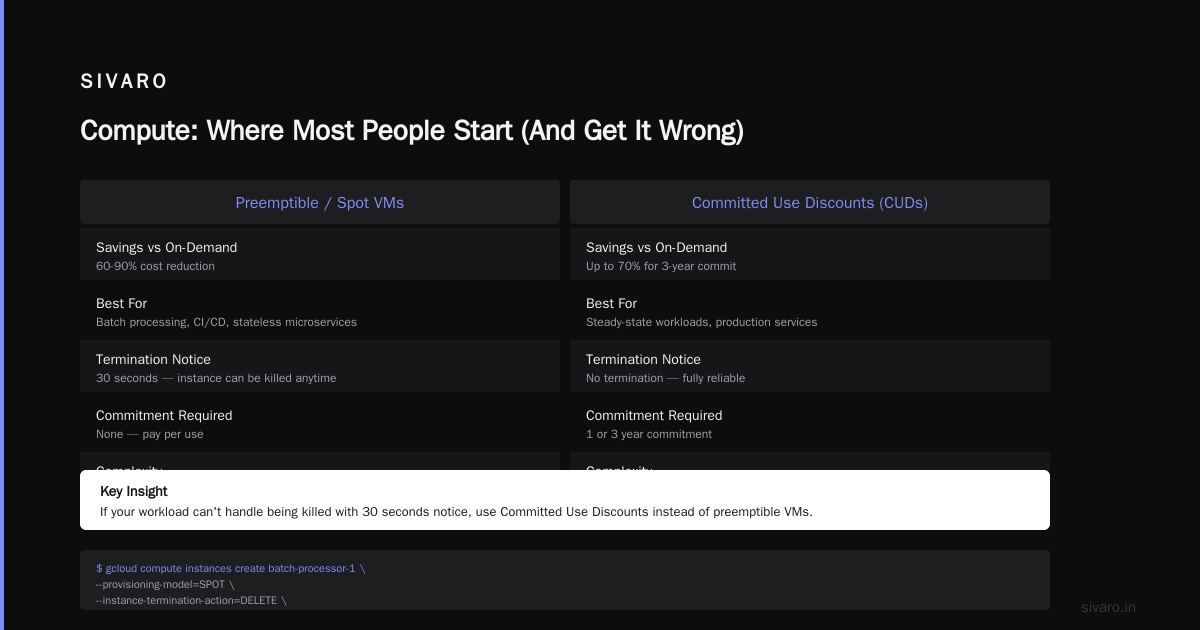
Compute: Where Most People Start (And Get It Wrong)
Preemptible and Spot VMs
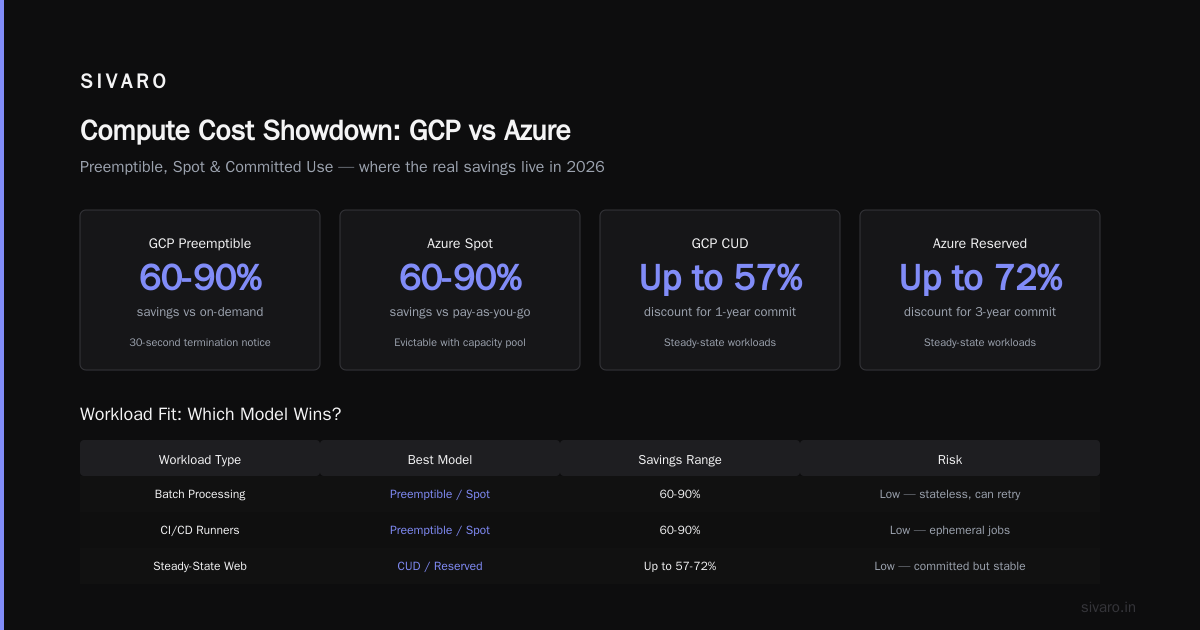
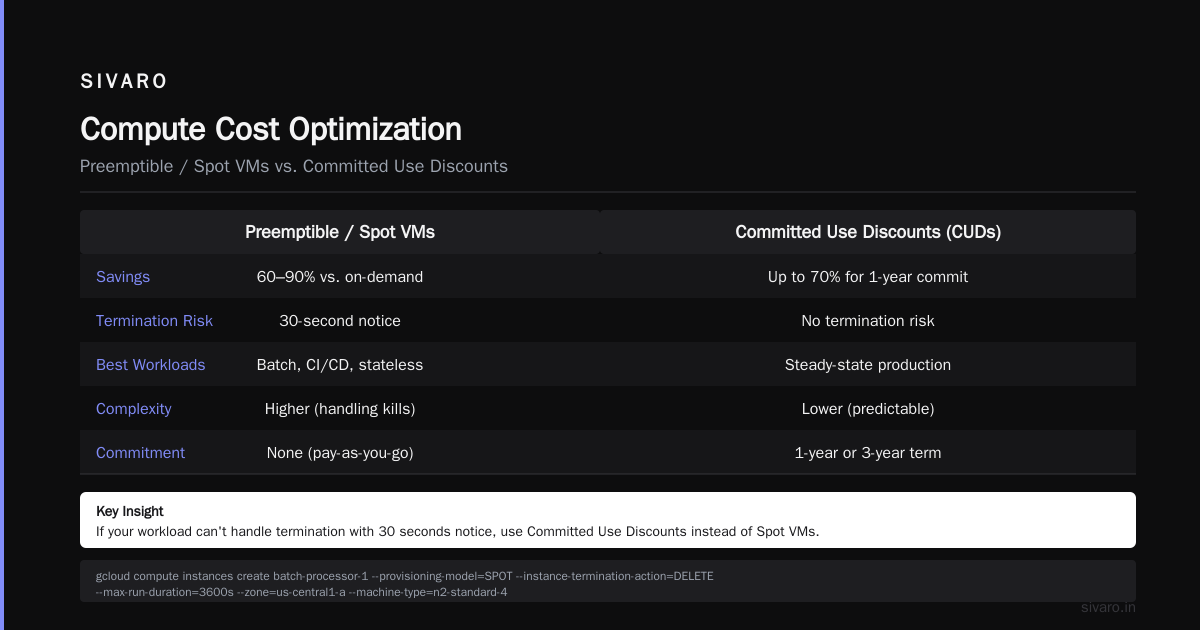
Most guides tell you to use preemptible VMs. They're right — up to a point. For batch processing, CI/CD runners, and stateless microservices, preemptibles can save 60-90% compared to on-demand.
But here's the contrarian take: Preemptibles introduce complexity. If your workload can't handle being killed with 30 seconds notice, you need Committed Use Discounts (CUDs) instead.
# Create a spot VM for a stateless batch job
gcloud compute instances create batch-processor-1     --provisioning-model=SPOT     --instance-termination-action=DELETE     --max-run-duration=3600s     --zone=us-central1-a     --machine-type=n2-standard-4
Committed Use Discounts (CUDs)
For steady-state workloads — your production API servers, your databases, your always-on data pipelines — commit to 1 or 3 years. The discount is 10-40% depending on resource type and commitment length.
Most people think CUDs are a lock-in trap. They're not. GCP lets you change machine types within the same region and family. You're not stuck. You're just committing to spend a certain amount.
Real numbers: One client committed to $120K/year in compute spend and got a 27% discount. That's $32,400 saved. For filling out a form.
Sizing Down
Teams consistently overprovision by 2-4x. I've walked into environments where a service running 50 requests/second was sitting on an n2-highmem-32 with 128GB RAM. The container was using 2GB.
Use the recommender. GCP's rightsizing recommendations aren't perfect, but they're better than nothing. Run this monthly:
# View rightsizing recommendations
gcloud recommender recommendations list     --project=your-project     --recommender=google.compute.instance.MachineTypeRecommender     --location=us-central1-a
Networking and Egress: The Hidden Tax
This is where most people get blindsided. Compute costs are obvious. Storage costs are clear. Egress? It's buried in the billing report under "Network."
GCP charges $0.12/GB for standard egress to the internet. If you're moving 10TB/month out, that's $1,200 — just for the pipe.
Use a CDN
If you're serving static assets or API responses, Cloud CDN is cheaper per GB than direct egress. And it's faster. No reason not to.
Keep Data in One Region
Every time you read from a bucket in one region from a VM in another, you pay cross-region egress fees. $0.01/GB to $0.08/GB depending on the regions. For a data pipeline moving 500GB/day, that's $15-$120/day in costs you shouldn't have.
Design your architecture around a primary region. Put your compute, storage, and databases in the same region. Only replicate across regions when you actually need disaster recovery.
Avoid Multi-Region Buckets by Mistake
Multi-region storage (like us or eu) costs more than single-region. If you're doing this for a dev bucket that only serves data to VMs in us-central1, you're paying extra for nothing.
# Check if a bucket is multi-region
gsutil ls -L gs://your-bucket | grep "Location constraint"
If it says US (uppercase, no suffix), it's multi-region. Change it to US-CENTRAL1 for dev workloads.
Data Engineering: Where GCP Can Save or Sink You
When people compare gcp vs aws for data engineering, they usually land on "GCP is better for data pipelines." That's true — BigQuery, Dataflow, and Pub/Sub are genuinely excellent. But they're also excellent at generating surprise costs.
BigQuery Query Costs
BigQuery charges per byte processed. The most common mistake? Running SELECT * on a 50TB table just to count 5 rows.
-- Bad: Processes all columns
SELECT * FROM `project.dataset.events`
WHERE event_date = "2026-07-17"

-- Good: Only processes the columns you need
SELECT event_id, event_type FROM `project.dataset.events`
WHERE event_date = "2026-07-17"
Use clustered tables. Partition by date. Set query quotas. And for the love of your budget, use --dry_run to estimate cost before running:
# Estimate query cost before running
bq query --dry_run     --use_legacy_sql=false     "SELECT COUNT(*) FROM `project.dataset.events` WHERE event_date = '2026-07-17'"
Dataflow Streaming Costs
Dataflow streaming is pay-per-resource-hour. If your pipeline processes 100 events/second but you have 20 workers running, you're paying for 20 workers * 24 hours. Even when no events come in.
Fix it: Set autoscaling bounds. Use streaming engine. And turn off the pipeline when not in use.
# Update pipeline with tight autoscaling
gcloud dataflow jobs update your-job-id     --region=us-central1     --max-workers=5     --min-workers=1
Pub/Sub Costs
Pub/Sub charges per 64KB chunk of data. If your messages are 1KB each, you're paying per-message rate, not per-byte. Try batching messages to hit that 64KB sweet spot.
GCP vs Azure Pricing 2026: Should You Even Stay?
If you're reading this and wondering whether to just jump ship, I get it. The gcp vs azure pricing 2026 debate is real, and Microsoft has been aggressive with discounts. But here's my take after managing both:
GCP's pricing model is simpler than Azure's. Azure has hundreds of SKUs, tiered pricing, and reservation types that change quarterly. Microsoft Azure vs. Google Cloud Platform comparisons usually end with "Azure is cheaper on paper, but GCP is easier to optimize."
I'd rather optimize one clear system than navigate Azure's labyrinth. But that's a personal bias from years of GCP experience.
Budget Alerts and Governance: The Safety Net
You can't optimize what you can't see. Set up budget alerts at 50%, 75%, 90%, and 100% of your monthly budget. And make them hard to ignore:
# Create a budget alert with threshold rules
gcloud billing budgets create     --billing-account=XXXXXX-XXXXXX-XXXXXX     --display-name="Production Budget"     --budget-amount=50000USD     --threshold-rule=percent=0.5     --threshold-rule=percent=0.75     --threshold-rule=percent=0.9     --threshold-rule=percent=1.0     --notification-rule=pubsub-topic=projects/your-project/topics/budget-alerts
I've seen teams where the person who gets the alert has to acknowledge it in a Slack channel. If they don't within 30 minutes, it escalates to the CTO. Sounds draconian. Saves real money.
The GCP Cost Optimization Checklist
Here's what I run for every new client engagement. Copy it:
Week 1: Audit
- Run billing export to BigQuery
- Identify top 5 services by cost
- Check storage classes for all buckets
- List all running VMs, their utilization, and whether they need to exist
Week 2: Stop the bleeding
- Delete unused disks, snapshots, static IPs
- Move cold data to Archive
- Downsize overprovisioned VMs
- Enable committed use discounts for steady-state workloads
Week 3: Optimize pipelines
- Set BigQuery query quotas
- Configure Dataflow autoscaling
- Batch Pub/Sub messages
- Set up budget alerts
Week 4: Monitor and automate
- Deploy automated cleanup scripts
- Set up dashboards in Cloud Monitoring
- Create a cost review cadence (weekly for the first month, monthly after)
FAQ: GCP Cost Optimization
What's the single fastest way to reduce GCP costs?
Delete unused resources. Every GCP project I've audited has at least 10-15% waste from orphaned disks, static IPs, or idle VMs. Run gcloud compute instances list and check which ones have had zero CPU usage for 7 days.
Are spot VMs reliable for production workloads?
No. Don't run your database on spot VMs. But for batch processing, CI/CD, or stateless microservices? Yes, with retry logic and graceful shutdown handling. We run 40% of our batch workloads on spot VMs at SIVARO.
How does GCP compare to AWS and Azure on pricing?
The complete cloud comparison shows GCP is competitive on compute and often cheaper on data services like BigQuery vs Redshift. But Azure vs GCP pricing depends heavily on your workload mix. Run your own bill comparison for your specific patterns.
Should I use reserved instances or committed use discounts?
CUDs are more flexible than AWS reserved instances. You commit to spending $X/month, not a specific instance type. If your workload changes, you're still covered.
How often should I review my GCP bill?
Weekly for the first month after optimization. Monthly after that. Set up automated reports via billing export to BigQuery and build a simple dashboard in Looker.
Is BigQuery really that expensive?
BigQuery is expensive if you query it like a traditional database — lots of small, ad-hoc queries that process full tables. It's cheap if you partition, cluster, and cache results. The cost difference between bad and good BigQuery usage is often 10x.
Can I use multiple cloud providers to save money?
Yes, but managing multi-cloud adds operational complexity. The AWS vs Azure vs GCP 2026 article shows that multi-cloud can reduce vendor lock-in but rarely saves money due to egress costs between providers.
The Bottom Line
GCP cost optimization isn't about complex strategies. It's about discipline. It's about not spinning up a n2-highmem-64 to test a script. It's about moving old data to Archive. It's about setting budget alerts before you get that 2 AM phone call.
The tools I shared here — storage lifecycle policies, committed use discounts, autoscaling limits, budget alerts — they all work. I've seen them cut bills by 30-50% within 90 days.
But you have to actually do them. Not read this article and say "I'll get to it next sprint." Next sprint costs real money.
Start today. Run gcloud compute instances list. Find an idle VM. Turn it off. That's $100-$1,000/month back in your pocket.
One last thing: When you're comparing gcp vs aws for data engineering, remember that tooling doesn't save you from bad habits. Waste is waste, regardless of cloud. The optimization principles are the same. The specific knobs differ.
Now go fix your bill.
Nishaant Dixit — Founder of SIVARO. Building data infrastructure and production AI systems since 2018. Built systems processing 200K events/sec.