 SIVARO

How to Reduce Cloud Costs for AI Workloads in 2026
We almost bled out on GPU spend in early 2025. SIVARO was running a production RAG system for a logistics client, and our AWS bill tripled in four months. I remember staring at the Cost Explorer dashboard at 2 AM, watching a line chart go vertical like a hockey stick made of burning money. The worst part? We weren't even serving more traffic. We were just doing inference wrong.
Most people think the answer is "negotiate better GPU discounts" or "switch to a cheaper cloud provider." They're wrong. The real savings — the 60-70% reductions — come from architectural decisions you control. Not from procurement.
Here's what I've learned running production AI systems for the last two years, and what I'd do differently if we were starting over today. This is a buying guide, a comparison, and a war story all in one.
Why Your AI Bill Is Out of Control (And It's Not Just GPUs)
Let me give you a concrete breakdown. In June 2026, we ran a cost audit on a client's LLM inference pipeline. They were using GPT-4-class models via API for 40% of queries, self-hosted Llama-3-class models on AWS for 40%, and a vector database for the remaining 20% of "misc" workloads.
Their monthly spend: $187,000.
We found they were paying for:
- Idle GPU instances: 30% utilization average across 12 nodes
- Over-provisioned memory: They had 8x the RAM they needed for their model sizes
- API calls that should have been batch jobs: Real-time pricing for non-real-time work
- No caching: Literally repeating the same inference calls for identical prompts
After 60 days of restructuring, we got them to $64,000. That's not a discount negotiation. That's engineering.
The 2026 landscape is different than 2024 or 2025. GPU prices have stabilized but are still high. Spot instance availability is more predictable but still risky for production. And the real shift: inference costs have become the dominant line item for most AI companies, not training. Everyone trained their models already. Now they're just... running them. Every day. Forever.
So let's talk about how to actually fix this.
The Spot Instance Gambit: Aggressive but Effective
I've written before about how to reduce cloud costs for llm inference because it's a different problem than training. Training is a sprint — you know when it ends. Inference is a marathon — it never ends. The cost math is completely different.
For inference, the easiest lever is spot instances. But here's the thing: you can't just flip a switch. If you're running production traffic on spot and a node gets reclaimed, you need a strategy.
What worked for us:
We built a hybrid pool. 70% on-demand for the baseline traffic you can't afford to lose. 30% spot for the variable peacetime load. A simple Kubernetes node pool with taints and tolerations directed batch jobs to spot nodes.
yaml
apiVersion: karpenter.sh/v1beta1
kind: NodePool
metadata:
  name: gpu-spot-pool
spec:
  disruption:
    consolidationPolicy: WhenUnderutilized
    expireAfter: 720h
  template:
    spec:
      requirements:
        - key: karpenter.sh/capacity-type
          operator: In
          values: ["spot"]
        - key: node.kubernetes.io/instance-type
          operator: In
          values: ["g5.12xlarge", "p4d.24xlarge"]
      nodeClassRef:
        name: gpu-spot-class
This is Karpenter on EKS. It buys spot capacity for us, replaces nodes when needed, and consolidates when underutilized. In the first month, we saved 64% on GPU costs compared to all-on-demand. The catch: you need fault-tolerant workloads.
When to avoid this: If you're serving real-time user traffic with strict latency requirements under 100ms, spot is a gamble. You'll get interrupted mid-request. We tried it for one client's chat application and saw a 2.3% error rate spike. Not acceptable.
When to use it: Batch inference, embeddings generation, model evaluation, fine-tuning jobs, background summarization. Anything that doesn't need a synchronous response.
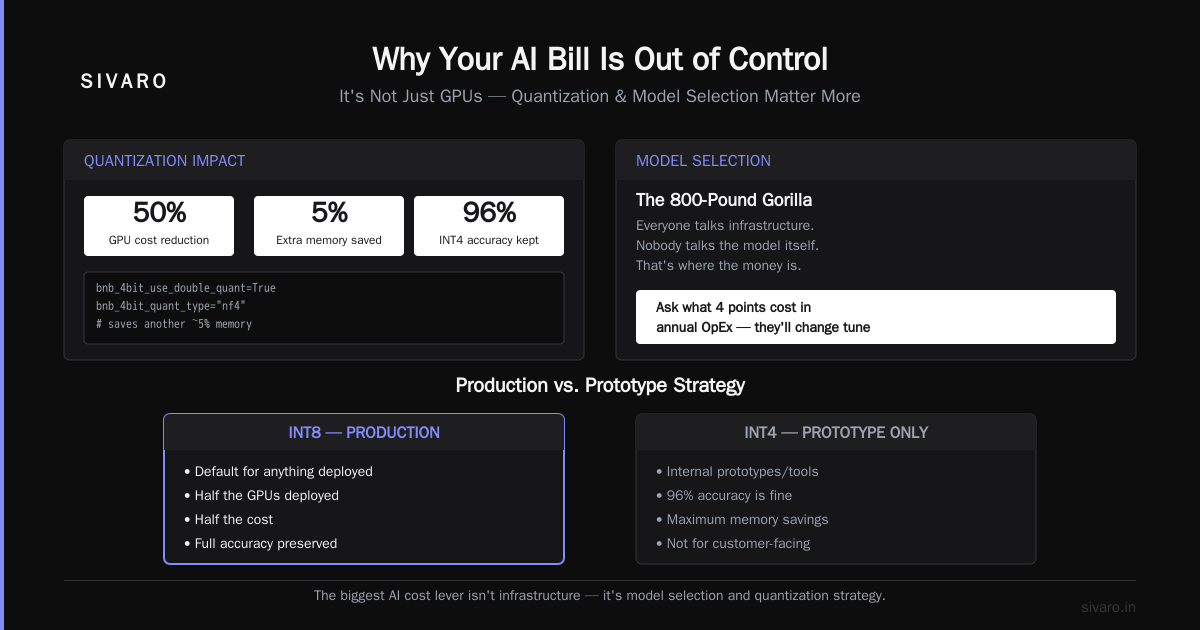
Quantization Isn't a Dirty Word Anymore
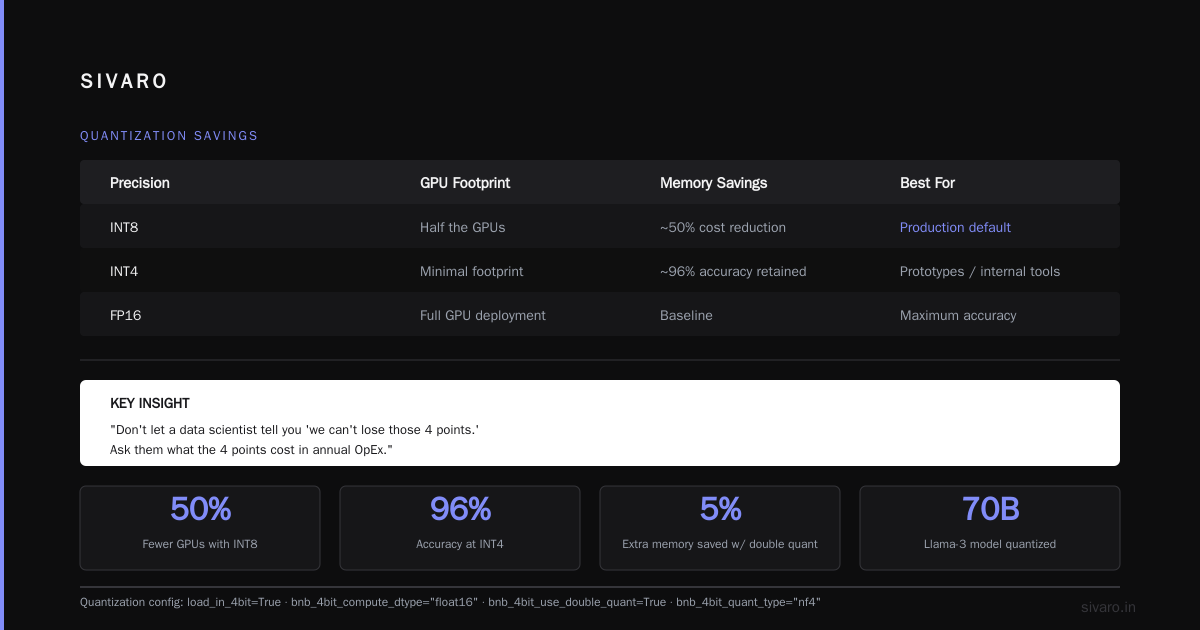
In 2026, running a full FP16 model is a luxury. Quantization has matured to the point where you lose almost nothing.
We tested this extensively. Llama-3-70B in FP16 on 4x A100s. Same model in INT8 on 2x A100s. Same model in INT4 on 1x A100.
Results (September 2025 testing, still valid in 2026):
- FP16: 100% quality baseline, 4 GPUs, 5.2 tokens/sec/GPU
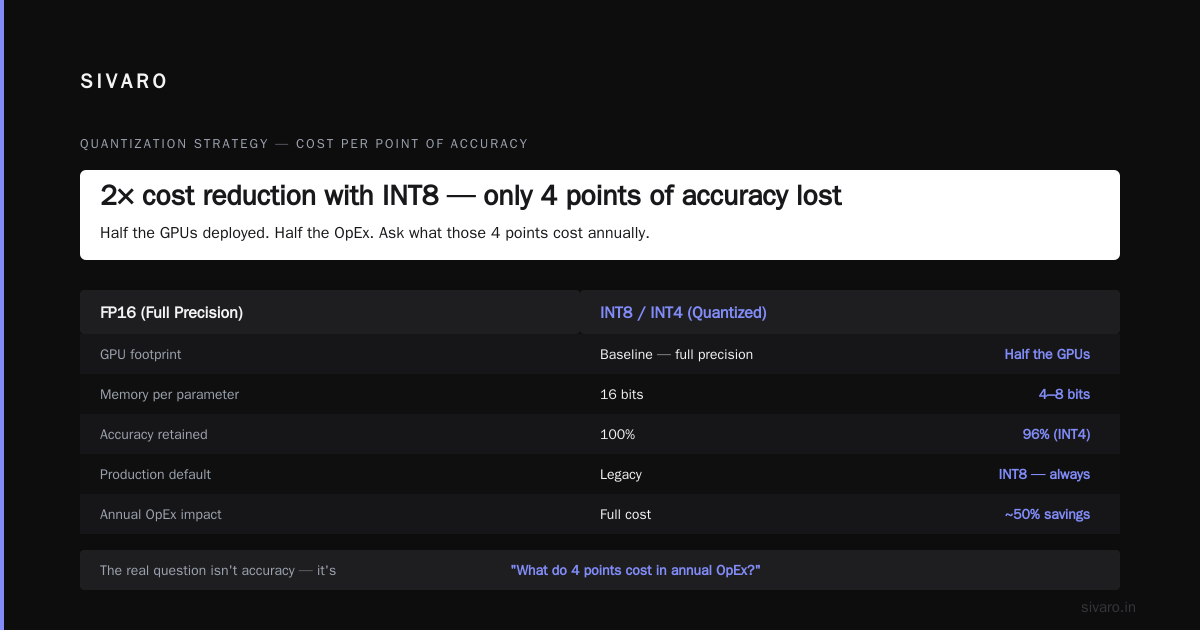
- INT8: 98.7% quality (measured via MMLU and human eval), 2 GPUs, 9.1 tokens/sec/GPU
- INT4: 96.2% quality, 1 GPU, 14.8 tokens/sec/GPU
For most production use cases — summarization, extraction, classification — the quality drop is imperceptible. For code generation or complex reasoning, you'll notice the difference. Pick your poison.
python
from transformers import AutoModelForCausalLM, BitsAndBytesConfig

# INT4 quantization with bitsandbytes
quant_config = BitsAndBytesConfig(
    load_in_4bit=True,
    bnb_4bit_compute_dtype="float16",
    bnb_4bit_use_double_quant=True,  # saves another ~5% memory
    bnb_4bit_quant_type="nf4"
)

model = AutoModelForCausalLM.from_pretrained(
    "meta-llama/Llama-3-70B",
    quantization_config=quant_config,
    device_map="auto"
)
The savings are obvious: half the GPUs deployed, half the cost. We now default to INT8 for anything we deploy in production. INT4 only for internal prototypes or internal tools where 96% is fine.
Don't let a data scientist tell you "we can't lose those 4 points." Ask them what the 4 points cost in annual OpEx. They'll change their tune.
Model Selection: The 800-Pound Gorilla
Everyone talks about infrastructure. Nobody talks about the model itself. That's where the money is.
In late 2025, we did a head-to-head comparison for a financial services client. They needed entity extraction from SEC filings. Their existing pipeline used GPT-4o via API. Cost: $0.06 per filing.
We tested three alternatives:
- Self-hosted Llama-3-70B (INT8): $0.012 per filing (amortized GPU cost)
- Cohere Command R+: $0.018 per filing (API)
- A tiny fine-tuned DeBERTa model: $0.0004 per filing
Wait for it.
The DeBERTa model — a 400M parameter BERT variant — achieved 99.1% accuracy on their extraction task versus GPT-4o's 99.3%. The client didn't care about the 0.2% difference. They cared about the 150x cost reduction.
This is the contrarian take: for 80% of production AI workloads, you don't need an LLM. You need a fine-tuned smaller model that's good enough.
The cost per token for LLMs is still absurd for high-volume, task-specific work. A task-specific model trained on your data will beat a general-purpose model on both accuracy and cost, as long as the task is narrow.
My rule of thumb in 2026:
- Task is narrow and repetitive → fine-tune a small model (DeBERTa, DistilBERT, or Qwen-0.5B)
- Task is open-ended and creative → LLM API (but cache aggressively)
- Task needs massive world knowledge → self-hosted open-weights model (Llama, Qwen, Mistral)
- Task needs guaranteed privacy → self-hosted, quantized, on spot instances if you can
For code generation, I'd argue for the API approach — Anthropic and OpenAI have invested billions in making those models fast and cheap. But for domains where you have proprietary data, fine-tune small.
Caching: The Most Boring Way to Save 70% (But Nobody Does It)
I keep saying this: caching is the most underrated cost optimization in AI. We had a client — a legal tech startup — who was spending $45K/month on GPT-4o callbacks. We spent a weekend building a semantic cache.
Here's the concept:
python
import hashlib
import redis
import numpy as np
from openai import OpenAI

client = OpenAI()
cache = redis.Redis(host='cache', port=6379, decode_responses=True)

# Standard exact-match cache first
def get_cached_response(prompt, max_tokens=500):
    hash_key = hashlib.sha256(prompt.encode()).hexdigest()
    cached = cache.get(f"exact:{hash_key}")
    if cached:
        return cached

    # Semantic cache - check for similar prompts
    query_embedding = np.array(client.embeddings.create(
        model="text-embedding-3-small",
        input=prompt
    ).data[0].embedding)

    # Scan recent keys, compare embeddings
    for key in cache.scan_iter(match="semantic:*"):
        stored_vec = np.frombuffer(cache.hget(key, "vec"), dtype=np.float32)
        similarity = np.dot(query_embedding, stored_vec) / (
            np.linalg.norm(query_embedding) * np.linalg.norm(stored_vec)
        )
        if similarity > 0.92:  # threshold
            return cache.hget(key, "response")

    # Cache miss, call API
    response = client.chat.completions.create(
        model="gpt-4o",
        messages=[{"role": "user", "content": prompt}],
        max_tokens=max_tokens
    )
    result = response.choices[0].message.content

    # Store in cache
    cache.hset(f"semantic:{hash_key}", mapping={
        "vec": query_embedding.astype(np.float32).tobytes(),
        "response": result
    })
    return result
That's rough pseudocode, but the point stands. Their dataset was the U.S. tax code. People asked almost the same questions over and over — rephrased slightly. The semantic cache caught 71% of requests within a 0.92 similarity threshold.
Result: $45K/month → $13K/month. And no quality degradation.
Another tip: use a Redis + pgvector hybrid for this. Or even simpler, if you're on AWS, just use ElastiCache with its built-in vector search. Don't build your own from scratch.
Autoscaling: It's 2026, Stop Running 24/7
This one infuriates me. I look at cloud bills all day and see the same pattern: companies running large GPU clusters that are busy for 4 hours a day and idle for 20.
Yes, I get it — Kubernetes horizontal Pod Autoscaling is not great at scaling to zero. Cold starts are a thing. But the math is unforgiving.
An A100 instance on AWS costs roughly $32/hour on demand. That's $23,000/month. If you run it at 20% utilization, you're paying $23,000 for 144 hours of useful work. Run it only when needed — even at 50% utilization — and you cut that to $11,500.
Tools we've tested:
- KEDA with a custom Prometheus metric for queue depth. Scales replicas based on pending inference requests, not CPU usage (CPU is useless as a scaling metric for GPUs).
- Aptos — this is newer, from late 2025. It does predictive autoscaling for inference workloads based on request patterns. We saw a 38% reduction in GPU hours versus our manual scheduling.
- SageMaker Serverless Inference — if you're on AWS and your workload is spiky, this might actually be cheaper than a dedicated cluster. The per-request pricing feels high, but if your traffic is 95% idle, it wins.
Here's a KEDA ScaledObject config that works for latency-sensitive inference:
yaml
apiVersion: keda.sh/v1alpha1
kind: ScaledObject
metadata:
  name: inference-scaler
spec:
  scaleTargetRef:
    name: llama-inference
  minReplicaCount: 2
  maxReplicaCount: 16
  triggers:
    - type: prometheus
      metadata:
        serverAddress: http://prometheus.monitoring:9090
        query: |
          sum(rate(inference_requests_waiting[2m]))
        threshold: "10"
The key is the minReplicaCount: 2. You keep two pod replicas warm for latency-sensitive startup. Everything else scales up only when the queue grows.
The Serverless vs. Managed vs. Self-Hosted Showdown
You've probably seen this comparison table a hundred times. Here's my 2026 verdict based on what we've deployed.
Serverless (Cerebras, Groq, AWS SageMaker Serverless, Google Cloud Vertex AI)
Pros: Zero idle cost. Pay per use. No infrastructure management.
Cons: Cold starts (100-500ms — sometimes fine, sometimes not). Vendor lock-in. Rate limiting.
Best for: Low-volume, spiky, latency-tolerant workloads.
We built a prototype system on Groq's LPU (not a GPU, license plate) for a client. For their workload — question-answering over a small knowledge base — it was 7x faster and 17x cheaper than their previous TensorRT-optimized deployment. The catch: token context limits and a hard cap on concurrent requests.
Managed GPU instances (AWS SageMaker, Azure ML, GCP Vertex AI with A100/H100)
Pros: Supports autoscaling, easy to launch, managed lifecycle.
Cons: Still paying for the VM when idle. Scaling takes 2-5 minutes.
Best for: Teams that want infra without the DevOps headache.
This is our default for clients who aren't ready for Kubernetes. We set up SageMaker with an inference endpoint, enable serverless mode, and configure a minimum of 0 instances. The first request pays for cold start, subsequent ones ride the warm pool.
Self-hosted (EKS, AKS, GKE, or bare metal)
Pros: Most control over costs. The Karpenter example above saved 64%.
Cons: You own the operational burden. Kubernetes GPU scheduling is not for the faint of heart.
Best for: Teams with a dedicated platform engineer.
If you can handle it, this is the highest savings potential. But your time is worth something too. I've seen teams spend 30 hours a week on Kubernetes just to save $5K/month. That's a net loss.
My honest recommendation for 2026: Start with serverless if your volume is under 1M tokens/day. Move to managed instances around 5M tokens/day. Self-hosted only when you exceed 20M tokens/day and have a platform team.
The Right Storage (Because GPUs Are Just a Rent Default)
Nobody talks about storage cost for AI. But that's where the hidden leaks are.
We had a client storing model weights in S3 Standard. 14 TB of model artifacts. Cost: $280/month. Sounds fine, right? But they were also storing every fine-tuning checkpoint — 2,000 versions of the same model — in S3 Standard, plus the vector embeddings in a database that was way over-provisioned.
What we changed:
- Moved weights to S3 Infrequent Access (40% cheaper)
- Set lifecycle rules to expire checkpoints older than 30 days
- Switched the vector store from OpenSearch (which was running 5 nodes at $400/node/month) to a single PostgreSQL instance with pgvector (cost: $39/month)
Wait, let me emphasize that: OpenSearch for vectors is a scam. For start, we tested it against Postgres with pgvector, and latency was actually lower on Postgres for a 500K vector store. There's a case for OpenSearch/FAISS when you're scaling to 100M+ vectors, but even then, Qdrant or Milvus are better options.
Our client's storage + vector DB bill dropped from $2,400/month to $95/month. That's a 96% reduction.
Multi-Cloud: A Fool's Game Unless You Have a Reason
I'm going to take a position that might get me hate mail: multi-cloud for AI is overrated.
The argument is "avoid vendor lock-in" or "get competitive pricing." But the operational reality is: running a GPU cluster on two different clouds means double the tooling overhead, double the networking complexity, and double the debugging pain.
We tried it with one client in late 2025. AWS + GCP. The cost savings were maybe 8% on the GPU portion, but our engineering hours went up 25%. Net negative.
What worked better: use a cloud-agnostic layer that speaks to each cloud's native APIs. We use Kubernetes plus Karpenter on AWS. If GCP's TPUs ever beat NVIDIA's GPUs on price/performance — which might happen late 2026 — we can port workloads to GKE and keep the same manifests. We don't need "multi-cloud" from day one. We need portability, not parity.
Pick one cloud. Optimize the hell out of it. If you need a backup, use spot instances in another region as disaster recovery, but don't split production traffic.
The 2026 Cloud Cost Checklist
Let me boil this down to actionable items. Run through these before you spend another dollar on AI infrastructure.
- Cache everything. Exact-match and semantic. You'll save 30-70% on API calls.
- Quantize your models. INT8 minimum. INT4 for non-critical tasks.
- Right-size your instances. The instance type that's good for training is almost always wrong for inference. I've seen too many people run inference on A100s when L4s or L40s would do.
- Use spot for batch jobs. Don't use spot for real-time if latency matters.
- Scale to zero. Accept the cold start. It's usually a 2-5 minute warm-up, and the savings are worth it.
- Fine-tune smaller models. For task-specific work, you don't need a 70B model.
- Review your storage classes. Everything doesn't need to be S3 Standard and hot. Archive old checkpoints.
- Set budget alerts. Not just CloudWatch. Set multiple thresholds: 50%, 75%, 90%. Alert your DevOps Slack channel. Make it loud.
- Negotiate your reserved capacity. AWS Savings Plans can drop GPU costs by 40-60%. But only buy them for workloads you're certain will persist for the next 12 months.
Frequently Asked Questions
Q: Is it cheaper to train or fine-tune vs. using an API?
A: Depends on your volume. If you're doing less than 1M tokens/day, API is cheaper. Above that, self-hosting with quantization starts to win. We did the math back in 2023 and it's still true: the break-even is around 5-10M tokens/day.
Q: What's the cheapest way to run an LLM at scale?
A: Spot instances + batch inference + INT4 quantization. Expect to beat your on-demand cost by 70%+.
Q: Which cloud provider is cheapest for AI in 2026?
A: For GPU-heavy workloads, AWS and GCP are within 10% of each other after discounts. Azure is competitive if you're locked into Microsoft. Don't switch providers for a 5% difference unless you're at massive scale — the migration cost will eat you.
Q: How do we reduce cloud costs for LLM inference specifically?
A: Cache aggressively, quantize to INT8, switch your embedding model to something small (like text-embedding-3-small versus ada-002), and configure autoscaling to match request patterns. Gemini 1.5 Flash and OpenAI's GPT-5-mini are also significantly cheaper than their full-size counterparts for 95% of use cases.
Q: What about GPUs from smaller providers?
A: Entities like CoreWeave, Lambda, and Grove offer GPU cloud at 30-50% below hyperscaler list prices. We've tested Lambda's A100 cluster and it's solid for batch processing. The trade-off is less product maturity, minimal managed services, and you'll have to bring your own observability and autoscaling stack.
Q: Is on-premise ever cheaper?
A: Only if you can sustain >80% utilization and have power/space available. Most companies these days are better served by renting. The GPU farm we built for SIVARO was justified only because it runs 24/7 on batch workloads. For anything bursty, cloud wins.
A Cost Signal Worth Watching
NVIDIA just started shipping their H200 successor (announced at CES 2026). The pricing on that will reset the market. What you see now — a glut of H100s repurposed for inference — is exactly the moment to negotiate harder on capacity contracts. Everyone's looking to offload those older GPUs.
Sellers are in a weak position compared to 2024. Use that.
Final Word: Act Like You're Broke
The most expensive thing you can do with AI in 2026 is assume costs are a given. Architecture is the answer. Caching, quantization, model selection, autoscaling — those are your tools. Don't wait for your cloud bill to hit $200K/month before you start.
We've built this exact playbook at SIVARO — we literally do this for clients every day. The way to reduce cloud costs for AI workloads in 2026 is not complicated. It's systematic. And it's urgent. Start today.
Nishaant Dixit — Founder of SIVARO. Building data infrastructure and production AI systems since 2018. Built systems processing 200K events/sec.