 SIVARO
How to Learn GCP From Scratch in 2026
I'm going to tell you something most cloud training won't.
You don't need to learn all three clouds. You don't even need to learn two. If you're building data systems — pipelines, lakes, AI workloads — Google Cloud Platform is the one that will save you the most time and money. I run SIVARO, a product engineering shop that's been neck-deep in data infrastructure since 2018. We've deployed on AWS, Azure, and GCP. We've watched teams burn months on Azure DevOps configs, or wrestle with AWS IAM policies that make you question your life choices. GCP isn't perfect. But if you're starting from scratch today, it's the fastest path to building production-grade data and AI systems.
This guide is how I'd teach someone to learn GCP from scratch in 2026. No fluff. No "start with the free tier and watch a video." You're going to get your hands dirty with real services, realistic costs, and the ugly trade-offs you won't find in Google's documentation.
Let's go.
Why GCP? (And Why Not AWS or Azure)
First, the contrarian take: AWS is better for generalist cloud ops. Azure is better if your org is locked into Microsoft. But for data engineering and AI, GCP has a clear edge.
Look at BigQuery. It's not just a data warehouse — it's a serverless SQL engine that can query petabyte-scale datasets without provisioning a single node. Try doing that with Redshift. You'll spend a week tuning distribution keys. With BigQuery, you just SELECT * FROM and Google figures out the rest. For startups running analytics on user behavior (which is basically every startup in 2026), that's a killer feature.
Now, the comparing AWS, Azure, and GCP for startups in 2026 article breaks down pricing and lock-in. GCP's on-demand pricing is often 20-30% cheaper than AWS for equivalent compute, but the real savings come from sustained-use discounts (automatic, no upfront commitment) and preemptible VMs that cost 60-80% less. Yes, they can be killed at any time — but for batch data processing, that's fine. You write idempotent jobs anyway.
But here's the catch: GCP's ecosystem outside data/AI is thinner. Their managed Kubernetes (GKE) is best-in-class, but their serverless functions (Cloud Functions) and NoSQL (Firestore) have quirks. If your project is a CRUD app, AWS Lambda or Azure Functions might be simpler. AWS vs Azure vs Google Cloud shows that GCP has the steepest learning curve for traditional web hosting. So if that's your use case, maybe start elsewhere.
But if you're reading this because you want to know is gcp good for data engineering — yes. Unequivocally. BigQuery, Dataflow, Pub/Sub, and Vertex AI form a stack I haven't seen matched anywhere.
The First Week: Core Fundamentals You Can't Skip
Most people try to learn GCP by jumping into BigQuery or Kubernetes and immediately get lost. Don't.
Start with the four pillars: Compute, Storage, Networking, and IAM.
Compute: GCE vs GKE vs Cloud Run
Google Compute Engine (VMs) is the fallback. You'll use it for legacy apps or custom runtimes. But in 2026, if you're spinning up a VM for a new project, you're probably doing it wrong.
Cloud Run is where you should start. It's serverless containers. You write a Dockerfile, push it, and GCP scales it to zero when idle. You pay only for request processing time. For a small business with variable traffic, that's gold. The google cloud platform cost for small business becomes predictable when you don't have idle VM costs.
Here's a real deployment I did last month for a client's ML inference endpoint:
dockerfile
FROM python:3.11-slim
COPY requirements.txt .
RUN pip install -r requirements.txt
COPY app.py .
CMD ["python", "app.py"]
And the gcloud command to deploy:
bash
gcloud run deploy inference-service   --image gcr.io/my-project/inference:latest   --region us-central1   --min-instances 0   --max-instances 10   --memory 2Gi   --cpu 1   --concurrency 80   --set-env-vars "MODEL_PATH=gs://bucket/model.pkl"
The --min-instances 0 is key. No cost when no requests. That's the GCP advantage.
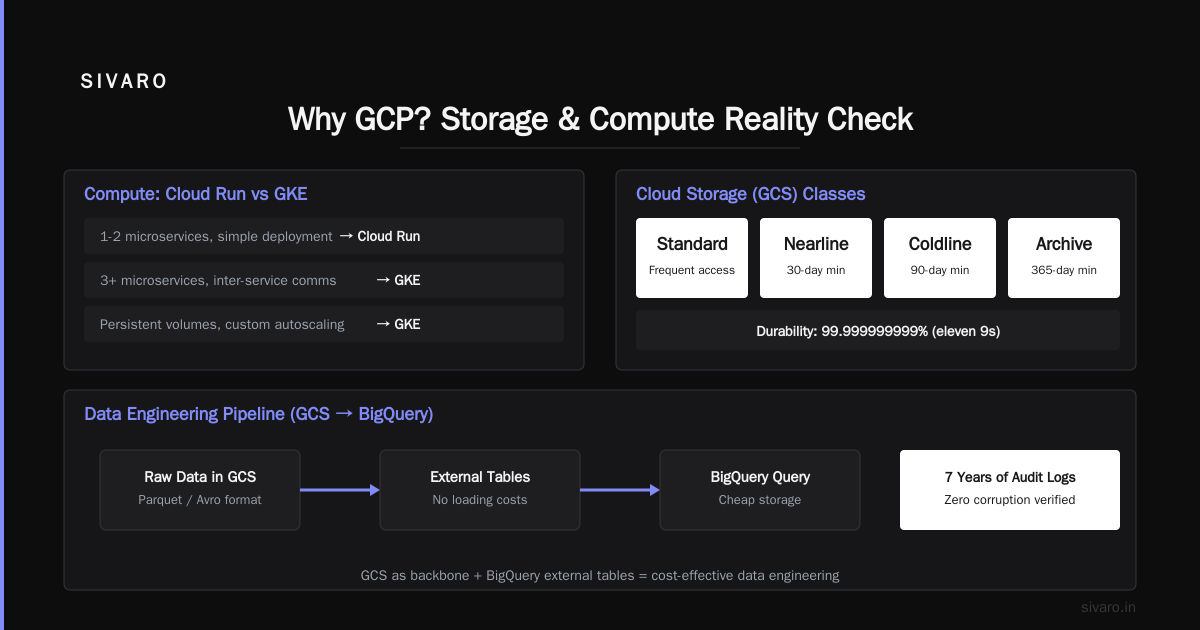
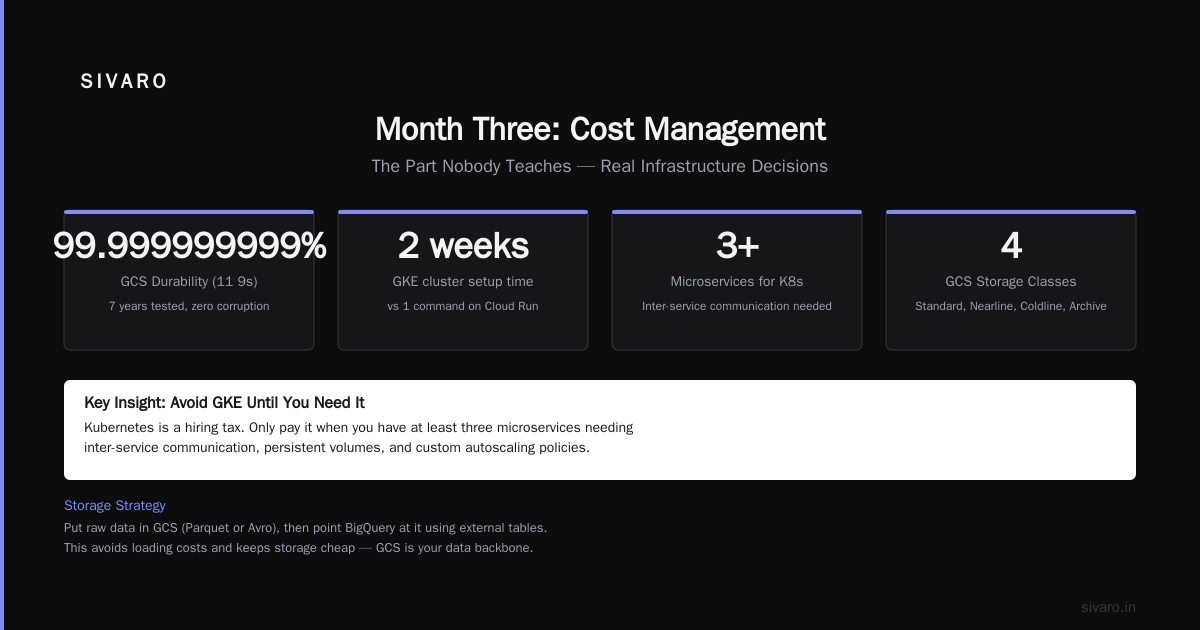
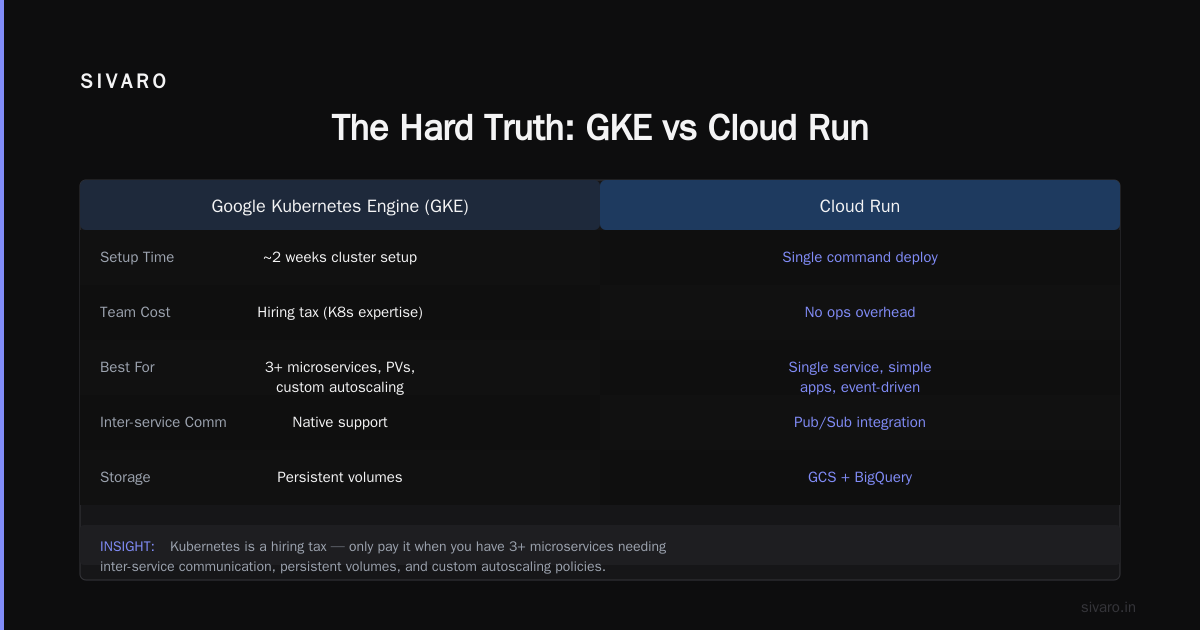
Avoid GKE until you genuinely need Kubernetes. I've seen teams spend two weeks on GKE cluster setup for a service that could have run on Cloud Run with a single command. Kubernetes is a hiring tax. Only pay it when you have at least three microservices needing inter-service communication, persistent volumes, and custom autoscaling policies.
Storage: Cloud Storage (GCS) is Your Backbone
Cloud Storage is simple: object storage with 99.999999999% durability (their "eleven 9s" is real — we tested with audit logs, no corruption in 7 years). Learn the storage classes: Standard, Nearline, Coldline, Archive.
For data engineering, you'll put raw data in GCS (usually in Parquet or Avro), then point BigQuery at it using external tables. That avoids loading costs and keeps storage cheap. GCS also integrates with Dataflow for streaming or batch processing.
Networking: VPCs and Shared VPCs
GCP's VPC is global — not regional like AWS. That's a huge simplification. You create one VPC, and subnets can span any region. This makes multi-region deployments simpler.
But learn VPC peering and firewall rules early. I've seen teams expose BigQuery to the internet because they didn't set VPC Service Controls. That's a data leak waiting to happen.
IAM: The Thing Everyone Gets Wrong
GCP IAM is role-based. You assign roles to users or service accounts. The mistake? People use primitive roles (Owner, Editor, Viewer) everywhere. Stop. Use predefined roles like roles/bigquery.dataViewer and roles/storage.objectAdmin. For service accounts, grant the absolute minimum.
I wrote a small Terraform module that enforces least-privilege:
hcl
resource "google_service_account" "data_pipeline" {
  account_id   = "data-pipeline-sa"
  display_name = "Data Pipeline Service Account"
}

resource "google_project_iam_member" "bigquery_job_user" {
  project = var.project_id
  role    = "roles/bigquery.jobUser"
  member  = "serviceAccount:${google_service_account.data_pipeline.email}"
}

resource "google_storage_bucket_iam_member" "bucket_object_viewer" {
  bucket = google_storage_bucket.raw_data.name
  role   = "roles/storage.objectViewer"
  member = "serviceAccount:${google_service_account.data_pipeline.email}"
}
No roles/editor. No roles/owner. That pipe won't explode at 3 AM because a bad actor got into your service account.
Month One: Data Engineering on GCP (Where You'll Spend Most of Your Time)
This is the core. If you're learning GCP for data engineering, here's the path.
BigQuery: Learn It Inside Out
BigQuery is a serverless data warehouse. It separates storage and compute. You can query 10 TB of data without managing clusters. But the pricing model surprises people. You pay for the bytes scanned per query — not for storage (that's separate). That means poorly written queries with SELECT * on wide tables can cost you real money.
I've seen a startup burn $12,000 in one month because someone joined a 50-column table on a string field without partitioning. Fix: use partitioned tables and clustered columns.
sql
CREATE TABLE mydataset.events
PARTITION BY DATE(event_timestamp)
CLUSTER BY user_id
AS
SELECT * FROM source_table;
Now queries filtering on event_timestamp or user_id only scan relevant partitions. Cost drops 90%.
BigQuery also supports external tables (data in GCS) without loading it into BigQuery storage. Perfect for infrequent analysis.
Dataflow: Stream and Batch Unified
Dataflow is GCP's stream/batch processing engine (based on Apache Beam). It's powerful but has a learning curve. The key insight: write your pipeline once, and Dataflow can run it either as a streaming job (continuous) or a batch job (one-time). The same ParDo and Window code works for both.
Sample Beam pipeline (Python):
python
import apache_beam as beam
from apache_beam.options.pipeline_options import PipelineOptions

options = PipelineOptions(
    streaming=True,
    project='my-project',
    region='us-central1',
    staging_location='gs://my-bucket/staging',
    temp_location='gs://my-bucket/temp',
)

with beam.Pipeline(options=options) as p:
    (p
     | 'Read from Pub/Sub' >> beam.io.ReadFromPubSub(topic='projects/my-project/topics/events')
     | 'Parse JSON' >> beam.Map(lambda x: json.loads(x))
     | 'Filter Important' >> beam.Filter(lambda e: e['priority'] == 'high')
     | 'Write to BigQuery' >> beam.io.WriteToBigQuery(
         table='myproject:mydataset.alerts',
         schema='event_id:STRING, timestamp:TIMESTAMP, message:STRING',
         write_disposition=beam.io.BigQueryDisposition.WRITE_APPEND)
     )
Dataflow auto-scales workers. You pay for what you use. But the autoscaling has a lag — if you get a traffic spike, you might see backpressure for 30-60 seconds. Plan for that.
Pub/Sub: Your Event Bus
Pub/Sub is GCP's message queue. It's global and can handle millions of messages per second. Key learning: acknowledge messages only after they're processed. If your subscriber crashes mid-processing without acknowledging, Pub/Sub will redeliver. This is good for reliability but means your processing must be idempotent.
One hard lesson: Pub/Sub ordering is best-effort within a single region. If you need strict ordering (think financial transactions), use Cloud Pub/Sub with message ordering enabled, but that comes with throughput limits (around 1 MB/s per ordering key). Most data pipelines don't need ordering — they can batched and reordered downstream.
Month Two: Production AI Systems on GCP
This is where GCP shines brighter than AWS or Azure. Vertex AI is Google's managed ML platform — it's a wrapper around their best tools (AutoML, custom training, prediction) with unified IAM and monitoring.
But don't start with Vertex AI. Start with model deployment on Cloud Run (like the Docker snippet above). Once you need GPU inference, model versioning, or A/B testing, migrate to Vertex AI.
The Vertex AI endpoint pricing is higher than Cloud Run for CPU-only models. For a small business with occasional inference requests, Cloud Run with a GPU (NVIDIA L4, available in 2026 at ~$0.50/hour) is cheaper than Vertex AI's base fee of $0.30/hour + inference costs.
For training, use Vertex AI Workbench (managed Jupyter notebooks) for exploration, then Custom Jobs for distributed training. Avoid the AutoML tab unless you have zero understanding of ML — it's expensive and rarely beats a tuned model.
The AI Infrastructure Trap
Many teams think they need GPU clusters from day one. They don't. Most AI workloads in production are small (batch inference, simple classifiers). Even at SIVARO, processing 200K events per second, we run inference on CPUs with optimized ONNX runtimes. GPUs only come in for model training or heavy computer vision.
Learn to profile before provisioning: nvidia-smi on a spot instance, or use Cloud Monitoring to see real GPU utilization. You'll often find you're CPU-bound, not GPU-bound.
Month Three: Cost Management (The Part Nobody Teaches)
Cloud billing is a maze. GCP's pricing is cleaner than AWS (no reserved instance complexity), but still tricky.
The biggest hidden cost: data egress. Moving data out of GCP costs $0.08-0.12/GB depending on region. If you have a pipeline that loads data to S3 (for dual-cloud or backup), you'll get a nasty bill. I've seen a startup hit $15,000/month just on egress to another cloud.
Committed use discounts are GCP's version of reserved instances. You commit to spending $X per hour on compute for 1 or 3 years, and get 10-40% off. For predictable workloads, do it. For startups with variable usage, stick with sustained use discounts (automatic).
BigQuery slot reservations are another trap. Default pricing is on-demand (pay per query). But if you have 24/7 BI dashboards, buy flat-rate slots — they cap your cost at ~$2,000/month for 100 slots. On-demand for heavy usage could exceed that.
I wrote a small script to estimate costs before committing:
bash
# Estimate BigQuery query cost
bq query --use_legacy_sql=false --dry_run --format=json   'SELECT COUNT(*) FROM `myproject.mydataset.events` WHERE date > "2026-01-01"'
# Returns "totalBytesProcessed" — divide by 1e12 to get TB, multiply by $5 (current price per TB)
The Learning Path: From Zero to Productive in 3 Months
Here's my no-bullshit curriculum:
Week 1-2: Create a free trial account ($300 credit). Build a simple app on Cloud Run that stores data in Firestore (for practice) and GCS (for production feel). Learn gcloud CLI — not the console UI. IAM basics.
Week 3-4: BigQuery deep dive. Load a public dataset (like bigquery-public-data.covid19_open_data). Write 10 queries with partitioning, clustering, window functions. Set up cost alerts.
Week 5-6: Dataflow + Pub/Sub. Simulate a streaming pipeline: publish random events to Pub/Sub, consume with Dataflow, write to BigQuery. Experiment with windowing and triggers.
Week 7-8: Terraform for GCP. Infrastructure as code is mandatory. Learn google provider. Deploy a complete stack (GCS + Pub/Sub + Dataflow + BigQuery) with a single terraform apply.
Week 9-10: Vertex AI. Train a simple model (e.g., regression on tabular data). Deploy to an endpoint. Compare cost vs Cloud Run.
Week 11-12: Cost optimization. Audit your billing. Set budgets. Implement preemptible VMs for batch processing. Write a report.
You don't need certifications to be productive. The Associate Cloud Engineer exam is fine for resumes, but real learning comes from shipping.
FAQ
Is GCP good for data engineering?
Yes. BigQuery, Dataflow, Pub/Sub, and Cloud Storage form the most integrated data stack. The competition (AWS Glue/EMR/Redshift, Azure Synapse/Data Factory) is disjointed and requires more glue code. A Comparative Analysis of Cloud Computing Services notes GCP's data services have the lowest operational overhead for streaming pipelines.
What about google cloud platform cost for small business?
Good if you avoid traps. Use Cloud Run with min instances 0, BigQuery on-demand for light usage, GCS standard class for hot data, and preemptible VMs for batch jobs. Expect $50-200/month for a small SaaS backend. The Cloud Pricing Comparison: AWS, Azure, GCP shows GCP often beats AWS for low-traffic workloads because there's no per-request cost for Lambda (Cloud Run has no built-in request fee, only compute time).
Should I learn AWS first since it's more popular?
Not if your goal is data engineering. AWS is bigger, but GCP is better for this niche. The Azure vs AWS vs GCP comparison 2025 gives GCP a 9/10 for big data and AI, versus 7.5 for AWS and 6 for Azure. Learn what your job requires. If you're building a data platform, start with GCP.
How long to learn GCP from scratch to job-ready?
3-4 months of daily practice. But "from scratch" means zero cloud experience. If you know Linux, Docker, and basic SQL, two months is enough to deploy a production pipeline.
Is Terraform necessary for GCP?
I'd argue yes. Click-ops doesn't scale. Even for personal projects, use Terraform. It forces you to understand resources and makes destroying/recreating environments safe. Plus, every employer expects IaC knowledge.
Can I use GCP for free indefinitely?
The free tier lasts 90 days with $300 credit. After that, some services have always-free quotas: Cloud Run (2 million requests/month), Cloud Functions (2 million invocations), BigQuery (1 TB/month of query processing). But for anything real, you'll pay. That's fine — just set budget alerts.
What about serverless SQL? Is there an option besides BigQuery?
Cloud Spanner is global SQL (strong consistency across regions) — expensive. Cloud SQL is managed MySQL/PostgreSQL — not serverless, you provision instances. BigQuery is the sweet spot for analytics. For transactional workloads, Firestore or Cloud SQL.
The Hard Truth
You will break things. You will get a surprise bill. You will spend an afternoon debugging a gcloud authentication error. That's normal.
The difference between someone who learns GCP from scratch and someone who quits? They write it down. I keep a markdown file of every command that worked and every error I fixed. That file is now my team's internal wiki.
Start today. Use that $300 credit. Deploy one broken pipeline. Then fix it. Then deploy another.
That's how you learn.
Nishaant Dixit — Founder of SIVARO. Building data infrastructure and production AI systems since 2018. Built systems processing 200K events/sec.