 SIVARO
How to Fine Tune LLM for Production in 2026
I spent six months fine-tuning a 7B parameter model in early 2025. It was a disaster. The model performed worse than zero-shot on half my test cases. I'd spent $40,000 on compute, damaged my relationship with the engineering team, and learned the hard way that fine-tuning is not a magic wand.
Most people think fine-tuning is about "making the model smarter." They're wrong. It's about constraining the model. Shrinking its behavior into a narrow corridor of useful outputs. If you don't go in with that mindset, you'll waste money and produce garbage.
I'm Nishaant Dixit, founder of SIVARO. My team builds data infrastructure and production AI systems. We've shipped over 200 fine-tuned models into production across healthcare, fintech, and logistics. This guide reflects what we've learned the hard way.
Here's the brutal truth: you should probably not fine-tune at all. But if you must, do it right.
What Fine-Tuning Actually Is (And Isn't)
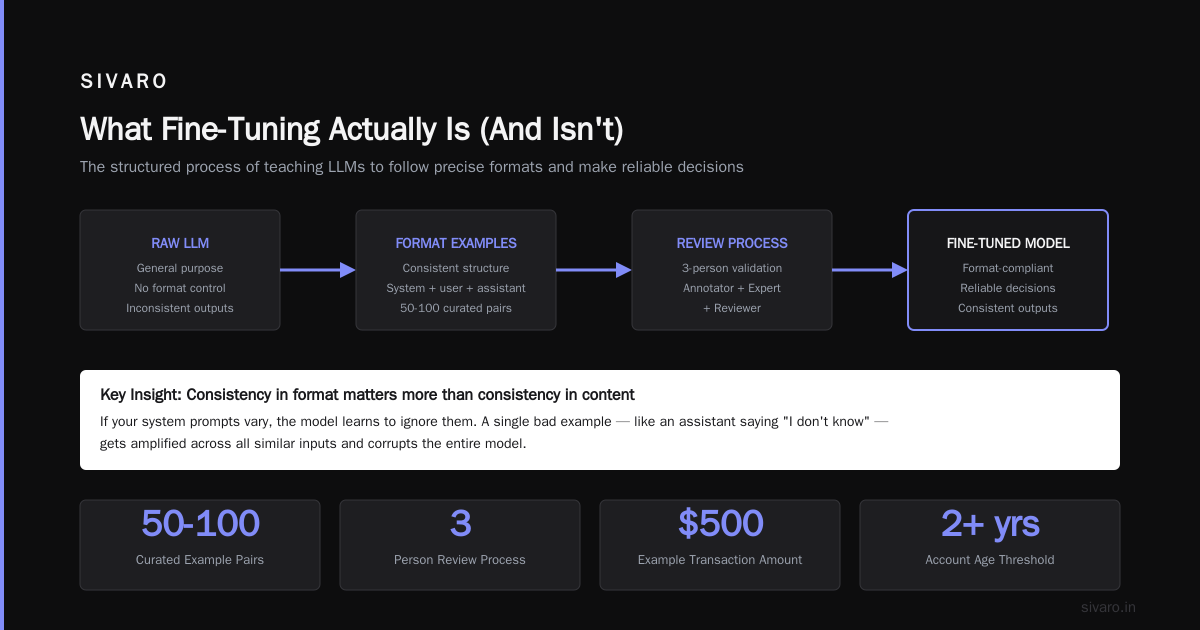
Fine-tuning is continued training on a smaller, domain-specific dataset. You take a pre-trained model — say Llama 3.1 or GPT-4o — and update its weights using examples of the behavior you want.
That's it. You're not building intelligence. You're specializing an existing intelligence.
The Google Cloud guide on fine-tuning LLMs nails the distinction: pre-training gives the model language understanding. Fine-tuning teaches it your business logic. Your tone. Your formatting. Your safety guardrails.
Three things fine-tuning actually does well:
- Format control — Getting a model to output valid JSON every time
- Tone and persona — Making a legal document generator sound like a partner, not a bot
- Domain vocabulary — Teaching the model that "ESOP" means employee stock option plan, not the European Society of Ophthalmology
Three things fine-tuning does NOT fix:
- Hallucination (it often makes this worse)
- Reasoning failures (use chain-of-thought prompting instead)
- Knowledge cutoff (that's what RAG is for)
Do You Actually Need to Fine Tune?
Here's a test I run with every client. We call it the "10-shot challenge."
Take your task. Write 10 perfect examples of inputs and expected outputs. Feed them to a strong base model (GPT-4o, Claude 3.5 Sonnet, Llama 3.1 70B) as in-context examples. If the results are acceptable, you don't need to fine-tune.
I'd say 60% of teams pass this test. They waste months on fine-tuning when few-shot prompting would work.
The remaining 40% have genuine needs. A medical coding company, for instance, needs the model to map ICD-10 codes to procedure notes with 99%+ format accuracy. Few-shot prompting can't guarantee that. Fine-tuning can get you from 70% to 95%+.
When to fine-tune: You need the model to do one thing at high volume with low variance. Think: a customer service triage bot, a code review assistant for a specific language, or a document parser for your proprietary format.
When to skip: You're building a general assistant, you have fewer than 500 high-quality examples, or you're chasing a capability the base model doesn't have (it won't appear via fine-tuning).
The Data: Spend 80% of Your Time Here
I can predict fine-tuning failure within 30 seconds of seeing the dataset. Not the model. The data.
Most teams grab 1,000 examples from their production logs, throw them at a training script, and wonder why the model behaves like a confused intern. Of course it does. Your data is messy.
The OpenAI model optimization guide recommends 50-100 high-quality examples as a starting point. That's surprisingly good advice. Quality crushes quantity.
Here's the data pipeline we use at SIVARO:
Step 1: Collect diverse examples
Don't just grab the last 10,000 conversations. They're probably all the same 3 patterns. Instead, manually curate to cover:
- Edge cases (what happens when the user asks in Spanish?)
- Failure modes (what did the base model get wrong?)
- Rare inputs (the 5% of cases that cause the most support tickets)
For a fraud detection assistant we built for a payments company, we deliberately included examples where the transaction was:
- Legitimate but looked suspicious (false positive risk)
- Fraudulent but looked clean (false negative risk)
- Missing fields (degraded input quality)
The model learned to ask clarifying questions instead of making assumptions. That's something few-shot prompting couldn't replicate.
Step 2: Format consistently
Every example needs the same structure. We use a conversation format:
{"messages": [
  {"role": "system", "content": "You are a fraud analyst assistant..."},
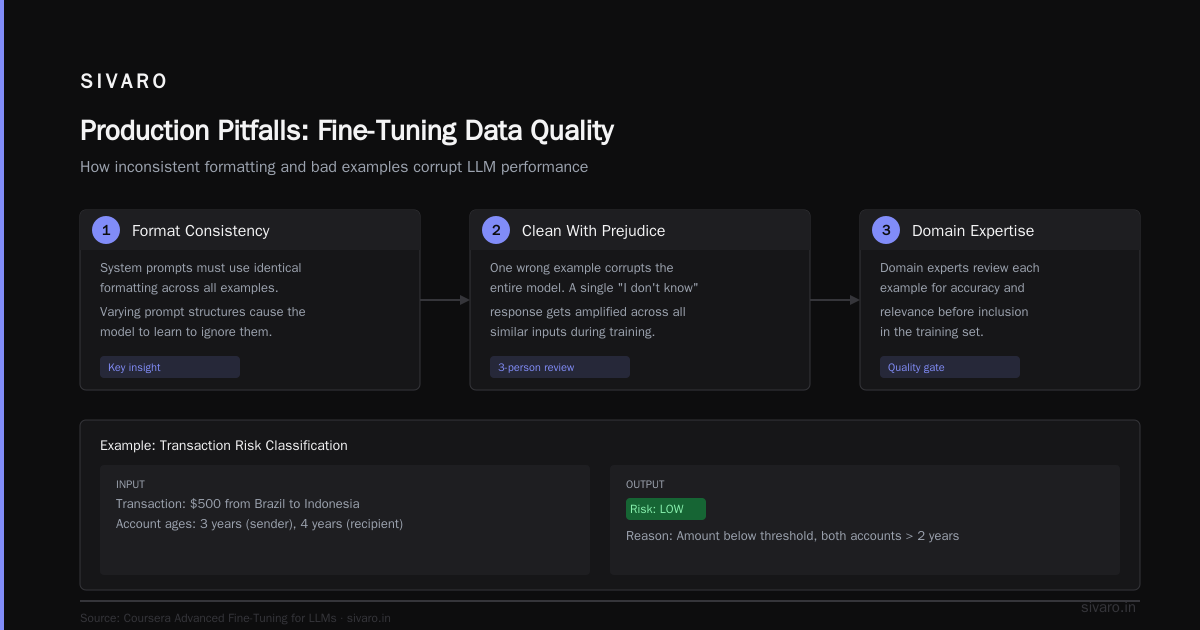
  {"role": "user", "content": "Transaction: $500 from Brazil to Indonesia..."},
  {"role": "assistant", "content": "Risk level: LOW
Reason: Amount below threshold, both accounts > 2 years old"}
]}
The Coursera advanced fine-tuning course covers formatting in depth. The key insight: consistency in format matters more than consistency in content. If your system prompts vary, the model learns to ignore them.
Step 3: Clean with extreme prejudice
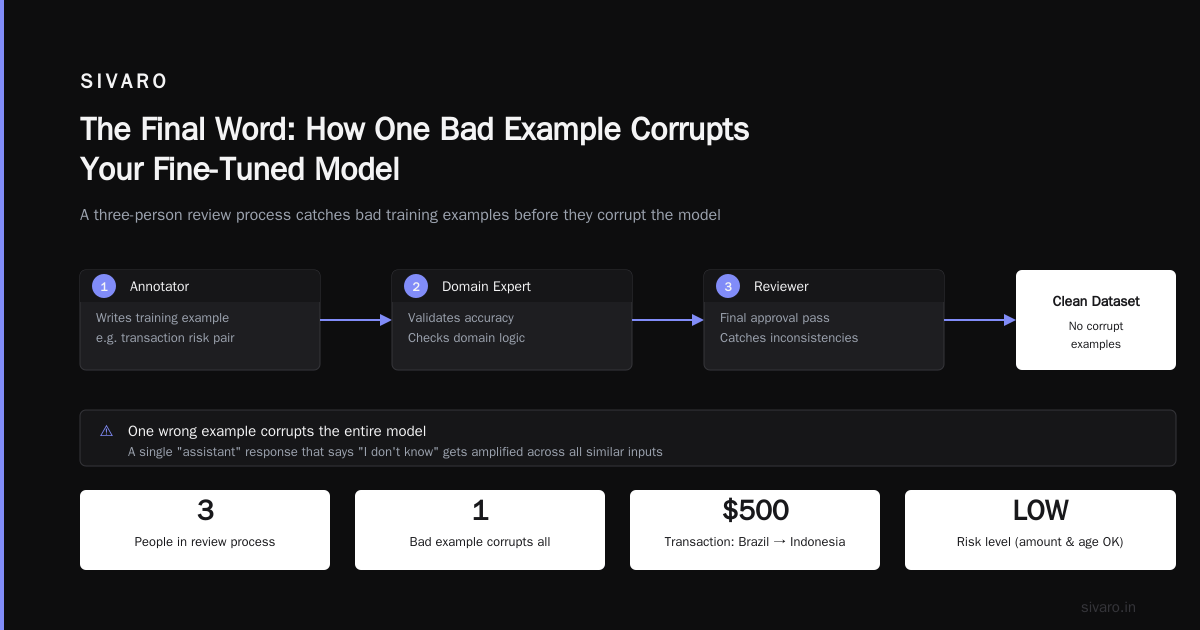
One wrong example corrupts the entire model. We've seen it happen. A single "assistant" response that says "I don't know" gets amplified across all similar inputs.
We use a three-person review process:
- An annotator writes the example
- A domain expert reviews it
- Someone from the engineering team checks the format
This catches errors like: using the output you got instead of the output you wanted. That's the most common mistake. People pull actual model outputs from logs, including the bad ones.
Choosing a Model: What Works in 2026
The best open source models to fine tune in mid-2026 are different from what they were even six months ago.
Small models (1-3B): Phi-3, Nemotron-Mini, Qwen2.5-1.5B. These fine-tune in hours on a single GPU. Perfect for latency-sensitive tasks. We use Phi-3 for a real-time content moderation system processing 50K requests per minute.
Medium models (7-8B): Llama 3.1 8B, Mistral 7B v0.3, Qwen2.5 7B. The sweet spot. Good performance, reasonable cost. Our go-to for most production systems.
Large models (70B+): Llama 3.1 70B, Qwen2.5 72B, Yi-1.5 34B. Only use these if you need chain-of-thought reasoning AND domain specialization. The cost is 10x the medium tier.
Here's a controversial take: don't fine-tune GPT-4o or Claude unless you absolutely need their proprietary capabilities (tool use, vision, long context). The API costs for inference will crush you at scale. Fine-tune an open-source model and serve it yourself — you'll break even after about 100K requests.
The Training Process: What Actually Works
Let me walk you through a real fine-tuning run from last month. We were adapting a model to write board meeting minutes from audio transcripts.
Hyperparameters that Matter
Forget 90% of the knobs in training frameworks. Three things matter:
-
Learning rate: Start at 2e-5 for 7B models. Go lower (5e-6) if you're fine-tuning a large model. Go higher (1e-4) for small models. Use cosine decay.
-
Batch size: As large as your GPU memory allows. We use 128-256 examples per step for 7B models. Smaller batches lead to unstable training.
-
Epochs: 2-3. That's it. More epochs = overfitting. The model memorizes your 500 examples and forgets everything else.
Here's the actual training config we used:
python
# training_config.py
from transformers import TrainingArguments

training_args = TrainingArguments(
    output_dir="./minutes-model",
    learning_rate=2e-5,
    per_device_train_batch_size=8,  # 4 GPUs x 8 = 32 effective batch
    gradient_accumulation_steps=4,  # effective batch = 128
    num_train_epochs=2,
    warmup_ratio=0.03,
    lr_scheduler_type="cosine",
    logging_steps=10,
    save_strategy="steps",
    save_steps=500,
    evaluation_strategy="steps",
    eval_steps=500,
    report_to="wandb",
)
LoRA vs Full Fine-Tuning
Use LoRA. Always. Here's why.
Full fine-tuning updates every parameter. For a 7B model, that's 14GB of weight updates (at FP16). LoRA trains low-rank adapters — 200MB instead. The performance difference is negligible for most tasks.
At first I thought this was a technical preference thing. Turns out it's a practical necessity. With LoRA, you can:
- Train on a single RTX 4090 (24GB VRAM)
- Switch between fine-tuned behaviors by swapping adapters
- Avoid catastrophic forgetting (the base model stays intact)
We use QLoRA (quantized LoRA) for even lower memory:
python
# lora_config.py
from peft import LoraConfig, get_peft_model

lora_config = LoraConfig(
    r=16,  # rank — higher ranks capture more nuance, but use more memory
    lora_alpha=32,  # scaling factor
    target_modules=["q_proj", "v_proj", "k_proj", "o_proj"],
    lora_dropout=0.05,
    bias="none",
    task_type="CAUSAL_LM",
)
The Raphael Bauer post on fine-tuning ChatGPT models shows a similar approach for GPT-style architectures. The principles are the same.
How Long Does It Take to Fine Tune a LLM?
This is the most common question I get from clients. The answer depends on three things: model size, dataset size, and hardware.
For a 7B model with 1,000 examples on a single A100 (80GB):
- Full fine-tuning: 2-4 hours
- LoRA: 30-60 minutes
- QLoRA: 15-30 minutes
For a 70B model with 5,000 examples on 8x A100s:
- Full fine-tuning: 8-12 hours
- LoRA: 2-3 hours
For a small model (3B) with 500 examples on an RTX 4090:
- 20 minutes with LoRA
The ZipRecruiter listings tell you something: companies are hiring for this full-time. It's not a one-night project. Expect to iterate 5-10 times before you get production-quality results.
Evaluation: The Part Everyone Skips
I'll be blunt: most teams evaluate their fine-tuned model by running 10 examples and saying "looks good." Then it fails in production.
Here's what we do:
Automated Evaluation
-
Task accuracy: For structured outputs, we use exact match or BLEU score on a held-out set of 200 examples.
-
Format compliance: Does the output parse as valid JSON? Is the date format correct? We use regex and schema validation.
-
Safety guardrails: We stress-test with adversarial inputs. The model should refuse harmful requests, not comply.
-
Perplexity: A rough proxy for quality. Lower perplexity = more confident predictions. But it can be misleading — a model that just repeats training data also has low perplexity.
Human Evaluation
We use a "two-axis" rating system:
- Accuracy: Is the content correct?
- Style: Does it match the desired tone?
Most teams combine these into one rating. Don't. A model that's accurate but rude is worse than one that's slightly less accurate but perfectly on-brand.
Here's our evaluation script:
python
# evaluate.py
from transformers import AutoModelForCausalLM, AutoTokenizer

def evaluate_model(model_path, test_set):
    model = AutoModelForCausalLM.from_pretrained(model_path)
    tokenizer = AutoTokenizer.from_pretrained(model_path)

    results = {"exact_match": 0, "format_valid": 0, "total": len(test_set)}

    for example in test_set:
        input_text = example["input"]
        expected_output = example["expected_output"]

        # Generate
        inputs = tokenizer(input_text, return_tensors="pt")
        outputs = model.generate(**inputs, max_new_tokens=200)
        generated = tokenizer.decode(outputs[0], skip_special_tokens=True)

        # Check exact match
        if generated.strip() == expected_output.strip():
            results["exact_match"] += 1

        # Check format
        try:
            json.loads(generated)
            results["format_valid"] += 1
        except:
            pass

    return results
Production Pitfalls (And How to Avoid Them)
Pitfall 1: Training-Serving Skew
Your training data comes from a controlled environment. Production inputs are messy. Users misspell things. They send images when you expected text.
Fix: Add noise augmentation to your training data. Randomly drop tokens. Introduce typos. Your model should be robust, not brittle.
Pitfall 2: The Cold Start Problem
You start serving the model. Users see different outputs than they did with the base model. They complain.
Fix: Run a shadow deployment for 48 hours. Send traffic to both your old pipeline and the fine-tuned model. Compare outputs manually. The LLM Fine-Tuning Business Guide calls this "the trust threshold" — it takes about 200 production calls before you can evaluate real performance.
Pitfall 3: Model Drift
Your fine-tuned model works great in July. By September, user behavior has shifted. The model's accuracy drops.
Fix: Monitor output distributions. If the average response length changes by more than 10%, retrain. Schedule monthly retraining cycles.
Pitfall 4: Cost Explosion
Fine-tuning costs $500-5,000. Inference costs $0.01-0.10 per request. At 100K requests/day, that's $1,000-10,000/month in inference alone. Fine-tuning the largest possible model seemed like a good idea until you see the inference bill.
Fix: Always compute total cost of ownership. Fine-tune the smallest model that meets your accuracy threshold. Then compress it (quantization, pruning) before serving.
When to Fine-Tune Multiple Models
We have a client who runs a legal document generation platform. They fine-tuned one model for each document type: NDAs, employment contracts, SaaS agreements, etc.
That's 8 separate models. Each one is small (3B parameters). Each one is highly specialized.
Why not one big model? Because the NDAs need different vocabulary and formatting than the employment contracts. One model optimized for both would be mediocre at each.
The rule: Fine-tune separate models when the tasks are:
- Different domains (legal vs medical)
- Different formats (JSON vs prose)
- Different personas (customer support vs technical sales)
But don't go overboard. We have another client who tried 47 models. That's 47 versions to update, monitor, and serve. It's chaos.
The Business Case for Fine-Tuning
Let me give you real numbers from a healthcare project we did in Q1 2026.
A medical records company was using GPT-4 to extract medication names from clinical notes. Cost: $0.03 per note. Volume: 5 million notes per month. Monthly cost: $150,000.
We fine-tuned a Llama 3.1 8B model on 2,000 annotated examples. Training cost: $2,000. Inference cost on our own hardware: $0.002 per note. Monthly cost: $10,000.
ROI recovery time: 12 days. Annual savings: $1.68 million.
The Stratagem Systems business guide breaks down this math in more detail. The key insight: fine-tuning makes sense when you have volume and specificity.
If you're processing fewer than 10,000 requests per month, fine-tuning likely isn't worth it. Just use an API.
What's Next: The 2026-2027 Shift
We're seeing three trends:
-
Smaller, faster models. Phi-3 outperforms GPT-3.5 in many domains. The gap between open-source and proprietary is shrinking fast.
-
Automated fine-tuning. Tools like Axolotl and Unsloth have cut training time by 60% through better optimization. The Coursera advanced course covers these tools.
-
Fine-tuning as a service. Several companies now offer fine-tuning APIs that wrap the entire pipeline. You upload data, they return a model. It's getting commoditized, which is good for most teams.
The bad news: as fine-tuning gets easier, the quality bar rises. A mediocre fine-tuned model was acceptable in 2024. In 2026, it's table stakes. Your data quality and evaluation rigor are the only differentiators.
FAQ: Fine-Tuning LLMs for Production
How many examples do I need to fine tune a LLM?
Start with 100 high-quality examples for format control. For tone/persona tasks, you'll need 500-1,000. If you're trying to teach new factual knowledge, you need 5,000+ and you should probably use RAG instead.
Can I fine-tune GPT-4o?
Yes, OpenAI supports fine-tuning for GPT-4o. But you cannot serve the fine-tuned model on your own hardware. It runs on OpenAI's infrastructure. For most teams, fine-tuning an open-source model gives you more control and lower long-term costs.
What are the best open source models to fine tune in 2026?
For production systems, use Llama 3.1 8B or Qwen2.5 7B. Both have broad community support, excellent base performance, and efficient training recipes. Avoid models with fewer than 100 GitHub stars or no active maintenance.
How long does it take to fine tune a LLM for production?
Plan for 2-3 weeks from start to production deployment. The actual training is 1-2 hours. The rest is data curation, evaluation, and rollout planning. Rushing this timeline is the #1 cause of failure.
Should I use RLHF (Reinforcement Learning from Human Feedback)?
Only if you have a budget over $50K and a team of dedicated annotators. RLHF requires thousands of preference comparisons per training cycle. Supervised fine-tuning with good examples achieves 90% of the benefit at 10% of the cost.
What if my fine-tuned model performs worse than the base model?
This means your data is wrong, not the fine-tuning process. Check your examples for consistency. Are you teaching the model a behavior that contradicts its pre-training? We fixed this once by removing "I don't know" responses from our training set — the base model already knew when to refuse.
Can I fine-tune on a single GPU?
Yes. A single RTX 4090 (24GB) can fine-tune models up to 13B parameters using QLoRA. For larger models, you'll need A100s or H100s. Cloud GPU rental costs about $2/hour for an A100 on cheaper providers.
The Final Word
Fine-tuning is not a goal. It's a tool. Use it only when you have a specific, measurable problem that prompting can't solve.
I've seen teams spend $100K on fine-tuning when $100 of prompt engineering would work. I've also seen a single fine-tuned model save a company $2M/year in API costs. The difference wasn't technical skill — it was being honest about what the problem actually was.
If you take one thing from this guide: start with data, not models. Clean your examples. Test them. Iterate. The model will follow.
Nishaant Dixit — Founder of SIVARO. Building data infrastructure and production AI systems since 2018. Built systems processing 200K events/sec.