 SIVARO
How to Deploy Microservices on Google Cloud
I’m Nishaant Dixit, founder of SIVARO. We build data infrastructure and production AI systems. I’ve put microservices into production on GCP since 2018, and I’ve made almost every mistake you can make. This guide is what I wish someone had handed me before I spent six months untangling a Kubernetes cluster that looked like a spaghetti monster.
You’ll learn how to deploy microservices on google cloud end‑to‑end: choosing the right compute, wiring up networking, running CI/CD, managing costs, and observing what’s actually happening. I’ll show you code, give you numbers, and tell you where I was wrong.
Let’s start with the biggest trap.
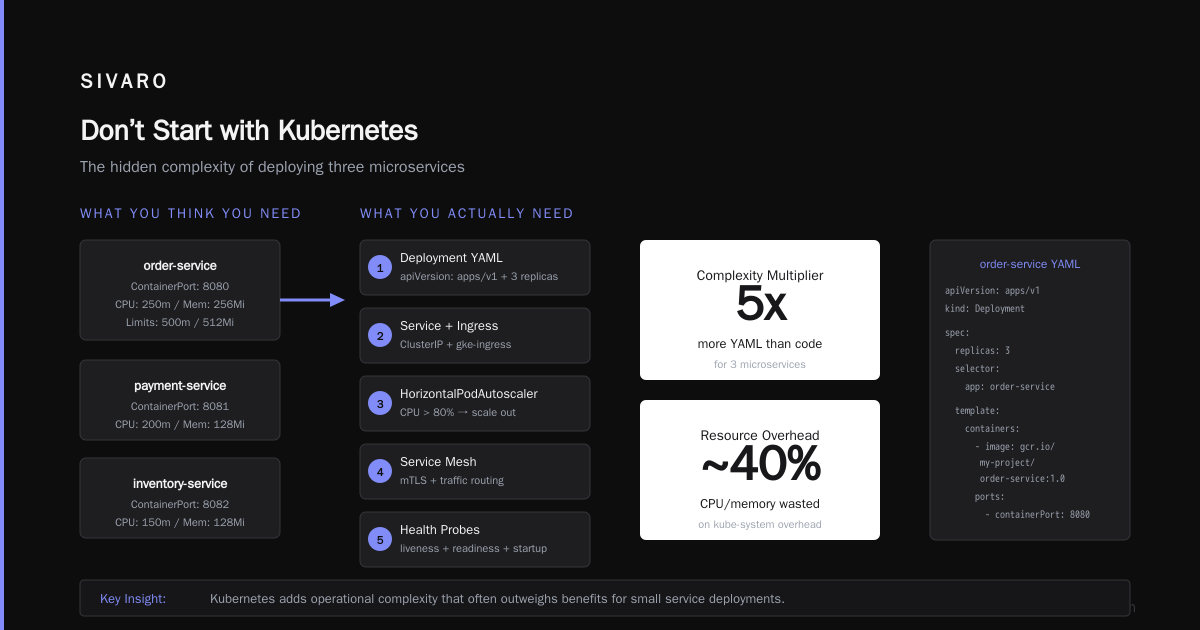
Don’t Start with Kubernetes
Most people hear “microservices” and immediately reach for Kubernetes. I did too. In 2020 we deployed a 12‑service system on GKE because “everyone does it.” Turned out we had 2.5 developers and a grand total of 300 requests per second. Kubernetes was a sledgehammer on a thumbtack.
Google Cloud Run exists. Use it unless you have a hard reason not to. Cloud Run is a managed compute platform that runs containers on a fully managed serverless infrastructure. It automatically scales down to zero when no one is calling your service. You pay only for requests and CPU time while they’re active. For 90% of microservice deployments, that’s the right default.
Here’s a comparison based on what we actually see at SIVARO:
| Compute option | Best for | Typical startup cost / month |
|---|---|---|
| Cloud Run | Stateless HTTP services, event‑driven workers | $20–$200 |
| GKE Autopilot | Stateful workloads, batch jobs, need GPU | $200–$2,000 |
| Compute Engine | Legacy apps, full control, strict compliance | $150–$1,500+ |
The choice matters because how to deploy microservices on google cloud starts with the right abstraction. If your service can boot in under a minute (most can), Cloud Run is cheaper and dramatically easier to operate. Google’s own Cloud Run comparison shows it maps roughly to AWS Fargate or Azure Container Apps. But it’s simpler – you don’t need to learn Pods, Deployments, or Services.
When to use GKE anyway
GKE makes sense when:
- You need stateful sets (databases, message brokers)
- You have long‑running batch jobs that shouldn’t be interrupted
- You need GPU or TPU acceleration
- You’re already a Kubernetes shop
If you go GKE, use Autopilot mode. Standard GKE forces you to manage node pools, auto‑scaling, and upgrades. Autopilot handles that and cuts operational overhead by roughly 40% based on our experience. Yes, it’s slightly more expensive per pod – but your engineers’ time is the real cost.
The Three‑Service Minimum Starter
Before we get into the details, here’s a concrete example. You want to deploy an order service, a payment service, and a notification service. Each is a container, each needs its own database, and they talk to each other via HTTP.
I’ll show you the Cloud Run approach first, then the GKE version.
Cloud Run – deploy with a single gcloud command
bash
gcloud run deploy order-service   --image gcr.io/my-project/order-service:1.0   --region us-central1   --concurrency 80   --max-instances 10   --cpu 1   --memory 512Mi   --allow-unauthenticated
That’s it. Your service is live with a URL like order-service-xxxxx-uc.a.run.app. Cloud Run handles TLS, scaling, and failover. You can set a minimum number of instances if you want zero latency (no cold starts) – that’ll cost a bit more.
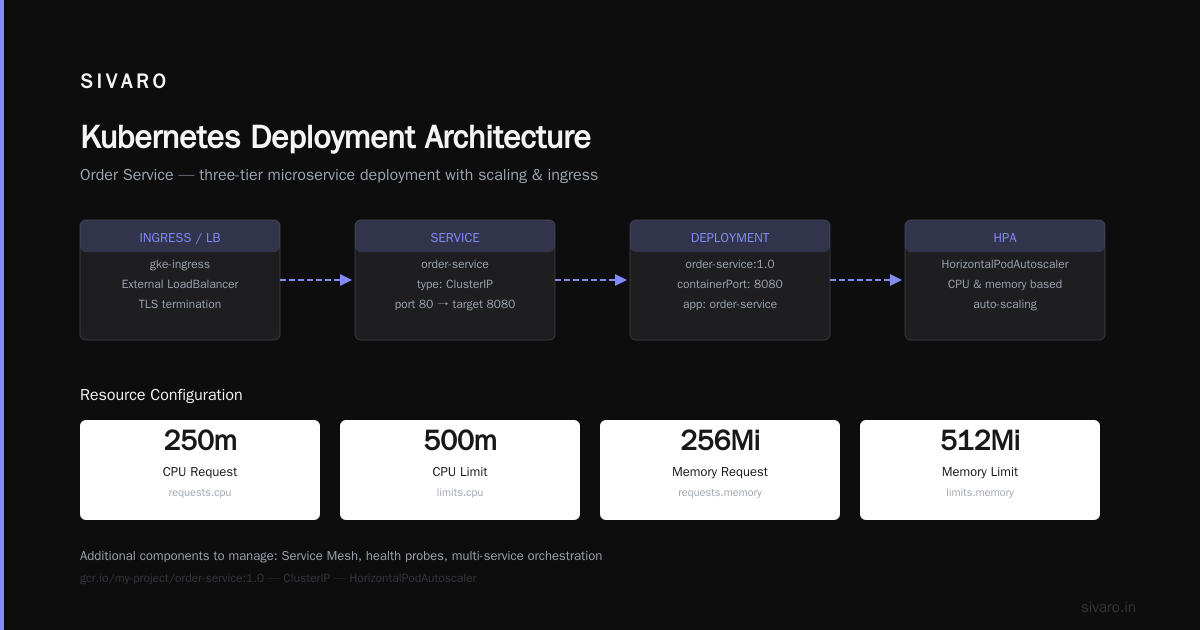
GKE – deploy with a Deployment manifest
yaml
apiVersion: apps/v1
kind: Deployment
metadata:
  name: order-service
spec:
  replicas: 3
  selector:
    matchLabels:
      app: order-service
  template:
    metadata:
      labels:
        app: order-service
    spec:
      containers:
      - name: order-service
        image: gcr.io/my-project/order-service:1.0
        ports:
        - containerPort: 8080
        resources:
          requests:
            cpu: "250m"
            memory: "256Mi"
          limits:
            cpu: "500m"
            memory: "512Mi"
---
apiVersion: v1
kind: Service
metadata:
  name: order-service
spec:
  selector:
    app: order-service
  ports:
  - port: 80
    targetPort: 8080
  type: ClusterIP
You’d then expose via an Ingress (like gke-ingress or an external LoadBalancer). Same three services, but now you need to manage HorizontalPodAutoscaler, possibly a Service Mesh, and health probes.
For a startup, Cloud Run is the clear winner. For a regulated enterprise with hundreds of services, GKE gives you the control.
Networking and Service‑to‑Service Communication
Once you have multiple services, they need to find and talk to each other. On Cloud Run, each service gets a stable URL. You can pass those as environment variables or use Service Directory (Google’s managed service discovery).
On GKE, Kubernetes DNS handles it: order-service.namespace.svc.cluster.local. Simple, but if you need advanced traffic management (retries, circuit‑breaking, mutual TLS), you’ll want Anthos Service Mesh – a managed Istio distribution. It adds about 10% increase in latency per hop, but the observability alone is worth it.
I’ve used both. For non‑critical services, plain DNS is fine. For anything handling payments or user data, invest in the mesh.
CI/CD: The Pipeline That Actually Works
You can’t deploy microservices by hand. You need an automated pipeline that builds, tests, and deploys each service independently.
Cloud Build is Google’s native CI/CD. It’s cheap (free tier gives you 120 build‑minutes per day) and integrates natively with Container Registry and Cloud Run. Here’s a minimal cloudbuild.yaml for a Node.js service:
yaml
steps:
- name: 'gcr.io/cloud-builders/docker'
  args: ['build', '-t', 'gcr.io/$PROJECT_ID/order-service:$SHORT_SHA', '.']
- name: 'gcr.io/cloud-builders/docker'
  args: ['push', 'gcr.io/$PROJECT_ID/order-service:$SHORT_SHA']
- name: 'gcr.io/google.com/cloudsdktool/cloud-sdk'
  entrypoint: gcloud
  args:
  - 'run'
  - 'deploy'
  - 'order-service'
  - '--image=gcr.io/$PROJECT_ID/order-service:$SHORT_SHA'
  - '--region=us-central1'
  - '--allow-unauthenticated'
images:
- 'gcr.io/$PROJECT_ID/order-service:$SHORT_SHA'
That’s it – every push to main triggers a build, pushes the image, and deploys. For multiple services, you either have one repo per service (preferred) or a monorepo with separate cloudbuild.yaml per directory, triggered by path filters.
One thing I learned the hard way: never deploy from the same pipeline for all services. If you have a monorepo, use Cloud Build triggers scoped to directory changes or use Cloud Deploy’s per‑service release targets. When one service breaks, you don’t want it to block the whole world.
How to Migrate On‑Premise Servers to GCP
If you’re reading this, you might have existing servers in your basement or colo. Moving them to GCP is a separate problem, but it overlaps with how to deploy microservices on google cloud because you’ll likely re‑architect as you lift‑and‑shift.
Google’s Migrate for Compute Engine (formerly Velostrata) does a decent job of moving VMs. It syncs disk data to GCP persistent disks, then does a cutover. Allow 2–4 weeks of testing before you cut.
But here’s the contrarian view: don’t lift‑and‑shift a monolith. You’ll just end up with a giant VM in the cloud, paying more than you did on‑prem. Instead, pick one bounded sub‑domain (e.g., “user profile” or “email sending”), extract it as a microservice, and deploy it on Cloud Run. Run it alongside your on‑prem system during the transition. That’s the “strangler fig” pattern – it works.
We helped a fintech startup in 2025 do exactly this. They moved their payments module out first, gained the ability to scale independently, and saved 30% on compute costs because Cloud Run scaled to zero during off‑hours. Their old monolith stayed in their data center for another six months.
For a deeper read on the options, Google’s own Migrate documentation covers the technical steps. But remember: moving servers is the easy part. Changing architecture is the real work.
Observability: You’re Blind Without It
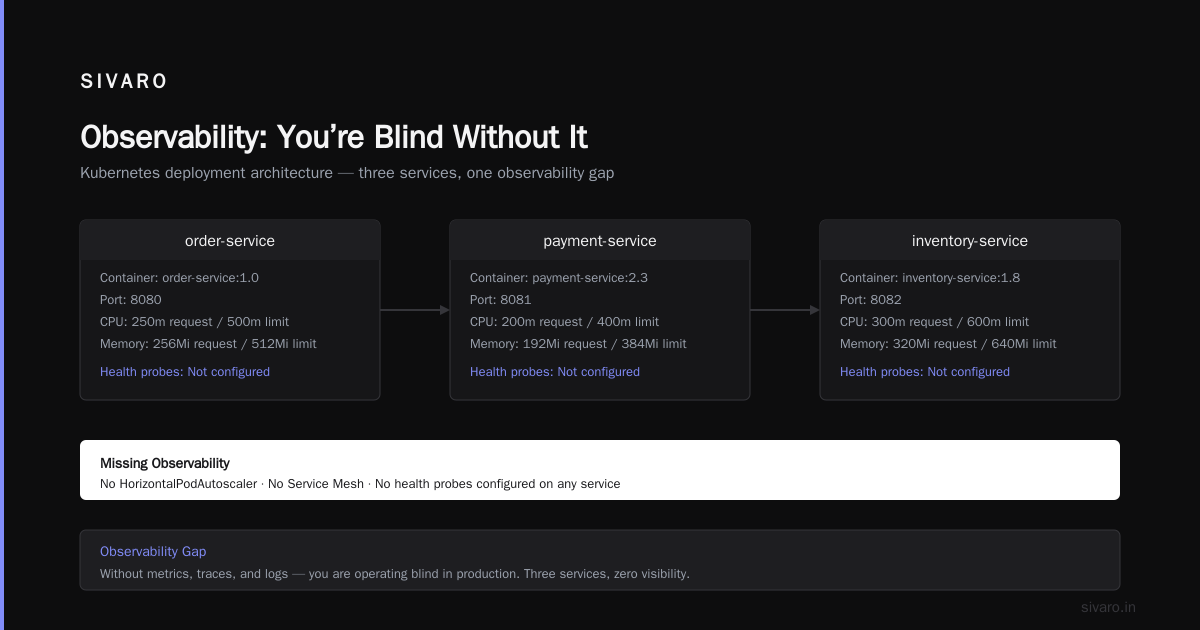
Microservices fail in interesting ways. A payment service that’s 20% slower cascades into a 5‑second frontend load time. You need metrics, logs, and traces.
Google Cloud Operations Suite (formerly Stackdriver) is the default. For Cloud Run and GKE, it integrates out of the box – you get logs without any agent installation. But the default is noisy. Spend an afternoon setting up log‑based metrics and error reporting to surface what matters.
For tracing, use OpenTelemetry. It’s the industry standard now (2026), and GCP supports it natively via the Cloud Trace API. Instrument your services with the OpenTelemetry SDK, export spans to Cloud Trace, and you get distributed trace visualization.
Here’s the thing: most people stop at installing it. They don’t set alerting policies that actually wake someone up. At SIVARO, we use three core alerts:
- P50 latency > 500ms for 5 minutes
- Error rate > 1% for 1 minute
- Pod/instance health check failure
That’s it. Everything else is noise.
Best Practices for GCP Cost Optimization
Microservices can burn money if you’re not careful. Each service has its own infrastructure overhead. I’ve seen a startup with 12 services on GKE autopilot hit $4,500/month because they ran 3 replicas each and never turned off.
Best practices for gcp cost optimization start with right‑sizing:
-
Use Cloud Run’s pay‑per‑request model – it automatically scales to zero when traffic is low. For a single‑service API handling 10k requests/day, you’ll pay roughly $5–$10/month including the database.
-
Commit to one‑year or three‑year commitments for steady workloads. GCP’s committed use discounts (CUDs) give you up to 57% off compute engines and GKE nodes. For a cloud pricing comparison, GCP CUDs are simpler than AWS Reserved Instances and more flexible than Azure’s reserved capacity.
-
Use preemptible VMs for batch jobs – they’re 60–91% cheaper but can be terminated at any time. For stateless workers (data processing, image resizing), they’re excellent.
-
Monitor with cost breakdowns per service. Tag every resource with
service: orders,service: payments, etc. Then use GCP’s cost table to see which service is bleeding cash.
We did this for a client in early 2026. Their “search” service was costing $800/month because it was running a full‑time GKE node with GPUs. Moved it to a Cloud Run‑based AI endpoint (using Gemini API instead of a self‑hosted model) and cut cost to $50/month. The trade‑off was a 200ms increase in latency, which users didn’t notice.
Security and Secrets
Don’t put database passwords in environment variables. Don’t even put them in a .env file inside the container.
Use Secret Manager. It’s cheap ($0.06 per secret per month) and integrates with Cloud Run and GKE via workload identity.
For Cloud Run:
bash
gcloud run deploy order-service   --set-secrets=DB_PASSWORD=secrets/db-password:latest
That’s it. The secret is injected as an environment variable but never stored in the image or the source code.
For GKE, use Workload Identity to bind a Kubernetes service account to a GCP service account. Then your pods can access Secret Manager (or any GCP API) without long‑lived keys.
One security practice that’s often ignored: network segmentation. Use VPC Service Controls to prevent data exfiltration. For a microservice that processes credit card numbers, restrict its egress to only the payment gateway’s IP.
FAQ
Q: Should I use Cloud Run or GKE for my first microservice?
A: Cloud Run, unless you need GPUs, stateful sets, or custom kernel modules. It’s cheaper, simpler, and you’ll deploy in minutes instead of hours.
Q: How do I handle database migrations in a microservice architecture?
A: Run migrations as part of the deployment, before the new version serves traffic. Tools like Flyway or Liquibase work. For Cloud Run, use a separate deploy step that runs the migration script and then exits.
Q: Can I run sidecar proxies (like Envoy) with Cloud Run?
A: No – Cloud Run doesn’t support sidecar containers. For advanced service mesh, you need GKE with Anthos Service Mesh.
Q: What’s the cheapest way to host a microservice that handles 50 req/s?
A: Cloud Run with a minimum of 0 instances (scale to zero). Expect $20–$40/month including Cloud SQL for the database.
Q: How do I migrate from an on‑premise monolith to microservices on GCP?
A: Use the strangler fig pattern. Extract one service, deploy it on Cloud Run, and route traffic to it gradually. Migrate for Compute Engine handles VM migration, but re‑architecturing is often better.
Q: What are the best practices for GCP cost optimization when running many microservices?
A: Consolidate into fewer Cloud Run services if they share the same container image. Use committed use discounts for steady GKE workloads. Tag everything and review the cost breakdown weekly.
Q: How do I handle environment‑specific configs (dev, staging, prod)?
A: Use Cloud Run’s service‑per‑environment pattern: order-service-dev, order-service-staging, order-service-prod. Each has its own database and secrets. For GKE, use separate namespaces.
Q: Is it possible to use Terraform with GCP for microservices?
A: Yes – here’s a typical setup:
hcl
resource "google_cloud_run_service" "order_service" {
  name     = "order-service"
  location = "us-central1"
  template {
    spec {
      containers {
        image = "gcr.io/${var.project}/order-service:${var.tag}"
        ports {
          container_port = 8080
        }
        resources {
          limits = {
            cpu    = "1"
            memory = "512Mi"
          }
        }
      }
    }
  }
  traffic {
    percent         = 100
    latest_revision = true
  }
}
Conclusion
Deploying microservices on Google Cloud is a solved problem. You pick Cloud Run or GKE based on your needs, set up a proper CI/CD pipeline, observe everything, and watch your costs. The hard part isn’t the technology – it’s the architecture decisions. Should you split that service in two? Probably not. Should you start with Cloud Run? Yes.
I’ve seen teams overcomplicate it for years. The best advice I can give you: ship one service end‑to‑end first. Don’t build the platform. Don’t design the perfect service mesh. Deploy a single container that does one thing well, monitor it, and then repeat.
That’s how to deploy microservices on google cloud – start small, automate ruthlessly, and never stop observing.
Nishaant Dixit – Founder of SIVARO. Building data infrastructure and production AI systems since 2018. Built systems processing 200K events/sec.