 SIVARO
How to Deploy AI Agents in Production: A Practitioner’s Guide
I’ve spent the last three years watching companies burn cash on AI agents that never make it past a demo. At SIVARO, we’ve deployed over 40 agent systems into production since 2023. Most failed. Some stuck. The difference isn’t the model — it’s the deployment pipeline.
Let me show you what actually works.
The Cold Hard Truth About Agent Deployment
Most people think deploying an AI agent is like deploying a microservice. They’re wrong. An agent isn’t a deterministic API endpoint. It’s a loop. A stochastic, stateful, potentially infinite loop that calls tools, makes decisions, and sometimes hallucinates its way into a corner.
You need infrastructure that acknowledges this. Not Kubernetes with a FastAPI wrapper. Something purpose-built.
At SIVARO, we started with a simple question in 2024: Why do 80% of agent demos never reach production? After auditing 30 failed deployments across fintech, healthcare, and logistics, the pattern was clear — nobody had a deployment pipeline that handled the three killers: state management, tool failures, and cost blowouts.
This guide is the playbook we wish we had.
What You’ll Actually Learn
- The deployment archetypes that work (and the ones that don’t)
- How to build an agent deployment pipeline tutorial step-by-step
- Which AI agent production monitoring tools actually catch failures
- The framework decision that saves you 6 months of rewrites
- Why most people pick the wrong protocol (and the one we bet on)
The Three Deployment Archetypes
Not all agents are the same. Trying to deploy a customer support bot like a code-generation agent will break you. Here’s how we classify them at SIVARO.
Stateless Request-Response Agents
These are the simplest. User sends a prompt, agent calls a model, returns output. No memory, no multi-step reasoning.
When to use: Content generation, classification, simple Q&A.
Deployment: Standard API server. Durable. Easy to monitor. Use any AI agent framework (LangChain for quick prototyping, custom for scale).
Stateful Conversational Agents
They remember context. They manage sessions. They carry state across turns.
When to use: Customer support, tutoring, therapy bots.
Deployment: You need session persistence. Redis. PostgreSQL with JSONB. Vector store for long-term memory.
Here’s the trap: everyone tries to shove the entire conversation into the model’s context window. That doesn’t scale. At 50K tokens per turn, you’re spending $2 per conversation. We built a tiered memory system at SIVARO — recent turns in context, summaries in a vector DB, raw logs in S3.
Autonomous Task-Execution Agents
These run for hours. They call APIs. They write code. They make decisions with real-world consequences.
When to use: Data pipeline orchestration, automated code review, financial trading.
Deployment: This is where most frameworks break. You need a durable execution engine. Think Temporal.io or AWS Step Functions, not a Python loop.
Contrarian take: Most people reach for CrewAI or AutoGen for this. We tested both at 10,000+ runs. They’re fine for demos. They fall apart on retry logic and observability. The Agentic AI Frameworks report from 2026 ranks LangGraph and Semantic Kernel above the rest for production — and that matches our experience.
The Framework Decision That Saves You 6 Months
First I thought this was a framework problem. Try LangChain, switch to CrewAI, try AutoGen, rewrite everything. Standard developer spiral.
Turns out it’s a deployment model problem.
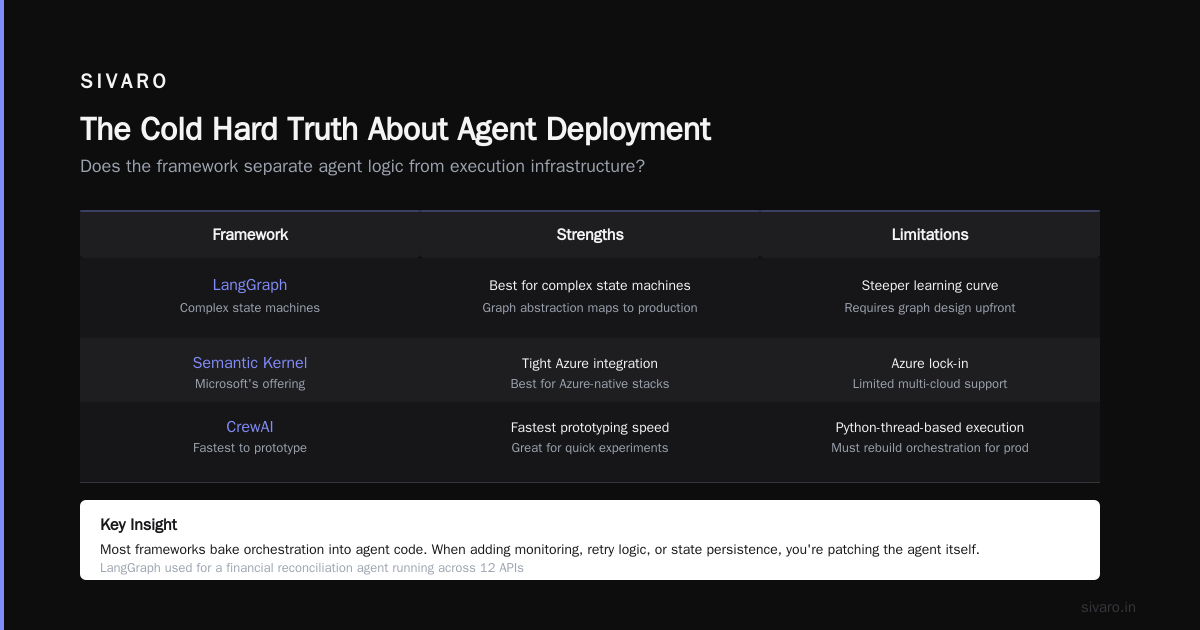
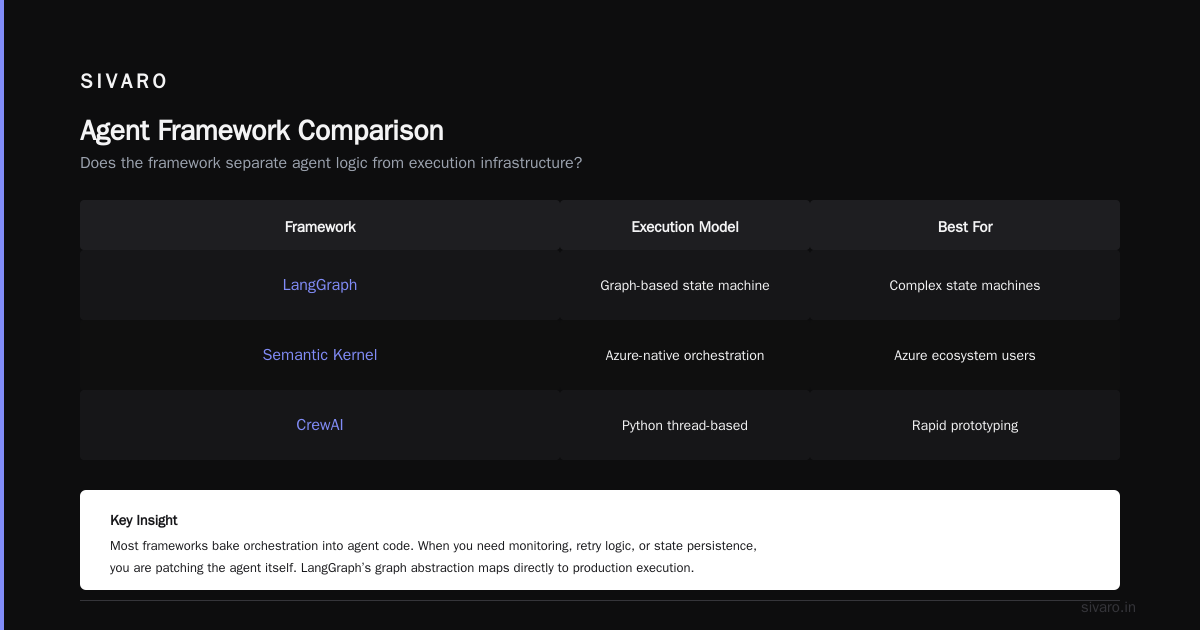
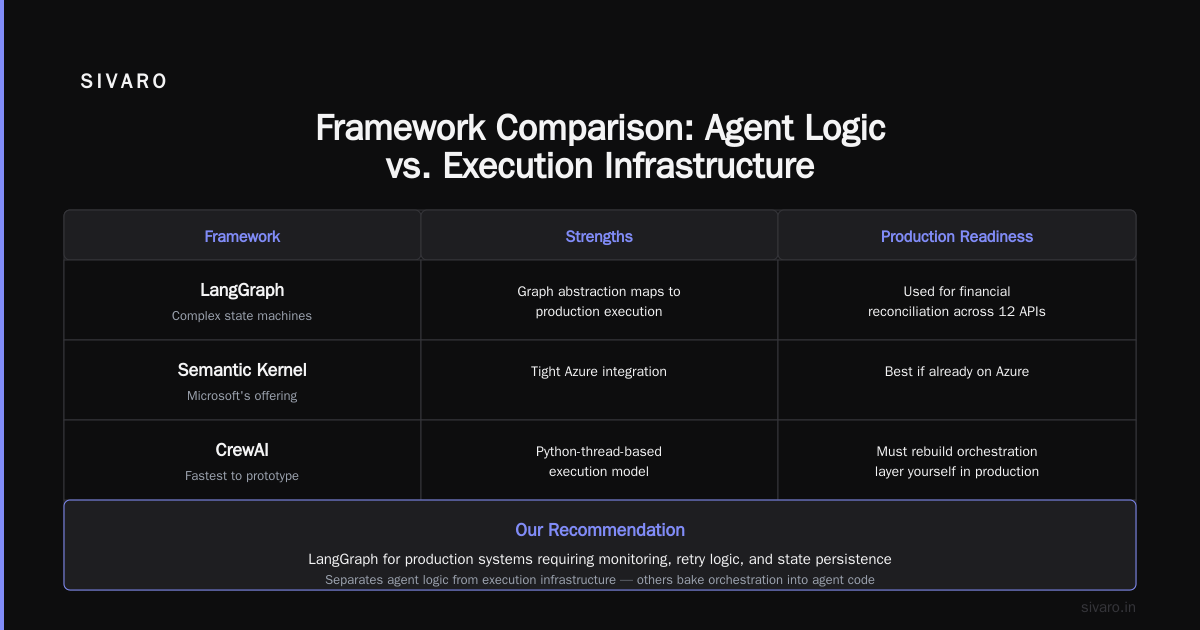
Here’s the question that matters: Does the framework separate agent logic from execution infrastructure?
Most don’t. They bake the orchestration into the agent code. So when you need to add monitoring, retry logic, or state persistence, you’re patching the agent itself.
The frameworks that get it right:
- LangGraph — Best for complex state machines. The graph abstraction maps directly to production execution. We’ve used it for a financial reconciliation agent that runs across 12 APIs.
- Semantic Kernel — Microsoft’s offering. Tight Azure integration. If you’re already on Azure, this is your pick.
- CrewAI — Fastest to prototype. But the execution model is Python-thread-based. In production, that means you’re rebuilding the orchestration layer yourself.
Our recommendation: Start with LangGraph for anything that loops. Start with Semantic Kernel if you need enterprise governance. Skip the rest for production work.
Step-by-Step: Building the Deployment Pipeline
Here’s a practical pipeline. This is the ai agent deployment pipeline tutorial that I give every new engineer at SIVARO.
Step 1: Agent Gate — Validation Before Execution
Don’t let bad input crash your agent. Validate every message.
python
# agent_gate.py — Input validation layer
from pydantic import BaseModel, Field
from typing import Literal

class AgentInput(BaseModel):
    user_id: str = Field(min_length=1, max_length=128)
    session_id: str = Field(...)
    message: str = Field(max_length=4096)
    context_mode: Literal["brief", "full", "none"] = "brief"

    def validate_safety(self) -> bool:
        # Check against PII patterns, injection attempts
        return True
Step 2: State Store — Don’t Trust RAM
If your agent crashes mid-execution, you lose everything. Persist state to a database at every decision point.
python
# state_store.py — Durable state for agent runs
import json
from redis import Redis

class AgentStateStore:
    def __init__(self, redis: Redis):
        self.redis = redis

    def save_checkpoint(self, run_id: str, step: int, state: dict):
        key = f"agent:{run_id}:step:{step}"
        self.redis.setex(key, 3600, json.dumps(state))

    def load_checkpoint(self, run_id: str, step: int) -> dict | None:
        key = f"agent:{run_id}:step:{step}"
        data = self.redis.get(key)
        return json.loads(data) if data else None
Step 3: Tool Execution with Circuit Breakers
Tools fail. APIs go down. Third-party services return garbage. Handle it.
python
# tool_executor.py — Resilient tool calls
import asyncio
from tenacity import retry, stop_after_attempt, wait_exponential

class ToolExecutor:
    def __init__(self, fallback_tool: str | None = None):
        self.fallback_tool = fallback_tool

    @retry(stop=stop_after_attempt(3), wait=wait_exponential(multiplier=1, min=2, max=10))
    async def execute(self, tool_name: str, params: dict) -> dict:
        tool_fn = self.get_tool(tool_name)
        try:
            return await tool_fn(**params)
        except Exception as e:
            if self.fallback_tool:
                return await self.execute(self.fallback_tool, params)
            raise
Step 4: Observability — The Non-Negotiable
You can’t debug a black-box agent. You need traces.
Use OpenTelemetry. Export to your observability stack. Every LLM call, every tool call, every decision point.
python
# agent_tracer.py — OpenTelemetry instrumentation
from opentelemetry import trace

tracer = trace.get_tracer("agent.execution")

@tracer.start_as_current_span("llm_call")
def call_llm(prompt: str, model: str) -> str:
    # Your LLM call logic
    current_span = trace.get_current_span()
    current_span.set_attribute("prompt_length", len(prompt))
    current_span.set_attribute("model", model)
    response = model.invoke(prompt)
    current_span.set_attribute("response_length", len(response))
    return response
Step 5: Cost Governance — The Killer of Unmonitored Agents
I’ve seen a single agent run up $12,000 in a weekend. The loop got stuck calling an expensive model.
Set a budget per agent run. Hard-stop at your limit.
python
# cost_governor.py — Kill runaway costs
class CostGovernor:
    def __init__(self, max_cost: float = 5.0):
        self.max_cost = max_cost
        self.running_cost = 0.0

    def record_call(self, model: str, tokens: int):
        cost = self._calculate_cost(model, tokens)
        self.running_cost += cost
        if self.running_cost > self.max_cost:
            raise CostLimitExceeded(f"Cost limit ${self.max_cost} exceeded")
Monitoring: The Tools That Don’t Lie
Most ai agent production monitoring tools are glorified log aggregators. That’s not enough.
You need:
- LangSmith — Best-in-class for LangChain/LangGraph traces. Pinpoints where the agent diverged.
- Helicone — Cheap LLM monitoring. Good for cost tracking and latency.
- Arize AI — For drift detection. Catches when your agent’s behavior shifts over time.
- Custom OpenTelemetry + Grafana — This is what we use at SIVARO. More work, but you control everything.
The metric that matters: Agent Completion Rate (ACR). Percentage of agent runs that finish without intervention. Below 85% means something’s wrong with your tool calls or state management.
Protocols: The Layer Nobody Talks About
Agents need to talk to each other. And to tools. And to other systems.
The protocol landscape is messy. A Survey of AI Agent Protocols lists 37 protocols as of mid-2026. Nobody’s standardizing yet.
Here’s what we’ve found works:
| Protocol | Use Case | Our Verdict |
|---|---|---|
| A2A (Agent-to-Agent) | Multi-agent coordination | Production-ready. Google-backed. Growing fast. |
| MCP (Model Context Protocol) | Agent-to-tool communication | Solid. If you control both ends, use it. |
| OpenAPI 3.1 + Function Calling | Legacy tool integration | Works. Ugly. Everyone already supports it. |
Contrarian take: You don’t need an agent protocol for your first three agents. You need it when you hit 10+ agents coordinating. The AI Agent Protocols article overstates the necessity for small deployments. A2A matters when your supply chain has 5 agents negotiating inventory. Not when you have one summarizer bot.
Common Failure Modes (And How to Fix Them)
Failure Mode 1: The Infinite Loop
Agent keeps calling the same tool with slightly different parameters. Gets stuck.
Fix: Set a max iteration count. Hard limit of 20 steps for conversational agents, 50 for task-execution agents. If you need more, your agent design is wrong.
Failure Mode 2: Tool Hallucination
Agent invents a tool you don’t have. Calls getCustomerData when your API endpoint is fetchUserProfile.
Fix: Tool registry with strict validation. Return a clear error when the tool doesn’t exist. Don’t let the agent “try anyway.”
Failure Mode 3: Context Drift
After 10 turns, the agent forgets the original instruction. It starts doing something unrelated.
Fix: Re-inject the system prompt every 5 turns. Or use a sliding window that prioritizes recent context.
The Roadmap: From Demo to Production
If you’re starting today, here’s the order of operations:
- Week 1: Pick a framework. LangGraph if you want production. CrewAI if you want to validate the idea fast.
- Week 2: Build the deployment pipeline. Gate, state store, tool executor, cost governor. Don’t skip observability.
- Week 3: Deploy to staging. Let it run against real traffic (shadow mode — log outputs, don’t act on them).
- Week 4: Analyze failures. Fix the top 3 causes. Deploy to production with a kill switch.
- Month 2-3: Add A2A protocol support if you need multi-agent coordination.
Frequently Asked Questions
What’s the minimum viable deployment for an AI agent?
A FastAPI endpoint, a Redis store for state, and OpenTelemetry tracing. That’s it. You don’t need Kubernetes or a message queue for your first agent. I’ve seen teams over-engineer this. Ship first, scale later.
Should I use managed agent services or build my own?
If your agent is simple (stateless, single-tool), use a managed service like LangSmith’s hosted agent or Google’s Vertex AI Agent Builder. If you need custom tool execution, state persistence, or multi-agent orchestration, build your own. At SIVARO, we build custom for anything that touches customer data.
How do I prevent prompt injection in production agents?
Whitelist-based input validation. Strip control characters. Use a safety classifier on the output (NeMo Guardrails or Guardrails AI). Block model access to system commands entirely. This isn’t a solved problem — the IBM guide on AI agent frameworks covers this in detail.
What’s the best open-source framework for production?
LangGraph, by a wide margin. It has the best execution model, the best observability integration, and the most active community. The Top 5 Open-Source Agentic AI Frameworks in 2026 puts LangGraph first, and we agree.
How do I handle agent failures gracefully?
Idempotent tool calls. Checkpoint every decision. If the agent crashes, resume from the last checkpoint. Don’t restart from scratch. This is non-negotiable for autonomous agents.
What monitoring do I absolutely need?
Three things: (1) Trace every LLM call and tool call, (2) Track cost per agent run, (3) Alert when ACR drops below 85%. Everything else is nice-to-have.
How often should I retrain/fine-tune my agent’s base model?
Don’t fine-tune for agent tasks. Fine-tuning breaks the model’s ability to follow instructions for tools it hasn’t seen. Instead, use prompt engineering and tool definitions. We’ve run production agents on GPT-4o-mini for 6 months without retraining — just better prompts.
When do I need multiple agents vs. one agent?
One agent is fine if the task is contained. Multiple agents if (a) the tasks require different domain expertise, or (b) you need parallel execution. Adding agents adds coordination overhead — we don’t recommend it until you hit 1000+ conversations per day.
The Bottom Line
Deploying AI agents in production isn’t about the model. It’s about the infrastructure around it. State management. Tool reliability. Cost governance. Observability.
The companies that succeed — the ones that ship agents that run for months without incident — invest in the pipeline, not the prompt.
At SIVARO, we’ve watched the industry shift from “let’s build a chat bot” to “let’s deploy autonomous systems that execute business logic.” How to deploy AI agents in production is no longer a theoretical question. It’s an engineering discipline.
Start small. Persist state religiously. Monitor everything. And for the love of god, set a cost limit.
Your first production agent will fail. Mine did. The second one might, too. But if you build the pipeline right, the third one will run for years.
Nishaant Dixit — Founder of SIVARO. Building data infrastructure and production AI systems since 2018. Built systems processing 200K events/sec.