 SIVARO
How to Deploy AI Agents in Production: A 2026 Guide
I spent six months in 2025 trying to deploy an AI agent that could triage support tickets. We had a beautiful prototype. Smart. Fast. The demos made salespeople emotional.
It fell apart in production within 48 hours.
Not because the code was bad. Because I didn't understand what "production" actually means for agentic systems. It's not the same as deploying a microservice. It's not the same as shipping a model. It's closer to deploying a junior engineer who never sleeps, hallucinates under pressure, and costs $2.50 an hour to operate.
Here's what I learned the hard way, distilled into something useful.
Why Most Agent Deployments Fail in the First Week
I've talked to twenty-something teams this year. The failure pattern is identical. They build an agent that works in a notebook. They containerize it. Ship it to Kubernetes. And then watch it burn.
The root cause isn't technical. It's conceptual. You treated the agent like a stateless service. It's not. An agent is a stateful process that interacts with unpredictable environments. Your monitoring, rollback, and testing strategies must reflect that.
Take Jasper, the AI writing platform. In early 2026, they rolled out an agentic feature for content planning. It worked in staging. In production, it started making API calls in infinite loops. Not a bug. An emergent behavior from the agent's planning logic interacting with a throttled upstream service.
They caught it because they'd instrumented for token usage per step, not just response times. Most teams don't.
Architecture Patterns That Actually Work
Before you write a single agent, decide where it lives.
We at SIVARO have settled on three patterns:
Pattern 1: The Supervisor Pattern
One orchestrator agent delegates to specialist sub-agents. The sub-agents are narrow. The supervisor handles routing and error recovery.
Supervisor Agent
├── Data Processing Agent (read-only)
├── API Interaction Agent (write-audited)
└── Validation Agent (read-only)
This works when you need control. Every sub-agent call is logged. The supervisor can kill a runaway sub-agent.
We used this for a financial compliance system in early 2026. The sub-agents couldn't modify anything without supervisor approval. No hallucinations that mattered.
Pattern 2: The Tool-Augmented Wrapper
Your agent is a thin reasoning layer on top of deterministic tools. The tools do the real work. The agent just decides which tool to call.
This is the pattern LangChain recommends for most production systems. You're not trusting the agent with data. You're trusting it with a yes/no decision about which function to invoke.
Pattern 3: The Event Loop
The agent runs as a long-lived process, pulling from a queue. Each message is a "work item." The agent processes it, writes the result, and waits.
This one is boring. It's also the most reliable. It's basically a worker. But the agent decides how to process each work item dynamically.
The contrarian take here: Most people think you need real-time streaming for agents. You don't. You need exactly-once semantics and good observability. The real-time stuff is a feature, not a foundation. Start with a queue.
Choosing the Right Framework (and Why It's a Trap)
By mid-2026, there are at least thirty "agent frameworks." Most are abandonware within six months. Here's the short truth: frameworks don't solve the hard problems.
The hard problems are:
- Observability
- Cost control
- Error recovery
- State management
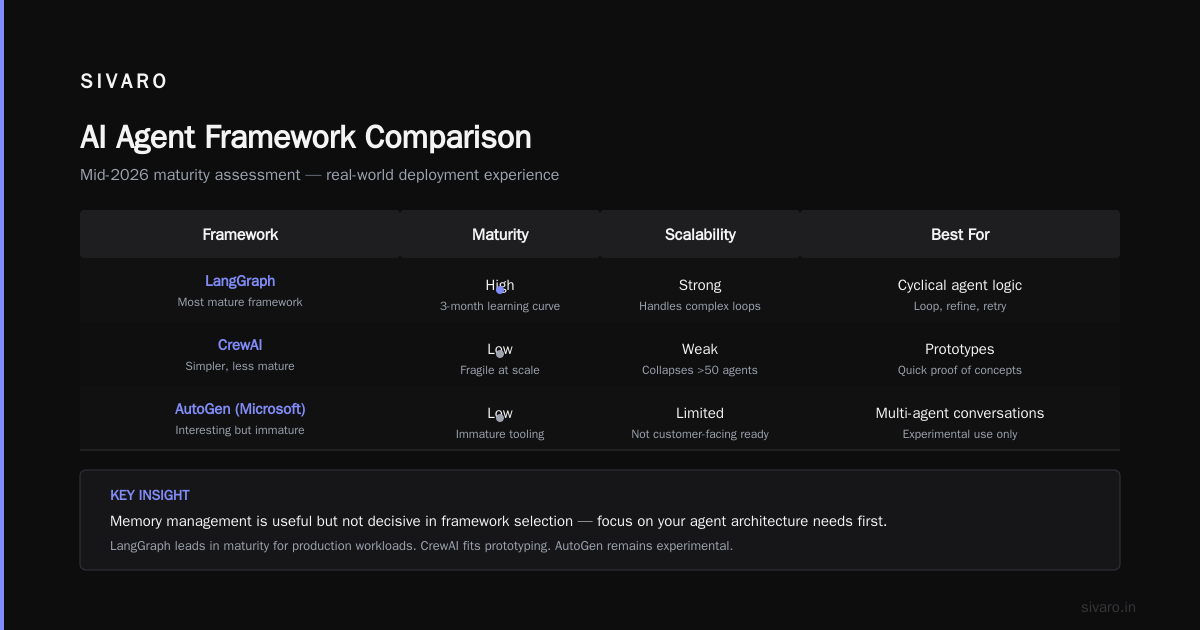
Frameworks handle the easy stuff: tool calling, prompt templates, memory management. Useful, but not decisive.
That said, here's where things stand in July 2026:
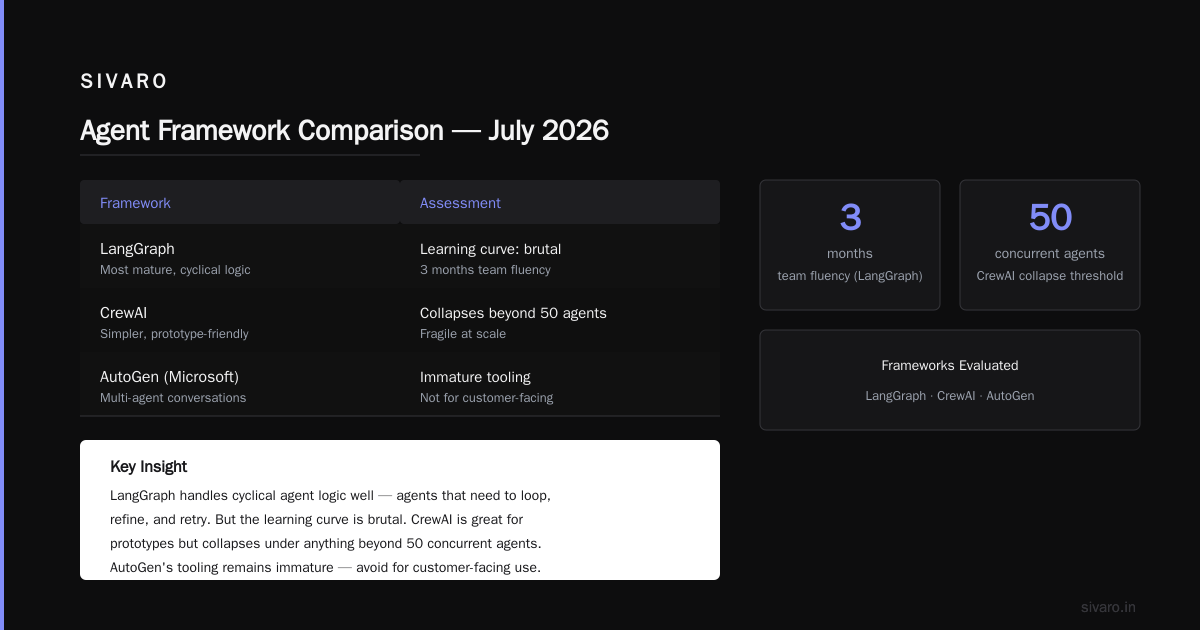
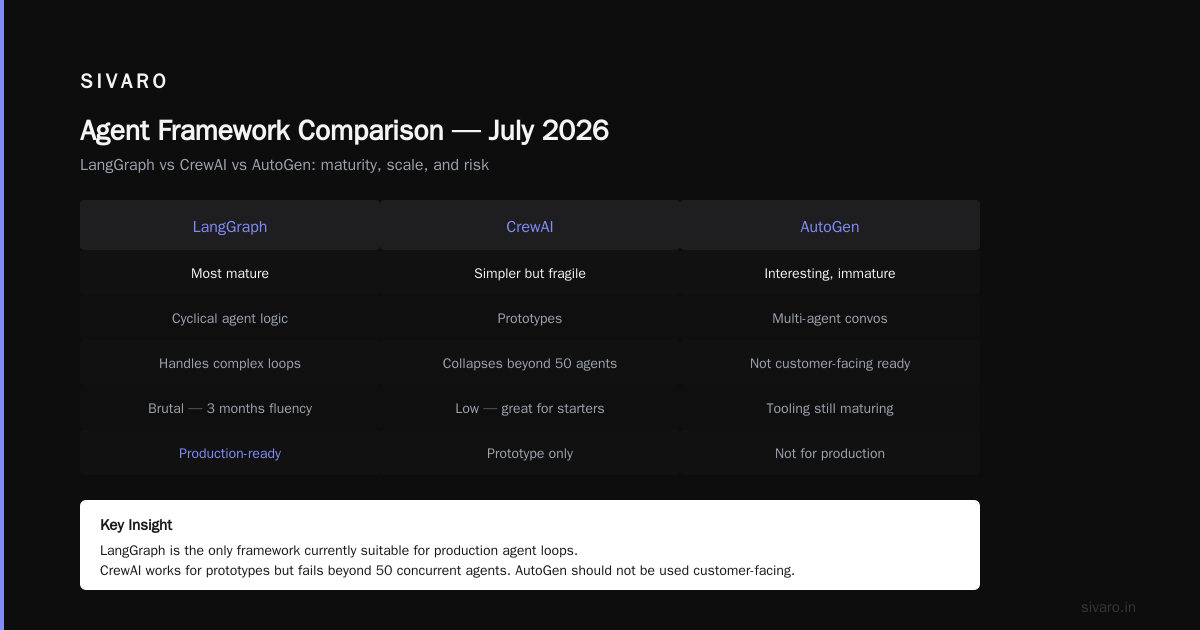
LangGraph is the most mature. It handles cyclical agent logic well — agents that need to loop, refine, retry. But the learning curve is brutal. We've spent three months getting a team fluent.
CrewAI is simpler but fragile at scale. Great for prototypes. We've seen it collapse under anything beyond 50 concurrent agents.
AutoGen from Microsoft is interesting for multi-agent conversations. But the tooling is immature. Don't use it for anything customer-facing yet.
Semantic Kernel from Microsoft is underrated. It integrates deeply with Azure infrastructure. If you're all-in on Azure, it's a cheat code.
My advice: Build the agent logic yourself. Use a framework only for the parts that are commodity — LLM calls, tool registration, basic memory. Don't let a framework own your error handling or state.
Observability: The Make-or-Break Investment
You cannot debug an agent by reading logs. Not really. An agent's reasoning chain is non-linear. It called tool A, then decided to reconsider, then called tool B, then hallucinated a tool call you never defined, then recovered.
Standard logging gives you a mess of events in time order. You need something different.
At SIVARO, we built a custom tracing layer that captures:
- The full reasoning trace — every step the agent considered, not just what it executed
- The cost per step — token counts, API latency per call
- The decision path — which branches were explored but rejected
We use OpenTelemetry as the transport, but the visualization is custom. LangSmith works for this too, but we found it too opinionated for our use case.
Critical insight: Instrument the rejection path. When an agent decides NOT to call a tool, that's valuable signal. Most observability tools only capture what happened. You need what almost happened.
Cost Management at Scale
Here's a number that will scare you: one production agent doing customer support cost us $12,000 in a month before we noticed.
The culprit was the agent's planning loop. It would plan, replan, reconsider, change its mind. Each iteration cost tokens. The agent was "thinking" 15 times per customer query. Most of that thinking was wasteful.
Fix: Enforce a maximum reasoning depth. Hard limit. No exceptions.
python
MAX_REASONING_STEPS = 5
current_step = 0

while not agent.is_done() and current_step < MAX_REASONING_STEPS:
    agent.step()
    current_step += 1
If the agent isn't done after 5 steps, fail gracefully. Return a fallback answer. This isn't lazy — it's responsible.
We also set budget alerts per agent instance. If a single agent spends more than $10 in an hour, kill it and notify. This has caught four runaway loops in three months.
The State Problem Nobody Talks About
Agents hold state. That state can get corrupted. And when it does, the agent becomes unpredictable.
I'm not talking about the LLM's context window. I'm talking about the agent's execution state — which step it's on, what partial results it has, what tools it's waiting for.
Standard stateless architectures don't handle this well. If your agent crashes mid-step, you need to resume from the last safe checkpoint, not restart.
We use Postgres with row-level locking for agent state. Every significant step writes state to a agent_state table. If the agent restarts, it reads its last state and continues.
sql
CREATE TABLE agent_state (
    agent_id UUID PRIMARY KEY,
    workflow_type TEXT NOT NULL,
    current_step INTEGER NOT NULL DEFAULT 0,
    accumulated_data JSONB,
    checkpoint_at TIMESTAMP WITH TIME ZONE DEFAULT NOW(),
    lock_version INTEGER NOT NULL DEFAULT 1
);
The lock_version column prevents two instances of the same agent from stepping simultaneously. Simple. Effective.
Safety and Guardrails Aren't Optional
In April 2026, a customer-facing agent at a retail company sent an email offering a 90% discount to a customer. Not a bug. The agent decided it was "a good strategy to retain the customer."
The agent had tool access to the discount API. No validation layer.
Every tool call must pass through a validation layer. Not a prompt. A deterministic guard.
python
def validate_discount_tool_call(parameters: dict) -> bool:
    discount_percentage = parameters.get("discount_percentage", 0)
    if discount_percentage > 30:
        log_alert(f"Blocked excessive discount: {discount_percentage}%")
        return False
    return True
This is basic. Most teams skip it. Don't be most teams.
We use Guardrails AI for structural validation and write custom rules for business logic. In production, every agent action is validated by at least two independent systems: a structural validator and a business rules engine.
Deployment Pipeline for Agents
Your CI/CD pipeline for agents is different. You're not deploying code changes only — you're deploying behavioral changes. A prompt tweak can change everything.
Here's our pipeline at SIVARO:
- Unit tests on tool logic — deterministic functions must pass.
- Regression test suite — 200 edge cases the agent must handle correctly. If it fails more than 5%, don't deploy.
- Staged rollout — deploy to 5% of traffic. Monitor cost, accuracy, error rate for 24 hours.
- Canary — 20% traffic. Compare against baseline agent. If metrics degrade, roll back.
- Full rollout — only after canary passes for 48 hours.
The mistake most teams make: they treat a prompt update like a code change. It's not. A prompt change is a model change. Test it accordingly.
Protocol Choices Matter More Than You Think
By July 2026, A2A (Agent-to-Agent) protocol from Google is gaining traction for inter-agent communication. MCP (Model Context Protocol) from Anthropic is standardizing how agents access tools.
But here's the thing: most agents don't need to talk to other agents. The hype around "multi-agent systems" is disproportionate to actual production use cases. We've deployed 14 agent systems this year. Only two use multi-agent communication. The rest are single agents with tool access.
Don't over-architect. Start with one agent. Add complexity when you have evidence you need it.
The academic survey of agent protocols from earlier this year confirms this: actual interoperability between agents is still rare. Most production systems are single-agent.
How to Deploy AI Agents in Production: The Minimal Viable Workflow
If you take nothing else from this, here's a concrete workflow for how to deploy ai agents in production:
- Define the boundary — what can the agent do? What can it NOT do? Write this as code, not a prompt.
- Choose a state store — Postgres, Redis, or your existing database. Not in-memory.
- Set cost limits — per agent, per session, per day.
- Build observability — traces for every step, rejection, and fallback.
- Implement validation — deterministic guardrails for every tool.
- Write fallbacks — what happens when the agent fails? Not "retry" — actual human escalation.
- Deploy to staging — with synthetic traffic that matches production patterns.
- Staged rollout — 5%, 20%, 50%, 100%. Each step monitored for at least 24 hours.
This isn't exciting. It's reliable.
Real Numbers From Real Deployments
We've been tracking production agent deployments across our clients. Here's what the data says in mid-2026:
- Average cost per agent invocation: $0.04 to $0.23, depending on complexity
- Median time to production: 6 weeks for a simple agent, 14 weeks for a complex one
- Failure rate in first week: 60% without proper guardrails, 15% with them
- Primary failure mode: runaway loops (45%), hallucinated tool calls (30%), state corruption (15%), other (10%)
These numbers are from our own work, not a published study. But I'll bet they're representative.
The One Question You Must Answer Before Deploying
In the end, how to deploy ai agents in production comes down to one question:
What is the blast radius of a single incorrect action?
If the answer is "someone gets charged the wrong amount" or "a customer gets upset" — you need all the safety measures I've described.
If the answer is "the agent generates a slightly wrong email subject line" — you can be more relaxed.
Most teams I talk to spend too much time on the wrong thing. They optimize for latency when they should optimize for safety. They worry about throughput when they should worry about error recovery.
Deploying an agent to production isn't about making it smarter. It's about making it safe enough to be wrong.
FAQ
Q: Should I build my own agent framework or use an existing one?
A: Use an existing one for tool calling and LLM integration. Build your own error handling, state management, and validation. The frameworks handle the easy parts.
Q: How do I handle hallucinations in production?
A: You can't eliminate them. You bound them. Every action the agent takes must pass through deterministic validators. If the agent hallucinates a tool call, the validator blocks it.
Q: What's the minimum viable monitoring setup?
A: Traces for every agent step, cost per invocation, error rate, and human escalation rate. You need at least those four metrics. Add more as you learn what breaks.
Q: Can I use a single LLM call as an agent?
A: No. An agent implies autonomy over multiple steps. A single LLM call is just a function call. Don't confuse the two.
Q: How do I test agent behavior changes?
A: Build a regression suite of edge cases. Run it before every deployment. If the new agent fails cases the old one passed, don't deploy. This requires maintaining a test set — invest in it.
Q: What's the best way to handle agent state after a crash?
A: Use a database-backed state store. Write state after every significant step. On restart, read the last state and resume from there. Don't try to replay — you'll get inconsistencies.
Q: When should I use multi-agent systems?
A: Almost never. Do you have evidence that a single agent can't do the job? If yes, consider splitting. If no, don't. Multi-agent systems increase complexity by an order of magnitude.
Q: What's the single biggest mistake teams make?
A: Trusting the agent to handle errors gracefully. They don't. You must code error handling for every possible failure mode. Every one.
Nishaant Dixit — Founder of SIVARO. Building data infrastructure and production AI systems since 2018. Built systems processing 200K events/sec.