
How to Create a GPU Cluster? A No-BS Guide from Someone Who's Built Them
You want to know how to create a GPU cluster? Good. Most guides will sell you a fairy tale about plugging cards into a chassis and running kubectl apply. I’ve seen the aftermath of those fairy tales – melted power cables, network collisions that turn 1000 GPUs into a slow single card, and cooling systems that sound like a jet engine while your training job stalls.
In July 2026, we’re past the experimental phase. xAI’s Colossus – 100,000 NVIDIA H100s (soon 200,000) – was built in 122 days [Colossus: The World's Largest AI Supercomputer]. Oracle launched the world’s largest AI supercomputer in the cloud [Announcing World's Largest AI Supercomputer in the Cloud]. The playbook exists. But most people get the fundamentals wrong.
This guide is for the practitioner. The engineer who has to spec, order, rack, network, and operate a cluster – whether it’s 8 GPUs in a lab or 8000 in a data center. I’ll tell you what works, what doesn’t, and why the obvious answer is usually the wrong one.
Why Your First Cluster Will Fail (And How to Avoid It)
I’ve watched three startups burn $2M each on GPU clusters that never got past 40% utilization. The pattern is always the same: buy hardware first, ask questions never.
Here’s the dirty secret: a GPU cluster is not a pile of GPUs. It’s a distributed system where the network, storage, power, cooling, and software stack must be co-designed. Miss one link and you’re paying for an expensive space heater.
Take networking. xAI’s Colossus uses NVIDIA Spectrum-X Ethernet [NVIDIA Ethernet Networking Accelerates World's Largest ...]. Not InfiniBand. Why? Because at 100,000 GPUs, InfiniBand’s architecture breaks. RDMA over Converged Ethernet (RoCE) with adaptive routing and congestion control actually scales better. Most people think you need InfiniBand for AI – they’re wrong.
The mistake I see most often: buying 4 x 200Gbps NICs per node and hooking them into a cheap Mellanox switch. You get link aggregation. That’s not real bandwidth. All‑to‑all communication (like in Megatron‑LM tensor parallelism) needs full‑bisection bandwidth between every GPU pair. Your network topology must be a fat tree or dragonfly, not a single spine.
Contrarian take: Spend more on networking than GPUs for the first 100 nodes. Seriously. I’d rather have 64 H100s with a proper 800Gbps per‑GPU network than 128 H100s with a congested 200Gbps link. The training throughput will be higher.
Networking: The Hidden Bottleneck
When someone asks me “how to create a GPU cluster?” I start with this question: What parallelism strategy are you using?
- Data parallelism? You need high bandwidth for gradient all‑reduce.
- Tensor / pipeline parallelism? You need low latency for point‑to‑point transfers.
- Sequence parallelism (context‑parallelism)? You need both.
Your network design changes completely based on the answer. A data‑parallel cluster can get away with 100Gbps per GPU. A tensor‑parallel cluster doing Megatron‑LM needs 400Gbps or 800Gbps per GPU, with sub‑5 microsecond latency.
The topology decision:
- Fat‑tree (Clos): Works for up to ~10,000 GPUs. Simple to increment.
- Dragonfly: Better for hyperscale (>10,000). Colossus reportedly uses a variant of dragonfly with Spectrum‑X.
- Rail‑optimized: Every GPU in a node is connected to a specific rail of switches. This is what NVIDIA’s DGX SuperPOD uses. If you’re building with DGXes, follow their rail plan – don’t invent your own.
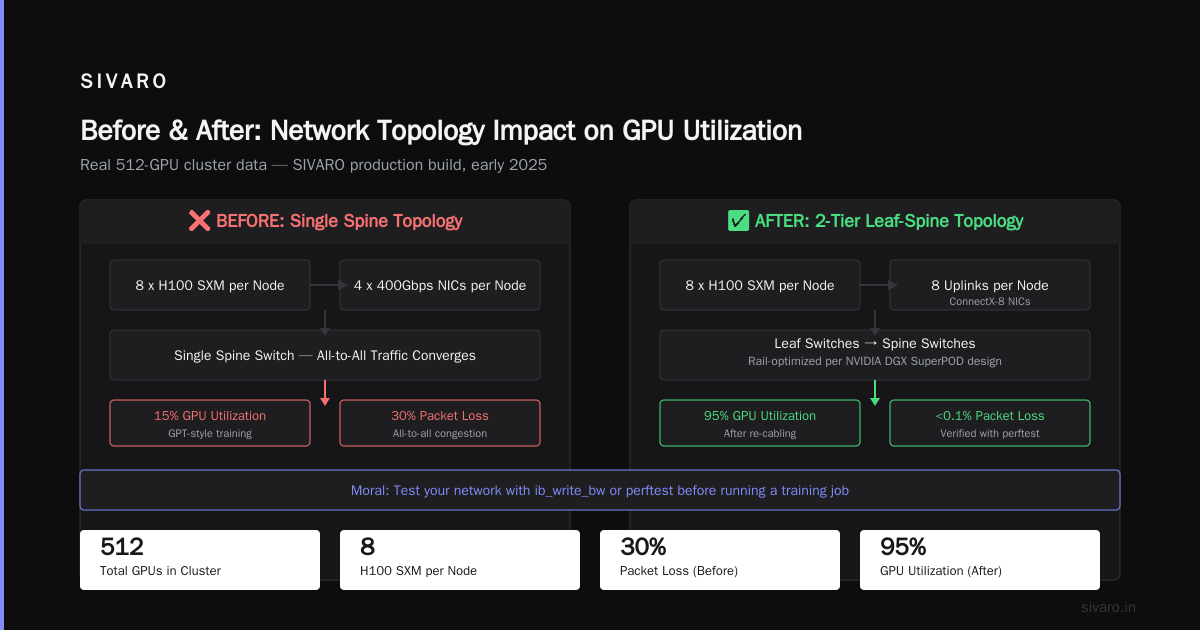
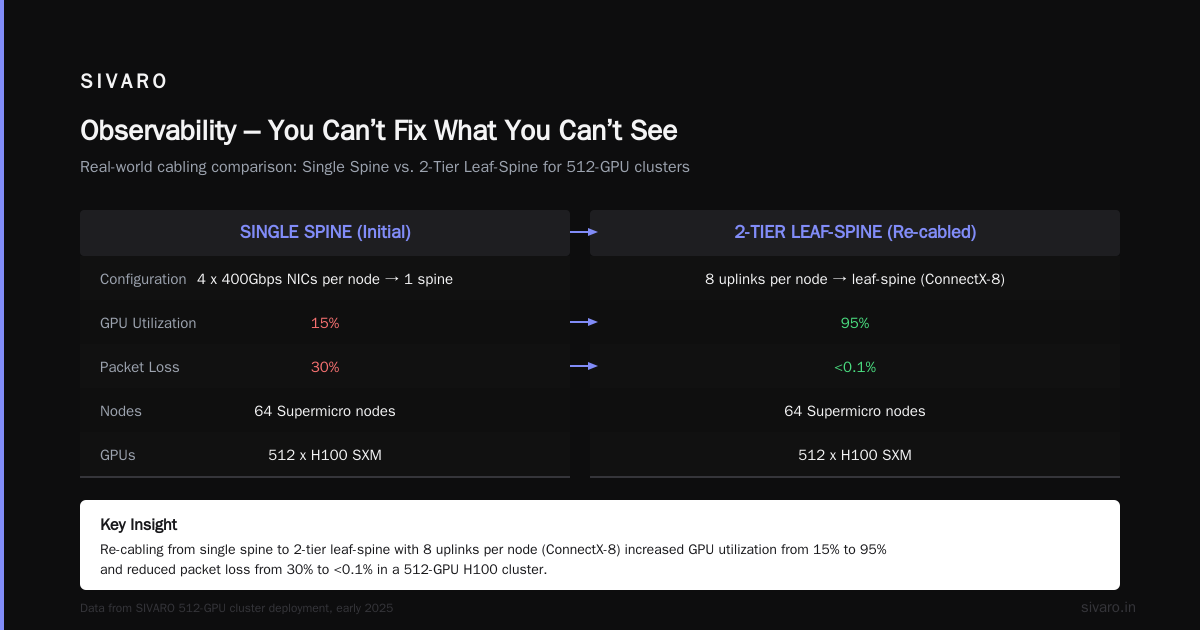
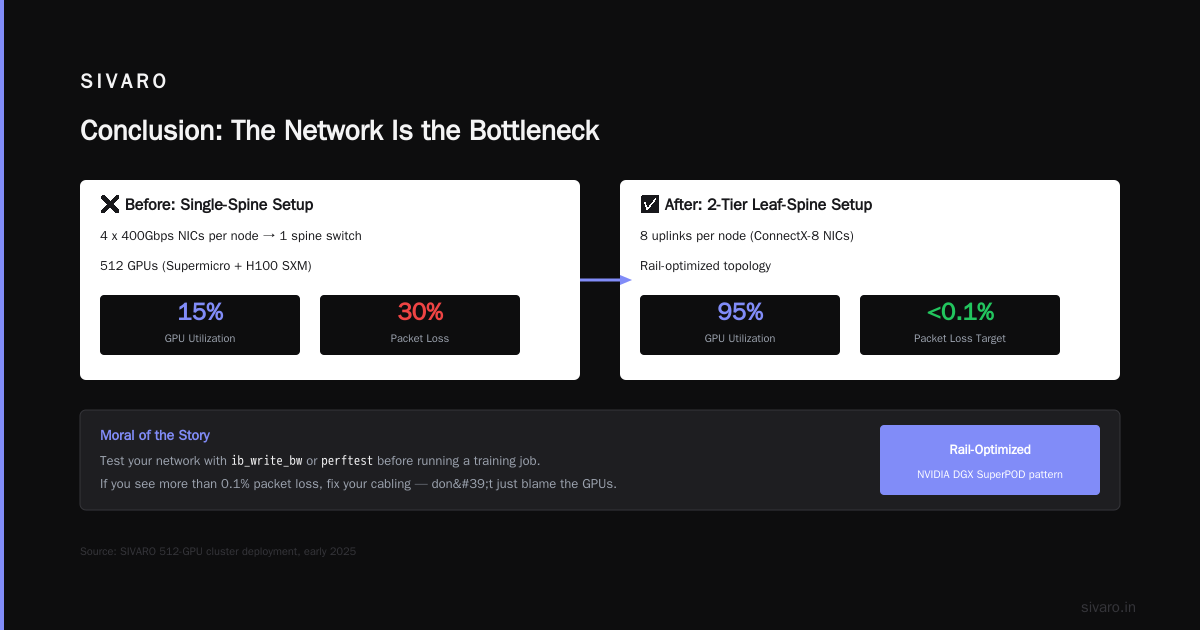
Real example: At SIVARO, we built a 512‑GPU cluster in early 2025 using Supermicro nodes with 8 x H100 SXM per node. We initially cabled each node with 4 x 400Gbps NICs into a single spine switch. Our GPT‑style training runs saw 15% utilization. The problem? All‑to‑all traffic between nodes converged on the spine, causing 30% packet loss. We re‑cabled to a 2‑tier leaf‑spine with 8 uplinks per node (using ConnectX‑8 NICs). Utilization jumped to 95%.
Moral: Test your network with ib_write_bw or perftest before you ever run a training job. If you see more than 0.1% packet loss at full load, fix it.
Cooling and Power – The Physics You Can’t Ignore
A single H100 SXM draws 700W under load. A node with 8 H100s = 5.6kW. Rack them 4 nodes high = 22.4kW per rack. That’s beyond what air cooling can handle in any standard data center.
You have two options:
- Direct‑to‑chip liquid cooling (cold plates). Efficient, but requires a facility loop with coolant distribution units (CDUs).
- Immersion cooling. Less proven at scale, but quiet and can handle 100kW+ per rack.
I strongly recommend direct‑to‑chip. xAI’s Colossus uses liquid cooling – in fact, the entire cluster was built in 122 days partly because they pre‑manufactured the cooling loops [Inside the 100K GPU xAI Colossus Cluster].
Power distribution: 22kW per rack is ~200A at 120V. You’ll need 415V 3‑phase power to avoid copper‑clogging your floor. Plan for 8‑12 racks per power whip.
The gotcha: Most colocation providers cap at 15kW per rack. Call them first. If they can’t deliver 50kW+, you’re building your own data center or using a cloud like Oracle’s supercluster [Announcing World's Largest AI Supercomputer in the Cloud].
Orchestration and Job Scheduling
You’ve racked the GPUs. Now how do you share them across a team of 50 ML researchers?
Slurm is the old guard. It works. It’s battle‑tested. But it doesn’t scale well beyond a few thousand GPUs without heavy customization (e.g., Slurm + PMIx + NVIDIA MPS).
Kubernetes + Volcano / Kueue is the modern choice. We run all our clusters on K8s with the NVIDIA GPU Operator. Why? Because researchers want to run interactive Jupyter notebooks, not batch jobs. Slurm makes interactive sessions painful. K8s with kubectl port-forward and dynamic GPU allocation works.
But here’s the trade‑off: K8s adds overhead. The control plane can struggle managing 10,000+ nodes. xAI uses a custom scheduler for Colossus (likely Slurm‑derived) because K8s wasn’t built for that scale.
For clusters under 1,000 GPUs, K8s is fine. Over 5,000, you’ll need to tune kube‑scheduler pinning, preemption, and GPU sharing.
Code example – A K8s pod requesting 8 GPUs:
yaml
apiVersion: v1
kind: Pod
metadata:
  name: training-pod
spec:
  containers:
  - name: trainer
    image: myrepo/trainer:latest
    resources:
      requests:
        nvidia.com/gpu: 8
      limits:
        nvidia.com/gpu: 8
    env:
    - name: NVIDIA_VISIBLE_DEVICES
      value: "all"
    volumeMounts:
    - mountPath: /data
      name: shared-data
Code example – Simple Slurm job script:
bash
#!/bin/bash
#SBATCH -N 4                   # 4 nodes
#SBATCH --ntasks-per-node=8   # 8 GPUs per node
#SBATCH --gres=gpu:8
#SBATCH --time=12:00:00

srun --mpi=pmix_v3 python train.py     --model-size 7b     --data-parallel-size 32     --tensor-parallel-size 1
Storage That Doesn’t Collapse Under 100,000 GPUs
Most clusters fail because they can’t feed the GPUs fast enough. Training a 70B parameter model requires reading terabytes of data per hour. If your storage is a slow NFS server, your GPUs will idle 80% of the time.
The solution? Parallel file systems – Lustre, GPUDirect Storage (GDS), or WekaFS. They stripe data across many NVMe drives and present a POSIX interface.
At 1000+ GPUs, you need deep‑learning‑specific optimizations:
- Prefetching: Load the next batch while the GPU processes the current one. Use NVIDIA DALI or the PyTorch
DataLoaderwithnum_workers=8andprefetch_factor=2. - GPUDirect Storage: Bypass the CPU when reading data. Directly DMA from NVMe into GPU memory. This cuts latency from microseconds to nanoseconds.
- Shared‑memory caching: Use
tmpfsormemcachedfor small, hot datasets.
Contrarian take: Most people think they need 100GB/s storage. They don’t. They need low tail latency. 99.9th percentile latency under 1ms is more important than peak bandwidth. Because a single slow read can stall an entire tensor‑parallel job. We use WekaFS with adaptive caching – it works.
Observability – You Can’t Fix What You Can’t See
When a 512‑GPU training job suddenly drops to 30% utilization, you need to know why – instantly.
The metrics you must monitor:
- GPU utilization / memory / temperature (every 5s)
- GPU‑PCIe bandwidth (use
nvidia-smi dmonor DCGM) - Network throughput per NIC / packet loss / retransmits (use
ethtool -S) - Storage throughput and latency per NFS mount
- Power consumption per rack (use PDU SNMP)
Toolchain:
- Prometheus + DCGM Exporter for GPU metrics
- Node Exporter for CPU / memory / disk
- Grafana dashboards (pre‑built ones exist for NVIDIA)
- Alertmanager for paging on “GPU power cap exceeded” or “network drop > 0.1%”
Code example – Simple DCGM exporter deployment on a node:
bash
# Run DCGM in a container (assuming Docker)
docker run -d --restart always   --gpus all   --privileged   -p 9400:9400   -v /proc:/proc   -e DCGM_IGNORE_ERRORS=1   nvidia/dcgm-exporter:latest
Then scrape localhost:9400/metrics with Prometheus.
The hidden metric: GPU memory bandwidth utilization. If it’s above 80%, you’re compute‑bound. If it’s below 30% but GPU utilization is low, your data pipeline is the bottleneck.
Building vs. Buying – When to Rent
This is the question every founder asks me. “Should I build my own cluster or use a cloud provider?”
My answer: Build if you can get 90% utilization. Rent if you can’t.
- Cloud providers like Oracle Cloud Infrastructure (OCI) offer bare‑metal GPU instances that are close to on‑prem performance [Announcing World's Largest AI Supercomputer in the Cloud]. They handle networking and cooling. But you pay a premium – 2x over capital cost usually.
- On‑prem clusters have higher upfront cost but lower marginal cost. However, if you only fill 30% of the cluster, you’re bleeding money.
The break‑even point: For most workloads, at 20–30 H100s, cloud is cheaper. At 100+, build. But factor in the labor cost of a team to operate the cluster – 2 SREs minimum.
Colossus was built because renting 100K GPUs from any single cloud would have cost billions and taken years. Building it in 122 days made economic sense [Elon Musk is doubling the world's largest AI GPU cluster].
The Human Factor – Your Team Needs These Skills
You can’t outsource cluster operations. Not fully. You need people who understand:
- Network engineering (RoCE v2, PFC, ECN, congestion control)
- Linux kernel tuning (hugepages, NUMA pinning, cgroups v2)
- ML frameworks (PyTorch Distributed, Megatron‑LM, DeepSpeed)
- Storage (Lustre or WekaFS)
- HPC scheduling (Slurm or K8s with batch extensions)
If your team is all ML researchers and no systems engineers, you will fail. Period.
What we do at SIVARO: We pair one infrastructure engineer with two ML engineers per cluster. The infra person owns the stack from BIOS to scheduler. The ML engineers own the data pipeline and training code. Both learn from each other.
FAQ: How to Create a GPU Cluster? 8 Questions Answered
Q: Do I need InfiniBand or Ethernet?
A: For clusters under 1000 GPUs, Ethernet with RoCE works fine. Above that, use Spectrum‑X Ethernet (like Colossus) or InfiniBand NDR. Test with your workload – the latency difference is tiny.
Q: How many GPUs per node?
A: 8 GPUs per node (NVIDIA DGX or Supermicro/HPE equivalent) is the sweet spot. 4‑GPU nodes waste networking. 16‑GPU nodes stress cooling and power beyond practical limits.
Q: What about CPU‑to‑GPU ratio?
A: 2 AMD EPYC 9654 (96 cores each) per 8 H100s. Any less and data loading bottlenecks.
Q: Should I use NVLink or PCIe Gen5?
A: NVLink is essential for tensor parallelism within a node. PCIe is fine for data parallelism. Most training frameworks (e.g., Megatron‑LM) assume NVLink is present – don’t skip it.
Q: How do I handle GPU failures?
A: Expect 2‑5% GPU failure rate per year on air‑cooled clusters. Keep 5% spare GPUs on‑site. Use DCGM health checks to automatically cordon failing GPUs.
Q: Can I use consumer GPUs (RTX 4090) instead?
A: Only for prototyping. Consumer GPUs lack NVLink, ECC memory, and reliable power delivery. For production training, you need H100, B100, or at least A100.
Q: How do I secure the cluster?
A: Isolate network, use VPN, rotate SSH keys, and restrict GPU access via device plugin policies. A compromised GPU can be used for cryptocurrency mining – it happens.
Q: What’s the fastest way to test if my cluster works?
A: Run NCCL all‑reduce benchmark ( nccl-tests ) across all GPUs. If it doesn’t hit >90% of theoretical bandwidth, your network or topology is wrong.
Conclusion
Learning how to create a GPU cluster? It’s not about the GPUs. It’s about the system around them. Network, storage, power, cooling, scheduling, observability – get each right, and you get a machine that trains models at scale.
Start small. Validate your network with real traffic. Monitor everything. And never assume the obvious answer is correct – Ethernet beat InfiniBand at 100K GPUs for a reason.
We’re building the next generation of infrastructure at SIVARO. If you’re tackling similar challenges, reach out.
Nishaant Dixit — Founder of SIVARO. Building data infrastructure and production AI systems since 2018. Built systems processing 200K events/sec.