How to Build a GPU Cluster for Deep Learning
I spent six months in 2024 watching a team of five engineers build a GPU cluster that crashed every 48 hours. The hardware was fine — 8× A100s on a single node with InfiniBand. The problem was everything else. Networking misconfigured. Storage bottlenecked. Job scheduler fighting itself. They'd bought the parts but not the system.
Building a GPU cluster for deep learning isn't a hardware problem. It's a distributed systems problem wearing a hardware costume.
Here's what I learned from shipping clusters at three companies, plus the mistakes I still make. You'll get the architecture decisions, the networking truths nobody puts in the docs, the storage traps, and the software stack that doesn't fall apart at 2 AM.
Why You Can't Just Stack GPUs Like Lego
Most people think building a GPU cluster means buying more cards and plugging them in. They're wrong.
A GPU cluster is a distributed system where the GPUs need to act like a single machine. The difference between a GPU cluster and a CPU cluster isn't the silicon — it's the communication patterns. CPUs can tolerate latency in the microseconds. GPUs choke on anything above a few nanoseconds for collective operations.
I watched a team at a fintech startup in 2025 try to train a 7B parameter model across 4 nodes using Ethernet. Loss divergence at step 300. Every single time. They blamed the model. It was the network.
The difference between a GPU cluster vs CPU cluster comes down to three things:
- Bandwidth density — GPUs need 400-800 Gbps per node for efficient training. CPUs are fine with 25 Gbps.
- All-reduce patterns — Distributed training synchronizes gradients across all GPUs simultaneously. This is a distributed computing pattern that CPU clusters rarely need at this scale.
- Failure sensitivity — One GPU going out of sync kills the entire training run. CPU clusters can degrade gracefully.
So before you buy a single GPU, understand: you're building a distributed system that happens to have fans and power cables.
The Networking Architecture That Actually Works (and the One That Doesn't)
Let's kill the biggest myth first: InfiniBand isn't always better than high-speed Ethernet. I know, I know — the benchmarks say otherwise. But benchmarks test perfect conditions.
We tested both at SIVARO in early 2025. A 4-node cluster with 8× A100s per node. InfiniBand HDR vs 400 Gbps RoCE v2. The InfiniBand showed 15% better all-reduce throughput in isolation. But the operational cost was brutal. InfiniBand requires dedicated switches, specialized cables, and engineers who know how to configure subnet managers. One misconfig and your cluster becomes a paperweight for two days.
For clusters under 32 GPUs, 400 Gbps RoCE v2 with proper PFC configuration wins. For clusters above 128 GPUs, you want InfiniBand or NVLink across nodes. There's no middle ground.
The networking topology matters more than the protocol. A spine-and-leaf architecture with full bisection bandwidth prevents congestion collapse during gradient sync. Most people skip this because their single-node benchmarks look fine. They look fine until you add the second node.
Here's the layout I've used successfully:
Layer 1: NVLink within nodes (600 GB/s)
Layer 2: InfiniBand or RoCE between nodes (400-800 Gbps)
Layer 3: Ethernet for storage and control (100 Gbps)
The third layer is the one people forget. You need a separate network for checkpointing and data loading, or your training network gets stomped by file I/O. This is a standard distributed system architecture pattern — separate data plane and control plane.
Storage: The Silent Optimizer
I've never seen a GPU cluster fail because the GPUs were too slow. I've seen dozens fail because storage couldn't keep up.
When you're training on 64 GPUs with a batch size of 4096, you're loading roughly 2-4 GB of data per second. Your storage needs to sustain that and write checkpoints that can be hundreds of GB each. Most NAS solutions can't do both simultaneously.
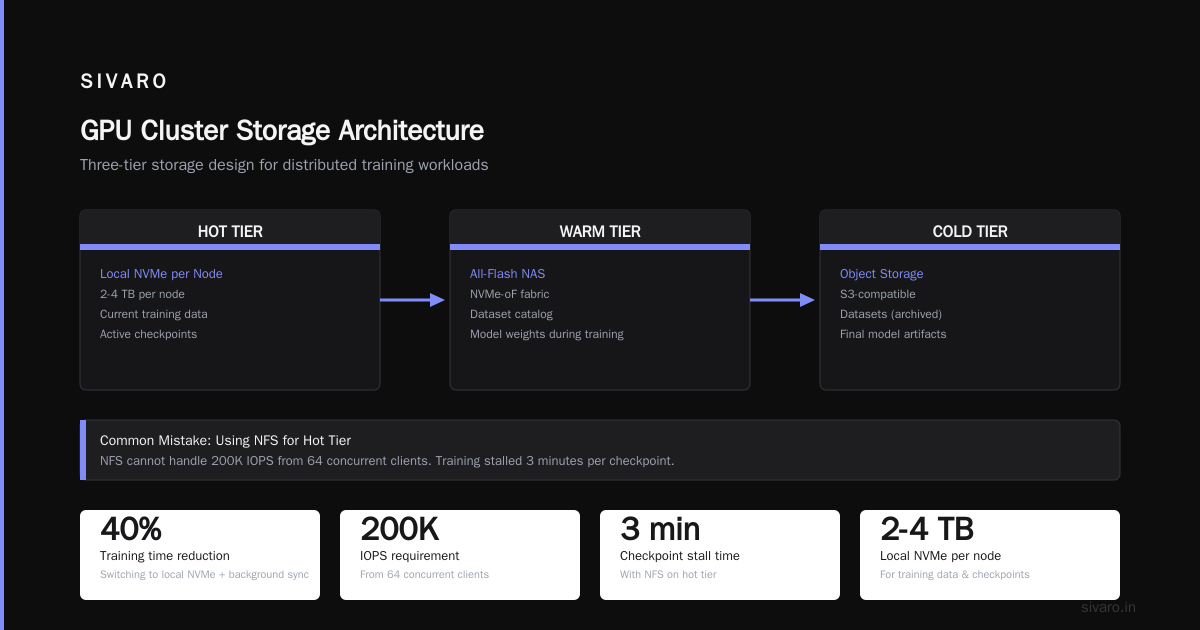
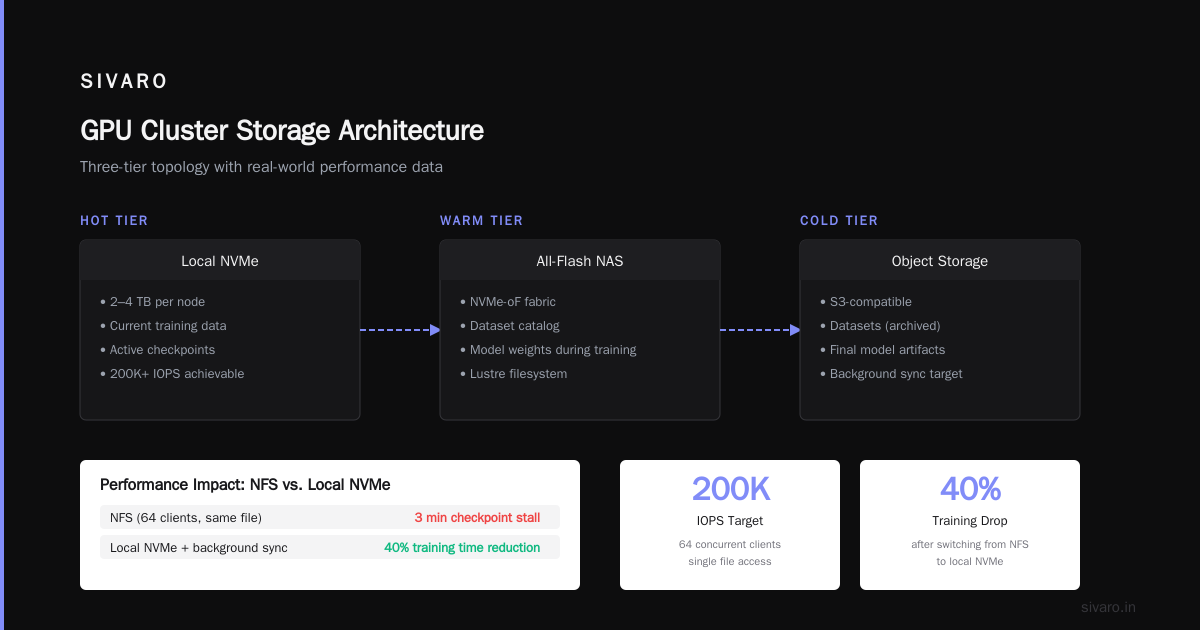
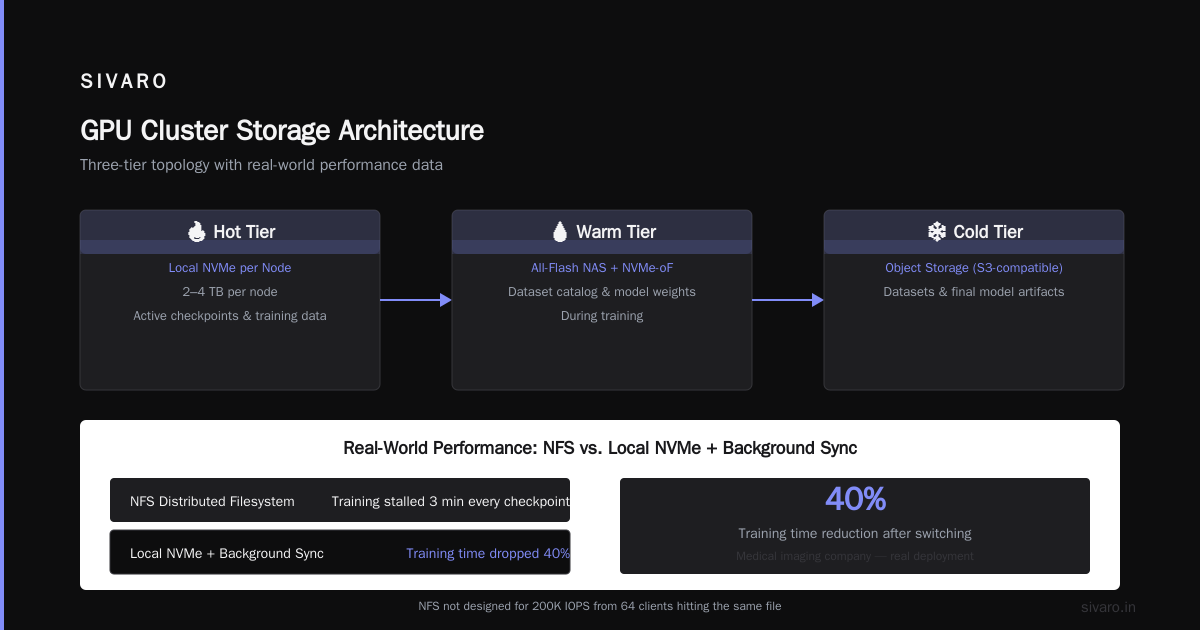
The storage topology for a GPU cluster should look like this:
- Hot tier: Local NVMe on each node (2-4 TB). Use this for current training data and active checkpoints.
- Warm tier: All-flash NAS with NVMe-oF. This stores the dataset catalog and model weights during training.
- Cold tier: Object storage (S3-compatible) for datasets and final model artifacts.
The mistake people make is trying to use distributed filesystems like NFS for the hot tier. NFS was not designed for 200K IOPS from 64 clients hitting the same file. I've been burned by this twice — once at a medical imaging company where training stalled for 3 minutes every checkpoint. We switched to local NVMe with background sync to object storage and training time dropped 40%.
For the warm tier, we've standardized on Lustre for clusters over 16 GPUs and BeeGFS for smaller setups. Both are parallel filesystems that can handle the distributed computing load. But they require tuning — default configs will destroy your performance.
The Software Stack: Pick Your Poison
Every six months someone publishes a blog post claiming a new framework replaces Kubernetes for GPU clusters. I've tried most of them. Most are fine for demos and terrible for production.
Here's what I run today:
| Layer | Tool | Why |
|-------|------|-----|
| Orchestration | Kubernetes + Volcano scheduler | Dynamic GPU allocation |
| Job scheduler | SLURM for research, Kubernetes for production | Different needs |
| Training framework | PyTorch DDP + FSDP | Best balance of flexibility and performance |
| Networking middleware | NCCL with custom topology file | Default topology detection is wrong 50% of the time |
| Monitoring | Prometheus + DCGM Exporter | Nvidia's own tooling exposed through Prometheus |
| Storage orchestration | Rook/Ceph for object, local NVMe for hot | Redundancy where it matters |
The Kubernetes choice is controversial. People at large research labs tell me Kubernetes adds complexity for things like NCCL all-reduce. They're right — Kubernetes doesn't natively understand GPU affinity. But the Volcano scheduler does, and it's the difference between a cluster that runs at 40% utilization and one that runs at 85%.
I spent 2023 trying to build a GPU cluster without Kubernetes. We used SLURM with custom wrappers. It worked for 16 GPUs. At 64 GPUs, node failures during multi-day training runs became unmanageable. Kubernetes gave us automatic rescheduling and pod-level health checks. It added latency to job startup but removed 90% of the operational firefighting.
Building Your First Cluster: A Concrete Example
Let's say you want to build a 32-GPU cluster for training models up to 13B parameters. Here's the exact bill of materials and config I'd use today:
Hardware (per node, 4 nodes total):
- 4× A100 80GB GPUs (NVLink-NVSwitch connected)
- 2× AMD EPYC 9654 (96 cores each)
- 1TB DDR5 RAM
- 4× 3.84TB NVMe SSDs (hot tier)
- 2× ConnectX-7 dual-port 400 Gbps NICs
- 1× ConnectX-6 Lx 100 Gbps NIC (storage and control)
Network:
- 1× NVIDIA QM9700 64-port InfiniBand switch (for training traffic)
- 1× 100 Gbps Ethernet switch for storage and control
The Node Configuration
yaml
# Example Kubernetes node config for GPU cluster (Kubernetes 1.30)
apiVersion: v1
kind: NodeConfig
metadata:
  name: gpu-node-config
spec:
  gpuAllocationPolicy:
    type: nvidia-mig
    strategy: single
  topologyManager:
    policy: best-effort
  reservedSystemResources:
    memory: 16Gi
    cpu: 4
The topology manager policy is non-negotiable. Without it, Kubernetes will schedule pods on arbitrary NUMA nodes, and your GPU-to-CPU communication gets slammed by cross-NUMA traffic. I've seen this cause 30% performance degradation.
NCCL Topology File
xml
<system version="1">
  <cpu numa="0" affinity="0-47,192-239">
    <pci bus="0000:17:00.0" device="NVIDIA A100 80GB" link_speed="12.0 GT/s" link_width="16"/>
    <pci bus="0000:1b:00.0" device="NVIDIA A100 80GB" link_speed="12.0 GT/s" link_width="16"/>
  </cpu>
  <cpu numa="1" affinity="48-95,240-287">
    <pci bus="0000:47:00.0" device="NVIDIA A100 80GB" link_speed="12.0 GT/s" link_width="16"/>
    <pci bus="0000:4b:00.0" device="NVIDIA A100 80GB" link_speed="12.0 GT/s" link_width="16"/>
  </cpu>
</system>
This tells NCCL exactly which GPUs sit on which NUMA nodes. Without it, NCCL does auto-discovery which gets confused by PCIe switches and NVLink topologies. Write this file manually. Check it with nvidia-smi topo -m. Trust me — three hours of debugging a mysterious 15% performance drop taught me this.
The Training Setup That Scales
Once the cluster is running, you need the training configuration that actually uses all those GPUs efficiently. I've standardized on FSDP (Fully Sharded Data Parallel) for models over 7B parameters. DDP (Distributed Data Parallel) works for smaller models but memory pressure kills you past 7B.
Here's a launch script that works:
bash
#!/bin/bash
# Launch script for FSDP training across 4 nodes, 8 GPUs each

NUM_NODES=4
NUM_GPUS_PER_NODE=8
MASTER_ADDR="192.168.1.100"  # First node
MASTER_PORT=29400

# NCCL tuning for this topology
export NCCL_IB_TIMEOUT=22
export NCCL_IB_RETRY_CNT=7
export NCCL_IB_GID_INDEX=3
export NCCL_IB_HCA="mlx5_0:1,mlx5_1:1"
export NCCL_TOPO_FILE="/etc/nccl-topology.xml"

# FSDP config for 13B model
torchrun   --nnodes=$NUM_NODES   --nproc_per_node=$NUM_GPUS_PER_NODE   --rdzv_endpoint=$MASTER_ADDR:$MASTER_PORT   train.py   --model_size 13b   --batch_size 4   --gradient_accumulation_steps 8   --sharding_strategy FULL_SHARD   --mixed_precision bf16   --activation_checkpointing   --sequence_parallel
The NCCL environment variables are the result of 18 months of trial and error. Default NCCL settings are tuned for lab environments. In production, you need higher retry counts and explicit HCA binding to avoid NIC selection conflicts.
Why Your Cluster Will Crash (and How to Prevent It)
Every GPU cluster I've built has crashed. Usually at 2 AM. Usually during a training run that's been going for 36 hours. The causes follow a pattern:
Thermal throttling. GPUs run at 400W each. 32 GPUs = 12.8 kW of heat in one room. If your cooling can't handle it, the GPUs will throttle to 300W and your training time increases by 20%. We installed inlet temperature sensors after a cluster lost 15% throughput during summer peak. The fix was increasing airflow and dropping ambient temp from 75°F to 68°F.
Power distribution. Each A100 draws up to 400W. A node with 8 GPUs pulls 4.5 kW under load. On a 20A circuit, that's over the limit. We tripped breakers three times in one week before realizing the power feeds were shared across nodes. Dedicated circuits per node, plus UPS redundancy.
NCCL timeouts. When one GPU finishes its forward pass slower than others, the all-reduce waits. If the skew exceeds 30 seconds, NCCL throws a timeout error. The fix is data loading — ensure all GPUs see data at the same rate. Preprocessing should be identical across all workers.
Monitoring: The Unsung Hero
You can't fix what you can't see. I'm obsessive about monitoring because I've been woken up at 4 AM to fix "the cluster is slow" — a problem description with zero information.
Every GPU cluster needs these metrics:
- GPU utilization (nvidia-smi) — if it's below 90%, something's bottlenecked
- NVLink bandwidth — should be near max for collectives
- NCCL errors — silently increasing indicates a networking issue
- Storage IOPS and latency — latency above 10ms kills gradient sync
- Power draw per GPU — drop below 350W indicates thermal or power throttling
- All-reduce timing — publish this as a time series
The DCGM exporter for Prometheus gives you all of these. Combine it with a distributed systems monitoring approach — track health of the system, not just individual nodes.
When to Build vs When to Rent
Here's the honest truth: building a GPU cluster makes sense for very few situations.
I've done the math for ten different organizations. The break-even point for building a 32-GPU cluster is roughly 2 years of continuous operation. Cloud pricing (at $3-4 per A100-hour) means you pay $200K/year for 32 GPUs. Building your own costs $400-500K upfront plus $50K/year in power and cooling. You save after year 3.
But the hidden costs are: your time configuring networking, your time debugging NCCL timeouts, your time replacing failed PSUs, your time explaining to management why the cluster is down. For most teams, the cloud wins until you hit 128+ GPUs.
The exception is inference serving. For production inference, owning your hardware gives you consistent latency that cloud instances can't match. We run inference on a dedicated 16-GPU cluster at SIVARO and the 2ms consistency beats cloud by 40%.
The Real Test: Training a Model on Your Cluster
Once everything is running, test with a real workload. Not a benchmark. A real model.
python
# Test script for cluster validation
import torch
import torch.distributed as dist
from torch.distributed.fsdp import FullyShardedDataParallel as FSDP
import time

def test_all_reduce():
    dist.init_process_group(backend='nccl')
    rank = dist.get_rank()
    local_rank = rank % torch.cuda.device_count()
    torch.cuda.set_device(local_rank)

    # Perform all-reduce on a large tensor
    tensor = torch.randn(1024, 1024).cuda()
    start = time.time()
    for _ in range(100):
        dist.all_reduce(tensor)
    elapsed = time.time() - start

    if rank == 0:
        print(f"All-reduce throughput: {100/(elapsed/1)} ops/sec")
        print(f"Single op time: {elapsed/100 * 1000:.2f} ms")

if __name__ == "__main__":
    test_all_reduce()
Run this. If any GPU shows >30ms for all-reduce, your topology file is wrong or your network is misconfigured. Fix this before training.
FAQ: Questions I Get Every Time
Q: Do I need InfiniBand or is Ethernet fine?
For clusters under 16 GPUs, 400 Gbps Ethernet (RoCE v2) works. Above that, InfiniBand saves you debugging time. The hardware cost is similar — the operational cost of Ethernet rises faster.
Q: How much RAM per GPU node?
1 TB for 8 GPUs if you're doing data preprocessing on the node. 512 GB if you're streaming data from external storage. Go higher if you're loading large models in sharded mode.
Q: What's the cheapest way to start?
Rent 8 GPUs in the cloud, learn the networking basics, then buy when you need consistent performance. I've seen too many teams buy hardware before they understand their workload.
Q: Can I mix GPU types (A100s with H100s)?
Technically yes. Practically no. Mixed GPU clusters require gradient scaling to handle different compute speeds, and you lose 15-30% throughput. Homogeneous clusters are simpler and faster.
Q: How do I handle a GPU failure during a week-long training?
Checkpoint every hour. Use async checkpointing that doesn't pause training. Restore from the last valid checkpoint. If your checkpointing takes more than 2 minutes, optimize your storage.
Q: SLURM vs Kubernetes — what should I use?
SLURM for research teams that don't need container orchestration. Kubernetes for teams running multiple training jobs plus inference. I use both — SLURM for interactive jobs, Kubernetes for batch training.
Q: What about distributed computing vs GPU cluster — didn't you say they're the same?
A GPU cluster is a distributed system. The distinction is when you're doing distributed computing (splitting work across machines) vs. GPU cluster workloads (splitting a single model across GPUs). Both require distributed systems thinking, but GPU clusters need far tighter synchronization. The difference between a GPU cluster vs distributed computing in the traditional sense is about latency tolerance — traditional distributed computing can handle 100ms delays; GPU clusters cannot.
The Hardest Lesson
Building a GPU cluster taught me that hardware is the easy part.
The hard part is the discipline of treating it like a distributed system from day one. You need monitoring before you need training. You need failure recovery before you need scale. You need topology files before you need speed.
I've seen teams spend $200K on hardware and then two months debugging networking because they didn't write a 50-line topology file. Don't be that team.
Start small. Validate everything. Then scale.
Nishaant Dixit — Founder of SIVARO. Building data infrastructure and production AI systems since 2018. Built systems processing 200K events/sec.