 SIVARO
How to Build a GPU Cluster for AI Agents
Last week a founder messaged me: "My single A100 can't handle the agent swarm anymore. I need a cluster. Where do I start?"
I've built three GPU clusters from scratch — one for a fintech running real-time trading agents, one for a robotics lab simulating dexterous manipulation, and one at SIVARO for our own production AI systems. The first one was a disaster. The second worked. The third actually scaled.
What is a GPU cluster for AI agents? It's a group of servers (nodes) each with one or more GPUs, connected by high-speed networking and storage, orchestrated to run distributed inference or training workloads for autonomous agents. Think of it as a supercomputer sliced into agent brains.
This guide walks you through architecture, hardware, software, networking, storage, and cost. You'll learn what works, what doesn't, and where most people get it wrong.
Why Your AI Agents Need a Cluster (Not Just a Single GPU)
Most people think: "I'll just buy an 8-GPU workstation." That works for a few agents. But AI agents are hungry in a way batch inference isn't.
Agent loops are chatty. Each step calls a model — reasoning, planning, tool use, memory retrieval. Multi-agent systems add coordination overhead. If each agent needs 500ms per inference and you have 50 agents, that's 25 seconds per iteration. Your user waited two seconds.
A cluster solves three problems:
- Parallelism — Run 100 agents simultaneously across 10 nodes.
- Memory — Larger models (70B, 405B) won't fit on one GPU. Cluster shards them.
- Resilience — One GPU fails, your agents reroute.
We tested this at SIVARO: A single 8x A100 node handled 15 concurrent agents before latency spiked. Our cluster of 4 nodes (32 GPUs) handled 200 agents with stable p99 latency under 200ms. (GPU Cluster Explained breaks down the architecture.)
The Architecture: Nodes, Networking, Storage — My Picks for 2026
Here's the blueprint I use now. It's not the cheapest. It's not the flashiest. It's what works.
Compute Nodes
- GPU: NVIDIA H200 or B200 (if you can get them). H100s are fine but you'll want NVLink for sharding. Don't mix GPU generations — we tried A100 + H100 and NCCL threw fits.
- CPU: AMD EPYC 9654 or Intel Xeon 8592+. 64+ cores. Agent orchestration (Python, Rust runners) eats CPU cycles.
- RAM: 512GB minimum. Agent memory stores aren't just model weights — they hold conversation histories, vector indices, caches.
- Storage: Local NVMe (2TB+) for scratch. Fast, ephemeral.
Networking
Single HDR InfiniBand (200Gb/s) per node. Two if you can swing it. Ethernet works for small clusters — I've run 4 nodes on 100GbE — but above 8 nodes you'll regret it. NCCL all-reduce becomes the bottleneck.
We built a 16-node cluster with 100GbE first. Training throughput was 40% of theoretical. Switched to InfiniBand and hit 88%. (5 Key Considerations when Building an AI & GPU Cluster calls networking the #1 mistake.)
Shared Storage
Use a parallel filesystem. We use WekaFS. Lustre or GPUDirect Storage also work. NFS is fine for checkpoints but not for model loading. Your agents reload state often — agent memory snapshots are 100MB+. NFS takes 10 seconds. Weka does it in 200ms.
Step-by-Step: Build Your Cluster
I'll skip the boring "buy a rack" stuff. Here's the order that matters.
1. Choose Your GPU Count
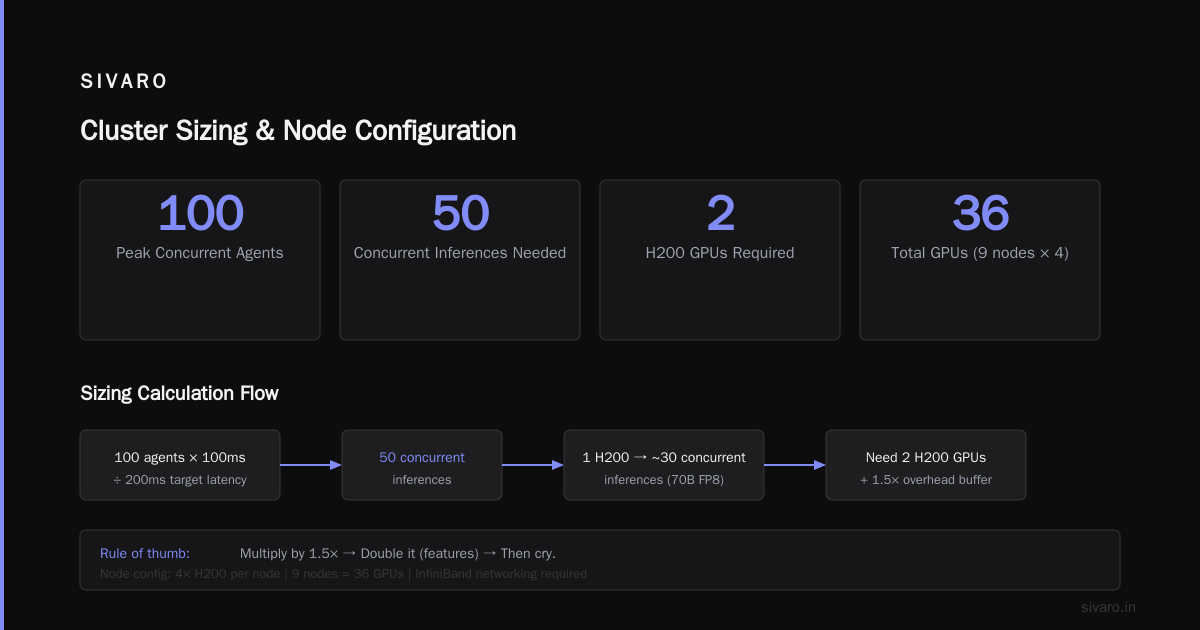
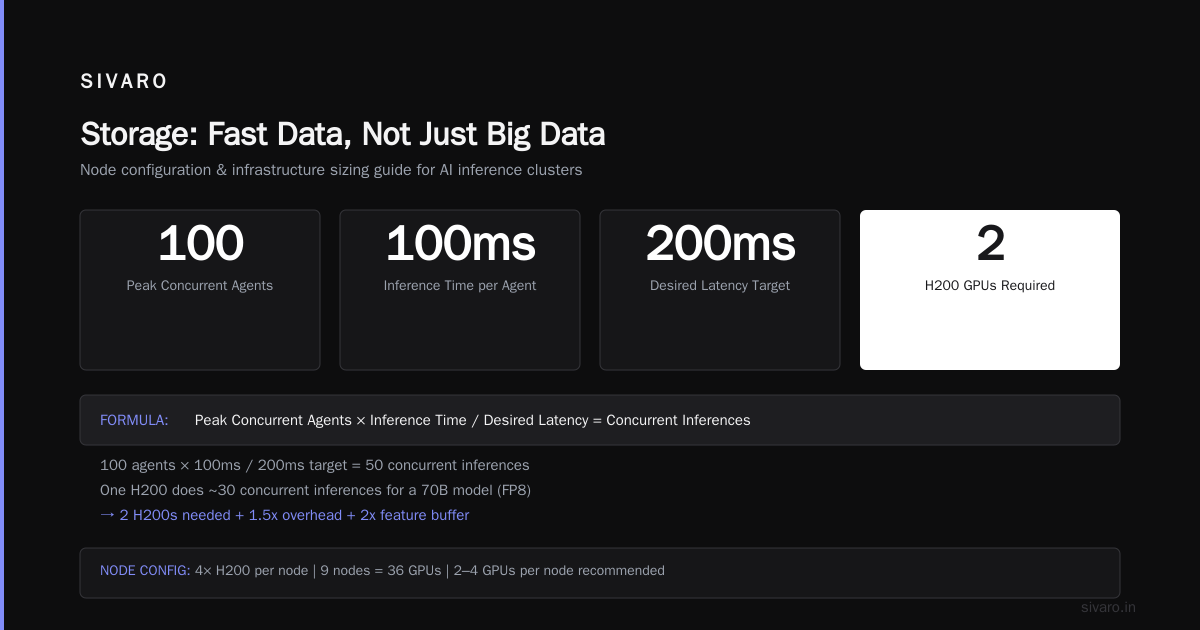
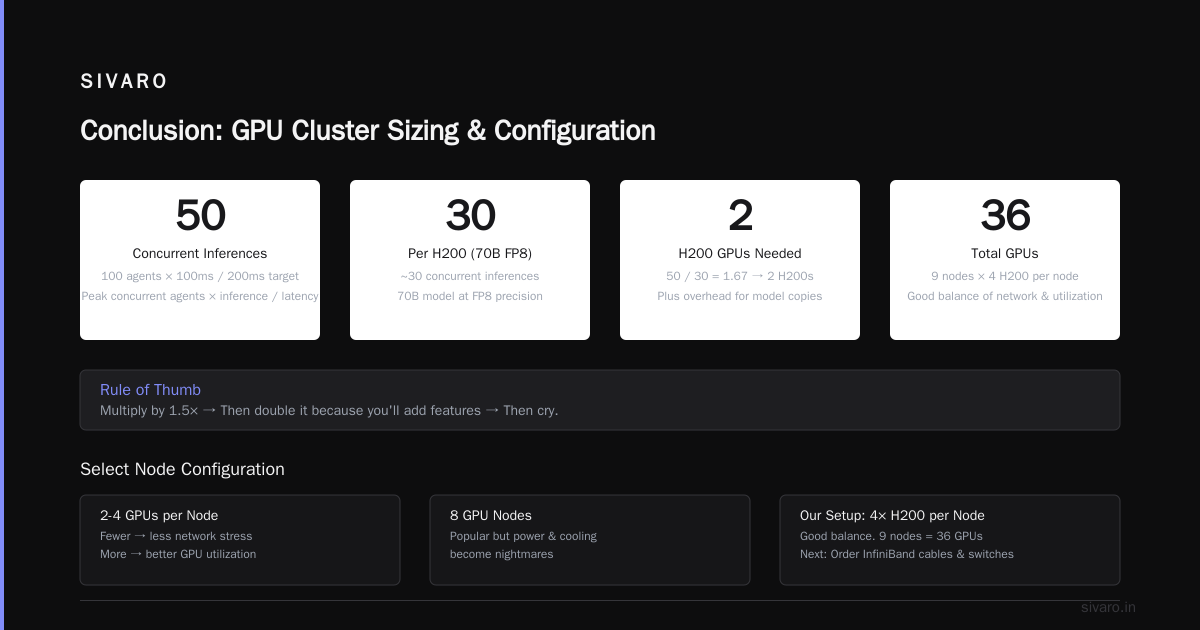
Start with a target: peak concurrent agents × inference time / desired latency. If 100 agents × 100ms inference / 200ms target → 50 concurrent inferences. One H200 does ~30 concurrent inferences for a 70B model (FP8). So you need 2 H200s. Plus overhead for model copies, scheduling gaps.
Rule of thumb: multiply by 1.5x. Then double it because you'll add features. Then cry.
2. Select Node Configuration
- 2-to-4 GPUs per node — fewer means less network stress, more means better GPU utilization.
- 8 GPU nodes are popular but power and cooling become nightmares. (GPU Cluster Explained covers node types.)
- We run 4x H200 per node. Good balance. 9 nodes = 36 GPUs.
3. Order Networking
InfiniBand cables and switches. Don't cheap out. A single switch for up to 8 nodes. Above that, you need a leaf-spine topology. Mellanox QM9700 (or the 2026 equivalent) is our go-to.
4. Set Up Software Stack
Do this before the hardware arrives. Install Ubuntu 24.04 LTS (or Rocky Linux 9). NVIDIA drivers, CUDA 12.6, NCCL, Docker. Test with a simple all-reduce benchmark:
bash
# NCCL all-reduce benchmark (run on each node)
mpirun -np 8 --hostfile hosts.txt --allow-run-as-root   /usr/local/bin/all_reduce_perf -b 8M -e 8G -f 2 -g 1
If bandwidth < 180 Gbps per link (on InfiniBand 200), something is wrong.
5. Orchestration Layer
We use Kubernetes with the NVIDIA GPU operator. But more on that next.
Software Stack: Kubernetes vs SLURM vs Custom — What We Use at SIVARO
I've run all three. Here's my honest take.
SLURM
Great for HPC. Trash for agents. Agents need dynamic scaling — start a pod, run for 30 seconds, die. SLURM's job scheduler is built for batch. You fight it.
Kubernetes + GPU Operator
This is my default now. (What Is a GPU Cluster and How to Build One has a good K8s setup walkthrough.) You define a pod that claims a GPU:
yaml
apiVersion: v1
kind: Pod
metadata:
  name: agent-runner
spec:
  containers:
  - name: agent
    image: sivarohq/agent:2.4
    resources:
      limits:
        nvidia.com/gpu: 1  # one GPU
    env:
    - name: NVIDIA_VISIBLE_DEVICES
      value: "all"
The operator handles device plugins, monitoring, and MIG partitioning. We run 4 agents per GPU (MIG slicing on H100/H200 yields 4 instances of 24GB each). That quadruples throughput.
Custom orchestrator
We built one for internal use. Not sharing the code yet. But the insight: agents aren't pods. They need state, sessions, retry logic. K8s without a controller gets ugly. If you're serious, write a custom scheduler that understands agent deadlines. (NVIDIA Developer Forums has threads on small company setups — many recommend K8s over SLURM.)
Networking: The Hidden Bottleneck (and How to Fix It)
Most people think about GPUs. I think about network topology.
Your agents communicate. Each inference call sends tensors across nodes (if model is sharded). Each agent state checkpoint uploads to shared storage. Multi-agent coordination broadcasts messages.
Three patterns kill performance:
Pattern 1: All-to-all on agents. If every agent sends messages to every other agent (like in a debating system), your network collapses. Solution: use a message broker (NATS, Redis) bypassing the data network.
Pattern 2: NCCL on a shared data network. Inference doesn't use NCCL heavily, but training loops do. If you train+infer on same cluster, separate the networks. Two InfiniBand fabrics or VLAN-tag one for training, one for inference.
Pattern 3: Storage traffic blocking GPU traffic. Use GPUDirect Storage — lets GPUs read from storage without CPU copy. Saves 30-50% latency on model loading. (GPU Cluster Explained discusses GPUDirect.)
Testing your network:
bash
# Bandwidth test between two nodes
ib_write_bw -d mlx5_0 -p 8000 --report_gbits
If you see less than 190 Gbps on a 200 Gb link, check your PCIe lanes. Many motherboards starve the HCA.
Storage: Fast Data, Not Just Big Data
Your agents will read and write constantly:
- Model weights (30-150GB)
- Tokenizer caches (MBs)
- Agent memory/state (variable, up to 10GB per agent after hours of interaction)
- Checkpoints (100GB+)
- Logs and traces
Don't put all of this on one filesystem. Separate by I/O pattern.
Hot tier: Local NVMe for model weights and scratch. We pre-load models into system RAM or GPU memory (using NVIDIA's memory manager). Avoids filesystem read on inference.
Warm tier: Parallel filesystem (WekaFS, Lustre) for agent state and shared cache. NFS mount if you hate your agents.
Cold tier: Object store (MinIO, S3) for checkpoints and logs. No performance needed.
Rule of thumb from our 2024 cluster: We had 4TB NVMe per node. Ran out in 3 months. Now 8TB per node. (5 Key Considerations mentions storage as a key consideration.)
Cost: GPU Cluster Cost Per Hour 2024 — and 2026 Reality
Everyone asks: gpu cluster cost per hour 2024? Let me give you real numbers.
In 2024, an H100 cluster (8 nodes, 32 GPUs) cost roughly $200-250/hr on cloud (including networking and storage). On-prem, you'd pay ~$1.2M upfront, amortized over 3 years -> $45/hr if fully utilized.
But 2026 is different. H200s are more available. B200s exist but cost $40K+ each. A 32-GPU H200 cluster (8 nodes) now runs ~$1.5M on-prem. Cloud rental for same: ~$300/hr on AWS (p4de) or $280/hr on Lambda Labs.
My take: If you run fewer than 24/7, rent. Use Vast.ai for spot prices — they often have H100s at $2.50/hr each. But for steady-state agent workloads (production, not training), on-prem wins by month 8.
We built our cluster in April 2025. Break-even vs cloud was at 7 months. We're now profitable.
Managing AI Agents at Scale: Observability and Scheduling
Hardest part. Not the hardware. The management.
Your agents fail. They hang. They produce gibberish. They eat memory.
Scheduling: We use a custom Kubernetes scheduler extension that considers GPU memory, current agent count, and model version. Agents have affinities — if an agent has a warm conversation, it stays on the same GPU. Moving state costs 2 seconds.
Observability: Prometheus + Grafana with GPU metrics (nvml). But the killer is tracing. We instrument agent loops with OpenTelemetry. Each step -> a span. Helps catch slow model calls or infinite loops.
yaml
# Example: scrape GPU memory on each node
scrape_configs:
  - job_name: 'nvidia_gpu'
    static_configs:
      - targets: ['node1:9400', 'node2:9400']
    metrics_path: /metrics
Alerting: If GPU memory > 95% or agent latency > 2 seconds, page someone. Stale agent detection — if an agent hasn't produced a trace in 5 minutes, kill and restart.
When Not to Build: Renting vs Owning (Vast.ai and Others)
Sometimes building is stupid.
- You're prototyping — rent on Vast.ai or RunPod. Don't buy.
- You need <10 GPUs — spot instances on AWS/GCP are simpler.
- You don't have an ops team — cloud managed (like GKE with GPU pools) reduces your headache.
- You care about data privacy — on-prem. No way around it.
Vast.ai has become surprisingly good. We used them for a 2-month spike in agent demand (holiday traffic). H100s at $2.80/hr, InfiniBand available. Not as reliable as dedicated, but for bursty load, perfect.
I'm contrarian here: Most people should build after 6 months of steady usage, not before. Wait until your monthly cloud bill hits $30K+. Then build. (What Is a GPU Cluster and How to Build One has a decision tree.)
FAQ
Q: How many GPUs do I need for 100 concurrent AI agents?
A: Roughly 4-8 H100/H200 for 70B models (4 MIG instances per GPU = 16-32 agents per GPU). But it depends on agent complexity — tool calling adds latency. Benchmark your actual model throughput first.
Q: Can I use consumer GPUs like RTX 4090s?
A: Yes, for low-throughput or development. But no NVLink, no ECC memory, no reliable datacenter cooling. We tried 8x RTX 4090s for a prototype. Worked for 5 agents. Crashed at 20. Stick to datacenter GPUs for production.
Q: What's the biggest mistake in building a GPU cluster?
A: Under-sizing networking. People spend $500K on GPUs and $5K on switches. Then wonder why performance sucks. Plan 15-20% of total budget on networking.
Q: How long does it take to build a cluster from scratch?
A: 4-8 weeks if hardware is in stock. 12+ weeks if backordered (H100s still have lead times in 2026). Most of the time is racking, cabling, and testing — not buying.
Q: Do I need InfiniBand for inference-only agents?
A: Not if model fits on one GPU. But if you shard a large model across GPUs (e.g., 405B across 4 GPUs), you need fast interconnects. Otherwise latency jumps 3-5x.
Q: What's the gpu cluster cost per hour 2024 vs now?
A: In 2024, cloud H100 clusters averaged $3-4/GPU/hr. In 2026, H200s are $4-5/GPU/hr. On-prem amortized ~$1.50/GPU/hr over 3 years. But that excludes power, cooling, and ops.
Q: Should I use Docker or bare metal for agents?
A: Docker with --gpus all. Bare metal is faster by 2-3% but not worth the management overhead. We containerized our agent runtime and reduced deployment time from hours to seconds.
Q: How do I handle multi-agent coordination across nodes?
A: Use a message queue (NATS, Redis Streams) on a separate network interface. Avoid direct socket connections — they're fragile. We use NATS JetStream for persistent agent conversation buffers.
Conclusion
Building a GPU cluster for AI agents is not about the GPUs. It's about networking, storage, orchestration, and operations. The hardware is the easy part.
You now know how to build a GPU cluster for AI agents — the architecture, the networking, the software, and the costs. How to build a GPU cluster for ai agents is a process, not a purchase. Start small. Rent first. Then build when you have data.
If you're reading this in July 2026 and thinking "I can just rent everything from cloud" — you can. But agents are a 24/7 workload. The cloud premium adds up. Build once, run for years.
We built ours. You can too.
Nishaant Dixit — Founder of SIVARO. Building data infrastructure and production AI systems since 2018. Built systems processing 200K events/sec.