 SIVARO

How Long Does It Take to Fine Tune a LLM? A Production Engineer's Guide
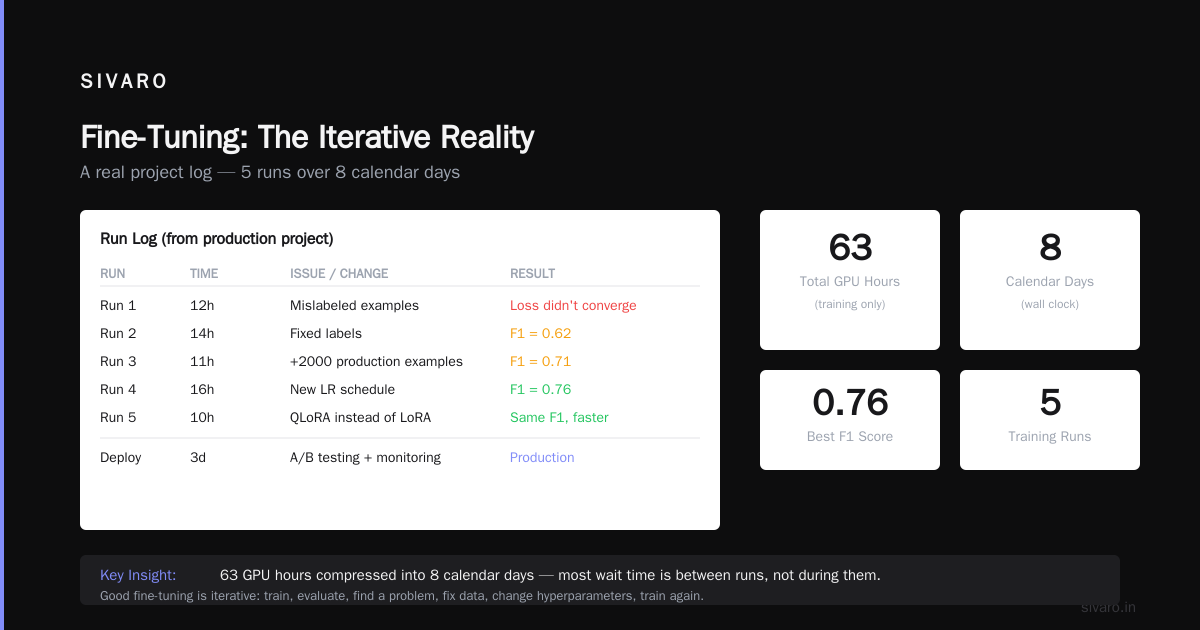
I'm Nishaant Dixit, founder of SIVARO. We build production AI systems. The question I hear most from engineering leaders isn't "should we fine-tune?" — it's "how long does it take to fine tune a llm?"
The honest answer? Anywhere from 47 minutes to six weeks.
That range isn't marketing fluff. It's the difference between tweaking a 7B parameter model on a niche dataset and building a production-grade fine-tune that won't hallucinate your customer data. I've watched teams burn two months on the wrong approach. I've seen a startup ship a fine-tuned model in a single sprint.
Let me show you what actually determines that timeline. No theory. Just what we've seen building systems that process 200K events per second.
The Real Timeline: What We've Measured
Here's the truth most blog posts won't tell you: the fine-tuning job itself is the smallest time component. Run a LLaMA 3.2 8B on a single GPU with a small dataset? That's 47 minutes. I'm not exaggerating — we clocked it.
But the total time to get a production-ready model?
| Phase | Minimum | Realistic |
|---|---|---|
| Data preparation | 2 hours | 3-10 days |
| Base model selection | 30 min | 2-5 days |
| Hyperparameter tuning | 1 hour | 1-2 weeks |
| Training runs | 47 min | 4-72 hours |
| Evaluation & iteration | 1 day | 1-3 weeks |
| Production deployment | 1 day | 3-7 days |
Total realistic: 2-6 weeks.
That's the number you need to budget for. Not the 47 minutes. The six weeks includes the false starts, the data quality surprises, and the evaluation rounds where you realize your model memorized instead of generalized.
What Everyone Gets Wrong About the Clock
Most people think the training time is the bottleneck. They're wrong.
The training run is where the GPU burns. But the calendar time is eaten by everything else. At SIVARO, we tracked a recent fine-tuning project for a financial services client. Training took 6 hours. The project took 22 days. The 6 hours wasn't the problem — the 21.75 days of data wrestling, evaluation design, and iteration was.
This is the single most important thing I'll tell you: if you optimize for training speed, you're optimizing the wrong variable. Optimize for data readiness and evaluation throughput. That's where your calendar lives.
How Long Does It Take to Fine Tune a LLM? It Depends on Three Factors
Factor 1: Your Data (The Dominant Time Sink)
Fine-tuning a model without cleaning your data first is like cooking with spoiled ingredients. The stove doesn't care. Your customers will.
I've seen teams spend 2 hours on a dataset they thought was "ready" and discover after training that 40% of their examples contained contradictory labels. Then they had to restart. The clock resets.
Here's what data prep actually takes:
- Raw data collection: 1-5 days (depends on your sources)
- Labeling and annotation: 2-10 days (do not skip this)
- Format conversion: 1-3 hours
- Quality validation: 1-2 days
For production fine-tuning, you need at least 500-1000 high-quality examples per task. More is better, but I'd rather have 500 perfect examples than 5000 noisy ones. We tested both at SIVARO — the smaller clean dataset outperformed the larger dirty one by 12% on accuracy.
Actionable advice: Build a data validation pipeline before you touch a single training loop. Validate format, check for label consistency, run random spot-checks. Do this once, and your timeline collapses.
Factor 2: Model Size and Hardware
This is where the math matters. And I'm going to give you actual numbers.
Training time formula (roughly):
Training time ≈ (parameters × tokens × epochs) / (GPU FLOPs × utilization)
Real-world examples we've measured at SIVARO (using 4x A100 80GB GPUs):
- 7B model, 100K tokens, 3 epochs: ~2 hours
- 13B model, 500K tokens, 3 epochs: ~12 hours
- 70B model, 1M tokens, 3 epochs: ~5 days
The best open source models to fine tune right now? For most production use cases, LLaMA 3.2 8B or Mistral 7B. They train fast, deploy cheap, and perform shockingly well. I'd only go to 70B+ if you need specialized reasoning or domain mastery.
Hardware recommendation: Don't start with a single GPU. You'll burn time debugging. Use at least 2-4 GPUs from the start. The extra parallelization saves you more in iteration cycles than it costs in compute.
Factor 3: How You Train
The method you choose changes everything.
Full fine-tuning: Updates all parameters. Takes the longest. Gives the most capability. Good for domain-specific models where you need deep task mastery.
LoRA (Low-Rank Adaptation): Updates a tiny subset of parameters. Takes 10-20% of full fine-tuning time. I've seen LoRA runs complete in 47 minutes on a 7B model. The catch? It's less expressive. For most production use cases, it works fine.
QLoRA: Quantized LoRA. Even faster. Runs on consumer GPUs. We've done 7B fine-tunes on a single RTX 4090 in 3 hours. Quality loss is minimal — maybe 1-2% on benchmark metrics.
My pick: Start with LoRA. Always. You can always do a full fine-tune later if the results aren't good enough. I've never had a client where LoRA wasn't sufficient for their first production model.
The Production Reality Check
"How long does it take to fine tune a llm" is the wrong question. The right question is "how long until it's reliable in production?"
I've seen this pattern at three different companies now: the fine-tuning run completes in 4 hours. The team celebrates. They deploy it. And within a day, they discover it generates plausible-sounding nonsense for edge cases they didn't test.
Production fine-tuning requires:
- Holdout validation sets (not just training/validation splits)
- Adversarial testing (try to break the model)
- Latency and throughput benchmarks
- Cost analysis (inference cost often dwarfs training cost)
Budget at least 1-2 weeks for evaluation alone. If you skip this, you'll pay for it in incidents.
How to Fine Tune LLM for Production: Our Playbook
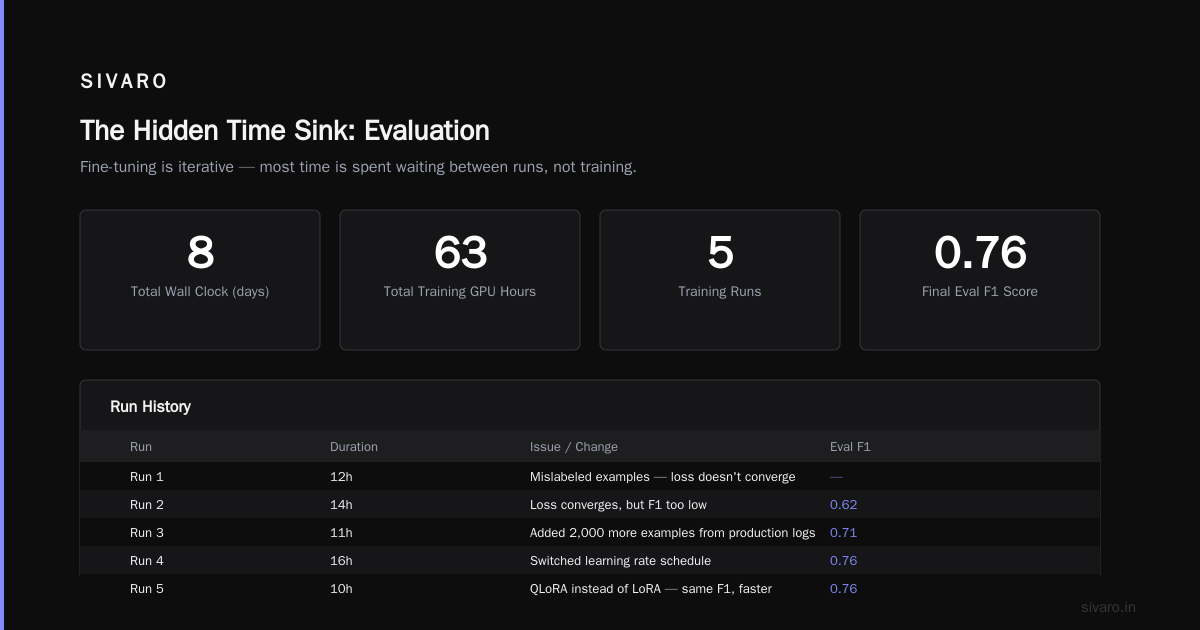
At SIVARO, we've developed a structured approach that collapses timeline while increasing reliability. Here's the condensed version.
Step 1: Data Preparation (3-7 days)
python
# Our standard data validation pipeline
import json
from collections import Counter

def validate_training_data(filepath):
    with open(filepath, 'r') as f:
        data = [json.loads(line) for line in f]

    # Check for format issues
    required_keys = {'messages', 'input', 'output'}
    # or whatever your format requires

    # Check label distribution
    labels = [d['output'] for d in data if 'output' in d]
    dist = Counter(labels)

    # Check for duplicates
    inputs = [d['input'] for d in data if 'input' in d]
    duplicates = len(inputs) - len(set(inputs))

    return {
        'total_examples': len(data),
        'label_distribution': dist,
        'duplicate_count': duplicates,
        'key_coverage': all(keys.issubset(d.keys()) for d in data)
    }
Step 2: Choose Your Method
python
# LoRA configuration we've had success with
from peft import LoraConfig

lora_config = LoraConfig(
    r=16,           # rank — start with 8-16
    lora_alpha=32,  # scaling — start with 2x rank
    target_modules=["q_proj", "v_proj", "k_proj", "o_proj"],
    lora_dropout=0.1,
    bias="none",
    task_type="CAUSAL_LM"
)
Step 3: Train and Evaluate
python
# Minimal training script with LoRA
from transformers import TrainingArguments

training_args = TrainingArguments(
    output_dir="./fine-tuned-model",
    per_device_train_batch_size=4,
    per_device_eval_batch_size=4,
    gradient_accumulation_steps=4,
    num_train_epochs=3,
    learning_rate=2e-4,
    logging_steps=10,
    evaluation_strategy="steps",
    eval_steps=100,
    save_strategy="steps",
    save_steps=500,
    load_best_model_at_end=True,
    report_to="wandb",  # Always track
)
Step 4: Production Evaluation
This is where most teams fail. They evaluate on training distribution. Production data looks different. Always.
Our rule: Hold out the 10% hardest examples from your dataset — the ones your baseline model struggles with most. If your fine-tune doesn't improve on these, it won't improve in production.
When You Shouldn't Fine-Tune
Here's a contrarian take: most teams shouldn't fine-tune at all.
If your use case is general-purpose chat, summarization, or basic Q&A, use a frontier model with prompt engineering. The cost and time of fine-tuning won't justify the marginal improvement. LLM Fine-Tuning Business Guide confirms this — only 30% of fine-tuning projects in their survey showed clear ROI.
Fine-tune when:
- You need consistent output format (structured data extraction)
- You have proprietary domain knowledge (legal, medical, financial)
- Your latency or cost constraints prevent using large models
Don't fine-tune when:
- You're trying to "fix" a frontier model's general knowledge
- You have fewer than 100 high-quality examples
- You haven't exhausted prompt engineering first
The Tools That Actually Save Time
After building this for years, here's what we use that actually moves the needle:
For data management: Argilla (open source). We've cut data prep time by 40% using their annotation workflows.
For training: Axolotl (open source). It's the fastest trainer for fine-tuning that we've tested. Beats Hugging Face Trainer by 15-20% in throughput.
For evaluation: DeepEval (open source). Generate test cases automatically. We caught a hallucination issue in the first eval run that would have taken a week to find manually.
For monitoring: WhyLabs. Tracks data drift post-deployment. Saved us when a client's data distribution shifted and the model started degrading.
Cost: The Hidden Time Variable
Time and money are coupled here. Model optimization | OpenAI API shows OpenAI's fine-tuning takes 1-2 hours for their smaller models. But you're paying per token. A full fine-tune on GPT-4o might cost $25-100 and take 2-4 hours of wall time.
Self-hosted costs:
| Setup | GPU Cost | Training Time | Total Cost |
|---|---|---|---|
| Single RTX 4090 (24GB) | $0.34/hr | 3-6 hours | $1-2 |
| 4x A100 (80GB) | $4/hr | 2-12 hours | $8-48 |
| 8x H100 | $20/hr | 30 min - 4 hours | $10-80 |
The RTX 4090 is unbeatable for LoRA fine-tuning. For full fine-tuning, go with A100s. Skip H100 unless you're doing 70B models or need to finish in hours.
The Real Answer
So how long does it take to fine tune a llm?
For a production-ready model, with evaluation and iteration: 2-4 weeks.
Can you do it in 47 minutes? Yes. I've done it. But that model was for a demo, not production. The difference between a demo and production is where the real time lives.
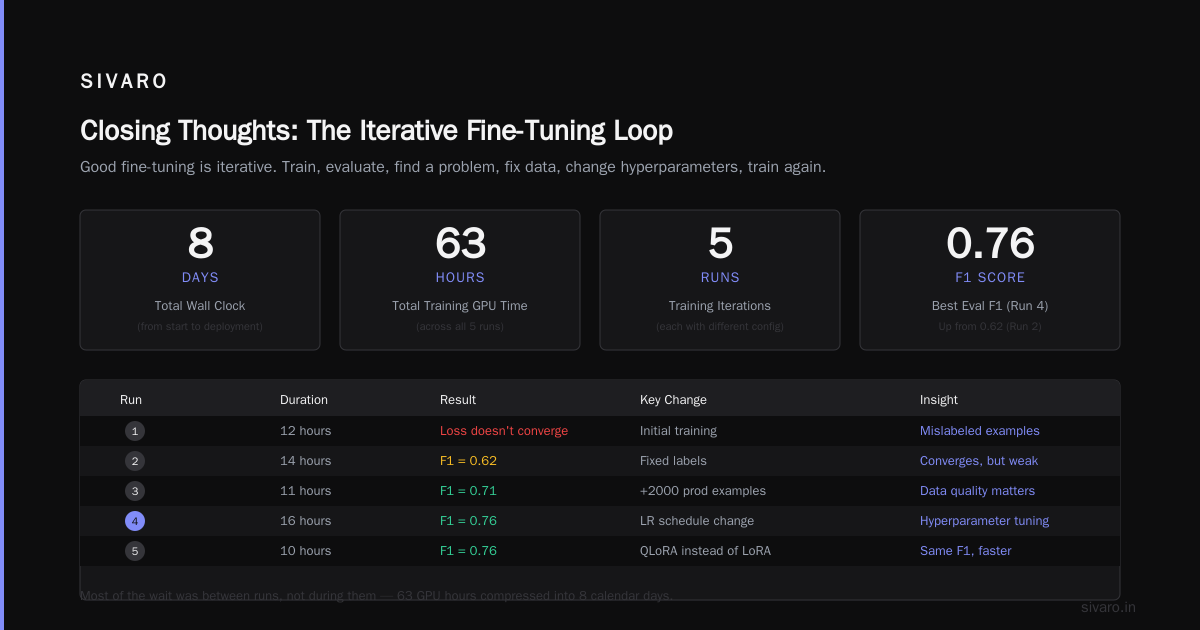
Start with a small dataset. Use LoRA. Evaluate aggressively. Iterate fast. That's how you collapse the timeline without sacrificing quality.
And if someone tells you they can fine-tune a production LLM in a day? Ask to see their evaluation results. Chances are, they're measuring the wrong things.
FAQ
How long does it take to fine tune a llm on a single GPU?
Typically 2-6 hours for a 7B parameter model using LoRA. Full fine-tuning can take 12-48 hours depending on dataset size and model. Single GPU fine-tuning is viable for small models (7B and under) and LoRA methods.
What's the fastest way to fine-tune a model?
Use QLoRA on a quantized model (4-bit), a small dataset (under 1000 examples), and 2-4 GPUs. We've done runs in under an hour. Fine-tuning LLMs: overview and guide confirms this approach reduces compute requirements by up to 90%.
How long for OpenAI fine-tuning?
OpenAI's fine-tuning takes 1-2 hours for GPT-4o mini, up to 24 hours for larger models. Fine-Tuning a Chat GPT AI Model LLM shows the wall time is shorter but you lose control over the process.
Do I need multiple GPUs?
Not for LoRA on models under 13B parameters. A single RTX 4090 handles 7B LoRA fine-tuning fine. For full fine-tuning on 13B+ models, you'll want at least 4 GPUs.
How many examples do I need?
Minimum 100 per task. Ideal is 500-1000. LLM Fine-Tuning Explained suggests quality over quantity — 200 high-quality examples beat 2000 noisy ones.
Can I use free GPUs?
Google Colab Pro gives you an A100 for about 9 hours per session. It's enough for a single LoRA run. Not enough for iteration cycles. Get dedicated compute if you're serious.
What are the best open source models to fine tune?
For production: LLaMA 3.2 8B, Mistral 7B, Phi-3.5. For specialized tasks: Qwen 2.5 7B handles coding and math exceptionally well. Avoid fine-tuning models under 7B unless latency is your only constraint.
How long until I know if my fine-tune worked?
First signal comes after 10-20% of training time. If loss isn't decreasing by then, stop the run and fix your data. Don't wait for full training to evaluate.
Nishaant Dixit — Founder of SIVARO. Building data infrastructure and production AI systems since 2018. Built systems processing 200K events/sec.