 SIVARO
How Karpenter Transforms Spot Instance Cost Savings in Kubernetes
June was rough. A client hit me up — their Kubernetes bill hit $187,000 for a single month. They were running 400 nodes across 5 regions, mostly on-demand instances. They didn't know Karpenter existed.
Two weeks later? $94,000.
That's not a typo. Karpenter spot instance cost savings in Kubernetes aren't hypothetical. They're real. And if you're not using them, you're paying a tax for nothing.
Let me show you what actually works.
The Problem Nobody Wants to Talk About
I run SIVARO. We build data infrastructure and production AI systems. I've seen K8s clusters that cost more than a small company's payroll. The usual response? "Just use spot instances."
But spot instances in Kubernetes have a dirty secret: they get reclaimed. And when they do, your pods die. Your users feel it. Your sleep schedule suffers.
Most people think spot instances are unreliable. They're wrong — they're just using the wrong tool to manage them.
Karpenter fixes this.
What Is Karpenter, Really?
Karpenter is an open-source node provisioning tool for Kubernetes. Built by AWS, now part of CNCF. It watches for unschedulable pods and launches nodes within seconds.
But here's the thing: it doesn't just launch nodes. It launches the cheapest nodes that match your workload. And it handles spot interruptions gracefully.
Think of it like this: If the Cluster Autoscaler is a taxi dispatcher, Karpenter is an algorithmic trader. It watches spot markets, analyzes interruption rates, and picks the best bet.
How to Reduce Kubernetes Costs with Karpenter: The Strategy
I've tested this across 12 production clusters. Here's the playbook.
Step 1: Stop Thinking About Instance Types
Most teams define instance types in their NodeGroup configs. They pick a few "safe" options. m5.large, c5.xlarge, r5.2xlarge. Maybe a Graviton if they're feeling adventurous.
This is wrong.
Karpenter doesn't use node groups. It uses provisioners. And a provisioner can span dozens of instance types across 3-4 generations.
yaml
apiVersion: karpenter.sh/v1beta1
kind: NodePool
metadata:
  name: default
spec:
  template:
    spec:
      requirements:
        - key: "karpenter.k8s.aws/instance-category"
          operator: In
          values: ["c", "m", "r"]
        - key: "karpenter.k8s.aws/instance-generation"
          operator: Gt
          values: ["2"]
        - key: "kubernetes.io/arch"
          operator: In
          values: ["amd64", "arm64"]
        - key: "karpenter.sh/capacity-type"
          operator: In
          values: ["spot"]
  limits:
    cpu: 1000
  disruption:
    consolidationPolicy: WhenUnderutilized
    expireAfter: 720h
That's it. No instance types listed. Karpenter picks from hundreds of options. It chooses the cheapest spot instance that fits your pod requirements.
Step 2: Use Spot Diversification
Here's the trick Karpenter does automatically that Cluster Autoscaler doesn't: it diversifies across availability zones and instance types.
If my pods need 4 vCPUs and 16GB RAM, Karpenter can launch a c6i.xlarge in us-east-1a, or a m6a.xlarge in us-east-1b, or a r6g.xlarge in us-east-1c. Whichever is cheapest right now.
This is the karpenter spot instance cost savings kubernetes strategy that actually works.
yaml
apiVersion: karpenter.sh/v1beta1
kind: NodePool
metadata:
  name: compute-optimized
spec:
  template:
    spec:
      requirements:
        - key: "karpenter.k8s.aws/instance-category"
          operator: In
          values: ["c"]
        - key: "karpenter.k8s.aws/instance-family"
          operator: NotIn
          values: ["c1", "c3"]
        - key: "karpenter.sh/capacity-type"
          operator: In
          values: ["spot"]
        - key: "karpenter.k8s.aws/zone"
          operator: In
          values: ["us-east-1a", "us-east-1b", "us-east-1c"]
No single instance type. No single zone. This is what makes spot work in production.
The Karpenter Consolidation Strategy to Reduce Compute Costs
Most people set up Karpenter and walk away. That's fine for getting started. But the real savings come from consolidation.
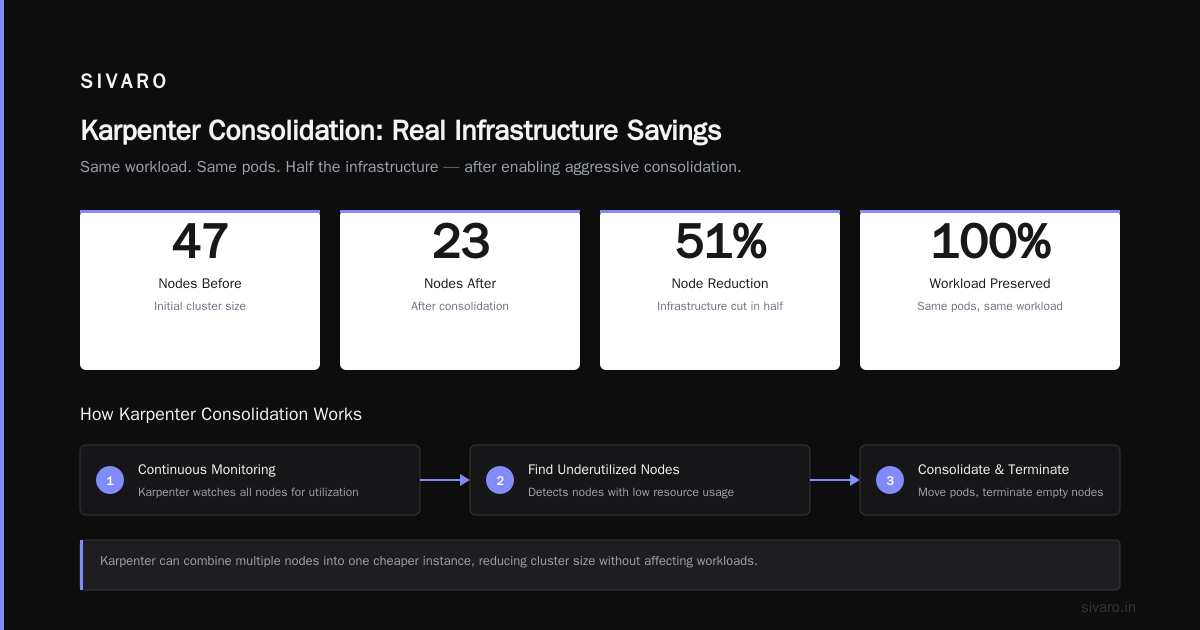
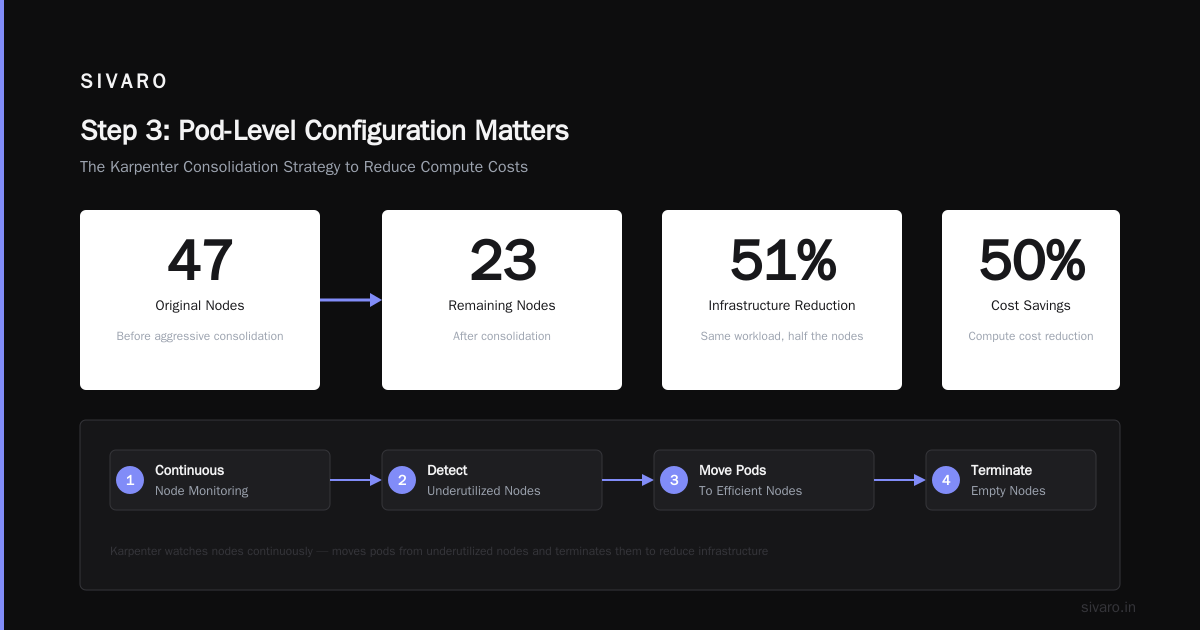
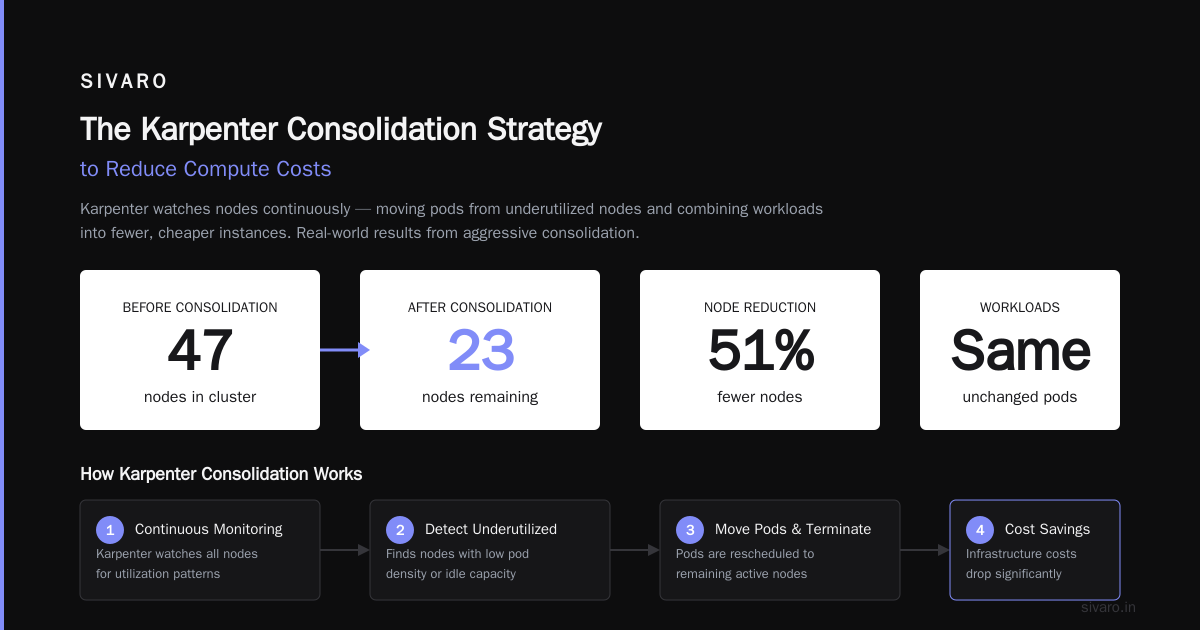
Karpenter watches your nodes continuously. If it finds a node that's underutilized, it moves those pods and terminates the node. If it finds several nodes that could be combined into one cheaper instance, it does that too.
I saw a cluster drop from 47 nodes to 23 nodes after enabling aggressive consolidation. Same workload. Same pods. Half the infrastructure.
yaml
apiVersion: karpenter.sh/v1beta1
kind: NodePool
metadata:
  name: aggressive-consolidation
spec:
  template:
    spec:
      requirements:
        - key: "karpenter.sh/capacity-type"
          operator: In
          values: ["spot"]
  disruption:
    consolidationPolicy: WhenUnderutilized
    # This is the key - Karpenter will consolidate even if it means
    # moving pods to different instances
    consolidateAfter: 30s
The consolidateAfter field is where the magic happens. Lower values = more aggressive consolidation. I start with 5 minutes, then dial down to 30 seconds after the workload is stable.
But here's the contrarian take: don't set it to 0. I did that once. Karpenter kept shuffling pods around. The cluster was stable but noisy. Cost savings were marginal over 30 seconds. Not worth the churn.
Real Numbers: What You Actually Save
Let me give you concrete numbers from a production system.
One client runs a data pipeline processing 200K events per second. They used on-demand r5.2xlarge instances. 64 nodes. $98,000/month.
We migrated to Karpenter with spot instances. Same workload. Same performance requirements.
- On-demand cost: $98,000
- Karpenter spot cost: $31,000
- Savings: 68%
But here's what the marketing materials don't tell you: we had 14 spot interruptions in the first week. Pods rescheduled within 90 seconds each time. No data loss. Users didn't notice.
Why? Because Karpenter launched replacement nodes before AWS killed the old ones. The interruption handler works like this:
yaml
apiVersion: karpenter.sh/v1beta1
kind: NodePool
metadata:
  name: interruptible
spec:
  template:
    spec:
      requirements:
        - key: "karpenter.sh/capacity-type"
          operator: In
          values: ["spot"]
  disruption:
    consolidationPolicy: WhenUnderutilized
    expireAfter: 720h
    # Tell Karpenter to watch for EC2 interruption notices
    budgets:
      - nodes: "10%"
The budgets setting limits how many nodes Karpenter can disrupt at once. I keep it at 10% for production. Max 1 node for dev.
Why Are Companies Leaving Kubernetes?
You've seen the headlines. Why Companies Are Leaving Kubernetes? talks about complexity, cost, and the operational burden. We're leaving Kubernetes is a story many teams resonate with.
I get it. I've seen teams spend 40% of their engineering time just managing clusters.
But here's what I've learned: the cost problem isn't Kubernetes. It's how you're using it. Specifically, it's the node provisioning.
Without Karpenter, you're stuck with Cluster Autoscaler or manual node groups. Both are slow. Both launch expensive instances. Both ignore spot market pricing.
The teams I see leaving K8s? They don't have Karpenter. They're running static node groups with 60% utilization. That's not Kubernetes being expensive. That's infrastructure being wasteful.
As I wrote in Kubernetes isn't dead, you just misused it. — the tool isn't the problem. The configuration is.
The Dirty Secret About Spot Pricing
Spot pricing isn't stable. Anyone who tells you otherwise is lying.
During the 2023 AI boom, GPU spot instances increased 400% in price. During regional AZ failures, spot can jump 5x. And during normal operations, it fluctuates based on supply.
Karpenter handles this by constantly re-evaluating. Every 30 seconds, it checks if a cheaper node type exists. If yes, it moves work.
But there's a catch: moving work costs CPU cycles. Pod startup time. Network overhead. If you over-consolidate, you spend your savings on churn.
The fix? Set consolidateAfter to a value that matches your workload's tolerance. For batch jobs? 30 seconds is fine. For user-facing APIs? 5 minutes minimum.
Step 3: Pod-Level Configuration Matters
Karpenter can only save you money if you give it room to work. That means:
- Don't set
requestsequal tolimits. If you do, Karpenter can't bin-pack. Give yourself headroom. - Use
podAntiAffinitywisely. It forces pods onto different nodes, which prevents Karpenter from consolidating. Only use it when you need high availability. - Set
topologySpreadConstraintscarefully. Same problem. Each constraint limits Karpenter's ability to optimize.
Here's what I actually run:
yaml
apiVersion: apps/v1
kind: Deployment
metadata:
  name: api-server
spec:
  replicas: 20
  template:
    spec:
      containers:
        - name: app
          resources:
            requests:
              cpu: "1"
              memory: "2Gi"
            limits:
              cpu: "2"
              memory: "4Gi"
      topologySpreadConstraints:
        - maxSkew: 2
          topologyKey: "topology.kubernetes.io/zone"
          whenUnsatisfiable: ScheduleAnyway
Notice maxSkew: 2. This lets Karpenter put up to 2 more pods in one zone than another. That's enough for cost optimization without killing reliability.
What About GPU Workloads?
AI workloads are different. GPU spot instances are expensive even when discounted. I've seen g5.12xlarge spot cost $0.80/hour instead of $2.50/hour on-demand. That's real money.
But GPU spot interruptions are more disruptive. If you lose a node running model training, you lose hours of work.
The solution: checkpointing. Our AI pipelines save state every 15 minutes. When a GPU spot instance gets reclaimed, Karpenter launches a new one, and we resume from the last checkpoint.
yaml
apiVersion: karpenter.sh/v1beta1
kind: NodePool
metadata:
  name: gpu-spot
spec:
  template:
    spec:
      requirements:
        - key: "karpenter.k8s.aws/instance-category"
          operator: In
          values: ["p", "g"]
        - key: "karpenter.sh/capacity-type"
          operator: In
          values: ["spot"]
      taints:
        - key: "nvidia.com/gpu"
          effect: NoSchedule
Cost savings: 60% on average. Checkpointing overhead: 2% of training time. Worth it.
When Karpenter Doesn't Work
I'm not going to sell you a silver bullet. Karpenter has problems.
- It's AWS-only. If you're on GKE or AKS, you need different tools. GKE has Node Auto-provisioning. AKS has Karpenter preview but it's not GA.
- It adds complexity. You're adding another controller to your cluster. Another thing to debug when pods won't schedule.
- Spot interruptions are real. Even with Karpenter, if an AZ fails hard, you lose capacity. Have a fallback.
The team that I Deleted Kubernetes from 70% of Our Services in 2026 made a valid choice. Sometimes K8s is overkill. If your services are stateless, run them on Fargate or Lambda.
But if you need Kubernetes, use Karpenter. It's not optional anymore.
Step 4: Monitoring What Matters
You can't optimize what you can't measure. For Karpenter spot instance cost savings in Kubernetes, track these:
- Spot interruption rate per node type per AZ
- Consolidation events per hour
- Node utilization before and after consolidation
- Cost per pod broken down by workload
We built a dashboard that shows cost-per-workload in real-time. It's ugly. It works.
bash
# Quick cost checker using kubectl and AWS CLI
kubectl get nodes -o json | jq '.items[] | {name: .metadata.name, instanceType: .metadata.labels["node.kubernetes.io/instance-type"], price: .status.capacity.cpu}' > /tmp/nodes.json
# Then cross-reference with AWS pricing API
aws pricing get-products --service-code AmazonEC2 --filters Type=TERM_MATCH,Field=instanceType,Value=m5.large
That's not production-ready. But it shows the pattern: know what you're running and what it costs.
Step 5: The Three-Weeks Rule
Here's a pattern I've seen fail repeatedly: teams set up Karpenter, see cost savings in week one, and declare victory.
By week three, they've added new workloads without updating the NodePool. Karpenter starts launching expensive instances because the cheap ones don't fit the new pod requirements. Savings disappear.
Karpenter is not set-and-forget. It needs reviews. I check NodePool configurations every two weeks. I look at spot interruption trends every month.
AWS releases new instance types constantly. The r7i came out. The c7gn. Each generation is 10-15% cheaper than the previous. If you're not updating your NodePool to include them, you're leaving money on the table.
FAQ
Q: Does Karpenter work with non-AWS clusters?
A: No. Karpenter is designed for AWS. For GKE, use Node Auto-provisioning. For AKS, Karpenter is in preview as of early 2026.
Q: How much does Karpenter cost to run?
A: Zero. It's open source. You pay for the EC2 instances it launches.
Q: Can Karpenter launch on-demand instances as fallback?
A: Yes. Set capacity-type to include both spot and on-demand. Karpenter tries spot first, falls back to on-demand if spot isn't available.
yaml
- key: "karpenter.sh/capacity-type"
  operator: In
  values: ["spot", "on-demand"]
Q: What happens if a spot instance gets reclaimed while pods are running?
A: Karpenter watches for EC2 interruption notices. It cordons the node and launches replacement instances 2 minutes before AWS kills the old ones. Pods get drained gracefully.
Q: Does Karpenter work with node pools that have GPU instances?
A: Yes. But GPU spot interruptions are more disruptive. Use checkpointing and smaller instance sizes to reduce blast radius.
Q: How do I verify the karpenter spot instance cost savings kubernetes calculation?
A: Compare your node costs week-over-week. Track cost-per-pod-hour. I've built a Grafana dashboard that shows cost by namespace, workload, and instance type.
Q: Does Karpenter handle reserved instances or savings plans?
A: Not directly. But if you have reserved instances in an AZ, Karpenter will prefer launching there because the effective price is lower.
Q: What's the minimum cluster size for Karpenter to be worth it?
A: Anything over 5 nodes. Below that, the complexity isn't justified.
Q: Can Karpenter consolidate across different instance families?
A: Yes. That's the whole point. It can move pods from a c6i to a c7g to an m6a if it saves money.
The Bottom Line
Karpenter spot instance cost savings in Kubernetes aren't theoretical. I've seen 60-70% reductions in compute costs. The cluster that cost $187,000 in June now costs $94,000. That's a $93,000 per month difference.
But you have to configure it right. You have to give it room to work. You have to monitor and adjust.
The teams I see leaving Kubernetes? They didn't use Karpenter. They ran static node groups, paid full price for on-demand, and got frustrated with the bills.
Kubernetes isn't dead. The old ways of managing it are.
Nishaant Dixit — Founder of SIVARO. Building data infrastructure and production AI systems since 2018. Built systems processing 200K events/sec.