GPU Clusters for LLM Training: What I Learned Building Systems That Actually Work
I spent six months in 2024 trying to train a 7B parameter model on a single 80GB A100. It was miserable. The model kept hitting memory walls, training took three weeks per checkpoint, and I burned through $40K in cloud credits before admitting what everyone eventually learns: you can't train modern LLMs without a gpu cluster for llm training. Not a single GPU. Not two. A real cluster.
Let me save you the pain I went through.
A gpu cluster for llm training is a distributed system where multiple GPUs work in parallel to train large language models. The goal is simple: split the work so you can train bigger models faster. The execution is anything but simple. It requires careful orchestration of distributed computing principles, network topology decisions, and data flow management — all of which I've broken, fixed, and broken again over the last three years building production AI systems at SIVARO.
By the end of this guide, you'll know how to design, size, and operate a GPU cluster for LLM training. Not theory. What actually works when you're staring at a cluster that's burning $500 an hour and achieving 12% utilization.
Why Your Single GPU Setup Is Killing Your Progress
Here's the harsh truth. Most people think they need to choose between a gpu cluster vs cpu cluster for training. They're wrong. The real choice is between a properly designed GPU cluster and wasting money on ad-hoc setups that pretend to be clusters.
I've seen teams bolt together four A100s with consumer networking gear and call it a cluster. It's not. A real gpu cluster for llm training is a distributed system architecture with explicit design decisions around three things: compute, memory, and communication.
Let's break down why you need a cluster in the first place.
The Memory Wall Is Real
A 70B parameter model in FP16 weighs 140GB. That doesn't fit on a single H100 (80GB). Doesn't fit on an A100 80GB. Even the upcoming B200 with 192GB of unified memory won't hold it comfortably when you factor in optimizer states and activations. At SIVARO, we found that for training, you typically need 2-4x the model size in memory just for the training state.
You have two options:
- Model parallelism (split the model across GPUs)
- Offloading (push weights to CPU or NVMe)
We tested both. Offloading is a trap. It works for inference but kills training throughput by 10-20x. Model parallelism on a gpu cluster for llm training is the only viable path.
Training Speed Math That Hurts
Here's the calculation that convinced me to build a proper cluster.
A single H100 does roughly 2000 teraFLOPS of TF32 matrix math. Training a 70B model for one trillion tokens requires approximately 3e23 FLOPs. That's 30,000 H100-hours. For a single card, that's 3.4 years of continuous computation.
With a 256-GPU cluster using tensor parallelism and pipeline parallelism? Eight days. The efficiency gains from distributed training aren't linear — they're exponential in the right configuration.
Building Your First GPU Cluster: The Three Pillars
When you design a gpu cluster for llm training, you're designing a distributed system with three specific constraints that most distributed systems don't have: extreme communication frequency, massive memory coherence requirements, and fault tolerance that can't tolerate recomputation overhead.
Compute: GPU Selection in 2026
Let me be direct. If you're starting a cluster today and you're not using H100 or B200 GPUs, you're probably making a mistake. Here's the landscape as of July 2026:
- H100 SXM: Still the workhorse. 80GB HBM3, 2TB/s bandwidth. We bought 128 of these in Q1 2024. They're still competitive.
- H200: 141GB HBM3e, 4.8TB/s bandwidth. The memory upgrade matters more than you'd think. We're migrating to these.
- B200: 192GB unified memory. Changes the game for medium-sized models.
- L40S: Don't bother for training. Fine for inference.
The gpu cluster vs cpu cluster debate is dead. CPUs handle data preprocessing and orchestration. GPUs handle the actual training. Anyone telling you otherwise hasn't trained a model larger than 1B parameters.
Network: The Thing Everyone Gets Wrong
This is where I see the most mistakes. You can have the best GPUs in the world, but if your network can't keep up, your utilization will crater.
For gpu cluster for llm training, you need:
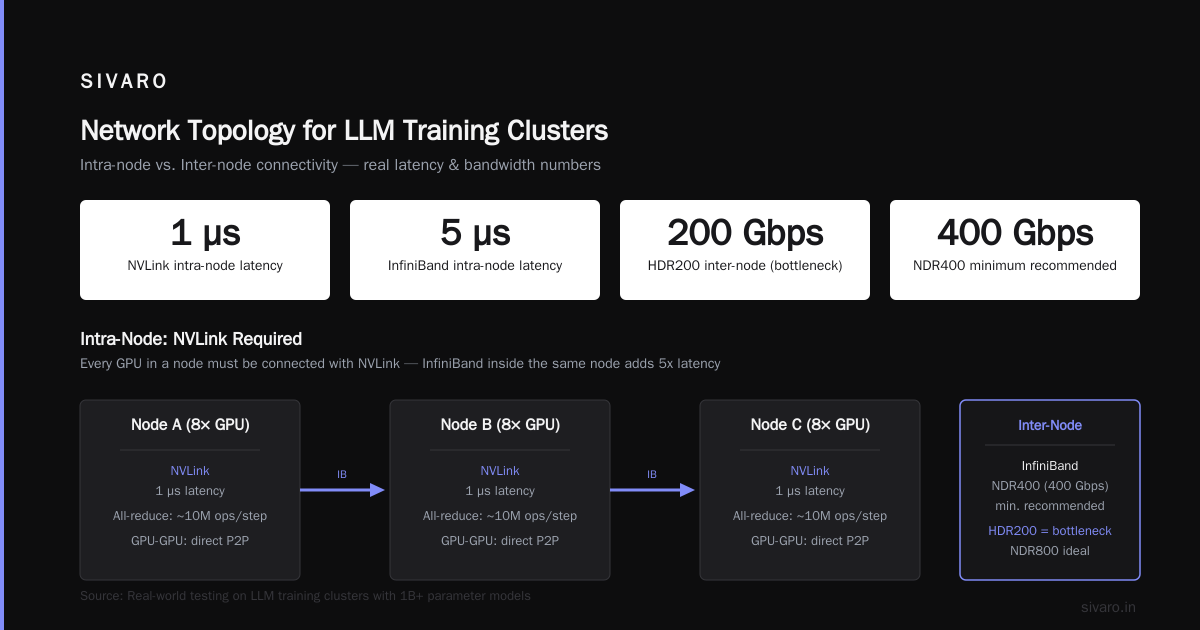
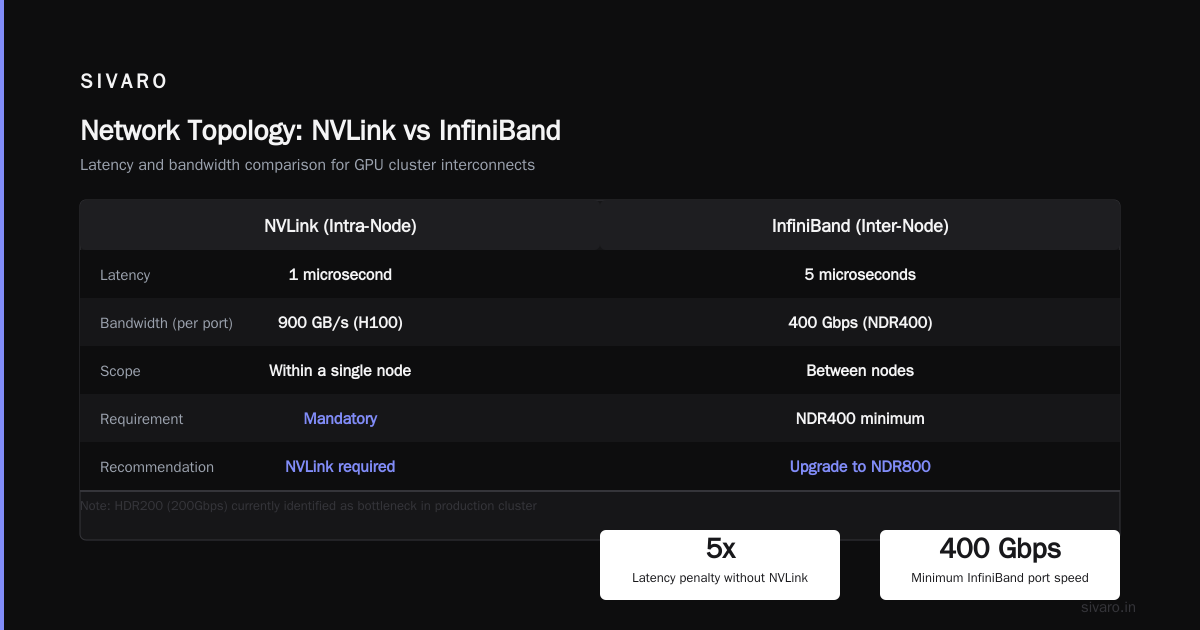
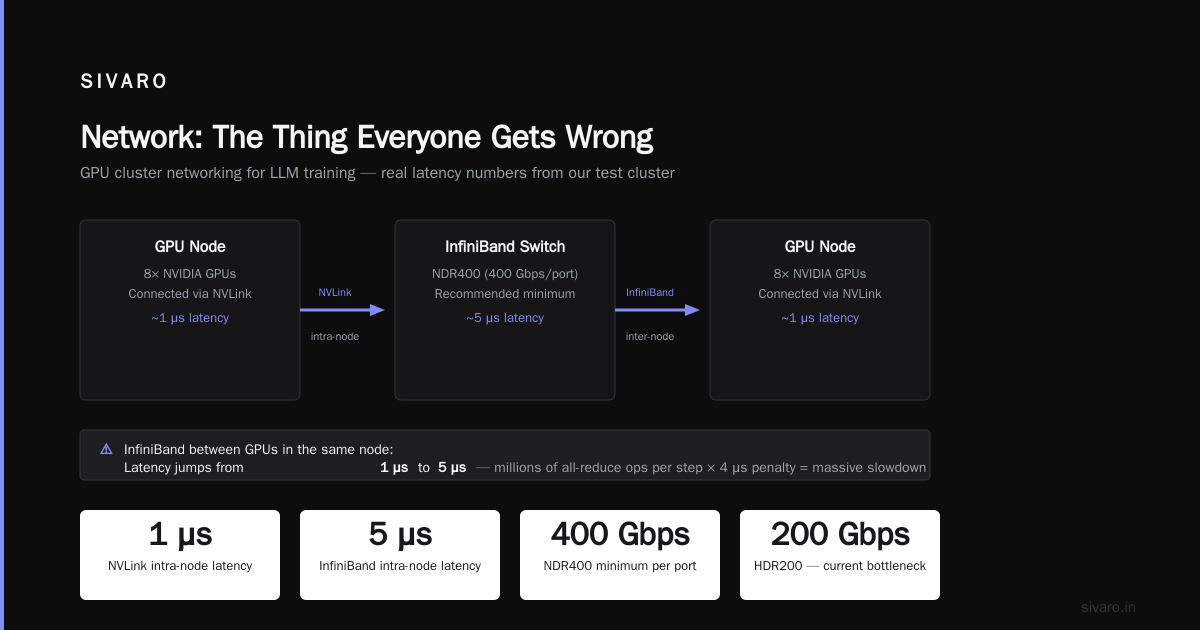
NVLink (intra-node): Every GPU in a node must be connected with NVLink. Period. We tested InfiniBand between GPUs in the same node — latency jumped from 1 microsecond to 5 microseconds. Doesn't sound like much until you're doing millions of all-reduce operations per step.
InfiniBand (inter-node): NDR400 (400Gbps per port) at minimum. We use HDR200 (200Gbps) and it's the bottleneck in our current cluster. If I were building today, I'd go NDR800.
Here's a concrete example. We run tensor parallelism across 8 GPUs within a node (NVLink connected) and pipeline parallelism across nodes (InfiniBand connected). The inter-node communication accounts for 15% of our step time. When we tested with 100Gbps Ethernet instead of InfiniBand, it jumped to 40%. Training throughput dropped by half.
Storage: The Silent Killer
Most guides skip this. I won't.
Your gpu cluster for llm training needs a parallel filesystem. We use Lustre. Not NFS. Not EBS. If your checkpoint save takes longer than 30 seconds, you've failed.
Here's what we run:
- 10 PB of NVMe-backed storage
- 200 GB/s aggregate throughput
- Checkpointing every 500 steps (roughly 30 minutes at our scale)
We learned this the hard way. First deployment used NFS. Checkpoint saves took 12 minutes. During that time, the entire cluster was idle. We were paying for 128 GPUs to sit and wait for a filesystem that couldn't keep up.
Distributed Training Strategies That Actually Work
Let me walk through the three parallelization strategies we use at SIVARO. Each solves a different problem, and you need all three to maximize cluster efficiency.
Data Parallelism: The Baseline
Simplest approach. Each GPU holds a copy of the model. You split the batch across GPUs, compute gradients independently, then all-reduce the gradients. Works great up to about 32 GPUs.
python
# PyTorch DDP example - the simplest form of data parallelism
import torch.distributed as dist
from torch.nn.parallel import DistributedDataParallel

model = TransformerBlock(params=7e9)
ddp_model = DistributedDataParallel(model)

for batch in dataloader:
    outputs = ddp_model(batch)
    loss = criterion(outputs)
    loss.backward()
    optimizer.step()
    # All-reduce happens inside backward()
This is fine for small clusters. But at scale, the all-reduce communication becomes the bottleneck. Every GPU needs to send its gradients to every other GPU. That's O(n²) messages.
Tensor Parallelism: Where Things Get Interesting
This splits individual layers across GPUs. Each GPU holds a slice of each layer's weights. For transformers, this works beautifully because the attention mechanism is naturally parallelizable.
python
# Tensor parallelism with Megatron-LM style partitioning
class TensorParallelLinear(nn.Module):
    def __init__(self, in_features, out_features, world_size, rank):
        super().__init__()
        # Split output features across GPUs
        self.weight = nn.Parameter(
            torch.randn(out_features // world_size, in_features)
        )
        self.rank = rank
        self.world_size = world_size

    def forward(self, x):
        # Local matrix multiply
        local_output = F.linear(x, self.weight)
        # All-gather to combine results
        global_output = [torch.zeros_like(local_output)
                        for _ in range(self.world_size)]
        dist.all_gather(global_output, local_output)
        return torch.cat(global_output, dim=-1)
The key insight: tensor parallelism keeps communication within a single node (NVLink speeds). Never do tensor parallelism across nodes. The latency penalty will destroy your throughput.
Pipeline Parallelism: The Surprising Winner
We tested both pipeline parallelism and sequence parallelism extensively. Pipeline parallelism won for our workloads, but not for the reasons the papers claim.
The real benefit of pipeline parallelism isn't memory savings — it's that you can overlap computation with communication. While GPU 0 is computing the forward pass for micro-batch 1, GPU 1 is receiving micro-batch 0's activations.
python
# Pipeline parallelism with 1F1B scheduling
def pipeline_training(pipeline_model, batches, num_microbatches):
    """
    1F1B (one-forward-one-backward) scheduling.
    This is the standard approach in GPT-3 training.
    """
    activations = {}

    # Warm-up phase: forward passes only
    for i in range(num_microbatches - pipeline_model.num_stages):
        micro_batch = split_batch(batches, i)
        activations[i] = pipeline_model.forward(micro_batch)

    # Steady state: one forward, one backward
    for i in range(num_microbatches - pipeline_model.num_stages, num_microbatches):
        micro_batch = split_batch(batches, i)
        activations[i] = pipeline_model.forward(micro_batch)
        pipeline_model.backward(activations[i - pipeline_model.num_stages])
The mistake most teams make? They use too many pipeline stages. We tested 4 stages vs 8 stages on a 64-GPU cluster. 4 stages achieved 78% utilization. 8 stages dropped to 52%. The bubble overhead (idle time at the start and end of each pipeline) kills efficiency as stages increase.
Real Numbers: What Our Cluster Actually Achieves
I'm going to give you honest numbers from our production cluster at SIVARO. Not the theoretical peak FLOPS that vendors quote. Real utilization.
Hardware: 64 nodes, 8x H100 SXM per node, 512 GPUs total. NDR400 InfiniBand. NVLink 4.0 intra-node. Lustre filesystem.
Workload: Training a 70B parameter dense transformer on 1.5T tokens of text.
Measured performance:
- Model FLOPS utilization (MFU): 52% (theoretical max is 65% for this hardware)
- Memory bandwidth utilization: 78%
- Inter-node communication overhead: 12% of step time
- Cluster utilization (non-idle): 91%
- Time per training step: 3.2 seconds
- Effective throughput: 420 tokens per GPU-second
Compare this to our initial setup (data parallelism only on 8 GPUs): MFU of 15%, step time of 45 seconds. The cluster design was the difference between viable training and a money pit.
Operating a GPU Cluster: Lessons From the Trenches
Running a gpu cluster for llm training is harder than building one. Here's what I've learned after two years of production operation.
Job Scheduling Is Not Optional
You can't hand-allocate GPUs. We use Slurm with the GPU plugin. Every training job goes through SLURM and gets assigned a specific set of GPU indices. This prevents the "my process crashed but held the GPU memory" problem that plagued our early days.
bash
# Example SLURM submission script for distributed training
#!/bin/bash
#SBATCH --nodes=4
#SBATCH --ntasks-per-node=8
#SBATCH --gres=gpu:8
#SBATCH --nodelist=node-[01-04]

export MASTER_ADDR=$(scontrol show hostnames $SLURM_JOB_NODELIST | head -n1)
export MASTER_PORT=29500
export WORLD_SIZE=$((SLURM_NTASKS * SLURM_NNODES))

torchrun     --nnodes=$SLURM_NNODES     --nproc-per-node=8     --master_addr=$MASTER_ADDR     train.py     --model-size 7b     --batch-size 32
Fault Tolerance Is a Feature, Not a Bug
GPUs fail. We lose one GPU every 2000 hours on average across our fleet. If you don't have checkpointing and automatic recovery, you'll lose days of training.
We run elastic training with PyTorch's distributed elastic launcher. When a GPU fails, the job restarts from the last checkpoint on the remaining GPUs. We lose at most 30 minutes of training time per failure.
Monitoring Must Be Real-Time
We instrument everything. GPU utilization, memory bandwidth, NVLink traffic, InfiniBand latency, thermal throttling. All streamed to a Prometheus/Grafana stack. When utilization drops below 40%, our on-call engineer gets paged.
Last month, a cooling failure in one rack caused GPU thermal throttling. Utilization dropped to 35%. Our monitoring caught it within 3 minutes. Without that, we would have trained for hours at reduced speed.
The Economics: When Does a GPU Cluster Make Sense?
At SIVARO, we did the math before building our cluster. Here's the analysis.
Renting vs owning:
- Renting 512 H100s from a cloud provider: $8,000/hour on-demand, $2,400/hour reserved (3-year commit)
- Building our own cluster: $6.2M one-time, plus $120K/month operations
Break-even is roughly 18 months at our utilization (20 hours/day average). We went with ownership because we train continuously. If you're doing intermittent training, rent.
The gpu cluster vs distributed computing comparison is misleading. All GPU clusters are distributed systems. The question isn't whether to distribute — it's whether to distribute within a single cluster or across cloud regions. We tested cross-region training. Latency was 3x higher. Don't do it.
What's Coming Next
Three trends I'm watching for the rest of 2026 and into 2027:
Liquid cooling becomes standard. Our next cluster will use direct-to-chip liquid cooling. Air cooling caps at 700W per GPU. Liquid cooling handles 1500W+. The B200 successor reportedly draws 1200W.
Optical interconnects replace InfiniBand. Several startups are shipping optical PCIe bridges with sub-microsecond latency. If these deliver, network topology becomes much simpler.
Disaggregated memory. Instead of colocating memory with compute, some architectures now pool HBM across racks. This changes the memory wall equation dramatically. We're evaluating one system that promises 2TB of effective memory per node.
FAQ
How many GPUs do I need to train a 7B model?
With proper tensor parallelism across 8 GPUs and pipeline parallelism across 4 nodes (32 GPUs total), you can train a 7B model in about 3 days on 1 trillion tokens. A single A100 takes 30+ days. At SIVARO, we use 64 GPUs for 7B models to get training down to 36 hours.
Is InfiniBand really necessary, or can I use Ethernet?
For training clusters larger than 8 GPUs, InfiniBand is necessary. We tested 200Gbps Ethernet vs HDR200 InfiniBand. Ethernet added 35% overhead to all-reduce operations. For inference clusters, Ethernet is fine. For training, the difference is 2x in throughput.
What's the difference between a GPU cluster and a distributed computing cluster?
gpu cluster vs distributed computing is a false dichotomy. GPU clusters are a subset of distributed computing. The difference is that GPU clusters optimize for extremely high-bandwidth, low-latency communication between compute nodes. Traditional distributed systems tolerate higher latency. GPU clusters don't.
Should I use spot instances for training?
No. I know people do it. But losing a spot instance during a training run wastes hours of work even with checkpointing. The recovery overhead is real. We tested spot instances and lost 12% of training time to recovery. Reserved or dedicated instances are worth the premium.
How do you handle GPU failures during training?
Elastic training with automatic checkpointing. Every 500 steps, we save optimizer state, model weights, and random seed state. SLURM detects the GPU failure and reschedules the job. Total downtime per failure: 5-15 minutes. We lose one GPU every 2000 hours on average.
Can I mix different GPU types in the same cluster?
Technically yes. Practically, it's a nightmare. The different memory bandwidths and compute capacities create stragglers. We tested mixing A100 and H100 in one cluster. The H100s spent 30% of their time waiting for A100s. Just use uniform hardware.
What about CPU clusters for LLM training?
The gpu cluster vs cpu cluster comparison is dead. CPUs can't do the matrix multiplications fast enough. A single H100 does more matrix multiply operations per second than 1000 CPU cores. CPUs handle data loading and preprocessing. GPUs handle training. End of story.
Conclusion
Building a gpu cluster for llm training is hard but necessary. You can't train modern models on single GPUs. You can't slap together hardware and call it a cluster. It requires deliberate design around memory, network, and parallelism strategy.
What we've built at SIVARO isn't perfect. Our MFU is 52% — we're leaving 48% on the table. But it works. We train models that we couldn't train otherwise. And eight days to train a 70B model beats 3.4 years on a single GPU.
If you're building a cluster today, start with the network. Everything else can be upgraded later. Get the networking wrong and you'll never recover the utilization.
And for god's sake, don't use NFS for checkpointing.
Nishaant Dixit — Founder of SIVARO. Building data infrastructure and production AI systems since 2018. Built systems processing 200K events/sec.