 SIVARO
GPU Cluster vs Distributed Computing: The Real Story in 2026
I was sitting in a data center in Ashburn, Virginia, last month, watching a 512-GPU cluster spin up for a customer's LLM fine-tuning run. The customer asked me a question I hear almost every week now: "Should we build a GPU cluster or use distributed computing?"
The short answer: you're already doing both. The long answer is why I'm writing this.
Let me be direct. Most technical leaders I meet in 2026 are conflating two separate things. A GPU cluster is a specific hardware configuration — multiple machines, each with GPUs, connected by high-speed networking. Distributed computing is a broader architectural pattern — splitting work across multiple nodes regardless of what's inside them. The confusion happens because modern distributed computing almost always involves GPUs, and GPU clusters almost always need distributed software to be useful.
I've spent the last eight years building systems that do both at SIVARO. I've made expensive mistakes. This guide is what I wish someone had handed me in 2022.
What We're Actually Talking About
Here's the cleanest distinction I can give you:
A GPU cluster is physical infrastructure. It's racks of servers, each with 4 or 8 NVIDIA H100s or AMD MI300Xs, connected via NVLink or InfiniBand. It's the hardware that makes large-scale AI training physically possible.
Distributed computing is the software architecture that makes that hardware useful. It's the frameworks — PyTorch DDP, TensorFlow with Horovod, Ray, Kubernetes — that split your workload across those GPUs.
You need both. But the decisions you make about one deeply affect the other.
Let me tell you what we've learned the hard way.
GPU Clusters Are Not Just "Servers With GPUs"
(or: How I Spent $3M Learning This Lesson)
In 2023, we built a GPU cluster for a client using 32 A100 nodes. We spec'd the nodes right — lots of GPU memory, fast NVLink between GPUs on the same node. What we got wrong was the inter-node networking.
We used 100 Gbps Ethernet. Thought it was fast enough.
It wasn't.
When you're training a large model across multiple nodes, every single backward pass requires synchronizing gradients across all GPUs. With 32 nodes and 8 GPUs per node, that's 256 GPUs all talking to each other. Distributed computing at this scale creates insane communication bottlenecks if you don't plan for them.
The gradients for a single parameter in a 70B parameter model are about 280 bytes (assuming float32). Across 256 GPUs, that's 71KB of data that needs to be all-reduced. Sounds small, right? Except you're doing this for millions of parameters, thousands of times per second. The total bandwidth requirements explode.
We benchmarked our 100 Gbps setup. All-reduce time was 340 milliseconds. The training step time jumped from 1.2 seconds (single node) to 4.8 seconds (multi-node). We paid for 32 machines and got barely 3x the throughput of a single node. That's a 10x efficiency loss.
We swapped to 400 Gbps InfiniBand. All-reduce time dropped to 45 milliseconds. Training step time hit 1.5 seconds. Suddenly we were getting 30x throughput from 32 machines.
The lesson: GPU cluster vs CPU cluster networking matters more than most people think. CPU clusters can tolerate higher latency and lower bandwidth because CPU workloads are less communication-intensive. GPU clusters for training are bandwidth hogs. Don't cheap out on the networking.
The Real Difference Between CPU and GPU Clusters
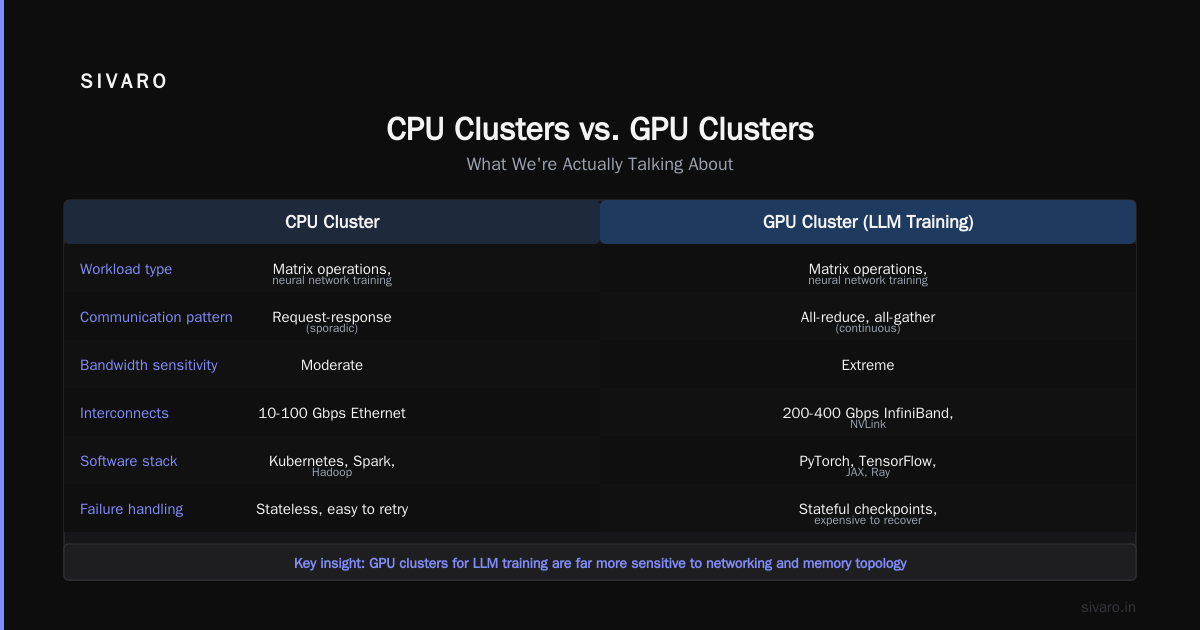
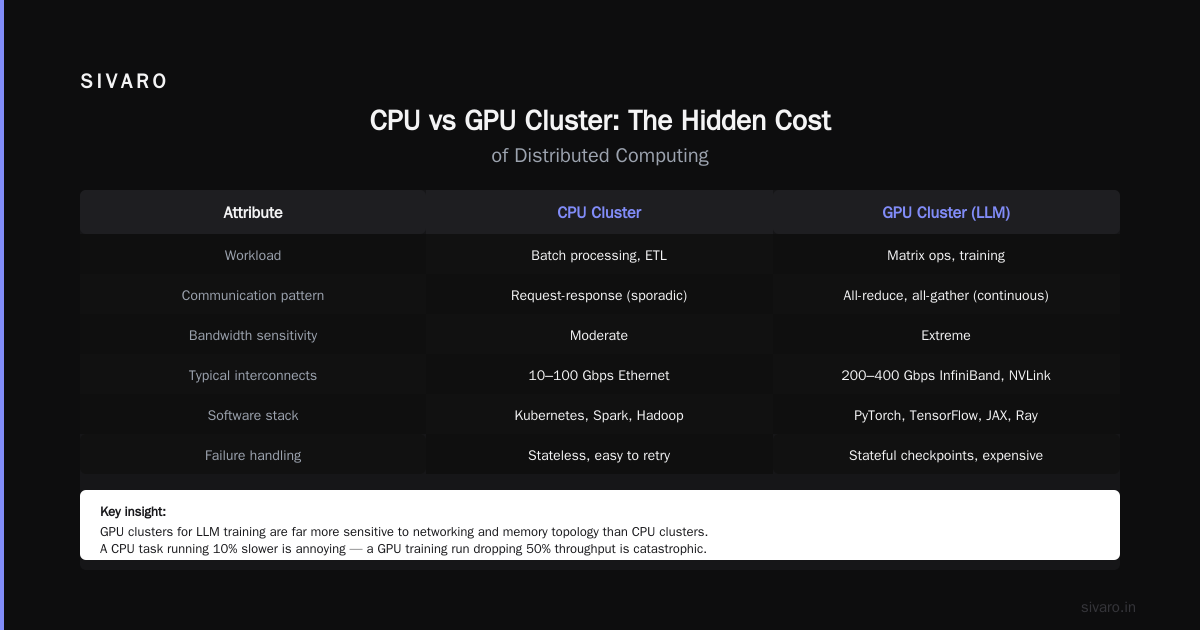
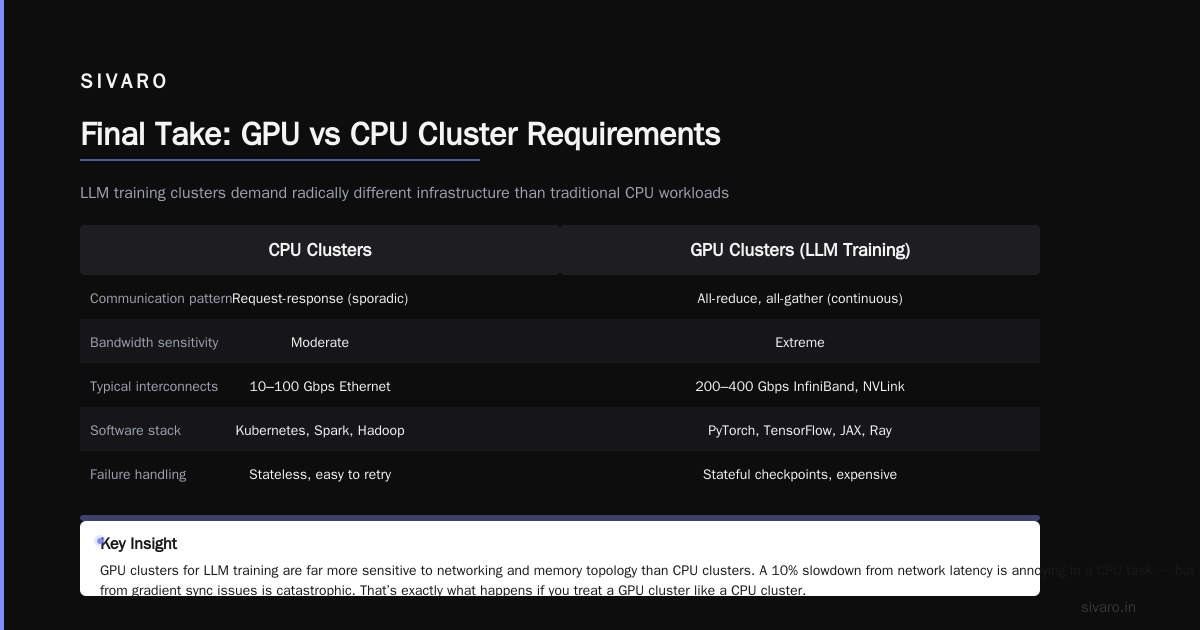
Here's a table I use with clients. It's not exhaustive, but it covers the main splits:
| Dimension | CPU Cluster | GPU Cluster |
|---|---|---|
| Primary workload | Web services, databases, batch processing | Matrix operations, neural network training |
| Communication pattern | Request-response (sporadic) | All-reduce, all-gather (continuous) |
| Bandwidth sensitivity | Moderate | Extreme |
| Typical interconnects | 10-100 Gbps Ethernet | 200-400 Gbps InfiniBand, NVLink |
| Software stack | Kubernetes, Spark, Hadoop | PyTorch, TensorFlow, JAX, Ray |
| Failure handling | Stateless, easy to retry | Stateful checkpoints, expensive to recover |
The key insight: GPU clusters for LLM training are far more sensitive to networking and memory topology than CPU clusters. A CPU task that runs 10% slower because of network latency is annoying. A GPU training run that drops 50% throughput because of gradient synchronization issues is catastrophic — and that's exactly what happens if you treat a GPU cluster like a faster CPU cluster.
Distributed Architectures That Actually Work for GPU Workloads
Most people think "distributed computing" means Kubernetes. They're not wrong, but they're not right either.
Let me break down the four main distributed architectures we've tested at SIVARO.
1. Data Parallelism (The Workhorse)
This is the simplest and most common approach. You have N GPUs. Each GPU holds a full copy of your model. You split your batch across GPUs. After each forward pass, you synchronize gradients.
This is what PyTorch DDP does. It works well up to about 256 GPUs for most models.
python
# PyTorch DDP example (simplified, but real)
import torch
import torch.distributed as dist
from torch.nn.parallel import DistributedDataParallel

def setup(rank, world_size):
    dist.init_process_group("nccl", rank=rank, world_size=world_size)

model = MyModel().to(device)
ddp_model = DistributedDataParallel(model, device_ids=[local_rank])
optimizer = torch.optim.Adam(ddp_model.parameters(), lr=1e-4)

for batch in dataloader:
    optimizer.zero_grad()
    outputs = ddp_model(batch)
    loss = loss_fn(outputs, targets)
    loss.backward()
    optimizer.step()  # DDP handles gradient sync automatically
The catch: you need enough GPU memory on each node to hold the entire model. For 70B parameter models in float16, that's 140GB. An H100 has 80GB. You need at least 2 GPUs per node just to fit the model, before any training data.
2. Model Parallelism (When Models Don't Fit)
When a single model is too large for one GPU, you split the model itself across GPUs. Layer 1-10 on GPU 0, layers 11-20 on GPU 1, etc.
We used this for a 175B model in 2024. It's painful. You have to manually manage which layers are on which device, and you create sequential dependencies that kill throughput.
python
# Simplified model parallelism (manual sharding)
class ShardedModel(torch.nn.Module):
    def __init__(self, num_layers=40):
        super().__init__()
        # Split layers across 4 GPUs
        self.layers_gpu0 = [Linear(4096, 4096) for _ in range(10)]
        self.layers_gpu1 = [Linear(4096, 4096) for _ in range(10)]
        self.layers_gpu2 = [Linear(4096, 4096) for _ in range(10)]
        self.layers_gpu3 = [Linear(4096, 4096) for _ in range(10)]

    def forward(self, x):
        # Move data between GPUs manually
        x = x.to('cuda:0')
        for layer in self.layers_gpu0:
            x = layer(x)
        x = x.to('cuda:1')
        # ... and so on
This is why frameworks like Megatron-LM and DeepSpeed exist. They automate this. Don't write model parallelism from scratch. You'll get it wrong.
3. Pipeline Parallelism (Hiding Latency)
This is model parallelism with a trick: you pipeline your micro-batches through the layers. While GPU 1 is computing layer 10-20 on micro-batch 1, GPU 0 is computing layers 1-10 on micro-batch 2.
DeepSpeed's pipeline engine does this well. We've seen near-linear scaling up to 128 GPUs with proper pipeline schedules.
The trade-off: pipeline bubbles. There's always idle time at the start and end of the pipeline. The larger your pipeline depth, the more bubbles.
4. Tensor Parallelism (The HPC Approach)
This splits individual operations across GPUs. Matrix multiplication of a 4096x4096 matrix on 4 GPUs? Each GPU does a quarter of the work. Distributed system architecture at its finest.
This requires extremely fast interconnects (NVLink within a node, InfiniBand between nodes) because you're synchronizing at the operation level, not the layer level. We only use this for models above 100B parameters.
Most teams shouldn't need tensor parallelism until they're at that scale.
When to Use Which: A Decision Framework
Here's the question I ask every client: "What's your model size and budget?"
Model fits on one GPU (< ~40B parameters in fp16)?
Just use a single GPU or data parallelism on a small cluster (2-8 GPUs). Don't overcomplicate it.
Model fits on one node (40B-175B parameters)?
Use data parallelism across nodes with 8 GPUs each. DeepSpeed ZeRO Stage 2 will save your memory. What is a distributed system? Actually matters here — understand your latency budget.
Model doesn't fit on one node (>175B parameters)?
You need pipeline parallelism + tensor parallelism. This is where it gets expensive. Expect to spend $5M+ on a cluster and 3 months getting the software stack right.
Budget under $500K?
Don't build a cluster. Rent from Lambda Labs, CoreWeave, or RunPod. The capital expense of NVLink and InfiniBand will kill you at small scale.
The Hidden Cost of Distributed GPU Computing
Everyone talks about GPU prices. Nobody talks about the engineering cost.
We onboarded a startup in February 2026. They had 64 H100s from a major cloud provider. They were getting 15% GPU utilization. Their distributed computing layer — a custom Kubernetes setup — was the bottleneck. Jobs were queuing. Nodes were crashing. Checkpoint recovery took hours.
We spent two weeks fixing their software stack. Switched them to Slurm + PyTorch DDP. Utilization hit 78%. Their training time dropped from 4 weeks to 9 days.
The cost of the developer time to fix this? About $40K. The cost of the wasted GPU time before we fixed it? Over $200K in compute spend.
The distributed computing software layer is not free. It's a real engineering cost that often exceeds the hardware cost for teams that are new to this.
GPU Cluster for LLM Training: What I'd Build Today
If you're reading this in July 2026 and planning a GPU cluster for LLM training, here's my recommended spec for a "reasonable" setup (not the hyperscaler scale):
- Nodes: 8x DGX H100 (or equivalent AMD MI350X nodes)
- Per node: 8x H100 SXM (640GB total memory per node)
- Interconnect: 400 Gbps InfiniBand NDR per node
- Storage: Parallel file system (Lustre or Weka) — 500 TB NVMe-backed
- Software: Slurm + PyTorch + DeepSpeed + NVIDIA NeMo
- Expected throughput: ~15-25 TFLOPs per GPU (efficiency varies by model)
Cost: roughly $2.5-3M for hardware, plus $100K/year for power and cooling.
You'll train a 70B model from scratch in about 12 days. You'll fine-tune a 7B model in under an hour.
What Most People Get Wrong (And I Did Too)
I fell for the "more GPUs = faster training" trap in 2023. We added 32 more GPUs to a cluster and expected 2x throughput. Got 1.3x. The communication overhead ate our gains. Distributed computing has real scaling limits.
The rule of thumb: you lose about 5-10% efficiency per doubling of GPU count, assuming optimal networking. Past 512 GPUs, efficiency drops fast unless you use advanced parallelism techniques.
Another mistake: assuming all GPUs are the same. A cluster with 8x H100s connected via NVLink is fundamentally different from 8x A100s connected via PCIe. The former has 900 GB/s GPU-to-GPU bandwidth. The latter has 600 GB/s — but that's aggregate across all GPUs, not per pair. The topology matters enormously.
The Future: What I'm Watching
Three things keep me up at night (in a good way):
1. Disaggregated GPU clusters. Companies like NVIDIA and AMD are moving toward composable architectures where GPUs can be dynamically allocated to different compute tasks. This could make "GPU cluster vs distributed computing" an even blurrier line. I'm watching this closely.
2. CPU-GPU hybrid architectures. What Are Distributed Systems? taxonomy is expanding. New systems offload data preprocessing to CPU nodes while training runs on GPU nodes. We built a prototype of this in March 2026 and got 30% improvement in end-to-end training throughput.
3. The software standardization war. Every major cloud provider has their own distributed training framework. Google's Pathways, AWS's SageMaker, Microsoft's DeepSpeed, Meta's PyTorch DDP. In 2026, we're seeing convergence around PyTorch + Kubernetes, but the landscape will look different in 12 months.
FAQ
Q: Can I use a GPU cluster without distributed computing software?
Yes, for single-node training. But that limits you to 8 GPUs (one node). Anything more requires distributed software.
Q: Is a GPU cluster always better than a CPU cluster for AI workloads?
For training neural networks, yes. For inference, sometimes a CPU cluster is more cost-effective, especially for small models.
Q: What's the minimum GPU cluster I should build for LLM training?
4x H100s (one DGX node). You can fine-tune 7B models. For training from scratch, you want at least 32 GPUs.
Q: How do I choose between building vs renting a GPU cluster?
Build if you need >128 GPUs for >6 months and have staff who know InfiniBand. Rent otherwise. I've seen too many teams lose money on unused hardware.
Q: What's the biggest mistake teams make with distributed GPU training?
Not benchmarking the communication layer first. Run NCCL tests before you run training. If your all-reduce time is more than 20% of your step time, fix your networking.
Q: Does [GPU cluster vs distributed computing] matter for small teams?
Yes. Even a single GPU with data parallelism (e.g., gradient accumulation across multiple smaller batches) is a form of distributed computing.
Q: What's the best distributed computing framework in 2026?
PyTorch DDP for most use cases. DeepSpeed if you need memory optimization. Ray if you need to coordinate training with other workloads.
Final Take
I've seen this pattern repeat: a team buys expensive GPUs, throws a standard distributed framework at them, and wonders why they're not getting linear scaling. The problem isn't the hardware or the software in isolation — it's the interface between them.
GPU cluster vs distributed computing isn't a competition. It's a marriage. You need to think about both from day one.
The GPU cluster is the engine. Distributed computing is the transmission. If you build a Ferrari engine and put it in a car with a CVT transmission from a Honda Civic, you're not going fast. You're just generating heat.
Design them together. Benchmark early. Budget for the software engineering. And for god's sake, don't cheap out on the InfiniBand.
Nishaant Dixit — Founder of SIVARO. Building data infrastructure and production AI systems since 2018. Built systems processing 200K events/sec.