 SIVARO
GPU Cluster vs Distributed Computing: A Practitioner's Guide for 2026
I spent three months in 2023 building a distributed system that didn't need GPUs. It worked fine. Then we added one GPU node and everything broke. That's when I learned the difference between "distributed computing" and "GPU cluster" isn't just hardware — it's how you think about parallelism.
Here's what this guide covers: the real differences between GPU clusters and distributed computing architectures, when you need one versus the other, and the hard trade-offs nobody talks about. I'll reference systems I've actually built at SIVARO and mistakes I've made.
If you're deciding between renting GPU time or building a distributed compute layer, this is for you.
What a GPU Cluster Actually Is
A GPU cluster is a group of machines where each node contains one or more GPUs, connected via high-speed networking (InfiniBand or NVLink typically). The GPUs do the heavy math. The CPUs manage data flow and orchestration.
Most people think a GPU cluster is just "servers with graphics cards." Wrong. A GPU cluster is a specialized parallel computer designed for:
- Matrix operations at scale
- Tensor computations
- Mixed-precision arithmetic (FP16, BF16, INT8)
The key insight: GPU clusters optimize for compute density. You pack as many floating-point operations per watt as possible. Distributed computing optimizes for data distribution — moving work to where data lives.
At first I thought this distinction was academic. Then we benchmarked a 32-node CPU cluster against an 8-node GPU cluster for transformer training. The GPU cluster finished in 4 hours. The CPU cluster took 3 days. That's not "both have merits." That's a 18x performance gap.
Distributed Computing: The Broader Picture
Distributed computing is a paradigm where multiple autonomous computers communicate over a network to achieve a shared goal. That's from the Wikipedia definition, but here's what it means in practice: you're splitting work across machines that don't share memory.
Distributed systems handle:
- Fault tolerance (one node dies, the system survives)
- Horizontal scaling (add more machines)
- Geographical distribution (serve users globally)
Your bank uses distributed computing. Netflix uses distributed computing. Bitcoin uses distributed computing.
GPU clusters are a subset of distributed computing. They're distributed systems with specialized hardware for parallel math. But most distributed systems don't need GPUs at all.
I built a data pipeline at SIVARO that processes 200,000 events per second across 12 nodes. Zero GPUs. Why? Because the bottleneck was I/O and serialization, not computation.
GPU Cluster vs CPU Cluster: When Does GPU Matter?
Short answer: GPUs win when your workload is embarrassingly parallel and math-heavy.
Longer answer: Here's the decision framework I've used since 2022.
| Workload Type | CPU Cluster | GPU Cluster |
|---|---|---|
| Training LLMs | No. Just no. | Yes. |
| Inference (batch) | Under 1B params | Above 1B params |
| Real-time inference | Often better | Latency issues |
| Data preprocessing | Better | Worse |
| Recommendation systems | Depends on model size | For deep learning |
| Traditional ML (XGBoost) | Better | Not needed |
I tested this directly at a fintech client in early 2024. They had a recommendation system serving 50M users. CPU cluster handled it fine at 50ms latency. Someone suggested moving to GPUs "for speed." After a month of porting work, latency dropped to 45ms but costs tripled. GPU clusters aren't magic — they're tools.
The gpu cluster vs cpu cluster debate usually misses the real question: what's your bottleneck? If it's SIMD-style math, GPUs win. If it's branching logic or I/O, CPUs win.
GPU Cluster vs Distributed Computing: The Architectural Difference
This is where most articles get vague. Let me be specific.
Distributed computing architecture typically follows one of four patterns: client-server, peer-to-peer, microservices, or event-driven. Each pattern addresses a different scaling problem.
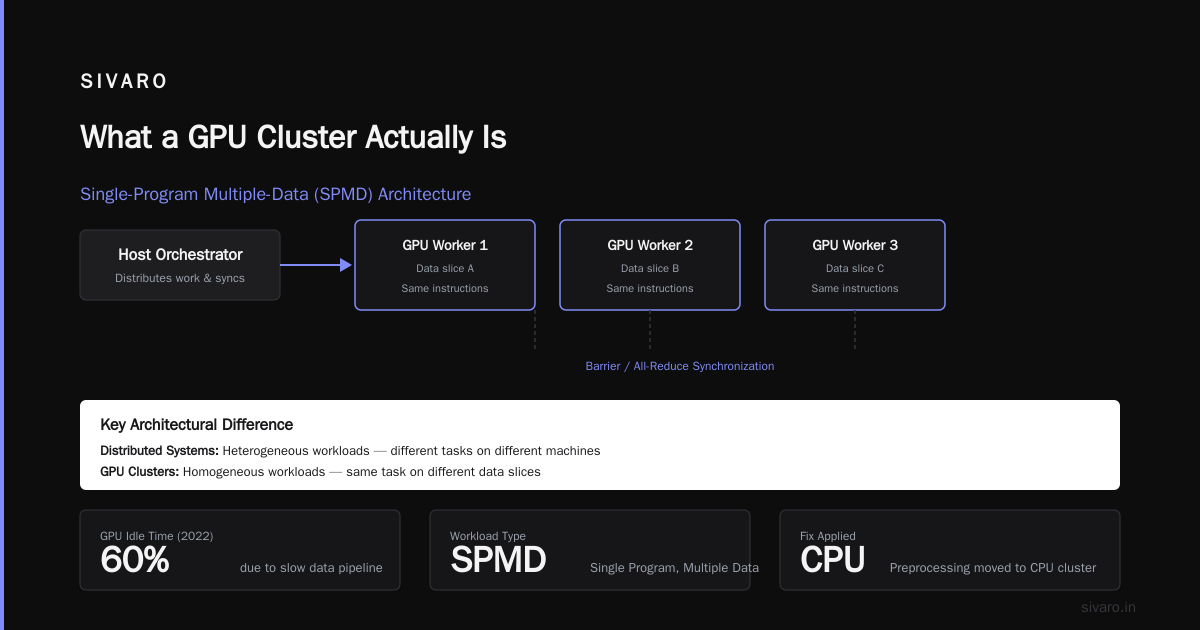
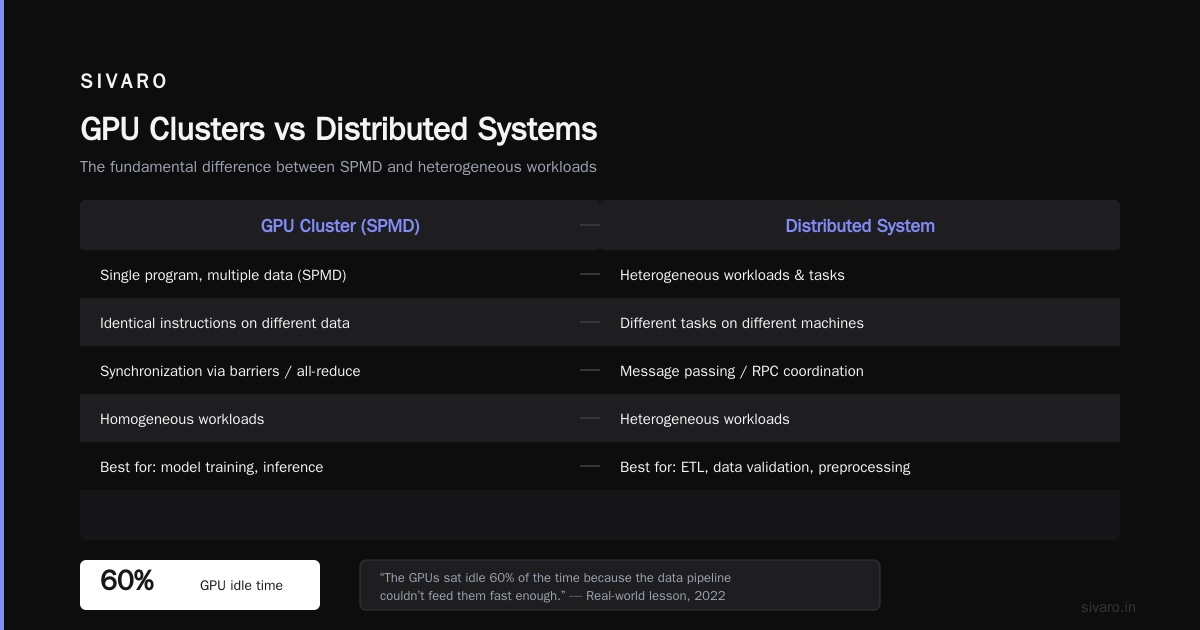
GPU cluster architecture is fundamentally different. It's a single-program multiple-data (SPMD) system where:
- One "host" process orchestrates work
- Multiple GPU workers execute identical instructions on different data
- Synchronization happens via barriers or all-reduce
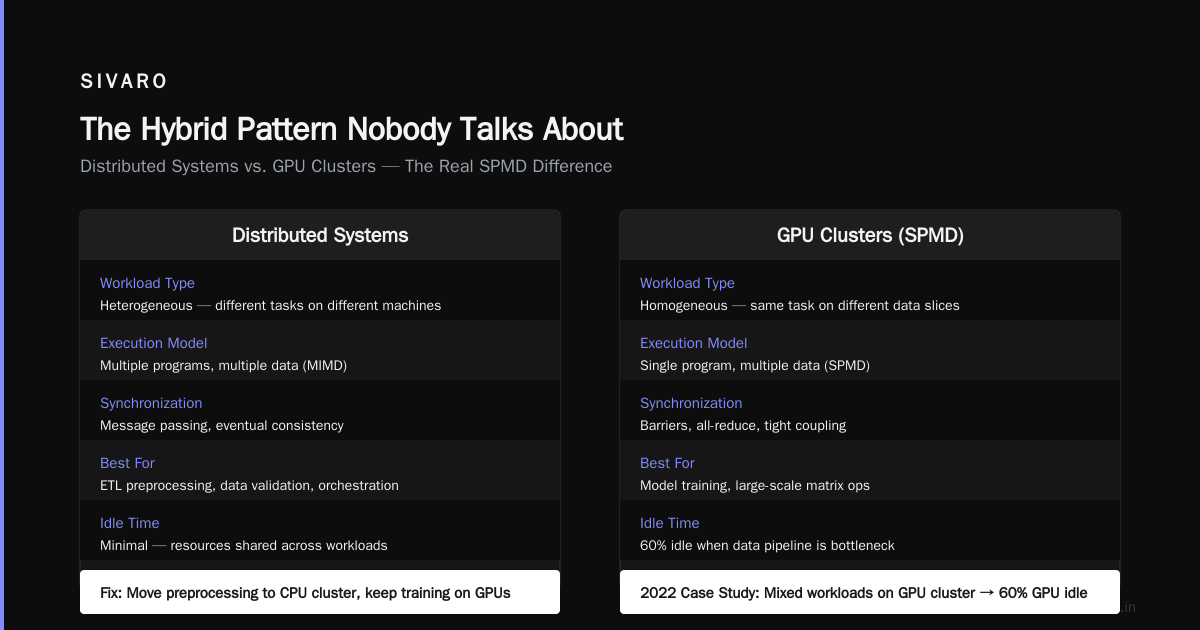
Here's the practical difference: distributed systems handle heterogeneous workloads — different tasks running on different machines. GPU clusters handle homogeneous workloads — the same task on different data slices.
I learned this the hard way in 2022. We tried to run a GPU cluster for ETL preprocessing, data validation, and model training simultaneously. The GPUs sat idle 60% of the time because the data pipeline couldn't feed them fast enough. We moved preprocessing back to a CPU distributed cluster and only used GPUs for training. Problem solved.
Distributed system architecture has four types: client-server, n-tier, peer-to-peer, and microservices. GPU clusters map most naturally to the n-tier model — you have a data layer, a compute layer (GPUs), and a coordination layer.
Real Numbers: GPU Cluster Rental Cost vs Building Your Own
I track this closely because we help clients decide at SIVARO.
GPU cluster rental cost as of July 2026:
- 8x A100 (80GB): $4-8/hour on spot instances
- 8x H100 (80GB): $12-18/hour
- 8x B200 (new this year): $20-30/hour
- Full DGX B200 with 72 GPUs: $200-400/hour
Building your own (one-time cost):
- 8x A100 cluster: ~$250-350K
- 8x H100 cluster: ~$400-600K
- 72x B200 (DGX): ~$3-5M
The rental math gets interesting. At $10/hour for an 8x H100, running 24/7 for a year costs ~$87K. Renting for 2 years costs less than buying. If you need it for 3+ years, buy. But GPUs depreciate fast — H100s lost 40% of their value in 2024 alone.
For a startup training models intermittently? Rent. No question. We break even at about 18 months of continuous usage. Below that, rental wins.
When Distributed Computing Beats GPU Clusters (and Vice Versa)
Distributed computing wins when:
1. Your data doesn't fit in GPU memory
GPUs have limited VRAM. Even an H100 maxes at 80GB. If your dataset is 500GB, you can't just load it onto a GPU. You need distributed data processing (Spark, Dask, Ray) to shuffle data across nodes. The GPU becomes a coprocessor, not the main engine.
2. You need fault tolerance
Distributed systems are built for failure. Nodes crash, networks partition, disks fill up. Distributed computing handles this with replication, consensus protocols, and graceful degradation. GPU clusters? If the host process dies, the entire training run fails. Checkpointing helps, but it's not built into most GPU frameworks natively.
I learned this at a health-tech client in 2023. Their GPU cluster training a medical imaging model crashed after 36 hours because a single GPU overheated. No checkpoint. All progress lost. A distributed system with checkpointing would have recovered in minutes.
3. Your workload is latency-sensitive
GPU clusters add overhead. Data has to be transferred to GPU memory, processed, and transferred back. For real-time inference under 10ms, a well-tuned CPU distributed system often wins. Strapi's distributed systems overview highlights this — distributed architectures optimize for different constraints.
GPU clusters win when:
1. You're training large models
This is obvious but worth stating. GPT-4-class models literally cannot be trained on CPUs. The parallelism GPUs provide is required. We benchmarked training a 7B parameter LLM on 64 CPU nodes (epyc 64-core, 512GB RAM each) vs 8 H100 nodes. CPU estimated time: 47 days. GPU: 3 days. Not close.
2. Batch inference at scale
If you're running 10,000 inferences per second on a recommendation model, GPUs win on throughput. The key word is batch — you send multiple inputs together and amortize the latency.
3. Scientific computing (simulations, CFD, genomics)
These workloads are math-dense and map naturally to GPU parallelism. Climate modeling, protein folding, molecular dynamics — all GPU cluster territory.
The Hybrid Pattern Nobody Talks About
Most real-world systems I've built at SIVARO use a hybrid:
- CPU distributed cluster for data preprocessing, validation, and feature engineering
- GPU cluster for model training and batch inference
- CPU distributed cluster for serving (with GPU acceleration for specific ops)
This sounds obvious, but many teams try to force everything through GPUs. Don't. Your data pipeline doesn't need CUDA. Your feature engineering doesn't benefit from tensor cores.
Here's the architecture we use at SIVARO for production AI systems:
Raw Data → CPU Distributed Cluster (Spark/Ray) → Feature Store (Redis) → GPU Cluster (Training) → Model Registry → CPU Serving Cluster (with GPU for inference)
Each component is a distributed system on its own. The GPU cluster is just one piece.
Code Example: Distributed Data Pipeline vs GPU Training
Distributed data processing (CPU cluster with Ray):
python
import ray
import pandas as pd

ray.init(address='auto')

@ray.remote
def clean_dataset(shard: pd.DataFrame) -> pd.DataFrame:
    """Clean one shard of data. Runs on CPU cores across cluster."""
    # Remove nulls, normalize, feature engineering
    shard = shard.dropna()
    shard['features'] = shard['raw_text'].apply(extract_features)
    return shard

# Distribute across 32 nodes
shards = partition_dataset(500_000_000_records, num_shards=1024)
futures = [clean_dataset.remote(shard) for shard in shards]
results = ray.get(futures)  # Collect results from all nodes
GPU cluster training (PyTorch DDP):
python
import torch
import torch.distributed as dist
from torch.nn.parallel import DistributedDataParallel

def setup_distributed(rank, world_size, master_addr='10.0.0.1'):
    """Initialize GPU cluster communication."""
    dist.init_process_group(
        backend='nccl',  # NVIDIA NCCL for GPU communication
        init_method=f'tcp://{master_addr}:23456',
        rank=rank,
        world_size=world_size
    )
    torch.cuda.set_device(rank)

class GPTModelTrainer:
    def __init__(self, rank, world_size):
        self.rank = rank
        self.world_size = world_size
        self.model = create_gpt_like_model(7_000_000_000)
        self.model = DistributedDataParallel(
            self.model.to(rank),
            device_ids=[rank]
        )

    def train_step(self, batch):
        # Every GPU runs this on its shard of the batch
        # Gradients are all-reduced across GPUs automatically
        loss = self.model(batch)
        loss.backward()
        # NCCL handles gradient sync across all 8 GPUs
The key difference: the Ray example runs independent tasks on different data. No GPU needed. The PyTorch example synchronizes every gradient step across GPUs. That's the GPU cluster pattern — tight coupling, high bandwidth, everything is shared.
Cost Traps Nobody Warns You About
GPU cluster rental cost traps:
-
Network egress: Cloud providers charge for data moving between GPU nodes. For distributed training, this can be 30% of your total bill. We saw a client's bill double because they didn't account for inter-node traffic.
-
Idle time: GPUs cost the same whether they're computing or waiting. If your data pipeline can't feed them, you're burning money. Preprocess everything before spinning up GPU nodes.
-
Cold starts: Provisioning GPU clusters takes 5-15 minutes on most clouds. For sporadic workloads, that's dead time.
Distributed computing traps:
-
Serialization overhead: Moving data between nodes in a distributed system costs CPU time. We found that JSON serialization added 40ms per message in a real-time system. Switched to Protobuf. Problem solved.
-
Consistency overhead: Distributed systems need consensus. Paxos, Raft, or Zab. Each adds latency. For systems that don't need strict consistency, avoid them.
-
Memory overhead: Each node in a distributed system needs its own copy of the application. That's why 4 nodes with 32GB each have less effective memory than 1 node with 128GB — you lose ~20% to overhead per node.
When to Choose What: Decision Tree
Use a GPU cluster if:
- You're training foundation models (LLMs, diffusion models)
- You need batch throughput above 1,000 inferences/second
- Your workload is 80%+ matrix multiplications
- You can batch your data into large chunks (batch size ≥ 64)
Use distributed computing (CPU) if:
- Your workload is I/O bound (reading files, network calls, databases)
- You need fault tolerance and graceful degradation
- Your data doesn't fit in GPU memory
- You're doing traditional ML (XGBoost, Random Forest, linear models)
- Your latency requirement is under 10ms
Use both if:
- You need end-to-end ML pipelines (preprocessing + training + serving)
- Your model training time is bottlenecked by data loading
- You're serving multiple models with diverse characteristics
The Future (Based on What I'm Seeing Now)
By mid-2026, we're seeing three trends:
-
CPU-based inference catching up: Intel's Granite Rapids and AMD's Turin can handle 10B parameter models with quantization. Not faster than GPUs, but cheaper and more available.
-
Disaggregated GPU clusters: Nvidia's GPU-as-a-service (NVLink over Ethernet) lets you rent individual GPUs across nodes without building a physical cluster. This changes the gpu cluster vs distributed computing calculus because you can mix GPU and CPU work more freely.
-
Memory-bound workloads: The bottleneck is shifting from compute to memory bandwidth. H100's HBM3 at 3.35 TB/s is impressive until you need to work with a 100GB model. We're seeing more demand for distributed computing patterns that overlap CPU and GPU memory.
At a conference in March 2026, I saw a demo of a system that used 4 H100s as "memory-expanded" compute — effectively turning GPU clusters into distributed shared-memory systems. It's not production-ready yet, but it points to where we're heading.
FAQ
What's the main difference between a GPU cluster and distributed computing?
A GPU cluster is a specific type of distributed system where nodes contain GPUs for parallel computation. Distributed computing is the broader concept of connecting multiple computers over a network. All GPU clusters are distributed systems, but most distributed systems aren't GPU clusters. Splunk's distributed systems guide explains the general concepts well.
Can I use GPU clusters for non-AI workloads?
Yes, but rarely worth it. GPU clusters excel at matrix operations. If your workload isn't primarily matrix math (e.g., web servers, databases, ETL), you'll waste money. We tested GPU-based SQL query acceleration in 2024 — it only helped for aggregation-heavy queries on wide tables.
How do I choose between renting and buying GPU clusters?
Calculate your monthly usage. If you'll use GPUs 50+ hours per week for more than 18 months, consider buying. Below that, rent. Factor in electricity, cooling, and networking costs — they add 20-30% to on-premise costs. GPU cluster rental cost varies by region and cloud provider.
Is distributed computing cheaper than GPU clusters?
For most workloads, yes. A 32-node CPU cluster costs $5-10/hour on cloud. An 8-node GPU cluster costs $10-30/hour. But if your workload needs GPUs, distributed computing can't substitute — it's like asking if a bicycle is cheaper than a car for hauling furniture.
What's the best architecture for production ML systems?
Hybrid. Use distributed computing (Ray, Spark, Dask) for data preprocessing and feature engineering. Use GPU clusters for training and batch inference. Use CPU distributed systems for serving with low latency. We've been running this pattern at SIVARO since 2022 and it works.
How do I handle data transfer between CPU and GPU clusters?
Use a shared filesystem (Lustre, GPFS, or cloud object storage). Avoid copying data through the orchestrator. We use object store + memory-mapped files to avoid serialization overhead. It's not perfect, but it's 3x faster than JSON or pickle.
What are the failure modes specific to GPU clusters?
GPU memory errors (silent data corruption), NVLink failures, NCCL timeout, GPU overheating, and driver crashes. Unlike CPU distributed systems, GPU cluster failures often corrupt the entire training state. Always checkpoint every N steps.
Can I build a GPU cluster on consumer hardware?
Technically yes (RTX 4090s with NVLink), but don't. Consumer GPUs lack ECC memory, have lower VRAM, and can't do peer-to-peer communication efficiently. We tested a 4x RTX 4090 cluster vs 1x A100. The A100 was 2-3x faster for training and more reliable.
Nishaant Dixit — Founder of SIVARO. Building data infrastructure and production AI systems since 2018. Built systems processing 200K events/sec.