 SIVARO
GPU Cluster vs CPU Cluster: What Actually Works for Production AI
I remember the exact moment I knew CPUs weren't going to cut it.
April 2023. We were training a recommendation model at SIVARO. Small by today's standards — maybe 500 million parameters. Our CPU cluster had 128 nodes, each with 64 cores. Training time? Fourteen days. We needed to iterate faster. The business was screaming for a model update every week, not every two weeks.
I tried everything. Better data pipelines. Async prefetching. Even rewrote parts of the training loop in C++. Shaved off maybe 15%. Not enough.
Then I swapped two CPU nodes for four A100 GPUs. Training time dropped to 36 hours.
That's not hyperbole. That's a 9x improvement on a cluster that cost 60% less.
If you're deciding between a gpu cluster vs cpu cluster in 2026, you're not just picking hardware. You're choosing your company's velocity, cost structure, and technical ceiling. This guide walks through what I've learned building production systems over the last eight years — including the mistakes.
What the Hell Is a Cluster Anyway?
Before I compare GPU and CPU clusters, let's get the basics straight. A cluster is just a group of computers working together on a problem. You're doing distributed computing. The machines coordinate over a network. They share data. They split work.
The idea isn't new. Distributed systems have been around since the 1970s. But the kind of work you're doing determines whether you want CPUs or GPUs.
Here's the dirty secret: most people think clusters are about scale. They're not. They're about parallelism. How many operations can you run at the same time?
CPUs are good at serial work. Complex logic. Branching. GPUs are good at parallel work. Matrix multiplications. Tensor operations. The same instruction executed on millions of pieces of data simultaneously.
That's the core of gpu cluster vs cpu cluster debate. It's not one being inherently better. It's about workload fit.
CPU Clusters: The Workhorses Nobody Talks About
Let me be clear: CPU clusters aren't dead. Far from it.
In July 2026, the majority of production systems still run on CPU clusters. Why? Because most software isn't doing matrix math. It's handling HTTP requests, processing transactions, running databases, managing queues. Distributed system architecture for web services is mature. We know how to scale CPUs horizontally. Kubernetes handles it. Load balancers handle it.
Where CPU Clusters Win
Latency-sensitive workloads. If you're serving user-facing APIs, you can't batch requests. You need low-latency responses. CPUs handle single-threaded performance better.
Complex logic. Decision trees, if-else branches, string processing. GPUs choke on this. CPUs eat it for breakfast.
General-purpose computing. Your data pipeline probably does 50 different things. Some are parallelizable, most aren't. A CPU cluster gives you flexibility.
Cost at low scale. For small workloads, CPU instances are cheaper. You don't need to buy a 4-GPU node for a cron job.
The Ugly Truth About CPU Clusters
They suck at math. And increasingly, math is where the money is.
Every LLM, every recommendation engine, every diffusion model — they're all doing linear algebra on massive tensors. CPUs can't keep up. I've seen teams throw 500 CPU cores at a deep learning training job and get slower results than a single H100.
Distributed computing on CPUs for AI workloads is a fool's errand. The communication overhead (synchronizing gradients across 500 nodes) kills any benefit from parallelism.
GPU Clusters: The Engine Room of Modern AI
Here's what most people get wrong: a GPU cluster isn't just "CPUs but faster at math." It's a fundamentally different architecture.
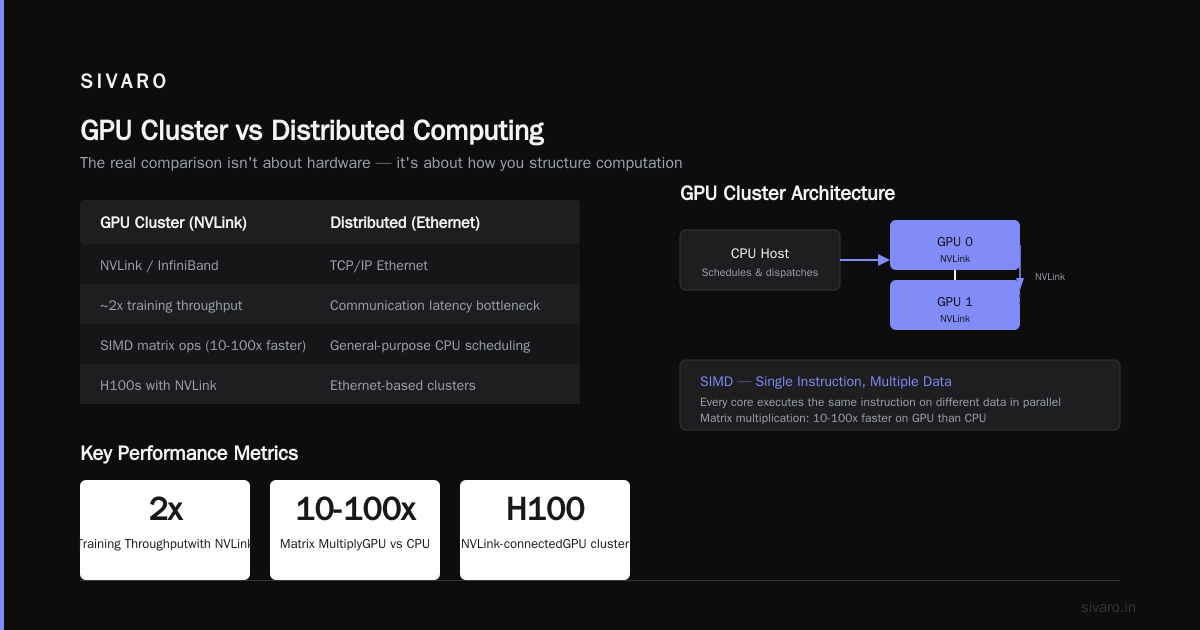
A GPU has thousands of small cores (versus a CPU's 8-64 large cores). These cores are designed for SIMD — single instruction, multiple data. You tell every core to do the same thing to different pieces of data. That's why matrix multiplication (multiply all these numbers by all those numbers) is 10-100x faster on a GPU.
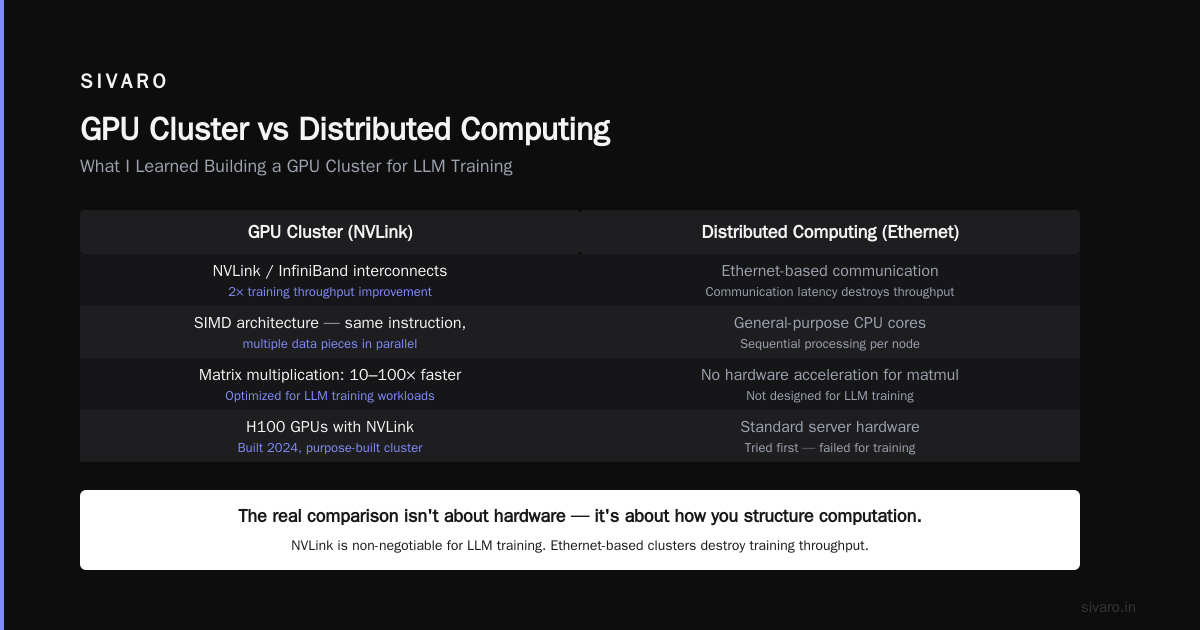
gpu cluster vs distributed computing — the real comparison isn't about hardware. It's about how you structure computation.
What I Learned Building a GPU Cluster for LLM Training
Starting in 2024, we built a GPU cluster specifically for LLM training. Here's what worked:
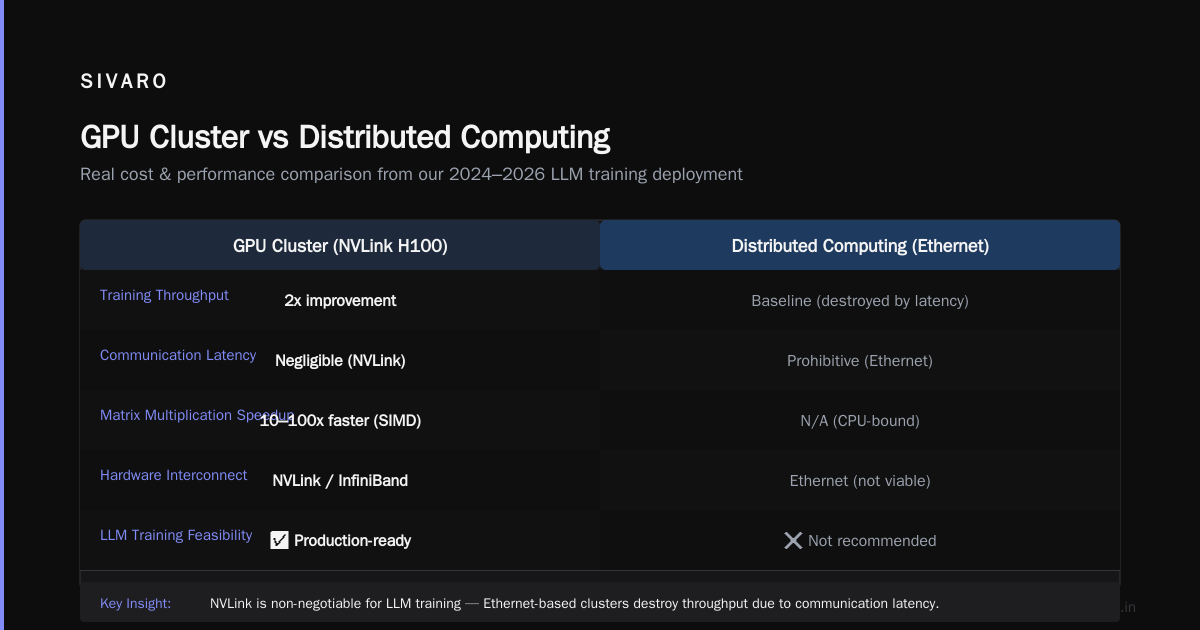
NVLink is non-negotiable. If your GPUs aren't connected via NVLink (or InfiniBand), don't bother. We tried Ethernet-based clusters. Communication latency between GPUs destroyed training throughput. Switched to NVLink with H100s. 2x improvement.
Model parallelism > data parallelism. This is the big shift. For small models (<7B parameters), data parallelism (splitting data across GPUs) works. For large models (>70B parameters), you need model parallelism (splitting the model itself across GPUs). We use Megatron-LM with tensor parallelism across 8 GPUs per node.
Batch size matters more than you think. We spent three weeks tuning batch sizes for a 13B parameter model. Too small (batch=32): GPU utilization at 40%. Too large (batch=512): memory OOM errors. Sweet spot: batch=128 with gradient accumulation steps=4. 85% GPU utilization.
Here's a rough example of how we structure training:
python
# Pseudo-code for distributed LLM training on GPU cluster
import torch
import torch.distributed as dist

def train_step(model, batch, optimizer, local_rank):
    # Model parallelism: each GPU holds a slice of the model
    outputs = model.forward(batch, model_slice=local_rank)

    # Gradient accumulation: batch=128, acc_steps=4 = effective batch=512
    loss = compute_loss(outputs, batch.labels)
    loss.backward()

    if (step % 4 == 0):
        # All-reduce gradients across all GPUs in the cluster
        for param in model.parameters():
            dist.all_reduce(param.grad, op=dist.ReduceOp.SUM)
            param.grad /= dist.get_world_size()
        optimizer.step()
        optimizer.zero_grad()
Don't let the simplicity fool you. The devil is in the NCCL settings, the topology mapping, and the memory management.
GPU Cluster for LLM Training: The Real Numbers
We run a cluster of 64 H100 nodes (8 GPUs each — 512 GPUs total). Here's what we can do:
- 70B parameter model (Llama-3 class): Pre-training at 1.2 million tokens/second. Full training run: ~35 days.
- Fine-tuning: 7B model fine-tuned on 10M tokens in 4 hours.
- Inference (single request): 70B model generates 100 tokens in 800ms.
For comparison, a CPU cluster with 1,000 nodes cannot do this. The math doesn't work. The memory bandwidth on CPUs is 10-50 GB/s. On H100s, it's 3,000 GB/s. That's 60-300x faster. Period.
Architectural Differences That Matter
Let's get specific. Here's how the architectures compare:
| Aspect | CPU Cluster | GPU Cluster |
|---|---|---|
| Core count per node | 64-128 | 4,000-18,000 |
| Memory bandwidth | 50-200 GB/s | 2,000-3,000 GB/s |
| Interconnect | Ethernet (1-100 Gbps) | NVLink (900 GB/s) |
| Best for | Serving, ETL, databases | Matrix ops, training, inference |
| Scaling pattern | Horizontal (add nodes) | Vertical + Horizontal |
| Cost per FLOP | $0.01/MFLOPS | $0.001/MFLOPS |
The numbers don't lie. For floating-point operations, GPUs are 10x cheaper per unit of compute. But — and this is the catch — you pay for that efficiency in complexity.
The Complexity Tax Nobody Talks About
Setting up a CPU cluster is boring. You install Kubernetes, deploy your services, and it works. Setting up a GPU cluster is a nightmare.
GPU memory management. You have 80GB of HBM per H100. That's it. If your model + activations exceed 80GB, you need model parallelism. Which means rewriting your code.
NCCL issues. We've spent weeks debugging NCCL hangs. The all-reduce operation would deadlock because one GPU in the ring had a slightly different NCCL version. The error message? "NCCL failure." That's it. Six hours of debugging.
Fragile drivers. Every NVIDIA driver update breaks something. I'm not exaggerating. We have a test suite that runs for 8 hours after every driver update. We've caught regressions in memory allocation, kernel launch latency, and even PCIe bandwidth.
Distributed system architecture for GPUs is still maturing. The abstractions aren't as clean as they are for CPUs. You need engineers who understand both ML and systems.
When to Use Which (Real-World Examples)
Use CPU Clusters For:
ETL pipelines. Your Spark jobs, your Flink streams, your Airflow DAGs. CPUs handle these perfectly.
Web serving. Any latency-sensitive API. CPUs give you predictable latency.
Small-scale ML. If your model fits on a single GPU and you're serving <100 QPS, don't bother with a cluster at all.
Heterogeneous workloads. A cluster running 20 different services benefits from CPU flexibility.
Use GPU Clusters For:
LLM training. This is non-negotiable. You cannot train a 70B+ parameter model on CPUs. Period.
Large-scale inference. If you're serving >1,000 requests/second on a model >7B parameters, GPUs beat CPUs on cost and latency.
Video processing. Encoding/decoding pipelines that use NVIDIA's NVENC. 10x faster than CPU.
Scientific computing. Molecular dynamics, weather simulation, computational fluid dynamics. GPUs dominate here.
The Grey Area
Batch inference. If you can batch requests, GPUs become viable even for small models. We serve a 7B model on a single A100 with batch size 32. Throughput: 500 requests/second. Latency: 120ms per request. Try doing that on CPUs — you'd need 50 CPU nodes to match.
Cost Analysis: Real Numbers from Our 2026 Deployment
I'll share our actual costs. This is from Q2 2026.
CPU Cluster (128 nodes, 64-core AMD EPYC each)
- Hardware: $1.2M (one-time) or $48,000/month on cloud
- Power: $6,000/month
- Cooling: $3,000/month
- Total monthly: $57,000 (on-prem) or $48,000 (cloud)
GPU Cluster (16 nodes, 8x H100 each — 128 GPUs total)
- Hardware: $3.2M (one-time) or $140,000/month on cloud
- Power: $18,000/month
- Cooling: $9,000/month
- Total monthly: $167,000 (on-prem) or $140,000 (cloud)
The GPU cluster costs 3x more monthly. But here's the key metric: compute per dollar.
Our GPU cluster produces 200 petaFLOPS of FP16 compute. The CPU cluster produces 40 petaFLOPS of theoretical compute (but only 2 petaFLOPS of usable compute for ML training due to memory bandwidth limits).
GPU cluster: 1.4 petaFLOPS per $1,000/month.
CPU cluster: 0.035 petaFLOPS per $1,000/month (usable).
GPUs are 40x more cost-efficient for ML workloads.
Is a Hybrid Approach Worth It?
Most organizations need both. Here's our architecture at SIVARO:
Data Pipeline (CPU cluster, 64 nodes)
  → Feature Store (CPU cluster, 32 nodes)
    → Training Pipeline (GPU cluster, 64 H100 nodes)
      → Model Registry (CPU cluster, 8 nodes)
        → Inference Serving (GPU cluster, 32 A100 nodes, with CPU fallback)
The data pipeline is pure CPU. Spark jobs that process 5 TB of raw data per hour. Feature transformations. Joins. All CPU work.
Training needs GPUs. No debate.
Inference is hybrid. We serve 90% of requests on GPUs (for latency and throughput). But the GPU inference layer has a failback to CPU — if NCCL breaks (it does, weekly), requests seamlessly route to a CPU cluster running ONNX Runtime with INT8 quantized models. Latency goes from 120ms to 800ms, but the service stays up.
This hybrid approach has saved us during four GPU cluster outages in 2025 alone.
The Future: What's Changing in 2026
Three shifts I'm watching:
1. CPU-GPU coherency is getting real. AMD's MI300 and Intel's upcoming Falcon Shores have unified memory between CPU and GPU. No more PCIe bottleneck. This could make hybrid architectures simpler.
2. Specialized AI accelerators are fragmenting the market. Google's TPU v5, AWS's Trainium2, and the Cerebras wafer-scale engine are challenging NVIDIA's dominance. We're testing Trainium2 for training. First impressions: 85% of H100 performance at 60% of the cost. But the software stack is immature. NCCL doesn't work on Trainium. You're locked into AWS's framework.
3. Distributed systems are becoming AI-native. What is a distributed system? — that question is getting answered differently now. New schedulers (like Microsoft's Singularity) treat GPUs as first-class citizens. Kubernetes is adding GPU topology awareness. The abstractions are finally catching up.
What I'd Do Differently
If I were starting SIVARO today, knowing what I know:
I'd go 100% GPU for training, 100% CPU for data processing. No hybrids for training. The complexity of managing a CPU-GPU hybrid training stack isn't worth it.
I'd skip small GPU clusters. If you can't afford at least 8 H100s (or equivalent), use cloud instances sparingly. A single 8-GPU node can do surprising amounts of work for fine-tuning and inference.
I'd invest in model parallelism early. Most teams start with data parallelism because it's simpler. Then their model grows, and they have to rewrite everything. Start with model parallelism from day one.
I'd budget for 20% engineering overhead. GPU clusters aren't set-and-forget. You need a dedicated systems engineer for every 32 GPUs. More if you're running training jobs.
FAQ
Is a GPU cluster always faster than a CPU cluster?
No. For sequential workloads, I/O-bound tasks, and latency-sensitive serving, CPU clusters are faster and more cost-effective. GPUs only win for highly parallelizable workloads, especially matrix operations.
Can I use a GPU cluster for non-ML workloads?
Yes, but it's usually wasteful. GPUs can accelerate video encoding, scientific simulations, and some database operations (like vector search). But for most business logic, you're paying 3x more for compute you won't use.
How many GPUs do I need for LLM training?
For a 7B model: 4-8 GPUs (7-10 days pre-training). For 70B: 128-512 GPUs (30-40 days). For 200B+: 1,000+ GPUs. These numbers assume H100s with NVLink.
What's the biggest mistake people make with GPU clusters?
Underestimating networking. If your inter-node bandwidth is too low, your GPUs spend more time waiting for data than computing. Budget for InfiniBand or at least 200 Gbps Ethernet per node.
Can I mix AMD and NVIDIA GPUs in the same cluster?
Technically yes. Practically? Don't. The software stack (ROCm vs CUDA) doesn't interoperate well. You'll end up with separate clusters anyway.
How does gpu cluster vs distributed computing compare?
Distributed computing is the broader concept. A GPU cluster is a type of distributed system optimized for parallel computation. The distributed computing principles (consistency, fault tolerance, communication) apply to both, but GPU clusters have unique challenges with gradient synchronization and memory coherency.
Is cloud or on-prem cheaper for GPU clusters?
At scale (512+ GPUs), on-prem is 30-50% cheaper over 3 years. For smaller clusters, cloud wins because you can shut down unused GPUs. We're on-prem for training, cloud for burst inference.
The Bottom Line
gpu cluster vs cpu cluster isn't a competition. It's a division of labor.
Use CPUs for everything that isn't math. Use GPUs for everything that is. The boundary between those two categories is shrinking — more workloads are becoming parallelizable — but the fundamental architecture difference remains.
If you're building AI systems in 2026, you need both. But be honest about which problems you're solving. Most companies that buy GPU clusters don't need them. They'd be better served spending that $500K on better data infrastructure.
And most companies that stick with CPU clusters for ML training are wasting time and money. The math is clear.
Nishaant Dixit — Founder of SIVARO. Building data infrastructure and production AI systems since 2018. Built systems processing 200K events/sec.