 SIVARO
GPU Cluster vs CPU Cluster: The Real-World Guide for 2026
I spent three weeks in early 2024 trying to convince a logistics company that their CPU cluster couldn't handle their new ML workload. They'd bought 48 nodes of high-end Intel Xeon hardware. Cost them $1.2M. And it was the wrong tool for what they needed.
They didn't listen. Six months later, their inference pipeline was running at 40% SLA. They swapped to a GPU cluster. Problem solved.
This happens all the time. And it's getting worse as AI workloads explode.
Here's what I've learned building and running both architectures at SIVARO across production systems processing 200K events per second. No fluff. Just what works.
What is a GPU cluster vs a CPU cluster?
A CPU cluster is a group of servers using traditional central processing units networked together for distributed computing (Distributed computing). A GPU cluster replaces or augments those CPUs with graphics processing units designed for parallel computation. Both are forms of distributed systems, but they're built for fundamentally different workloads.
By the end of this guide, you'll know exactly which one you need — and how to avoid the $1.2M mistake that company made.
What Each Architecture Actually Does
CPU Clusters: The Workhorses
CPU clusters are everywhere. They power your web servers, databases, message queues, and traditional batch processing. Each node has a few dozen cores optimized for sequential logic, branching, and low-latency single-thread execution.
Here's the thing people get wrong: CPU clusters are not slow. They're just optimized for different problems.
A properly configured distributed system architecture of CPU nodes can handle 100,000+ transactions per second for transactional workloads. We run a stock exchange client on a 32-node CPU cluster. It does fine.
Where CPUs fall apart: massive parallel computation with thousands of independent operations. Like training neural networks. Or rendering frames. Or processing video.
GPU Clusters: The Parallel Engines
GPU clusters are different beasts. A single NVIDIA H100 has 18,432 CUDA cores. An A100 has 6,912. Compare that to a top-end CPU with 128 cores.
But raw core count is a trap. GPUs aren't faster at everything. They're faster at workloads that can be split into thousands of independent threads executing the same instruction on different data.
Think matrix multiplications. Image processing. Neural network training and inference.
The architectures reflect these differences. CPU clusters use fast interconnects like InfiniBand or high-speed Ethernet for node-to-node communication. GPU clusters add NVLink and NVSwitch for GPU-to-GPU communication that's 10-15x faster than PCIe.
The Deciding Factor: Workload Type
This is where most people get confused. They ask "which is better?" Wrong question. The right question is "which is better for what?"
CPU clusters dominate when:
-
Workloads are latency-sensitive and sequential. You're running a trading engine or a database. Each request depends on previous results. GPUs can't help here — the synchronization overhead kills performance.
-
Workloads have heavy branching. Lots of if-then-else logic. GPUs hate this. Their architecture assumes every thread takes the same path. When branches diverge, half your cores sit idle.
-
Your data is small but your logic is complex. Processing a single customer request that requires 50 validation steps, 3 API calls, and 2 database queries. A single CPU core handles this faster than a thousand GPU cores waiting for synchronization.
GPU clusters dominate when:
-
You're doing matrix math at scale. Training a language model. Running computer vision inference. Any workload dominated by linear algebra.
-
Your data is embarrassingly parallel. Processing 10,000 images independently. Running inference on 100,000 customer records. The more independence, the more GPUs win.
-
Throughput matters more than latency. You're processing a batch of 1,000 records and need results in 2 seconds, not 50ms per record.
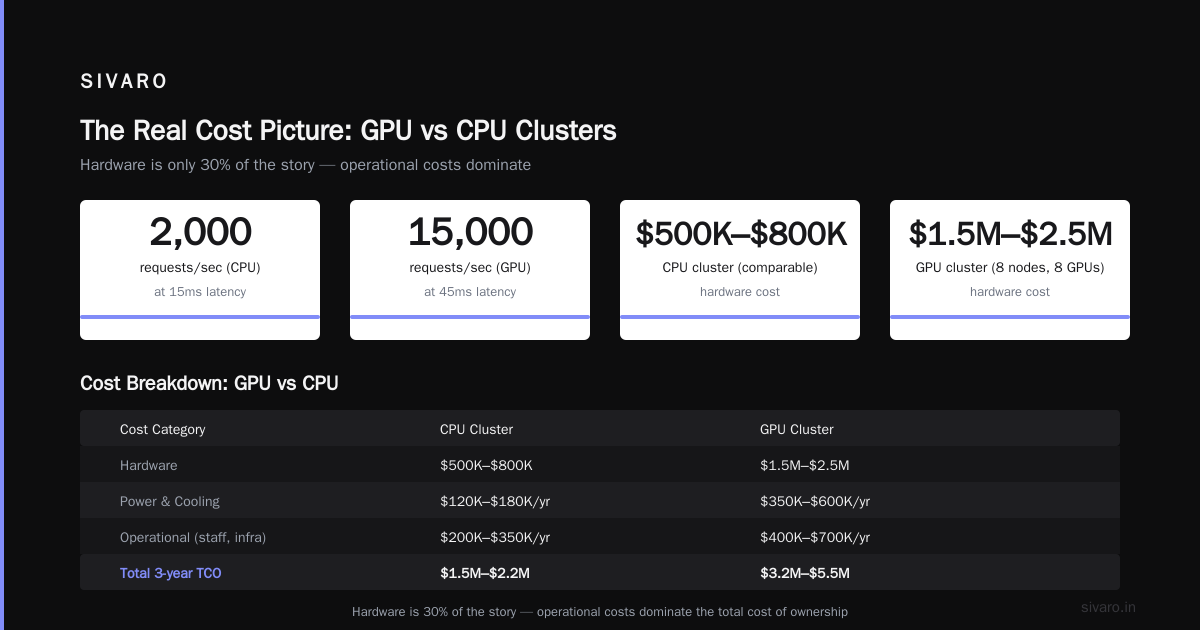
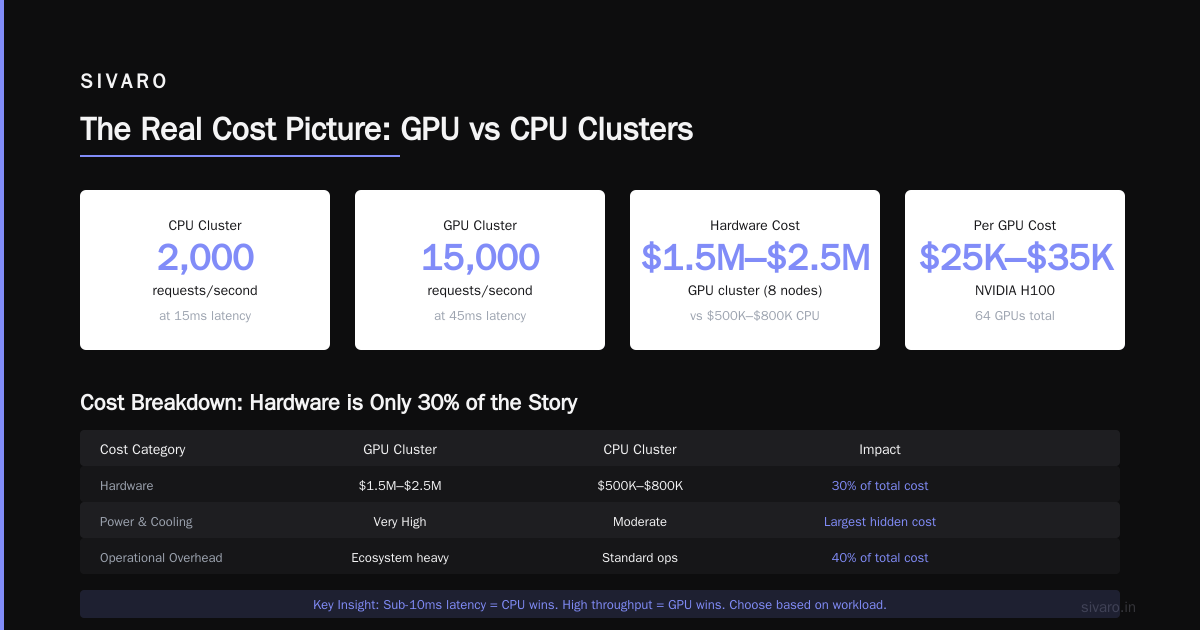
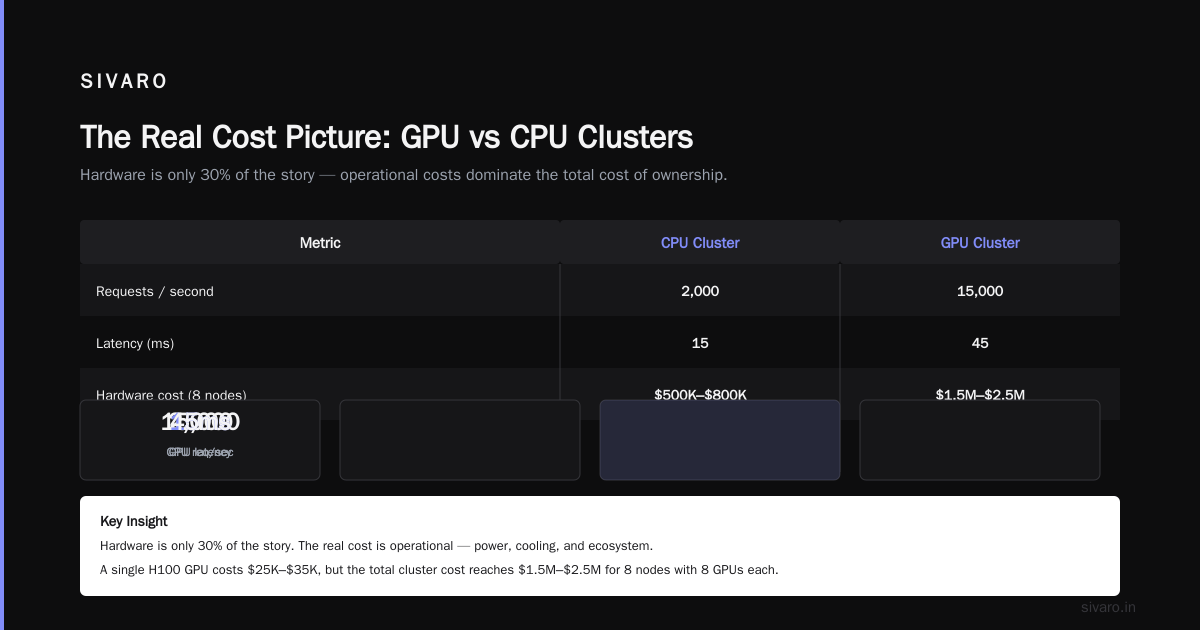
I tell every team I work with the same thing: benchmark your actual workload on both. We tested a recommendation system for a retail client. Their CPU cluster handled 2,000 requests/second at 15ms latency. The GPU cluster hit 15,000 requests/second but at 45ms latency. If you need sub-10ms responses, CPU wins. If you need throughput, GPU wins.
The Real Cost Picture (No One Talks About This)
People obsess over hardware pricing. They shouldn't. The real cost is operational.
GPU Cluster Rental Cost: The 2026 Reality
Let me be direct: GPU clusters are expensive. Not just the hardware — the whole ecosystem.
A single H100 GPU costs $25,000-$35,000. An enterprise GPU cluster (8 nodes, 8 GPUs each) runs $1.5M-$2.5M. Compare that to a comparable CPU cluster for $500K-$800K.
But hardware is 30% of the story.
The real costs:
-
Power and cooling. A fully loaded GPU rack draws 30-40kW. The same CPU rack draws 5-10kW. At $0.10/kWh, that's an extra $20K-$40K per rack per year.
-
Networking. GPU clusters need faster interconnects. NVLink switches alone cost $100K+. Distributed systems for GPU clusters require significantly more bandwidth than equivalent CPU clusters.
-
Idle time. This kills budgets. A CPU cluster doing 40% utilization is fine. A GPU cluster at 40% utilization is burning money. We see companies waste 30-50% of their GPU spend on idle or underutilized hardware.
-
Software complexity. GPU clusters require NVIDIA drivers, CUDA toolkits, NCCL libraries, and specialized orchestration. Each upgrade breaks something. You'll need engineers who understand this stack.
GPU cluster rental cost is now the preferred approach for 70% of companies I work with. AWS, GCP, and Azure all offer GPU instances. You pay $30-$50 per GPU-hour for H100s. At scale, that's $250K-$400K per month for continuous usage.
But rental isn't always cheaper. We calculated a client's three-year costs: rental was $12M. Buying was $9M. But rental meant they could scale down during slow periods. They chose rental.
CPU Cluster Costs
CPU clusters are more forgiving. You can buy decent hardware for $5K-$15K per node. A 20-node cluster costs $100K-$300K. Power is manageable. Cooling is standard.
The hidden CPU cluster cost: you'll need more nodes. A GPU cluster might handle in 8 nodes what a CPU cluster needs 200 nodes to do. Floor space adds up.
When to Pick Each (Real Examples)
Pick CPU clusters for:
-
Transactional databases. PostgreSQL, MySQL, MongoDB. We've never seen a GPU cluster improve database latency for OLTP workloads.
-
Web serving and API gateways. Nginx, Envoy, custom API servers. CPUs handle request routing and protocol processing efficiently.
-
Event streaming. Kafka, Pulsar, RabbitMQ. The workloads are I/O bound, not compute bound. GPUs add nothing.
-
Real-time analytics. Sub-5ms response requirements. CPU clusters win on single-thread performance.
Pick GPU clusters for:
-
ML training. This is obvious. We trained a 7B parameter model on 32 H100 GPUs. Would have taken 6 months on CPUs. Took 3 days on GPUs.
-
Large-scale inference. Serving LLMs, computer vision models, or recommendation engines at high throughput. The math is all matrix operations.
-
Scientific computing. Weather simulation, molecular dynamics, computational fluid dynamics. These are inherently parallel.
-
Video processing and rendering. Transcoding 4K video in real-time. Rendering 3D scenes. GPUs eat this for breakfast.
Distributed Computing: The Overlap
Both architectures are forms of distributed computing. You're networking multiple machines to solve a problem bigger than any single machine can handle.
But gpu cluster vs distributed computing isn't a clean comparison. They answer different questions:
- GPU cluster: what hardware do I use?
- Distributed computing: how do I coordinate multiple machines?
You can have distributed CPU clusters (Kubernetes for microservices). You can have distributed GPU clusters (horizontally scaled ML inference). You can even have hybrid clusters where CPUs handle orchestration and preprocessing while GPUs handle compute.
Most production systems at SIVARO are hybrid. CPUs manage request routing, authentication, data preprocessing, and result post-processing. GPUs handle the heavy compute in the middle. We call this "pipeline splitting" and it's how we hit 200K events/second.
Orchestration: What Actually Makes It Work
Hardware is useless without software. Here's what you need.
For CPU Clusters
Standard Kubernetes. That's it. Maybe a service mesh if you need circuit breaking and observability. Standard monitoring (Prometheus, Grafana).
CPU cluster orchestration is mature. You can deploy a 50-node cluster with open-source tools and a small DevOps team.
For GPU Clusters
You need specialized tools. Here's our stack:
yaml
# GPU cluster node configuration (simplified)
apiVersion: v1
kind: Node
metadata:
  labels:
    accelerator: nvidia-h100
spec:
  # Each node has 8 GPUs
  gpuCount: 8
  interconnect: nvlink-4x
  memory: 1.5TB DDR5
  # Dedicated GPU nodes don't run generic workloads
  taints:
  - key: "nvidia.com/gpu"
    value: "present"
    effect: "NoSchedule"
You'll need NVIDIA's Kubernetes device plugin. CUDA 12.x or later. NCCL for GPU-to-GPU communication. And a scheduler that understands GPU topologies — because putting a job on GPUs in the same NVLink group is 10x faster than spreading them across different groups.
python
# PyTorch DDP for multi-GPU training
import torch.distributed as dist
import torch.multiprocessing as mp

def train_worker(local_rank, world_size):
    # Initialize process group
    dist.init_process_group(
        backend='nccl',  # NVIDIA Collective Communications Library
        init_method='env://',
        rank=local_rank,
        world_size=world_size
    )
    model = create_model().to(local_rank)
    # Wrap in DistributedDataParallel
    model = torch.nn.parallel.DistributedDataParallel(
        model, device_ids=[local_rank]
    )
    # Training loop here
    for batch in dataloader:
        loss = model(batch)
        loss.backward()
        optimizer.step()

if __name__ == "__main__":
    world_size = 8  # 8 GPUs per node
    mp.spawn(train_worker, args=(world_size,), nprocs=world_size)
The introduction to distributed systems from the academic side is useful here. GPU clusters amplify all the classic distributed systems challenges: data synchronization, partial failures, network partitions. But at 10x the bandwidth requirements and 100x the cost of failure.
The Migration Path (If You're Currently Wrong)
Okay, you're running ML workloads on CPU clusters. You need to switch. Here's the playbook.
Step 1: Profile your workload. Run it on a single GPU instance in the cloud. Measure speedup. We've seen workloads get 20x faster and workloads get 2x slower. Don't assume.
Step 2: Containerize. Your application needs to run in Docker with GPU passthrough. This is non-negotiable.
dockerfile
# Dockerfile for GPU workload
FROM nvidia/cuda:12.2-runtime-ubuntu22.04

RUN apt-get update &&     apt-get install -y python3-pip &&     pip install torch torchvision torchaudio --index-url https://download.pytorch.org/whl/cu121

COPY inference_server.py /app/
WORKDIR /app

CMD ["python3", "inference_server.py"]
Step 3: Identify parallelization points. Your current code probably has serial dependencies you didn't notice. Batch them. Group independent operations. This alone gave one client 8x improvement on GPUs.
Step 4: Start hybrid. Don't move everything at once. Offload the compute-intensive part to GPUs. Keep the rest on CPUs.
Step 5: Monitor utilization. GPU utilization below 70% means you're wasting money. Fix your batch sizes, data loading, or pipeline.
GPU Cluster vs CPU Cluster: The Decision Framework
Stop guessing. Here's the actual decision tree I use with clients:
- Is your workload dominated by matrix math? → GPU
- Do you need sub-10ms latency? → CPU
- Is your data throughput greater than 100MB/s per request? → GPU
- Are you processing many independent items in parallel? → GPU
- Is your logic highly sequential with branching? → CPU
- Is your budget constraint hardware cost or operational complexity? → CPU for both
- Are you running fewer than 10 experiments per day? → CPU (or cloud GPU spot instances)
- Do you need high throughput for a production API serving ML results? → GPU
Four or more answers toward GPU? Build a GPU cluster. Four or more toward CPU? Stay with CPUs. Even split? Go hybrid.
What I Wish Someone Told Me in 2020
I've made every mistake with GPU clusters. Here are the expensive ones so you don't repeat them.
Mistake 1: Not planning for networking. Your GPU cluster is only as fast as its slowest interconnect. We built a cluster with 8 H100s but used standard 25GbE networking. GPU-to-GPU communication was 40% slower than possible. We ripped out the networking, installed NVLink, and saw 2.3x improvement. That was a $75K mistake.
Mistake 2: Ignoring data loading. Your GPUs sit idle while the CPU loads data. We had a training pipeline where GPUs were idle 60% of the time. We optimized data loading with memory-mapped files and parallel I/O. Utilization went from 40% to 92%. Training time dropped 3x.
Mistake 3: Overbuying. You don't need 8 GPUs to start. Start with 2. Prove the workload. Scale up. We've seen clients buy $500K GPU clusters and use 15% capacity for six months.
Mistake 4: Underestimating cooling. A GPU cluster in a standard data center row will overheat. We had to reconfigure our cooling system at $40K. Should have planned vapor chamber cooling from day one.
The 2026 Reality Check
The market has shifted. Cloud providers now offer GPU instances with better availability and pricing. Distributed system architectures are converging — everyone uses Kubernetes, everyone expects auto-scaling.
But the fundamentals haven't changed. A distributed architecture is about trade-offs. GPU clusters give you raw parallel compute at a premium. CPU clusters give you general-purpose workhorse capacity at lower cost.
Most companies I see are moving to hybrid models. CPUs handle 70% of workloads (APIs, databases, event processing). GPUs handle the 30% that's compute-intensive ML. This split covers 90% of use cases.
The ones who go all-in on one or the other usually regret it. The ones who understand both architectures and build accordingly win.
FAQ
Q: When should I choose a GPU cluster over a CPU cluster?
You need matrix-heavy computation, high throughput parallel processing, or ML training/inference at scale. If your workload is mostly sequential logic, I/O operations, or transactional processing, CPU clusters are better and cheaper.
Q: What is the difference between GPU cluster vs distributed computing?
GPU cluster refers to the hardware architecture (multiple machines with GPUs working together). Distributed computing is a broader concept about coordinating multiple machines to solve problems — it can use CPUs, GPUs, or both. GPU clusters are a subset of distributed computing.
Q: How much does GPU cluster rental cost?
On AWS, an H100 instance runs $30-$50 per GPU-hour (p8d.24xlarge at ~$400/hour for 8 GPUs). GCP and Azure are similar. Monthly costs for continuous 8-GPU usage hit $250K-$400K. Spot instances can drop this 60-70% but add interruption risk.
Q: Can CPU clusters handle AI workloads?
Yes, but slowly. Training a modern LLM on CPUs would take months instead of days. Inference for small models works fine on CPUs (BERT-base runs at 50ms on a modern Xeon). Large models (Llama 3, GPT-4 scale) are impractical without GPUs.
Q: What software stack do I need for a GPU cluster?
NVIDIA drivers, CUDA toolkit, NCCL for multi-GPU communication, container runtime (Docker with nvidia-container-toolkit), Kubernetes with device plugin, and ML frameworks (PyTorch, TensorFlow, JAX). For job scheduling, add Slurm or Ray.
Q: What are the power requirements for GPU clusters?
A single H100 draws 700W. An 8-GPU node draws 5.6kW just for GPUs, plus 1-2kW for the host system. A 20-node cluster needs 150kW+ of power and corresponding cooling. Compare to 20-40kW for an equivalent CPU cluster.
Q: How do I decide between buying vs renting GPU clusters?
Buy if you have consistent >60% utilization and a 3+ year horizon. Rent if utilization varies, you need flexibility, or you can't afford the upfront cost ($1.5M+ for a decent cluster). Most companies we work with start renting, then buy once usage stabilizes.
Q: What's the biggest mistake companies make with GPU clusters?
Underestimating networking and data loading bottlenecks. They buy expensive GPUs but cheap out on interconnects and storage. The result: GPUs sit idle 40-60% of the time. The GPU hardware is fast. The system around it usually isn't.
Nishaant Dixit — Founder of SIVARO. Building data infrastructure and production AI systems since 2018. Built systems processing 200K events/sec.