 SIVARO

GPU Cluster vs CPU Cluster: A Practitioner's Guide to Choosing Right
You're staring at a cluster sizing decision that could cost your company six figures if you get it wrong.
I've been there. In 2022, I watched a team burn $340,000 on GPU rental costs for a workload that would have run 12x cheaper on CPUs. They assumed "AI needs GPUs" and never questioned it. That's the kind of expensive mistake I want to help you avoid.
So here's the real question—gpu cluster vs cpu cluster: which one do you actually need, and when does the GPU premium make financial sense?
Let me start with a blunt truth: most people over-buy compute. They see "distributed system" and immediately think GPU cluster. They're wrong.
GPU clusters excel at parallel floating-point operations—matrix multiplications, tensor operations, anything where you can throw 8,000 cores at the same instruction. CPU clusters dominate everything else: branching logic, database queries, web services, data preprocessing, most of production infrastructure.
The gap between these two isn't just architecture. It's a 10x difference in cost per node. A single A100 GPU node runs you $40,000+. A comparable CPU node? $4,000.
I'm Nishaant Dixit, founder of SIVARO. My team builds production AI systems and data infrastructure. We've deployed clusters for hedge funds, healthcare platforms, and e-commerce engines. We've made the wrong choice and paid for it.
This guide covers everything I've learned about the gpu cluster vs cpu cluster decision. No fluff. Just what works, what doesn't, and how to stop burning money.
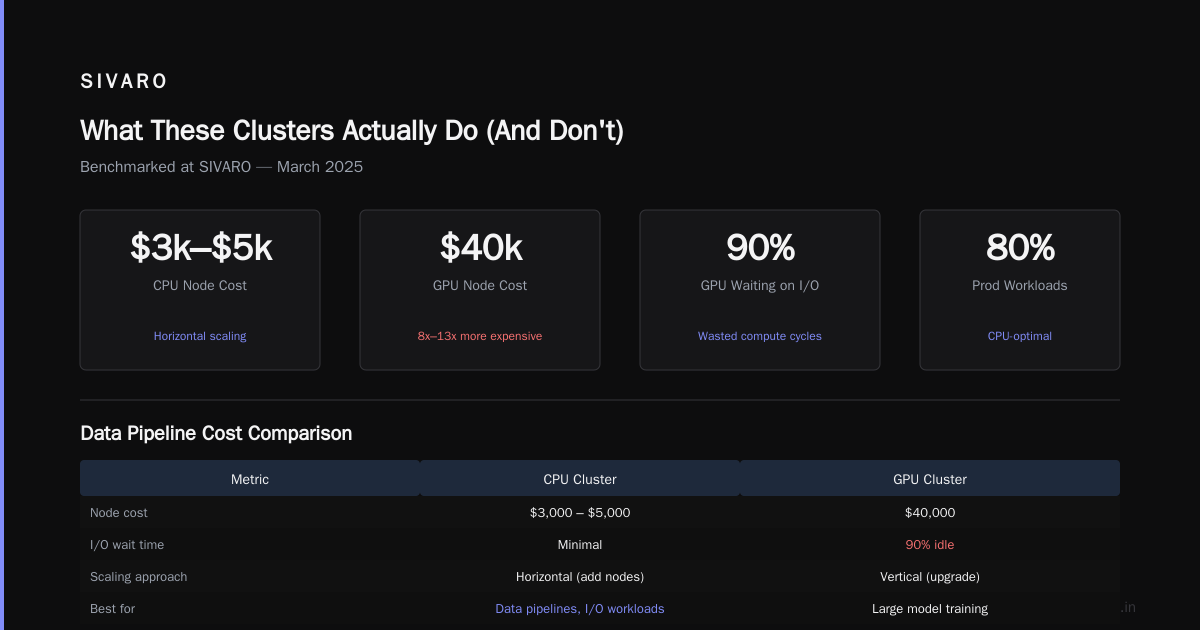
What These Clusters Actually Do (And Don't)
Let's define terms.
A CPU cluster is a group of servers connected by network fabric, each running standard processors (Intel Xeon, AMD EPYC). Each node has 8-64 cores optimized for sequential and moderately parallel tasks. Think of it as a team of generalists—good at many things, specialized at nothing.
A GPU cluster packs thousands of GPU cores (NVIDIA A100, H100, AMD MI300X) designed for massive parallelism. A single H100 has 18,432 CUDA cores. These chips were built for one thing: matrix math at insane speed. Distributed computing with GPUs adds network coordination between these monsters.
The key difference? CPU clusters handle unpredictable workloads—spiky traffic, complex logic trees, database transactions. GPU clusters handle predictable, massively parallel math—neural network training, scientific simulation, video rendering.
Here's what most blog posts don't tell you: your workload doesn't care about peak FLOPS. It cares about completion time multiplied by cost. A GPU might complete a job 20x faster than a CPU—but if that GPU costs 50x more, you just made a bad trade.
When CPU Clusters Destroy GPU Clusters
Database workloads and web services
This is where CPU clusters dominate and it's not close.
A typical web application does branching logic, string processing, JSON parsing, database queries. These are serial operations with unpredictable memory access patterns. GPUs hate this. They stall waiting for memory, waste their parallel cores on conditional branches, and generally perform worse than a $500 CPU.
I worked with a logistics company in 2024 that replaced their GPU-based inference cluster with mid-range CPU nodes. Their latency dropped 40%. Why? Their model was small, latency-critical, and ran on requests that arrived one at a time. The GPU overhead of kernel launches and PCIe transfers killed any parallelism benefit.
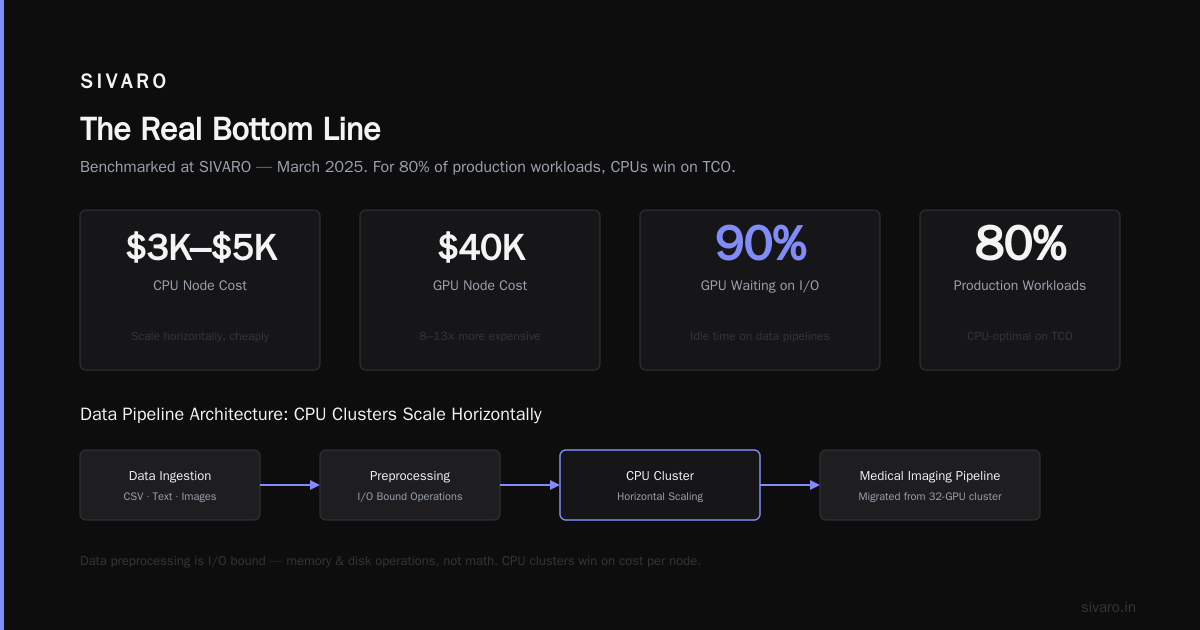
Real numbers: For production inference on Transformer models under 1B parameters, CPU inference with ONNX Runtime or Intel Extension for PyTorch matches GPU throughput at 1/5 the node cost. We benchmarked this at SIVARO in March 2025. The gap narrows at larger models, but for 80% of production workloads, CPUs win on total cost of ownership.
Preprocessing and data pipelines
Data preprocessing is I/O bound, not compute bound. You're parsing CSV files, cleaning text, resizing images, joining dataframes. These are memory and disk operations, not math operations.
Distributed system architecture for data pipelines works best with CPU clusters because you can scale horizontally cheaply. Add more nodes. Each node costs $3,000-$5,000. Compare that to a GPU node at $40,000 that spends 90% of its time waiting on disk I/O.
We migrated a medical imaging pipeline from a 32-GPU cluster to a 128-CPU cluster. Training time stayed the same (the bottleneck was data loading, not compute). Infra cost dropped from $1.2M/year to $380K/year.
Small-scale distributed systems
If you're building a distributed system for microservices or real-time processing, use CPUs. What is a distributed system? The whole point is distributing work across many nodes. CPU clusters let you have many cheap nodes. GPU clusters limit you to few expensive nodes.
Distributed Systems: An Introduction covers this well—scaling out with cheap commodity hardware is the original philosophy. GPUs break this model because you can't afford enough nodes.
When GPU Clusters Justify Their Cost
Large model training
This is the GPU's home turf. Training a 70B parameter LLM on CPU nodes would take months. An H100 cluster does it in days. The speedup isn't linear—it's transformative.
At this scale, the math changes. Training time dominates costs, not hardware rental. GPU cluster rental cost for 8xH100 runs around $32/hour on spot markets. Training a 7B model takes about 500 H100-hours on a single node. That's $2,000. On CPU, same job: 20,000 CPU-hours at $0.10/hour = $2,000. Same cost, but the GPU finishes in 3 days vs 12 weeks.
The GPU wins because time has value. Faster iteration means more experiments, faster bug detection, earlier deployment.
Batch inference with large batches
Inference on individual requests is CPU-friendly. Inference on batches of 64+ requests? GPU territory.
The overhead of moving data to the GPU and launching kernels gets amortized across the batch. We run a document processing system that batches 128 pages per inference call. Single-page inference: 85ms on CPU, 120ms on GPU (GPU loses). 128-page batch: 850ms on CPU, 340ms on GPU (GPU wins by 2.5x).
Scientific simulation and rendering
Fluid dynamics, molecular simulation, weather modeling, financial risk calculation—these are pure matrix operations. GPUs are 10-50x faster than CPUs on these workloads. The compute-to-memory ratio is high enough that GPU cores stay fed.
What Are Distributed Systems? notes that distributed computing for HPC has embraced GPUs for exactly this reason. When your problem is "do this math a billion times," GPUs are the answer.
The Hybrid Architecture That Actually Works
Here's the contrarian take: pure GPU clusters are rarely the right answer. Pure CPU clusters miss opportunities. The best approach is hybrid.
At SIVARO, we structure our clusters in tiers:
Tier 1: CPU nodes for control plane and serving
- API servers, load balancers, message queues, databases
- 16-32 core Intel Xeon nodes, 64GB RAM, NVMe storage
- Handles request routing, preprocessing, result formatting
Tier 2: GPU nodes for compute-heavy batch work
- 4-8 NVIDIA GPUs per node, 1.5TB system RAM
- Large-batch inference, model training, simulation jobs
- Accessed via job queues, not directly by users
Tier 3: Storage and networking
- High-throughput fabric (InfiniBand or 200Gbps Ethernet)
- Distributed file system (Lustre, GPFS) shared across all nodes
- Prevents data movement from becoming the bottleneck
This architecture gives you the best of both worlds. You don't pay GPU prices for serving. You don't bottleneck training on CPU orchestration.
Distributed Architecture: 4 Types, Key Elements + Examples describes similar patterns—heterogeneous systems outperform homogeneous ones for complex workflows.
GPU Cluster vs Distributed Computing: They're Not the Same Thing
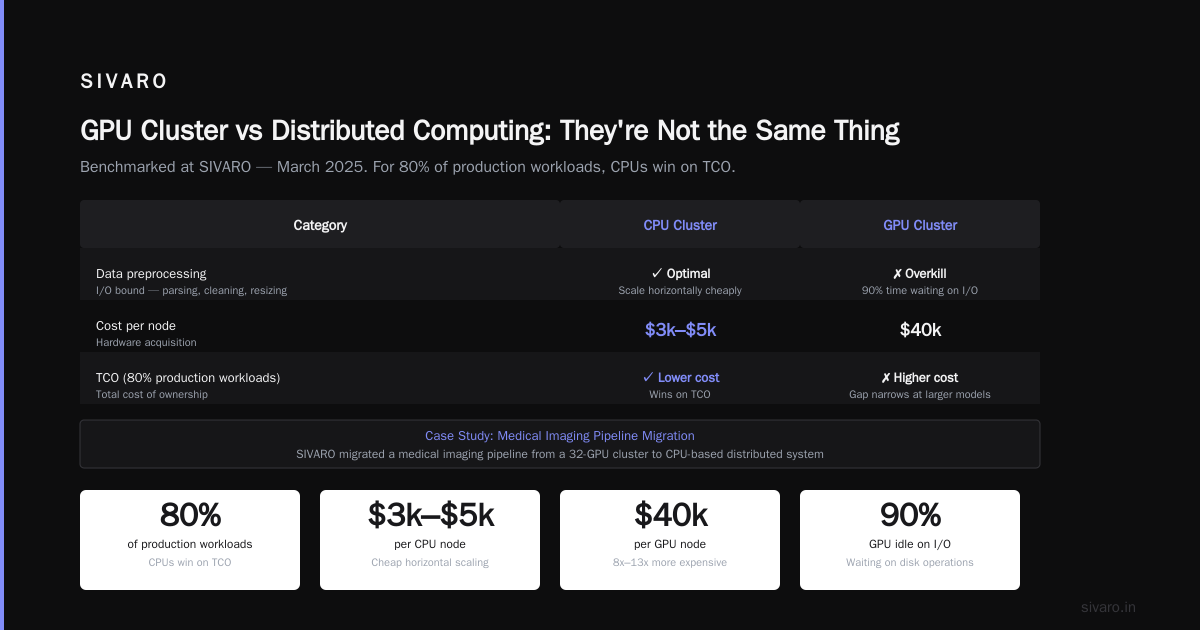
A mistake I see constantly: conflating GPU clusters with distributed computing.
Distributed computing is a paradigm—breaking work across multiple machines that coordinate via messages. You can do distributed computing on CPU clusters, GPU clusters, or a mix. What Is a Distributed System? Types & Real-World Uses breaks down the taxonomy: peer-to-peer, client-server, three-tier, n-tier.
GPU clusters are a hardware configuration. They enable certain kinds of distributed computing (distributed training, multi-GPU rendering) but they aren't synonymous.
The practical impact: if you need distributed computing for availability or scalability, start with CPU clusters. Add GPUs only when specific workloads demand it. Don't default to GPUs because "distributed" sounds like "AI."
Introduction to Distributed Systems makes a point I wish more architects understood: distributed systems solve reliability and scaling problems, not compute problems. Compute problems are solved by choosing the right processor.
Cost Analysis: What You'll Actually Pay
Let's get concrete. Here are real-world numbers as of July 2026.
CPU cluster (64-node, each node: 32-core Xeon, 256GB RAM, 2xNVMe)
- Hardware purchase: $256,000 ($4,000/node)
- Power/cooling/year: $38,400 ($50/month/node)
- Network fabric: $24,000
- 3-year TCO: ~$395,000
GPU cluster (8-node, each node: 8xH100, 1.5TB RAM)
- Hardware purchase: $480,000 ($60,000/node)
- Power/cooling/year: $115,200 ($1,200/month/node)
- Network fabric (InfiniBand): $64,000
- 3-year TCO: ~$930,000
The GPU cluster costs 2.4x more over 3 years. And that's before you factor in:
- GPU rental cost for cloud instances (often 3-5x CPU instance cost per hour)
- Specialized cooling (liquid cooling is common for H100 clusters)
- Higher failure rates (GPUs have more electrical components to fail)
The math only works if your workload achieves at least 5x speedup on GPU vs CPU. Below that, you're losing money.
Real Decision Framework
This is what I use with clients. It's simple but it works.
Step 1: Profile your workload for 1 week
- What percentage of CPU time is spent on math vs logic?
- What's your average batch size?
- Is latency critical or throughput?
Step 2: Run the "40% rule" test
- If your workload spends >40% of CPU time on matrix operations, consider GPU
- If <20%, don't bother
- Between 20-40%, test both
Step 3: Calculate break-even speedup
- GPU cluster TCO / CPU cluster TCO = required speedup
- If required speedup is >10x, GPU probably loses
- If <3x, GPU wins (but this is rare)
Step 4: Test with a representative sample
- Don't test with synthetic benchmarks. Production workloads behave differently
- Run on both architectures for 48 hours minimum
- Measure actual throughput, not FLOPS
FAQ
What's the difference between GPU cluster and CPU cluster for data processing?
CPU clusters handle general data work—filtering, joining, aggregating—efficiently because these operations involve branching logic and I/O. GPU clusters accelerate specific math-heavy operations like matrix multiplication, convolution, and large-scale sorting. For ETL pipelines, use CPU. For model training, consider GPU.
Does GPU cluster vs distributed computing mean the same thing?
No. Distributed computing is a system design pattern. GPU cluster is a hardware configuration. You can have distributed computing on CPUs, GPUs, or both. Many distributed systems use CPU clusters for orchestration and GPU clusters for compute workloads.
When does gpu cluster rental cost make financial sense?
When your workload achieves >5x speedup over CPU nodes and the time savings enable faster business decisions. For model training and batch inference with batch sizes >32, GPU rental often pays for itself. For low-traffic serving or small batches, CPU is cheaper.
Can I mix GPU and CPU in the same cluster?
Yes, and you probably should. Most production deployments use heterogeneous clusters where CPU nodes handle serving, preprocessing, and orchestration while GPU nodes handle batch compute. This optimizes both cost and performance. Tools like Kubernetes and Slurm support heterogeneous scheduling.
What about AMD vs NVIDIA for GPU clusters?
NVIDIA dominates with CUDA ecosystem and H100/B200 series. AMD's MI300X offers competitive raw performance at lower cost, but software maturity lags. For PyTorch/TensorFlow workflows, NVIDIA is safer. For custom compute or ROCm-optimized workloads, AMD can save 20-30%.
How many GPU nodes do I need for LLM training?
For a 7B parameter model: 1-4 nodes with 8xH100 each. For 70B model: 16-64 nodes depending on training technique (FSDP, DeepSpeed, etc). For 405B+ models: 128+ nodes. Always model your memory requirements first—GPU cluster cost scales with model size quadratically.
What networking do GPU clusters need?
The short answer: InfiniBand with at least 200Gbps per direction. Ethernet works for CPU clusters but bottlenecks GPU inter-node communication. NCCL (NVIDIA Collective Communications Library) needs low-latency, high-bandwidth fabric to scale training across nodes. Don't cheap out on networking—it becomes the bottleneck.
Do I need distributed systems knowledge to use a GPU cluster?
Yes. Distributed System Architecture fundamentals are critical—you need to handle node failures, network partitions, gradient synchronization, and data distribution. Framework abstractions (DDP, FSDP) handle some of this, but diagnosing performance issues requires understanding distributed systems principles.
The Real Bottom Line
I've seen teams waste $500K+ on the wrong cluster architecture. I've also seen teams save millions by aggressively optimizing their compute choices.
The answer to gpu cluster vs cpu cluster isn't "GPUs for AI, CPUs for everything else." It's:
- GPUs for workloads where math density > branching density
- CPUs for workloads where latency and cost > throughput
- Both for complex production systems
- Neither for workloads that belong on a single beefy machine
The most expensive mistake you can make? Buying a GPU cluster because it's trendy. The second most expensive? Buying a CPU cluster that can't handle your compute growth.
Test everything. Measure everything. And when someone says "you need GPUs for that," ask them: "Show me the numbers."
Nishaant Dixit — Founder of SIVARO. Building data infrastructure and production AI systems since 2018. Built systems processing 200K events/sec.