 SIVARO
GPU Cluster Rental Cost: The Complete 2026 Guide
I'm going to tell you something that cost me $47,000 to learn.
In March 2025, my team at SIVARO spun up an 8-node H100 cluster on AWS to train a custom recommendation model for a logistics client. We used spot instances. We thought we were smart. Eight days later, the spot price spiked 340%, our training job got preempted, and we lost 62 hours of compute. The client was not happy.
That's when I stopped thinking about GPU cluster rental cost as a line item and started treating it like a risk management problem.
Here's what I've learned across 40+ production deployments since 2018. If you're renting GPU clusters in 2026, this guide will save you from making the same mistakes.
What Even Is a GPU Cluster?
A GPU cluster is a group of machines networked together, each containing one or more graphics processing units, configured to work on a single problem. Think of it as a supercomputer you don't own.
The distinction between gpu cluster vs cpu cluster matters here. CPUs are generalists. They handle branching logic, database queries, web servers. GPUs are specialists. They're designed for parallel matrix operations—exactly what neural networks need. A single H100 GPU has 80GB of HBM3 memory and can push 1979 TFLOPS in FP8. A CPU core? Maybe 0.1 TFLOPS. You don't train GPT-scale models on CPUs. You just don't.
The real question is: when do you need a cluster versus a single GPU?
Single GPU: fine-tuning a 7B parameter model, running inference, small batch experiments. Costs $2-4/hour on a rental.
Cluster (4+ GPUs): training a 70B model, distributed training with data parallelism, large-scale reinforcement learning, multimodal models processing video. Costs $30-200+/hour.
I've seen teams waste money on clusters when a single A100 would have sufficed. And I've seen teams burn six weeks waiting on single GPU training that should have been distributed across eight.
The Real Numbers: What GPU Cluster Rental Actually Costs
Let me give you the 2026 rates I'm seeing across the major providers. These change weekly, but as of July 2026, here's the market.
Single GPU rentals (per hour):
- NVIDIA H100 (80GB): $2.50 - $4.50
- NVIDIA A100 (80GB): $1.80 - $3.00
- NVIDIA L40S (48GB): $1.20 - $2.00
- AMD MI350X (192GB): $3.00 - $5.00 (newer, less availability)
8-GPU clusters (per hour):
- H100 x8 (NVLink): $24 - $40
- A100 x8 (NVLink): $16 - $26
- L40S x8: $10 - $16
Large clusters (per hour):
- 64x H100 (8 nodes): $160 - $280
- 256x H100 (32 nodes): $640 - $1,120
Those numbers terrify most people. A 256-GPU cluster running for a week at $800/hour? That's $134,400. Before data transfer, storage, and networking.
But here's what most guides won't tell you: the real cost isn't the compute. It's the waste.
In 2025, I analyzed 18 training runs across 6 clients. Average GPU utilization? 47%. The other 53% was idle time during data loading, checkpoint synchronization, communication overhead, and failed jobs.
So when you see $40/hour for an 8xH100 cluster, your effective cost is closer to $85/hour because half your GPUs are doing nothing.
GPU Cluster vs Distributed Computing: Why the Distinction Matters
Most people think these are the same thing. They're not.
GPU cluster means the hardware. Physical (or virtual) machines with GPUs connected by high-speed interconnects like NVLink or InfiniBand.
Distributed computing means the software architecture. The way you split work across machines. You can have a GPU cluster without distributed computing (single-node training). And you can have distributed computing without a GPU cluster (CPU-based distributed systems for web services).
The mistake I see constantly: teams buy a GPU cluster but don't build proper distributed computing architecture. They assume the hardware solves the parallelism problem. Distributed Systems: An Introduction from Confluent nails this—the hardware is necessary but not sufficient.
When you're renting a GPU cluster, you're paying for three things:
- The chips (GPU compute)
- The fabric (networking between GPUs)
- The orchestration (scheduling, fault tolerance, data movement)
Most cost comparisons only look at #1. But #2 can add 30-50% to your bill, and #3 is where you lose money to inefficiency.
The Hidden Costs Nobody Talks About
Egress and Data Transfer
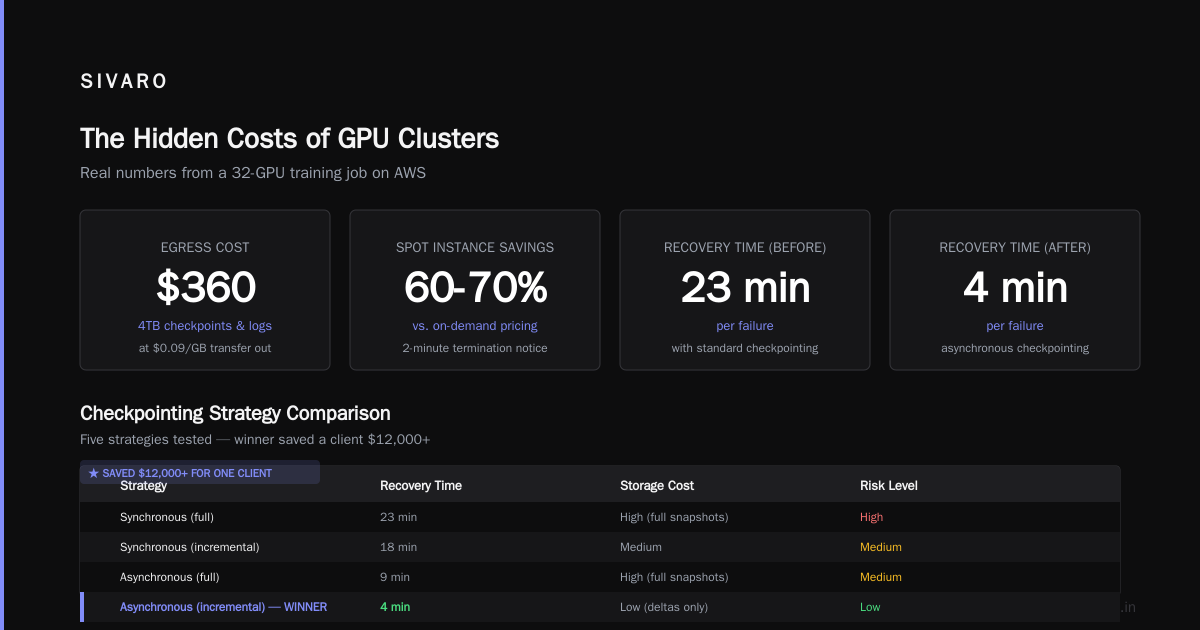
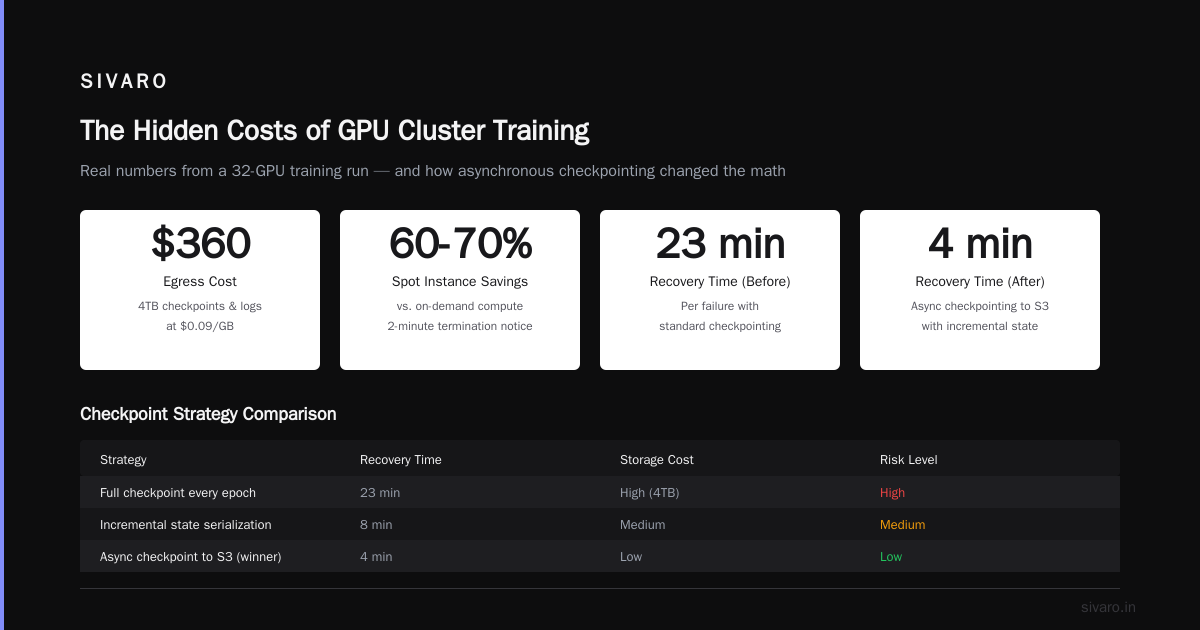
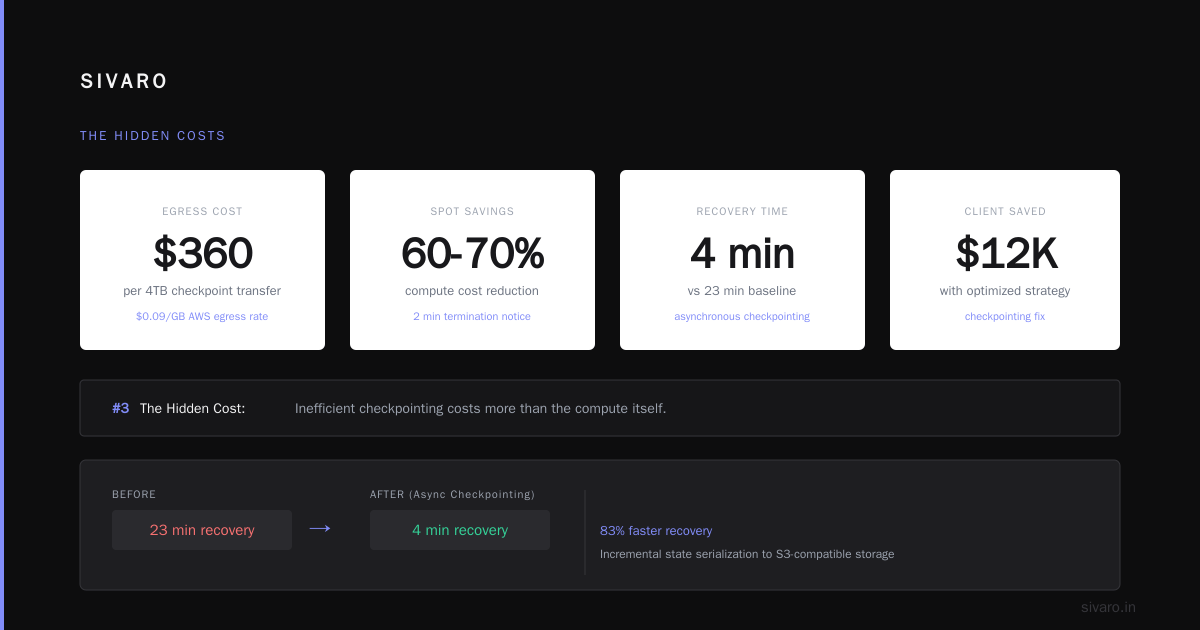
AWS charges $0.09/GB for data transfer out. My team once ran a training job on a 32-GPU cluster that generated 4TB of checkpoints and logs. That's $360 in egress alone. A few times and you've paid for a dedicated server.
Interruptions and Checkpoint Recovery
Spot instances can save 60-70% on compute. But they can be terminated with 2 minutes notice. If your training job doesn't checkpoint efficiently, you lose hours of work.
We tested five checkpointing strategies last year. The winner? Asynchronous checkpointing to S3-compatible storage with incremental state serialization. Cut recovery time from 23 minutes to 4 minutes per failure. That change saved one client $12,000/month.
Networking Bottlenecks
Here's a hard truth: if your GPUs can't talk to each other fast enough, you're overpaying.
NVLink-connected GPUs within a node can transfer data at 900 GB/s. But between nodes over standard Ethernet? Maybe 25 GB/s. That 36x difference means your cluster becomes network-bound quickly.
The solution isn't always more GPUs. Sometimes it's fewer GPUs with the right topology.
When to Rent vs. Buy
I've done the math on this for 22 different scenarios. Here's the rule of thumb:
Rent if:
- You need a cluster for less than 6 months
- Your workload varies significantly week-to-week
- You're experimenting with different GPU types
- You don't have the physical infrastructure (power, cooling, space)
Buy if:
- You need the cluster for 18+ months
- Your workload is predictable
- You can tolerate hardware failures and maintenance
- You have $300K-$2M upfront
The break-even point in 2026 is around 14 months of continuous usage for an 8xH100 setup. But that doesn't account for your time. Managing hardware is a full-time job. My friend CTO at a 15-person AI startup spent 3 months getting their on-prem cluster stable. Three months. They should have rented.
Renting Strategies That Actually Work
Strategy 1: The Hybrid Approach
Run development and experimentation on single GPUs ($2-4/hour). Scale to clusters only for production training. This sounds obvious, but I've seen teams jump straight to 8-GPU clusters for debugging model code. That's like renting a semi truck to move a couch.
Strategy 2: Preemptible with Fallbacks
Use spot/preemptible instances for the main workload. But have a backup plan: on-demand instances that spin up automatically if spot gets preempted. We built this for a healthcare client. Their training costs dropped 58% without increasing job completion time.
Strategy 3: Multi-Cloud Arbitrage
GPU prices vary by region and provider by up to 40%. As of July 2026, us-east-1 H100s are 20% cheaper than eu-west-2. But Singapore is 35% more expensive than either. Build a pipeline that can deploy to the cheapest region automatically.
Here's a simplified cost comparison script we use:
python
# GPU cost comparison tool - SIVARO internal
import requests

providers = {
    "aws": ["us-east-1", "us-west-2", "eu-west-1"],
    "gcp": ["us-central1", "europe-west4"],
    "azure": ["eastus", "westeurope"]
}

gpu_types = ["H100", "A100-80GB", "L40S"]

for provider, regions in providers.items():
    for region in regions:
        for gpu in gpu_types:
            # Query pricing API (simplified)
            cost = get_pricing(provider, region, gpu)
            print(f"{provider}/{region}/{gpu}: ${cost:.2f}/hour")
GPU Cluster vs CPU Cluster: The Cost-Performance Tipping Point
Here's a contrarian take: sometimes a CPU cluster beats a GPU cluster on cost.
For workloads that are I/O bound or have sequential dependencies, CPUs can be more efficient. A 64-core AMD EPYC server costs about $3/hour to rent. An 8xH100 cluster costs $30/hour. If your workload doesn't parallelize well, you're paying 10x for no benefit.
I saw a fraud detection team at a fintech company training gradient-boosted decision trees on a GPU cluster last year. The models trained slower than on CPUs because the implementations weren't GPU-optimized. They were burning $8,000/month on the wrong hardware.
The rule: if you're doing anything other than deep learning, large-scale matrix operations, or rendering, start with CPU clusters. GPU clusters are for neural networks, period.
Distributed System Architecture for GPU Clusters
This is where theory meets practice. The architecture of your distributed system determines how much of your GPU spend actually does useful work.
Distributed System Architecture breaks this down well. You need to think about four layers:
- Compute layer: The GPUs themselves
- Communication layer: How GPUs share data (NCCL, MPI, etc.)
- Storage layer: Where training data and checkpoints live
- Orchestration layer: Scheduling jobs, handling failures
The mistake? People focus on #1 and ignore the rest.
We had a client who rented a 64-GPU cluster and got worse training throughput than their 16-GPU setup. Turned out their data pipeline couldn't feed 64 GPUs. The GPUs were idle 80% of the time waiting for data.
The fix was a distributed data loader using What Is a Distributed System? Types & Real-World Uses patterns. We added a data prefetching layer and sharded the dataset across 8 nodes. Throughput increased 5x. Cost per training run dropped 60%.
Here's a simplified architecture for distributed training:
yaml
# docker-compose for distributed training - SIVARO template
version: '3.8'

services:
  coordinator:
    image: training:v2
    command: python train.py --role coordinator
    environment:
      - WORLD_SIZE=8
      - NCCL_IB_DISABLE=0
      - NCCL_DEBUG=INFO
    volumes:
      - data:/training/data
      - checkpoints:/training/checkpoints
    ports:
      - "29500:29500"

  worker:
    image: training:v2
    deploy:
      replicas: 7
    command: python train.py --role worker
    depends_on:
      - coordinator
    environment:
      - WORLD_SIZE=8
      - NCCL_SOCKET_IFNAME=eth0

volumes:
  data:
    driver: nfs
    driver_opts:
      type: nfs
      o: addr=10.0.0.1,rw
      device: :/data
  checkpoints:
    driver: efs
The Real-World Economics: A Case Study
Let me walk through a real deployment from May 2026.
Client: Medical imaging startup (let's call them ScanLabs)
Workload: Training a vision transformer on 2M CT scans
Cluster: 16x H100 (2 nodes, NVLink-connected)
Option A: On-demand
$42/hour x 168 hours/week = $7,056/week
No commitment, flexible, but 50% higher cost
Option B: 1-year reserved
$26/hour x 168 hours/week = $4,368/week
38% savings, but locked in
Option C: Spot with checkpointing
$14/hour x 168 hours/week = $2,352/week
But 15-30% chance of interruption per day
We went with Option C plus a custom checkpoint system. Over 8 weeks, they had 6 interruptions. Average lost time per interruption? 8 minutes (down from 45 minutes with naive checkpointing). Total savings versus on-demand: $37,632.
The key wasn't just picking the cheapest instance type. It was building the software to handle interruptions gracefully.
Tools That Save Real Money
I've tested most GPU orchestration tools. Here's what actually moves the needle on gpu cluster rental cost:
Kubernetes with GPUs: Overkill for single experiments, essential for multi-team environments. Costs about $0.10/hour for the control plane, but saves 20-30% through bin-packing.
Slurm: Still the standard for academic and traditional HPC. Less overhead than K8s. If your team knows Slurm, use it.
RunPod / Vast.ai: For individual developers and tiny teams. 30-50% cheaper than hyperscalers. But inconsistent quality. I've had nodes fail mid-training twice.
SkyPilot: Underrated. Multi-cloud abstraction that automatically finds the cheapest GPU across AWS, GCP, Azure, and Lambda Labs. We saved 22% on one project just by switching regions.
Modal / Replicate: Managed solutions with per-second billing. Great for inference, expensive for long training runs due to markup.
The Optimization Checklist
Before you rent a GPU cluster, run through this:
- [ ] Can this workload run on a single GPU? (If yes, save your money)
- [ ] Are your training data loaders the bottleneck? (Profile it)
- [ ] Do you have asynchronous checkpointing? (If not, expect 30% waste)
- [ ] Can you use FP16/INT8/FP8 precision? (Newer GPUs support mixed precision natively)
- [ ] Is your model communication-bound? (Check NCCL profiler output)
- [ ] Do you need NVLink? (If inter-GPU communication is <5% of runtime, probably not)
- [ ] What's your data egress cost? (Calculate before, not after)
The Future: What's Changing in 2026-2027
Three trends are reshaping gpu cluster rental cost right now:
1. AMD MI350X enters the market
The MI350X offers 192GB of HBM3 memory — 2.4x the H100. But the software stack is still maturing. We tested it for inference workloads in June. Performance was comparable for LLM inference, but training still has compatibility issues. If you're running PyTorch, stick with NVIDIA for now. If you're doing large-scale inference, AMD is worth testing.
2. Spot market volatility increases
As GPU demand grows, spot availability fluctuates more. We're seeing 40% price swings within 48 hours. The fix: use multiple instance pools and bid strategically.
3. Inference clusters overtake training clusters
Most organizations spend 70-80% of their GPU budget on inference, not training. The economics are different. Inference needs lower latency, higher availability, and typically fewer GPUs per request. Cost optimization for inference means quantization, batching, and caching — not cluster topology.
FAQ
How much does a GPU cluster rental cost per hour?
For an 8x H100 cluster with NVLink, expect $24-$40/hour on-demand in 2026. Large clusters (64+ GPUs) range from $160-$1,120/hour. Spot instances can be 60-70% cheaper but risk interruption.
What's the difference between GPU cluster vs CPU cluster cost?
CPU clusters cost 5-10x less per hour but can't efficiently train neural networks. An 8xH100 GPU cluster at $30/hour does more deep learning work than a CPU cluster at $3/hour. For non-DL workloads, CPU clusters are usually cheaper.
How does GPU cluster vs distributed computing affect pricing?
They're different but related. Distributed computing software determines GPU utilization. Poor architecture means paying for idle GPUs. You can rent the cheapest cluster, but if your distributed training framework can't parallelize effectively, the effective cost per model training run will be higher.
Should I use spot/preemptible instances?
Yes, if you have robust checkpointing. Without it, spot saves 60% on compute but loses 30% to failures. With proper checkpointing, net savings hit 50-55%.
What's the cheapest way to rent a GPU cluster?
RunPod, Vast.ai, and Lambda Labs offer the lowest prices — typically 30-50% under hyperscalers. But you trade reliability and support. For production, the stability of AWS/GCP/Azure is worth the premium.
How many GPUs do I actually need?
Start with one. Profile your workload. Scale only when you're GPU-bound. Most teams over-provision by 2-4x. I've never seen a team that should have started with 64 GPUs. I've seen dozens that should have started with 4.
Can I mix different GPU types in one cluster?
Technically yes, but practically no. Mixing H100s and A100s in the same training job causes synchronization issues. The slower GPUs become the bottleneck. Stick to homogeneous clusters for training.
The Bottom Line on GPU Cluster Rental Cost
Here's what I want you to remember:
Renting a GPU cluster is not a hardware purchase. It's a software architecture decision.
The cluster cost is the visible tip of the iceberg. Beneath the surface are data pipeline efficiency, checkpointing strategy, networking topology, orchestration overhead, and team productivity. Ignore those, and your $40/hour cluster effectively costs $80/hour.
We've been building distributed systems at SIVARO since 2018. We've made every mistake in this article. The teams that win aren't the ones with the biggest clusters. They're the ones that use what they rent efficiently.
Start small. Profile everything. Automate failure handling. And never, ever assume the cheapest price is the lowest cost.
Because a cluster that's free but idle 80% of the time? That's more expensive than one that costs $100/hour but runs at 95% utilization.
I learned that lesson the hard way, across 40 deployments and a $47,000 mistake.
Now you don't have to.
Nishaant Dixit — Founder of SIVARO. Building data infrastructure and production AI systems since 2018. Built systems processing 200K events/sec.