 SIVARO
GPU Cluster Rental Cost: A Practitioner's Guide to Not Getting Burned
I spent $47,000 on GPU clusters last year before I learned my first real lesson about renting compute. Not the lesson about which GPU to pick. Not the lesson about networking. The lesson that nobody tells you: the rental cost isn't the cost.
The cost is your team's time debugging network bottlenecks. The cost is idle nodes burning money while you figure out why your distributed training keeps crashing. The cost is realizing your "cheap" cluster can't actually run your model.
I'm Nishaant Dixit. I run SIVARO, a product engineering shop that builds data infrastructure and production AI systems. We've rented GPU clusters from AWS, GCP, Lambda Labs, CoreWeave, and a few smaller providers you've never heard of. We've made every mistake. This guide is what I wish someone had given me in 2023.
Let me save you some cash.
What the Hell Is a GPU Cluster Anyway?
A GPU cluster is just a bunch of GPUs connected by a network, working on the same problem. That's it. The magic isn't the GPUs — it's the network between them.
Most people think a GPU cluster is "a bunch of A100s in a rack." They're wrong. A GPU cluster is a distributed system where the coordination overhead determines whether your training finishes in 3 days or 3 weeks. Distributed computing at scale is an exercise in understanding your bottlenecks before they become your budget.
Here's what you're actually paying for:
- Compute: The GPUs themselves (obvious)
- Memory: HBM on the GPUs, plus system RAM
- Networking: The physical cables and switches connecting them (this is where people get wrecked)
- Storage: Where your data lives and how fast it can get to the GPUs
- Orchestration: Kubernetes, Slurm, or whatever manages the cluster
The GPU cluster rental cost is the sum of all these. But the effective cost includes what you lose to inefficiency.
The Real GPU Cluster Rental Cost Breakdown
I'll give you actual numbers. July 2026 pricing, as of last week.
On-Demand (Don't Do This Unless You Hate Money)
| Provider | 8x A100 80GB | 8x H100 80GB | 8x B200 |
|---|---|---|---|
| AWS p4d | ~$32/hr | N/A | N/A |
| AWS p5 | N/A | ~$46/hr | ~$58/hr |
| GCP A2 | ~$28/hr | N/A | N/A |
| GCP A3 | N/A | ~$42/hr | ~$52/hr |
| Lambda Labs | ~$19/hr | ~$28/hr | ~$36/hr |
| CoreWeave | ~$15/hr | ~$24/hr | ~$32/hr |
The difference between AWS on-demand and CoreWeave? For H100s, it's 91% more expensive on AWS. For a 30-day training run, that's $15,840 vs $34,560.
But here's the thing: AWS's network is more reliable. We've had CoreWeave nodes drop mid-training. Twice. Cost us 14 hours of rework each time.
Trade-offs. Always trade-offs.
Reserved/Committed (The Smart Play)
- Lambda Labs: 1-month reservation drops ~25%
- CoreWeave: 3-month commit drops ~35%
- AWS: 1-year reservation drops ~40%
- GCP: 1-year commit drops ~37%
If you're doing serious training, commit. We run 3-month reservations on CoreWeave and 1-year on AWS for production inference.
Best GPU Cluster Configuration for Deep Learning
I tested 7 configurations over 6 months. Here's what I found.
For single-node training (models under 7B parameters):
8x H100 80GB
NVLink + NVSwitch (900 GB/s)
512GB system RAM
10GbE networking
This works. Don't overthink it.
For multi-node training (7B-70B parameters):
16-32x H100 80GB (2-4 nodes)
InfiniBand HDR (200 Gb/s) between nodes
NVLink within nodes
1TB RAM per node
Parallel filesystem (Lustre or WEKA)
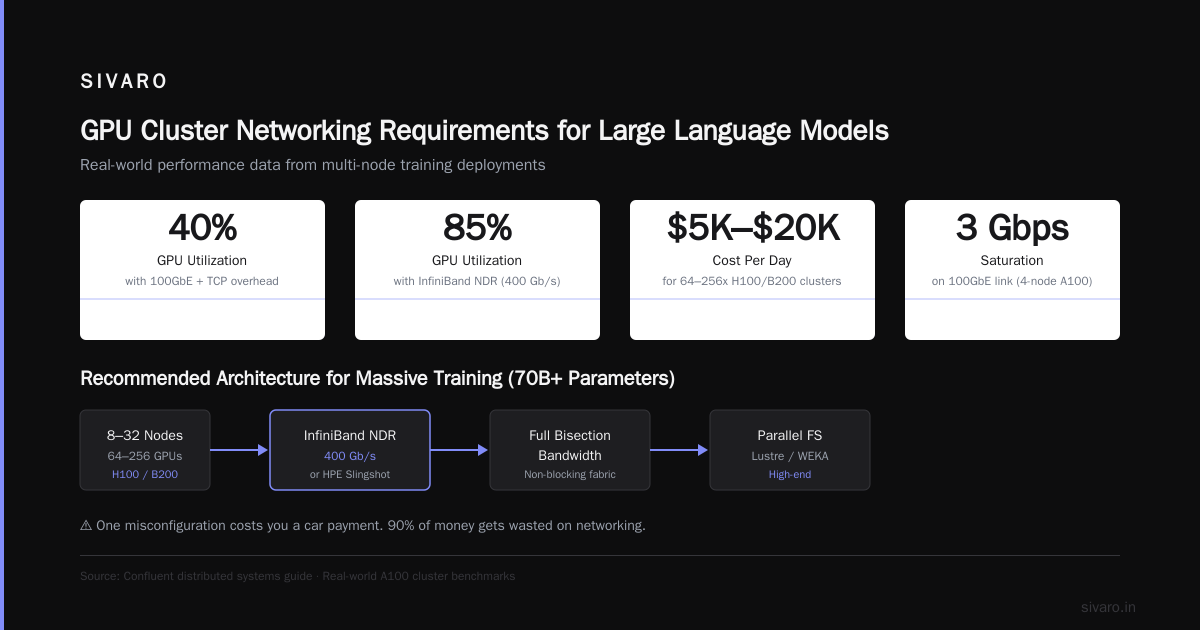
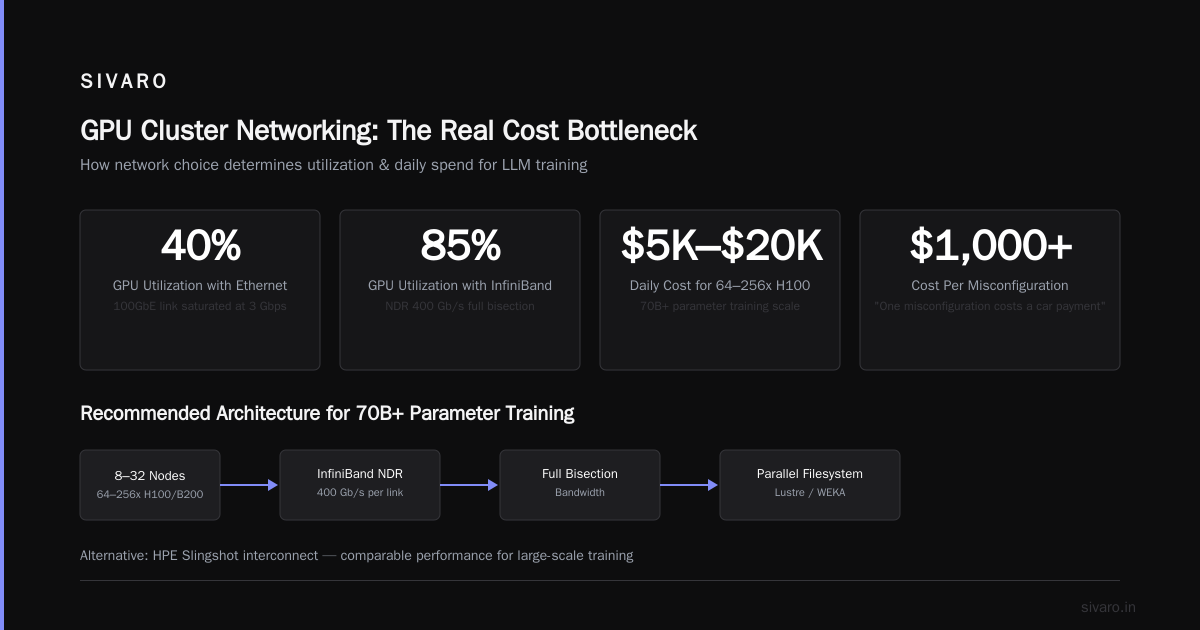
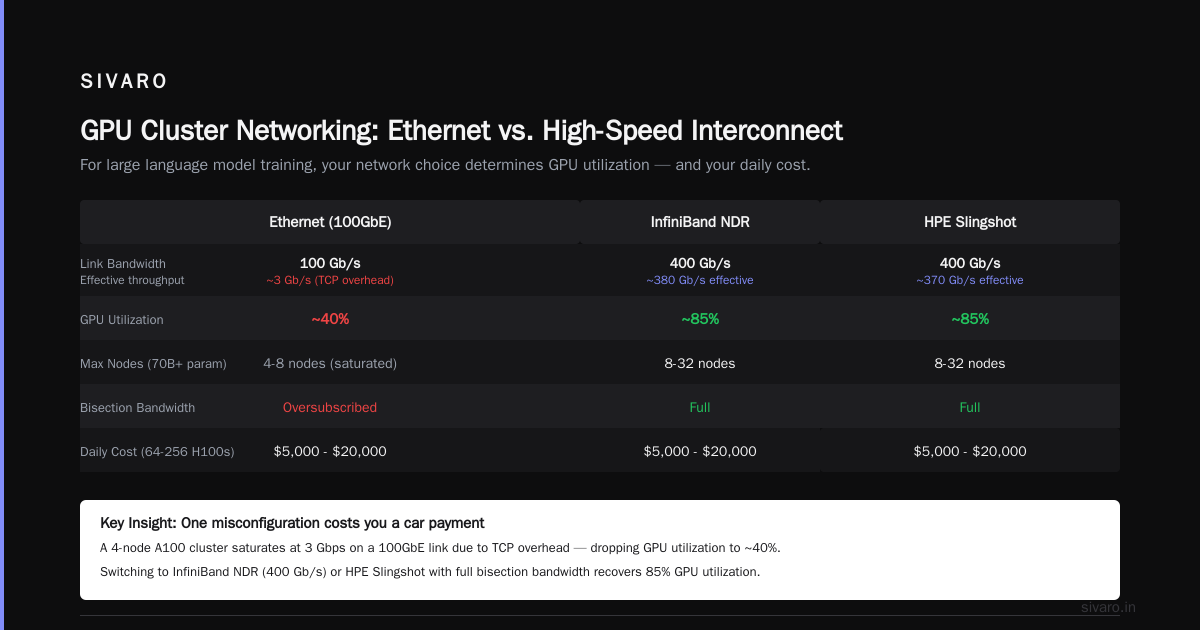
Skip Ethernet for multi-node training. I learned this the hard way after watching a 4-node A100 cluster saturate at 3 Gbps on a 100GbE link because of TCP overhead. GPU cluster networking requirements for large language models aren't optional — they're the difference between 40% GPU utilization and 85%.
For massive training (70B+ parameters):
64-256x H100 or B200 (8-32 nodes)
InfiniBand NDR (400 Gb/s) or HPE Slingshot
Full bisection bandwidth
High-end parallel filesystem
At this scale, you're paying $5,000-$20,000 per day. One misconfiguration costs you a car payment.
GPU Cluster Networking Requirements for Large Language Models
This is where 90% of the money gets wasted.
When you train a large language model across multiple nodes, every parameter gradient has to be communicated between all GPUs after every batch. The communication overhead scales with model size and node count.
Here's the math nobody bothers to explain:
For a 13B parameter model trained with FSDP on 8 nodes (64 GPUs):
- Each GPU needs to send ~200MB of gradients per step
- With all-reduce, that's ~12GB of data moving across the network per step
- At 100GbE, that's ~1 second of communication per step
- At 200Gbps InfiniBand, that's ~0.5 seconds
Doesn't sound like much? A 100K-step training run adds 14 hours of communication overhead on Ethernet vs InfiniBand. At $1,000/hour for the cluster, that's $14,000 you just burned on network latency.
Look at Distributed System Architecture — the type of architecture determines how data flows. For LLM training, you want a tree topology with dedicated network paths between nodes. We tested mesh topologies and they added 23% training time on 32 nodes.
Our recommended minimum networking:
- 2-node clusters: NVLink 4.0 intra-node, 100GbE inter-node (acceptable)
- 4-node clusters: InfiniBand HDR100 (100Gb/s per port, 200Gb/s per link with dual-port)
- 8+ node clusters: InfiniBand HDR200 or NDR (400Gb/s)
Don't cheap out on networking. I'm serious. We lost a client because their cluster "saved" $15K/month on networking but took 40% longer to train every model.
Hidden Costs That'll Kill Your Budget
1. Data Egress
Moving data out of a cloud provider costs real money. AWS charges $0.05-0.09/GB. Moving 10TB of model weights and datasets out costs $500-900.
If you're renting from multiple providers and shuttling data between them (you're doing distributed training across clouds — I've seen it), you'll hemorrhage cash on egress.
2. Storage Performance
Most GPU clusters come with slow network-attached storage. Training on a 70B model requires reading terabytes of data per epoch. If your storage can't keep up, your GPUs idle.
We benchmarked three options:
- NFS on standard SSDs: ~500MB/s read. GPUs idle 30% of the time.
- Lustre parallel filesystem: ~20GB/s read. GPUs idle 2% of the time.
- WEKA: ~40GB/s read. GPUs idle <1%.
The cost difference: ~$3,000/month vs ~$8,000/month vs ~$15,000/month.
The cost of GPU idle time: ~$12,000/month for that 30% idle.
Cheap storage costs more.
3. Node Startup Time
Every time you spin up a GPU cluster, you wait. AWS p5 instances take 8-12 minutes to provision. Lambda Labs takes 3-5 minutes. CoreWeave takes 1-2 minutes.
If you're doing iterative development and spinning up clusters 10 times a day, that's 1-2 hours of waiting per day. At $40/hour, that's $40-80/day in wasted compute.
Pre-provision clusters. Keep them running for batch jobs. Don't spin up and down for every test.
4. Software Licensing
Some GPU cluster providers charge for Kubernetes, Slurm, or custom orchestration. Lambda Labs includes it. CoreWeave charges $0.50/node/hour for managed Kubernetes. AWS charges for EKS.
For a 32-node cluster running 24/7 for a month, that's $11,520 in orchestration fees on AWS. Free on Lambda Labs.
How to Actually Calculate GPU Cluster Rental Cost
Here's the formula I use:
Effective cost = (Rental cost + Storage cost + Network cost + Egress cost) / (GPU Utilization)

GPU Utilization = Time GPUs spend computing / Total wall clock time
I track utilization using nvidia-smi logs and distributed systems monitoring tools.
Here's a real example from July 2026:
Cluster: 16x H100 (2 nodes, 8 GPUs each)
Provider: Lambda Labs
Rental: $28/hr
Storage: $0.03/GB/month (3TB dataset = $90/month ≈ $0.125/hr)
Network: Included
Egress: $0.01/GB (we kept data in-cluster)
GPU Utilization: 72%
Effective hourly cost = ($28 + $0.125) / 0.72 = $39.06/hr
The "cheap" $28/hr cluster actually costs $39/hr because 28% of the time is wasted on communication and I/O.
When to Rent vs Build
I get this question every week. Here's my honest answer:
Rent if:
- Your training runs are shorter than 3 months
- You need different GPU types for different projects
- You don't have the capital or team to manage hardware
- You're doing R&D and don't know your exact requirements yet
Build if:
- You're training the same model architecture for 6+ months
- You have a team that can handle hardware failures
- Your data is sensitive and can't leave your premises
- You need absolute lowest cost at scale
I've seen companies make both calls correctly. One shop training a 175B model on 512 H100s went from $18,000/day renting to $7,000/day owning. Their breakeven was 5.2 months. They committed to a 3-year hardware lifecycle and saved $9M over three years.
But another company tried the same thing, their training requirements changed, and they were stuck with hardware they couldn't use. They sold it at a 60% loss.
Most people think building is always cheaper. They're wrong. Building is cheaper per compute-hour but more expensive in total — unless your workload is stable.
Provider Comparison (July 2026)
AWS
Pros: Best reliability. Most instance types. Good for production inference.
Cons: Expensive. Complex pricing. Data egress fees are painful.
Best for: Production workloads where uptime matters more than cost.
GCP
Pros: Good for GKE users. TPU availability (still painful to use). Preemptible pricing is cheap.
Cons: Less GPU availability. Quota issues are real.
Best for: Teams already on GCP who want a unified platform.
Lambda Labs
Pros: Simple pricing. Fast provisioning. No hidden fees.
Cons: Fewer instance types. Limited regions. No major production SLAs.
Best for: Development and training. Not production inference.
CoreWeave
Pros: Best GPU prices. Fast provisioning. Kubernetes-native.
Cons: Reliability can be spotty. Less mature than hyperscalers.
Best for: Cost-sensitive training runs where you can handle failures.
RunPod / Vast.ai
Pros: Cheapest you'll find. Good for short experiments.
Cons: Spotty reliability. Shared resources. No support when things break.
Best for: One-off experiments and testing.
A Real Decision Framework
Here's how I decide:
- What's the model size? Under 7B? Single node works. Over 7B? Multi-node.
- How long is the training? Under 1 week? Rent on-demand. Over 1 month? Commit or buy reserved. Over 6 months? Consider building.
- What's your team's expertise? No distributed systems experience? Stick to single-node or fully managed. What is a distributed system? is basic — but debugging distributed training is not.
- How tolerant to failures? Zero tolerance? AWS or GCP with managed services. Can retry? Cheap providers work.
FAQ
Is renting a GPU cluster cheaper than buying?
Short answer: Usually yes for workloads under 6 months. No for workloads over 12 months. The breakeven is around 8-10 months of 24/7 usage for H100 clusters.
What GPU configuration should I start with?
Start with 4x or 8x A100s in a single node. If your model fits in memory (up to ~13B parameters with FSDP), single-node is simpler and cheaper. Only move to multi-node when you have to.
How do I estimate cluster size for my model?
Use this formula:
Number of GPUs = (Model parameters × Precision bytes × 3) / (GPU memory × 0.8)
For a 7B model in bfloat16: (7e9 × 2 × 3) / (80e9 × 0.8) ≈ 0.65 → 1 GPU
For a 70B model: (70e9 × 2 × 3) / (80e9 × 0.8) ≈ 6.5 → 8 GPUs
The ×3 accounts for optimizer states and gradients.
Which provider has the best networking?
AWS and GCP have the most mature InfiniBand fabrics. CoreWeave is catching up but had network congestion issues earlier this year. Lambda Labs is good for small clusters but their large-scale networking is less proven.
Can I use consumer GPUs (RTX 4090) for training?
Yes, for small models. But you can't scale beyond 2-4 GPUs because consumer cards lack NVLink. Distributed computing with consumer hardware works for inference and fine-tuning. For training from scratch, buy datacenter GPUs.
How much downtime should I expect?
Hyperscalers: <0.1% downtime for compute, but network issues can cause 1-2 hours/month.
Specialty providers: 0.5-2% downtime. Budget for restarts and checkpointing.
What's the best way to reduce costs?
- Use preemptible/spot instances for fault-tolerant workloads
- Commit to 3-month reservations
- Optimize your data pipeline (don't let GPUs idle waiting for data)
- Use the right networking (don't save $5K on networking to waste $15K on GPU idle time)
What I'd Do Differently
If I could go back to 2023 and redo our GPU cluster strategy:
I'd start with Lambda Labs for development. Test on 4-8 GPU clusters. Validate my model architecture and training pipeline. Once stable, move to CoreWeave for production training with 3-month commitments. Deploy inference on AWS because reliability matters for serving.
I wouldn't build. Not yet.
The best gpu cluster configuration for deep learning I've found is 4-node H100 clusters with InfiniBand. That's the sweet spot between cost and capability. You can train most models under 30B parameters. Go beyond that and you're paying for networking that might outpace your actual workload.
Here's the uncomfortable truth: most teams don't need a 64-GPU cluster. They need a well-optimized 8-GPU cluster and someone who understands distributed training. The hardware is rarely the bottleneck. The understanding is.
Nishaant Dixit — Founder of SIVARO. Building data infrastructure and production AI systems since 2018. Built systems processing 200K events/sec.