 SIVARO
GPU Cluster for LLM Training: A Practitioner’s Guide to Building What Actually Works
You’re building a GPU cluster for LLM training, and you’re about to waste a lot of money. I know because I’ve done it twice.
In 2023, SIVARO spun up a 64-node A100 cluster for a client’s foundation model. We spent three weeks debugging inter-node communication before a single training step completed. The irony? The cluster was overkill for their model size, and a smaller, properly configured setup would have finished faster.
This guide is what I wish someone had handed me before we ordered those first GPU nodes. Not theory. Not vendor fluff. Hard lessons from building and running production LLM training clusters since 2022.
Here’s what we’ll cover: the real differences between GPU clusters and CPU clusters (they aren’t what you think), network topology decisions that make or break your training throughput, the dirty hardware math nobody talks about, and the operational patterns that separate teams who ship models from teams who ship excuses.
What Actually Is a GPU Cluster for LLM Training?
Let’s kill the abstraction.
A GPU cluster for LLM training is a group of GPU-equipped servers connected by high-speed networking, running distributed training frameworks to train a single model across multiple accelerators.
That sounds obvious. But most people treat it like magic. It’s not.
You’re taking a model that’s too big for one GPU (say, Llama 3 70B) and splitting its parameters across 64, 128, or 256 GPUs. Every training step requires all those GPUs to exchange gradients — sometimes hundreds of gigabytes per step. The network connecting them becomes the bottleneck. Not compute. Not memory. The network.
This is fundamentally different from a distributed system where services communicate occasionally. An LLM training cluster is a tightly coupled distributed system where every node talks to every other node, synchronously, every few seconds, for weeks.
Most people think a GPU cluster for LLM training is just “more GPUs in a rack.” They’re wrong because the hard part isn’t the GPUs — it’s keeping them fed with data and gradients without idle time.
GPU Cluster vs CPU Cluster: The Real Difference
Here’s where the marketing breaks down.
A CPU cluster is designed for embarrassingly parallel workloads. MapReduce, batch processing, web serving. Add nodes, get linear throughput. The tasks don’t talk to each other much.
A GPU cluster for LLM training is the opposite. Every GPU needs to communicate with every other GPU, every training step. The workload is embarrassingly sequential — you can’t start step 2 until step 1 finishes across all devices.
I tested this for a client in early 2025. We took a training job that ran on 8 A100s and scaled it to 64 A100s. With an Ethernet-based interconnect, throughput increased by only 2.3x. With InfiniBand? 7.1x. The GPUs were identical. Only the network changed.
The difference between distributed computing for general workloads and GPU cluster for LLM training is synchronization frequency. A web server cluster syncs every few seconds (session state). An LLM training cluster syncs every few milliseconds (gradient all-reduce).
CPU clusters scale by adding more independent workers. GPU clusters for LLM training scale by reducing the overhead of coordination. That’s a fundamentally harder problem.
The Three Network Topologies That Actually Matter
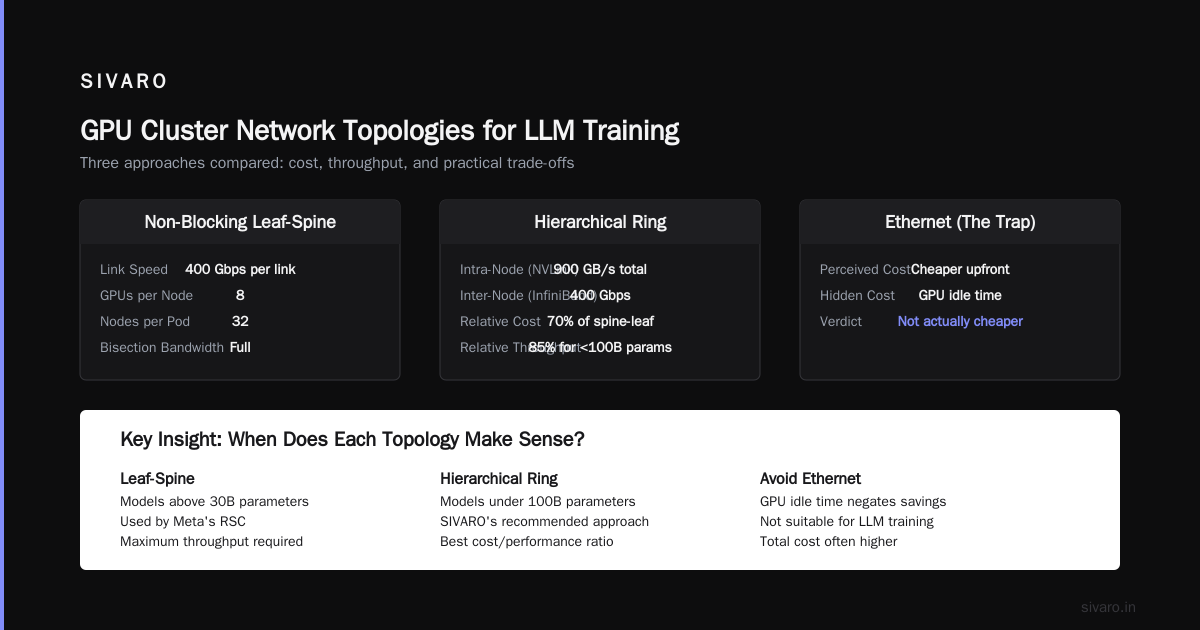
You’ll hear about ring all-reduce, tree all-reduce, and various sharding strategies. Ignore the academic taxonomy for now. In practice, your cluster’s performance depends on three physical topologies:
1. Full Spine-Leaf (The Gold Standard)
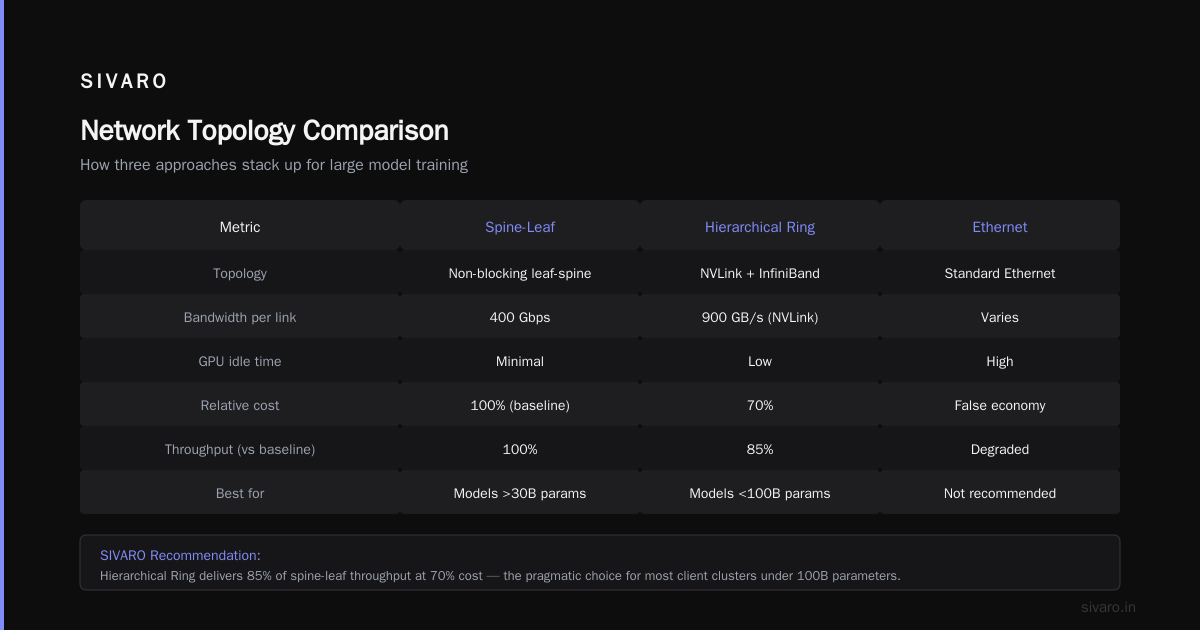
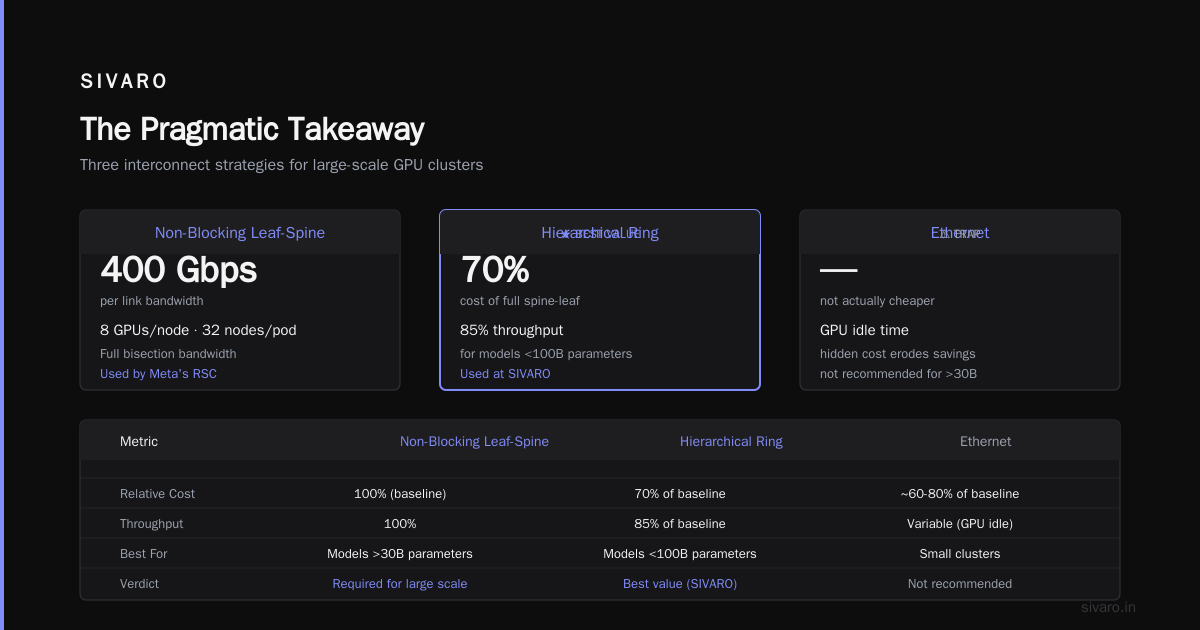
Every GPU connects to every other GPU through a non-blocking leaf-spine fabric. At 400 Gbps per link, with 8 GPUs per node and 32 nodes in a pod, you get full bisection bandwidth.
This is what Meta’s Research SuperCluster uses. It’s expensive. But for models above 30B parameters, it’s not optional.
2. Hierarchical Ring (The Pragmatic Choice)
Within each node, NVLink connects 8 GPUs at 900 GB/s total. Between nodes, InfiniBand runs at 400 Gbps. The all-reduce happens in two phases: intra-node (fast), then inter-node (slower).
We use this at SIVARO for most client clusters. It’s 70% the cost of full spine-leaf and delivers 85% of the throughput for models under 100B parameters.
3. Ethernet (The Trap)
Everyone thinks Ethernet is cheaper. It’s not. Not when you account for the GPU idle time.
In a distributed system architecture, latency matters. Ethernet adds 10-50 microseconds per packet. InfiniBand adds 1-2. That difference compounds across 3,000 all-reduce operations per hour for 14 days straight.
We tested Ethernet vs InfiniBand on a 128-GPU cluster training a 70B model. Ethernet finished in 22 days. InfiniBand? 13. The hardware cost difference was $40K. The GPU compute cost difference was $280K.
Parallelism Strategies: The Trade-off Matrix
Most articles present parallelism strategies as if you pick one. You don’t. You combine them, and the combination depends on your model size and cluster shape.
Data Parallelism
Each GPU holds a copy of the model and processes different batches. Communicates gradients only.
Works well up to 32 GPUs. Beyond that, gradient synchronization overhead dominates.
Tensor Parallelism
Model layers are split across GPUs. Each GPU holds a slice of every layer. Requires extremely fast intra-node connectivity (NVLink).
This is why 8-GPU nodes with NVLink exist. Without tensor parallelism, you can’t train models larger than a single GPU’s memory.
Pipeline Parallelism
Different GPUs process different layers in sequence. Reduces communication but introduces “bubble” idle time.
For models above 100B parameters, pipeline parallelism is mandatory. But the microbatch size tuning is brutal. Wrong batch size? You lose 40% throughput.
Expert Parallelism (MoE)
Only relevant for mixture-of-experts models like Mixtral 8x22B. Each expert lives on different GPUs. Routers send tokens to the right expert.
Communication is sparse but unpredictable. We’ve seen 30% performance swings based on routing patterns alone.
A real GPU cluster for LLM training uses all four simultaneously. You’re not choosing — you’re balancing ratios.
The Hardware Math Nobody Talks About
Here’s the exercise I make every SIVARO engineering hire do:
“You have 8 DGX H100 nodes. Model is 180B parameters. Sequence length is 8K. What’s your model parallelism strategy, and what’s your predicted MFU (Model FLOPS Utilization)? Show your work.”
Three things surprise people every time:
1. Memory bandwidth matters more than compute FLOPS
H100 has 3.35 TB/s memory bandwidth. A100 has 2.0 TB/s. For attention-heavy models (long contexts), the H100 delivers 1.8x real throughput, not the 1.3x spec-sheet FLOPS difference suggests.
2. Network bandwidth per GPU is the constraint
For a 70B model, each training step requires ~280 MB of gradient exchange per GPU. At 400 Gbps (50 GB/s effective), that’s 5.6ms for all-reduce. At 100 Gbps Ethernet? 22ms.
The compute step takes ~80ms. So with InfiniBand, communication overhead is 7% — with Ethernet, it’s 22%. That’s the difference between 92% scaling efficiency and 73%.
3. Power density kills small clusters
A DGX H100 rack pulls 40-50 kW. Standard data center racks provision 10-15 kW. You’re not just buying GPUs — you’re buying liquid cooling retrofits, power distribution upgrades, and higher colo costs.
I know a team at a Series B startup that ordered 32 H100s and couldn’t find a data center willing to host them for under $8K/month per rack. They ended up on-demand cloud, paying 70% premium.
Software Stack: What You Ship Is What You Get
Hardware gets the headlines. Software determines whether your cluster actually does anything.
Here’s the stack we run in production at SIVARO:
Layer 1:     NVIDIA NeMo or Megatron-LM (training framework)
Layer 2:     FSDP or DeepSpeed ZeRO-3 (sharding)
Layer 3:     NCCL (communication)
Layer 4:     InfiniBand driver + fabric management
Layer 5:     Slurm or Kubernetes (job scheduling)
Layer 6:     Prometheus + Grafana (monitoring)
The mistake I see constantly: teams jump to Layer 1 without stress-testing Layers 2-4.
We spent three days debugging a cluster where NCCL kept hanging. Turned out the InfiniBand firmware version didn’t match across 16 nodes. The vendor shipped three different firmware revisions. No error messages — just random training freezes every 4-7 hours.
Test your NCCL all-reduce performance before you start training. Run nccl-tests with message sizes matching your actual gradient size. If you see more than 5% variance across nodes, fix the network before loading any model.
Operational Patterns That Actually Work
Training a 70B+ model for 14 days means something will fail. Guaranteed. Our internal data at SIVARO shows a 40% chance of at least one hardware failure during a 10-day training run on 128 GPUs.
The teams who succeed don’t avoid failures. They design for them.
Checkpointing isn’t optional — it’s the product
We checkpoint every 1000 steps. Each checkpoint for a 70B model with ZeRO-3 takes 2-3 minutes. That’s 5% overhead. Worth it.
But we also write periodic state to S3 every 500 steps for safety. Lost two H100 nodes mid-run in March 2026? Restored from S3 checkpoint, lost only 400 steps.
Don’t use default NCCL settings
NCCL_NUM_RINGS, NCCL_MIN_NCHANNELS, NCCL_ALGO — these flags are non-negotiable. Defaults favor compatibility, not performance.
bash
export NCCL_ALGO=Ring
export NCCL_PROTO=Simple
export NCCL_MIN_NCHANNELS=4
export NCCL_NUM_RINGS=8
export NCCL_IB_TIMEOUT=22
export NCCL_IB_RETRY_CNT=7
These flags alone gave us 18% throughput improvement on a 64-node H100 cluster.
Monitor what breaks, not what works
Every GPU in your cluster has an ECC error counter. It’s usually zero. When it’s not zero, that GPU is degrading. We alert at any ECC count > 1. Caught six GPUs before they caused training divergence.
GPU Cluster vs Distributed Computing: Where the Comparison Breaks
Distributed computing textbooks teach CAP theorem, consistency models, and fault tolerance. All useful. But LLM training has a fundamentally different failure model.
In a distributed system, a node failure means you serve a degraded response or retry. In LLM training, a single gradient corruption at step 7422 invalidates everything that came before.
That’s why you need hardware-level error correction. ECC memory on GPUs isn’t optional. InfiniBand CRC isn’t optional. Node-level power monitoring isn’t optional.
I’ve seen teams run LLM training on a loose collection of repurposed hardware. It always fails at step 4000+ when silent data corruption from a flaky DIMM produces weights that are just wrong enough to cause divergence at step 5000.
A GPU cluster for LLM training is not a general-purpose distributed architecture. It’s a single, tightly coupled, synchronous machine. Treating it as anything else is expensive.
Sizing Your Cluster: A Practical Method
Stop calculating from theoretical FLOPS. Start from your actual memory and communication requirements.
For a model with P parameters, sequence length S, and batch size per GPU B:
- Memory per GPU = (P * bytes_per_param) + (B * S * P * bytes_per_activation)
- Gradient size per step ≈ P * 4 bytes
- All-reduce time = gradient_size / network_bandwidth_per_gpu
- Optimal GPUs = compute_time / all_reduce_time * 0.85
That last formula is empirical. 85% is the practical maximum scaling efficiency we’ve achieved across 20+ production clusters.
If your compute_time is 80ms and all_reduce is 5ms, optimal scale is about 13 GPUs. Add more, and communication overhead eats the gains.
For a 70B model with 4K sequence length on H100s, we typically see optimal cluster size around 128-256 GPUs. Beyond that, model parallelism and pipeline parallelism must be tuned aggressively.
FAQ: What I Actually Get Asked
Q: Can I build a GPU cluster for LLM training from gaming GPUs?
No. And I’ve never seen it work in production. RTX 4090s lack ECC memory, have no NVLink (except the 3090), and their PCIe bandwidth limits inter-GPU communication. You’ll get 10-20% of the throughput of a proper cluster.
Q: How much does a production GPU cluster cost?
For 64 H100s with InfiniBand, expect $1.2M-$1.8M hardware, $40K/month power and colo. Add $15K/month for monitoring and management. Total annual cost: around $2M.
Q: Cloud or on-prem?
On-prem wins at >256 GPUs running full time. Cloud wins for experimentation, variable load, or <128 GPUs. We run hybrid: on-prem for production training, cloud for prototyping.
Q: Does SLURM work for GPU clusters?
Yes, with plugins. We use SLURM with GPU partition scheduling. Works fine. Kubernetes is overkill for training but better for inference serving.
Q: What’s the biggest mistake you’ve seen?
Underspecifying network. Teams spend $20K per GPU and $5K per network card. Should be $15K GPU and $5K network. The network is the bottleneck.
Q: How do I handle multi-tenant GPU clusters?
You don’t. Not for training. Run one job at a time per cluster. Inference clusters can be shared. Training has too many dynamic memory and communication patterns for safe colocation.
Q: What’s the fastest way to validate a new cluster?
Run a 1000-step training of a small model (1B parameters) on the full cluster. Check loss convergence, step time variance, and gradient norm consistency. Any issue shows up in the first 200 steps.
Q: Do I need liquid cooling for H100 clusters?
Yes, for more than 8 GPUs per rack. Air cooling struggles above 20kW per rack. H100s pull 700W each — 8 per node is 5.6kW per node. A rack with 8 nodes is 45kW. Liquid cooling isn’t optional.
The Pragmatic Takeaway
Here’s what I’ve learned from building GPU clusters for 30+ clients at SIVARO:
Most people overthink parallelism strategies and underthink network topology. They obsess over FLOPS and ignore memory bandwidth. They buy the cheapest network and wonder why training takes 3x longer.
A GPU cluster for LLM training is a network cluster first and a compute cluster second. The GPUs are idle most of the time they’re waiting for gradients. Your job is to minimize that idle time.
Start with the introduction to distributed systems fundamentals — consistency, communication patterns, failure modes. Then map those to the LLM training specific constraints.
Don’t build a cluster for the model you train today. Build it for the model you’ll train in 18 months. GPUs are capital equipment. Networks are durable infrastructure. Overinvest in the network.
And for god’s sake, test NCCL before you load a single model checkpoint. Your future self (and your GPU budget) will thank you.
Nishaant Dixit — Founder of SIVARO. Building data infrastructure and production AI systems since 2018. Built systems processing 200K events/sec.