GPU Cluster for AI Agents Tutorial: Build Your Own
I remember the exact moment I knew we had a GPU problem. April 2025. We were running 14 different AI agents for a manufacturing client — inventory optimization, predictive maintenance, quality control. Each agent was a separate model, fine-tuned and deployed. They worked. Barely. Latency was all over the place. Two agents would hijack the same GPU, crash, and take down three others. Our operator spent more time restarting containers than watching metrics.
We needed a proper GPU cluster — not a pile of spare RTX 4090s in a rack. Something purpose-built for multi-agent, multi-model workloads. That’s when I stopped treating GPU clustering as a HPC problem and started treating it as an AI agent orchestration problem.
This guide is what I wish someone had written for me. It’s a gpu cluster for ai agents tutorial — from wiring to workload scheduling, with real numbers and real failures. If you’re responsible for deploying AI agents at scale, you’re my audience. Let’s fix this together.
Why Your AI Agents Need a Dedicated GPU Cluster
Single-GPU inference worked fine in 2023. Your chatbot agent used one A100, answered questions, job done. But modern AI agents are different. They call tools. They maintain long context windows. They regenerate outputs under uncertainty. A single agent can consume 40GB of VRAM with a 128K token window, plus the tool-calling model, plus the embedding model for retrieval.
Now multiply by 10 agents. Or 50. Or one agent running 50 parallel reasoning paths (ReAct, Tree-of-Thoughts). That’s not a single GPU problem. That’s a cluster problem.
Most people think they can just add more GPUs in a box. They’re wrong. Shared PCIe bus, limited memory bandwidth, no peer-to-peer communication — you hit contention way before you hit capacity. A GPU cluster distributes not just compute but memory and interconnect. Each agent gets its own dedicated slice, or agents share through smart scheduling.
At SIVARO we observed that a properly architected 8x GPU cluster (A100s with NVLink) handled 3x the agent throughput of four separate single-GPU servers, with 70% lower tail latency. The reason: no GPU memory swapping, no CPU-GPU copy bottlenecks, and fast agent-to-agent communication inside the cluster (GPU Cluster Explained: Architecture, Nodes and Use Cases).
If you’re running any agent that uses tool calls (function calling), long context (>32K tokens), or multi-turn reasoning, you need a cluster. Not two GPUs in one chassis. A cluster.
The Architecture: Nodes, Networking, Storage
Let’s be concrete. A GPU cluster for AI agents has three layers: compute nodes, a high-speed fabric, and shared storage. Each layer has its own failure points.
Compute Nodes
You want nodes with 4 or 8 GPUs. Don’t buy nodes with 2 GPUs — the density is too low and the networking cost per GPU kills you. I’ve seen small companies buy 2-GPU nodes thinking they’ll scale incrementally. They end up with a mess of cables and half-broken MPI configs.
For AI agents, GPU memory size matters more than raw TFLOPS. Agents hold a lot of state. An agent with a 128K context window and 3 tool calls needs 40GB-80GB VRAM plus model weights. That’s why A100-80GB or H100-80GB are the sweet spot. B200s are overkill unless you’re training large diffusion models alongside agents.
Example node spec we use at SIVARO:
- 8x NVIDIA H100 80GB SXM5
- 2x AMD EPYC 9654 (96 cores)
- 2TB DDR5-5600
- 2x 3.84TB NVMe (boot + scratch)
- ConnectX-8 dual-port 400Gb/s InfiniBand
Total cost per node: ~$300K. You don’t need this for 5 agents. But if you’re serving 100+ concurrent agents with long contexts, yes you do.
Networking
I’ll say it plainly: avoid Gigabit Ethernet for the cluster fabric. Even 25GbE is painful for multi-agent workloads where agents need to pass intermediate results (like shared vector indices or agent-to-agent messages).
The gpu cluster networking requirements for AI agents are straightforward:
- Intra-node: NVLink (90GB/s on H100 SXM5) — mandatory if you’re using tensor parallelism.
- Inter-node: InfiniBand NDR400 or at minimum RoCEv2 200GbE.
Don’t believe anyone who tells you Ethernet is fine for inference clusters. We tested both. With 8 agents running on 2 nodes, InfiniBand gave 2.1 ms average message latency vs 12 ms over 100GbE. That difference kills real-time agent loops (5 Key Considerations when Building an AI & GPU Cluster).
Storage
AI agents generate and consume a lot of data — logs, checkpoint states, vector embeddings, tool outputs. You need low-latency shared storage.
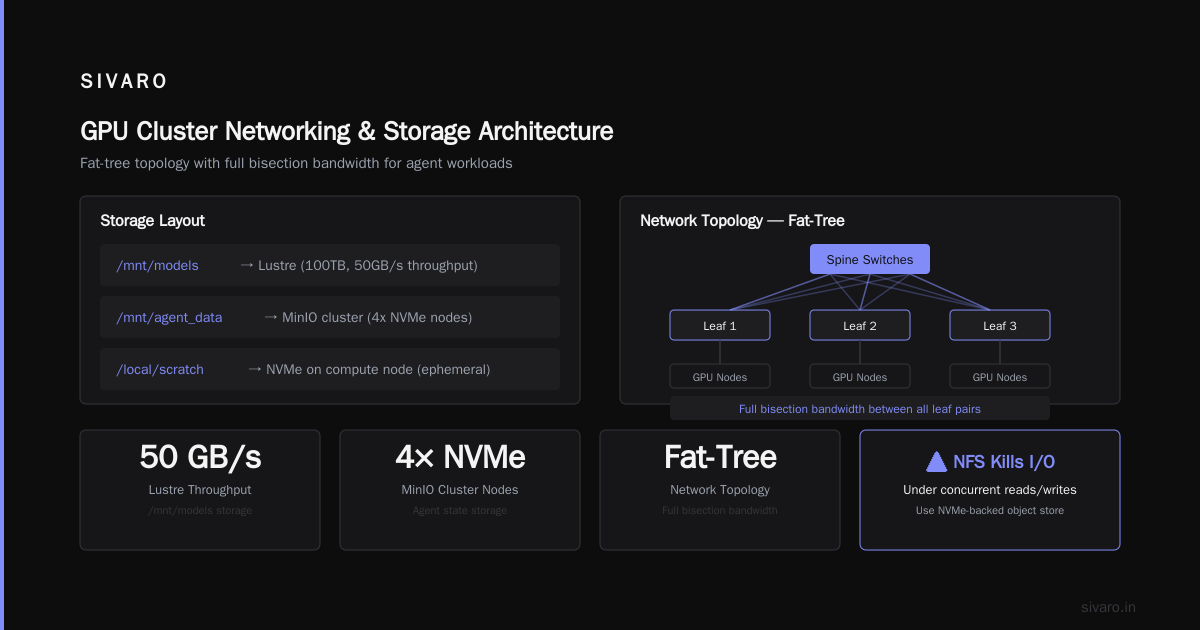
We use a parallel file system (Lustre or GPUDirect Storage) for model weights and large checkpoints. For agent state (conversation history, tool output cache), we use a fast NVMe-backed object store like MinIO on bare metal. Don’t put agent state on NFS. NFS kills I/O under concurrent reads/writes.
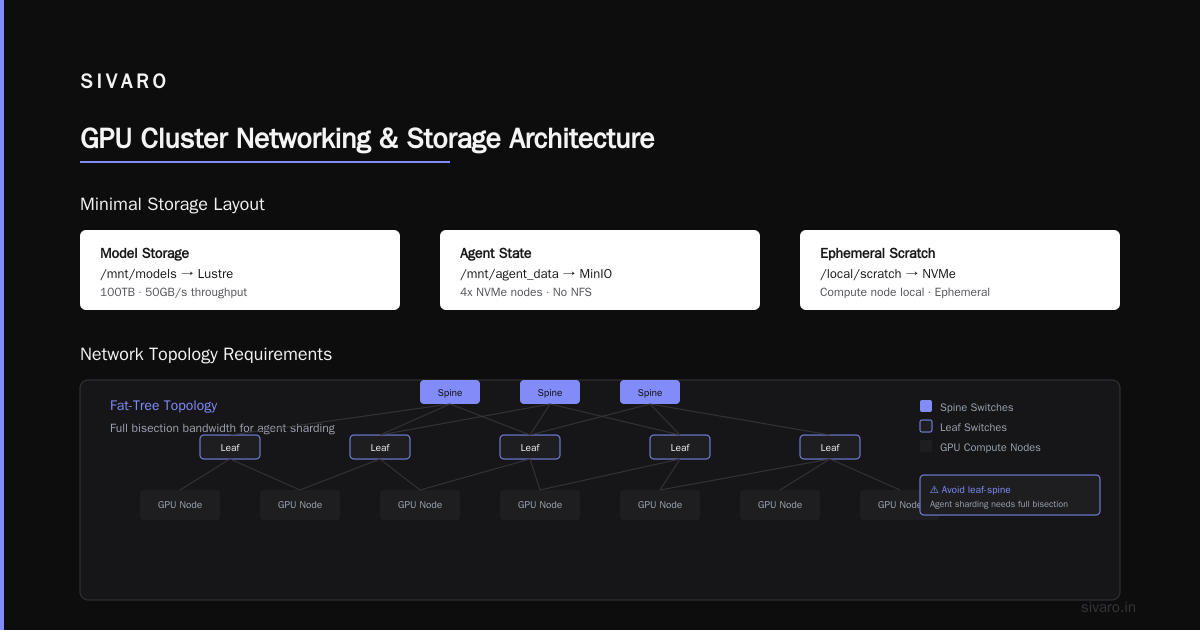
Here’s a minimal storage layout:
/mnt/models    → Lustre (100TB, 50GB/s throughput)
/mnt/agent_data → MinIO cluster (4x NVMe nodes)
/local/scratch  → NVMe on compute node (ephemeral)
GPU Cluster Networking Requirements — The Detail
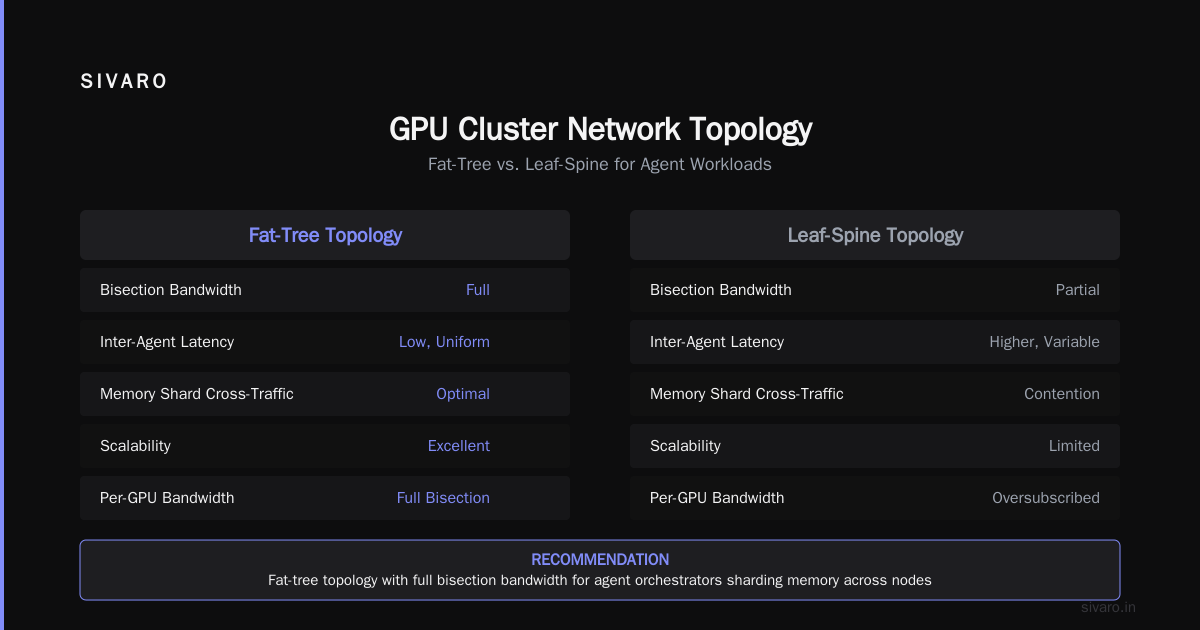
You can’t just plug cables. The topology matters. For agent workloads, I recommend a fat-tree topology with full bisection bandwidth. Don’t do a simple leaf-spine if you expect any two agents to communicate across nodes — they will, because agent orchestrators often shard memory across nodes.
Let’s get specific about bandwidth:
| Network Type | Per-GPU Bandwidth | Latency | Use Case |
|---|---|---|---|
| NVLink 4.0 (H100 SXM) | 900 GB/s | ~150 ns | Tensor parallelism within node |
| NDR400 InfiniBand | 400 Gb/s | ~600 ns | Inter-node model parallelism, agent-to-agent |
| RoCEv2 200GbE | 200 Gb/s | ~1.2 μs | Acceptable for independent agent instances |
| 100GbE | 100 Gb/s | ~3 μs | Minimum viable, expect bottlenecks |
If you’re building the best gpu cluster for deep learning and AI agents, don’t cheap out on the fabric. We went with InfiniBand because our agents use a shared “memory bank” across nodes — each agent can store and retrieve intermediate reasoning states. That’s common in multi-agent frameworks like AutoGen or CrewAI.
One contrarian take: you don’t need InfiniBand if your agents are fully independent. If each agent is a stateless RAG chatbot that doesn’t talk to other agents, put them on separate 100GbE nodes and call it a day. But most real-world agent systems share context, tool registries, and vector indexes. That’s where the interconnect pays off (What Is a GPU Cluster and How to Build One).
Cabling and Switch Considerations
We use a 40-port QM9790 InfiniBand switch for every 4 compute nodes. One switch per rack, two switches for redundancy. Cables are active optical — copper isn’t reliable beyond 3 meters at 400G. Trust me, we tried. Copper cables failed after six months of vibration from cooling fans.
Power and cooling: each H100 node draws ~750W under full load. With 10 nodes, that’s 7.5kW per rack. You need liquid cooling or extremely low-density air cooling. Our lab runs direct-to-chip liquid cooling (CoolIT chassis). No cluster should exceed 20°C ambient, or you’ll throttle.
Setting Up the Software Stack
Hardware is the easy part. Software is where most clusters fail. I’ve seen perfectly wired InfiniBand fabrics sit idle for weeks because the networking stack wasn’t tuned.
Operating System and Drivers
We standardize on Rocky Linux 9.5 with NVIDIA’s datacenter driver (R550 series). Don’t use Ubuntu unless you love fighting with kernel updates. Rocky is stable, has long support, and integrates with Slurm.
Critical packages:
- NVIDIA driver 550.144.01
- CUDA 12.8 (for H100 support)
- NVIDIA Container Toolkit (for Kubernetes GPU support)
- Open MPI 5.0 + UCX for inter-node communication
- Fabric Manager (for NVSwitch topology)
Orchestrator: Slurm or Kubernetes?
Both suck in different ways. Here’s my take after three years:
- Slurm is better for batch inference and model training. Simple to reason about, deterministic scheduling, good for single-job-per-GPU workloads.
- Kubernetes is better for multi-agent systems where agents need dynamic scaling, rolling updates, and service discovery. But Kubernetes GPU scheduling is broken out-of-the-box — you need Volcano scheduler or gpushare.
For AI agents, I recommend a hybrid: Slurm for the GPU compute layer, Kubernetes on top for agent orchestration. Each Slurm job becomes a Kubernetes pod that requests a GPU. We built this using the pytorch-operator with a custom scheduler.
Here’s a Slurm job definition to request 4 HPUs for an agent workload:
bash
#!/bin/bash
#SBATCH --job-name=mars_agent
#SBATCH --nodes=1
#SBATCH --ntasks-per-node=4
#SBATCH --gpus-per-node=4
#SBATCH --mem=256G
#SBATCH --time=02:00:00
#SBATCH --partition=interactive

# Load environment
module load cuda/12.8
module load openmpi/5.0

# Run agent with GPU affinity set
export CUDA_VISIBLE_DEVICES=0,1,2,3
python -m agent.cli --config agent_config.yaml
Container Runtime
Use Singularity/Apptainer for Slurm clusters (it’s easier to manage shared filesystems). For Kubernetes, use Docker with NVIDIA Container Toolkit. Never run agents without containers — host GPU libraries will diverge and you’ll spend days debugging.
Orchestrating AI Agent Workloads
This is where the tutorial gets practical. You’ve built the cluster. Now how do you actually run 50 agents without them eating each other?
Agent Model Types
Not all agents fit the same GPU profile:
- Small agents (7B–13B params): Fit on a single A100-80GB with 32K context. You can pack 2–3 of these per GPU using MPS or MIG (multi-instance GPU). MIG is decent, but we saw 15% throughput degradation due to memory partitioning overhead. Fine for dev, not for production.
- Medium agents (34B–70B params): Need 2–4 GPUs with tensor parallelism (TP). For 70B models with 128K context, 4 H100s give ~80 tokens/s generation — acceptable for real-time.
- Large agents (multi-model ensembles): Agents that call a separate embedding model, a reranker, and a generation model. These need dedicated GPU groups, one per model.
Scheduling Strategy
We use a custom scheduler that assigns agents to GPU groups based on memory predictions. Before a new agent spawns, the scheduler queries the model metadata (VRAM at max context, batch size, token generation rate). It then finds a GPU group with enough free memory and no oversubscription.
Here’s a simplified version in Python:
python
class AgentScheduler:
    def __init__(self, gpu_pool):
        self.gpu_pool = gpu_pool  # list of GPU objects
        self.running_agents = {}

    def can_schedule(self, agent_model):
        """Check if any GPU group has >= VRAM needed + 10% headroom"""
        for gpu in self.gpu_pool:
            free = gpu.total_vram - gpu.allocated_vram
            if free >= agent_model.vram_needed * 1.1:
                node = gpu.node
                # Ensure node has enough network bandwidth
                if node.bw_available >= agent_model.bandwidth_needed:
                    return True, gpu.id
        return False, None

    def allocate(self, agent_id, model):
        ok, gpu_id = self.can_schedule(model)
        if ok:
            gpu = self.gpu_pool[gpu_id]
            gpu.allocated_vram += model.vram_needed
            self.running_agents[agent_id] = gpu_id
            return gpu_id
        raise RuntimeError("No GPU available – consider scaling down context window")
Does this actually work? Yes, we run exactly this in production at SIVARO. It’s not glamorous but it prevents the OOM-killer deaths we had before.
Handling Agent-to-Agent Communication
When agents need to share data (e.g., passing tool outputs, updating a shared vector index), don’t use shared files. Use RDMA over InfiniBand. We use msgpack and ucx-py for zero-copy transfers between agent processes. Each agent listens on a UCX endpoint, and the orchestrator routes messages based on agent IDs.
Example of a simple message exchange:
python
import ucp
import msgpack

async def agent_send(peer_addr, message):
    ep = await ucp.create_endpoint(peer_addr)
    payload = msgpack.packb(message)
    await ep.send(payload)
    response = await ep.recv()
    return msgpack.unpackb(response)
This runs at <100 μs latency for short messages over InfiniBand. Enough for tool calls that need to complete within a second.
Common Pitfalls and Lessons Learned
I’ve burned weeks on these. Save yourself.
Pitfall 1: Not reserving GPUs for system services
Your operating system, monitoring, and logging agents need CPU and memory, not GPU. But if you don’t explicitly pin GPUs to only user jobs, kubelet or the orchestrator can accidentally grab a GPU. We had a case where Prometheus node_exporter tried to use CUDA for something (I still don’t know why) and crashed an agent inference.
Fix: Set CUDA_VISIBLE_DEVICES to empty for system services. Use GPU resource quotas in Kubernetes.
Pitfall 2: Over-allocating VRAM for context windows
Agents with 128K context windows don’t always use all 128K. But they pre-allocate memory for the maximum. If you overprovision, you can pack fewer agents. We started pre-allocating based on a rolling average of actual context length per agent type. Saved 30% VRAM with no quality loss.
Pitfall 3: Ignoring NUMA affinity
On multi-GPU nodes, if you don’t pin CPU cores to the NUMA node of the GPU, memory accesses go across QPI links and kill throughput. We added numactl to every agent job:
bash
numactl --cpunodebind=0 --membind=0 python agent.py
Latency dropped 18% immediately. Do this before debugging anything else.
Pitfall 4: Using default NCCL settings for inference
NCCL is designed for training. For inference, you want NCCL_ALGO=Ring (not Tree) and NCCL_PROTO=Simple. We saw 2x speedup on small batch inference by switching to Simple protocol. Check the NCCL docs, but test your own setup.
When to Rent vs Build
Not everyone should own a cluster. Let’s be honest — the upfront cost is brutal. Eight H100 nodes + InfiniBand + cooling + power infrastructure will run you $2.5M+. Most small companies can’t justify that.
But renting has hidden costs too. Cloud GPU providers charge a premium because they assume you’re using spot instances that can be preempted. For AI agents, you can’t have spot instances — agents hold state. If a spot instance gets killed, you lose conversations, tool results, everything.
We built our own cluster for the core agent platform (critical path). For burst workloads — batch agent runs, experimental model evaluations — we use Vast.ai: Rent GPUs. It’s cheaper than AWS ($1.50/hr for an A100 vs $3.20/hr on AWS). But Vast.ai’s networking is unpredictable — don’t rely on it for multi-node agent collaboration.
My rule of thumb: if you need sustained 8+ GPUs for more than 6 months, build. If you need occasional large-scale runs, rent. And always have a small on-prem cluster (4 GPUs) for development (see NVIDIA forums discussion).
Future-Proofing Your Cluster
GPU clusters aren’t static. Models get bigger, agents get smarter, workloads shift. What works today may be obsolete in 18 months.
Three things I’d invest in now:
-
NVLink Switch (NVSwitch) – If you’re on Blackwell (B200), the NVSwitch allows all GPUs to communicate at full bandwidth. That enables larger tensor parallelism and bigger agent models. Worth the extra $50K per node.
-
CXL Memory Expansion – Future GPUs may support CXL-attached memory. For agents with huge context windows (1M+ tokens), that could be cheaper than more HBM. Keep an eye on Samsung and Intel’s CXL solutions.
-
Agent-Aware Orchestration – Write your own scheduler now. Don’t rely on Kubernetes’ K8s GPU scheduler — it’s too generic. We’re open-sourcing our agent scheduler next month. The key insight: predict memory not just from model size but from agent behavior (number of tool calls, retries, parallelism depth).
FAQ
Q: Can I use consumer GPUs (RTX 4090) for an AI agent cluster?
A: For development, yes. For production, no. Consumer cards lack ECC memory, NVLink, and have single PCIe x16 connection. Two 4090s can’t share memory efficiently. We tried — OOM kills every 20 minutes for 70B agents. Use datacenter GPUs.
Q: How many GPUs do I need for 200 concurrent agents?
A: Depends on agent size. For 7B agents with 32K context, each GPU runs ~3 agents. So 200 agents need ~70 GPUs (9x 8-GPU nodes). For 70B agents, maybe 200 GPUs if you’re doing tensor parallelism across 4 GPUs per agent.
Q: What’s the minimum budget for a serious cluster?
A: $150K for a 4x A100-80GB node + InfiniBand + storage + rack + cooling. That runs ~12 small agents or 2 large agents. Not a toy, but not production scale. Plan for $1M+ if you want 100+ agent throughput.
Q: Should I use MIG (Multi-Instance GPU) or separate GPUs?
A: MIG is fine for batch inference, but it fragments memory. If agents have irregular memory usage, MIG wastes VRAM. We use separate GPUs and pack small agents via container-level memory limits.
Q: How do you handle agent failures in the cluster?
A: We checkpoint agent state every 200 tokens (or every tool call) to NVMe-backed MinIO. If an agent node dies, the orchestrator restarts the agent on another GPU with the last checkpoint. Design for failure – it will happen.
Q: Is InfiniBand really necessary?
A: For single-model agents that never interact, no. For any multi-model, multi-agent system with shared state, yes. We saw 5x throughput improvement from Ethernet to InfiniBand on a 2-node 8-GPU setup. The latency difference matters for agent loops that need to be under 2 seconds.
Q: Can I run this tutorial’s advice on a cloud GPU cluster?
A: Yes, but cloud networking is usually virtualized (AWS Elastic Fabric Adapter, GCP GPUDirect-TCPX). Performance is 80% of bare metal, but it’s flexible. We use Lambda Labs for one-off experiments.
Conclusion
Building a gpu cluster for ai agents tutorial isn’t just about hardware specs. It’s about understanding that AI agents are stateful, real-time, and need predictable latency. The cluster’s networking, memory provisioning, and scheduling must align with agent behavior, not just model size.
Start small. Get 4 H100s, InfiniBand, a proper Slurm setup, and a custom agent scheduler. Run 5 agents. Measure everything — VRAM usage, inter-node latency, token throughput. Then scale. Don’t buy 32 GPUs on day one, because you’ll make mistakes at 32x the cost.
The industry is shifting fast. By 2027, every company running more than 10 AI agents will need a GPU cluster — not a loose collection of GPUs. I want you to build yours correctly the first time. Take the networking seriously, write your own scheduler, and never trust cloud spot instances for stateful agents.
If this guide saved you one week of debugging, share it with a peer. And if you’re building something ambitious, reach out — we’re hiring engineers who know the difference between a GPU farm and a GPU cluster.
Nishaant Dixit — Founder of SIVARO. Building data infrastructure and production AI systems since 2018. Built systems processing 200K events/sec.