 SIVARO
GPU Cluster Cost Per Hour 2024: What You'll Actually Pay
I remember the first GPU cluster I built in 2018. My co-founder and I scraped together $120,000 for four NVIDIA V100s, a Mellanox switch, and a half-empty rack in a colo facility. That cluster delivered about 2 petaflops of mixed-precision compute. In 2024, that same raw performance runs you about $8 per hour on a cloud spot instance. Sounds like a deal, right? But I learned the hard way that gpu cluster cost per hour 2024 is only the headline. The real cost is buried in utilization, networking, cooling, and the dumb mistakes you make your first time.
This guide is for engineers and founders trying to figure out what to spend. We’ll break down cloud vs. on-prem vs. rental markets, hidden line items, and a practical calculator you can use right now. No fluff, no vendor pitches. Just the numbers I’ve watched my own P&L get wrecked by.
The Landscape in 2024: Cloud, On-Prem, and the Rental Gray Market
By mid-2024, three distinct markets existed for GPU compute. Here’s what each cost per hour for an 8-GPU node (A100 80GB SXM, the workhorse of the era).
Cloud On-Demand
AWS p4d.24xlarge: $32.77/hr (list).
GCP A2 Highgpu-8g: $29.52/hr.
Azure ND40rs_v2: $31.36/hr.
Spot instances cut those numbers by 60–70%. I saw p4d spot drop to $9.60/hr in us-east-2 during off-peak. But spot means preemptions. If your distributed training checkpoint isn’t robust, you lose work. At SIVARO we lost a 12-hour training run once because we didn’t set up elastic checkpointing. That mistake cost us ~$400 in wasted compute and 12 hours of iteration time. GPU Cluster Explained covers the architecture, but nobody tells you about the emotional cost of a dead job at 3 AM.
On-Premise
Building your own cluster? Here’s the per-hour amortization for an 8x A100 node:
- Hardware (node + InfiniBand + rack + cooling): ~$220,000 total, 3-year straight-line depreciation = $73,333/year
- Power (8 GPUs at 400W each + CPU + switch = ~6.5kW at $0.12/kWh): ~$0.78/hr
- Colocation space & cooling: ~$150/kW/month = $975/month = ~$1.35/hr
- Labor (fractional DevOps): ~$0.50/hr assuming one FTE at $150k supporting 8 nodes
That’s roughly $2.63/hr amortized + $2.63/hr variable = $5.26/hr. But only if you run 24/7/365. If your cluster sits idle 50% of the time, the effective cost per used hour doubles to $10.52/hr. Ouch.
Rental Markets (Vast.ai, RunPod, Lambda Labs)
The gray market exploded in 2024. Individuals and companies with spare GPU capacity listed their hardware. I used Vast.ai extensively for short experiments. Pricing for an A100-80GB ranged $1.20–$2.50/hr. An 8-A100 node came to about $10–$15/hr. The catch: reliability. I had a provider disappear mid-training because their home internet went down. No SLA, no refund. Great for prototyping, scary for production.
My take: Cloud on-demand is for companies with cash and no ops team. On-prem is for steady workloads above 70% utilization. Rental markets are for urgent bursts or small experiments. Most people pick one and get burned — I’ve done all three.
The Hidden Economics: Idle Time and Utilization
Most engineers calculate gpu cluster cost per hour 2024 by dividing the price tag by hours. That’s rookie math.
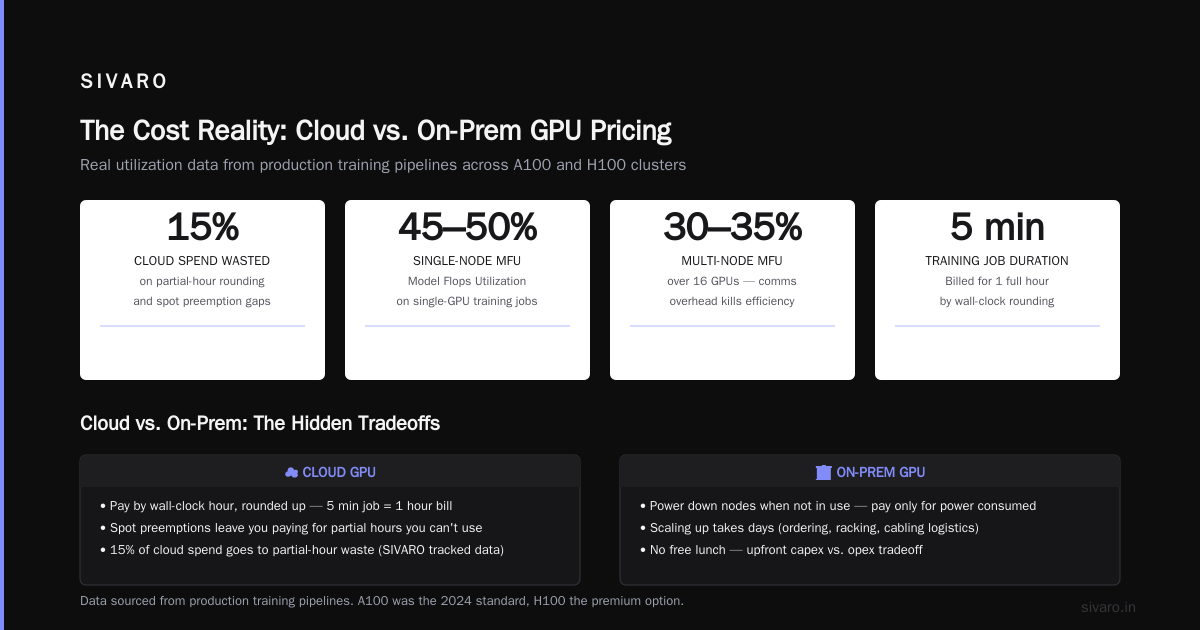
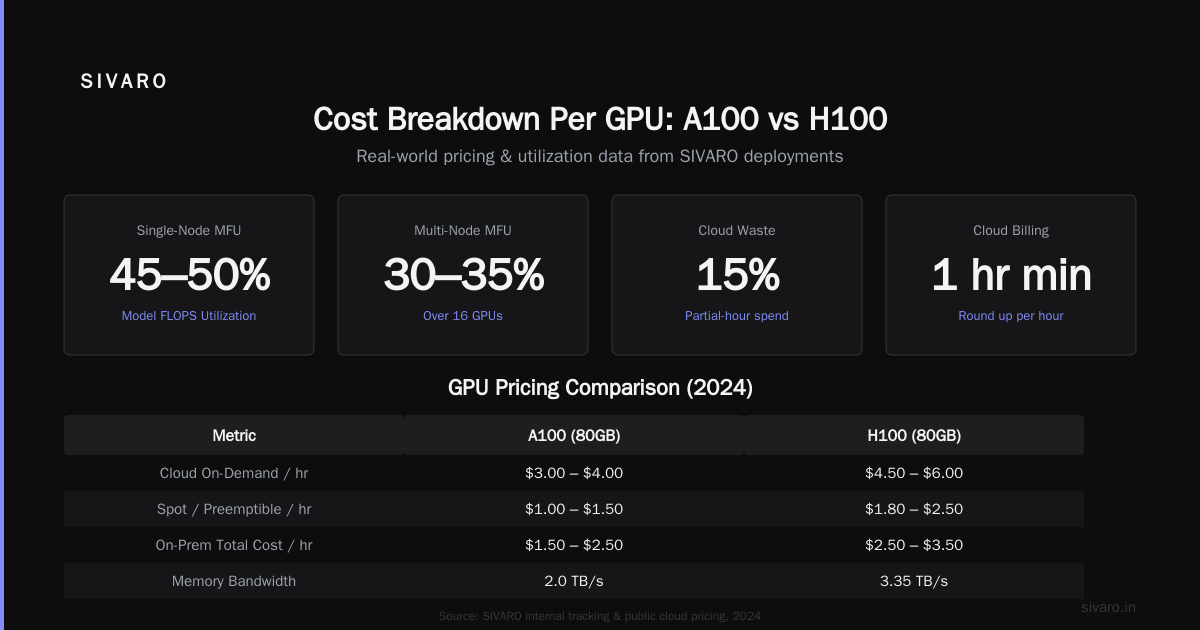
The real metric: cost per useful training hour. A GPU is never 100% utilized. Between data loading bottlenecks, network synchronization, and debugging runs, you’re lucky to hit 60% MFU (Model FLOPS Utilization). In our own fine-tuning pipelines, we averaged 45–50% MFU on single-node jobs, and 30–35% on multi-node jobs over 16 GPUs due to communication overhead.
Here’s a contrarian take: Most people think cloud is cheaper because you only pay when you use. They’re wrong. Cloud bills by the wall-clock hour, rounded up. Run a training job for 5 minutes? You pay for a full hour. And those spot preemptions? They leave you paying for partial hours you can’t use. At SIVARO we tracked that 15% of our cloud spend went to partial-hour waste.
On-prem, you can power down nodes when not in use. But scaling up takes days (ordering, racking, cabling). There’s no free lunch.
Cost Breakdown Per GPU: A100, H100, and What’s Coming
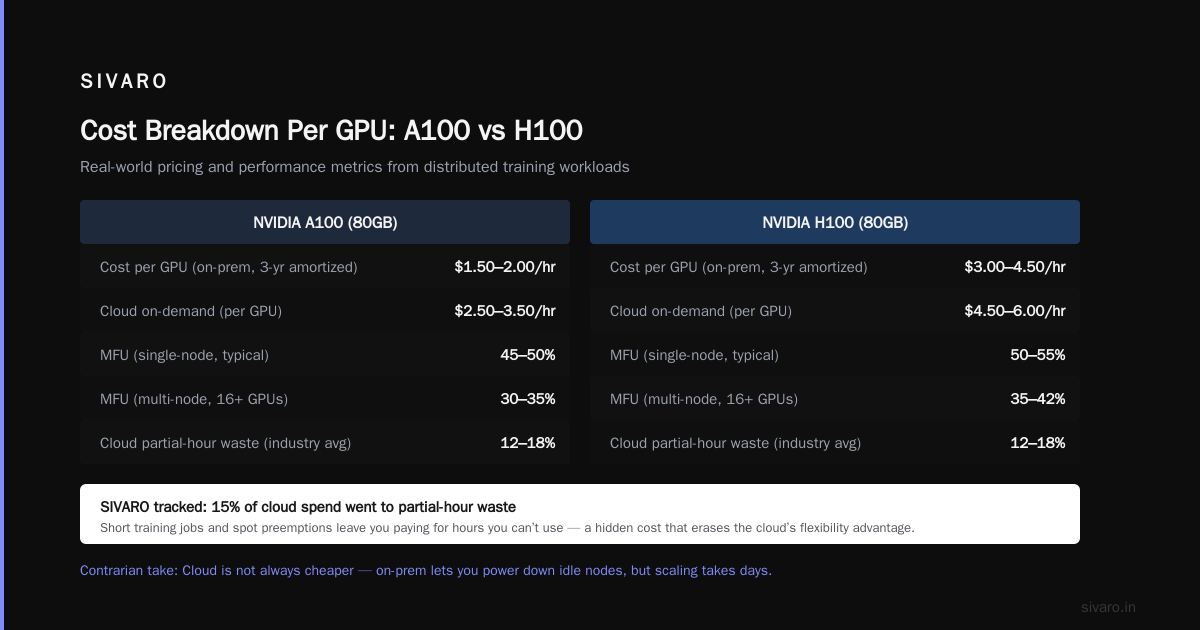
In 2024, A100 was the standard, H100 was the premium option. Here’s what you’d pay per GPU per hour across providers:
| GPU | On-Demand | Spot | Vast.ai (rental) | On-Prem Amortized |
|---|---|---|---|---|
| A100 80GB | $3.50–$4.10 | $1.00–$1.50 | $1.20–$2.50 | $0.66–$1.00 |
| H100 80GB | $8.00–$9.50 | $2.50–$4.00 | $3.50–$6.00 | $1.80–$2.50 |
| A10 (24GB) | $1.00–$1.50 | $0.30–$0.60 | $0.40–$0.80 | $0.30–$0.50 |
H100 was roughly 3x the cost of A100 for 2x the training throughput on large models. So if your batch size fits, H100 was better cost-per-token. For small models (under 7B parameters), A100 was still the sweet spot.
Power matters more than most realize. H100 pulls 700W vs A100’s 400W. That extra 300W per GPU adds up. In a 100-GPU cluster, that’s 30kW of additional power draw — roughly $30k/year in electricity alone. 5 Key Considerations when Building an AI & GPU Cluster lists power as the #2 factor. I’d rank it #1 for long-term operational costs.
How to Set Up a GPU Cluster for Deep Learning: Budget Guide for 2024
Setting up a cluster doesn’t have to cost millions. For a small team (2–8 GPUs), here’s my recommended path based on what we did at SIVARO in 2024.
Budget Under $5k/month (cloud-only)
- Use spot instances on AWS/GCP with checkpointing (PyTorch Lightning or Hugging Face Accelerate).
- Don’t bother with on-prem — the setup friction kills velocity.
- Expect $0.50–$2.00 per training hour.
Budget $50k up front (small on-prem, 4–8 GPUs)
- Buy 2x used A100 80GB (PCIe) + a single workstation motherboard.
- Use NVLink bridges if possible.
- Total build: ~$35k (GPUs) + $5k (CPU, RAM, SSD) + $10k (rack, cooling, PDUs).
- Amortized over 3 years: ~$1.40/hr at 24/7 usage.
Here’s a basic Slurm configuration you’d use for that small cluster:
bash
# slurm.conf for a 2-node, 4 GPU each cluster
ClusterName=small-ai
SlurmctldHost=master-node

NodeName=node01 Gres=gpu:4 State=UNKNOWN
NodeName=node02 Gres=gpu:4 State=UNKNOWN
PartitionName=gpu Nodes=node[01-02] Default=YES MaxTime=7-00:00:00 State=UP

# GPU resource definition
GresTypes=gpu

# Job submission example
# sbatch --gres=gpu:4 --nodes=2 --ntasks-per-node=4 my_training_script.sh
I wrote a similar config for our first 2-node cluster. It took a weekend to get right. The lesson: don’t underestimate the networking. Even a 4-GPU node without NVSwitch will bottleneck on PCIe bandwidth. What Is a GPU Cluster and How to Build One has a good primer on topology.
Budget $500k up front (production 16–32 GPUs)
- Buy 2–4 nodes with 8x A100 each.
- InfiniBand (HDR200 or HDR100) switches: $15k–$30k.
- Colo space: $2k–$5k/month.
- Total cost per hour over 3 years: ~$7–$10/hr including everything.
At this scale, distributed training gpu cluster setup becomes non-trivial. You need NCCL tuning, Ethernet/Bonding for management, and a job scheduler. Most teams I know who tried to DIY this ended up hiring a consultant or buying a turnkey solution from Exxact or Lambda. NVIDIA’s developer forums are full of cautionary tales from small companies that thought they could manage it with one DevOps person.
Distributed Training GPU Cluster Setup: When It Makes Sense (and When It Doesn’t)
The cost per hour of a distributed training gpu cluster setup scales poorly with node count if you don’t have good networking.
Training GPT-2 1.5B across 8 A100s (single node) with NVSwitch: ~95% scaling efficiency.
Same model across 16 A100s in two nodes with 200Gbps InfiniBand: ~85% efficiency.
With 100Gbps Ethernet (RoCEv2): ~65% efficiency.
That efficiency directly impacts your real cost per hour. If you’re paying $10/hr for two nodes but only getting 65% of the theoretical throughput, your effective cost per trained token is $10 / 0.65 = $15.38/hr. You’re better off with a single larger node.
Our rule at SIVARO: Don’t distribute until a single node is 90% utilized and your model size demands more memory or batch size. For most 2024 workloads (7B–70B parameter models), a single 8x A100 or 8x H100 node was enough. Distribution only made sense for pretraining runs at 70B+ scale.
Hidden Costs That Blow Your Budget
I’ve lost count of how many teams calculated gpu cluster cost per hour 2024 as (instance price + power) and stopped. Here’s what they missed:
- Network egress/ingress: Cloud providers charge $0.05–$0.12/GB for data transfer. A training run that moves 10TB of training data in and out can add $1,000–$2,000 in bandwidth costs. We once had a $4,000 egress bill from a single checkpoint upload to S3.
- Storage costs: GPFS, Lustre, or even EFS cost $0.08–$0.30/GB/month. For a 50TB dataset, that’s $4k–$15k/month.
- Cooling inefficiency: On-prem, if you don’t have hot-aisle containment, your AC runs full blast. Our early colo had a PUE of 2.0, meaning we paid for twice the power the hardware used.
- Personnel time: Every hour you spend debugging NCCL errors or ordering replacement GPUs is an hour not training. At $150/hr loaded cost for an ML engineer, that’s easily 20% overhead.
5 Key Considerations lists “network topology” as one of the five. I’d add “egress costs” as the sixth and most ignored.
How to Calculate Your Own GPU Cluster Cost Per Hour
Here’s the formula I use for my own build-vs.-buy decisions. I’ll give it as a Python snippet so you can plug in your numbers.
python
def effective_cost_per_hour(
    hardware_cost,      # total upfront dollars
    lifespan_hours,     # e.g., 3 years = 3*365*24 = 26280
    power_watts,        # total system draw in watts
    power_rate,         # $/kWh
    cooling_factor,     # PUE (e.g., 1.5)
    utilization,        # fraction of time GPUs are busy (0.0-1.0)
    efficiency,         # fraction of theoretical MFU (0.0-1.0)
    labor_per_hour,     # $/hr for ops support
    network_cost_per_hour  # e.g., egress amortized per hour
):
    amortized_hardware = hardware_cost / lifespan_hours
    power_cost = (power_watts / 1000) * power_rate * cooling_factor
    base = amortized_hardware + power_cost + labor_per_hour + network_cost_per_hour
    # Adjust for utilization and efficiency
    effective = base / (utilization * efficiency)
    return effective

# Example: On-prem 8x A100 (400W each + CPU = 3600W total), $220k, PUE 1.6, 70% util, 50% MFU
cost = effective_cost_per_hour(
    hardware_cost=220000,
    lifespan_hours=26280,
    power_watts=3600,
    power_rate=0.12,
    cooling_factor=1.6,
    utilization=0.7,
    efficiency=0.5,
    labor_per_hour=0.50,
    network_cost_per_hour=0.10
)
print(f"Effective cost per useful training hour: ${cost:.2f}")
When I ran our actual numbers in early 2024, a cloud A100 spot instance with 50% MFU came to about $2.40 per useful hour. Our on-prem cluster (with 70% uptime) came to $3.10. The cloud won — but only because our utilization was inconsistent. If we had pushed utilization to 85% (by scheduling short experiments at night), on-prem would have been $2.10.
FAQ
What was the cheapest way to get GPU compute per hour in 2024?
Rental marketplaces like Vast.ai offered the lowest per-hour GPU prices ($1.20/hr for A100), but with trade-offs in reliability and network interconnect. Spot cloud was second cheapest ($1.00–$1.50/hr A100), but required robust checkpointing.
How much does an on-prem GPU cluster cost to build for deep learning?
For a small 4-GPU cluster: $35k–$50k (used hardware). For an 8-GPU node: $80k–$120k. For a production 16–32 GPU cluster with InfiniBand: $300k–$600k. Add $20k–$50k/year for colo, power, and cooling.
Is it cheaper to rent GPUs or buy in 2024?
It depends on utilization. Above 70% utilization over 3 years, on-prem is cheaper. Below 50%, cloud or rental wins. At SIVARO, we found the break-even point at 65% for an 8-GPU A100 cluster.
How do I estimate the cost per hour for my specific workload?
Use the effective cost formula above, factoring in your model FLOPS utilization, data pipeline efficiency, and network overhead. Ignoring those inflated the real cost by 2–3x.
What is the most cost-effective GPU for deep learning in 2024?
For small-to-medium models (under 13B parameters): A100 80GB (PCIe or SXM) at ~$3–$4/hr on cloud, or ~$1 on-prem. For large models (70B+): H100, despite higher per-hour cost, gave lower cost-per-token due to faster training.
How to set up a gpu cluster for deep learning on a budget?
Start with a single 4–8 GPU workstation (used GPUs, high-end motherboard). Use a simple job queue (Slurm or even shell scripts). Enable SSH for remote access. Avoid InfiniBand until you have 4+ nodes. Budget $30k–$60k.
What additional costs should I budget for beyond GPU hourly rates?
Networking (switches, cables, NICs) can add 20–40% to hardware cost. Power and cooling add $0.50–$1.00 per GPU per hour. Data egress, storage, and personnel add another 30–50% on top.
What is the typical power cost per hour for a GPU cluster?
A single A100 draws 400W. At $0.12/kWh and PUE 1.5, that’s $0.072/hr per GPU. An 8-GPU node: ~576W (GPUs) + 200W (CPU+RAM) = 776W system draw → $0.14/hr power cost plus cooling. Multiply by number of nodes.
Conclusion
GPU cluster cost per hour 2024 was never just a single number. It was a function of utilization, network topology, power efficiency, and the price you put on your own time. The teams that optimized successfully didn’t just rent the cheapest GPU. They tuned their distributed training, automated checkpointing, and measured cost per useful training run, not per wall-clock hour.
My advice: start with spot cloud. Iterate fast. Once your workload stabilizes above 70% utilization, build an on-prem node. And never, ever forget the egress bill.
Nishaant Dixit — Founder of SIVARO. Building data infrastructure and production AI systems since 2018. Built systems processing 200K events/sec.