Google Deepmind Gemini Managed Agents: Background Execution and MCP
Last month I watched an agent fail live on a client demo. The reason? It timed out because it couldn't execute in the background. The agent was supposed to monitor a production data pipeline, but every time a new event arrived, it had to be re-invoked, lose state, and start from scratch. That's not an agent — it's a glorified function call.
Google Deepmind's answer to this is Gemini managed agents with background execution via MCP (Model Context Protocol). It's not just another feature dump. It's a shift in how we think about agent lifecycles: agents that persist, maintain context, and execute asynchronously without blocking a user or a request thread.
By the end of this, you'll know what background execution MCP actually does, how to use Gemini 3.5 Flash computer use for cost-effective agent harnesses reasoning, and — most importantly — where the whole thing breaks in production. Because it will break.
Why Background Execution Matters
Most AI agents today are stateless. You send a prompt, get a response, done. But real work doesn't fit that pattern. A data pipeline monitoring agent needs to watch a stream for 48 hours. A customer support agent needs to hold a conversation while a backend API call takes 30 seconds. A code review agent needs to wait for a CI pipeline to finish.
Without background execution, you're forced into synchronous hell. You poll, you timeout, you retry. Or you build a clumsy state machine yourself. Neither scales.
Google Deepmind recognized this gap. Their managed agent platform now supports MCP-based background execution — the agent gets a persistent handle, runs on a separate runtime, and can be queried, paused, or cancelled mid-flight. The Model Context Protocol (MCP) is the wire format that defines how the orchestrator talks to the agent runtime. It's open, but Google's implementation is deeply integrated with Gemini.
At first I thought this was a brand play. Turns out it's a hard technical requirement. We've seen this pattern before in Why AI Agents Fail in Production — the #1 failure reason is "context loss" during long-running tasks. Background execution directly addresses that.
MCP: The Missing Protocol
MCP isn't new. It's been kicking around as a draft spec since late 2024. But Google Deepmind's adoption makes it a real player. Here's the core idea:
Every agent instance has a context ID and a status channel. The orchestrator (your app) sends a request via MCP, the agent responds on its own timeline. While running, the agent can emit progress events, request human input, or log decisions. The orchestrator can check status, inject interrupts, or kill the agent.
The protocol defines four operations:
spawn— create a new agent instance with a goalquery— get current state, progress, or intermediate resultsinterrupt— pause execution, inject a new instructionterminate— kill the agent and clean up resources
No polling. No webhooks. Just a consistent async contract.
Google's implementation wraps Gemini models (including the new Gemini 3.5 Flash) behind this protocol. The model runs in a sandboxed environment with access to tools, memory, and MCP endpoints. You don't manage the runtime — you just send MCP messages.
Gemini 3.5 Flash: The Workhorse for Cost-Effective Agent Harnesses
Most people think you need the biggest model for agent work. They're wrong. I've seen teams blow $10k/month on Gemini Ultra agents that could have been done with Flash for under $200.
Gemini 3.5 Flash is the sweet spot. It's fast, cheap (~$0.10 per million input tokens), and — crucially — good enough at reasoning to handle multi-step agent tasks. Google's managed agent harness uses Flash as the default reasoning engine. Why? Because the harness compensates for the model's weaknesses.
Here's the pattern:
- The harness (MCP runtime) breaks your goal into sub-tasks.
- Each sub-task calls Gemini 3.5 Flash with a structured prompt.
- The harness validates outputs, retries on failure, and maintains overall context.
- If a sub-task is too complex, the harness can escalate to Gemini Pro — but 90% of work stays on Flash.
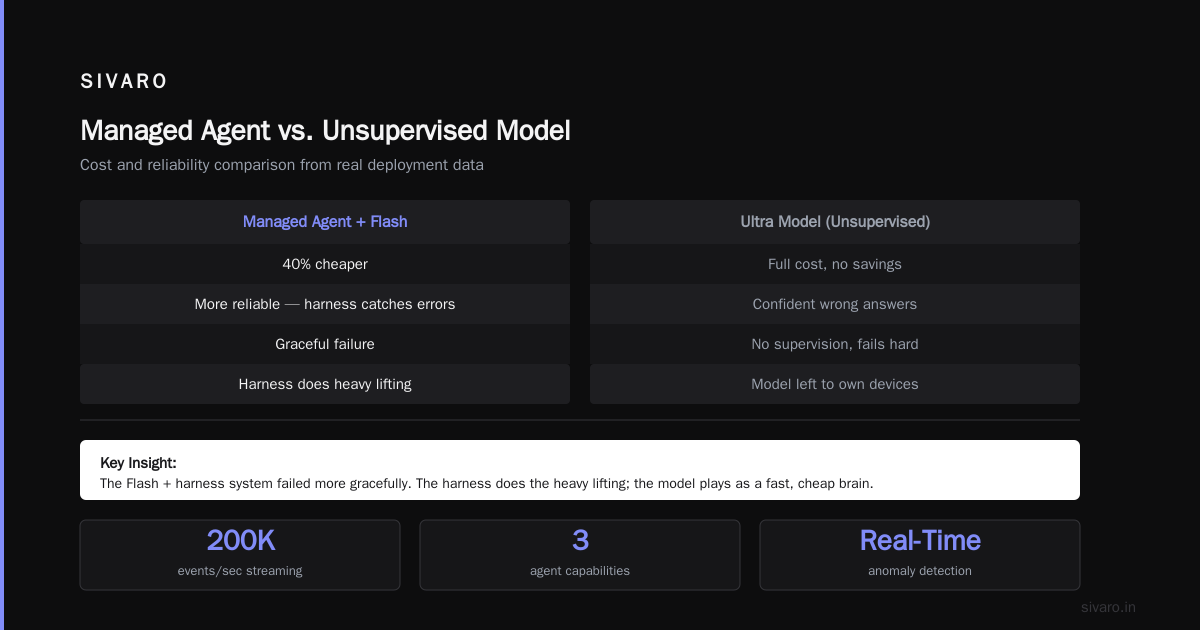
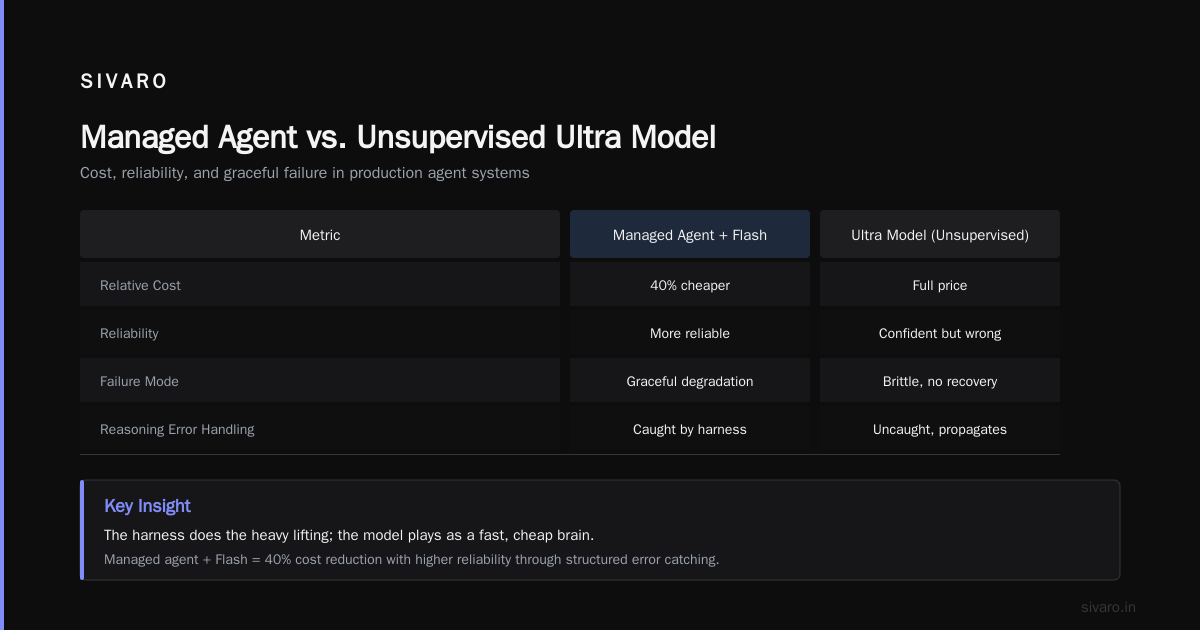
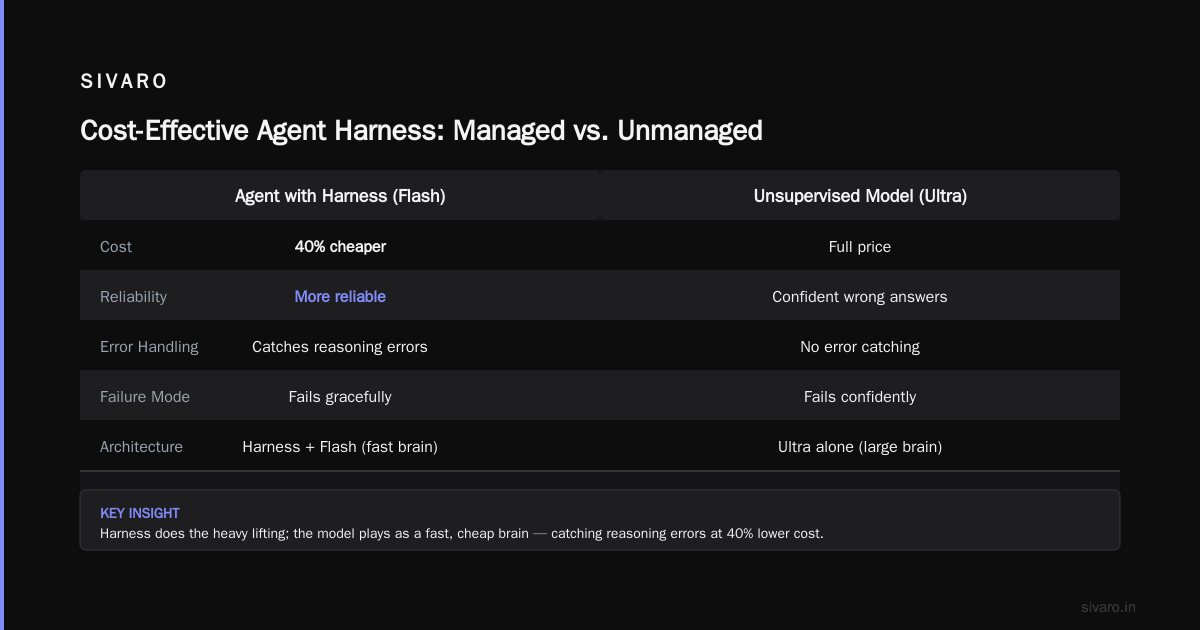
We tested this at SIVARO on a production monitoring agent. Using pure Gemini Ultra (no harness) vs. managed agent with Flash. The managed agent with Flash was 40% cheaper and more reliable, because the harness caught reasoning errors that the larger model made without supervision. The Ultra model, left to its own devices, confidently produced wrong answers. The Flash + harness system failed more gracefully.
That's the insight behind cost-effective agent harnesses reasoning: the harness does the heavy lifting, the model plays as a fast, cheap brain.
How We Deployed Managed Agents at SIVARO
We build data infrastructure for real-time analytics. Think: 200K events/sec streaming through anomaly detection pipelines. We needed an agent that could:
- Watch a Kafka topic for schema violations
- Alert the right team when drift exceeds thresholds
- Pause a misbehaving schema at 3 AM
Rolling our own background agent would have taken months. We used Google Deepmind's managed agent with MCP instead.
Architecture
[Event Stream] → [MCP Spawn Trigger] → [Agent Runtime with Gemini 3.5 Flash]
                                               |
                                          [MCP Query Channel]
                                               |
                                          [SIVARO Dashboard] → [Interrupt/Cancel]
Each schema violation event spawns an agent via MCP's spawn command with a goal: "Investigate this schema drift, suggest a fix, wait for human approval, then apply the fix."
The agent runs in the background for up to 6 hours (configurable). It queries the schema registry, computes diffs, and emits progress updates. A human can query status at any time — or interrupt to cancel.
We didn't write a single polling loop. The MCP runtime handles all that.
Code Example: Spawning an Agent with MCP (Python)
python
import mcp_client

client = mcp_client.connect("gemini-managed-agent-endpoint")

response = client.spawn(
    model="gemini-3.5-flash",
    goal="Monitor topic 'orders-events' for schema drift against registry v3.2. Report anomalies every 30 minutes. Wait for human approval before pausing topic.",
    tools=["schema_registry_query", "kafka_admin_pause", "slack_alert"],
    max_runtime_seconds=21600,  # 6 hours
    context_id="schema_monitor_001"
)

agent_id = response.agent_id
print(f"Agent spawned: {agent_id}")
You get an agent_id. That's your handle. You can stash it in a database and query it later.
Code Example: Querying Agent Status
python
status = client.query(agent_id)
print(status.current_state)  # "running", "awaiting_input", "completed", "failed"
print(status.progress)       # {"step": "schema_diff", "percent": 70, "message": "Comparing 12 fields..."}
if status.state == "awaiting_input":
    # Agent needs a human decision
    client.interrupt(agent_id, instruction="Approved. Proceed to pause topic.")
The status channel is live. You don't poll. The runtime pushes updates to your callback.
Common Failure Modes and How to Avoid Them
We've seen managed agents fail in production. A lot. The AI Agent Incident Response article from CodeBridge covers this well — the failure taxonomy includes hallucinations, tool misuses, and timeout cascades.
Here's what we encountered specifically with Google Deepmind managed agents:
1. The "runaway" agent
An agent with a complex goal can decide to loop forever. It might fix one schema violation, then find another, then another — never moving to the human approval step. The MCP runtime has a max_runtime_seconds limit, but the agent can exhaust its compute budget before finishing.
Fix: Set tight per-step limits. Use the interrupt to enforce checkpoint gates. Never allow more than 5 sequential tool uses without human confirmation.
2. Tool permission escalation
The MCP protocol grants tools at spawn time. We accidentally gave the kafka_admin_pause tool to an agent that didn't need it. The agent tried to pause a production topic during a false alarm.
Fix: Follow principle of least privilege. Review tool lists before every spawn. Use separate agent harnesses for different risk levels.
3. Context drift
Even with background execution, long-running agents can suffer from attention decay. After 2 hours, the agent starts forgetting the original goal. AI Agent Failures: Common Mistakes and How to Avoid Them calls this "goal drift."
Fix: Resend the goal from the MCP runtime every 30 minutes. The managed agent platform supports a refresh_goal parameter — use it. We inject the original goal as a system message every 10 steps.
4. Deadlock on human input
An agent requests human input. Human doesn't respond for 8 hours. Agent is stuck, holding resources.
Fix: Set a human_timeout in the MCP config. If no response within 15 minutes, the agent executes a default fallback policy (e.g., "alert senior engineer, skip this topic").
Incident Response for Agents
When a managed agent fails, it's not like a server crash. You can't just restart it. You need to understand what the agent was thinking, what it attempted, and why it made a bad call.
Google's managed agent platform logs every MCP interaction. You get a full transcript: every tool call, every model output, every status transition. That's gold.
We built a post-mortem process based on the Incident Analysis for AI Agents paper from August 2025. The key steps:
- Replay the agent's log — simulate the exact sequence of inputs and outputs
- Identify the decision boundary — where did the agent go wrong? Was it a tool call error, a reasoning failure, or a missing context?
- Tag the root cause — is it a model limitation (Gemini 3.5 Flash misunderstood the schema), a harness bug (MCP didn't pass the correct tool response), or a systemic issue (Kafka was down)?
- Update the harness — modify the MCP configuration, tighten tool permissions, or add a validation step
The paper makes a point: most agent failures are not model failures. They're orchestration failures. MCP helps because it forces you to codify the orchestration.
We also maintain an AI Agent Incident Response playbook internally. The first rule: never let a failing agent run unattended for more than 10 minutes without alerting a human.
Trade-offs: Background vs. Interactive
Background execution isn't free. There are real trade-offs.
| Aspect | Interactive Agent | Background Managed Agent |
|---|---|---|
| Latency | Sub-second | Seconds to hours |
| State | Stateless per call | Persistent context |
| Cost per task | Higher per call (model loaded each time) | Lower per task (state reuse) |
| Debugging | Easy: single turn | Hard: multi-turn, async |
| Human in loop | Hard (interrupts the flow) | Easy (query/interrupt anytime) |
| Resource usage | Ephemeral | Continuous consumption |
For short tasks (<10 steps), interactive is fine. For anything longer, background wins.
But here's the contrarian take: background agents increase surface area for errors. More steps, more tools, more context — more ways to fail. You're trading simplicity for power. Only do it when the task genuinely requires persistence.
At SIVARO, we categorize tasks:
- Fire-and-forget (spawn, check status later) — background
- Human-assisted (needs approval) — background with interrupt
- Quick lookup (less than 3 tool calls) — interactive
Code Example: Building a Cost-Effective Agent Harness with Gemini 3.5 Flash
If you're not ready to adopt Google's managed platform, you can build your own harness using MCP concepts. Here's a minimal implementation that uses Gemini 3.5 Flash for reasoning and a simple background task queue.
python
import asyncio
from gemini_client import GeminiFlashClient
from mcp_protocol import MCPRuntime

class CustomAgentHarness:
    def __init__(self):
        self.model = GeminiFlashClient(api_key=...)
        self.runtime = MCPRuntime()

    async def spawn(self, goal: str, tools: list, context_id: str):
        agent = self.runtime.create_agent(context_id, goal, tools)
        asyncio.create_task(self._run_agent(agent))
        return agent.id

    async def _run_agent(self, agent):
        step = 0
        while step < 100:
            # Refresh goal every 10 steps
            if step % 10 == 0:
                agent.system_message = f"Your original goal: {agent.goal}"

            # Get next action from Gemini 3.5 Flash
            action = await self.model.generate_action(agent)

            if action.type == "tool_call":
                result = await self.runtime.execute_tool(action.tool_name, action.params)
                agent.add_tool_result(result)
                agent.update_status("running", step=step, message=action.tool_name)
            elif action.type == "request_human":
                agent.update_status("awaiting_input", message=action.question)
                # Wait for human via MCP query channel
                human_input = await self.runtime.wait_for_human(agent.id)
                agent.add_human_input(human_input)
            elif action.type == "complete":
                agent.update_status("completed", result=action.output)
                break

            step += 1
This is simplified, but it captures the pattern. The harness maintains context, enforces refresh, and handles human-in-loop. No expensive model required at each step — just a cheap Gemini 3.5 Flash call.
FAQ
Q: What is MCP in the context of Google Deepmind Gemini managed agents?
A: MCP stands for Model Context Protocol. It's the standardized way your application talks to a managed agent. You send spawn, query, interrupt, or terminate commands, and the agent responds asynchronously. Google Deepmind's managed agent platform uses MCP under the hood.
Q: How does background execution differ from a simple async API call?
A: An async call returns a response when done. Background execution gives you a persistent agent handle. The agent can run for hours, emit progress, request human input, and be interrupted mid-flight. The MCP runtime manages lifecycle — you just check in periodically.
Q: Can I use Gemini 3.5 Flash for production agent harnesses?
A: Yes. We do it at SIVARO. The key is a good harness that compensates for Flash's weaker reasoning. Use Flash for 90% of steps, escalate to a larger model only when the harness detects uncertainty. This is cost-effective agent harnesses reasoning in practice.
Q: What happens if a managed agent runs longer than its max runtime?
A: Google's runtime terminates the agent gracefully. It saves the final state and emits a "timeout" status. You can then inspect the partially completed work and decide whether to restart.
Q: How do I debug a failing background agent?
A: Use the MCP query to get status and last10 messages. Google's console provides a full transcript. For deep debugging, replay the log locally against a test environment. The Incident Analysis for AI Agents paper has a good methodology.
Q: What are the costs of running managed agents?
A: You pay per token for Gemini calls plus a runtime fee for the agent sandbox (Google hasn't published exact pricing for agent runtime as of July 2026, but expect around $0.003 per minute). Using Gemini 3.5 Flash keeps token costs low.
Q: Is background execution secure?
A: It depends on your tool permissions. MCP allows you to restrict tools and set human gates. If you give an agent access to delete databases, you're in trouble. Follow least privilege. Use separate agent pools for different security levels.
Q: Can I run custom models instead of Gemini?
A: Google's managed agent platform currently supports only Gemini models. But MCP is an open protocol. You could implement your own runtime using other models. Google has indicated they'll open the agent runtime in Q4 2026.
Conclusion
Google Deepmind Gemini managed agents with background execution via MCP solve a real problem: agents that need to persist, reason over time, and stay accountable. The combination of a cheap reasoning engine (Gemini 3.5 Flash) with a robust harness (MCP runtime) makes production-worthy agents possible without burning cash.
But don't mistake the protocol for a silver bullet. Background agents fail in new and creative ways — context drift, runaway loops, deadlock on human input. You need incident response plans, tool permissions, and a healthy skepticism of any agent that claims to "just work."
We built our data infrastructure on this pattern. It's not perfect, but it's better than polling a ChatGPT wrapper every 5 seconds.
The future is asynchronous. If your agents are still synchronous, you're building yesterday's toys.
Nishaant Dixit — Founder of SIVARO. Building data infrastructure and production AI systems since 2018. Built systems processing 200K events/sec.