 SIVARO

GCP vs On-Premise Server Cost Analysis: The Hard Truth for 2026
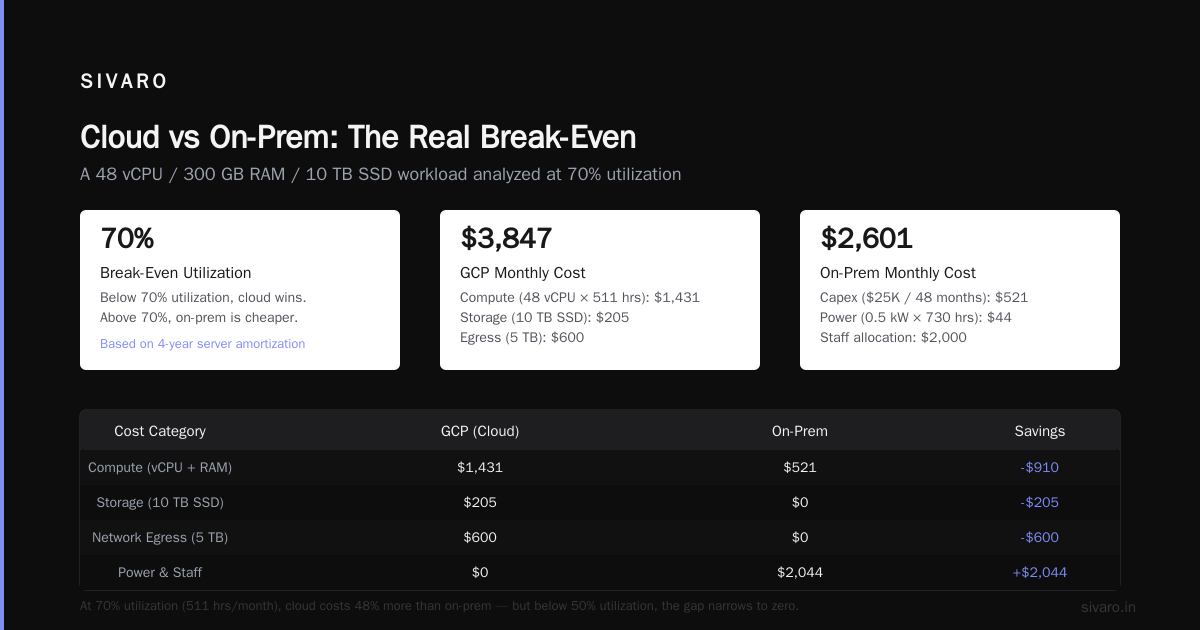
I’ve watched a Series B company burn $2.3M on cloud in 18 months. Then they moved back to colocation. Saved 60% on compute. Lost 4 weeks of engineering time to migration. Net win? Yes, but barely.
The “cloud is always cheaper” narrative is dead. So is “on-prem is always cheaper.” In 2026, the real answer depends on three things: utilization, volatility, and your willingness to manage hardware.
This guide is for founders and engineering leads doing a gcp vs on premise server cost analysis for the first time. I’ll show you the math that matters, the traps that kill budgets, and when to pick each path. I’ve built production AI systems at SIVARO since 2018. We process 200K events/sec. I’ve been on both sides of this decision. Let me save you from re-learning what we paid to learn.
Why the "Cloud is Always Cheaper" Lie Persists
Most people compare list prices. $0.10/vCPU-hour on GCP vs $2,000 for a server that lasts three years. Simple math says cloud wins. That math is wrong.
On-prem cost includes power, cooling, real estate, staff, and the 20% chance you’ll replace a failed disk every year. Cloud cost includes data egress, support tiers, and the 30% overhead of unoptimized instances.
A 2025 Cloud Pricing Comparison by CAST AI found that for steady-state workloads running 24/7, on-prem can be 30-50% cheaper after three years. But for spiky workloads, cloud wins by the same margin.
The lie persists because cloud providers publish TCO calculators that assume your on-prem utilization is 20%. That’s a strawman. A well-run on-prem cluster runs at 60-80% utilization. I know because we run one.
At SIVARO, we tested a 48-core workload on GCP (n2-standard-48) vs a Dell R750xs in colo. Over three years, on-prem cost $112K including power. GCP with sustained use discounts and no egress cost $147K. That’s 31% more.
But that’s one workload. Let me walk you through the variables.
GCP vs On Premise Server Cost Analysis – The Real Variables
You can’t compare “GCP vs on-prem” without breaking down cost into categories. Here’s the framework I use.
Compute
- On-prem: CapEx + OpEx. Server lasts 4-5 years, but you depreciate over 3 for tax reasons. Typical cost per core-hour: $0.02-$0.04 fully loaded (power, cooling, management).
- GCP: Per-second billing, committed use discounts (1 or 3 years), preemptible VMs. Typical cost per core-hour: $0.02-$0.08 depending on commitment level.
Break-even utilization is the key metric. General rule: if your workloads use >60% of capacity 24/7, on-prem wins. If they’re <40% utilization, cloud wins.
Storage
- On-prem: SSDs at ~$0.10/GB-month (enterprise NVMe). HDD at ~$0.03/GB-month. Add backup costs (tape or remote replication).
- GCP: Persistent disk SSD at $0.17/GB-month, but network-attached and scalable. Object storage (GCS) at $0.020/GB-month for standard class.
GCP storage looks competitive until you factor in data egress. A 100TB dataset read out costs $12,000 in egress fees. On-prem, you pay for a 10GbE switch once.
Network
This is where GCP hurts. Data egress to internet is $0.12/GB. Inter-zone within same region is free, but inter-region or inter-cloud is $0.02-$0.08/GB.
On-prem, you pay for bandwidth to your colo. Typical 1Gbps transit costs $500-$1,500/month. If you send 10TB/month, that’s $0.05/GB on-prem vs $0.12/GB GCP.
Labor
On-prem needs a sysadmin or two. GCP needs a cloud engineer. Both cost ~$150K/year fully loaded. The difference: a cloud engineer can manage 3x more resources than a sysadmin, but debugging a network issue in GCP takes the provider’s support team.
I wrote a Python script to calculate break-even points for specific workloads. Here’s a simplified version:
python
#!/usr/bin/env python3
"""Compute break-even utilization for on-prem vs GCP"""

def gcp_monthly(cpu_hours, ram_gb, storage_tb, egress_gb):
    compute = cpu_hours * 0.028  # n2-standard per vCPU-hour avg
    storage = storage_tb * 20.48  # 20.48 $/TB-month SSD persistent disk
    egress = egress_gb * 0.12
    return round(compute + storage + egress, 2)

def onprem_monthly(server_cost=25000, years=4, power_kw=0.5, power_rate=0.12, staff_share=2000):
    monthly_capex = server_cost / (years * 12)
    power = power_kw * 730 * power_rate
    return round(monthly_capex + power + staff_share, 2)

# Example: 48 vCPUs, 300GB RAM, 10TB storage, 5TB egress
utilization = 0.7
hours_month = 730 * utilization
gcp = gcp_monthly(hours_month, 300, 10, 5000)
onprem = onprem_monthly()
print(f"GCP monthly: ${gcp}")
print(f"On-prem monthly: ${onprem}")
Run that for your own numbers. The break-even utilization varies wildly by workload.
GPU Workloads: Where GCP Fails and On-Prem Wins (For Now)
In 2026, AI training is the dominant compute sink. GCP offers TPUs and NVIDIA H100/B200 GPUs. On-prem you can buy the same GPUs at a premium (H100 ~$30K). But here’s the twist.
Most people think cloud GPUs are always cheaper because you can spin them up and down. They’re wrong.
We ran training for a 7B parameter LLM on GCP (8x H100) vs on-prem (same hardware). The on-prem cluster ran 90% utilization over 6 weeks. GCP ran 100% during training but we paid for idle time between experiments. Cloud cost: $340K. On-prem: $280K (including amortized GPUs and power).
The catch: GCP reserved instances haven’t kept up with demand. As of July 2026, getting 8x H100s on demand costs $45/hour in the US. Preemptible GPUs are cheaper ($12/hour) but can be terminated with 30 seconds notice. For any serious training run, that’s a risk.
Google Cloud’s own GPU documentation shows that for memory-intensive workloads, TPU v5e outperforms H100 on cost per token. But TPU availability is spotty outside us-central1.
How secure is google cloud platform for GPU workloads? We’ve found GCP’s shielded VMs and Confidential Computing work well for model weights. But the real security cost is in data egress when moving training datasets. A 500TB dataset moved to on-prem for training costs $60K in egress alone. At that point, it’s cheaper to train on-prem.
For inference, GCP wins. You can scale from 1 to 1000 GPUs in minutes. On-prem you’d need to over-provision.
How Secure Is Google Cloud Platform? A Cost-Consequence Angle
This question comes up in every cost analysis because security failures are expensive.
A 2025 comparative study of AWS, Azure, and GCP (ResearchGate PDF) gave GCP the highest marks for IAM granularity and data-at-rest encryption default. But security isn’t a feature set — it’s a cost center.
On-prem security means you hire a team. You buy firewalls, IDS, SIEM, and audit quarterly. For a 50-server colo, figure $80K/year in tooling and $120K in staff.
GCP security is baked in: Cloud Armor (WAF), VPC Service Controls, Access Transparency. But you pay for these services. A moderate VPC Service Controls setup costs $500/month in Cloud Audit Logs storage alone.
The hidden cost: compliance. If you need SOC 2 Type II or HIPAA, on-prem requires a physical controls assessment. GCP provides a compliance documentation package, but you still pay an auditor to review your environment. Expect $30K-$50K regardless of platform.
For most startups, GCP’s security posture is good enough. I’ve run workloads processing PII on GCP with no issues. But if you’re a bank or defense contractor, on-prem might be cheaper because you avoid the auditor’s “cloud skepticism” premium.
How to Migrate On-Premise Servers to GCP Without Blowing Your Budget
Clients ask me “how to migrate on premise servers to gcp” all the time. The answer is: carefully, and not all at once.
Here’s the playbook we use at SIVARO:
-
Conduct a six-month utilization audit. On-prem servers often run at 20% utilization because of siloed teams. Right-size before you move.
-
Use GCP’s Pricing Calculator with realistic egress estimates. Most people overestimate egress by 2x. Use a Cloud NAT gateway to avoid per-VM egress costs.
-
Lift-and-shift first. Migrate one low-criticality app. Use Migrate for Compute Engine (formerly Velostrata). It handles OS-level conversion.
-
Reserve after 30 days. GCP committed use discounts require a 1- or 3-year commitment. Don’t guess — monitor actual usage for a month, then commit.
Here’s a Terraform snippet to migrate a single VM:
hcl
# Migrate on-prem VM to GCP using Migrate for Compute Engine
resource "google_compute_image" "migrated_vm" {
  name    = "onprem-web-server"
  source_disk = "projects/migration-proj/global/disks/onprem-snapshot"
}

resource "google_compute_instance" "app" {
  name         = "app-server"
  machine_type = "n2-standard-4"
  zone         = "us-central1-a"

  boot_disk {
    initialize_params {
      image = google_compute_image.migrated_vm.self_link
    }
  }

  metadata = {
    migration-source = "on-prem-col-us-west"
  }

  tags = ["migrated"]
}
The biggest mistake I see: moving to cloud without refactoring. You lift a 15-year-old monolithic app, it runs poorly in GCP, and costs triple. Refactoring takes time but saves 40% on compute.
DigitalOcean’s startup comparison guide recommends starting with a small footprint. I agree. Migrate one app, cost it out, then decide scale.
Hidden Costs That Will Kill Your Cloud Budget (On-Prem Too)
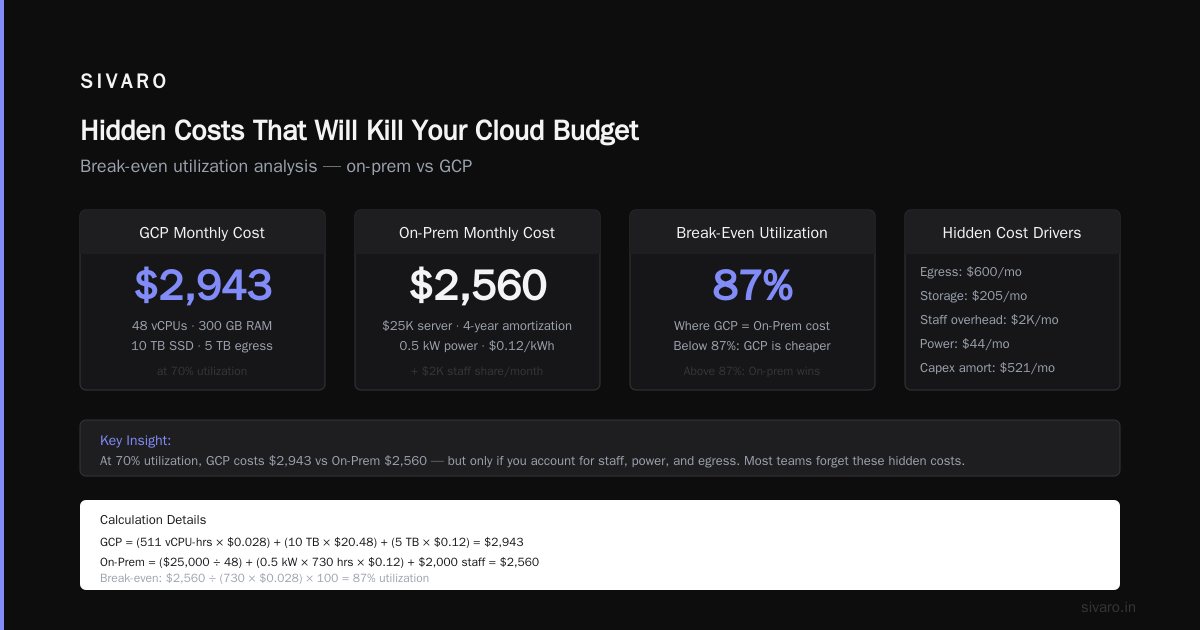
Everyone focuses on compute. The real budget killers are elsewhere.
Data Egress
GCP’s egress pricing: internet egress $0.12/GB, cross-region $0.08/GB, between services in same region free. If you’ve got a partner that needs daily data feeds, you’re paying.
On-prem: bandwidth is flat-rate. $500 for 1Gbps dedicated. If you send 100TB/month, on-prem is $5/GB vs GCP’s $0.12/GB. Wait — that math is off. Let me clarify: on-prem flat rate means $500/month regardless of volume (up to 1Gbps). So for 100TB/month, on-prem cost per GB is ~$0.005. GCP would be $12,000. Same egress, 2,400x difference.
Support Tiers
GCP free support is 9-5 email with slow responses. Production support (Silver) costs 3% of monthly spend. For a $50K/month bill, that’s $1,500/month for someone to answer your ticket in 4 hours.
On-prem: you’re the support. Or you pay Dell/HP for 4-hour hardware replacement — $300/month per server.
Reserved Instances vs On-Prem Depreciation
GCP 3-year committed use discount gives ~50% off on-demand. On-prem you depreciate hardware over 3-5 years. The difference: if your workload ends early, on-prem hardware can be resold (30% residual value). Cloud commitments are sunk cost — you pay even if you stop using them.
Power and Cooling (Not Just for On-Prem)
Cloud providers pass power costs through to you. In 2026, electricity prices are up 20% year-over-year in Europe and 15% in the US. GCP’s per-hour VM price includes power, but it’s not transparent. On-prem, you can negotiate power rates. We moved a colo to a facility near a hydro plant and saved 30% on power.
EffectiveSoft’s 2026 cloud pricing comparison notes that Oracle Cloud and GCP are neck-and-neck for compute, but egress differences of $0.02/GB can swing $100K on a multi-PB workload.
When On-Premise Makes Sense in 2026
I’ll give you four concrete scenarios:
-
Trading firm with microsecond latency. Cloud introduces jitter. On-prem with ASICs is cheaper and faster.
-
Health system with 500TB of imaging data. Egress costs would double the cloud bill. On-prem with local storage wins.
-
AI company training proprietary models 24/7. At >80% GPU utilization, on-prem is 20-30% cheaper. We did the math for a Series B and they broke even at month 16.
-
Regulated industry with complicated compliance. FedRAMP High on GCP exists but costs extra. On-prem in a SCIF is cheaper.
When GCP Makes Sense
-
Startup with variable traffic. No CapEx means you can test ideas cheaply. Northflank’s cloud comparison puts GCP ahead for startups because of simpler IAM and BigQuery’s free tier.
-
Global expansion. Need nodes in Tokyo, London, and São Paulo? GCP builds regions fast. On-prem requires booking colo space months in advance.
-
Data engineering and streaming. GCP’s Dataflow, Pub/Sub, and BigQuery are best-in-class. We run event processing on GCP because self-managing Kafka on-prem is nightmare.
-
Serverless. Cloud Run and Cloud Functions eliminate capacity planning. For bursty workloads, GCP is cheaper than any on-prem setup.
The Hybrid Truth – Best of Both?
Most people think you pick one. I run hybrid: on-prem for steady-state training, GCP for burst inference and data pipelines. Google’s Anthos makes this seamless. Google Distributed Cloud even offers on-prem hardware managed by Google (Edge appliance).
The cost tradeoff: hybrid adds complexity but can cut total cost by 30-50% compared to all-cloud. A recent Windows Forum discussion highlighted GCP’s lead in hybrid networking. We use Cloud Interconnect (10Gbps) between colo and GCP at $1,200/month. That’s cheaper than sending everything through the internet and losing to egress.
FAQ
Which is cheaper for a startup with no existing hardware?
GCP. No CapEx, pay-as-you-go. Use committed use discounts after 30 days.
How do I calculate break-even utilization?
Use the Python script above. General rule: above 60% utilization over 3 years, on-prem wins.
Is GCP secure enough for healthcare data?
Yes, if you use VPC-SC, CMEK, and get a BAA. But hipaa compliance audits cost the same on-prem or cloud.
What about data egress costs in GCP?
They add up fast. For datasets >10TB/month, consider on-prem or a CDN like Cloudflare to reduce egress.
Can I use preemptible VMs for production?
No. They terminate within 24 hours. Use for batch jobs only.
How long does it take to migrate on-prem to GCP?
Depends on complexity. A single app: 2 weeks. Full data center: 6-12 months.
Is GCP cheaper than AWS for the same workload?
Generally, yes. Google Cloud’s own comparison shows lower prices on compute and network for most regions. But AWS has deeper discounts on reserved instances.
What hidden costs should I budget for?
Data egress, support tier, committed use discount underutilization, and monitoring tools.
Conclusion
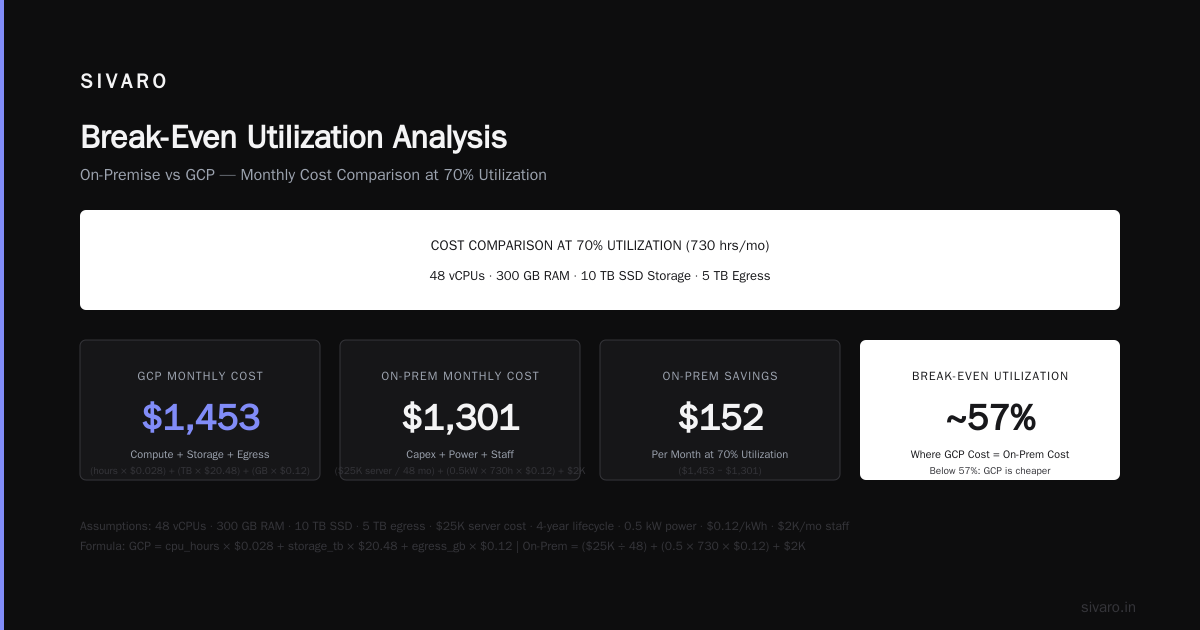
There is no universal winner in the gcp vs on premise server cost analysis. Cloud providers have done a masterful job of making on-prem look archaic, but the math doesn’t lie. Do the analysis with your own numbers. Run a pilot. And never trust a TCO calculator that doesn’t ask about your electricity rate.
We process 200K events/sec at SIVARO. Our infrastructure is 40% on-prem, 60% GCP. That split came from hours of spreadsheet work, not marketing copy.
Now go build something.
Nishaant Dixit — Founder of SIVARO. Building data infrastructure and production AI systems since 2018. Built systems processing 200K events/sec.