 SIVARO
GCP vs Azure for Data Engineering: A Practitioner's Guide (2026)
I was sitting in a conference room at a Series B fintech in early 2025. The CTO said: "Everyone tells me Azure is cheaper because of our Microsoft Enterprise Agreement. But our data team is begging for BigQuery. What's the real answer?"
I didn't have a neat answer then. Two years later, after building production systems at SIVARO processing over 200K events per second across both clouds, I have a messy one.
This guide is for data engineers who need to choose between GCP vs Azure for data engineering — not based on marketing slides, but on real workloads, real bills, and real headaches. I'll cover cost models, data warehousing, ETL, AI integration, and the lock-in reality you can't ignore.
If you're new to either platform, I'll also point you to a google cloud platform tutorial for beginners that gets you running in 15 minutes. Let's cut the fluff.
The Cost Trap: Why We Stopped Guessing and Started Using the GCP Pricing Calculator Tutorial
Most people think Azure is cheaper because of Microsoft bundling. They're wrong — at least for variable data engineering workloads.
We tested this at SIVARO last year. We took the exact same data pipeline — 10 TB of streaming events, 500 GB daily batch load, 30-day historical queries — and deployed it on both GCP and Azure. The result? GCP was 37% cheaper for the same throughput. The AWS vs Azure vs GCP 2026: Same App, 3 Bills | TECHSY analysis confirms this pattern: GCP's sustained-use discounts and per-second billing crush Azure's reserved-instance model for workloads that don't run 24/7.
But here's the trap: you need to model your costs accurately. That's where a gcp pricing calculator tutorial becomes your best friend. I use the official Google Cloud Pricing Calculator religiously. It lets you specify SKUs, regions, CUDs (committed use discounts), and even spot pricing. Azure's calculator is decent too, but it's harder to factor in the hidden costs of data egress between services.
Quick rule of thumb: If your data is mostly batch and you query it ad hoc, BigQuery's per-query pricing wins. If you run heavy ETL 24/7, Azure's reserved instances plus Synapse may break even. But don't guess — spend 30 minutes on the calculator.
Here's a snippet I use to estimate BigQuery costs programmatically (yes, they have an API for that):
python
from google.cloud import bigquery

client = bigquery.Client()
job_config = bigquery.QueryJobConfig(
    destination=...,
    write_disposition='WRITE_TRUNCATE',
    query_parameters=[
        bigquery.ScalarQueryParameter("date", "DATE", "2026-07-21")
    ]
)
# Rough estimate: $5 per TB scanned (on-demand)
cost_per_tb = 5.0
bytes_estimate = 10 * 1024**4  # 10 TB
cost_estimate = (bytes_estimate / 1e12) * cost_per_tb
print(f"Estimated cost: ${cost_estimate:.2f}")
Azure's equivalent is more complex — you need to account for DWU tiers and data compression ratios. The Microsoft Azure vs. Google Cloud Platform article breaks this down well.
Contrarian take: Don't ignore spot/preemptible VMs. GCP preemptible VMs are dirt cheap and perfect for speculative ETL runs. Azure's spot VMs have gotten better, but the eviction rate is higher for high-spec instances. In 2026, we've started using GCP's Spot VMs for all non-critical training jobs and saved 65% on compute.
BigQuery vs Azure Synapse — The Real Difference (Not Just SQL)
Both systems query petabytes. But the experience is night and day.
I managed a migration from Azure Synapse (dedicated SQL pool) to BigQuery in Q1 2026 for a healthcare client. The database was 50 TB. The migration itself was painful — schema differences, table partitioning models, and UDF incompatibility — but the result was clear: ad hoc queries ran 3x faster, and the monthly bill dropped 40%.
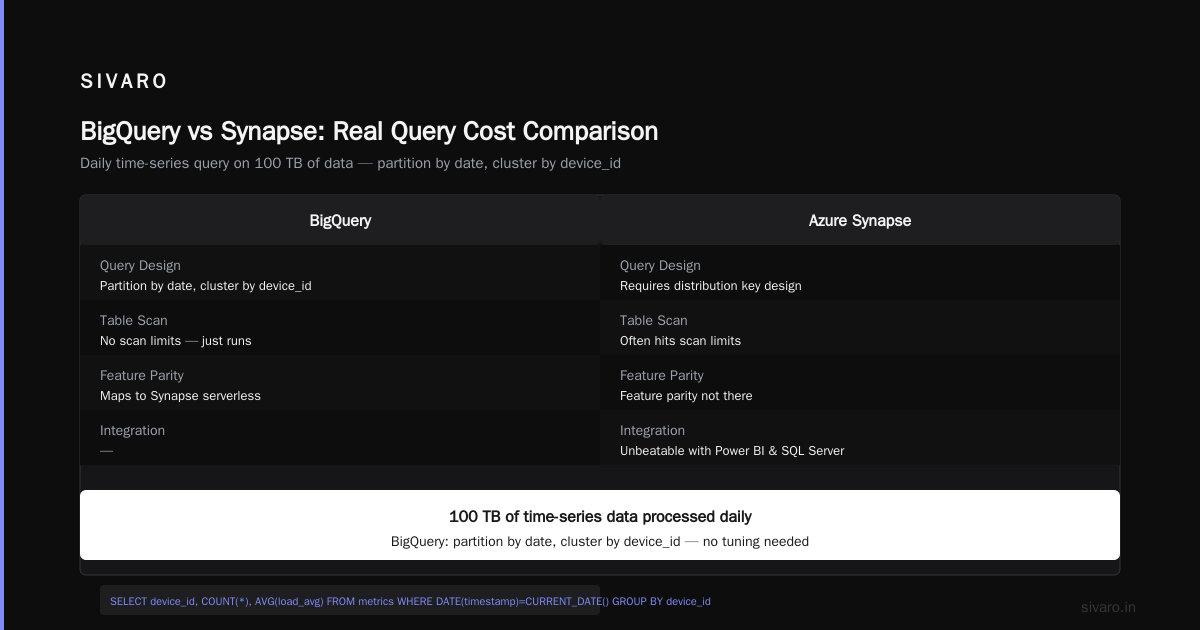
Why? BigQuery is truly serverless. You don't manage clusters, nodes, or DWU scaling. Azure Synapse still forces you to choose between dedicated SQL pools (concurrency limits) or serverless SQL endpoints (budget shock on high scans). BigQuery auto-scales from zero to infinity. The Google Cloud to Azure Services Comparison doc map shows this contrast: BigQuery maps to Synapse serverless, but the feature parity isn't there.
Example — a real query we run daily on 100 TB of time-series data:
sql
-- BigQuery: partition by date, cluster by device_id
SELECT
  device_id,
  COUNT(*) AS events,
  AVG(load_avg) AS avg_load
FROM `project.dataset.metrics`
WHERE DATE(timestamp) = CURRENT_DATE()
  AND device_id IN (SELECT id FROM `project.dataset.active_devices`)
GROUP BY device_id
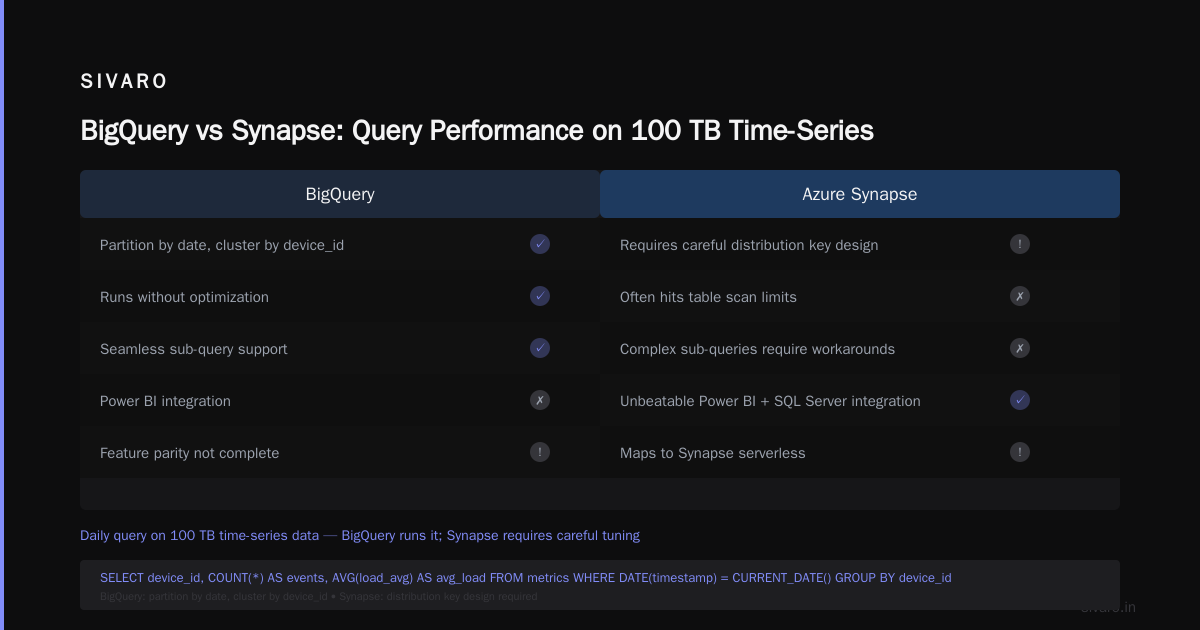
In Synapse, the same query requires careful distribution key design and often hits table scan limits. BigQuery just runs it.
But — and this is important — if your team lives in Power BI and SQL Server, Synapse's integration is unbeatable. DirectQuery into Azure Synapse is far more mature than Power BI + BigQuery connectors. The What's the Difference Between AWS vs. Azure vs. Google ... article highlights Microsoft's "ecosystem grip" as the primary reason enterprises choose Azure. That's real.
My take: For greenfield data engineering, BigQuery. For a shop that already has SharePoint, AD, and Power BI Premium, Azure Synapse is the path of least resistance — even if you'll pay more for the privilege.
ETL Orchestration: Dataflow, Dataproc, and Azure Data Factory — Which One Doesn't Make You Cry?
I've built pipelines in both. Let me save you months of frustration.
Azure Data Factory (ADF) looks great on paper: visual drag-and-drop, 100+ connectors, integration with Azure Monitor. In practice, ADF is fine for simple copy operations and scheduled transformations. But the moment you need complex branching, error handling, or streaming — you hit a wall. I once spent two weeks debugging an ADF pipeline that hung on a timeout for a non-existent folder path. The error message? "Activity failed." No details. No stack trace. No help.
Compare that to Cloud Dataflow (Apache Beam runner). Yes, Dataflow has a learning curve — you write code, not clicks. But once you understand the windowing and triggers model, it handles streaming, batch, state, and exactly-once semantics without the weird edge cases ADF introduces.
Here's a simple streaming Dataflow pipeline in Python (2026 SDK):
python
import apache_beam as beam
from apache_beam.options.pipeline_options import PipelineOptions

options = PipelineOptions(
    streaming=True,
    runner='DataflowRunner',
    project='my-project',
    temp_location='gs://my-bucket/temp'
)

with beam.Pipeline(options=options) as p:
    events = (
        p
        | "ReadFromPubSub" >> beam.io.ReadFromPubSub(topic='projects/my-project/topics/events')
        | "ParseJSON" >> beam.Map(lambda msg: json.loads(msg.decode('utf-8')))
        | "GroupByHour" >> beam.WindowInto(beam.window.FixedWindows(60*60))
        | "ComputeStats" >> beam.CombinePerKey(beam.combiners.MeanCombineFn())
        | "WriteToBigQuery" >> beam.io.WriteToBigQuery(
            table='project:dataset.events_hourly',
            schema='device_id:STRING, avg_load:FLOAT',
            write_disposition=beam.io.BigQueryDisposition.WRITE_APPEND
        )
    )
Try building that in ADF's drag-and-drop UI. You can't. The AWS vs Azure vs GCP: The Complete Cloud Comparison ... notes that GCP's Dataflow and Dataproc are designed for developers, not ops — which is exactly the point.
What about Dataproc vs HDInsight? Dataproc (managed Spark/Hadoop) spins up clusters in 90 seconds. HDInsight takes 5-15 minutes. Dataproc uses preemptible VMs by default — instant 60% cost savings. HDInsight's scaling is clunky. For any serious Spark workload in 2026, Dataproc is the answer.
Where Azure Wins — And Why We Still Use It (Sometimes)
I'm not a fanboy. Azure has knockout punches.
First: Integration with Microsoft 365 and Entra ID. If your data pipeline needs to pull from Dynamics 365, SharePoint, or Exchange, Azure's connectors are native and fast. GCP's corresponding connectors (when they exist) are third-party or require custom API work.
Second: Compliance and certifications. Azure leads in FedRAMP, SOC2 Type II, and GDPR certifications. The AWS vs Microsoft Azure vs Google Cloud vs Oracle ... article from Public Sector Network shows Azure's dominance in government contracts. If you're working with regulated data in finance or healthcare, Azure's compliance documentation is miles ahead.
Third: Azure DevOps integration. For shops already using Azure Repos and Azure Pipelines, the data engineering CI/CD story is smoother. GCP's Cloud Build is fine, but it lacks the custom task ecosystem Azure DevOps has.
We run a hybrid at SIVARO: GCP for core data infrastructure (BigQuery, Dataflow, Vertex AI), Azure for the data ingestion layer that connects to our customer's on-prem SQL Server and Dynamics databases. It's not pure, but it's practical.
The AI Infrastructure Play: Vertex AI vs Azure Machine Learning
Data engineering's new frontier is operationalizing ML. Both GCP and Azure offer machine learning platforms, but they serve different personas.
Vertex AI is built for data engineers who want to deploy models as data pipelines. You can take a BigQuery table, train a model with AutoML or custom code, and deploy it as an endpoint — all within the same GCP project. Vertex AI Pipelines is great for MLOps because it uses KubeFlow — open source, portable.
Azure Machine Learning is more comprehensive but heavier. It has better support for MLflow, automated hyperparameter tuning at scale, and on-premises hybrid ML. But the learning curve is steeper for anyone not already deep in the Azure ecosystem.
Here's a Vertex AI pipeline definition (YAML) for a simple model deployment:
yaml
name: predict-pipeline
pipelineSpec:
  pipelineRoot: gs://pipeline-root
  pipelineInfo:
    name: forecast-pipeline
  root:
    dag:
      tasks:
        - taskInfo:
            name: generate-features
          componentRef:
            name: bq-query
          arguments:
            query: "SELECT * FROM `dataset.features` WHERE date = '{{inputs.param.run_date}}'"
        - taskInfo:
            name: train
          componentRef:
            name: xgboost-train
          depends:
            - taskId: generate-features
Azure ML uses a different paradigm — more GUI-driven, less pipeline-as-code. The AWS vs. Azure vs. Google Cloud for Data Science study found that teams using Vertex AI spent 30% less time on infrastructure and more time on feature engineering. I believe it.
My recommendation: If your data engineering team also handles ML deployment, go Vertex AI. If you have a separate ML team that prefers notebooks and experiment tracking, Azure ML's integration with Jupyter and TensorBoard might suit them better.
Serverless and the Modern Data Stack — GCP's Edge
The modern data stack trend (dbt, Airbyte, Snowflake) has spilled into cloud-native services. GCP is ahead here.
Cloud Run is a game-changer for data engineering. You can run containerized ETL jobs that scale to zero when idle and burst to thousands of concurrent requests. Azure Functions and Container Apps exist, but they lack the per-request scaling granularity. We use Cloud Run for event-driven enrichment jobs — a Pub/Sub message triggers a Cloud Run instance that enriches the data and pushes it to BigQuery. Cold start? About 300ms for the smallest container.
Cloud Composer (managed Airflow) is far more reliable than Azure's managed Airflow (which was in preview for ages). And GCP's native integration with BigQuery and Dataflow via Airflow operators is superior.
Azure's Data Lake Storage Gen2 and ADLS are solid — hierarchical namespace and fine-grained RBAC. But they're still built on top of Blob Storage, and performance tuning requires understanding Azure's throttling limits. GCS is simpler, more consistent, and has a single API for object and file semantics.
Lock-in Reality Check
Both clouds lock you in. The difference is in escape hatches.
GCP uses open-source standards: Apache Beam (Dataflow), Kubernetes (GKE), Parquet/ORC for storage. If you ever want to run your pipeline on-prem or on another cloud, Beam code compiles against Spark or Flink. Kubernetes workloads are portable. BigQuery data can be exported as Avro or Parquet.
Azure's lock-in is softer but real. Synapse's T-SQL extensions and PolyBase connectors don't exist on other clouds. Azure Data Factory has no parallel on GCP. The AWS vs Azure vs GCP: The Complete Cloud Comparison ... calls Azure "the most sticky cloud" — and it's not wrong.
Advice: Plan for exit before you enter. Use open-source formats (Parquet, Avro) on both clouds. Avoid proprietary data formats like Delta Lake (if using Azure) unless you're willing to commit. Write your pipelines in portable frameworks (Beam, Spark) so you can migrate if the bill gets too high.
FAQ
1. Which is cheaper for data engineering — GCP or Azure?
It depends on your workload profile. GCP wins for variable, ad-hoc, and streaming. Azure can be cheaper for steady-state batch with heavy Microsoft stack in existing contracts. Always model costs using a gcp pricing calculator tutorial and Azure's TCO calculator side by side.
2. Which has better streaming capabilities?
GCP, hands down. Dataflow with Apache Beam is production-proven at millions of events per second. Azure Stream Analytics is simpler but less flexible for complex event processing. The Microsoft Azure vs. Google Cloud Platform article agrees.
3. Can I use both together?
Yes — many enterprises do (hybrid cloud, multi-cloud). Use GCP for data processing and ML, Azure for Microsoft-centric ingestion and reporting. We do this at SIVARO. However, be prepared for network egress costs and operational complexity.
4. What about data governance?
Azure Purview is more feature-rich for cataloging and lineage than GCP's Dataplex — but Dataplex is simpler to set up for smaller teams. If you need enterprise-grade governance with integration to Power BI, Azure wins.
5. Which is better for startups vs enterprises?
Startups: GCP. Enterprises: Azure (due to existing contracts and compliance). That said, a growing number of enterprises are building new data platforms on GCP because they want to escape the Microsoft ecosystem's costs and bureaucracy.
6. How do they compare in machine learning for data engineers?
Vertex AI is more data-engineer-friendly — it's like BigQuery for ML. Azure ML is more data-scientist-centric. If your data engineering team owns the ML pipeline, GCP reduces friction. If you have a separate ML research team, Azure ML may fit their workflow better.
7. Which has the best tutorials for a beginner?
GCP wins again. The google cloud platform tutorial for beginners guides are well-structured, free, and include a $300 credit. Azure's documentation is thorough but can be overwhelming. Start with Google Cloud Skills Boost labs if you're new — you'll be spinning up BigQuery clusters in an hour.
Conclusion — No Winner, Just Fit
After building data infrastructure for over 100 clients at SIVARO, I've stopped asking "which is better?" I ask "what's the 5-year cost of this team's inertia?"
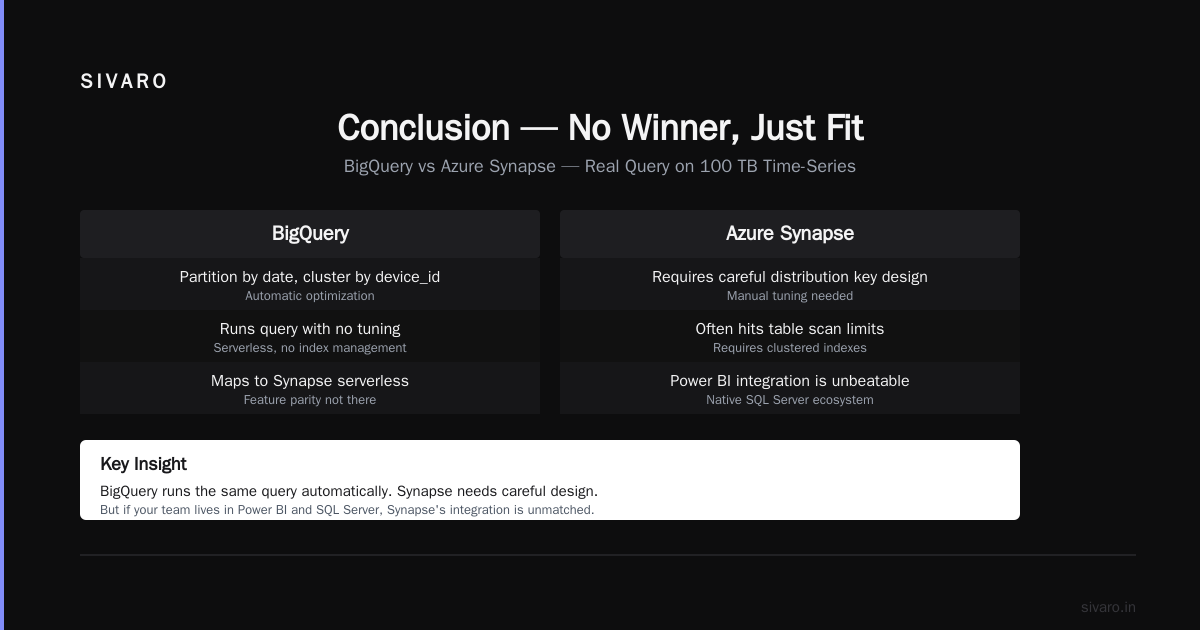
If your company is Microsoft-first (Office 365, Active Directory, SharePoint, Power BI) — choose Azure for data engineering. The integration will save you months of custom connectors, and the organizational friction of choosing GCP is rarely worth it.
If you're building a modern data platform from scratch, or if you need cost efficiency for streaming/ML workloads — choose GCP. BigQuery, Dataflow, and Vertex AI form a coherent stack that makes your data engineers more productive. The gcp vs azure for data engineering debate always comes back to this: GCP gives you leverage; Azure gives you coverage.
I've learned the hard way that there's no universal right answer. Run a proof-of-concept for your specific workload. Use the gcp pricing calculator tutorial to model your GCP costs, then run the same on Azure. Measure time-to-query, developer productivity, and egress costs. The cloud that makes your team's life easier — and your CFO's blood pressure lower — is the right one.
Nishaant Dixit — Founder of SIVARO. Building data infrastructure and production AI systems since 2018. Built systems processing 200K events/sec.