 SIVARO
GCP vs AWS: Which Is Easier to Learn in 2026?
I started SIVARO in 2018. Back then, I had to choose a cloud provider for our first production data pipeline. Everyone told me AWS was the default. "Just learn AWS," they said. "It's the industry standard."
I tried. And I hated it.
Not because AWS is bad — but because learning it felt like drinking from a firehose while someone kept turning up the pressure. Six months later, I switched to GCP for that project. Got productive in three weeks.
That experience shaped how I think about cloud learning. Today, I run a company that builds data infrastructure on both clouds. We've onboarded dozens of engineers. Some come from AWS. Some from GCP. I've watched them struggle, succeed, and form strong opinions.
Here's what I've learned about gcp vs aws which is easier to learn — not from comparison charts, but from real people trying to ship code.
The Myth of "AWS is Harder"
Most people think AWS is harder to learn because it's older and has more services. They're wrong about the reason.
AWS isn't harder because of service count. It's harder because of inconsistent design.
You know how GCP has one way to create a bucket, one way to set permissions, and one way to authenticate? AWS has four. And they change depending on which service you're touching. IAM policies use JSON. S3 bucket policies use a different JSON structure. Lambda permissions need yet another format. It's not complexity by design — it's complexity by accretion.
GCP, by contrast, feels like it was designed by a single team with a coherent philosophy. That's not an accident. Google built GCP on top of their internal infrastructure, which already had consistent APIs (Google Cloud documentation confirms this). AWS built each service independently, then tried to glue them together later.
For a learner, that difference is massive.
Console vs CLI vs Infrastructure as Code
I ask every new hire the same question: "How did you first interact with the cloud?"
Those who started with GCP usually say: "I used gcloud and it just worked."
Those who started with AWS say: "I opened the console and got lost in menus."
GCP's gcloud CLI is the best command-line tool in cloud computing — maybe in all of DevOps. It's consistent. Every command follows the same pattern:
bash
gcloud <service> <resource> <action> [flags]
Compare that to AWS CLI:
bash
aws s3api create-bucket --bucket my-bucket --region us-east-1
aws iam create-role --role-name my-role --assume-role-policy-document file://trust-policy.json
aws lambda create-function --function-name my-function --runtime python3.12 --role arn:aws:iam::123456789012:role/my-role --handler handler.handler --zip-file fileb://function.zip
Notice the inconsistencies. s3api uses --region. IAM uses --assume-role-policy-document with a file path. Lambda uses --runtime instead of --language. Each service defines its own flag names, its own resource identifiers, its own error messages.
I'm not saying AWS CLI is bad. It's powerful. But it requires you to memorize service-specific quirks. GCP's CLI lets you guess — and you'll be right more often than wrong.
If you're learning cloud computing and want to spend your mental energy on concepts (regions, IAM, networking) rather than CLI syntax, GCP wins.
Core Services: The 80/20 Rule
You don't need to learn 200 services to be productive. You need about 10.
Here are the essentials:
Compute: AWS EC2 vs GCP Compute Engine → Very similar. No big advantage either way.
Serverless: AWS Lambda vs GCP Cloud Functions → Lambda has more ecosystem. Cloud Functions has simpler IAM (no execution role confusion).
Storage: AWS S3 vs GCP Cloud Storage → S3 has more features (object lock, versioning done better). But Cloud Storage's naming convention (gs://your-bucket) and consistent ACL model make it easier to learn.
Databases: AWS RDS vs GCP Cloud SQL → Nearly identical. Both use managed MySQL/PostgreSQL. No meaningful difference for a beginner.
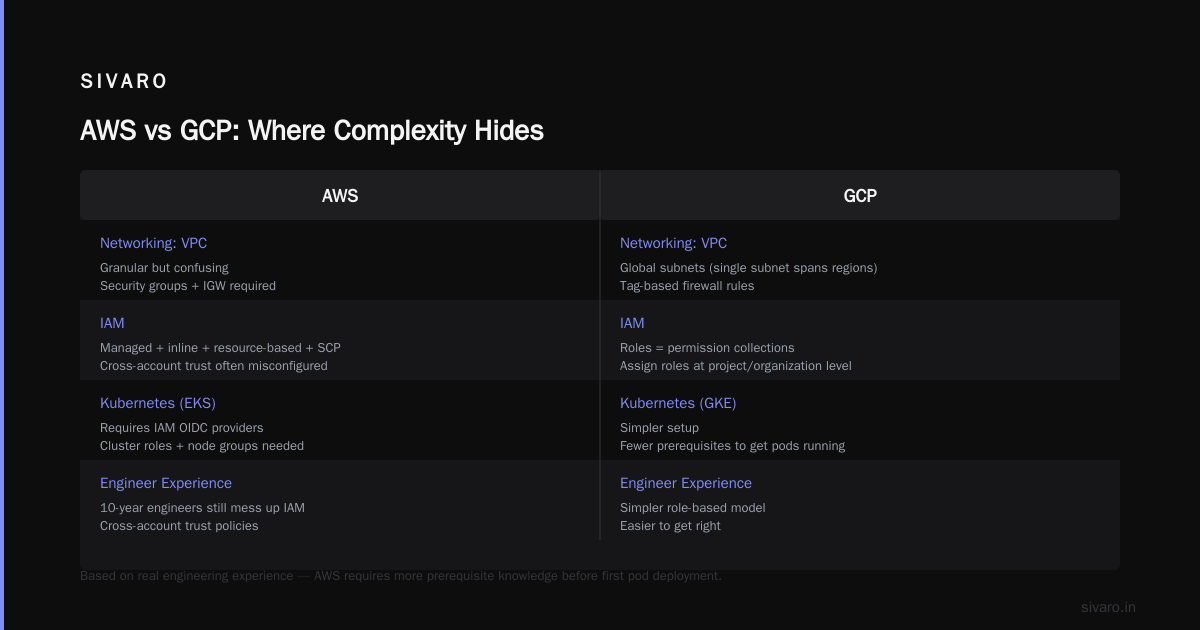
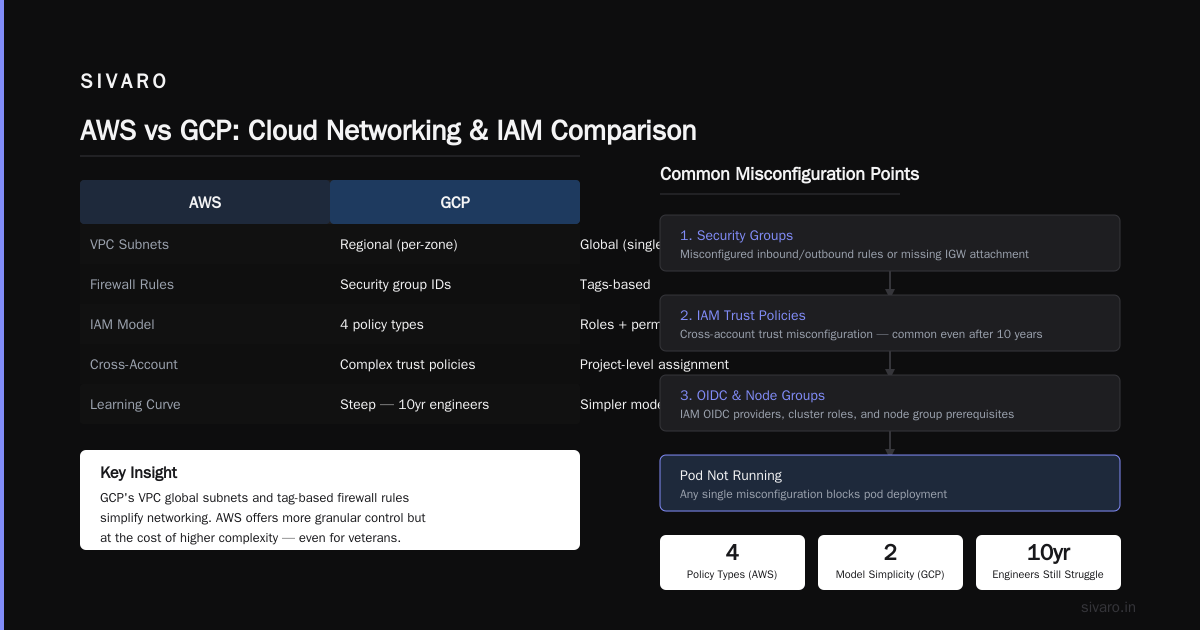
Containers: AWS ECS/EKS vs GCP GKE → GKE is objectively simpler to start with. Google invented Kubernetes. Their managed version requires less ceremony. EKS requires you to understand IAM OIDC providers, cluster roles, and node groups before you get a pod running.
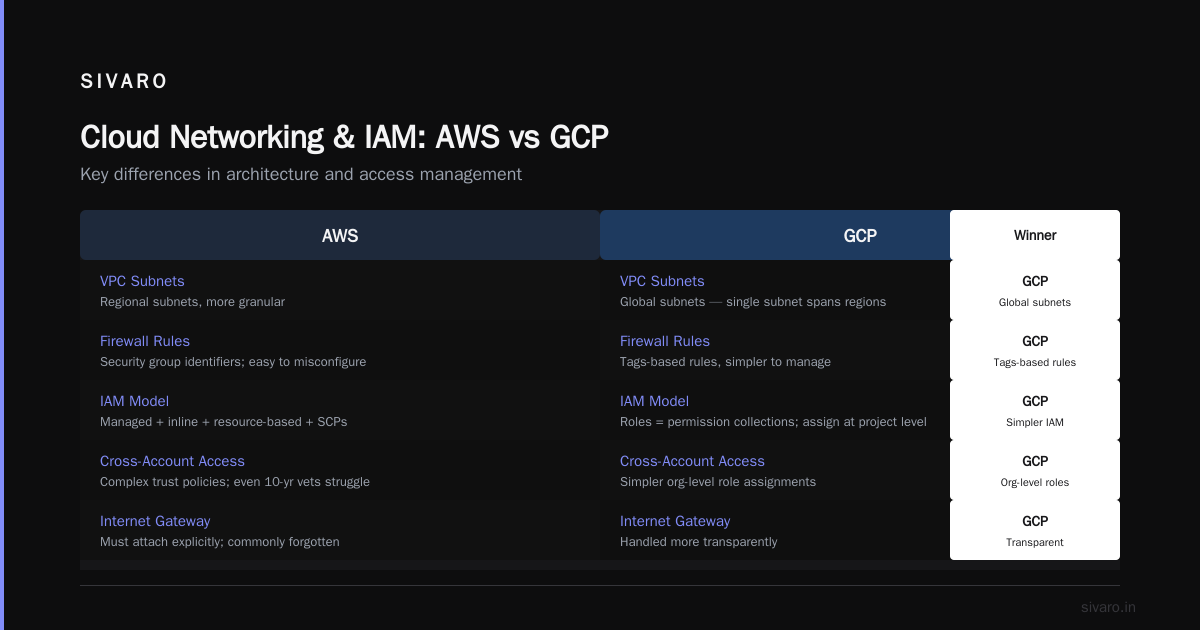
Networking: AWS VPC vs GCP VPC → Here's where GCP pulls ahead. GCP's VPC has global subnets (a single subnet spans regions) and firewall rules that apply to tags rather than security group identifiers. AWS VPC is more granular — and more confusing. Beginners routinely misconfigure security groups or forget to attach internet gateways.
IAM: AWS IAM vs GCP IAM → GCP uses a simpler model: roles are collections of permissions, you assign roles to principals at the project/organization level. AWS mixes managed policies, inline policies, resource-based policies, and service control policies. I've seen engineers with 10 years of AWS experience still mess up cross-account IAM trust policies. GCP's equivalent is cleaner.
Here's a practical example. Creating a service account and granting access to read from a bucket:
GCP:
bash
gcloud iam service-accounts create my-sa --display-name "My Service Account"
gcloud projects add-iam-policy-binding my-project   --member "serviceAccount:my-sa@my-project.iam.gserviceaccount.com"   --role "roles/storage.objectViewer"
AWS:
bash
aws iam create-role --role-name my-role --assume-role-policy-document file://trust-policy.json
aws iam put-role-policy --role-name my-role --policy-name s3-read-access   --policy-document file://s3-read-policy.json
aws iam create-instance-profile --instance-profile-name my-profile
aws iam add-role-to-instance-profile --instance-profile-name my-profile --role-name my-role
Notice GCP is one command for the role assignment. AWS requires a trust policy file, a permissions policy file, and then attaching the role to an instance profile. Each step is clear if you know what you're doing. But for a beginner, it's four separate concepts that must be understood in sequence.
GCP's Secret Weapon: The gcloud CLI
I mentioned consistency. Let me show you.
Want to list all compute instances across zones?
bash
gcloud compute instances list
Want to list all Cloud Storage buckets?
bash
gcloud storage buckets list
Want to list all Pub/Sub topics?
bash
gcloud pubsub topics list
Pattern holds. Every resource has list, describe, create, delete, update verbs. Flags are shared where possible. --project, --region, --format. Output is JSON by default, or you can pipe to --format=yaml or --format=table.
AWS CLI doesn't share this consistency. aws ec2 describe-instances is the list command for EC2. But aws s3 ls lists buckets. Not aws s3 list-buckets. And S3 objects use aws s3 ls s3://bucket, which is different from the API. These aren't dealbreakers, but they add friction.
A beginner who types aws s3 list and gets "Unknown options" will feel stupid. That feeling compounds over time.
AWS's Complexity Tax
The term "AWS complexity" is thrown around so much it's lost meaning. Let me be specific about where AWS hurts learners.
IAM Policies
Writing an IAM policy from scratch is a rite of passage. Here's a typical policy for Lambda to read from DynamoDB:
json
{
  "Version": "2012-10-17",
  "Statement": [
    {
      "Effect": "Allow",
      "Action": [
        "dynamodb:GetItem",
        "dynamodb:Query",
        "dynamodb:Scan"
      ],
      "Resource": "arn:aws:dynamodb:us-east-1:123456789012:table/MyTable"
    }
  ]
}
Seems fine. But beginners routinely:
- Forget the
ResourceARN format (account ID, region, table name) - Use
"Action": ["dynamodb:*"]instead of specific actions (too permissive) - Miss the
Versionfield (policy fails silently) - Add
Conditionblocks incorrectly
GCP uses predefined roles. You assign roles/dynamodb.reader or roles/pubsub.publisher. No policy document. No ARN syntax. No silent failures.
VPC Confusion
AWS VPC forces you to think about subnets, route tables, internet gateways, NAT gateways, security groups, network ACLs, and VPC endpoints. That's seven concepts before you can host a simple web server.
GCP VPC defaults work out of the box. Every project gets a default VPC with subnets in every region, firewall rules that allow SSH/HTTP/HTTPS, and a default route to the internet. You can create resources immediately without VPC knowledge.
Now, do you need to learn VPC eventually? Yes. But GCP lets you defer that learning until you actually hit a scaling problem. AWS forces it on day one.
Service Proliferation
AWS has over 200 services. GCP has about 60. That's not necessarily better — Google might underinvest in niche areas. But for a learner, fewer choices mean less analysis paralysis.
When you need a message queue, AWS offers SQS, SNS, EventBridge, Kinesis, MQ, and Step Functions. GCP offers Pub/Sub. That's it. You learn one, and it works for almost every use case.
I'm not saying fewer services is always better. Amazon has legitimately different tools for different jobs. But if your goal is to learn cloud computing quickly, you don't want to spend two weeks evaluating message queues.
Learning Paths: Certifications and Time to Competency
Let's talk about the gcp associate cloud engineer exam — because that's the certification most learners target.
The GCP Associate Cloud Engineer certification is widely considered the easiest major cloud certification. Not because it's easy, but because the scope is narrow. It tests your ability to do specific tasks: deploy applications, monitor projects, manage access. No deep theory. No multiple-choice questions about obscure service limits.
To how to pass gcp associate cloud engineer exam, I recommend:
- Complete the official Google Cloud Skills Boost labs (about 40 hours of hands-on work)
- Take the practice exam on the Google Cloud site
- Focus on: IAM, Compute Engine, Cloud Storage, Kubernetes Engine, Cloud SQL, VPC
Most people pass in 4-6 weeks.
AWS certifications, by contrast, are broader. The AWS Certified Solutions Architect – Associate requires understanding of 50+ services, complex networking scenarios, and cost optimization. The exam questions are longer and more ambiguous. Average study time: 8-12 weeks.
If you want to get certified quickly to validate your skills, GCP is the faster path.
But here's the trade-off: AWS certifications carry more weight in the job market. More companies use AWS. More recruiters recognize the badge. If you're learning for career reasons, AWS's harder cert might be worth the pain.
Pricing Models: Does Perplexity Matter for Learning?
Pricing shouldn't affect how easy a cloud is to learn — but it does.
GCP's pricing is simpler. Compute Engine uses per-second billing with sustained-use discounts. Cloud Storage charges per GB, per month, with a single price for standard storage. AWS has per-hour billing, reserved instances, savings plans, and a dozen storage tiers with different retrieval fees.
For a learner on a personal project, GCP's free tier is more generous. You get $300 credit for 90 days, plus always-free resources like one f1-micro VM and 5GB of Cloud Storage. AWS's free tier is more restrictive (12 months, then charges apply). You can easily accidentally rack up costs on AWS by leaving an EC2 instance running.
I've seen learners quit cloud because they got a $200 surprise bill from AWS. That doesn't happen on GCP.
GCP Use Cases for Small Business
gcp use cases for small business often start with cost and simplicity. I've worked with half a dozen small businesses (under 50 employees) who chose GCP over AWS. Their reasons:
- Straightforward billing (no confusing reserved instance math)
- Better free tier for prototyping
- Google Workspace integration (many already used Gmail/Drive)
- Simpler VPC and firewall rules for non-networking teams
One example: a bootstrapped SaaS company in 2024 moved from AWS to GCP because their non-technical CEO wanted to understand the cloud bill. On AWS, they had 14 line items for different services. On GCP, they had 6. That transparency made cloud learning less intimidating for their team.
But — I'll be honest — some small businesses outgrow GCP. If you need the depth of AWS's compute options (graviton, nitro, bare metal) or their broad partner ecosystem, GCP falls short. The "easier to learn" advantage fades once you need advanced features.
Real-World Example: Building a Data Pipeline on Both Clouds
At SIVARO, we built the same real-time data pipeline on GCP and AWS. The goal: ingest 10,000 events/second from a mobile app, enrich them with user profiles, and store in a warehouse.
GCP version:
python
# Publish event to Pub/Sub
from google.cloud import pubsub_v1
publisher = pubsub_v1.PublisherClient()
topic_path = publisher.topic_path("my-project", "events")
future = publisher.publish(topic_path, data, user_id=user_id)
Dataflow (GCP's managed Beam runner) reads from Pub/Sub, joins against Bigtable for user profiles, writes to BigQuery. One pipeline definition, managed scaling, automatic retry.
AWS version:
python
# Send event to Kinesis
import boto3
client = boto3.client("kinesis")
response = client.put_record(
    StreamName="events-stream",
    Data=data,
    PartitionKey=user_id
)
Then you need Lambda to consume from Kinesis, DynamoDB for profile lookups, and Redshift (or Athena on S3) for storage. Each component needs its own IAM roles, its own monitoring, its own retry logic.
For a beginner learning data engineering, GCP's integrated approach (Pub/Sub → Dataflow → BigQuery) is much easier to grasp end-to-end. AWS's "best of breed" approach gives you more flexibility but requires stitching services together. That stitching is where confusion — and bugs — happen.
The Verdict: Which is Easier to Learn in 2026?
GCP is easier to learn — for most people, for most contexts.
If you're:
- A student or career-switcher with no cloud experience
- A developer at a startup that uses Google Workspace
- Someone who wants to build and ship without fighting the platform
- Pursuing gcp use cases for small business or personal projects
Then GCP will get you productive faster. Its consistent CLI, simpler IAM, global VPC, and generous free tier reduce the cognitive load of learning. You'll spend more time on cloud concepts and less on service-specific idiosyncrasies.
If you're:
- Looking for a job at an enterprise (most use AWS)
- Planning a career as a cloud architect (AWS is the deeper platform)
- Building highly specialized infrastructure (GPU clusters, custom silicon)
Then you should learn AWS — but be prepared to invest more time. Accept that the learning curve is steeper. Don't beat yourself up if IAM policies feel like witchcraft for the first month.
And if you're smart? Learn GCP first. Get comfortable with cloud fundamentals. Then learn AWS. The concepts transfer. The AWS-specific syntax is just memorization.
I've seen engineers go from zero to deploying a production app in two weeks on GCP. On AWS, that same engineer took eight weeks. They weren't less capable. They just had to climb a steeper hill.
FAQ
Which cloud is easier for absolute beginners with no experience?
GCP. The user interface, documentation, and CLI are more beginner-friendly. AWS assumes you understand networking and IAM before you start. GCP assumes you want to get work done.
How long does it take to pass the GCP Associate Cloud Engineer exam?
Most people need 4–6 weeks of consistent study, including hands-on labs. You can how to pass gcp associate cloud engineer exam faster if you already know Linux and basic networking.
Do I need to learn both AWS and GCP?
Not initially. Pick one, master it, then learn the second. The concepts (compute, storage, networking, IAM) are 90% transferable. The syntax differs.
What are the hardest parts of AWS for new learners?
IAM policies, VPC configuration (subnets, route tables, NAT), and choosing the right service from overlapping options. Also, reading CloudWatch logs is painful.
Can I use GCP for a small business without high costs?
Yes. GCP's sustained-use discounts and per-second billing keep costs low for small workloads. The $300 credit helps for early prototyping. Monitor your usage to avoid surprise bills.
Is GCP's documentation better than AWS's?
GCP's documentation is more concise and task-oriented. AWS's documentation is more comprehensive but can be overwhelming. I prefer GCP's quickstarts; AWS wins for deep dives.
Which cloud has better free tier for learning?
GCP. The $300 credit and always-free tier (including one VM, 5GB storage, and Pub/Sub with no time limit) is more generous than AWS's 12-month-limited free tier.
Nishaant Dixit — Founder of SIVARO. Building data infrastructure and production AI systems since 2018. Built systems processing 200K events/sec.