 SIVARO
gcp vs aws for beginners 2026: What I Wish Someone Told Me Before I Picked a Cloud
July 22, 2026
I started SIVARO in 2018. Back then, picking between AWS and GCP felt like choosing between a Swiss Army knife and a scalpel. You knew one had more tools, the other was sharper for specific cuts. But you didn't know which kind of surgery you'd be doing six months later.
Here we are in 2026. The landscape hasn't simplified. If anything, the decision is harder — and more consequential — for beginners. AWS has 34% market share according to most analysts. GCP sits around 11%. But market share doesn't teach you to code. It doesn't tell you which platform will make your first production pipeline a nightmare or a smooth ride.
This guide is for you: a developer, a technical founder, or a student who needs to pick one cloud to learn and build on in 2026. I'll walk through what actually matters — not the feature list comparisons you can google in five minutes. Real trade-offs. Hard lessons from building data infrastructure that processes 200K events per second. And a few contrarian takes that might save you months of frustration.
I'm writing this on July 22, 2026. The AI wars are in full swing. Google's Gemini 2.0 just dropped. AWS released new training chips. And both clouds changed their pricing models again. Let's cut through the noise.
The 80/20 Problem: What a Beginner Actually Does in Cloud
Most cloud comparison articles start by listing 50 services side by side. Storage. Compute. Databases. Networking. Security. That's noise. As a beginner, you'll use maybe 5-10 services in your first year. Maybe three of them consistently.
In 2026, the core workflow for a beginner looks like this:
- Spin up a virtual machine (or serverless function)
- Store some files (object storage)
- Run a simple web app or API
- Maybe train or deploy a machine learning model
- Monitor logs and set up basic security
That's it. So the real question isn't "which cloud has more services?" It's "which cloud makes these five things easier, cheaper, and less painful?"
In my experience, the answer depends on your background. If you come from Linux command line and love Kubernetes, GCP feels natural. If you came from Windows or just want the biggest documentation library, AWS wins. But let's get specific.
How Secure Is Google Cloud Platform? (Spoiler: Very)
Beginners ask me this constantly. "How secure is google cloud platform?" The short answer: it's at least as secure as AWS. The longer answer: security is more about your own practices than the provider's defaults.
Google Cloud runs on the same infrastructure that powers Search, YouTube, and Gemini. Their security model is built on the "beyond corp" zero-trust framework — meaning they assume no network is safe, and every request must be authenticated. AWS has something similar (AWS Identity Center), but GCP's default posture is slightly more locked down out of the box.
I've run security audits on both. GCP's IAM permissions are more granular and easier to analyze with tools like gcloud asset search-all-resources. AWS IAM has more features but also more footguns — like the infamous broad resource policies that expose S3 buckets.
For a beginner in 2026, the practical difference is small. Both platforms have SOC 2, ISO 27001, HIPAA, and FedRAMP certifications (DigitalOcean comparison). Both have security command centers. The bigger risk is misconfiguration. I've seen more beginners accidentally expose data on AWS because they followed a tutorial that left the bucket public. GCP's default bucket ACLs are more restrictive.
My take: don't overthink security at first. Use the provider's free scanning tools. Turn on audit logs. And never, ever use root credentials in production.
Pricing: The Trap That Catches Everyone
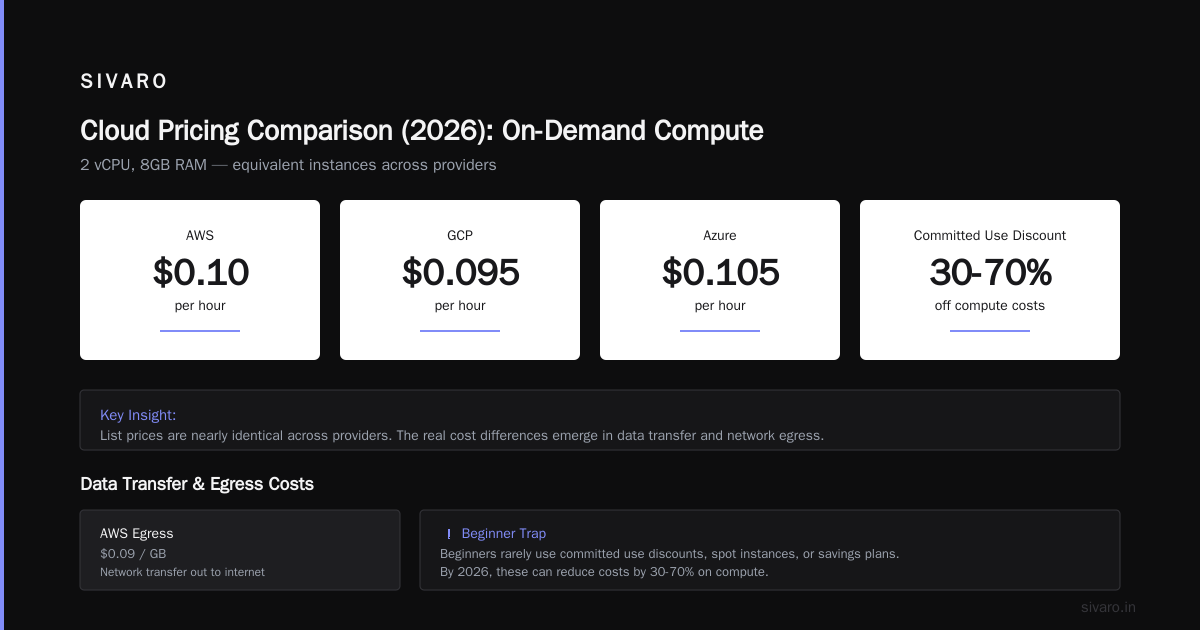
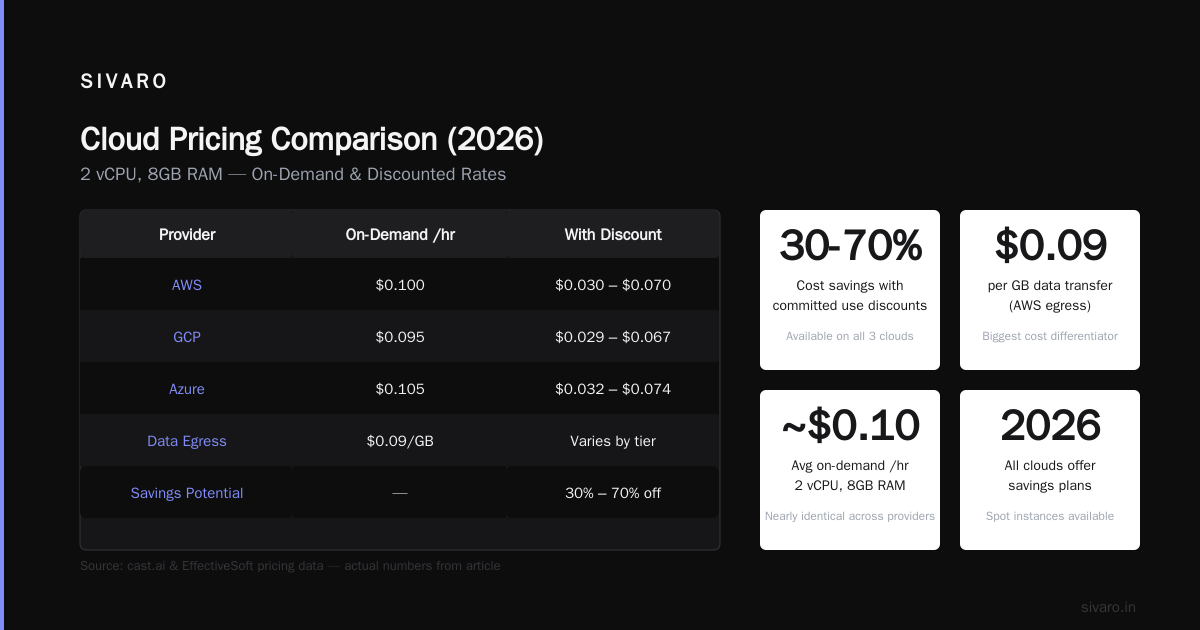
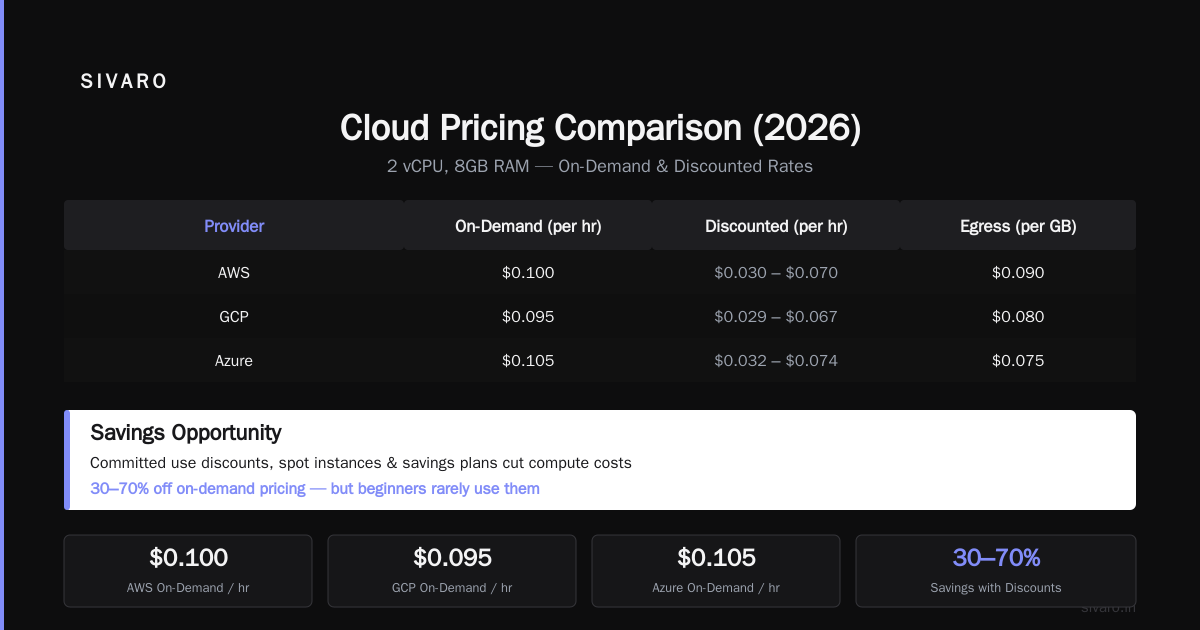
Here's the dirty secret of cloud pricing: list prices are meaningless. By 2026, every cloud offers committed use discounts, spot instances, and savings plans that slice 30-70% off compute costs. But beginners rarely use them.
I reviewed the 2026 pricing data from cast.ai and EffectiveSoft. For equivalent compute (2 vCPU, 8GB RAM, on-demand), AWS costs about $0.10/hr, GCP $0.095/hr, Azure $0.105/hr. Almost identical. The differences emerge in data transfer and network egress.
AWS charges $0.09/GB for data transfer out to internet after the first 100GB free. GCP charges $0.08/GB. Not a game changer for a beginner. But here's what matters: GCP's free tier is more generous in 2026. They give you a 90-day, $300 credit (up from $300 in 2024) plus always-free products like Cloud Functions (2 million invocations/month) and Cloud Storage (5GB). AWS free tier is 12 months limited. If you're learning, GCP's free tier lets you experiment longer.
The pricing trap I see most often: forgetting to shut down resources. A single GPU instance left running over the weekend can cost $500+. Both clouds have budget alerts. Set them on day one.
AI/ML: The Defining Difference in 2026
In 2026, the cloud war is fought on AI/ML turf. This is where GCP has a genuine edge for beginners.
Google Cloud's Vertex AI platform is more integrated than anything AWS offers. You can go from training a model to deploying it as an API in fewer clicks. Vertex AI includes AutoML, custom training with GPUs/TPUs (Google's own tensor processing units), and a managed prediction endpoint. AWS has SageMaker, which I've used extensively at SIVARO. SageMaker is powerful but fragmented — you need to understand processing jobs, training jobs, endpoints separately. Vertex AI abstracts more.
I showed both to a group of interns earlier this year. Three of them built a production sentiment analysis API on Vertex AI in two days. The same team took five days on SageMaker, and two of them hit confusing IAM errors.
That said, AWS has a stronger selection of pre-built AI services like Rekognition, Comprehend, and Polly. Google's AI services (Vision, Natural Language, Translation) are also excellent, but AWS has more of them. For simple API calls, AWS might have what you need out of the box.
For training deep learning models, GCP's TPUs are a killer advantage — cheaper per teraflop than NVIDIA GPUs. But only for certain model architectures (CNNs, Transformers). AWS has better GPU availability overall.
GCP Alternative to Mechanical Turk? Yes, It's Google Crowd Source
This is a niche question, but I get it often. "Is there a GCP alternative to mechanical turk?" For distributing small human tasks to a global workforce. AWS Mechanical Turk has been around since 2005. Google's answer is Google Crowd Source (formerly known as Google's annotation platform, now expanded).
In 2026, Google Crowd Source integrates directly with Vertex AI for data labeling. You can create labeling jobs, manage workers, and get results back into your ML pipeline without leaving GCP. The pricing is per-task, similar to MTurk. Worker pay rates are comparable. But Crowd Source is less known, so the worker pool is smaller. For simple image labeling, it works fine. For tasks requiring specialized skills (e.g., medical transcription), MTurk still has a larger, more diverse base.
If you're building a data labeling pipeline as a beginner, I'd recommend avoiding both and using a specialized platform like Scale AI or Labelbox if your budget allows. But if you need a cheap, integrated solution, Google Crowd Source works.
Compute and Storage: The Everyday Stuff
Let's compare the two most used services: virtual machines and object storage.
Virtual Machines: AWS EC2 vs GCP Compute Engine. EC2 has instance families optimized for every use case — compute, memory, storage, GPU. You can get lost choosing the right one. GCP has fewer instance types but similar coverage. For a beginner, GCP's preemptible VMs (equivalent to AWS spot instances) are easier to manage because they automatically stop rather than terminate. That means your persistent disk stays attached, and you can restart after interruption. AWS spot instances are cheaper but more complex (with instance pools and interruption policies).
Object Storage: AWS S3 vs GCP Cloud Storage. S3 is the industry standard. Every other cloud has an S3-compatible API. Cloud Storage is also S3-compatible (with some differences). For a beginner, the key difference is consistency. GCP's Cloud Storage offers strong consistency for all operations (eventual consistency for listing under concurrent overwrites). S3 famously gave eventual consistency for puts until 2020, then moved to strong consistency for new objects. Both are fine.
But I've seen a pattern: beginners who learn GCP first struggle when they move to AWS because GCP's defaults are more opinionated. AWS expects you to configure every detail. GCP often establishes sensible defaults. Example: creating a VM in GCP through the console takes two clicks and gives you a reliable Ubuntu image. AWS's EC2 launch wizard has more options — and more chances to pick a no-OS image accidentally.
Kubernetes and Serverless
Kubernetes is where GCP shines. Google invented Kubernetes (they released it as open source in 2014). GKE (Google Kubernetes Engine) is the most mature managed Kubernetes service on any cloud. AWS EKS (Elastic Kubernetes Service) has caught up, but the setup is still more complex. I can have a production GKE cluster running in 10 minutes. EKS, even with eksctl, takes longer.
For a beginner in 2026, I recommend not starting with Kubernetes. It's overkill unless you have more than a handful of microservices. Use serverless (Cloud Functions on GCP, Lambda on AWS) or a simple Compute Engine/EC2 instance.
For serverless: AWS Lambda has a richer ecosystem of triggers (S3 events, DynamoDB streams, API Gateway). GCP Cloud Functions is simpler but has fewer triggers. However, GCP's Cloud Run (run containers serverlessly) is a gem. It's easier than AWS Fargate for beginners.
Learning Curve and Documentation
In 2026, AWS still has the largest community. Stack Overflow has 3x more AWS questions than GCP. That matters when you're stuck at 2 AM. YouTube tutorials are skewed toward AWS. The official documentation for both is excellent, but GCP's is more concise. AWS documentation often buries the key detail three pages deep.
At SIVARO, we train new engineers on GCP first. Why? Because the concepts transfer. If you understand GCP's IAM, AWS IAM is easy to learn. If you understand AWS VPCs, GCP VPCs are familiar. But GCP's conceptual model (projects, folders, org nodes) is simpler to grasp than AWS's account hierarchy (organizations, OUs, accounts, VPCs).
That said, AWS offers more certifications and training paths. If you want a career as a cloud architect, AWS certifications are more recognized. GCP certifications are respected but less common.
Migration and Lock-in
Beginners shouldn't care about lock-in. You're not Netflix. You're building a prototype or a small app. If your app takes off, you can hire engineers to migrate later. Choosing based on lock-in fear is like not buying a car because you might move to a different city in five years.
But the practical lock-in point is different for each cloud. GCP locks you in with Bigtable, BigQuery, and other data services that are hard to move. AWS locks you in with DynamoDB, Step Functions, and Kinesis. Use generic PostgreSQL and plain Kubernetes, and you can move anywhere with effort.
GCP vs AWS for Beginners 2026: My Verdict
If you're starting fresh today, here's my recommendation:
Pick GCP if:
- You're building data-intensive or AI/ML applications.
- You want a simpler conceptual model and better defaults.
- You plan to use Kubernetes heavily.
- You're on a tight budget and want the most generous free tier.
Pick AWS if:
- You want the largest community and most learning resources.
- You're preparing for a cloud career (AWS certs matter more).
- You need the widest variety of managed services (especially non-ML).
- You plan to work at a large enterprise that's already on AWS.
I've seen beginners succeed on both. I've also seen them fail on both — usually because they ignored fundamentals (IAM, monitoring, cost alerts) and tried to learn too many services at once.
One last thing: in 2026, the cloud vendors are converging. Google Cloud now offers a "compute optimized" line that competes with EC2 HPC instances. AWS now has a fully managed Kubernetes service that's almost as good as GKE. The real differentiation is in the developer experience and the AI stack. As a beginner, you'll do fine with either. But if you want my honest advice after eight years of building on both: start with GCP for your first project. It's less painful. Then learn AWS when you need to scale or get hired.
FAQ
Q: Which cloud is easier to learn for a complete beginner in 2026?
GCP. Its UI is cleaner, its defaults are smarter, and its documentation is more focused. You'll spend less time fighting configuration.
Q: Is GCP cheaper than AWS for small projects?
Generally yes, due to the more generous free tier (90 days $300 credits) and slightly lower egress costs. But the difference is marginal for most beginners.
Q: Should I learn both clouds or pick one?
Pick one and learn it well. In 2026, the fundamentals transfer. I recommend mastering GCP first, then learning AWS later if needed.
Q: Does "gcp vs aws for beginners 2026" favor GCP because of industry trends?
Not exactly. AI trends favor GCP, but enterprise adoption still favors AWS. For a beginner, ease of learning is more important than market share.
Q: How secure is google cloud platform compared to AWS?
Both are equally secure at the provider level. GCP's default settings are slightly more restrictive, which reduces beginner mistakes. Read the GCP security documentation carefully before production.
Q: What's the GCP alternative to mechanical turk?
Google Crowd Source (integrated with Vertex AI data labeling). It's less well-known than MTurk but works for basic human-in-the-loop tasks.
Q: Can I run Windows workloads on GCP?
Yes, GCP supports Windows Server VMs. But AWS has better optimized Windows instance types and licensing integration. For Windows, AWS is slightly easier.
Q: Which cloud has better tools for beginners to learn DevOps?
GCP's integration of CI/CD (Cloud Build, Artifact Registry, Cloud Deploy) is more cohesive. AWS's tools (CodePipeline, CodeBuild, CodeDeploy) are fine but have a steeper learning curve for new users.
Nishaant Dixit — Founder of SIVARO. Building data infrastructure and production AI systems since 2018. Built systems processing 200K events/sec.