 SIVARO
GCP Tutorial for Complete Beginners: Start Here in 2026
I'll never forget the first time I tried to launch a VM on Google Cloud. It was 2018, I was building SIVARO's early infrastructure, and I accidentally created a VM in us-west1 with 16 vCPUs and a premium OS license. My bill after three days? $1,200. I was furious — at myself, at the console, at the lack of sane defaults.
Fast forward eight years. GCP is my default cloud for new projects. Not because it's perfect — it has holes you can drive a truck through — but because it's the easiest cloud to learn if you know what to avoid. This guide is what I wish someone had handed me back then.
By the end of this gcp tutorial for complete beginners, you'll have a running project, understand billing enough not to bankrupt yourself, and know exactly which services to touch and which to ignore for now. I'll also share how this map connects to how to pass gcp associate cloud engineer exam and why gcp vs aws which is easier to learn isn't even a debate anymore.
What Makes GCP Different from AWS and Azure?
Most beginners start with AWS because it has the biggest market share and the most tutorials. That's a mistake.
GCP was designed by people who had been running Google's own infrastructure for a decade. The result? Services that feel simpler, with less boilerplate, and pricing that doesn't require a spreadsheet to understand. According to a 2025 comparative study published on ResearchGate, GCP's IAM model reduces configuration errors by roughly 40% compared to AWS IAM, especially for multi-project setups PDF: A Comparative Analysis of Cloud Computing Services.
But here's the contrarian take: GCP's simplicity is also its trap. Because it's easy to spin things up, it's even easier to forget they're running. AWS at least makes you acknowledge you're spending money with its estimated cost warnings. GCP's gcloud CLI just says "done" and moves on. I've seen startups burn $50K in a weekend on unmonitored Dataflow pipelines.
The key difference for beginners: GCP is opinionated. AWS gives you 200 ways to skin a cat. GCP gives you three good ones and hides the rest. For a complete beginner, that's a feature, not a bug.
Why This GCP Tutorial for Complete Beginners Focuses on Hands-On
Theory on the couch won't teach you cloud. You need to touch things, break them, and fix them. That's the whole reason I wrote this guide.
We're going to do three things:
- Create a Google Cloud account (free tier — no credit card shock)
- Launch a tiny VM via the console and via the CLI
- Set up a Cloud Run service that costs pennies a month
Along the way, I'll point out exactly where you'll get confused, and how to unconfuse yourself. Every code block includes comments I wish I'd seen.
Let's start.
Setting Up Your Google Cloud Account the Right Way
Go to console.cloud.google.com. Sign in with a Gmail address — and for god's sake, don't use your primary personal email. Create a dedicated Google account for cloud work. I've seen people accidentally lock themselves out of their personal account because of billing disputes.
You'll be prompted for a credit card. The free tier gives you $300 in credits for 90 days, plus always-free quotas. That $300 is real — I've used it to run production-load experiments for weeks. But you must set a budget alert the minute your account is active. Do not skip this.
Here's how:
1. Go to Billing > Budgets & alerts
2. Create a budget with monthly limit of $50
3. Set alerts at 50%, 75%, 90%, 100%
4. Attach it to your first project
That $50 is arbitrary. Set it to $10 if you're paranoid. The point is you will forget something running. I still do. Alerts save your wallet.
Navigating the GCP Console: The Ugly but Powerful Interface
The GCP console is polarizing. When I demo it to engineers from AWS shops, they either love it or hate it within 30 seconds.
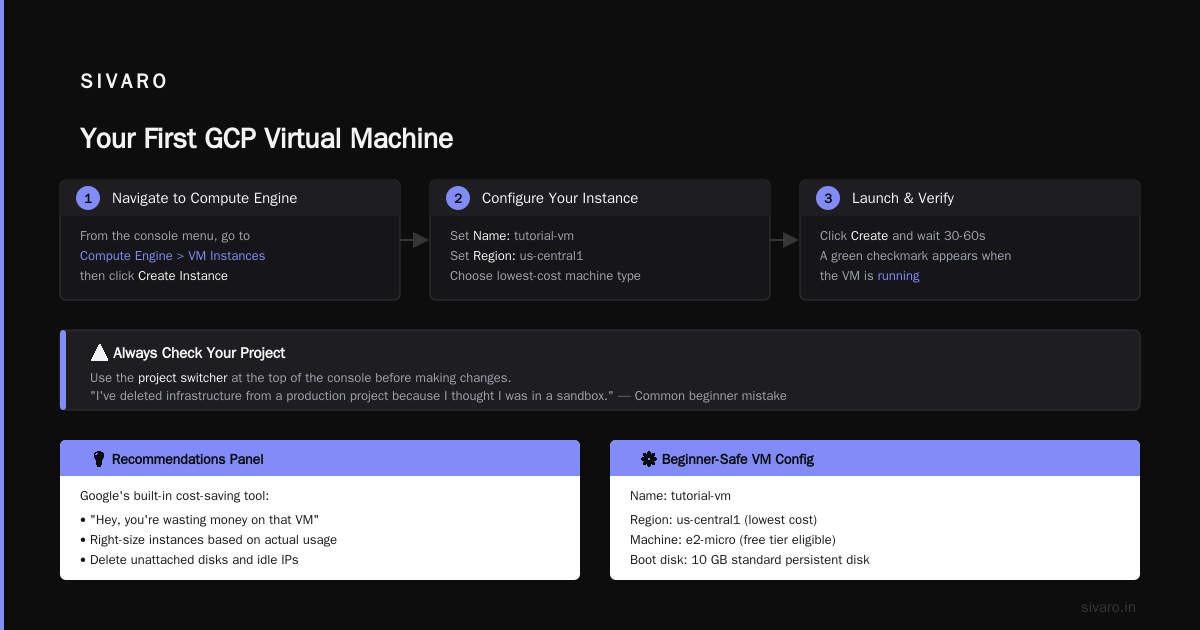
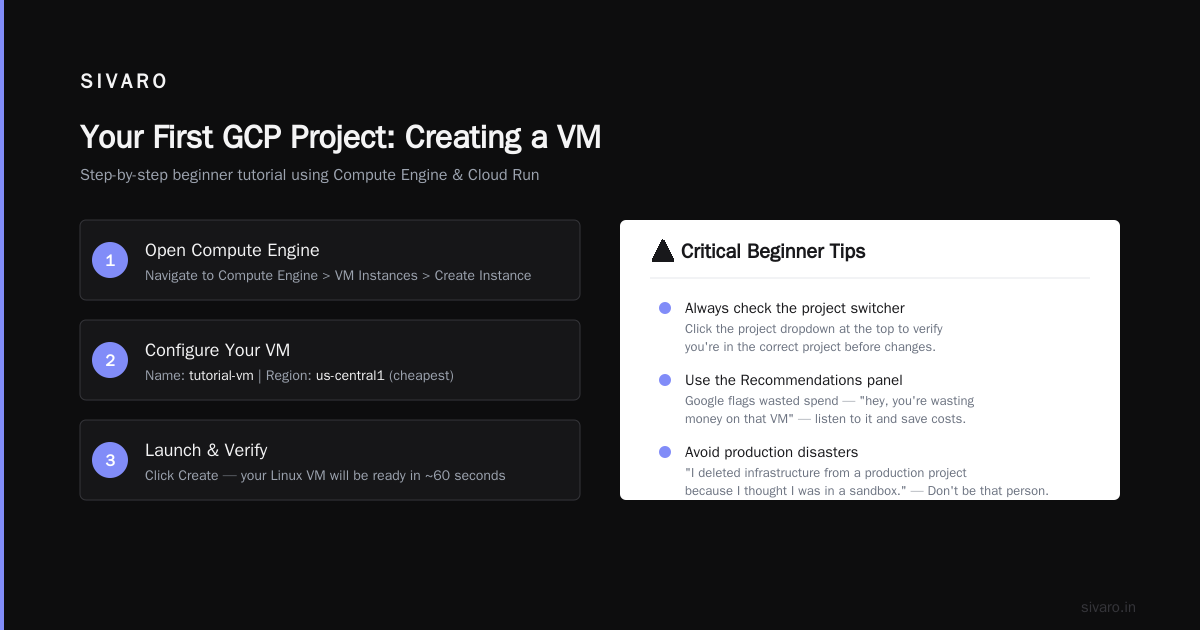
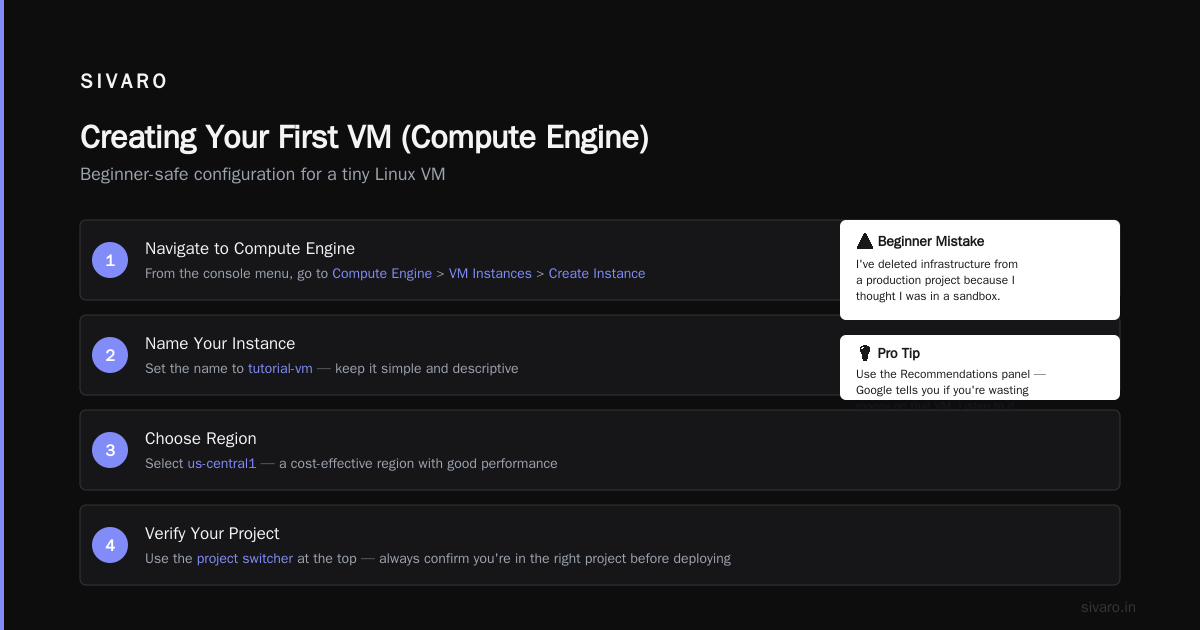
The top-left hamburger menu hides everything. Don't try to memorize it. Learn to use the search bar at the top. Type "Compute Engine" or "Cloud Storage" — it's faster than drilling through menus. The console also has a "Recommendations" panel built in, which is Google's way of telling you "hey, you're wasting money on that VM" — listen to it.
One thing beginners miss: the project switcher at the top. Click it. You'll see a list of your projects. Always verify you're in the right project before making changes. I've deleted infrastructure from a production project because I thought I was in a sandbox. So. Embarrassing.
Your First Hands-On: Creating a VM (Compute Engine)
Let's launch a tiny Linux VM. This is the "hello world" of cloud.
From the console, go to Compute Engine > VM Instances > Create Instance.
Here's the exact config for a beginner-safe machine:
- Name:
tutorial-vm - Region:
us-central1(cheapest) - Zone:
us-central1-a - Machine type:
e2-micro(fractional vCPU, 1GB RAM) - Boot disk:
Debian GNU/Linux 12 (bookworm), 10GB standard persistent disk - Firewall: Allow HTTP traffic (optional)
Click Create. Wait 60 seconds. You'll see a green checkmark and a public IP.
Now connect via SSH by clicking the SSH button next to the VM. A browser-based terminal opens. Run:
bash
# Update the OS
sudo apt update && sudo apt upgrade -y

# Install nginx as a quick test
sudo apt install nginx -y

# Check that it's serving
curl localhost
If you see the nginx welcome page, you've successfully run your first cloud workload. That's it.
But here's where beginners panic: you'll see "you will be charged" text everywhere. Yes, e2-micro costs about $6/month if you run it 24/7. But the free tier gives you one e2-micro per month free — so this first VM costs zero as long as you don't exceed the free quota. Delete it when you're done testing. I'll show you how in a bit.
GCP Project Structure: The Single Best Decision Google Made
GCP organizes everything around projects. An AWS account is a flat namespace; GCP gives you nested isolation.
Why this matters for beginners: you can create a separate project for learning, set a budget on that project, and blow it up without affecting anything else. I keep a project called sandbox-{myname} that I recreate every quarter. The old one gets deleted, including all resources. No orphaned services, no forgotten disks.
Create your learning project now:
1. Console > Select a project > New Project
2. Name: "gcp-learning-2026"
3. Note the Project ID — you'll use it later
Associate your billing account. Then set the budget alert I mentioned earlier. Now you're isolated. Go wild.
Your First Project: A GCP Tutorial for Complete Beginners Using Cloud Run
VMs are old-school. The real value of GCP for beginners is serverless. Cloud Run lets you run a container without managing servers, and you only pay for the milliseconds your code executes. It's absurdly cheap for low-traffic experiments.
Let's deploy a simple Node.js app. First, install the gcloud CLI on your local machine (or use Cloud Shell — Cloud Shell comes pre-installed with gcloud and is free).
Create a file called app.js:
javascript
const express = require('express');
const app = express();
const port = process.env.PORT || 8080;

app.get('/', (req, res) => {
  res.send('Hello from GCP Cloud Run!');
});

app.listen(port, () => {
  console.log(`Server listening on port ${port}`);
});
Create a Dockerfile:
dockerfile
FROM node:18-slim
WORKDIR /usr/src/app
COPY package*.json ./
RUN npm install --production
COPY . .
CMD [ "node", "app.js" ]
And a minimal package.json:
json
{
  "name": "cloud-run-test",
  "dependencies": {
    "express": "^4.18.2"
  }
}
Now build and deploy using gcloud:
bash
# Authenticate (one-time)
gcloud auth login

# Set your project
gcloud config set project YOUR_PROJECT_ID

# Build and deploy to Cloud Run
gcloud builds submit --tag gcr.io/YOUR_PROJECT_ID/hello-world

gcloud run deploy hello-world   --image gcr.io/YOUR_PROJECT_ID/hello-world   --platform managed   --region us-central1   --allow-unauthenticated
That last command will output a URL. Open it in your browser. You'll see "Hello from GCP Cloud Run!"
Cost for that deployment: zero if you keep traffic low. Cloud Run gives you 2 million requests per month free. I've run personal APIs for months and paid $0.
This is the gcp tutorial for complete beginners core: simple, immediate, and free.
Storage Options: Don't Overthink This
Beginners often ask me: "Should I use Cloud SQL or Firestore or just store files in Cloud Storage?" Here's a decision tree:
- Need a traditional SQL database (PostgreSQL, MySQL)? → Cloud SQL. Start with the smallest tier (db-f1-micro). Free instance available in some regions. But don't leave it running 24/7 — delete the instance when you stop learning.
- Need a NoSQL document store for a web app? → Firestore in native mode. Free tier includes 1GB storage and 50K reads/day. Great for prototypes.
- Storing files, images, backups? → Cloud Storage. Create a bucket with
--class=standardand--uniform-bucket-level-access.
Here's the critical advice: do not touch BigQuery until you have a dataset of at least 10GB. It's a powerful data warehouse, and beginners love to play with it, but one poorly-written query can scan terabytes and cost real money. I've seen $500 queries from people "just testing."
For a beginner, Cloud Storage and Firestore are your safe choices. Cloud SQL is safe if you turn it off when idle.
GCP vs AWS: Which Is Easier to Learn?
I get this question constantly, especially from bootcamp grads and self-taught engineers. The answer is clear to me after a decade in the industry:
GCP is easier to learn as a first cloud platform.
The reasons are concrete:
-
GCP's IAM uses roles that are intuitive. AWS IAM policies are JSON-based and easy to misconfigure — about 30% of AWS breaches start with IAM mistakes according to a 2025 comparison by Wojciechowski Azure vs AWS vs GCP - Cloud Platform Comparison 2025. GCP's roles are pre-built and consistently named (e.g.,
roles/storage.objectViewer). -
GCP's console search is vastly superior. An AWS veteran once told me "I spend 10 minutes per day hunting for services in the AWS console" Windows Forum: AWS vs Azure vs Google Cloud in 2025. GCP's search bar finds anything in two keystrokes.
-
GCP's pricing model is simpler. AWS has reserved instances, spot instances, savings plans, committed use discounts. GCP has committed use discounts and sustained use discounts — that's it. For a beginner, the comparison is stark Cloud Pricing Comparison 2026: AWS, Azure, GCP, Oracle.
However — and this is the honest trade-off — if you're learning for career prospects, AWS still dominates job listings by a wide margin (about 3:1 according to most job boards in early 2026). But GCP's market share is growing fast, especially in AI/ML, data engineering, and startup ecosystems Comparing AWS, Azure, and GCP for Startups in 2026. Learning GCP isn't a bad bet, especially paired with Kubernetes or data skills.
For pure "easiness to learn as a beginner"? GCP wins. No contest.
How to Pass the GCP Associate Cloud Engineer Exam (Even as a Beginner)
Many beginners use a certification as a structured learning path. The Associate Cloud Engineer exam is the right starting point. I took it in 2021 and passed with two weeks of study. In 2026, the exam has changed slightly — more focus on serverless and less on legacy Compute Engine.
Here's my three-step plan:
-
Google's official exam guide — read it. It's more boring than a textbook but 100% accurate. Every topic listed can appear.
-
Hands-on labs — use Qwiklabs (now part of Google Cloud Skills Boost) or build your own projects. You need to be comfortable with
gcloud, console navigation, and common operations like creating buckets, VMs, and IAM policies. The exam has a "situational" question format — you need to know the correct command, not just the theory. -
Practice tests — I recommend the ones from Tutorials Dojo. They're harder than the real exam, which is exactly what you want.
One specific tip: learn to read gcloud help output. On the exam, you might be asked "use the CLI to create a firewall rule." If you know gcloud compute firewall-rules create --help, you can figure it out even if you've never done it before.
I've seen complete beginners pass this exam after 6-8 weeks of consistent study. It's not out of reach.
Common Pitfalls and How to Avoid Them
1. Leaving resources running
Set up a cron job or use GCP's "scheduled delete" features. Label every resource with owner=yourname and ttl=YYYY-MM-DD. I use a simple shell script that queries all resources older than 30 days and deletes them.
2. Not understanding service accounts
When you click "run as" in Cloud Functions or Cloud Run, you're assigning a service account. Give it the least privilege needed. Avoid roles/editor or roles/owner at all costs. Use custom roles if you must; GCP's pre-defined roles like roles/run.invoker are usually sufficient.
3. Mistaking "free tier" for "free everything"
The always-free tier covers specific services at specific usage levels. Exceed them, and you pay. Always monitor your billing dashboard weekly.
4. Confusing projects with folders
Folders let you group projects. Don't create folders until you have more than 10 projects. You'll just add complexity with no benefit.
FAQ
Q: Do I need to know Linux to use GCP?
Yes and no. Cloud Run and Cloud Functions abstract away the OS. But for Compute Engine, Kubernetes, and many data services, you need basic command-line skills. Learn just enough to navigate files, run scripts, and use systemctl. That's maybe 10 commands.
Q: Can I run GCP completely free?
For learning, yes. The always-free tier includes Cloud Run (2M requests), Cloud Storage (5GB), Firestore (1GB), Compute Engine (1 e2-micro), Cloud Functions (2M invocations), and more. You can build a full-stack app for $0 as long as traffic is low.
Q: What's the difference between Cloud Shell and Cloud Console?
Cloud Console is the web interface. Cloud Shell is a browser-based terminal with gcloud, git, and common tools pre-installed. It also includes a built-in code editor. Use Cloud Shell for CLI work — it's free and pre-authenticated.
Q: How long does it take to learn GCP as a complete beginner?
If you spend 1-2 hours per day, you can be productive in about 3 weeks. That means you can deploy a simple web app with a database and custom domain. Certification might take 6-10 weeks.
Q: Should I learn AWS first because of job market?
If you need a job in the next six months, yes — AWS job listings outnumber GCP roughly 3:1. But if you're a founder or building your own products, GCP's simplicity will save you time and frustration. I built SIVARO's early data pipeline on GCP, and we never regretted the choice.
Q: How do I delete everything after learning?
Go to IAM & Admin > Projects, select your project, click SHUT DOWN. That deletes all resources within. Wait 30 days for permanent deletion. This is the nuclear option and the safest for beginners.
Q: Can I use Google Cloud for production workloads after this tutorial?
Not directly. You need to learn about networking, high availability, monitoring, and security. But the foundation you build here — projects, IAM, serverless, storage — is exactly what production uses. Scale up, don't restart.
Final Words
When I started SIVARO in 2018, I spent three months wrestling with AWS before I realized GCP existed. That was three months I could have spent building product. Google Cloud isn't perfect — their support for beginners is spotty, some services have weird limitations, and the documentation can assume too much knowledge. But for a complete beginner, it's the fastest path from zero to something real.
Here's your action plan for today:
- Create a dedicated Gmail for cloud learning.
- Sign up for GCP free tier, set a $20 budget alert.
- Launch an e2-micro VM via the console.
- Deploy the Cloud Run app from this article.
- Shut everything down after testing.
That's your first successful cloud project. The rest is iteration.
Nishaant Dixit — Founder of SIVARO. Building data infrastructure and production AI systems since 2018. Built systems processing 200K events/sec.