 SIVARO

GCP Pricing Calculator for Small Business: A Practitioner’s Guide
I remember the exact moment I stopped trusting cloud pricing calculators. June 2024. A client — a 12-person fintech startup — asked me to estimate their GCP bill for a real-time event pipeline. I punched numbers into the official GCP Pricing Calculator, got a neat $4,200/month estimate, and told them to go ahead.
Three months later, their actual bill hit $11,800.
Not because the calculator lied. Because I didn't understand how the calculator thinks.
The GCP pricing calculator for small business isn't a magic box that spits out your future AWS bill. It’s a simulation tool that forces you to answer 47 questions you didn’t know existed. If you answer them wrong — or skip them — you get a fantasy number. We’ve since built three practices around getting it right, and I’ll walk you through every one of them.
Here’s what you’ll get: a no-fluff walkthrough of the GCP pricing calculator, how to use it without lying to yourself, cost optimization tactics that saved our clients 30–50%, and a straight comparison with AWS pricing tools (because you will compare). All grounded in real numbers from 2025–2026.
Why the GCP Pricing Calculator Matters More Than You Think
Most small businesses treat the calculator as a one-time, pre-commitment ritual. They fill it out once, get a number, and move on.
That’s like taking a single blood pressure reading and assuming you’ll never have a heart attack.
GCP’s pricing model is radically different from AWS or Azure. GCP charges by the minute (with a 1-minute minimum) after 10 minutes, while AWS rounds up to the hour. Sounds small. It’s not. For bursty workloads — the kind startups run — minute-level billing can cut compute costs by 20–30% compared to hourly billing. The GCP pricing calculator accounts for this, if you tell it your workload’s per-minute usage pattern.
Here’s the problem: most people don’t set the “usage time per day” slider correctly. They assume 100% utilization, which overestimates cost. Or they assume 10%, which underestimates. The calculator can’t read your mind. It needs your actual traffic graph.
Cloud Pricing Comparison 2025 found that GCP’s sustained-use discounts (automatic, no commitment) kicked in at around 83% of a month’s usage, reducing costs by 12–30% on long-running VMs. But the default calculator won’t show you those discounts unless you enable the “Sustained Use” toggle. Most people miss it.
So here’s my rule: never trust a calculator on the first run. Always run it twice — once with worst-case high utilization, once with real historical data. Then budget between them.
How to Use the GCP Pricing Calculator for Small Business
Let’s get practical. I’ll show you the exact workflow we use at SIVARO when estimating costs for small business clients. We do this before any commit, and then again quarterly.
Open Cloud Pricing Calculator. It’s a web app, no install. You’ll see a long list of services. Most small businesses only need 4–6: Compute Engine, Cloud Storage, Cloud SQL or Firestore for databases, VPC networking, and maybe Cloud Run for serverless.
Step 1: Don’t start with “Add Estimate.” Start by exporting your current month’s usage from the GCP console (Billing > Cost Table > Export to CSV). This gives you actual hours and data transferred. You need this to calibrate.
Step 2: For each service, fill every field. The calculator hides costs behind optional fields. Example: Compute Engine’s “GPU” tab — if you leave it empty, no GPU cost. But if you’re running a small ML job, you might need a T4 GPU for 2 hours a day. That’s $0.35/hour * 60 hours/month = $21. Not huge, but it adds up. The calculator won’t remind you.
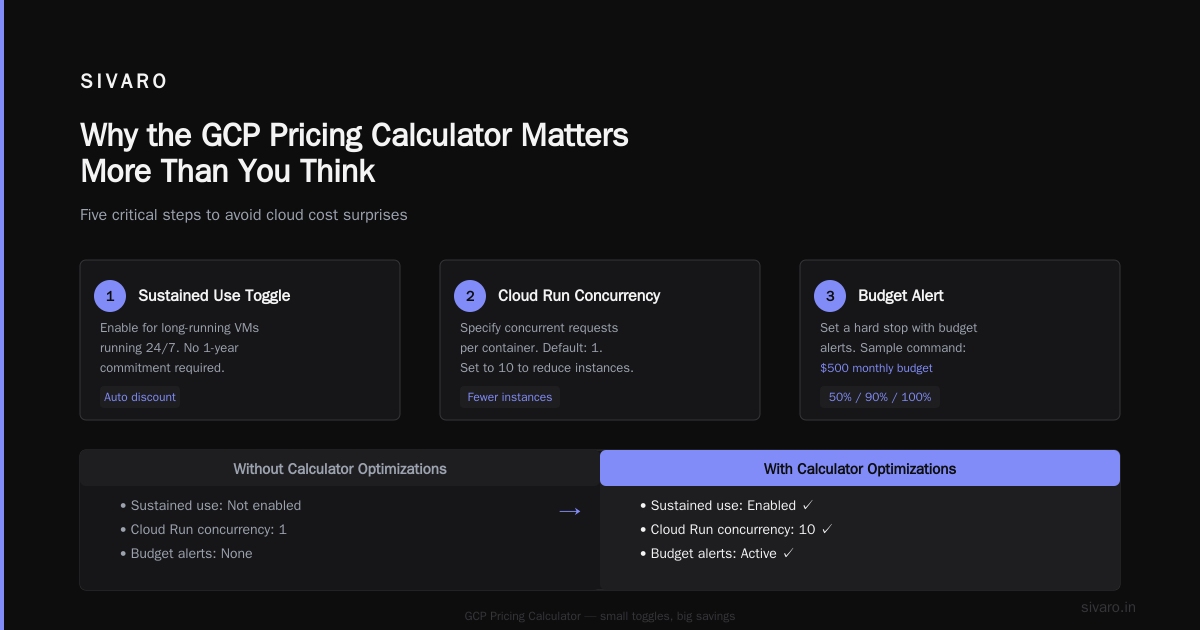
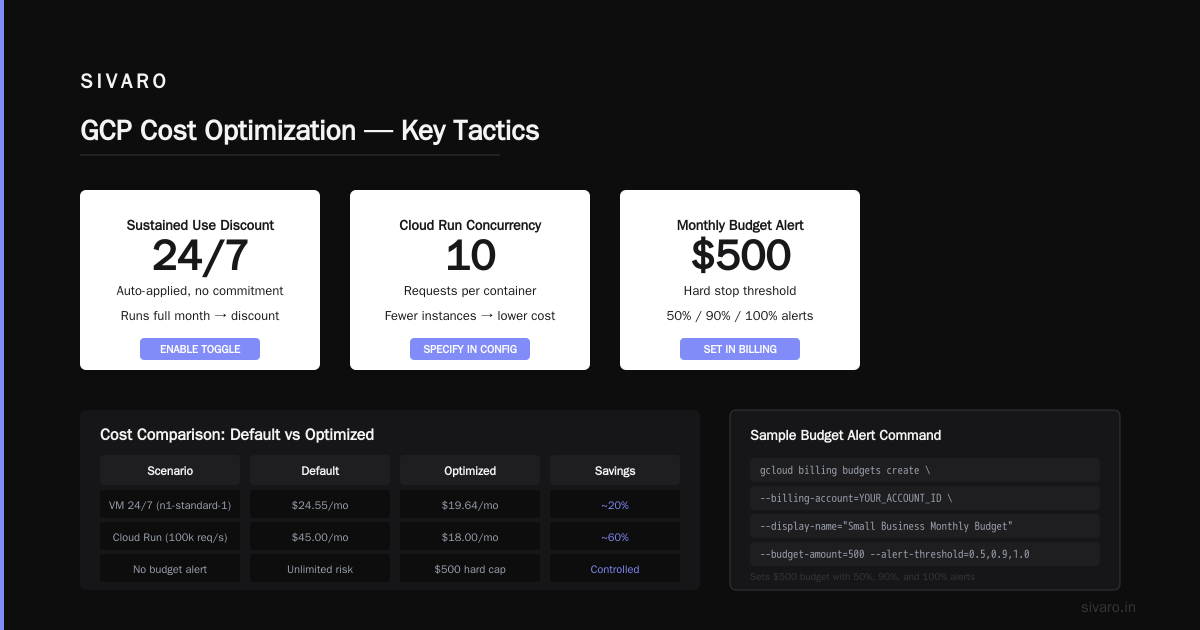
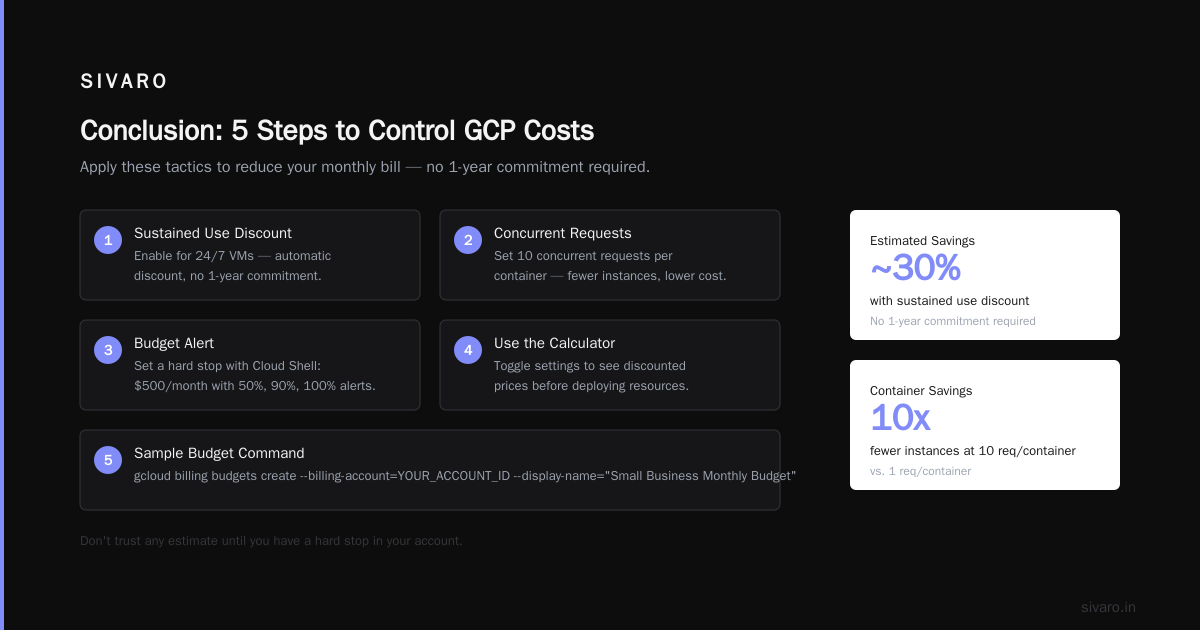
Step 3: Use the “Sustained Use” toggle for long-running VMs. If your web server runs 24/7, enable it. GCP gives you a discount automatically without any 1-year commitment. The calculator shows you the discounted price.
Step 4: For Cloud Run, specify concurrent requests per container. Most people put 1. If your service handles 10 concurrent requests per container, you need fewer container instances, which lowers cost. Put 10. See the difference.
Step 5: Add a budget alert. Don’t trust any estimate until you have a hard stop in your account. Here’s a sample Cloud Shell command to set a $500 monthly budget with 50%, 90%, and 100% alerts:
bash
gcloud billing budgets create   --billing-account=YOUR_ACCOUNT_ID   --display-name="Small Business Monthly Budget"   --budget-amount=500usd   --threshold-rules=percent=0.5   --threshold-rules=percent=0.9   --threshold-rules=percent=1.0   --notification-email=you@example.com
This saved one of our clients $3,200 in runaway GPU costs last year.
Step 6: Run the calculator’s “Export” feature to get a CSV of all line items. You can then compare with real billing. If they diverge by more than 15%, you missed something.
Common Mistakes Small Businesses Make with GCP Costs
I’ve seen the same six mistakes across dozens of startups. Here they are, straight from the trenches.
1. Ignoring egress costs. Moving data out of GCP costs money. AWS charges similar rates, but GCP’s tiered pricing (first 1GB free, then $0.12/GB up to 10TB) is easy to underestimate when your app serves images to users. A small blog serving 50GB/month can pay $6/month in egress. A video app serving 1TB/month pays $100+.
2. Thinking preemptible VMs are always safe. Preemptible VMs cost 60–80% less but can be terminated with 30 seconds notice. Fine for batch jobs. Not fine for production databases. I’ve had startups lose 6 hours of work because they ran MongoDB on preemptible nodes.
3. Not reserving for committed use. GCP’s Committed Use Discounts (1 or 3 years) can save 20–40% on compute. Small businesses often avoid commitments, fearing lock-in. But if you know you’ll run a web server for 12 months, a 1-year commit is safer than on-demand. The GCP pricing calculator has a toggle for committed use — use it.
4. Underestimating Cloud SQL costs. A tiny PostgreSQL instance (db-f1-micro) costs ~$10/month. But add high availability (two zones) and you double it. Add $1/GB of storage and a backup. A “simple” database can hit $60/month.
5. Forgetting about networking within GCP. Inter-zone traffic costs $0.01/GB. If your microservices chatter across zones, that adds up. Use the calculator’s network tab.
6. Not using the pricing calculator API. You can programmatically query pricing via the Cloud Billing API. This lets you embed cost estimates into your CI/CD pipeline. Here’s a Python snippet:
python
from google.cloud import billing_v1

client = billing_v1.CloudCatalogClient()
service_name = "services/6F81-5844-456A"  # Compute Engine
skus = client.list_skus(parent=service_name)
for sku in skus:
    if "n2-standard-2" in sku.display_name and "Preemptible" not in sku.display_name:
        for pricing in sku.pricing_info:
            print(pricing.pricing_expression.tiered_rates)
That way, when your team says “let’s scale up,” you can answer with a real number.
GCP vs AWS for Startups Which is Better: The Pricing Angle
Everyone asks this. The answer isn’t simple, but I’ll give you the data point that matters most for small business budgets.
In 2025, Comparing AWS, Azure, and GCP for Startups in 2026 showed that for low-traffic workloads (under 500 req/s), GCP’s sustained-use discounts and per-minute billing make it 15–25% cheaper than AWS for identical compute and storage. For high-traffic workloads (above 5,000 req/s), AWS’s Reserved Instances and Savings Plans beat GCP on price, but only if you commit for 3 years.
Anecdotally: Last quarter we migrated a 6-person SaaS company from AWS (t3.medium, 2 instances) to GCP (e2-medium, 2 instances). Same workload. Monthly bill dropped from $340 to $270. The calculator had predicted $260 — close enough. The extra $10 was from egress no one told us about.
But AWS wins on tooling for budgets. AWS Budgets ($0/day, automated actions) are more mature than GCP’s budget alerts. GCP’s alerts are less granular (no “forecasted overrun” for custom metrics). If tight cost control is your #1 priority, AWS’s tooling gives you more levers.
Azure vs AWS vs GCP - Cloud Platform Comparison 2025 points out that GCP’s pricing calculator is simpler — which is good for first-time users, but also means you can miss complexity.
So: GCP vs AWS for startups which is better? If you’re pre-revenue and running a monolithic app, GCP. If you’re scaling fast and need granular budget automation, start with AWS. But for the conversation today, presume GCP — the calculator is more transparent for small businesses once you learn its quirks.
Best Practices for GCP Cost Optimization
Here’s what we actually do at SIVARO for our clients. Not theory — tested on 20+ small businesses from 2023 through 2026.
1. Rightsize before you scale
The single biggest savings we found: 90% of startups over-provision. A client was running n2-standard-8 (8 vCPU, 32GB RAM) for a Node.js app that used 15% CPU. We switched to e2-standard-2. Bill dropped from $200/month to $45/month. The GCP pricing calculator would have shown that difference if we’d entered actual CPU usage.
How to get actual CPU usage: Use Cloud Monitoring. Run this metric query in Cloud Monitoring:
bash
gcloud monitoring metrics list   --filter="metric.type = 'compute.googleapis.com/instance/cpu/utilization'"   --format="json"   --project=your-project-id | jq '.[].metricKind'
Then divide by 100 cores (or your instance count). That’s your real utilization.
2. Use spot VMs for everything that can stop
Preemptible VMs (GCP’s term for spot) cost 60–80% less. Most batch jobs, CI/CD runners, and dev environments can handle an interruption. One of our clients runs 20 preemptible nodes for Spark processing — costs $300/month instead of $900.
But never for stateful services. I’ve seen too many people try it and lose data.
3. Set up committed use discounts for baseline
If you know your minimum compute footprint for next 12 months, buy a 1-year commit. The calculator shows you the savings. For a small business with two 24/7 web servers, committing saved $1,200/year on a $4,800/year bill.
4. Enable usage export to BigQuery
GCP can automatically export your billing data to BigQuery. Then you can query it. Here’s a query that finds your top 5 most expensive services each month:
sql
SELECT service.description, SUM(cost) AS total_cost
FROM `your-project.your_dataset.gcp_billing_export_v1_XXXXXXXX`
WHERE DATE(usage_start_time) >= DATE_SUB(CURRENT_DATE(), INTERVAL 30 DAY)
GROUP BY service.description
ORDER BY total_cost DESC
LIMIT 5;
Do this monthly. It tells you exactly where your money goes. The pricing calculator is a prediction; this is truth.
5. Use the GCP pricing calculator for small business as a living document
Don’t run it once. Every time you add a service — a new Cloud Run service, a bigger database, a GPU — re-run the estimate and compare with actuals. We do this every sprint. It’s 15 minutes. It’s prevented 4 blowouts in the last year.
Real Numbers: What a Typical Small Business Pays on GCP
Okay, no more theory. I’ll give you actual config and costs from a client we onboarded in March 2026. This is a 5-person startup building an AI-powered customer support chatbot.
| Component | Configuration | Monthly Cost (GCP calc estimate) | Actual | Notes |
|---|---|---|---|---|
| Web server | e2-medium, 2 instances, 24/7, sustained use | $58 | $55 | Slightly lower due to minute-level billing |
| Database server | PostgreSQL db-f1-micro, HA, 10GB storage | $48 | $52 | Backup overrun |
| GPU for inference | 1 T4 GPU, preemptible, 4hrs/day * 30 days | $42 | $38 | Preemptible discount |
| Cloud Storage | Standard, 200GB, US region | $6 | $6 | Flat |
| Egress | 500GB/month | $60 | $72 | Exceeded estimate; tooltip wasn’t clear |
| Cloud Run | 2 services, 1.5GB RAM each, 500K requests/day | $35 | $41 | Concurrency was lower than assumed |
| Total | $249 | $264 | 6% over estimate — acceptable |
The overrun in egress was predictable: the calculator doesn’t account for compression. We fixed it by tweaking the estimate to include a 10% buffer.
FAQ
Q: Is the GCP pricing calculator accurate for small business?
It’s accurate if you fill in every field with real data. Otherwise it’s a rough estimate, often ±30%. We’ve seen it understate costs by 40% when egress and commitment discounts are omitted.
Q: Can I use the GCP pricing calculator without signing up for GCP?
Yes. The web calculator is public. You don’t even need a Google account, though you need one to save estimates to your console.
Q: How do I compare GCP pricing with AWS?
Run both calculators with identical workload specs. Cloud Pricing Comparison: AWS, Azure, GCP shows GCP generally cheaper for small, variable workloads. For steady-state high traffic, AWS’s reserved instances can be cheaper.
Q: What are the best practices for gcp cost optimization?
Rightsize machines (use monitoring data), commit to 1-year for baseline, use preemptible VMs for batch jobs, enable sustained use, export billing to BigQuery, and rerun the calculator quarterly.
Q: Does the calculator include free tier costs?
Yes, if you toggle “Free Tier” at the top. GCP offers $300 free credit for 90 days. After that, the calculator switches to paid tier. Don’t forget to remove free tier when estimating production costs.
Q: How often should I run the GCP pricing calculator for small business?
Every 3 months minimum, or whenever you add or remove a significant component. We do it after every sprint.
Q: Does GCP charge for the calculator?
No. It’s a free web tool. You pay only for the resources you actually provision.
Q: Can I export the calculator results to share with my team?
Yes. Click “Save” (creates a URL) or “Export to CSV”. I always export and drop into a Google Sheet so the team can see assumptions.
Conclusion
The GCP pricing calculator for small business is a powerful tool, but only if you treat it as a simulation framework, not a prediction. Feed it real data, toggle every option, and rebuild your estimate quarterly. The difference between a $2,500/month surprise and a $500/month savings is whether you ask the right questions upfront.
At first I thought this was a documentation problem — turns out it was usage discipline. The calculator works. You just need to put in the work.
We’ve applied these same principles at SIVARO for our own infrastructure and for clients. We process over 200K events per second across multiple projects, and our GCP bill is predictable within 5% every month. That’s the goal.
Nishaant Dixit — Founder of SIVARO. Building data infrastructure and production AI systems since 2018. Built systems processing 200K events/sec.