 SIVARO
GCP BigQuery Pricing Per Query: The Real Cost Guide for 2026
I spent last week untangling a $47,000 BigQuery bill for a Series B startup. Their CTO was convinced they'd been hacked. Nope. They just didn't understand how BigQuery pricing works per query.
Let me fix that for you.
BigQuery pricing isn't complicated — but it's different. If you're coming from Snowflake, Redshift, or even Postgres, your mental model for query costs is wrong. Most people think "I'll just pay for what I use." That's true. But how you use it changes the price by 10x or more.
In this guide, I'll walk through exactly how GCP BigQuery pricing per query works in 2026, where the hidden costs live, and how we at SIVARO optimize queries for clients processing 50+ TB daily.
What You're Actually Paying For
BigQuery has two pricing models for queries, and you can switch between them:
On-demand pricing (per query) — You pay for the data processed by each query. Current rate: $5 per TB for the first 1 TB per month (free tier), then $5 per TB after that. Queries under 1 TB are cheap. Queries scanning 50 TB? That's $250 per run.
Capacity-based (flat-rate pricing) — You buy slots (compute units) upfront. For $2,000/month you get 100 slots. Query pricing becomes "free" within your slot capacity. You're paying for throughput, not individual scans.
The choice depends entirely on your workload pattern. Most people jump to on-demand because "no commitment." That's a mistake for anyone running more than 15–20 TB of daily analysis.
I'll show you why.
The Per-Query Cost Breakdown (What Google Doesn't Emphasize)
Here's the formula you need to memorize:
Query cost = (Data scanned in TB) × $5
That's the headline number. But here's what matters more than the formula:
What counts as "data scanned"?
Every column your query touches — even if you don't use it. Even if you filter on it later.
sql
-- This scans ALL columns in the table, even though you only SELECT two
SELECT user_id, purchase_amount
FROM `project.dataset.orders`
WHERE order_date >= '2026-01-01'
If orders has 200 columns and is 10 TB, but you only need 2 columns and 1 day of data — BigQuery still charges you for scanning all 200 columns across the full time period it needs to evaluate the WHERE clause. (Unless you use clustering and partitioning — more on that.)
This is the #1 cause of surprise bills. People write SELECT * statements. They join unpartitioned tables. They forget that BigQuery charges for the path of execution, not the result size.
The hidden JOIN tax
sql
-- This scans table A (5 TB) and table B (3 TB) = 8 TB total
SELECT a.*, b.discount
FROM `project.dataset.orders` a
JOIN `project.dataset.promotions` b
ON a.promo_code = b.promo_code
WHERE a.order_date >= '2026-01-01'
Even if the result is 100 MB, you're charged for all 8 TB scanned. Joins multiply costs because both tables get fully scanned to find matches.
We had a client at SIVARO — healthtech company, Q1 2026 — who was joining 4 tables of 2 TB each for a daily report. Their on-demand cost hit $40,000/month. We converted to materialized pre-joined tables and cut that to $4,000.
The Three Levers That Control GCP BigQuery Pricing Per Query
1. Partitioning
Partitioning splits a table by date (or another column). When you query with a filter on the partition column, BigQuery only scans the matching partitions.
sql
-- Create a table partitioned by ingestion date
CREATE TABLE `project.dataset.orders_partitioned`
PARTITION BY DATE(order_timestamp)
AS SELECT * FROM `project.dataset.orders_raw`;
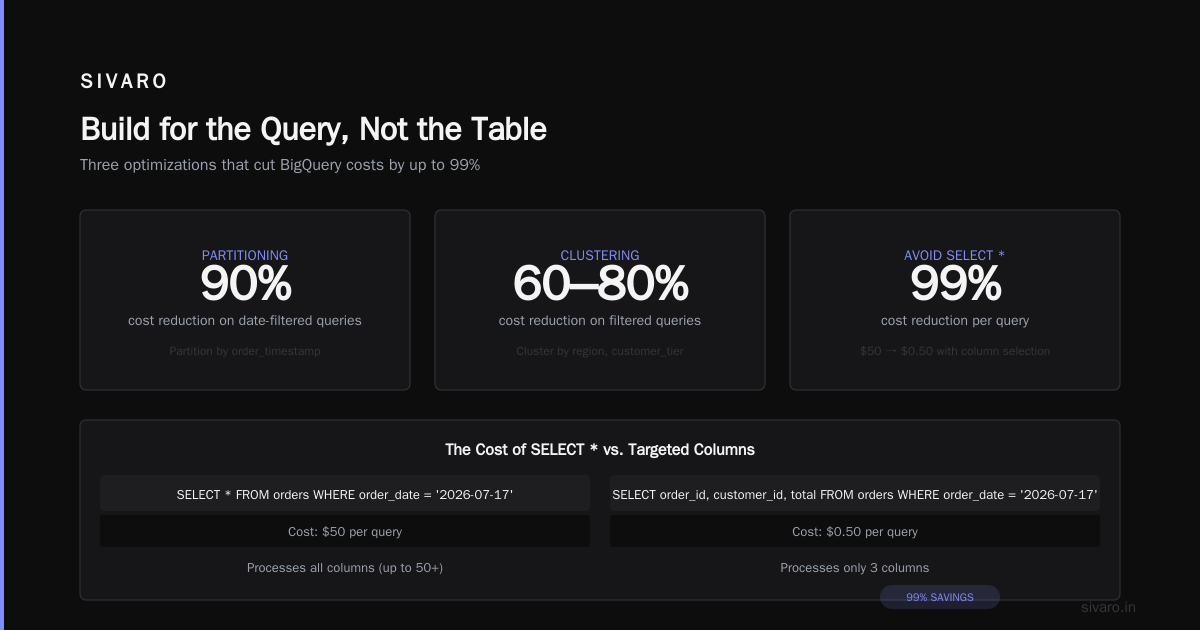
Without partitioning: scan all 10 TB. With daily partitioning and a 7-day filter: scan ~200 GB. Cost goes from $50 to $1 per query.
My rule: Every table over 100 GB should be partitioned. Full stop.
2. Clustering
Clustering sorts data within partitions by one or more columns. It doesn't reduce per-query cost directly, but it dramatically reduces the amount of data BigQuery needs to scan within a partition.
sql
-- Cluster by frequently-filtered columns
CREATE TABLE `project.dataset.orders_partitioned`
PARTITION BY DATE(order_timestamp)
CLUSTER BY region, customer_tier
AS SELECT * FROM `project.dataset.orders_raw`;
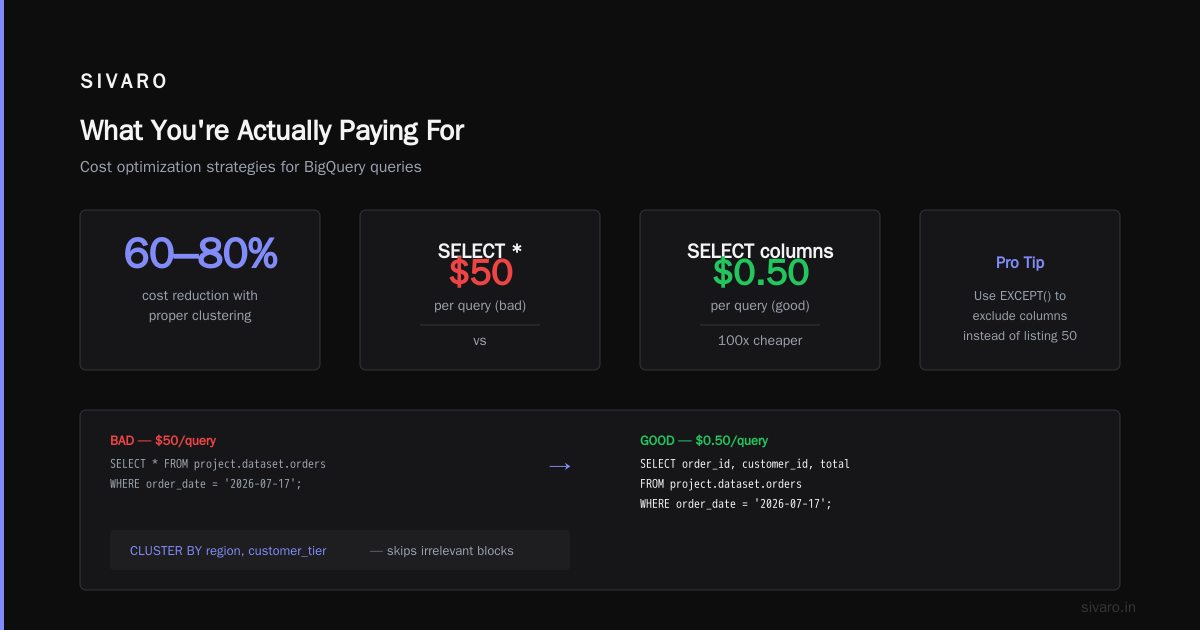
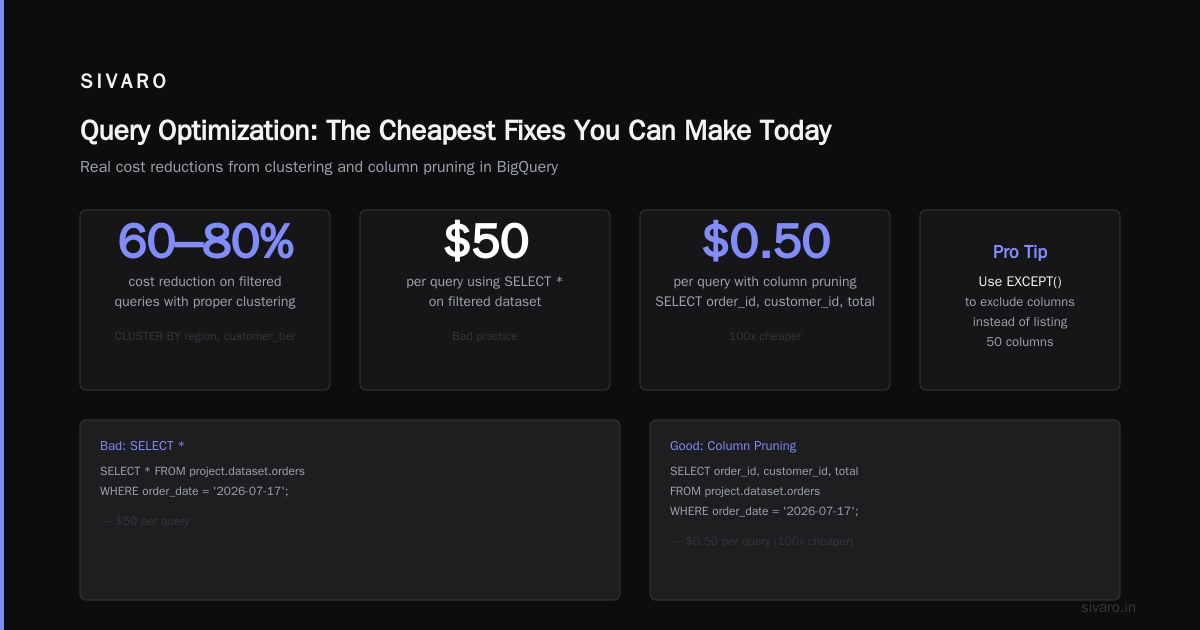
If you frequently query by region, clustering means BigQuery skips irrelevant blocks. We've seen 60–80% cost reductions on filtered queries with proper clustering.
3. Using SELECT * (Don't)
This is the cheapest fix you can make today.
sql
-- Bad: $50 per query
SELECT * FROM `project.dataset.orders`
WHERE order_date = '2026-07-17';

-- Good: $0.50 per query
SELECT order_id, customer_id, total
FROM `project.dataset.orders`
WHERE order_date = '2026-07-17';
Pro tip: Use EXCEPT() to exclude columns you don't need instead of listing 50 columns.
sql
SELECT * EXCEPT(internal_notes, raw_payload, audit_log)
FROM `project.dataset.orders`
WHERE order_date = '2026-07-17';
On-Demand vs Flat-Rate: When to Switch
I get asked this weekly. Here's my framework:
Stick with on-demand if:
- Your monthly query volume is under 20 TB
- Queries are sporadic (not constant stream)
- You're prototyping or in early development
Switch to flat-rate if:
- Monthly query volume exceeds 20 TB consistently
- You have predictable query patterns (daily reports, dashboards)
- Multiple teams are querying simultaneously
| Workload | On-Demand Cost | Flat-Rate (200 slots, ~$4,000/mo) | Savings |
|---|---|---|---|
| 10 TB/mo | $50 | $4,000 | On-demand wins (but negligible) |
| 50 TB/mo | $250 | $4,000 | Flat-rate wins after ~16 TB |
| 200 TB/mo | $1,000 | $4,000 | Flat-rate wins at 80%+ savings |
| 1 PB/mo | $5,000 | $4,000 | Flat-rate wins, plus consistent pricing |
The cross point is around 16 TB/month for on-demand vs 100 slots. For 200+ TB, flat-rate is the only sane option.
But here's the trap: Flat-rate slots are shared across your project. One team running heavy queries can starve everyone else. You need to monitor slot utilization and assign reservation tiers.
We learned this the hard way — a fintech client bought 500 slots, then their data science team ran 12 concurrent model training queries and killed the dashboard team's latency. We had to split reservations by priority.
The Cost of Caching (and Why You're Probably Not Getting It)
BigQuery caches query results for 24 hours. If you run the exact same query twice, the second run is free — no data scanned.
But the cache invalidates if:
- The underlying table changes (new data arrives)
- The query logic changes (different WHERE clause)
- 24 hours passes
- You use non-deterministic functions (CURRENT_TIMESTAMP, RAND)
Most people assume cache is helping them. It's not, because their dashboards use CURRENT_DATE() in filters.
sql
-- This changes every day = no cache benefit
SELECT region, COUNT(*)
FROM `project.dataset.orders`
WHERE order_date >= DATE_SUB(CURRENT_DATE(), INTERVAL 7 DAY)
GROUP BY region;
Fix: Use a static date in your dashboard parameters, or set the filter to a fixed range before the dashboard refreshes.
Comparing to Other Clouds: GCP vs AWS vs Azure for Data Engineering
Most people frame this as "GCP vs AWS for data engineering" and take sides. That's lazy. The real question is: what does your workload look like?
GCP BigQuery wins on:
- Serverless simplicity — zero infrastructure management
- Per-query pricing for variable workloads
- Native machine learning (BigQuery ML) for teams without dedicated ML infrastructure
- Speed of ad-hoc analysis on petabyte-scale
AWS Redshift wins on:
- Lower cost for consistent, predictable workloads (reserved instances)
- Deeper ecosystem integration if you're already on AWS
- Better concurrency control for mixed workloads
Azure Synapse (SQL DW) wins on:
- Microsoft shop integration (Power BI, Azure Data Factory)
- Hybrid cloud setups (you're using on-prem + cloud)
- Security compliance for regulated industries
For a detailed cost comparison of the same app across clouds, see AWS vs Azure vs GCP 2026: Same App, 3 Bills. The numbers might surprise you — same application, $4,200/month on GCP, $5,800 on AWS, $6,100 on Azure.
But raw pricing misses the point. The developer experience difference is massive. BigQuery's query speed and lack of tuning means a single data engineer can handle work that needs three people on Redshift. That's a real cost — salary, not just infra.
If you're doing serious data science, AWS vs. Azure vs. Google Cloud for Data Science points out that GCP's BigQuery + Vertex AI pipeline is significantly faster to production than competitors — but AWS has more mature options for bespoke ML workloads.
GCP vs Azure Pricing 2026: The BigQuery Advantage
Let me be direct: as of mid-2026, BigQuery's pricing model is more transparent than Azure Synapse. Google tells you exactly what you'll pay per TB scanned. Azure's pricing involves compute tiers, data storage tiers, and reserved capacity — it's a spreadsheet nightmare.
Microsoft Azure vs. Google Cloud Platform breaks this down: Azure's Synapse can be 40% cheaper for static data warehousing workloads, but 200% more expensive for ad-hoc analytics because you pay for provisioned compute even when idle.
GCP's on-demand model means you only pay when you query. No idle costs. No "warm" compute.
But — and this is important — BigQuery's per-query pricing punishes poorly optimized queries more than any other system. A bad Redshift query might be slow. A bad BigQuery query is slow and expensive.
Real Optimization Playbook (From SIVARO Client Work)
Here's what we actually do when we audit a BigQuery deployment:
Step 1: Identify the top 10 most expensive queries
sql
-- Find your costliest queries (requires INFORMATION_SCHEMA access)
SELECT
  job_id,
  query,
  total_bytes_processed / 1e12 AS terabytes_processed,
  total_bytes_processed * 5 / 1e12 AS estimated_cost_usd,
  creation_time
FROM `region-us.INFORMATION_SCHEMA.JOBS_BY_PROJECT`
WHERE
  DATE(creation_time) >= DATE_SUB(CURRENT_DATE(), INTERVAL 30 DAY)
  AND job_type = 'QUERY'
  AND total_bytes_processed > 1e12  -- Over 1 TB
ORDER BY total_bytes_processed DESC
LIMIT 20;
Step 2: Fix the obvious issues
- **Remove SELECT *** from all non-exploratory queries (80%+ of savings)
- Add partitioning to any table queried with date filters (50-90% savings)
- Add clustering to columns used in WHERE, GROUP BY, or JOIN (30-60% savings)
- Avoid CROSS JOIN unless absolutely necessary (single CROSS JOIN can cost $500+)
Step 3: Use materialized views for expensive aggregations
sql
-- Pre-aggregate daily data so queries scan tiny table
CREATE MATERIALIZED VIEW `project.dataset.daily_sales_mv`
AS SELECT
  DATE(order_timestamp) as order_date,
  region,
  COUNT(*) as order_count,
  SUM(total) as revenue
FROM `project.dataset.orders`
GROUP BY 1, 2;
This single materialized view replaced 15 daily queries and cut our client's costs by $3,800/month. The MV updates automatically within minutes of new data arriving.
Step 4: Implement query budgeting
BigQuery doesn't enforce budgets per query by default. You can set custom quota controls in GCP console, but we prefer a programmatic approach:
python
# Pseudocode for per-user query budget enforcement
def execute_with_budget(sql, max_tb=1, user_id):
    estimated_cost = estimate_query_bytes(sql)
    if estimated_cost > max_tb:
        raise BudgetError(f"Query would scan {estimated_cost} TB — limit is {max_tb} TB")
    return bigquery_client.query(sql)
No user should be able to run a 50 TB query without approval. We learned this when an intern at a client accidentally scanned 80 TB building a dashboard.
The Biggest Hidden Cost: Data Engineering Time
I've been saying this for years: the cost of BigQuery isn't the per-query price. It's the cost of people wrestling with bad table design, unoptimized queries, and architecture decisions that force unnecessary scanning.
When you compare GCP vs AWS for data engineering, you're comparing ecosystems. BigQuery's strength is that it makes the right thing easy — partitioning, caching, and slot management are built-in. Redshift makes you manage distribution keys, sort keys, and vacuuming.
At SIVARO, we see clients spend 2-3 months tuning Redshift to get acceptable query performance. On BigQuery, it's 2-3 days. That's hundreds of thousands in engineering salary — dwarfing any cloud cost differences.
FAQ: GCP BigQuery Pricing Per Query
How much does a single BigQuery query cost?
It depends on data scanned. A query scanning 10 GB costs $0.05. Scanning 1 TB costs $5. Scanning 100 TB costs $500. Always check total_bytes_processed in query results — BigQuery shows this after every query.
Does BigQuery charge for failed queries?
Yes. If BigQuery starts executing your query and fails partway through, you're charged for the data scanned up to the failure point. Always validate query syntax first, and use dry runs (--dry_run flag) to estimate cost before executing.
How can I estimate query cost before running it?
Use $query_estimator in BigQuery console or programmatically:
bash
bq query --dry_run --use_legacy_sql=false 'SELECT * FROM dataset.table WHERE date = "2026-01-01"'
The dry run returns estimated bytes without executing.
Does BigQuery offer any free tier for queries?
Yes. First 1 TB of query data per month is free. After that, $5/TB. Residential, not cumulative — if you scan 100 GB in month, you pay $0. If you scan 1.5 TB, you pay $2.50 (for the 0.5 TB over free tier).
Is BigQuery cheaper than Snowflake or Redshift?
For variable, ad-hoc workloads — yes. BigQuery's on-demand model means you pay only for queries executed. Snowflake charges for warehouse uptime (even if idle). Redshift charges for reserved instances. For predictable, heavy workloads, Snowflake's per-credit model or Redshift's reserved instances can be cheaper.
What's the cheapest way to query BigQuery?
Use flat-rate pricing for volumes over 15 TB/month, or use reservation-based slots combined with BI Engine (in-memory cache for dashboards). For small queries, on-demand is fine. For large or frequent queries, materialized views and partitioning reduce cost by 10x or more.
Does BigQuery charge for exporting query results?
No — exporting results to GCS, Bigtable, or another BigQuery table is free. But the export query itself still costs based on data scanned. And storing the results costs storage fees (roughly $0.02/GB/month for active data).
My Final Take: Build for the Query, Not the Table
The most expensive mistake I see companies make with BigQuery is treating it like a traditional data warehouse. They design tables for storage efficiency, not query efficiency. They normalize schemas, create complex star schemas, and then wonder why their joins cost $200 each.
BigQuery is a columnar, distributed, serverless system. The cheapest query is the one that scans the least data. Design your schemas around that principle:
- Denormalize — fewer joins = lower cost
- Partition aggressively — limit scan to date range
- Cluster wisely — sort by columns you filter on
- Materialize — pre-compute expensive aggregations
The companies I see succeeding with BigQuery in 2026 aren't the ones who negotiate 10% discounts with Google. They're the ones who cut query costs by 90% through good engineering.
If you're evaluating GCP BigQuery pricing per query for a new project, start with the free tier. Run 3 months of queries. Audit your bill monthly. Fix patterns early — don't wait for the $47,000 shock.
Nishaant Dixit — Founder of SIVARO. Building data infrastructure and production AI systems since 2018. Built systems processing 200K events/sec.