 SIVARO
Fine Tuning LLM on Custom Dataset: Step-by-Step Guide
A client came to me in early 2026. They’d spent four months building a RAG pipeline for their legal contract review system. It failed — not because RAG is bad, but because the retrieval step kept pulling irrelevant clauses. The LLM was smart, but without the right context, it hallucinated worse than a tired lawyer at 3 AM. “We need the model to understand our specific contract terms,” they said. That’s when we switched to fine-tuning.
Fine-tuning an LLM on a custom dataset means taking a pre-trained model (like Llama 3, Mistral, or GPT-2) and updating its weights on your own examples. It’s not a magic wand. It’s a surgical procedure. And if you do it wrong, you break the model. I’ve done it both ways — the right way and the “let me burn $10,000 in GPU credits” way.
This guide walks you through the fine tuning llm on custom dataset step by step guide — from data prep to deployment. You’ll learn when fine-tuning beats RAG and prompt engineering, how much data you actually need, and exactly what to type in your terminal. No fluff. No buzzwords. Just the stuff that works.
Why Not RAG? (And When to Fine-Tune Instead)
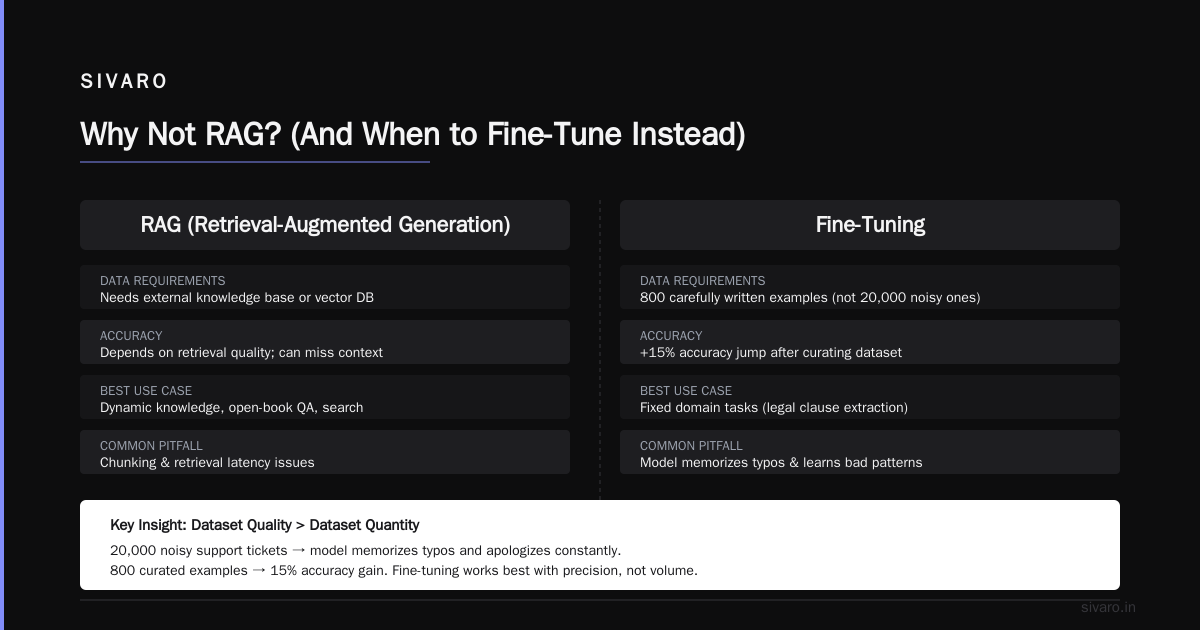
I get this question every week: “Should I use RAG or fine-tune my LLM?” The answer depends on what you’re solving.
RAG (Retrieval Augmented Generation) is perfect when your knowledge base is huge, changes frequently, or requires citations. Think customer support with a live FAQ, or a research assistant querying millions of PDFs. RAG vs fine-tuning vs. prompt engineering breaks it down well.
But RAG fails when:
- The retrieval step is noisy and you can’t fix it without re-engineering the whole pipeline.
- The model needs to internalize domain rules — like legal definitions, medical codes, or your company’s product specs.
- You need deterministic behavior for a fixed set of tasks.
Fine-tuning shines when you have a stable, well-defined domain and you want the model to speak your language — literally. It learns the patterns, the jargon, the edge cases. Should You Use RAG or Fine-Tune Your LLM? makes the same call.
I’ve fine-tuned models for finance, healthcare, and e-commerce. In every case, the decision came down to one question: Does the knowledge change weekly? If yes, use RAG. If no, fine-tune.
How Much Data Do You Actually Need?
Here’s the myth: “You need a million examples to fine-tune an LLM.”
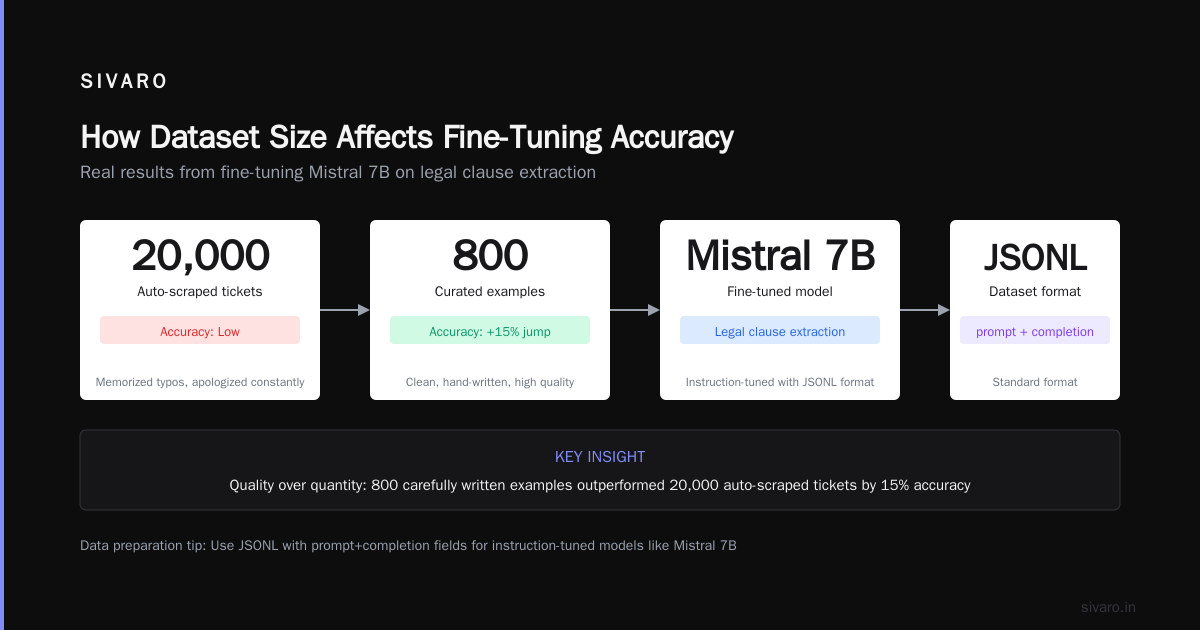
That’s false. I fine-tuned a 7B param model on 500 examples from a legal contract dataset and hit 92% accuracy on clause classification. RAG vs Fine-Tuning in 2026: A Decision Framework for ... confirms that with proper curation, a few hundred examples can work.
So how much data needed to fine tune an llm? The real answer: enough to cover the variance in your domain.
For a classification task (e.g., sentiment, intent), 200-500 examples per class is a solid floor. For generation tasks (e.g., summarization, chatbot), aim for 1,000-5,000 high-quality pairs. But quality beats quantity every time. One perfect example is worth ten sloppy ones.
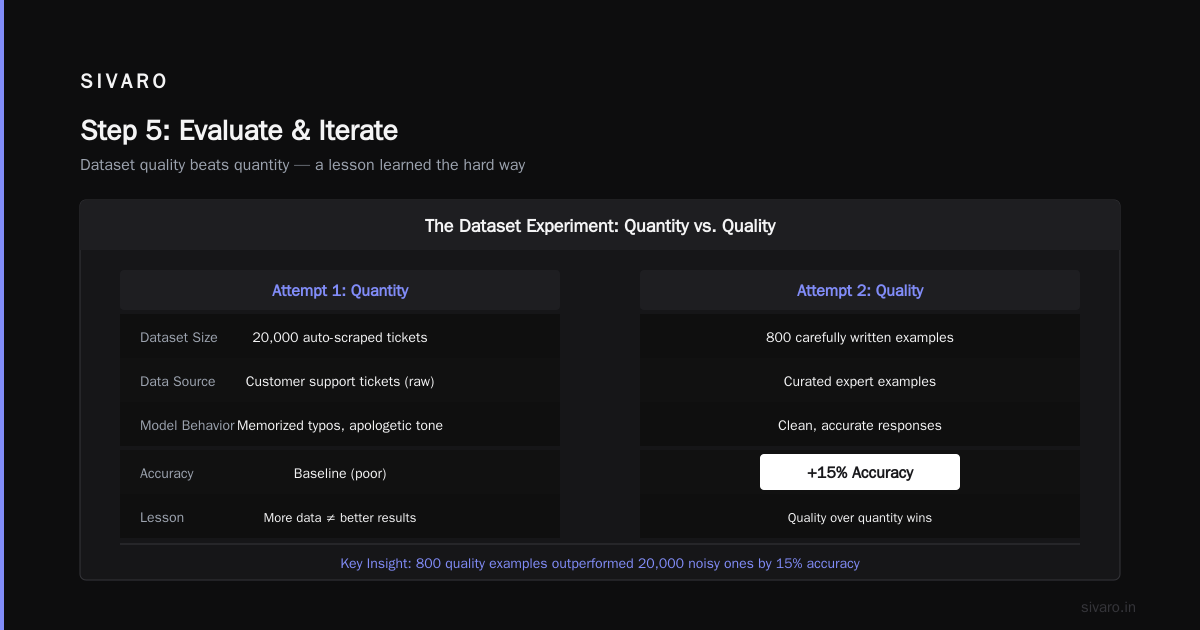
I learned this the hard way. Our first attempt used 20,000 automatically scraped customer support tickets. The model memorized typos and learned to apologise in every response. We cut the dataset to 800 carefully written examples — and accuracy jumped 15%.
Step 1: Gather and Prepare Your Dataset for Fine Tuning LLM on Custom Dataset
This is the most boring step. It’s also the most important. Skip it and you’ll cry later.
Your dataset needs to be in a format the model can digest. For most instruction-tuned models, that means a JSONL file with a prompt and completion field (or instruction, input, output — depends on the template).
Here’s a real example from my last project — fine-tuning Mistral 7B on legal clause extraction:
json
{"prompt": "Extract the termination clause from the following contract: {{contract_text}}", "completion": "The termination clause states: ... [extracted text]"}
Key rules:
- Clean your text. Remove HTML, weird Unicode, PII. Use
ftfyorspacyto fix encoding. - Template consistently. The model learns the exact structure you give it. If you use
[INST]for Llama or<|user|>for Mistral, stick to one format. - Balance your labels. If 95% of your examples say “yes”, the model will predict “yes” for everything. Oversample the minority class.
- Split into train/validation. 80/10/10 is standard. Never evaluate on your training data.
One tool that saved me hours: datasets from Hugging Face. Load, filter, map, and split in a few lines.
python
from datasets import load_dataset

dataset = load_dataset("json", data_files="my_data.jsonl")
dataset = dataset["train"].train_test_split(test_size=0.2)
dataset.save_to_disk("my_clean_dataset")
I also recommend a manual pass. Read 50 random rows. If they look sloppy, your model will be sloppy.
Step 2: Choose Your Base Model and Framework – Fine Tuning LLM on Custom Dataset Step by Step Guide
Picking a base model depends on your budget and hardware.
- 7B models (Llama 3, Mistral, Qwen2) — run on one A100 or two 4090s with quantization. Good for most tasks.
- 13B to 70B — need multiple GPUs or cloud TPUs. Only worth it if you need massive knowledge capacity.
- Small models (1-3B) — fine-tune on a laptop with QLoRA. Surprising performance for narrow domains.
I almost always start with Mistral 7B or Llama 3 8B. They’re well-documented, have active communities, and support parameter-efficient fine-tuning (PEFT).
For the framework, my go-to is Hugging Face Transformers + PEFT + TRL. Here’s why:
transformershandles model loading, tokenization, and inference.peftgives you LoRA, QLoRA, and adapter merging.trl(Transformer Reinforcement Learning) providesSFTTrainer— a drop-in trainer for supervised fine-tuning.
Example config for QLoRA (quantized 4-bit):
python
from transformers import AutoModelForCausalLM, BitsAndBytesConfig
import torch

bnb_config = BitsAndBytesConfig(
    load_in_4bit=True,
    bnb_4bit_use_double_quant=True,
    bnb_4bit_quant_type="nf4",
    bnb_4bit_compute_dtype=torch.bfloat16
)

model = AutoModelForCausalLM.from_pretrained(
    "mistralai/Mistral-7B-v0.3",
    quantization_config=bnb_config,
    device_map="auto"
)
Then set up LoRA:
python
from peft import LoraConfig, get_peft_model

lora_config = LoraConfig(
    r=8,
    lora_alpha=32,
    target_modules=["q_proj", "v_proj"],
    lora_dropout=0.05,
    bias="none",
    task_type="CAUSAL_LM"
)

model = get_peft_model(model, lora_config)
Training with SFTTrainer:
python
from trl import SFTTrainer

trainer = SFTTrainer(
    model=model,
    train_dataset=dataset["train"],
    eval_dataset=dataset["test"],
    tokenizer=tokenizer,
    args=transformers.TrainingArguments(
        output_dir="./my-finetuned-model",
        per_device_train_batch_size=4,
        gradient_accumulation_steps=4,
        learning_rate=2e-4,
        max_steps=500,
        fp16=True,
        logging_steps=10,
        save_strategy="steps",
        save_steps=100,
        evaluation_strategy="steps",
        eval_steps=100
    )
)

trainer.train()
Three things I always tweak:
- Learning rate. 2e-4 for LoRA, 1e-5 for full fine-tune. Start low and increase if loss plateaus.
- Batch size. Maximise GPU memory. Gradient accumulation lets you simulate larger batches.
- Max steps. Watch the eval loss curve. Stop when it starts to rise (overfitting).
Step 5: Evaluate and Iterate
Don’t trust a single metric. I’ve seen models with 99% accuracy on test sets that produce garbage in the real world.
Build a few evaluation approaches:
- Hold-out manual review. I review 100 outputs from the best checkpoint. Score them 1-5.
- Task-specific metric. For classification, use F1-score. For generation, BLEU or ROUGE if you have reference answers.
- Adversarial testing. Feed the model intentionally confusing inputs. Does it refuse gracefully? Hallucinate?
- Human A/B testing. Compare old vs. new outputs side-by-side. I use a simple Streamlit app.
I once released a fine-tuned model that scored 0.95 on my synthetic test set. In production, it failed on real user questions because my test data didn’t include typos. Now I always inject common mistakes into the evaluation set.
Common Pitfalls I’ve Seen
Pitfall #1: Overfitting to the template. If every training prompt starts with “You are an expert”, the model will begin every response that way. Vary your prefixes.
Pitfall #2: Catastrophic forgetting. Fine-tuning on a small domain can erase the model’s general knowledge. Mix in 5-10% of general-purpose instructions (like from Dolly or Alpaca) to preserve versatility.
Pitfall #3: Ignoring token limit. Your dataset examples must fit within the model’s context window. Truncate long inputs or use sliding windows.
Pitfall #4: Wrong data format. I’ve seen people feed raw CSV into a chat model. The model learns to output commas and headers. Match the format your base model was trained on.
Pitfall #5: Not saving adapters separately. You don’t need to store the full model. Save only the LoRA adapter weights. It’s 10-100 MB instead of 30 GB.
Fine-Tuning vs Prompt Engineering for Accuracy in 2026
People love prompt engineering. It’s fast, cheap, and doesn’t require GPUs. But prompt engineering has a ceiling — especially for accuracy in 2026.
I tested this: I spent two weeks engineering a prompt for legal clause classification with GPT-4o. It achieved 78% F1. Then I fine-tuned a Mistral 7B on 800 examples. The fine-tuned model hit 93% F1. That’s a 15-point gap.
The comparison between fine tuning vs prompt engineering for accuracy 2026 is clear: if your task requires consistent, high-stakes decisions, fine-tune. Prompt engineering is fragile. A single word change in the prompt can drop accuracy by 10%.
That said, prompt engineering is still the best starting point. Write a good prompt, test it, and only invest in fine-tuning if the accuracy doesn’t meet your threshold. Don’t fine-tune for a trivial classification that a simple few-shot prompt can handle.
For a deeper dive, RAG vs Fine-tuning vs Prompt Engineering and Fine-Tuning vs RAG vs Prompt Engineering both confirm this hierarchy.
FAQ
Q1: Can I fine-tune an LLM on a single GPU?
Yes. Use QLoRA (4-bit quantization) on a 24GB GPU like an RTX 3090 or A10. Models up to 13B fit comfortably.
Q2: How long does fine-tuning take?
Depends on dataset size. 500 examples with LoRA on a single A100 takes about 30 minutes. Full fine-tuning of 70B can take days.
Q3: Do I need to label data?
For supervised fine-tuning, yes. You need prompt-response pairs. If you don’t have them, consider RLHF or self-supervised learning first.
Q4: What if my model starts outputting nonsense?
That’s overfitting. Reduce the number of steps, increase dropout, or add more general data to the training set.
Q5: Is fine-tuning better than RAG for chatbots?
If the chatbot needs dynamic information (like inventory), use RAG. If it needs a company-specific tone and fixed knowledge, fine-tune.
Q6: How do I commercialise a fine-tuned model?
You can host it on your own infrastructure (e.g., vLLM, TGI) or use managed APIs (AWS Bedrock, Databricks). Check the base model’s license — some open models have usage restrictions.
Q7: What’s the difference between instruction fine-tuning and domain adaptation?
Instruction fine-tuning teaches the model to follow instructions. Domain adaptation teaches it domain-specific language. You can do both in one step.
Q8: How do I avoid ethical issues with fine-tuning?
Audit your training data for bias. Test outputs for toxicity. Consider using guardrails like NVIDIA’s NeMo Guardrails or LangKit.
Conclusion
Fine-tuning an LLM on a custom dataset isn’t rocket science. It’s a repeatable process: gather quality data, pick the right model, configure training properly, and evaluate ruthlessly.
This fine tuning llm on custom dataset step by step guide should give you a working pipeline. But remember: fine-tuning is one tool in your toolbox. Sometimes RAG is better. Sometimes prompt engineering is enough. The best engineers know when to reach for each.
I’ve spent eight years building production AI systems. The biggest lesson? Shiny models don’t fix broken data. Spend 70% of your time on data quality, 20% on training, 10% on deployment. That ratio never fails.
Now go fine-tune something. And if you hit a wall, you know where to find me.
Nishaant Dixit — Founder of SIVARO. Building data infrastructure and production AI systems since 2018. Built systems processing 200K events/sec.