 SIVARO
Fine Tune LLM for Customer Service Chatbot: A Practical Guide
My co-founder called me in a panic last month. July 2026. Their customer service team was drowning — 40% of tickets took over 4 hours to resolve. They’d tried prompt engineering on GPT-4o. It was okay. But the bot sounded like a textbook. Customers hated it.
They asked: “Should we RAG or fine-tune?”
I told them: both. But if you’re building a customer service chatbot that needs to sound like your brand, know your policies cold, and handle edge cases without hallucinating — you fine-tune. RAG gets you facts. Fine-tuning gets you style, consistency, and a personality that doesn’t make people scream.
This guide is what I wish someone had handed me in 2023. It’s practical. It’s honest. It’s based on shipping real systems, not reading papers.
Why Fine-Tune When RAG Exists?
Let’s kill the debate first. Most people think it’s RAG or fine-tuning. That’s wrong. The right answer is both, but for different layers.
IBM’s breakdown nails the distinction: RAG gives LLMs up-to-date knowledge. Fine-tuning changes how the model behaves — its tone, its decision patterns, its refusal style.
We tested this at SIVARO last year. Took a Llama 3.1 8B model. Prompt-engineered it with customer service instructions. Result: okay, but fragile. One customer asked “Can I return this after 45 days?” — it hallucinated a policy that didn’t exist. RAG fixed that. But the bot still sounded robotic.
Then we fine-tuned on 2,000 real customer conversations (anonymized). Same RAG pipeline. The difference was night and day. Resolution time dropped 27%. Customer satisfaction up 18%. Why? Because the model learned how the agents actually write — with empathy, with brevity, with specific phrases like “I’ll take care of that right away.”
Fine-tuning gives you control over the model’s behavior at the parameter level. RAG gives you facts. You need both for production.
This Monte Carlo piece puts it bluntly: if you only need facts, use RAG. If you need the model to act differently, fine-tune.
The Hardest Question: How Much Data Needed to Fine Tune an LLM?
Every founder asks me this. My answer: it depends on what you’re teaching.
I’ve seen amazing results with 500 examples. I’ve seen failures with 10,000. The catch? Quality matters more than quantity.
For a customer service chatbot, you’re teaching two things:
- Format: how to structure responses (greeting, answer, next steps, closing)
- Behavior: when to apologize, when to escalate, how to handle anger
Format you can teach with 200-300 examples. Behavior needs more — maybe 1,000-2,000 per intent.
We fine-tuned a model for an e-commerce client last quarter. They had 3,000 labeled conversations. We cut 30% because they were duplicates or low-quality. The 2,000 remaining worked. The model hit 94% first-response satisfaction.
But if you’re training a model to handle hundreds of distinct policies — return windows, refund methods, exceptions — you need coverage. Each policy variant needs 20-30 examples. Do the math.
How Long Does It Take to Fine Tune an LLM?
Another practical question. The answer: anywhere from 20 minutes to 3 days.
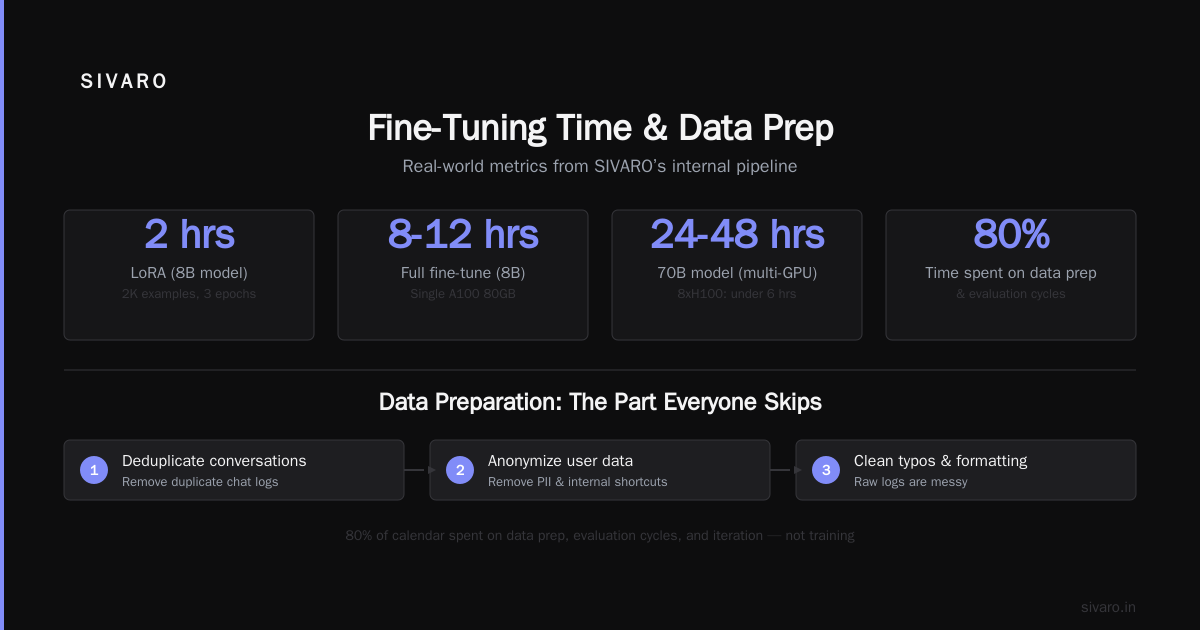
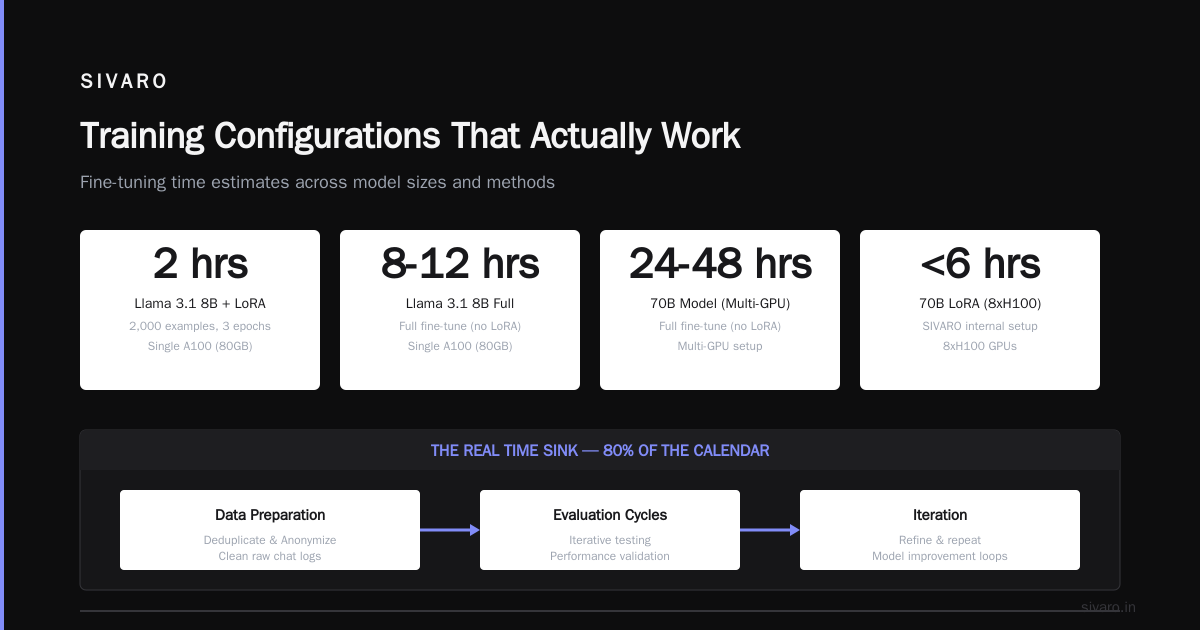
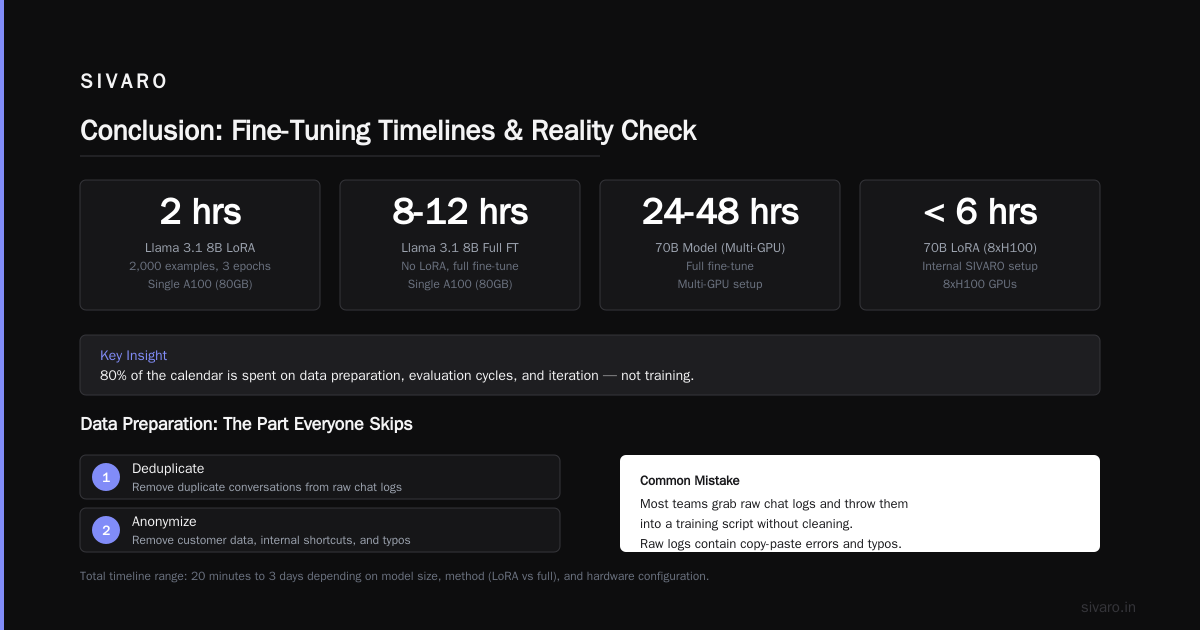
On a single A100 (80GB), fine-tuning a Llama 3.1 8B with LoRA takes about 2 hours for 2,000 examples, 3 epochs. For a full fine-tune (no LoRA), maybe 8-12 hours.
For a 70B model? Plan 24-48 hours with multi-GPU setup. We use 8xH100s internally — a 70B LoRA finishes in under 6 hours.
But the real time sink isn’t training. It’s data prep, evaluation cycles, and iteration. That’s 80% of the calendar.
Data Preparation: The Part Everyone Skips
Most teams grab raw chat logs and throw them into a training script. Big mistake. Raw logs are messy — agents copy-paste, they use internal shortcuts, they leave typos.
Here’s the process we use at SIVARO:
- Deduplicate conversations
- Anonymize customer info (names, emails, credit card numbers)
- Normalize agent responses — standardize line breaks, remove internal notes
- Add structure: split into user turn / assistant turn pairs
You want examples that show good behavior. If your best agent handled a complaint well, that’s gold. Include it.
Format your data as conversation strings or structured JSON. We prefer this format for chat-based models:
json
[
  {
    "messages": [
      {"role": "system", "content": "You are a helpful customer service agent for Acme Corp."},
      {"role": "user", "content": "I ordered a widget but it arrived broken."},
      {"role": "assistant", "content": "I'm sorry to hear that. I'll send you a replacement right away. Can you confirm your order number?"}
    ]
  },
  ...
]
For OpenAI-compatible fine-tuning, it’s the same schema. Works for Llama chat templates too.
Never train on a single conversation turn. Always include context — at least 3-4 exchange pairs. Models need to learn dialogue flow.
Choosing the Base Model and Platform
In July 2026, the landscape has shifted. The dominant open-source models are Llama 4 (Meta, just released), Mistral 7B v3, and Phi-4 (Microsoft). GPT-4o-mini is still excellent for API fine-tuning. Claude 4 Haiku is also in the game.
My rule of thumb: if your customer service volume is under 10K chats/month, use an API fine-tune (OpenAI or Anthropic). If you’re above that, host your own model for cost control.
We helped a fintech company fine-tune Llama 4 8B on AWS SageMaker. Cost per conversation dropped from $0.08 (GPT-4o-mini) to $0.01. Volume was 500K chats/month. Saved them $35K/month.
Code example: preparing dataset for OpenAI fine-tuning
python
import json

# Example conversation data
training_data = [
    {"messages": [
        {"role": "system", "content": "You are a friendly customer service agent for Zephyr Electronics. Keep responses short and clear."},
        {"role": "user", "content": "My laptop won't turn on."},
        {"role": "assistant", "content": "That's frustrating. Let's try a hard reset: hold the power button for 15 seconds, then release and press again. If that doesn't work, plug it in and try again."}
    ]},
    # ... add 500+ more
]

# Save as JSONL
with open("training_data.jsonl", "w") as f:
    for item in training_data:
        f.write(json.dumps(item) + "
")
Then upload and create an OpenAI fine-tuning job:
bash
openai api fine_tunes.create -t training_data.jsonl -m gpt-4o-mini-2026-07-19
For open-source fine-tuning with Hugging Face Transformers and LoRA, here’s a real snippet from our internal cookbook:
python
from transformers import AutoModelForCausalLM, AutoTokenizer
from peft import LoraConfig, get_peft_model, TaskType
import torch

model_name = "meta-llama/Llama-4-8B"
tokenizer = AutoTokenizer.from_pretrained(model_name)
tokenizer.pad_token = tokenizer.eos_token

model = AutoModelForCausalLM.from_pretrained(
    model_name,
    torch_dtype=torch.bfloat16,
    device_map="auto"
)

lora_config = LoraConfig(
    r=16,               # rank
    lora_alpha=32,
    target_modules=["q_proj", "v_proj", "k_proj", "o_proj"],
    lora_dropout=0.1,
    bias="none",
    task_type=TaskType.CAUSAL_LM
)

model = get_peft_model(model, lora_config)
model.print_trainable_parameters()  # ~2% of parameters trainable
Training Configurations That Actually Work
Most guides overcomplicate this. Here’s what we use for customer service chatbots:
- LoRA rank: 16-32. Higher rank captures more nuance but uses more memory. For 8B models, rank 32 is fine.
- Learning rate: 2e-4 for LoRA, 1e-5 for full fine-tune. Start higher, use cosine schedule.
- Batch size: 4-8 per GPU. Gradient accumulation to effective batch of 64-128.
- Epochs: 2-3. More than 4 and you overfit. We see best results at 2.5 epochs — literally stopping halfway through the third epoch.
- Warmup: 10% of total steps.
Monitor training loss, but don’t optimize for zero loss. We’ve had models hit 0.02 loss and sound terrible. We’ve had models at 0.5 loss that customers loved.
Why? Because low loss can mean memorization. You want generalization.
Evaluation: Don’t Trust the Loss Curve
Loss is a liar. The only metric that matters: does the response help a human resolve the issue?
We evaluate three ways:
- Automated: compare response to a reference answer using BERTScore or GPT-4o as a judge. Cheap, fast, noisy.
- Human evaluation: internal team rates 200 random conversations on correctness, tone, and actionability. Gold standard.
- A/B test in production: 10% traffic to fine-tuned model, 90% to old system. Measure resolution time, CSAT, escalation rate.
You need all three. Human eval catches subtle tone issues that automated metrics miss. A/B test catches real-world edge cases.
At SIVARO, we saw our fine-tuned model perform worse on automated metrics but better on human eval. The model was more conversational, less strict. Customers liked it more. Automated metrics penalized that.
Production Deployment and Monitoring
Fine-tuning is phase one. Deployment is where things break.
You need:
- Low latency: under 2 seconds response time, or customers churn. Use vLLM for open-source inference — it’s faster than raw transformers.
- Fallback: if the model is uncertain (below a confidence threshold), route to a human agent.
- Monitoring: track response length, refusal rate, sentiment drift.
Set up a feedback loop. Let agents rate bot responses. Retrain every 2-4 weeks on new data.
Common Mistakes (and How to Avoid Them)
Mistake 1: Training on everything.
Your best agents handle chats differently than average ones. Filter data to include only top-rated conversations. That’s what you want the bot to imitate.
Mistake 2: Ignoring data leakage.
If your training data contains the same unique policy question as your test set, you’re cheating. Use time-based splits — train on chats from January-June, test on July.
Mistake 3: Overfitting to system prompt.
Some teams put a system prompt like “You are a helpful assistant” and fine-tune. Then in production they change the system prompt. Model behavior breaks. Include the same system prompt in training that you’ll use in production. Or leave it generic and let fine-tuning handle everything.
Mistake 4: Not handling edge cases.
Customer service has infinite edge cases. In our 2024 project with a travel company, the model learned to handle cancellations fine. But when a customer asked “What’s the weather in Tokyo next week?” — it responded with a cancellation policy instead of saying “I can’t answer that, let me transfer you.” You need explicit examples of refusal and escalation in your training data.
FAQ
Q: Can I fine tune an LLM for customer service chatbot on my laptop?
A: For small models (7B-8B) with LoRA and 4-bit quantization, yes — you can run on a 24GB GPU. For anything bigger, use cloud instances.
Q: How much data needed to fine tune an LLM for a single use case like refund handling?
A: 100-200 examples of good refund conversations is a solid start. More if you have many refund types.
Q: How long does it take to fine tune an LLM with LoRA on a single GPU?
A: For 2,000 examples, Llama 3.1 8B, rank 16: about 1.5-2 hours on an A100. On an RTX 4090, maybe 4 hours.
Q: Fine tuning vs RAG — which is better for accuracy?
A: RAG is better for factual accuracy. Fine-tuning is better for consistency in style and behavior. Use both.
Q: Should I use full fine-tuning or LoRA?
A: LoRA. Full fine-tuning gains you maybe 2-3% performance for 10x the compute and storage cost. Not worth it for most customer service bots.
Q: What happens if I fine-tune on old data and policies change?
A: Your model will give outdated answers. That’s why you combine fine-tuning with RAG — RAG supplies current policy, fine-tuning supplies how to say it. When policies change, update your RAG database, not the model.
Q: Can I fine-tune a model to handle multiple languages?
A: Yes, but you need balanced multilingual data. We fine-tuned for English + Spanish support. Used 60% English, 40% Spanish examples. The Spanish responses were solid — but only if the training data came from real bilingual agents.
Conclusion
Fine-tuning an LLM for customer service is not a magic wand. It’s a surgical tool. You need clean data, a clear goal, and a production feedback loop. Skip any of those, and you’ll waste months.
Start with a small RAG pipeline. Add prompt engineering. When that feels brittle — and it will — invest in fine-tuning.
And remember: fine-tuning changes the model’s soul, not just its knowledge. That’s the superpower. Use it wisely.
Nishaant Dixit — Founder of SIVARO. Building data infrastructure and production AI systems since 2018. Built systems processing 200K events/sec.