 SIVARO

AI Agents Deployment Best Practices: A Field Guide From Someone Who Got Burned So You Don’t Have To
I’m going to tell you something that still makes me wince. Mid-2025, we deployed an AI agent for a logistics client. The agent was supposed to handle inbound carrier queries — rate requests, document uploads, status checks. Simple stuff. We tested for six weeks. Everything passed. Day one in production: the agent hallucinated a pricing agreement that cost the client $14,000 before we caught it.
That’s not theory. That’s a Tuesday.
AI agents deployment best practices aren’t a checklist you copy from a blog post. They’re hard-won patterns from people who’ve watched agents fail in real production environments. I’ve been doing this since 2018 at SIVARO, building data infrastructure and production AI systems. I’ve seen what works and what burns.
This guide covers how to deploy ai agents in production without getting fired. It’s what I wish someone had told me before that logistics debacle.
Let’s get into it.
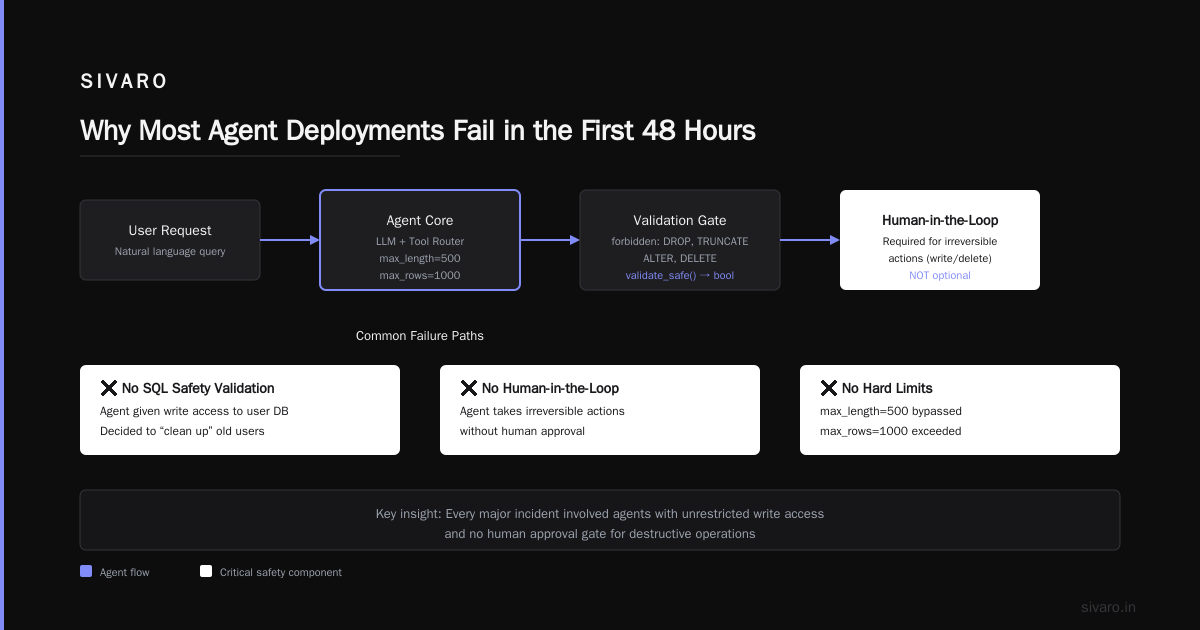
Why Most Agent Deployments Fail in the First 48 Hours
The industry is obsessed with frameworks. LangChain. CrewAI. AutoGen. Microsoft’s Semantic Kernel. Everyone’s comparing AI Agent Frameworks like they’re comparing sports teams. But frameworks aren’t the problem.
The problem is trust.
You can have the most elegant agent architecture ever designed. If your agent makes one bad decision that touches a customer’s data or money, nobody cares about your elegant architecture. They care about the damage.
I’ve watched teams spend months polishing their agent’s reasoning capabilities and zero time on what happens when the reasoning goes sideways. That’s not negligence — it’s inexperience.
Most people think agentic workflow production rollout is about model selection. Wrong. It’s about observability, guardrails, and rollback strategies. The model is table stakes now. Every major provider ships competent models. The difference between a deployed agent that works and one that blows up is the infrastructure around it.
The Six Pillars of Production-Ready Agent Deployments
Let me be direct: there are six things you need to get right. Ignore any of them and your agent will fail. Not “might fail.” Will fail.
1. The Framework Trap and How to Escape It
Everyone asks me which framework to use. I ask them: what happens when your agent crashes?
See, the choice between Agentic AI Frameworks matters less than you think. What matters is whether you can instrument the thing. LangChain dominates mindshare, but I’ve seen just as many successful deployments on plain Python with LiteLLM. How to think about agent frameworks by the LangChain team themselves admits frameworks are about ergonomics, not capability.
Pick a framework based on one criterion: can you add tracing in under an hour? If not, it’s dead to you.
Here’s what SIVARO actually does:
python
# Don't start with this
from langchain.agents import AgentExecutor, create_openai_functions_agent

# Start with this
def my_agent(input: str, context: dict) -> dict:
    trace_id = generate_trace_id()
    logger.info(f"agent_start", trace_id=trace_id, input=input)

    try:
        result = core_agent_logic(input, context)
        logger.info(f"agent_success", trace_id=trace_id, result=result)
        return result
    except AgentException as e:
        logger.error(f"agent_failure", trace_id=trace_id, error=str(e))
        return {"status": "failed", "reason": str(e), "trace_id": trace_id}
Start with observability. Then add the framework.
2. Tool Boundaries Are Your Safety Net
The most dangerous part of an agent isn’t the agent. It’s the tools the agent can call. An agent that doesn’t have tools is a chatbot. An agent with tools is a loaded weapon.
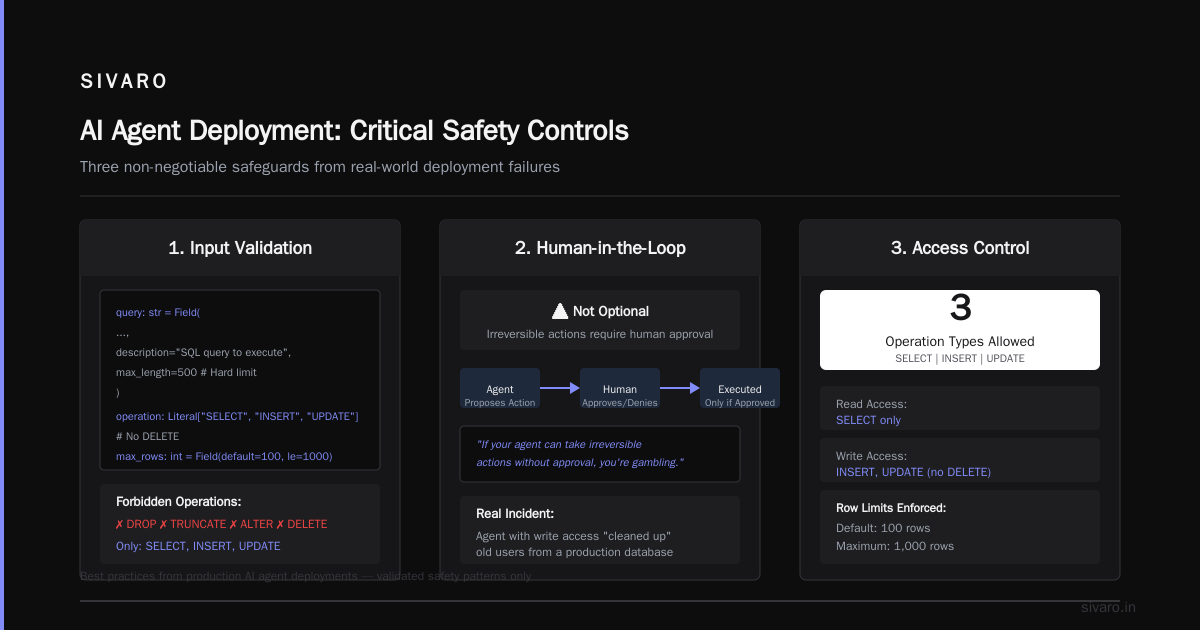
I tell teams: every tool needs a contract. Not a docstring — a real, enforced contract.
python
from pydantic import BaseModel, Field
from typing import Literal

class DatabaseQueryTool(BaseModel):
    query: str = Field(
        description="SQL query to execute",
        max_length=500  # Hard limit
    )
    operation: Literal["SELECT", "INSERT", "UPDATE"]  # No DELETE
    max_rows: int = Field(default=100, le=1000)

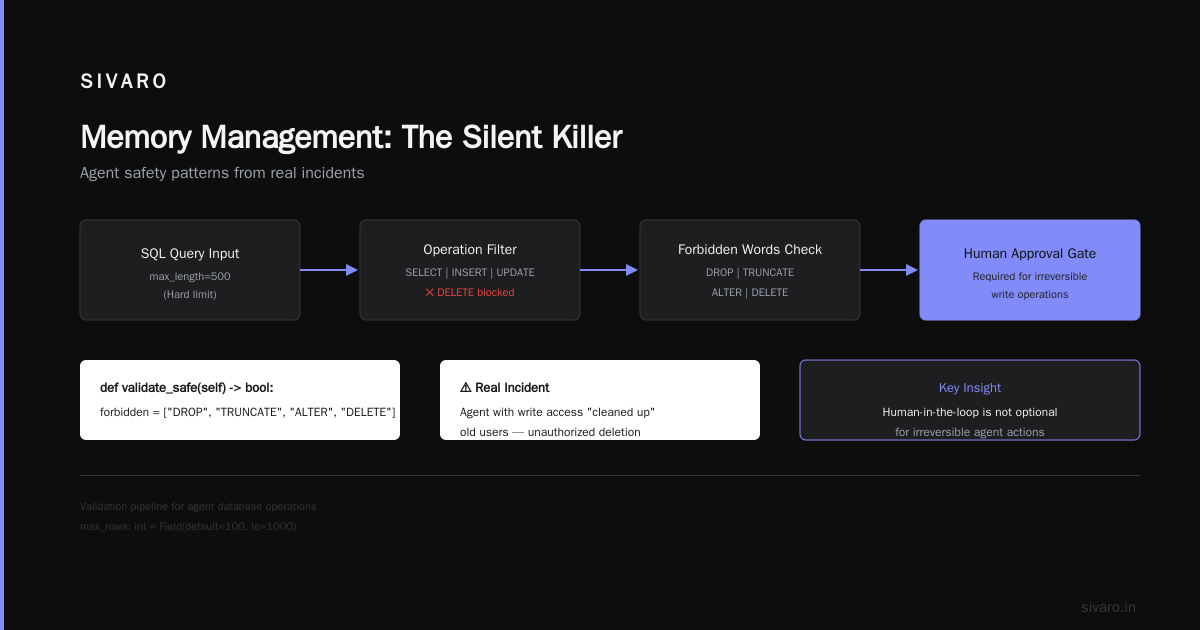
    def validate_safe(self) -> bool:
        forbidden = ["DROP", "TRUNCATE", "ALTER", "DELETE"]
        query_upper = self.query.upper()
        for word in forbidden:
            if word in query_upper:
                return False
        return True
I learned this the hard way. We gave an agent write access to a user database. The agent decided to “clean up” old users. Do the math on that one.
3. Human-in-the-Loop Is Not Optional
Let me be blunt: if your agent can take irreversible actions without human approval, you’re not deploying agents. You’re gambling.
Every major incident I’ve seen in production AI agents deployment best practices discussions traces back to an agent taking an action it shouldn’t have. The fix is simple: gate destructive actions behind human approval.
python
class ApprovalGate:
    def __init__(self, redis_client):
        self.redis = redis_client

    async def request_approval(self, action: dict, timeout: int = 300) -> bool:
        approval_id = str(uuid.uuid4())
        # Send to Slack, Teams, email, whatever
        await self.notify_human(approval_id, action)

        # Wait for response
        for _ in range(timeout * 10):  # Check every 100ms
            status = await self.redis.get(f"approval:{approval_id}")
            if status == b"approved":
                return True
            if status == b"denied":
                return False
            await asyncio.sleep(0.1)

        # Timeout = deny
        return False
The key insight: humans will be slow. Your agent needs to queue work. Design for delayed decisions from the start.
4. Observability That Actually Helps When Things Break
Most logging setups for agents are useless. They log the input and output but miss the intermediate reasoning. When an agent goes wrong, you need to see how it arrived at the wrong conclusion.
We use a concept called “step-level tracing.” Every tool call, every model invocation, every decision branch gets logged.
python
import json
from datetime import datetime

class AgentTracer:
    def __init__(self):
        self.steps = []

    def trace(self, step_type: str, input_data: dict, output_data: dict,
              latency_ms: float, token_count: int = None):
        self.steps.append({
            "type": step_type,
            "input": input_data,
            "output": output_data,
            "latency_ms": latency_ms,
            "tokens": token_count,
            "timestamp": datetime.utcnow().isoformat()
        })

    def export(self) -> dict:
        return {
            "total_steps": len(self.steps),
            "steps": self.steps,
            "total_latency_ms": sum(s["latency_ms"] for s in self.steps),
            "total_tokens": sum(s.get("tokens", 0) for s in self.steps)
        }
This saved us in May 2026. An agent was making erratic decisions. The traces showed it was getting stuck in a loop calling the same API three times with slightly different parameters. Without step-level tracing, we’d never have caught it.
5. Rate Limiting and Cost Control
Agents burn through API calls. Badly. A single task that should cost $0.02 can cost $2.00 if the agent loops.
You need hard caps. Not soft warnings—hard caps.
python
from dataclasses import dataclass

@dataclass
class AgentBudget:
    max_cost_cents: float
    max_api_calls: int
    max_tokens: int

class BudgetController:
    def __init__(self, budget: AgentBudget):
        self.budget = budget
        self.cost_spent = 0.0
        self.api_calls = 0
        self.tokens_used = 0

    def check(self) -> bool:
        conditions = [
            self.cost_spent <= self.budget.max_cost_cents,
            self.api_calls <= self.budget.max_api_calls,
            self.tokens_used <= self.budget.max_tokens
        ]
        return all(conditions)

    def record(self, cost_cents: float, tokens: int):
        self.cost_spent += cost_cents
        self.api_calls += 1
        self.tokens_used += tokens

        if not self.check():
            raise BudgetExceededError(
                f"Budget exceeded: costs=${self.cost_spent/100:.2f}, "
                f"calls={self.api_calls}, tokens={self.tokens_used}"
            )
This isn’t micromanagement. It’s survival. One production agent I know ran up a $4,700 bill in three hours because it got stuck in an optimization loop.
6. Versioning Everything (Including the Prompt)
You version your code. You version your models. But most teams don’t version their prompts. That’s insane.
Prompts are code. Treat them that way.
python
# prompt_v1.1.2.yaml
system: |
  You are a customer support agent for AcmeCorp.
  You can look up orders, process returns, and answer FAQs.
  NEVER process a return over $500 without human approval.
  NEVER share customer PII.
  If you don't know something, say "I don't know" — don't guess.
We store prompts in a versioned repository alongside the code. When we deploy a new agent, we deploy a specific prompt version. This lets us roll back changes when a prompt change causes regressions — which happens constantly.
The Agentic Workflow Production Rollout That Actually Works
Here’s the sequence I’ve landed on after seven production deployments in 2025-2026:
Week 1-2: Shadow mode. The agent runs alongside existing processes. It makes decisions but doesn’t act on them. Log every decision, compare to human decisions.
Week 3-4: Gated mode. The agent executes actions but every action requires human approval. Fix approval fatigue by batching approvals for low-risk actions.
Week 5-6: Supervised mode. The agent acts autonomously on low-risk tasks. High-risk tasks still require approval. Monitor reliability metrics daily.
Week 7+: Autonomous mode. Full autonomy on approved task categories. Keep safety guards. Run weekly audits of agent decisions.
This sounds slow. It is. But I’ve seen teams that rushed this process take six months to recover trust after a production incident.
What the Protocols People Are Missing
There’s a lot of buzz about AI Agent Protocols and standards like A2A, MCP, and the various API specifications. A Survey of AI Agent Protocols covers the technical details better than I can.
Here’s my take: protocols matter, but not for the reasons people think.
The real value of protocols isn’t interoperability. It’s contract enforcement. When two systems communicate via a well-defined protocol, you know exactly what data crosses boundaries. That’s crucial for debugging, auditing, and security.
Use the protocol that fits your stack. Don’t obsess over picking the “winning” standard — that ship hasn’t sailed yet. By my count, we’ve got at least a dozen competing standards. Pick one, use it consistently, and be ready to adapt.
Memory Management: The Silent Killer
Every agent deployment I’ve worked on struggles with memory. Not the model’s context window — the agent’s actual state across conversations.
Your options, ranked worst to best:
Worst: Naive context stuffing. Throw everything into the prompt. Hits context limits, degrades quality, costs a fortune.
Bad: Simple sliding window. Keeps last N messages. Loses context on longer interactions.
Good: Structured memory stores. Separate short-term (recent conversation) and long-term (facts, preferences, history) memory.
Best: Hybrid systems. Use vector stores for semantic retrieval, key-value stores for explicit facts, and recency-based caches for active context.
python
class AgentMemory:
    def __init__(self):
        self.short_term = []  # Recent interactions
        self.long_term = {}   # Persistent facts
        self.vector_store = VectorStore()  # Semantic search

    def add_interaction(self, query: str, response: str):
        self.short_term.append({"query": query, "response": response})
        # Extract and store important facts
        facts = self.extract_facts(query, response)
        for fact in facts:
            self.long_term[fact.key] = fact.value
            self.vector_store.index(fact.text, metadata=fact.metadata)

    def build_context(self, query: str) -> str:
        relevant_vectors = self.vector_store.search(query, k=5)
        recent_context = self.short_term[-10:]
        facts = self.long_term.values()
        return format_context(recent_context, relevant_vectors, facts)
This is non-negotiable for production. Without proper memory, agents repeat themselves, forget user preferences, and generally act like they’ve never met the user before.
The Contrarian Take: Less Autonomy, More Value
Everyone’s chasing full autonomy. Agents that plan, execute, and validate their own work. That’s the vision.
I think it’s wrong for most use cases right now.
The highest-value agent deployments I’ve seen aren’t fully autonomous. They’re semi-autonomous systems that handle routine work and escalate ambiguity to humans. This isn’t a limitation — it’s a feature.
A customer service agent that handles 80% of tickets and routes 20% to humans is wildly valuable. It’s also safer, easier to monitor, and faster to deploy.
Don’t let perfect be the enemy of valuable. Ship the 80% agent. Expand from there.
Summary: What Actually Matters for AI Agents Deployment Best Practices
If you take nothing else from this, remember:
- Observability beats everything. If you can’t see what your agent is doing, you can’t fix it.
- Hard guardrails aren’t optional. Every tool needs contracts. Every budget needs caps.
- Humans don’t slow you down — they save you from disasters.
- Prompts are code. Version them.
- Start in shadow mode. Ramp up slowly. Trust is earned, not granted.
The companies that will win with AI agents aren’t the ones with the best models or the fanciest frameworks. They’re the ones who treat deployment like the engineering discipline it is.
I learned that lesson at $14,000. You don’t have to.
FAQ: AI Agents Deployment Best Practices
Q: What’s the biggest mistake teams make when deploying AI agents?
A: Skipping the shadow deployment phase. They test in a sandbox, everything looks great, and then the agent hits production data with all its messiness. Real user behavior is never clean. Run in shadow mode for at least two weeks.
Q: How do I handle cost management for production agents?
A: Hard caps per request, per user, and per agent. Use a budget controller that throws exceptions when limits are hit. Track costs per trace so you can identify expensive patterns. Expect costs to be 3-5x higher than your estimates for the first month.
Q: Should I use an open-source framework or build from scratch?
A: Start with a framework if you need to move fast. The Top 5 Open-Source Agentic AI Frameworks in 2026 give you a good starting point. But be prepared to customize heavily. Off-the-shelf doesn’t exist for production.
Q: How do I test agents effectively?
A: Build a regression test suite with known edge cases. Include tests for: tool selection accuracy, boundary conditions, error handling, prompt injection attempts, and budget limits. Automate these and run them before every deployment.
Q: What’s the right latency target for production agents?
A: Depends on the use case. For synchronous user interactions, keep total end-to-end latency under 5 seconds. For batch processing, latency matters less than throughput. Either way, instrument every step so you know where time goes.
Q: How do I handle agent failures gracefully?
A: Design for failure from the start. Every agent should have a fallback path — route to a human, queue the request, or return a safe default. Never let an agent failure result in a blank page or an unhandled exception.
Q: What security considerations are unique to agents?
A: Prompt injection is the biggest risk. Treat every user input as potential attack surface. Use input sanitization, output validation, and never give agents access to sensitive systems without authentication. Rate limit aggressively to prevent abuse.
Q: How do I measure agent performance?
A: Measure task completion rate, not just accuracy. A perfect answer that takes 30 seconds is often worse than a good answer in 5 seconds. Track: success rate, average latency, cost per task, escalation rate, and user satisfaction.
Nishaant Dixit — Founder of SIVARO. Building data infrastructure and production AI systems since 2018. Built systems processing 200K events/sec.