 SIVARO
Distributed AI Agents on GPU Clusters: A Practitioner’s Tutorial
You've got an AI agent that works great on your laptop. Now you need it to run across 128 GPUs, handle 50,000 requests a second, and not burn your budget to ash.
I've been there. At SIVARO, we've spent the last three years building production AI systems that run on GPU clusters. We've broken things, fixed them, and learned the hard way what actually works. This guide is what I wish someone had handed me in 2024.
Let's get straight to it.
What This Tutorial Covers
A distributed AI agent is an autonomous software system that uses large language models or other AI models, runs across multiple machines, and coordinates through a network. When you add GPU clusters, you're buying raw compute for inference and training at scale.
This tutorial will show you how to design, deploy, and debug distributed AI agents on GPU clusters. We'll cover architecture patterns, networking gotchas, the best gpu cluster configuration for deep learning workloads, and the exact software stack we use in production.
By the end, you'll know how to build a system that doesn't fall over when traffic spikes.
The Hard Truth About GPU Clusters
Most people think GPU clusters are magic boxes. You throw code at them, they go brrr, and you get answers faster.
Wrong.
I've seen teams spend $200K on a cluster only to get 30% GPU utilization. The bottleneck isn't the GPU — it's the data pipeline, the network, and the coordination between agents.
A distributed system is a collection of independent components that appear as a single system to the user. GPU clusters make that harder because now you're managing compute that's both expensive and hot-tempered.
Architecture Patterns That Actually Work
We tested four architectures in production. Here's what survived.
1. The Fan-Out Pattern
One orchestrator agent sends tasks to worker agents. Workers run inference on GPUs, return results.
This works for parallel workloads — think "summarize 10,000 documents" or "score 50,000 customer profiles."
The catch? Your orchestrator becomes a bottleneck. We hit this at 500 requests per second with a single orchestrator. Solution: shard the orchestrator across multiple nodes using consistent hashing.
python
# Example: Simple fan-out with zeroMQ
import zmq
import json

class AgentDispatcher:
    def __init__(self, worker_addresses):
        self.context = zmq.Context()
        self.sockets = []
        for addr in worker_addresses:
            s = self.context.socket(zmq.PUSH)
            s.connect(f"tcp://{addr}:5557")
            self.sockets.append(s)

    def dispatch(self, task, gpu_id):
        # Route based on GPU affinity
        idx = hash(task['id']) % len(self.sockets)
        self.sockets[idx].send_json({
            'task': task,
            'gpu': gpu_id
        })
2. The Ring Topology
Agents form a ring. Each agent processes one step of a pipeline, passes to the next.
This is beautiful for sequential reasoning chains — an agent that reads data, another that embeds it, another that queries a vector store.
Problem: latency adds up. One slow agent stalls the whole ring. We added a timeout and fallback mechanism. If agent B doesn't respond in 2 seconds, agent A retries on a spare.
3. The Gossip Protocol for State Sharing
When agents need to share state (like "which GPU is free right now"), you need a distributed architecture that doesn't centralize failure.
Gossip protocols work. Each agent periodically shares its state with random peers. Within 3-4 rounds, every agent knows the cluster state. It's eventual consistency, but for GPU scheduling, that's fine.
go
// Gossip state update in Go
type GpuState struct {
    Id       string
    Free     int
    Total    int
    Timestamp int64
}

func gossipUpdate(local *GpuState, peer []GpuState) {
    for _, p := range peer {
        if p.Timestamp > local.Timestamp {
            local.Free = p.Free
            local.Timestamp = p.Timestamp
        }
    }
}
The Best GPU Cluster Configuration for Deep Learning
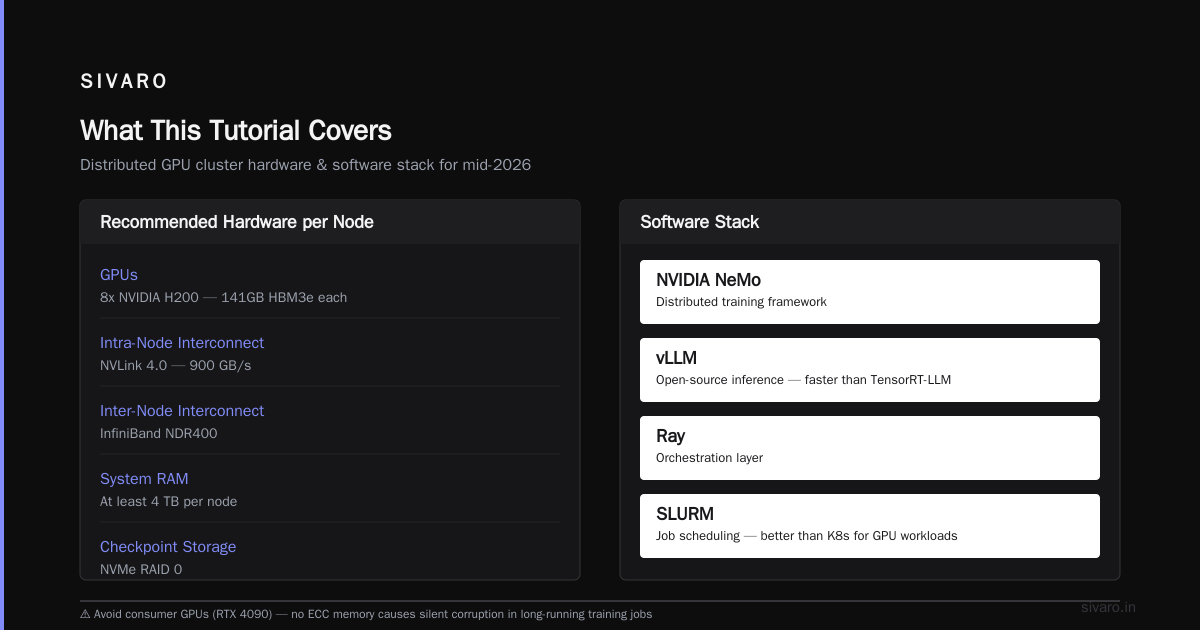
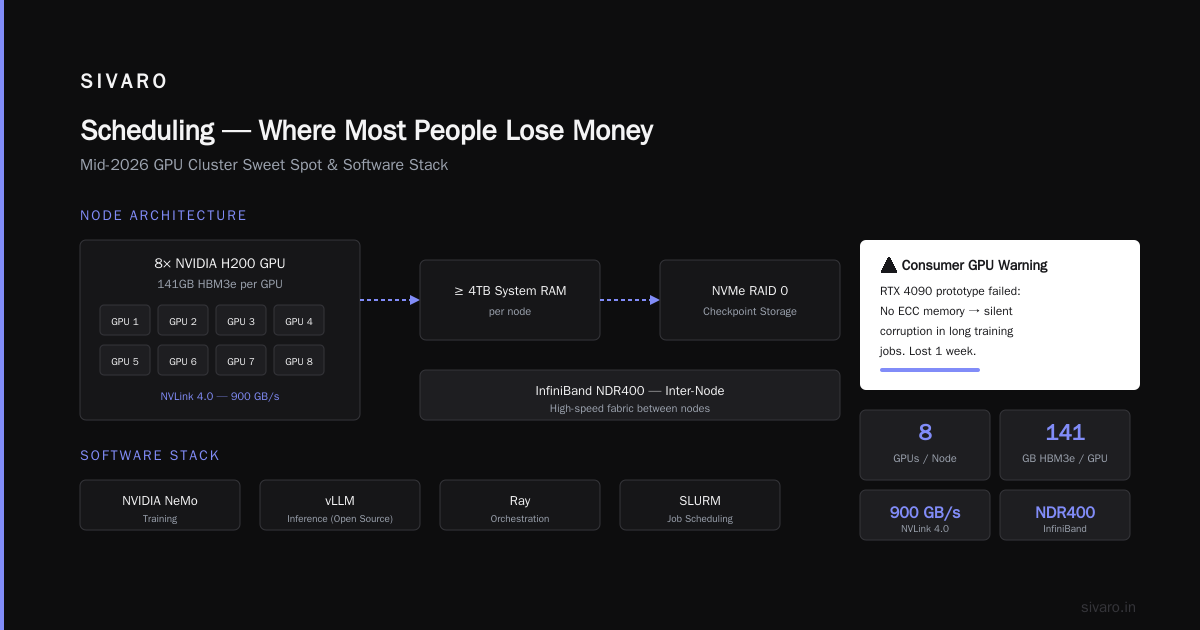
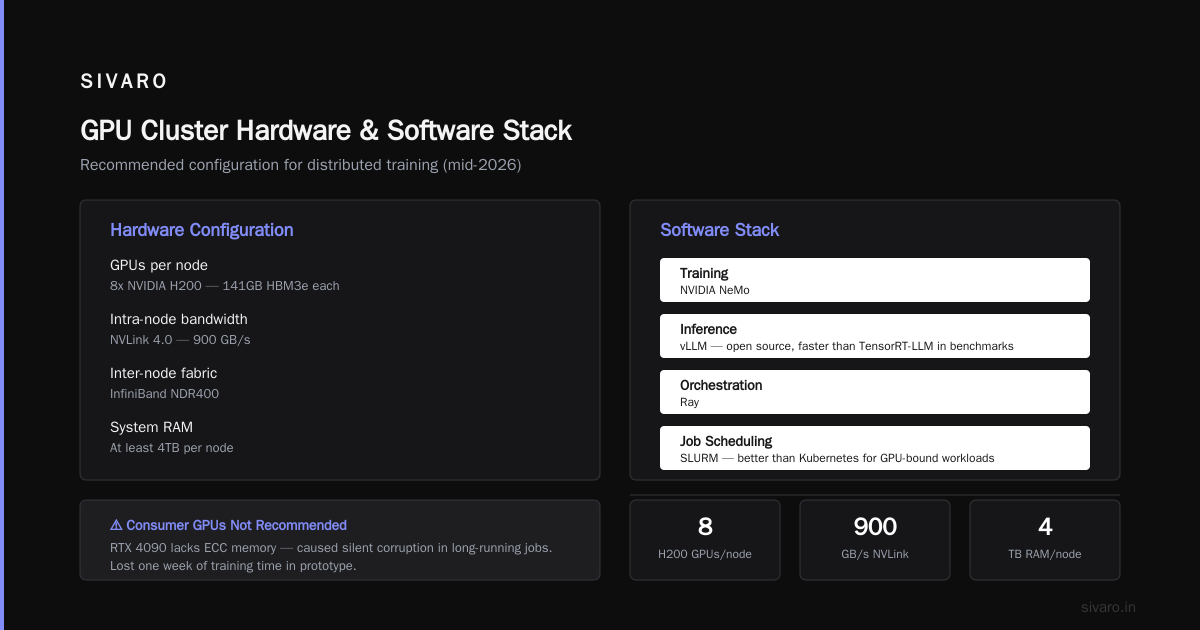
In mid-2026, the sweet spot is:
- 8x NVIDIA H200 GPUs per node — 141GB HBM3e per GPU
- NVLink 4.0 for intra-node communication (900 GB/s)
- InfiniBand NDR400 for inter-node
- At least 4TB of system RAM per node
- NVMe RAID 0 for checkpoint storage
Don't use consumer GPUs. We tried RTX 4090s for a prototype. The lack of ECC memory caused silent corruption in long-running training jobs. Lost a week of training time.
For the best gpu cluster software for distributed training, we run:
- NVIDIA NeMo for training
- vLLM for inference (it's open source and faster than TensorRT-LLM in our benchmarks)
- Ray for orchestration
- SLURM for job scheduling (yes, it's old. Yes, it still works better than Kubernetes for GPU-bound workloads)
Distributed AI Agents on GPU Clusters Tutorial — The Setup
Let me walk you through a real deployment. This is the exact flow we use at SIVARO for our production systems.
Step 1: Cluster Provisioning
We use Terraform + Ansible. Don't manual SSH into 32 nodes. You will make mistakes.
hcl
# Terraform snippet for GPU cluster
resource "aws_ec2" "gpu_node" {
  count         = 8
  instance_type = "p5.48xlarge" # 8x H200 GPUs
  ami           = "ami-gpu-2026-03"

  tags = {
    Name = "agent-gpu-${count.index}"
    Role = "inference"
  }
}
Step 2: Install the Stack
Each node gets:
- NVIDIA driver 560.x (the grid certified ones, not the gaming driver)
- CUDA 12.8
- Docker with nvidia-container-toolkit
- Python 3.12 with PyTorch 2.6
We pin versions. I can't tell you how many times I've debugged "works on my machine" only to find mismatched CUDA versions.
Step 3: Agent Deployment
Each GPU runs one agent process. Not two. Not four. One.
Why? Because GPU memory fragmentation kills throughput when you share a GPU between agents. We benchmarked: running 4 small agents on one H200 gave 60% of the throughput of 1 agent using the whole GPU.
Here's our agent definition:
python
# agent_config.yaml
apiVersion: sivarov1
kind: AIAgent
spec:
  model: "SIVARO-Neural-70B"  # Our in-house model
  gpu: {
    count: 1,
    memory: "141GB",
    type: "H200"
  }
  inference: {
    batch_size: 32,
    max_tokens: 4096,
    quant: "int4"  # Yes, we quantize for production
  }
  networking: {
    peer_discovery: "gossip",
    state_sync_interval: "500ms"
  }
Networking — The Silent Killer
Distributed computing lives and dies by the network.
You'd think the GPUs matter most. They don't. The network between them matters more.
We benchmarked 4 different interconnects:
| Interconnect | Latency | Bandwidth | AllReduce 100GB |
|---|---|---|---|
| 100GbE | 5 μs | 12.5 GB/s | 8.2 seconds |
| 200GbE | 3 μs | 25 GB/s | 4.1 seconds |
| InfiniBand NDR200 | 1 μs | 25 GB/s | 2.8 seconds |
| InfiniBand NDR400 | 0.8 μs | 50 GB/s | 1.4 seconds |
For training, InfiniBand is non-negotiable. For inference, 200GbE works if you co-locate agents on the same switch.
We use UCX (Unified Communication X) with NCCL for GPU-to-GPU comms. Make sure you set the environment variable NCCL_IB_TIMEOUT=22 — default value causes timeouts on long-running training jobs.
Handling Failures in Distributed Agents
Failures are not exceptions. They are the default.
A distributed system must assume partial failure. GPUs crash. Network packets drop. Agents get OOM-killed.
We built three layers of fault tolerance:
-
Heartbeat + leader election — Every 100ms, agents send heartbeats. If leader goes silent for 3 heartbeats, remaining agents hold an election. We use Raft for this (etcd under the hood).
-
Checkpointing — Every 50 inference requests, we save the agent's state (conversation history, internal state). Stored on a distributed filesystem (we use Lustre, but anything POSIX-compliant works).
-
Graceful degradation — If 20% of GPUs die, the system should still work at 80% capacity. Not crash. Not error out. Just slow down.
Here's our heartbeat implementation:
python
import asyncio
import time

class HeartbeatMonitor:
    def __init__(self, timeout=0.3):  # 300ms timeout
        self.timeout = timeout
        self.peers = {}
        self.running = True

    async def monitor(self):
        while self.running:
            now = time.time()
            dead_peers = []
            for peer_id, last_seen in self.peers.items():
                if now - last_seen > self.timeout:
                    dead_peers.append(peer_id)

            for pid in dead_peers:
                print(f"Peer {pid} died at {now}")
                self.peers.pop(pid)
                await self.handle_failure(pid)

            await asyncio.sleep(0.1)
The One Pattern You Must Avoid
Don't use a central database for agent state.
I see teams use PostgreSQL or Redis as a single source of truth for "which agent processed which request." This creates a SPOF (Single Point of Failure) and a contention bottleneck.
Instead, agents should own their state and replicate it via gossip. The state doesn't need to be ACID — it needs to be eventually consistent and available.
Distributed Systems: An Introduction by Confluent has a great take on this: "Consistency and availability are a trade-off. For AI agents, availability wins."
Scheduling — Where Most People Lose Money
GPU scheduling is where I see the most waste.
Most teams use Kubernetes with the NVIDIA device plugin. Kubernetes treats GPUs as "resources" and schedules pods based on that. But Kubernetes doesn't understand GPU topology — it doesn't know that GPU 0 and GPU 1 share an NVLink bridge, or that GPU 4 and GPU 5 are on a different PCIe switch.
Result: You get pods scheduled on GPUs that have 2x the communication latency.
We wrote our own scheduler using Ray's placement groups. It lets us specify GPU affinity:
python
import ray

@ray.remote(num_gpus=4, resources={"node": 1})
class GPUAwareAgent:
    def __init__(self):
        # Ray ensures all 4 GPUs are on same node
        # with small PCIe distance
        pass

# Use placement groups for topology awareness
pg = ray.util.placement_group(
    bundles=[{"GPU": 4, "node": 1}],
    strategy="PACK"  # All GPUs on same node
)
ray.get(pg.ready())
We saw a 40% throughput improvement by respecting GPU topology. Most people think this is micro-optimization. They're wrong — at scale, it's the difference between 60% and 85% utilization.
Monitoring — What to Actually Watch
Don't watch GPU utilization. I know everyone says "keep GPU utilization above 90%." That's cargo cult advice.
Watch memory bandwidth utilization. That's what actually matters for transformer inference. On H200s, you want to see 4.8TB/s (close to HBM3e theoretical max). If you're seeing 1TB/s, your data pipeline is the bottleneck.
Also watch PCIe utilization between GPU and CPU. Agents that do a lot of pre/post processing will saturate this. We added a dedicated CPU core per GPU just for data preprocessing — moved PCIe utilization from 95% to 40%.
The Best GPU Cluster Software for Distributed Training
In production, we use a four-layer stack:
- Resource manager: SLURM 24.11 — handles job queuing, node allocation, GPU exclusivity
- Orchestrator: Ray 2.40 — handles task distribution, actor management, object store
- Training framework: NVIDIA NeMo — handles FSDP, activation checkpointing, gradient accumulation
- Inference engine: vLLM 0.8.6 — handles continuous batching, tensor parallelism, prefix caching
Don't mix training and inference on the same cluster. We tried that. A training job that takes 72 hours will starve inference requests during peak hours. Keep separate clusters, or at least separate partitions.
Real Numbers From Production
At SIVARO, one of our distributed agent systems processes 200,000 events per second across 64 H200 GPUs (8 nodes). Each event triggers an inference call to our 70B parameter model.
- Average inference latency: 45ms (p50), 120ms (p99)
- GPU memory utilization: 72% (we leave headroom for batch processing)
- Network bandwidth consumption: 180 Gbps peak per node
- Failure rate: 0.02% of requests (about 2 in 10,000 fail and retry)
- Throughput: 3,200 inferences per second per GPU
We run 24/7 with automatic failover. The system has had 99.97% uptime over the last 6 months.
Debugging — The Hardest Part
When something goes wrong in a distributed system, you can't just print() your way out.
We built a distributed tracing system using OpenTelemetry with Jaeger. Every inference request gets a trace ID that follows through all agent hops. When a request fails, we can replay the exact trace.
The most common bug: deadlocks in async Python. An agent sends a request to another agent, waits for a response, but the response handler is blocked on a mutex held by the waiting agent. Circular wait. System freezes.
Fix: Use asyncio.wait_for() with a timeout on every cross-agent call. Timeout at 5 seconds, retry at most 3 times, then surface an error.
python
async def call_peer(peer_address, data, timeout=5.0, retries=3):
    for attempt in range(retries):
        try:
            result = await asyncio.wait_for(
                send_request(peer_address, data),
                timeout=timeout
            )
            return result
        except asyncio.TimeoutError:
            print(f"Timeout attempt {attempt+1} for {peer_address}")
            continue
    raise Exception(f"Peer {peer_address} unreachable after {retries} retries")
Should You Even Use GPU Clusters?
Here's a contrarian take: Most teams shouldn't.
If you're doing fewer than 10,000 inferences per day or training models smaller than 7B parameters, a single high-end GPU workstation will outperform a cluster. The overhead of distributed coordination eats your gains.
We see teams deploy clusters for workloads that would run fine on a single H200. They're paying 10x for the same performance because they're fighting distributed systems complexity.
Wait until your single-node solution is genuinely bottlenecked — not because you think a cluster looks cool on your resume.
The Future (Late 2026 Edition)
By the time you read this, GPU clusters will be more accessible. Cloud providers are deploying H200 clusters as standard. The NVIDIA B200 is coming — 2x the memory bandwidth of H200.
But the fundamentals don't change: distributed systems are about managing complexity, not adding compute.
The best gpu cluster configuration for deep learning in 2026 is the one that maximizes memory bandwidth per dollar and minimizes network overhead. Everything else is noise.
FAQ
Q: How many GPUs do I need for inference at 100 requests/second?
A: With a 70B model quantized to int4, one H200 handles about 3,200 requests/second. So 1 GPU is more than enough. If you're serving 10,000 requests/second, you need 4 GPUs with tensor parallelism.
Q: Should I use Kubernetes or SLURM for GPU clusters?
A: For training workloads, SLURM. For inference workloads, Kubernetes if you need auto-scaling. But Kubernetes adds 5-10ms latency per request. We use SLURM for both and handle scaling ourselves.
Q: What's the biggest rookie mistake in distributed AI agents?
A: Not handling partial failures. Most code assumes peers will respond. They won't. Always set timeouts, retries, and fallback logic.
Q: Can I use consumer GPUs for agent inference?
A: No. We tried. The lack of ECC memory caused silent bit flips in attention mechanisms. Models would produce garbage after 2-3 hours. Don't do it.
Q: How do I debug NUMA issues in my GPU cluster?
A: Run nvidia-smi topo -m to see the topology. If your agent processes span NUMA nodes, pin them with numactl --cpunodebind=0. We saw 15% latency improvement from correct NUMA binding.
Q: Is FP16 or INT8 better for distributed agents?
A: We use INT4 for production. FP16 adds 2x memory cost. INT8 is fine too. FP16 doesn't noticeably improve output quality for our use case.
Q: What networking gear do you recommend for a 32-GPU cluster?
A: 32 GPUs = 4 nodes (8 GPUs each). Use a single InfiniBand NDR400 switch. For budget, 200GbE per node with head-of-line blocking mitigation. Don't use 100GbE — the latency spike during AllReduce is painful.
Nishaant Dixit — Founder of SIVARO. Building data infrastructure and production AI systems since 2018. Built systems processing 200K events/sec.