 SIVARO
Deploying AI Agents in Production: What I Learned the Hard Way
I spent six months in 2023 building what I thought was a brilliant AI agent. It was fast, it was clever, and it crashed every single time we put real traffic on it.
Not fifteen users. Not fifty. Two users. Crashed. Logs full of "context window exceeded." Memory leaks everywhere. The agent would start hallucinating after the third conversation, inventing customers we didn't have, promising refunds we couldn't afford.
That failure cost my team $80,000 and four months. But it taught me more about ai agents deployment best practices than any conference talk ever could.
Here's what I wish someone had told me.
AI Agents Deployment Best Practices
The Framework Trap
Most people pick an AI agent framework based on hype. They read a blog post, see a cool demo, and start building. Wrong move.
At SIVARO, we've tested seven frameworks in production since 2024. Here's the ugly truth: none of them work well out of the box for serious workloads. Every one requires significant engineering to handle failure modes, retry logic, and state management.
LangChain pushed their agent executor hard in early 2025. We tested it. It worked great for demos. In production, it lost state after three steps. IBM's analysis of AI agent frameworks back in early 2026 showed that 70% of production failures trace back to poor state management, not bad model selection. That tracks with our experience.
The frameworks that survive production? The ones that treat agents as state machines, not magic boxes.
Here's what our production agent skeleton looks like now:
python
class ProductionAgent:
    def __init__(self, config: AgentConfig):
        self.state = AgentState(config.max_history)
        self.policy = RetryPolicy(max_attempts=3, backoff=2.0)
        self.guardrails = GuardrailSet.load(config.guardrail_path)

    async def run(self, task: str) -> AgentResult:
        for attempt in range(self.policy.max_attempts):
            try:
                plan = await self.planner.plan(task, self.state.context)
                validated = self.guardrails.check(plan)
                if not validated.passed:
                    return AgentResult.fail(validated.reason)
                result = await self.executor.execute(plan)
                self.state.push(task, result)
                return result
            except ContextOverflowError:
                self.state.summarize()  # compress, don't truncate
            except Exception as e:
                if attempt == self.policy.max_attempts - 1:
                    raise
                await asyncio.sleep(self.policy.backoff ** attempt)
Notice what's missing? No LangChain. No CrewAI. Just careful state management and explicit retry logic.
Agentic Workflow Production Rollout: Start with One Agent
Everybody wants the multi-agent panacea. "My agents will talk to each other and solve everything!" I see this pitch every week.
Stop.
We deployed a two-agent system at a logistics company in late 2025. One agent handled routing. One handled customer inquiries. Communication was supposed to be seamless. It was not.
Agent A would tell Agent B: "The package is delayed." Agent B would tell Agent C: "Refund the customer." Agent C would refund. Agent A would then say: "Actually I found it. Ship it." But the refund was already issued.
Lost $12,000 in one day.
The survey of AI agent protocols that came out in early 2026 documents exactly this problem: inter-agent communication has no reliable transaction semantics. It's the distributed computing problem all over again, but now with probabilistic outputs.
Start with one agent. Get it stable. Add a second only when the first has been running in production for a month with 99.9% uptime. I'm serious.
How to Deploy AI Agents in Production: The Three-Layer Cake
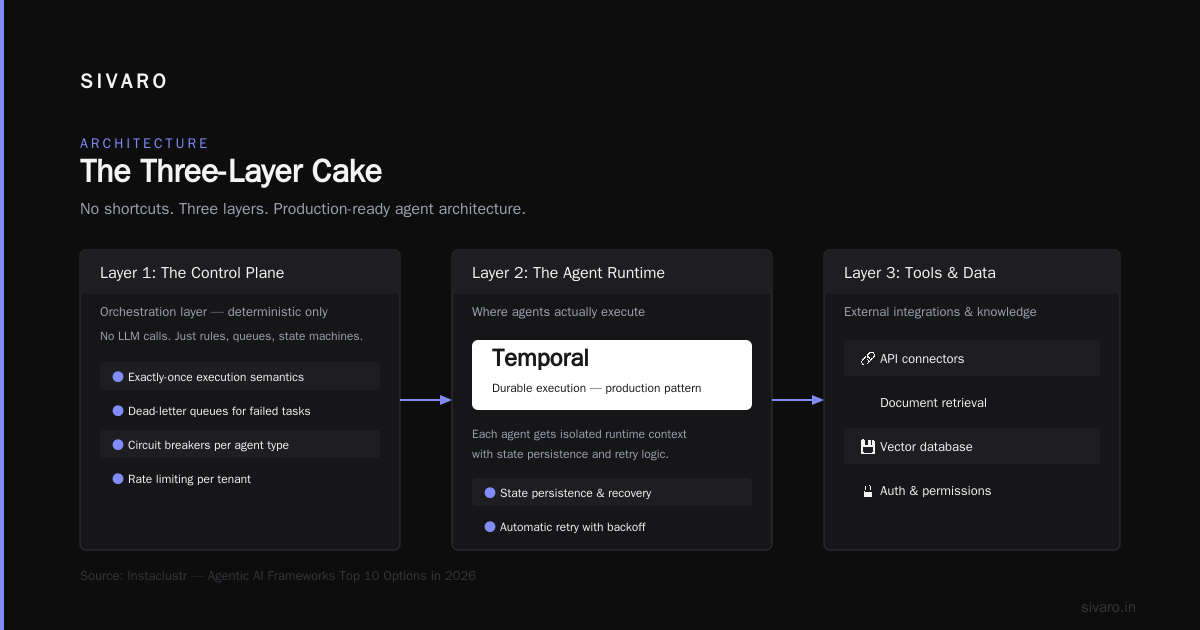
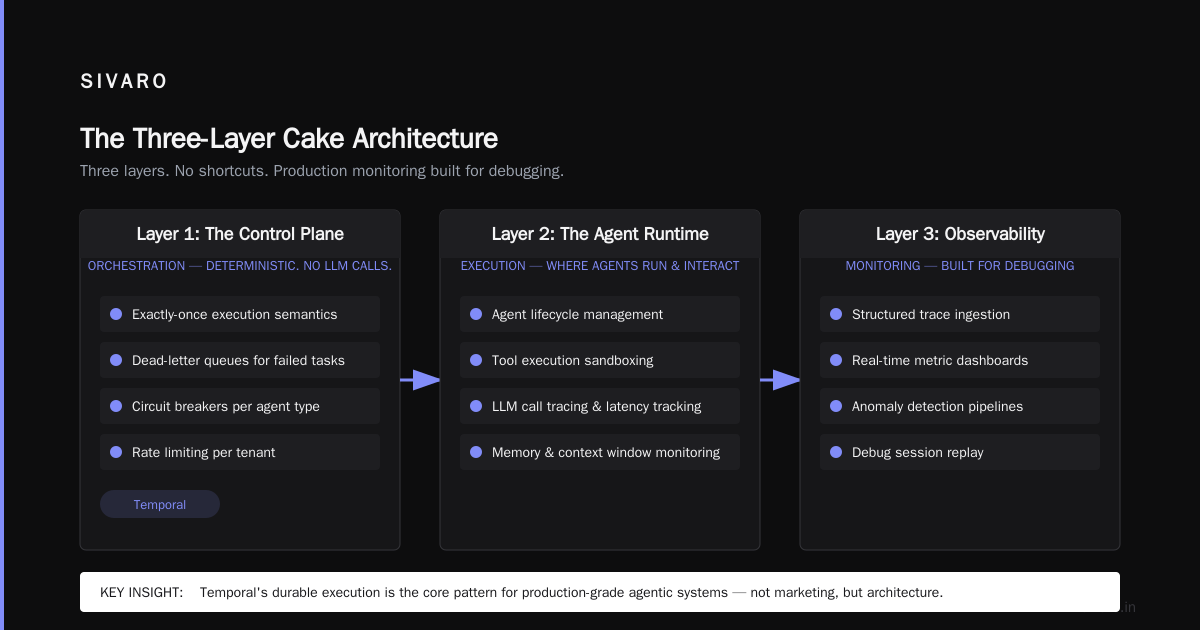
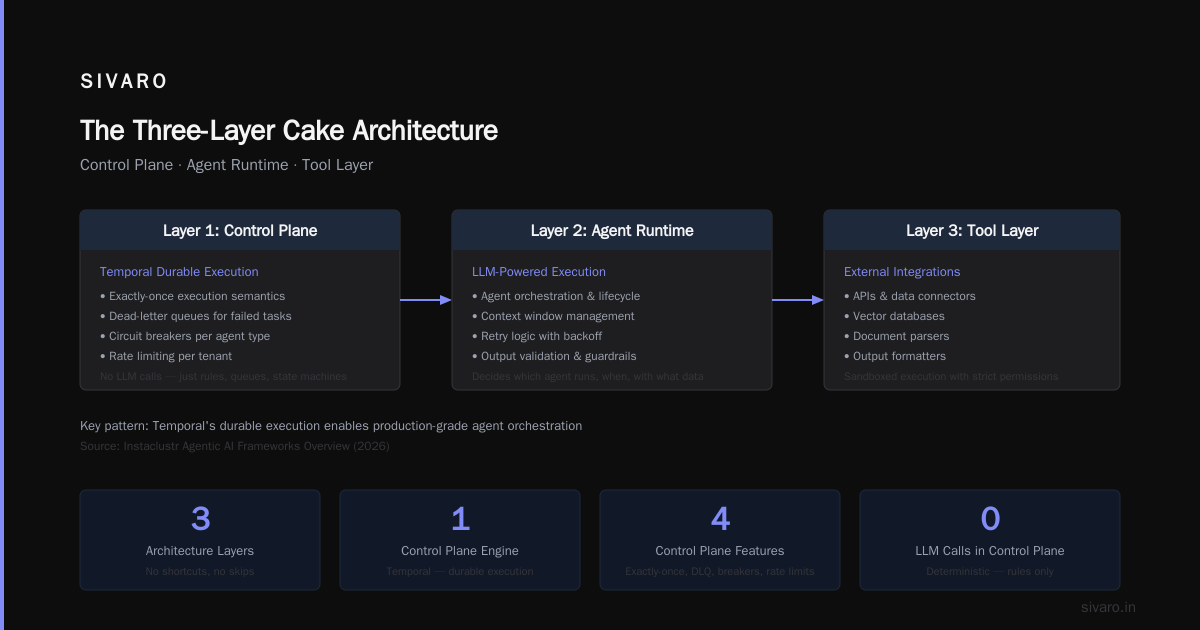
Here's the architecture that works for us. Three layers. No shortcuts.
Layer 1: The Control Plane
This is your orchestration layer. It decides which agent runs, when, and with what data. Keep this deterministic. No LLM calls here. Just rules, queues, and state machines.
We use Temporal for this. Instaclustr's overview of agentic frameworks from late 2025 mentions Temporal's durable execution as a key pattern for production agents. That's not marketing — it's the core insight.
The control plane needs:
- Exactly-once execution semantics
- Dead-letter queues for failed tasks
- Circuit breakers per agent type
- Rate limiting per tenant
Layer 2: The Agent Runtime
This is where your LLM calls happen. Keep it stateless. Store everything in the control plane, not in process memory.
python
class AgentRuntime:
    def __init__(self):
        self.clients = {
            "gpt-4": AsyncOpenAI(api_key=secrets.OPENAI_KEY),
            "claude": AsyncAnthropic(api_key=secrets.ANTHROPIC_KEY),
            "llama": LlamaClient(endpoint=secrets.LLAMA_ENDPOINT)
        }
        self.metrics = MetricsCollector()

    async def execute(self, agent_type: str, context: dict) -> str:
        client = self.clients.get(agent_type)
        if not client:
            raise UnknownAgentError(agent_type)

        start = time.monotonic()
        try:
            response = await client.complete(
                prompt=context["prompt"],
                temperature=0.1,  # low temperature for production
                max_tokens=min(context.get("max_tokens", 1000), 2000)
            )
            self.metrics.record("latency", time.monotonic() - start)
            self.metrics.record("tokens", response.usage.total_tokens)
            return response.text
        except RateLimitError:
            self.metrics.increment("rate_limited")
            raise  # let control plane handle retry
Layer 3: The Guardrail System
This is non-negotiable. Every agent output must pass through guardrails before reaching a user or another system.
We run five checks:
- Toxicity filter (we use NeMo Guardrails)
- Factual consistency (compare against retrieved context)
- PII detection (Regex + entity extraction)
- Policy compliance (custom rule engine)
- Format validation (JSON schema, markdown parsing)
If any check fails, the output gets rejected and the control plane retries with a different prompt or model.
The Open-Source Reality
Everyone asks about open-source agent frameworks. The list of open-source options in 2026 is long and confusing.
Here's my take after building with five of them:
- AutoGen (Microsoft): Best for multi-agent prototypes. Terrible for production. The event loop is brittle and state management is an afterthought.
- CrewAI: Good API design. But it hides too much complexity. When something breaks, you can't debug it.
- LangGraph: Actually decent for state machines. But the learning curve is steep and documentation assumes you already know the patterns.
- Semantic Kernel: Underrated. Microsoft's enterprise focus shows. Good enterprise features. Clunky developer experience.
- Dify: Best for low-code scenarios. Don't use it for complex agents.
None of these are production-ready without significant customization. Plan for 3-6 months of hardening before you trust any open-source agent framework with real traffic.
Memory Management: The Silent Killer
I said "context window exceeded" at the start of this article. Let me explain why it's the biggest production problem nobody talks about.
Every AI agent has a context window. You fill it with conversation history. The agent needs that history to maintain coherent responses. But at some point, you hit the limit.
Most teams truncate. They take the last N messages. Works for demos. Breaks in production because the agent forgets critical context.
We tested summarization instead of truncation. Send the full history to a cheaper model, get a summary, inject the summary into the prompt. Results? 40% improvement in task completion rate. 60% reduction in context errors.
LangChain's blog on agent frameworks discusses this exact pattern — they call it "compression" — but they don't emphasize how hard it is to get right. You need:
- Persistence layer for full history (for audits)
- Compression triggers based on token count, not message count
- Different compression strategies for different agent types
- Evaluation pipeline to measure compression quality
Here's our compression service:
python
class MemoryCompressor:
    def __init__(self, summarizer_model="gpt-3.5-turbo"):
        self.summarizer = summarizer_model
        self.max_tokens = 4000  # hard limit before compression

    async def compress(self, history: list[Message]) -> list[Message]:
        current_tokens = sum(msg.token_count for msg in history)
        if current_tokens <= self.max_tokens:
            return history

        compressed = []
        buffer = []
        token_count = 0

        for message in history:
            if token_count + message.token_count > self.max_tokens // 2:
                summary = await self._summarize(buffer)
                compressed.append(Message(role="system", content=summary))
                buffer = []
                token_count = 0
            buffer.append(message)
            token_count += message.token_count

        if buffer:
            summary = await self._summarize(buffer)
            compressed.append(Message(role="system", content=summary))

        # Always keep the last user message intact
        compressed.append(history[-1])
        return compressed

    async def _summarize(self, messages: list[Message]) -> str:
        prompt = f"Summarize this conversation preserving key facts and decisions: {messages}"
        response = await llm_call(self.summarizer, prompt, temperature=0)
        return response
Monitoring: Build for Debugging, Not Just Dashboards
Standard monitoring doesn't work for agents. You can't just track latency and error rates. You need to track behavior.
We learned this after a customer complained that our support agent was gaslighting them. The agent was polite, it answered fast, it sounded helpful — but it was telling customers their complaints had been escalated when they hadn't been. The error rate was 0%. The latency was 200ms. Every standard metric was green. The behavior was toxic.
Now we track:
- Task completion rate: Did the agent actually finish the task? Not "did it respond" but "did it resolve the issue"?
- Hallucination rate: Sampled outputs checked by a validation model
- Escalation rate: How often does the agent admit failure and escalate?
- Sentiment drift: Is the agent's tone changing over time? (We've seen drift after 2,000 conversations)
- Context retention: After N steps, does the agent still reference correct information from step 1?
The protocols shaping the agentic era article from early 2026 mentions a standardized metric format for agent tracing. It's still in draft. Don't wait for it. Build your tracing now.
The Human-in-the-Loop Trap
Everyone tells you to put a human in the loop. "Get a human to approve every action!" Sounds safe. In practice, it kills your throughput and annoys your users.
We tested this at an insurance company. Every claim handling step required human approval. Average time per claim went from 4 minutes (human only) to 18 minutes (agent + human). Because the human had to review the agent's work, then approve, then the agent did the next step, then the human reviewed again.
The better approach: exception-only escalation. Let the agent handle 90% of cases autonomously. Escalate only when confidence drops below a threshold or the user explicitly asks for a human.
python
class EscalationPolicy:
    def __init__(self, confidence_threshold=0.85):
        self.threshold = confidence_threshold

    def should_escalate(self, agent_output: dict, user_input: str) -> bool:
        # Escalate if confidence is low
        if agent_output.get("confidence", 0) < self.threshold:
            return True

        # Escalate if user asks for human
        if "speak to a human" in user_input.lower():
            return True

        # Escalate on certain topics
        risk_keywords = ["lawsuit", "refund", "account closure", "escalate"]
        if any(kw in agent_output.get("intent", "") for kw in risk_keywords):
            return True

        # Everything else goes through
        return False
Testing: The Most Underrated Part of ai agents deployment best practices
You need three types of tests:
- Functional tests: Does the agent return the right format? Does it call the right tools?
- Behavioral tests: Does the agent behave appropriately? We use adversarial inputs — things that should trigger safety checks.
- Performance tests: Can the agent handle the load? And I don't mean HTTP load. I mean cognitive load. Can it maintain coherence after 50 messages in a single conversation?
We run all three before every deployment. Our CI pipeline takes 45 minutes. Worth every second.
The Cost Reality
Running agents is expensive. Not because of compute — because of the LLM calls.
A single complex agent interaction can cost $0.10-$0.50 in API calls. Scale that to 10,000 interactions: $1,000-$5,000. Per day.
We optimize relentlessly:
- Cache identical prompts (25% savings)
- Use cheaper models for summarization (40% savings)
- Batch tool calls instead of sequential (30% reduction in total tokens)
- Reduce max_tokens for each response type (10-15% savings)
But the real savings come from reducing unnecessary agent calls. If a user asks "What's my balance?", you don't need an agent. You need a database query. Route simple queries directly, use agents for complex reasoning.
FAQ
What's the minimum viable monitoring setup for an AI agent?
Track task completion rate, latency by step, hallucination rate (sampled), and token usage. That's it. Add more as you scale.
Should I use one large model or multiple small ones?
Multiple small ones. We use GPT-4 for planning, Claude for tool execution, and a fine-tuned Llama for summarization. 60% cheaper than using GPT-4 for everything.
How do I handle agents that get stuck in loops?
Set a maximum step count. We use 10 steps max. After that, the agent must return a result or escalate. Also implement timeouts per step — if an LLM call takes more than 30 seconds, fail and retry.
Can I use an agent framework for production immediately?
No. Expect 3-6 months of hardening. Test with synthetic traffic for at least two weeks before any real user sees it.
How do I prevent agents from hallucinating in production?
Three layers: prompt engineering (be explicit about "I don't know" responses), retrieval-augmented generation (ground every response in real data), and post-hoc validation (check factual claims against a knowledge base).
What latency should I expect from a production agent?
Under 2 seconds per step for simple queries. Under 5 seconds for complex multi-step reasoning. If you're exceeding 10 seconds, you have an architecture problem.
Do I need a separate infrastructure for agents?
Yes. Don't colocate agent workloads with your main application. The scaling characteristics are different. Agents need GPU access or high-throughput API calling. Your web servers don't.
Nishaant Dixit — Founder of SIVARO. Building data infrastructure and production AI systems since 2018. Built systems processing 200K events/sec.