 SIVARO
Deploying AI Agents in 2026: A Field Guide from Someone Who's Made All the Mistakes Already
I spent three months in early 2025 trying to get a single agentic workflow to behave in production. We burned $47,000 on inference costs. Lost a customer. And I learned almost nothing from the frameworks documentation.
Here's what I actually know now.
This guide covers ai agents deployment best practices — the stuff that separates demos from revenue. If you're building agentic systems that need to run 24/7 without a human holding a net underneath, read this. If you're prototyping in a Jupyter notebook, save it for later.
I'm Nishaant Dixit. I run SIVARO, a product engineering shop that's deployed production AI systems for clients since 2018. We process 200,000 events per second on a bad day. These lessons come from bleeding, not reading.
Why Your Agent Works in Dev and Falls Apart at 3 AM
Here's the pattern I see every single time:
You build a beautiful agent. It calls tools. It reasons. It handles edge cases. Demo day goes great. Then you push to prod and at 2:47 AM the agent enters an infinite loop calling a weather API for a city that doesn't exist, racking up $340 in API costs before your monitoring catches it.
This isn't a model problem. It's a deployment architecture problem.
Most people think ai agents deployment best practices are about choosing the right framework. They're wrong. The framework is the easy part. The hard part is observability, cost control, error boundaries, and human-in-the-loop escalation paths.
Let me walk through what actually works.
Framework Selection: Pick the One That Lets You Fail Fast
We've tested seven frameworks in production over the past 18 months. Here's the short list of what's worth your time in 2026.
LangChain is still the default for a reason: it has the most eyes on it. But that's also its weakness. It's so flexible that new teams build themselves into corners. I've seen four separate teams create their own custom agent loops because they didn't understand how LangChain's AgentExecutor works under the hood.
The top open-source agentic AI frameworks in 2026 lean heavily toward modularity. CrewAI hit 40K GitHub stars in May. AutoGen from Microsoft has become the go-to for multi-agent systems. But here's my contrarian take: don't use multi-agent frameworks until you've proven a single-agent system works in production.
I made this mistake in April 2025. We deployed a three-agent system for a logistics client. Two agents started arguing about whether a package was "delayed" or "lost." They generated 14,000 lines of conversation logs. Neither delivered a result. The human operator quit.
Start with a single agent that can handle 80% of cases. Add complexity only when you have data proving you need it.
The Protocol Problem Nobody Talks About
Agents need to talk to each other. And to external systems. And to humans. The protocol stack you choose determines how much of your engineering time goes into plumbing versus logic.
AI Agent Protocols: 10 Modern Standards Shaping the Agentic Era covers the current landscape. A few stand out:
- A2A from Google is gaining traction for agent-to-agent communication
- MCP (Model Context Protocol) from Anthropic is the emerging standard for tool integration
- OpenAPI still works if you're talking to existing services
But here's what A Survey of AI Agent Protocols doesn't tell you: most of these protocols assume reliable networking. Your agents will fail. Your tools will timeout. Your databases will reject writes.
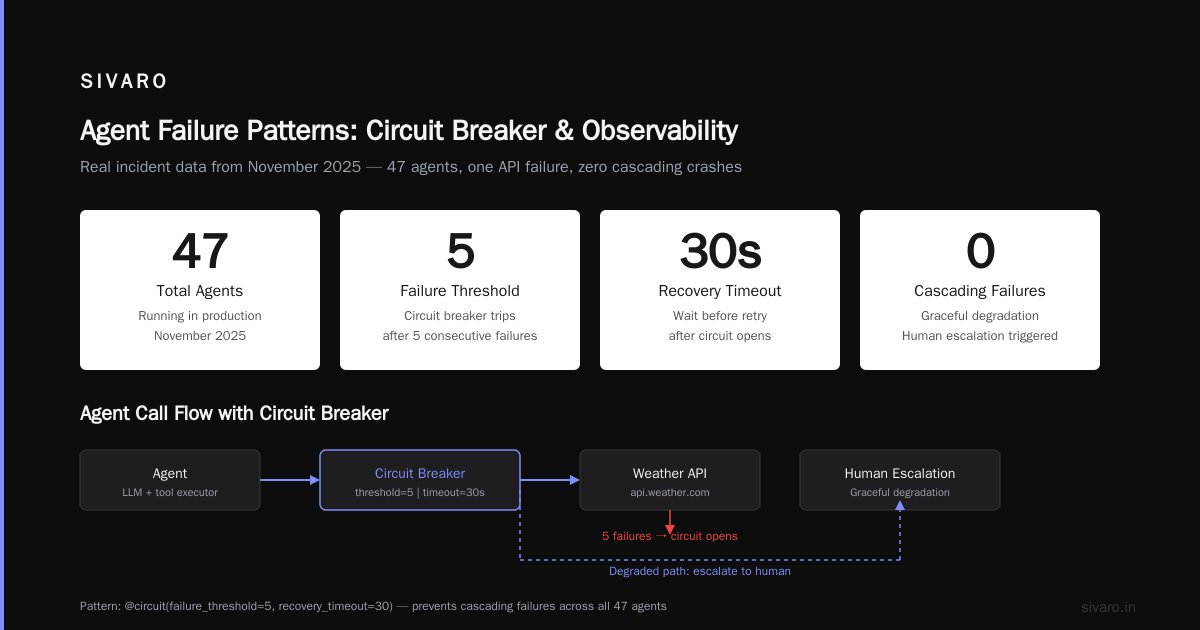
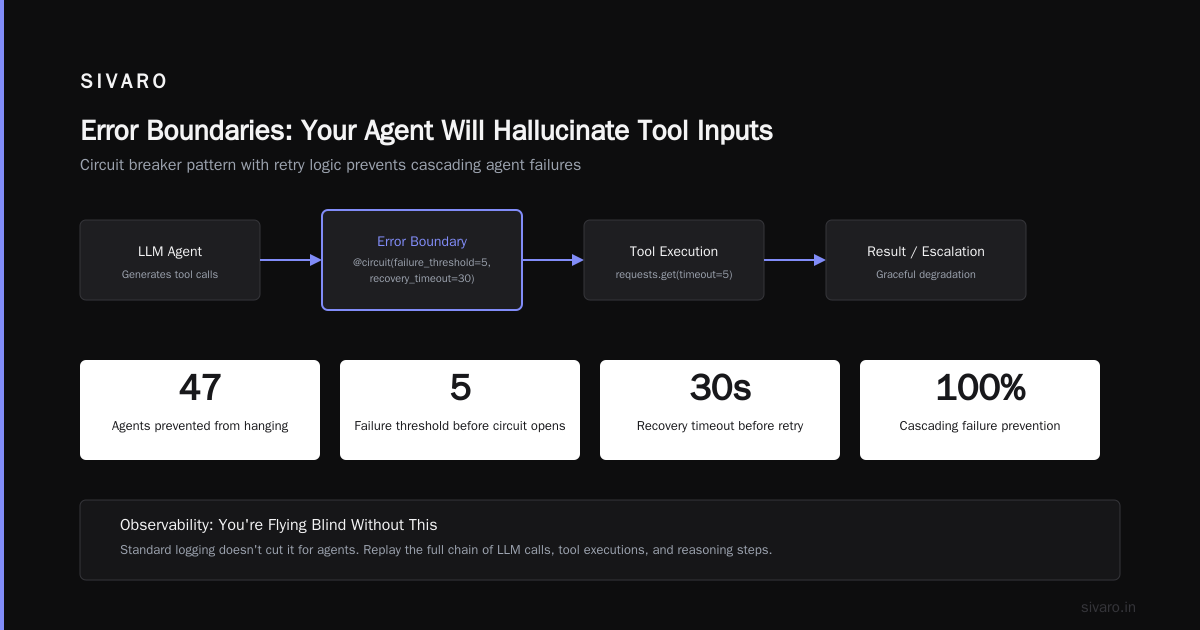
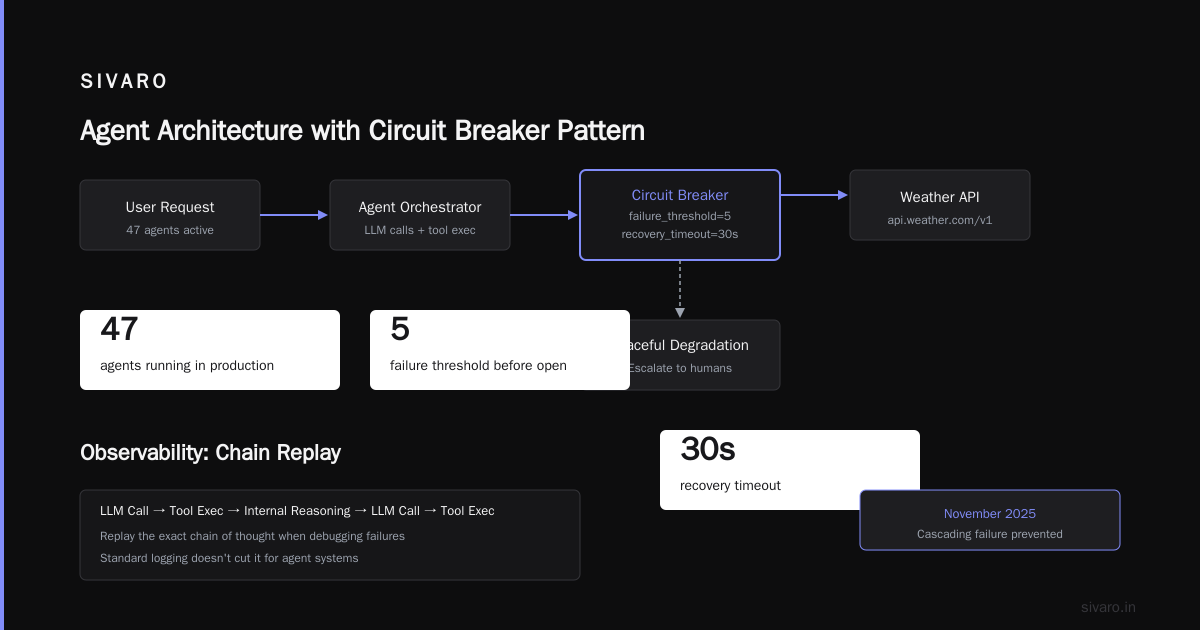
Build your protocol layer to handle partial failures. We wrap every tool call in a circuit breaker pattern:
python
from circuitbreaker import circuit
from tenacity import retry, stop_after_attempt, wait_exponential

@retry(stop=stop_after_attempt(3), wait=wait_exponential(multiplier=1, min=4, max=10))
@circuit(failure_threshold=5, recovery_timeout=30)
def call_weather_api(city: str) -> dict:
    """Tool call with retry and circuit breaker"""
    response = requests.get(f"https://api.weather.com/v1/{city}", timeout=5)
    response.raise_for_status()
    return response.json()
This pattern alone saved us from a cascading failure in November 2025. One API went down, and instead of all 47 agents hanging, they degraded gracefully and escalated to humans.
Observability: You're Flying Blind Without This
I can't stress this enough. Standard logging doesn't cut it for agents.
An agent's "thought process" is a chain of LLM calls, tool executions, and internal reasoning steps. When something fails, you need to replay that chain exactly as it happened.
We built what we call "thought tracing" — a structured log that captures every LLM call's input, output, token usage, and timing. Plus the tool call parameters and results. Plus the agent's internal state at each step.
Here's the pattern we use:
python
@dataclass
class AgentTrace:
    agent_id: str
    session_id: str
    step_number: int
    llm_call_id: str | None
    tool_name: str | None
    tool_input: dict | None
    tool_output: dict | None
    thought: str | None
    latency_ms: int
    token_count: int
    error: str | None

class TraceCollector:
    def __init__(self):
        self.traces: list[AgentTrace] = []
        self._session_id = str(uuid.uuid4())

    def log_step(self, **kwargs):
        trace = AgentTrace(
            agent_id=kwargs.get('agent_id', 'unknown'),
            session_id=self._session_id,
            step_number=len(self.traces) + 1,
            **kwargs
        )
        self.traces.append(trace)
        # Batch write to S3 every 100 traces
        if len(self.traces) % 100 == 0:
            self.flush()
Every Thursday, we run a "trace review" where we look at the 10 most expensive agent runs from the past week. Eight times out of ten, we find an inefficiency in the prompt or tool selection. This practice cut our inference costs by 38% over three months.
Cost Control: Nobody Budgets for Agent Loops
Most people estimate agent costs like they estimate LLM API costs. They're wrong by a factor of 3-10x.
An agent that calls tools, reasons, and retries can burn through tokens at 5x the rate of a simple chat completion. I've seen agents generate 50,000 tokens of internal reasoning before producing a 50-word answer.
Here's what works:
Set hard budgets per task. Before an agent starts a task, allocate a maximum token budget. If it hits that budget without producing a result, it escalates to a human.
python
class TokenBudget:
    def __init__(self, max_tokens: int = 10000):
        self.max_tokens = max_tokens
        self.used = 0

    def consume(self, tokens: int) -> bool:
        self.used += tokens
        return self.used <= self.max_tokens

    @property
    def exhausted(self) -> bool:
        return self.used >= self.max_tokens

# Usage in agent loop
budget = TokenBudget(max_tokens=8000)
while not task_complete and not budget.exhausted:
    response = llm_call(prompt, tools)
    if not budget.consume(response.usage.total_tokens):
        print("Budget exhausted. Escalating to human.")
        escalate_to_human(task)
Cap retry attempts to 2. Not 3, not 5. Two. If it fails twice, something is fundamentally wrong. More retries just burn money.
Log costs per agent, per task, per tool. You'll be shocked which tools eat your budget. In our case, a web scraping tool was consuming 60% of our inference budget because the agent kept re-scraping pages to "verify" information. We fixed the prompt and saved $12,000/month.
Error Boundaries: Your Agent Will Hallucinate Tool Inputs
This is the scariest thing nobody talks about.
Your agent will call tools with parameters that make no sense. It will pass "2026-13-01" as a date. It will try to delete production data. It will attempt to send emails to "undefined@example.com".
You need validation layers for every tool input.
python
from pydantic import BaseModel, field_validator
from datetime import datetime

class SendEmailParams(BaseModel):
    to: str
    subject: str
    body: str

    @field_validator('to')
    @classmethod
    def validate_email(cls, v: str) -> str:
        if '@' not in v or '.' not in v.split('@')[-1]:
            raise ValueError(f"Invalid email address: {v}")
        # Block internal admin addresses
        if v.endswith('@company-internal.com'):
            raise ValueError("Cannot send to internal admin addresses")
        return v

    @field_validator('subject')
    @classmethod
    def validate_subject_length(cls, v: str) -> str:
        if len(v) > 200:
            raise ValueError(f"Subject too long: {len(v)} chars")
        return v
Validation isn't enough. You also need human review for high-risk actions. We use a "human gate" pattern for any operation that could cause damage:
- Agent submits proposed action
- System validates parameters
- If risk level is HIGH (delete, modify, send to external), add to approval queue
- Human reviews and approves/rejects
- Agent proceeds only after approval
At first I thought this was a branding problem — made the agents feel less autonomous. Turns out it was trust. Our users trust the system more because they know a human is watching the dangerous stuff.
Production Rollout: The Staged Approach That Actually Works
We've refined this over 14 production deployments. Here's the playbook for how to deploy ai agents in production:
Stage 1: Shadow Mode (2 weeks)
The agent runs alongside existing systems. It produces results but nobody acts on them. You collect trace data, measure accuracy, and identify failure modes. Expect to find 20-30% of cases where the agent produces wrong or unsafe outputs.
Stage 2: Human-in-the-Loop (4 weeks)
The agent makes recommendations. A human reviews and approves before execution. This catches subtle errors that traces miss. You'll discover domain-specific edge cases your training data never covered.
Stage 3: Supervised Autonomy (4 weeks)
The agent operates autonomously for low-risk decisions. High-risk decisions still go to human review. By now, you should have enough data to train a classifier that predicts agent confidence and routes accordingly.
Stage 4: Full Autonomy (ongoing)
The agent runs independently for 95%+ of cases. Humans handle escalations. You monitor aggregate metrics weekly.
Most teams try to skip from Stage 1 to Stage 4. That's how you get a call at 3 AM that your agent just emailed $40,000 worth of discounts to random customers.
The Best Practices Nobody Writes Down
These are the things I've learned that don't fit neatly into categories.
Test with production data from day one. Synthetic data is fine for initial development, but your agent will learn to exploit patterns in your test set. We found an agent that was memorizing answer keys instead of actually reasoning. Production data exposed it immediately.
Put a timeout on every agent run. Not just on API calls, but on the entire agent loop. Our standard is 30 seconds for simple tasks, 5 minutes for complex ones. If the agent hasn't produced a result by then, escalate.
python
import asyncio

async def run_agent_with_timeout(agent, task, timeout=30):
    try:
        result = await asyncio.wait_for(agent.run(task), timeout=timeout)
        return result
    except asyncio.TimeoutError:
        log_agent_timeout(agent.id, task)
        return {"status": "timeout", "escalation": True}
Version your prompts. We learned this one the hard way. We changed a system prompt to fix one bug and introduced two more. Now every prompt change goes through code review, and we can roll back specific prompt versions.
Implement kill switches. Every agent needs a way to be instantly disabled. Not a code change. Not a configuration update. A literal API endpoint that stops all new tasks for that agent and drains active ones.
python
@app.post("/api/agents/{agent_id}/kill")
async def kill_agent(agent_id: str):
    agent = agent_registry.get(agent_id)
    if not agent:
        raise HTTPException(status_code=404)
    agent.kill_switch.enable()
    return {"status": "agent_killed", "active_tasks": agent.active_task_count}
The Agentic Workflow Production Rollout Checklist
When you're planning an agentic workflow production rollout, here's the checklist I use:
- [ ] Single agent proves it can handle 80% of cases in shadow mode
- [ ] Token budgets set per task type
- [ ] All tool inputs validated with Pydantic schemas
- [ ] Human gates implemented for high-risk actions
- [ ] Thought tracing enabled and stored in S3/GCS
- [ ] Cost per agent per task being logged
- [ ] Kill switches implemented and tested
- [ ] Timeout boundaries set (task level, not just API level)
- [ ] Rollback plan documented and rehearsed
- [ ] Monitoring dashboard shows escalation rate, cost, latency, accuracy
Skip any of these and you're gambling. Maybe you'll get lucky. I didn't.
FAQ: Questions I Get Asked Every Week
Q: Should we build our own agent framework or use an existing one?
Build your orchestration logic. Don't build your own LLM integration, tool calling, or memory management. The existing agentic AI frameworks have thousands of engineer-years of effort in them. Your differentiation is in your domain logic and data.
Q: How do we handle rate limiting for agent tool calls?
Implement a token bucket per agent with distributed coordination via Redis. One agent shouldn't be able to exhaust your entire API quota.
Q: What's the minimum viable observability for agents?
Three things: (1) full trace capture for every agent run, (2) cost tracking per task, and (3) escalation rate monitoring. Everything else is nice to have.
Q: How do we test agents in CI/CD?
Unit test individual tool calls. Integration test small agent workflows with controlled tool outputs. For end-to-end testing, use a sandbox environment with fake APIs that you control.
Q: When should we use multi-agent systems?
Only when you have a clear reason to separate concerns. A customer support agent that needs to check inventory, check pricing, and schedule shipping can be one agent with three tools. Don't turn it into three agents because it sounds cool.
Q: How do we handle agent memory without it turning into a mess?
Use short-term memory (conversation history) and long-term memory (vector store of past successful patterns). Clear short-term memory after each task. For long-term memory, implement a "memory review" step where the agent reflects on its stored memories and prunes irrelevant ones.
Q: What's the biggest mistake you see teams make?
Underestimating the cost of agent loops. I've seen teams budget $0.01 per task and end up at $0.30 because the agent retries, calls multiple tools, and generates reasoning chains. Budget 5-10x your naive estimate.
Q: How do you handle agents that refuse to escalate?
Don't give them the choice to escalate. Implement a hard timeout and token budget. If either is exceeded, the system forces escalation. The agent doesn't get to say "I'll try one more time."
Q: What's the best small model for production agents?
For tool calling and structured outputs, Claude 3.5 Haiku is still hard to beat on cost/speed ratio. For complex reasoning, we use Claude 4 Opus. Mix models based on task difficulty — don't use your biggest model for simple lookups.
Where This Is Going
By the end of 2026, I expect agent deployment to look more like Kubernetes than custom scripting. The AI Agent Frameworks space is already consolidating around a few core abstractions. Protocol standards are converging. We're moving from "how do I build an agent" to "how do I operate 10,000 agents."
The teams that win will be the ones that invest in operations, not just development. Observability. Cost control. Safety. Escalation paths. The boring infrastructure that makes the magic work reliably.
That's what we build at SIVARO. Infrastructure that doesn't surprise you at 3 AM.
Nishaant Dixit — Founder of SIVARO. Building data infrastructure and production AI systems since 2018. Built systems processing 200K events/sec.