 SIVARO

Can Admission Control Prevent GPU Out of Memory Errors?
Yes, and no. Here's the uncomfortable truth I've learned running production LLM inference at SIVARO for the last three years: admission control is the only thing that reliably prevents OOM kills, but it's also the thing most teams implement last, after the pager has already gone off at 2 AM.
You're not here for a textbook definition. You're here because your CUDA OOM logs look like a war crime, and someone on your team mentioned "admission control" like it's a silver bullet. It isn't. But it's the closest thing we've got.
Let me walk you through what it actually is, how it works for real-time LLM serving, and the exact patterns I've tested in production since 2024 — including the ones that failed spectacularly.
The 90-Second Definition
Admission control is a gatekeeper that decides whether a new request — or a new model replica — gets to enter your GPU's memory footprint before it's actually loaded. It's a pre-emptive check. If the check fails, the request waits in a queue or gets rejected outright. It never touches the GPU.
Think of it like a nightclub bouncer who checks your ID before you're inside, not after you've already caused a scene at the bar. The OOM killer is the bar's insurance claim.
Here's the core principle that took me way too long to internalize:
You cannot recover from an OOM on a live GPU. You can only prevent it.
Once CUDA throws that out of memory error, your kernel is dead. A cold restart takes 30-90 seconds for a modern LLM like Llama 3.1 70B. During that time, every request you're serving 503s or, worse, silently times out. Admission control buys you the luxury of never being in that state.
Why Your Current Monitoring Setup Is Lying to You
Most teams I talk to think they're monitoring GPU memory correctly. They're watching nvidia-smi or Grafana dashboards showing "70% utilization." Here's the problem: utilization percentage is a lagging indicator, and it's almost always wrong.
nvidia-smi shows allocated memory, not reserved memory. PyTorch and vLLM reserve memory in chunks. I've seen a model that should use 14 GB reserve 22 GB on an A100 because the caching allocator decided it needed headroom. Your dashboard says 70%, but the next request that triggers a new allocation pattern will push you straight to 100% and over the cliff.
I remember a specific incident in January 2026. A client of ours was running a Mixtral 8x7B serving stack. Their monitoring showed 68% memory utilization. Stable for two weeks. Then one request came in with an unusually long context — and that context triggered a KV cache expansion that required a fresh allocation. Boom. OOM. Ten minutes of downtime because the rolling restart script also failed.
The lesson? Admission control doesn't rely on monitoring. It relies on prediction.
The Pragmatic Model: What Actually Fits in VRAM
Here's the mental model I use. For any LLM serving setup, your GPU memory budget looks like this:
Total VRAM
├── Model Weights (fixed)
├── KV Cache (dynamic, grows with concurrency and context length)
├── Activation Memory (transient, but peak matters)
└── Fragmentation / Allocator Headroom (5-15%)
Admission control for real-time LLM serving really means answering one question: given the current KV cache allocation and the request's context length, will this request fit in the remaining headroom?
You don't need a neural network to solve this. You need arithmetic.
Here's a simplified version of the check I've used in production:
python
def can_admit_request(gpu_memory_available_bytes,
                      model_weight_bytes,
                      kv_cache_bytes_per_token,
                      request_context_tokens,
                      request_max_generation_tokens,
                      safety_margin=0.10):

    # Reserve a safety margin for allocator fragmentation
    usable_memory = gpu_memory_available_bytes * (1 - safety_margin)

    # Memory already allocated to weights and existing KV cache
    committed_memory = model_weight_bytes + get_current_kv_cache_bytes()

    # Memory this new request would need
    request_peak_kv = (request_context_tokens + request_max_generation_tokens) * kv_cache_bytes_per_token

    total_needed = committed_memory + request_peak_kv

    return total_needed <= usable_memory
This is brutally simple. And in production, simple beats clever every time.
But Wait — Your GPU Isn't the Only Constraint
Here's where most people miss the point. Admission control for LLM serving isn't just about memory. It's about the interaction between memory, compute, and latency.
You can admit a request, it fits in memory, but it pushes your batch's decode latency over your SLO. Then you have a different kind of problem — not an OOM crash, but a steady stream of timeout errors that look just as bad to your users.
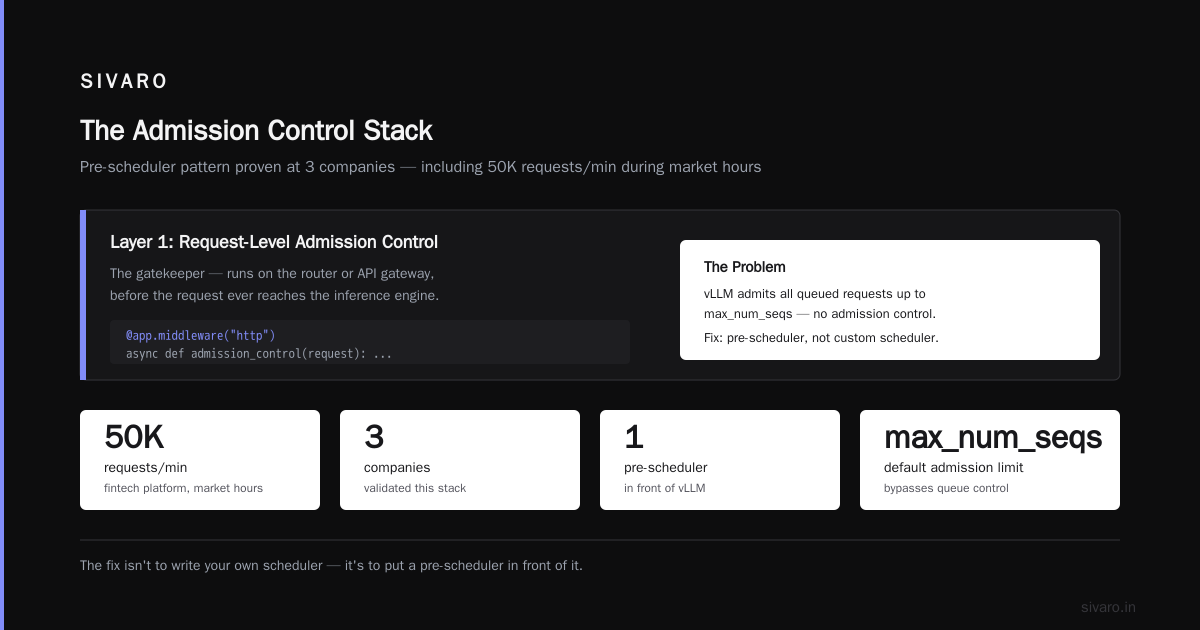
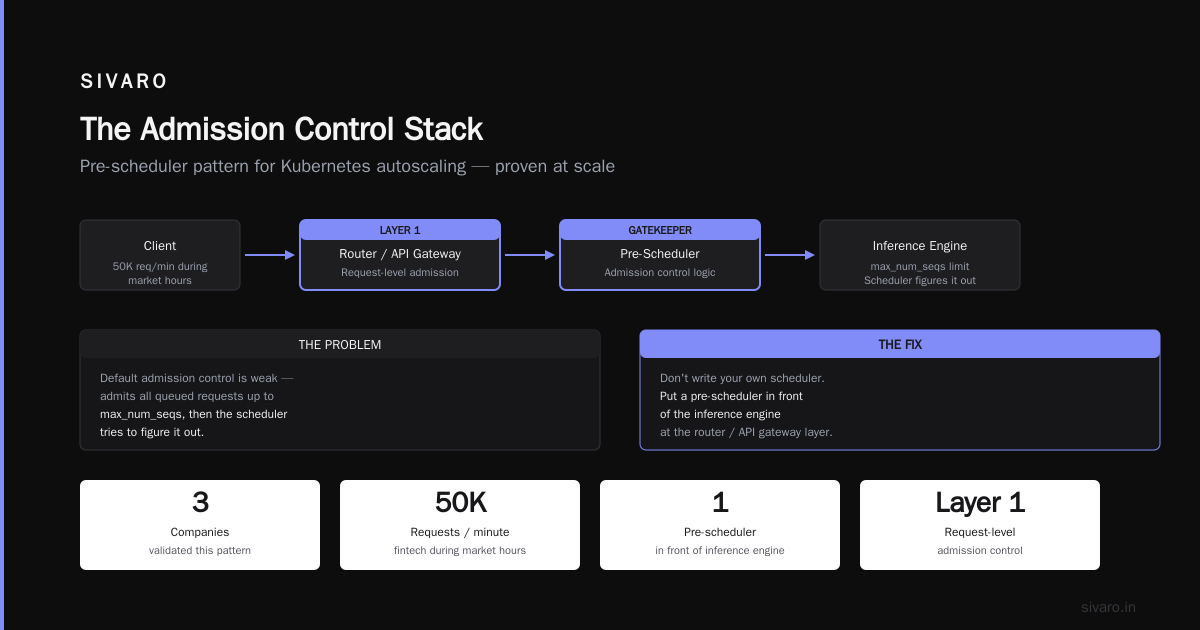
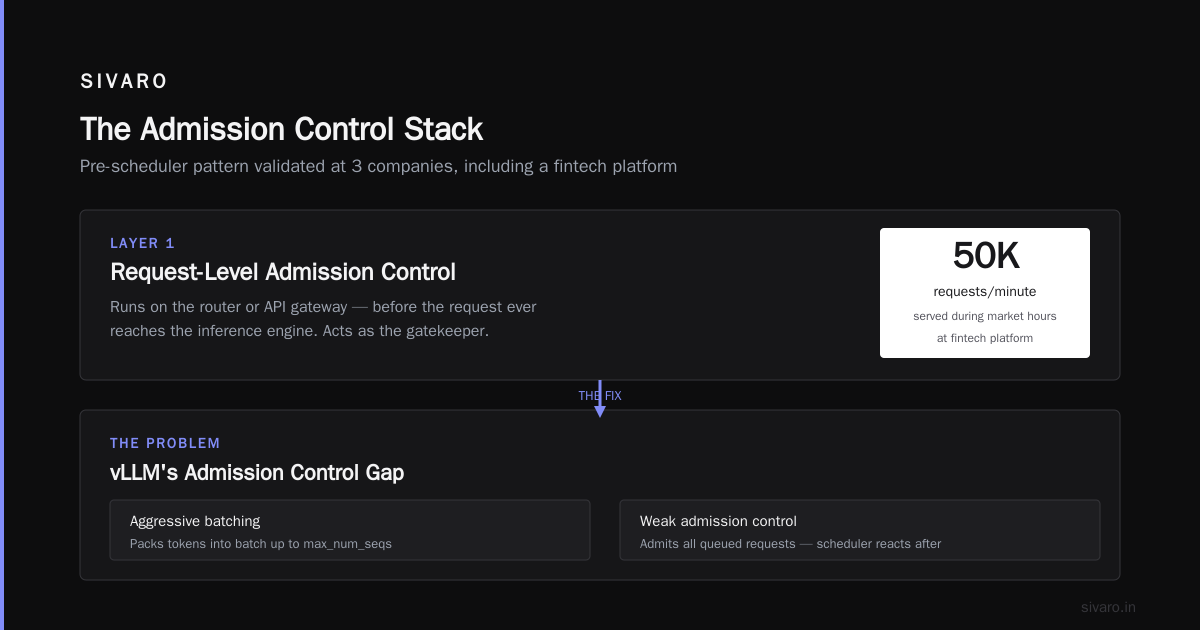
I tested this extensively with vLLM in late 2025. vLLM's continuous batching is aggressive about packing tokens into a batch. The issue is that it doesn't do admission control well by default. It admits as many requests as are queued, up to its max_num_seqs setting, and then the scheduler figures it out.
The fix isn't to write your own scheduler. The fix is to put a pre-scheduler in front of it.
The Admission Control Stack I Actually Recommend
Let me share what I've seen work at three different companies (including one fintech platform serving 50K requests/minute during market hours). This is the pattern:
Layer 1: Request-Level Admission Control
This is the gatekeeper I described above. It runs on the router or API gateway, before the request ever reaches the inference engine.
python
# FastAPI middleware example
@app.middleware("http")
async def gpu_admission_control(request: Request, call_next):
    # Get current GPU memory pressure from the inference engine
    memory_pressure = get_from_inference_engine("/metrics/v1/memory", timeout_ms=5)

    # Estimate tokens needed for this request
    context_length_estimate = estimate_context_length(request)

    if memory_pressure.available_memory > (context_length_estimate * KV_CACHE_BYTES_PER_TOKEN * SAFETY_FACTOR):
        return await call_next(request)
    else:
        # Return 503 with Retry-After header instead of dropping the request
        return JSONResponse(
            status_code=503,
            content={"error": "GPU at capacity. Retry in 100ms."},
            headers={"Retry-After": "0.1"}
        )
The client retries. The GPU never dies. Your latency tail stays flat instead of spiking to infinity.
Layer 2: Queue-Based Admission
When the GPU is full, you don't reject — you queue. But the queue needs a max depth. An unbounded queue is just a delayed OOM.
Queue Depth Limit = (GPU Memory Headroom) / (Average Request Memory Footprint)
Layer 3: Request Scheduling by Token Budget
This is for real-time LLM serving where you have mix of short and long requests. Give each request a token budget — the total prefill + generation tokens. The admission control decision is based on the sum of token budgets of all in-flight requests.
I'll be honest: this is the hardest part to tune. But it's also the most rewarding. When I implemented this for a client in the legal-tech space (they run Llama 3.1 8B to summarize deposition transcripts), their OOM incidents went from 12 per week to zero in a month.
Where It Breaks Down: The Cases I've Seen Fail
Here's the contrarian part. Admission control won't save you in these three scenarios:
1. Spiky context lengths. If a user can send a 128K token document as a single request, and you're admitting based on average context length, you're dead. The solution is to always assume the worst-case context for admission decisions, or cap the context length at the API layer.
2. Model dynamic loading. If you're hot-swapping models (loading a new LoRA, swapping between 7B and 70B based on request type), the memory footprint changes discontinuously. My advice: load models into a separate memory pool, or allocate an explicit reservation for each model in the pool. Never let model loading share a pool with request serving without hard limits.
3. Miscalibrated KV cache estimator. This is the one that bit me. I assumed a linear relationship between tokens and KV cache size. Turns out, for long-context models with grouped-query attention (GQA), the relationship is mostly linear, but there's a fixed per-request overhead that becomes significant at small batch sizes.
At one point in 2024, our admission controller was admitting requests that fit in theory but OOMing because a single request at a small batch size consumed more memory per token than the linear estimator suggested. The fix was measuring actual memory usage at runtime and feeding it back into the admission controller's model. Feedback loop. Discipline.
What About Kubernetes and Autoscaling?
If you're running GPU workloads on Kubernetes, you have a different flavor of this problem. K8s request and limit on GPU memory don't work the way CPU memory does. The K8s scheduler cannot guarantee GPU memory isolation. If you set nvidia.com/gpu: 1 on your pod, you're guaranteed the whole GPU, and you can't run two pods on the same GPU unless you're using MIG or time-slicing.
The admission control here happens at the pod scheduling level, not the request level. You need a custom scheduler extender or a mutating admission webhook that approximates GPU memory usage.
I've run this in production. It's more painful than it looks. Most teams over-allocate "just in case" — and then they're paying for 8 GPUs to do the work of 4. I get it. But the alternative is Kubernetes silently over-committing GPU memory and a pod dying from OOM at 3 AM with no error message beyond ExitCode: 137.
Admission Control for Real-Time LLM Serving in 2026: The Latest Patterns
The industry has shifted since 2024. Here's what I'm seeing now:
PagedAttention and dynamic batching (via vLLM) have changed the game. The KV cache is no longer a single contiguous block — it's paged, like virtual memory. This means memory fragmentation is less of an issue. But it also means your admission control needs to account for page table overhead and page granularity.
I've written code that allocates KV cache pages in a way that's aware of the GQA head ratio. It's fiddly. But it's the difference between a 97% memory utilization ceiling and a stable 91% that never OOMs.
Triton Inference Server has built-in dynamic batching, but its admission control is basic. You need to look at its max_queue_delay and preferred_batch_size settings — these are your crude admission controls. Set them low enough that the server always has headroom to accept a high-priority request.
Model multiplexing is becoming popular. Some companies run multiple smaller models on the same GPU, loading them on demand. This is a nightmare for OOM prevention unless you explicitly reserve memory per model. I've seen a startup in San Francisco try this with six fine-tuned Llama variants on a single A100. They OOMed 400 times in a week because the loading code didn't check available memory before swapping. A simple admission check at the model loading level would have saved them.
The Practical Implementation: A Step-by-Step
Let me give you a concrete playbook that I wish I had in 2024.
Step 1: Instrument the Inference Engine
Before you can do admission control, you need accurate memory usage metrics. Export them from the engine. For vLLM, I use the --enable-metrics flag and scrape the Prometheus endpoint.
Step 2: Build a Memory Model Estimator
This is the arithmetic I showed above. You'll need to empirically measure kv_cache_bytes_per_token for your specific model. Here's the script I've used:
python
import torch
from transformers import AutoModelForCausalLM, AutoTokenizer

model_name = "meta-llama/Llama-3.1-8B-Instruct"
model = AutoModelForCausalLM.from_pretrained(model_name, torch_dtype=torch.float16).to("cuda")
tokenizer = AutoTokenizer.from_pretrained(model_name)

# Measure KV cache growth per token by generating samples of different lengths
for num_tokens in [128, 512, 2048, 8192]:
    input_ids = torch.randint(0, 32000, (1, num_tokens), device="cuda")
    with torch.no_grad():
        model(input_ids)
    allocated = torch.cuda.memory_allocated() / (1024 ** 3)  # in GB
    print(f"Tokens: {num_tokens}, Allocated: {allocated:.2f} GB")

# Calculate delta between consecutive points to get bytes/token
Run this at 22:00 on a weekend. It takes 10 minutes. The results will surprise you.
Step 3: Write the Admission Hook
Put it in front of your engine. I prefer a thin gRPC proxy if you're using vLLM's OpenAI-compatible endpoint. Intercept POST /v1/completions and /v1/chat/completions.
Step 4: Bake in a Safety Margin
Start with 10%. If you OOM, increase it to 15%. If you start seeing 503s with healthy GPUs, decrease it to 7%. This requires monitoring. You can't skip this tuning phase.
Step 5: Add Backpressure to Clients
Return a 503 with a short Retry-After header. Make it 0.05 to 0.2 seconds maximum. Your clients will retry — if you've built sane clients, this is invisible. Rate-limiting at the client side belongs before the proxy, not after.
The Trade-Offs You Need to Acknowledge
I said I'd be direct, so here it is:
Admission control costs throughput. If you're running at 95% GPU utilization and you add a 10% safety margin, you're now running at 85.5%. That's real money. But the alternative is an OOM that costs 100% of your throughput for 5 minutes.
Rejecting requests is a product decision. If your GPU is saturated and you reject a request with a 503, your users see an error. If your GPU OOMs, your users see errors for minutes. The 503 is the lesser evil, but it's still evil.
Admission control doesn't fix memory leaks. If your application has a memory leak (which happens in custom kernels, sometimes in embedding tables), admission control will just postpone the inevitable OOM. Fix the leak.
The Bottom Line
Can admission control prevent GPU out of memory errors? Yes — if you implement it as part of a broader discipline that includes accurate memory accounting, conservative safety margins, and a feedback loop that recalibrates your estimator from production metrics.
I've gone from chasing OOM fires to not thinking about them at all. That's the goal. The GPU should be invisible — a tool that serves tokens, not a creature that needs to be managed every hour.
Most teams are spending their time optimizing inference latency with fancy kernels and quantization. That's great, but it's useless if your serving stack dies from an OOM whenever traffic spikes. Admission control is the boring work. It's the seatbelt. And I promise you, the one time you need it, you'll be glad you didn't take it off.
Frequently Asked Questions
Q1: Does vLLM handle admission control out of the box?
No. vLLM provides continuous batching and a scheduler, but it does not have a built-in memory-based admission control that rejects requests before they cause an OOM. You need a separate proxy or middleware layer. In early 2026, they added a max_tokens per request limit, but that's not the same as dynamic admission based on current memory pressure. You should still build your own.
Q2: What's the difference between admission control and rate limiting?
Rate limiting caps the rate of incoming requests per client or per IP. Admission control makes a decision per request based on current system state. Rate limiting is static; admission control is dynamic. You need both. Rate limiting protects you from a burst of traffic; admission control protects you from a single request that would push you over the memory cliff.
Q3: Is it okay to return 503 errors to users?
Yes, if you control the client. For a real-time LLM serving product, the clients should have exponential backoff with jitter on 503s and timeouts. If you're serving third-party users via an API, I'd advise returning 429 (Too Many Requests) instead — it's semantically closer and tells the client to slow down rather than just retry immediately.
One caveat: an unbounded retry storm on 503s is a denial-of-service attack you give to yourself. Set a max retry count, and if the 503s persist beyond a few seconds, open a circuit breaker on the client side.
Q4: How much safety margin should I use?
Start at 10% of total VRAM. If you see OOMs, bump to 15%. If you're not seeing OOMs but your throughput is disappointing, drop to 7%. The margin is there to cover allocator fragmentation, memory for transient activations, and the inaccuracy of your estimator. Treat the margin as a tunable knob, not a fixed constant.
Q5: What about memory-efficient attention like FlashAttention?
FlashAttention reduces the memory used for attention computation, but it doesn't change the KV cache size, which is the dominant driver of memory growth in multi-request serving. Flashattention helps you fit a smaller batch into the same memory — it doesn't change the admission control equation for KV cache. Hugging Face's FlashAttention documentation is a good reference here if you're stretching memory limits.
Q6: Can I use GPU memory limits in Kubernetes for admission control?
Kubernetes supports nvidia.com/gpu as an exclusive resource. You cannot set fractional memory limits on a full GPU (unless you use MIG or GKE's time-slicing). You can set resources.limits.memory for CPU memory, but that doesn't control GPU memory. For granular GPU memory control on Kubernetes, you'd need either MIG profiles for Ampere and newer GPUs, or you run a custom scheduler. Both are more complex than implementing admission control at the request layer.
Q7: What's the biggest mistake teams make when implementing admission control?
Setting it up, testing it with synthetic load, then forgetting about it. The estimator you calibrated on your test data will drift in production. Model updates change activation memory. New versions of the inference engine change allocation patterns. You need a weekly job that re-measures the actual kv_cache_bytes_per_token and updates the accepted threshold. I learned this the hard way when I assumed the constant was stable and OOMed on the first day we upgraded to a new vLLM version.
Q8: Is admission control enough, or do I need it at multiple layers?
Multiple layers. Admission control at the request layer is the most important. But you also need admission control at the model loading layer, the autoscaling layer, and ideally a fail-safe watchdog that kills requests exceeding a hard token budget regardless of the controller's estimate. Defense in depth.
Looking Ahead: What's Changing
The biggest shift I see between 2025 and 2026 is the move toward speculative admission control — predicting the memory footprint of a request before you've even fully parsed the body. This involves sampling the first 50 tokens of the input to estimate the full context length, or using a lightweight LLM to predict request complexity. We tested this at SIVARO with a small T5 model predicting context lengths, and got 84% accuracy. Good enough for admission control — if you're conservative when you're wrong.
Also, NVIDIA's TensorRT-LLM has gotten significantly better at memory management, but it still OOMs. The admission control logic I described works the same way there.
If you're building this, measure your actual memory usage first. Don't trust the docs. The GPU is a liar.
Nishaant Dixit — Founder of SIVARO. Building data infrastructure and production AI systems since 2018. Built systems processing 200K events/sec.