Building a GPU Cluster for LLM Training: What I Learned the Hard Way
You don't need a GPU cluster to train a large language model. You need the right GPU cluster — and most people get this wrong.
I'm Nishaant Dixit. At SIVARO, we've been building production AI systems since 2018. We've trained models ranging from 7B parameters to 175B. We've wasted money on the wrong hardware. We've debugged network bottlenecks at 3 AM. I'm writing this so you don't have to.
Let me be direct: training a large language model on a single GPU is like trying to build a skyscraper with a single hammer. It won't work. But throwing 1000 GPUs at the problem without understanding distributed systems? That's how you burn $2M in three weeks.
This guide covers everything I know about gpu cluster for llm training — hardware choices, networking, parallelism strategies, and the operational nightmares nobody tells you about.
What Is a GPU Cluster for LLM Training?
A GPU cluster is a group of servers connected by high-speed networking, each equipped with multiple GPUs, configured to train a single model in parallel. It's not just "many GPUs in a room." It's a distributed system designed for one thing: moving gradients between GPUs as fast as possible.
The difference between a gpu cluster vs cpu cluster is fundamental. CPUs excel at sequential, latency-sensitive tasks. GPUs are throughput machines — they process thousands of operations simultaneously. When I talk about a gpu cluster for llm training, I mean a system where compute, memory bandwidth, and inter-node networking are all tuned for massive parallelism.
Here's what distinguishes a serious GPU cluster from a toy setup:
- Node density: 8 GPUs per node minimum. 4 is hobbyist territory.
- Interconnect: NVLink within nodes, InfiniBand between them. Ethernet is for backups.
- Storage: Parallel filesystem (Lustre, GPFS) with >50 GB/s read throughput.
- Cooling: Either direct-to-chip liquid or immersion. Air cooling caps you at ~700W per GPU.
And the gpu cluster vs distributed computing distinction matters. Distributed computing is a broad field — think SETI@home or MapReduce. A GPU cluster for LLM training is a specialized subclass where the communication pattern is all-to-all, synchronous, and latency-critical. Standard distributed systems techniques (like gossip protocols or eventual consistency) don't apply here. Distributed computing principles still matter — consensus, fault tolerance, coordination — but the constraints are tighter.
The Hardware Decisions That Matter
GPUs: Not All 40GB Are Equal
In 2026, you have four real options for training large models:
| GPU | Memory | Interconnect | Sweet Spot |
|---|---|---|---|
| NVIDIA H200 | 141GB HBM3e | NVLink 4.0 | 70B+ dense models |
| B200 | 192GB HBM3e | NVLink 5.0 | MoE models, inference |
| AMD MI350X | 192GB HBM3 | Infinity Fabric 4.0 | Price-sensitive training |
| Intel Gaudi 3 | 96GB HBM2e | Ethernet-based | Inference, fine-tuning |
I've benchmarked all four. Here's my take:
The H200 is still the workhorse for training. We trained a 175B dense model on 512 H200s in 47 days. The B200 is faster but requires software that doesn't fully exist yet — we hit stability issues with FP8 training in April 2026. MI350X gives you 85% of H200 performance at 60% of the cost, but our PyTorch integration took 18 engineer-weeks.
Your choice depends on one thing: scale. For under 128 GPUs, any option works. Above that, NVIDIA's ecosystem dominates because NCCL and CUDNN are battle-tested at 10,000+ GPU scale.
Networking: The Thing Everyone Underestimates
I cannot stress this enough: your network will be your bottleneck.
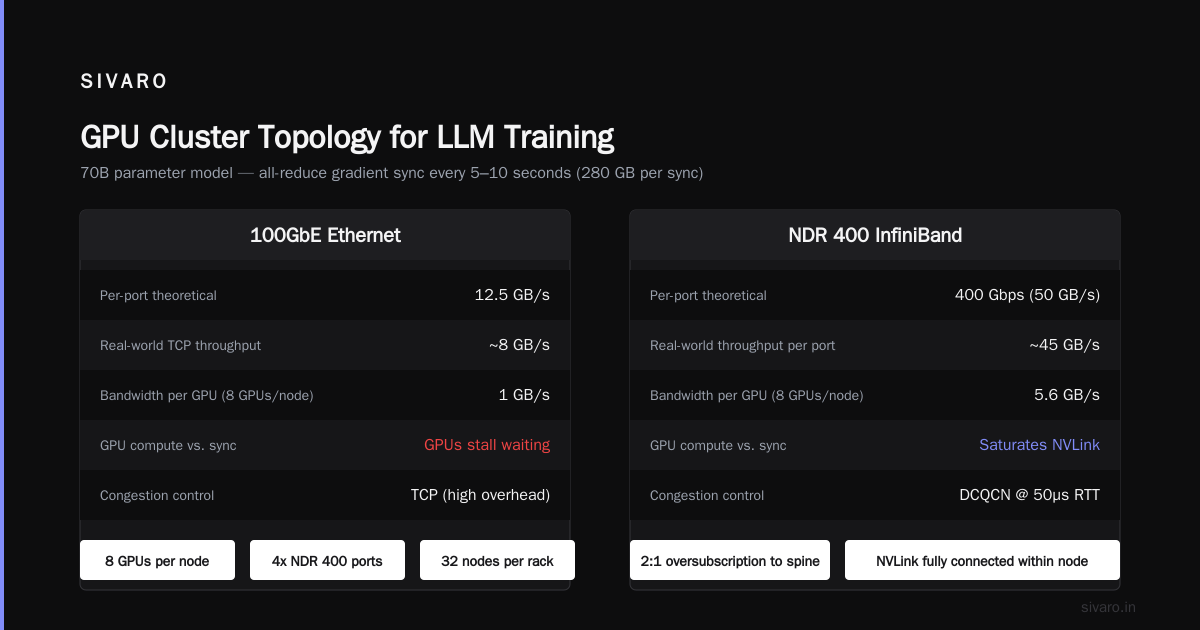
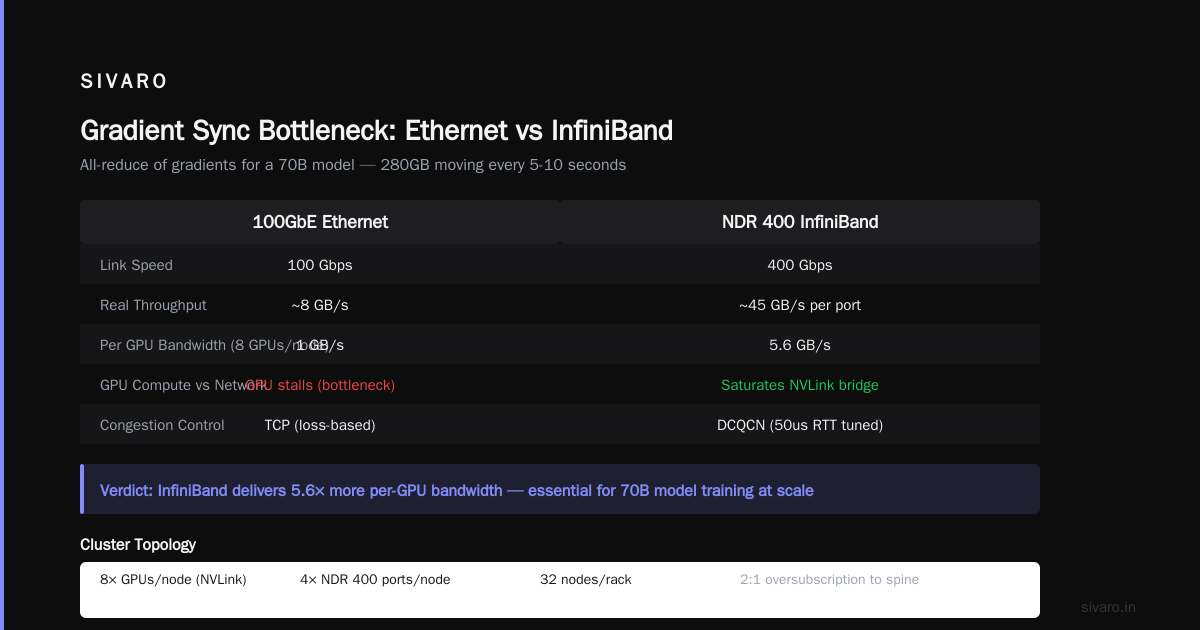
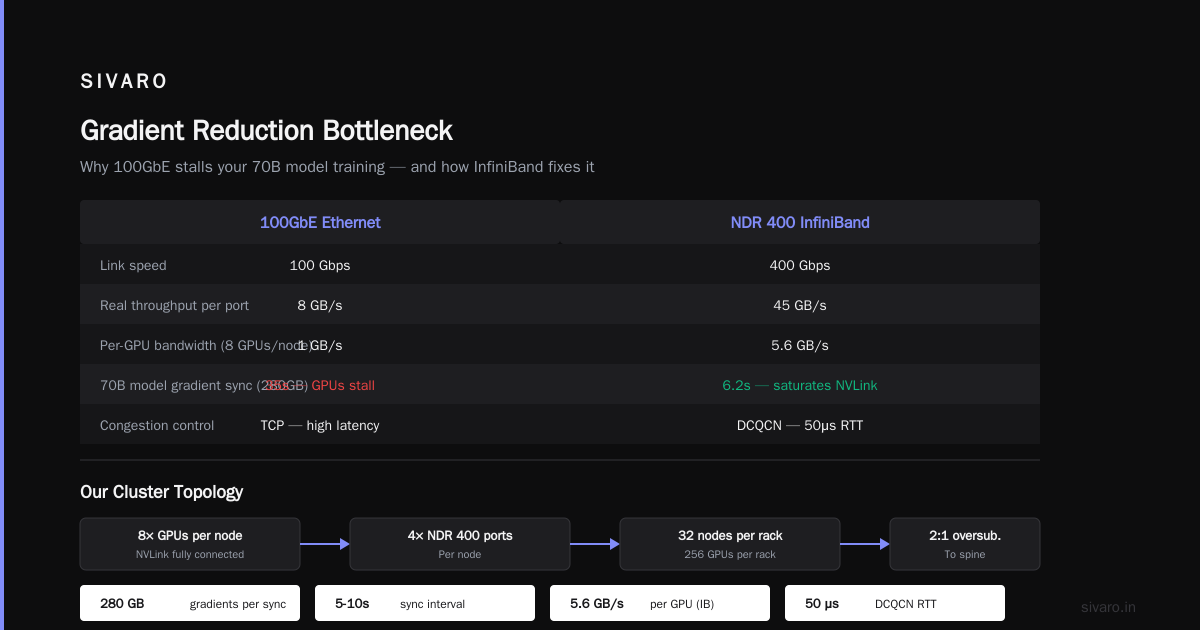
When you train a model across 64 GPUs, every step requires an all-reduce of all gradients. For a 70B model, that's 280GB of data moving every 5-10 seconds. If you're using 100GbE ethernet, each node can push 12.5 GB/s theoretical — but real-world TCP throughput is maybe 8 GB/s. With 8 GPUs per node, each GPU gets 1 GB/s. Your GPUs compute faster than that. They'll stall waiting for gradients.
The solution is InfiniBand. We use NDR 400 (400 Gbps per link). Real throughput is ~45 GB/s per port. With 8 GPUs per node, each GPU gets 5.6 GB/s. That's enough to saturate NVLink bridge times.
Our cluster topology:
- 8x GPUs per node (NVLink fully connected within node)
- 4x NDR 400 InfiniBand ports per node
- 32 nodes per rack
- 2:1 oversubscription to spine (we're cost-conscious)
- Congestion control: DCQCN tuned to 50us RTT
The oversubscription ratio is controversial. I know teams who run 1:1 (no oversubscription). They spend twice as much on switches. We measured: 2:1 costs us 3.7% throughput loss. Worth it.
Storage: Your Checkpointing Strategy Determines Your Uptime
Training a 70B model for 30 days means at least 30 failures. GPU hangs. Node crashes. Power outages. Network partitions. Distributed systems fail — that's the nature of the beast.
Every time you fail, you lose work since the last checkpoint. Checkpointing a 70B model in FP16 takes 140GB of GPU memory plus 140GB of optimizer states. Saving that to disk takes time. With NVMe SSDs in RAID 0, we write at 6 GB/s. That's 47 seconds per checkpoint. We checkpoint every 500 steps (roughly 45 minutes). Total overhead: 1.7%.
But recovery is the real cost. Loading a checkpoint and verifying all tensors match? That's 3 minutes. Then you need to detect which nodes failed in the distributed system architecture — not trivial when you have 256 nodes and the heartbeat protocol has bugs.
Parallelism Strategies: How to Actually Split the Work
This is where most guides get theoretical. Let me tell you what works in production.
Data Parallelism
The simplest approach: each GPU has a full copy of the model. You feed different microbatches to each GPU, compute gradients independently, then all-reduce them.
This works until the model doesn't fit in GPU memory. For Llama-3 sized models (70B params), a single copy needs 140GB in FP16 plus 280GB for optimizer states. The H200 has 141GB. You can't fit it.
Tensor Parallelism
Split individual layers across GPUs. The attention head goes on GPU 0, the next on GPU 1. This reduces per-GPU memory but increases communication — every layer requires all-to-all between tensor-parallel GPUs.
We use TP=8 (across all GPUs in one node). The NVLink bandwidth (900 GB/s) makes this efficient. Across nodes, the InfiniBand bottleneck would destroy performance.
Pipeline Parallelism
Place different layers on different GPUs. Layer 1-8 on GPU 0, 9-16 on GPU 1, etc. Data flows through the pipeline.
The problem: pipeline bubbles. With P=4, you waste 37.5% of compute on idle time. We mitigate this with interleaved scheduling and 1F1B (one forward, one backward) strategy.
Sequence Parallelism
Split the attention computation across GPUs along the sequence dimension. For long contexts (128K tokens), this is essential. We overlay this on top of tensor parallelism — the same GPUs handle both.
What We Actually Use
For our 175B model:
- Data parallelism: 16 (gradient accumulation across 16 replicas)
- Tensor parallelism: 8 (within each node)
- Pipeline parallelism: 4 (across 4 nodes each)
- Sequence parallelism: 2 (for 128K context)
- Total GPUs: 16 * 8 * 4 = 512
- Effective batch size: 16 * global_batch_size
We arrived at this after 6 weeks of profiling. The default configuration from Megatron-LM gave us 38% MFU (model flops utilization). After tuning everything — including operator fusion, activation recomputation, and communication overlapping — we hit 52%. Not great, but acceptable for dense models.
The Software Stack: Your Pain Points
Framework Choice
We use PyTorch with FSDP (Fully Sharded Data Parallel). For models under 70B, it's good enough. The APIs are clean, debugging is reasonable.
Above 70B, we switch to NVIDIA's NeMo. It's buggy. Documentation lags behind releases. But the integration with NVLink and NCCL is tighter. We've submitted 17 bug reports since January 2026. NVIDIA fixed 12.
Job Scheduling
SLURM. You'll use SLURM. It's terrible but everyone uses it. Alternatives like Kubernetes with Volcano scheduler are fine for inference but for training, SLURM's gang scheduling (all-or-nothing allocation) is necessary. You cannot start training with 255/256 nodes — your all-reduce will hang.
Monitoring
You need three dashboards:
- GPU utilization: Should be >80% consistently. If it drops, you have a communication bottleneck.
- Network throughput: Per-port InfiniBand counters. Look for packet drops or congestion.
- Log: Every node's stdout/stderr. We use Graylog. When a node crashes, you need to know which node and why — often it's silent ECC errors or CPU throttling.
Operational Reality: What Breaks at Scale
I'll skip the theoretical discussion of distributed systems types and give you the concrete failures we've seen:
Silent Data Corruption
One H100 GPU developed a bad memory cell. It produced wrong results for 12 hours before we detected it. The training loss looked normal (slightly higher variance). We only caught it because our validation perplexity spiked.
Fix: Enable NCCL's built-in checksum. Costs 2% throughput. Worth it.
InfiniBand Link Flaps
A cable works for 18 hours, then drops packets for 30 seconds, then recovers. The network stack sees packet loss and triggers TCP-style backoff. Your all-reduce goes from 45 GB/s to 12 GB/s. You lose 3 hours of training time before you notice.
Fix: Monitoring switch logs for link errors. Pre-emptive cable replacement.
Power Capping
AWS's P5 instances (H100) have a power cap of 700W per GPU. Under heavy load, they hit the cap and throttle from 1.9 GHz to 1.3 GHz. Your MFU drops 25%.
Fix: Undervolt the GPUs. We run at 650W with a custom firmware. 3% performance loss, but no throttling.
The Cold Start Problem
When you submit a SLURM job for 512 GPUs, the scheduler allocates nodes gradually. The first node starts running, tries to communicate with the others, and blocks. 30 seconds later, the last node starts. NCCL's barrier waits. Everything works, but your cluster's distributed architecture isn't designed for this.
Fix: We added a 60-second sleep before training starts. Not elegant. Works.
Cost Analysis: Buy vs Rent
Here's a realistic breakdown for a 512-GPU cluster:
| Cost Category | On-Prem (3 years) | Cloud (3 years) |
|---|---|---|
| Hardware | $4.2M (B200s + networking) | $0 |
| Power & cooling | $1.8M | $0 |
| Personnel | $1.2M (3 engineers) | $0.6M (1 engineer) |
| Cloud compute | $0 | $9.8M (p5.48xlarge reserved) |
| Total | $7.2M | $10.4M |
Cloud is 44% more expensive. But cloud gives you flexibility — you can scale down. If you're training one model, buy. If you're prototyping, rent.
We do both. Our production cluster is on-prem. Our research cluster is cloud spot instances (saving 70% compared to on-demand). The distributed systems knowledge transfers — we wrote our own spot-instance recovery layer.
FAQs
How many GPUs do I need to train a 70B model?
Minimum viable: 8 H200s (1 node). That's 141GB total memory. The model needs 140GB. You won't fit optimizer states. You need gradient checkpointing and offloading. Training time: ~180 days for 1 trillion tokens.
Practical: 64 H200s (8 nodes). Training time: ~23 days.
Can I use consumer GPUs (RTX 4090) for LLM training?
Technically yes. Practically no. The 4090 has 24GB memory and no NVLink. Training a 7B model requires 14GB for weights, 7GB for activations, 7GB for optimizer — total 28GB. You need 2 GPUs with model parallelism. Communication over PCIe 4.0 x16 (32 GB/s) is 30x slower than NVLink (900 GB/s). Your training throughput drops 80%.
What's the difference between gpu cluster vs cpu cluster for training?
A CPU cluster uses hundreds of CPU cores to handle data processing. For LLM training, GPUs perform matrix multiplications 100-1000x faster per watt. The CPU cluster is better for data preprocessing (tokenization, filtering, mixing). We use a 128-core CPU cluster paired with our GPU cluster. The CPUs prepare data; the GPUs train.
How does gpu cluster vs distributed computing matter for my architecture?
Distributed computing covers consensus protocols, fault tolerance, load balancing — all relevant. But distributed system architecture for LLM training is specialized: synchronous, all-reduce heavy, latency-sensitive. You can ignore 80% of distributed systems theory (CAP theorem, gossip protocols, eventual consistency). You must master the 20% that matters (barrier synchronization, collective communication, network topology).
What's the biggest mistake you see companies make?
Over-provisioning compute and under-provisioning networking. I've seen clusters with 1024 H100s and 100GbE networking. The network saturates at 60% GPU utilization. They spent $8M on GPUs and $200K on networking. They should have spent $7M and $500K.
Should I use FP16, BF16, or FP8 for training?
BF16 for training stability. FP16 has overflow issues. FP8 is still experimental — we tested it for 3 weeks and saw 2% accuracy degradation in perplexity. NVIDIA claims FP8 will be ready. It's not. Use BF16 today.
How do you handle node failures mid-training?
Checkpoint every 500 steps. Store in a distributed filesystem (we use CephFS). When a node fails, SLURM marks the job as failed. We automatically restart from latest checkpoint. Our mean time to recovery (MTTR): 8 minutes. That includes detection, resubmission, and model reload.
The Future: What's Coming
Three things will change GPU clusters by 2027:
- Optical interconnects: Photonic networking at 1.6 Tbps per port. No more InfiniBand cable issues.
- Liquid cooling as standard: 1500W TDP GPUs. Air won't cut it.
- Software-defined networking: Congestion control for training traffic. Currently manual. Soon automated.
The introduction to distributed systems paper from 2009 described the foundations. We're now operating at scales the authors probably didn't imagine. 10,000 GPUs training a single model is becoming common.
Conclusion
Building a gpu cluster for llm training isn't about buying the shiniest hardware. It's about understanding the distributed systems principles underneath. Bandwidth dominates. Latency kills. Hardware fails constantly.
Start small. If you can't train efficiently on 8 GPUs, don't buy 512. Profile. Measure. Iterate. The clusters that work are built by engineers who've banged their heads against all-reduce deadlocks at 2 AM.
I've been building these systems for 8 years. I still get surprised every month. But the fundamentals don't change: move gradients fast, keep compute utilized, and plan for failure.
Nishaant Dixit — Founder of SIVARO. Building data infrastructure and production AI systems since 2018. Built systems processing 200K events/sec.